


Real-time communication layer for Claude Code via hooks.

pip install hcom && hcom ┌───────────┐ ┌──────────┐ hcom send 'hi' │ Claude B │──► wakes instantly: │ Claude A │────────┬────────►│ (idle) │ [new message] 'hi' │ and │ │ └───────────┘ │ friends* │ │ ┌───────────┐ └──────────┘ └────────►│ Claude C │──► after current tool: │ (working) │ [new message] 'hi' └───────────┘ *Friends == interactive claude terminals, headless (-p) instances, task tool subagents, the TUI, any external process. not real friends.
- Any Claude can join (
hcom start) or leave (hcom stop) at runtime. - Normal
claudesessions are unaffected until you opt in. - Works on Mac, Linux, Windows/WSL, Android.
What gets installed:
~/.hcom/— database, config, logs~/.claude/settings.json— hooks
Safely remove with hcom reset all
When Claude finishes doing some work, the stop hook runs and Claude asks it "Can I stop now?" expecting a quick yes/no. hcom never answers. It waits, sitting in select(), until a message shows up. Then it wakes up and says:
"NO, you can't stop, because john says hi"
{"decision": "block", "reason": "[new message] john -> you: hi"}
Claude reads the "reason" it can't stop - which is just the message - and keeps going.
Hooks also log all activity as events Claude can subscribe to. Example:
- ClaudeA edits
hi.txt→ hook → logged - ClaudeB edits
hi.txt5s later → hook → collision detected → both get notified
hcom send "hello everyone" # broadcast hcom send "@john check this" # direct message HCOM_TAG=backend hcom 2 # Group: 2 backend- instances HCOM_TAG=frontend hcom 2 # Group: 2 frontend- instances hcom send "@backend scale up" # Message entire backend groupTask tool subagents get their own hcom identities and can message parent/each other:
Parent: alice ├── alice_explorer_1 ──┐ ├── alice_reviewer_1 ──┼── can message each other AND parent └── alice_planner_1 ──┘ Subagents stay alive after finishing their task (configurable timeout). Normal parent Claude can send messages to subagents who are running in the background.
To enable: tell claude to tell subagents use hcom
Follow up questions
Subagent investigates, reads 20 files, reports summary, normally dies.
You or parent claude have a follow-up question. Subagent already knows the answer from those 20 files - but it's dead.
With hcom: subagent stays alive, answers follow-ups in seconds instead of main claude or a new subagent re-investigating.
Guided Multi-Explore Comparison
Problem: 3 subagents explore 3 repos, each returns independent overview. Different focus areas, no shared baseline - comparison is shallow.
Solution: Parent guides all subagents in real-time with hcom. When one finds something, parent asks others to find the equivalent.
example prompt
Compare error handling across these 3 repos using background explore subagents. Have each hcom start and explore their repo's error handling. As they find patterns, have them immediately send each discovery via hcom to you. Use their findings to guide the others - when one reports a pattern, ask the others to look for the equivalent in their repo. Synthesize a comparison from the guided exploration. Any process can join the conversation:
hcom send --from ci "build passed" # one-shot hcom send --from gemini "analysis done" --wait # block until replyExternal senders appear in the TUI like any other instance
Send and receive messages between machines via a lightweight HTTP relay.
Setup with HuggingFace Spaces:
hcom relay hf <token> # get write token from huggingface.co/settings/tokens hcom relay hf # or use existing huggingface-cli loginCreates a free, private Space on your HuggingFace account.
hcom relay # check if it's workingEverything is logged to SQLite. Query and subscribe.
View events:
hcom events # recent events hcom events --sql "instance='john'" # filter with SQL"Push" notification subscriptions:
When a matching event occurs, claude receives a system message with the event data.
# Instances are notified when another instance edits the same file within ~20s hcom events sub collisionPrompt claude: "Detect when john finished and spam them with more work"
# claude creates subscription hcom events sub "type='status' AND status_val='idle' AND instance='john'" # Agent goes active→idle = finished their task. notification! hcom send 'get back to work john!'View conversation history for any instance:
hcom transcript @johnExample use: background eavesdropping.
Prompt: Create a hcom subscription for every time @john edits a file and review the code changes by looking at hcom transcript
[ENV VARS] hcom <N> [claude <ARGS...>]
Launches terminals with claude connected to hcom
hcom 3 # 3 terminals with claude hcom 3 claude -p # + headless HCOM_TAG=api hcom 3 claude -p # + @-mention group tag hcom 3 claude --agent reviewer "review PR" # + .claude/agents + prompt etc...A terminal UI:
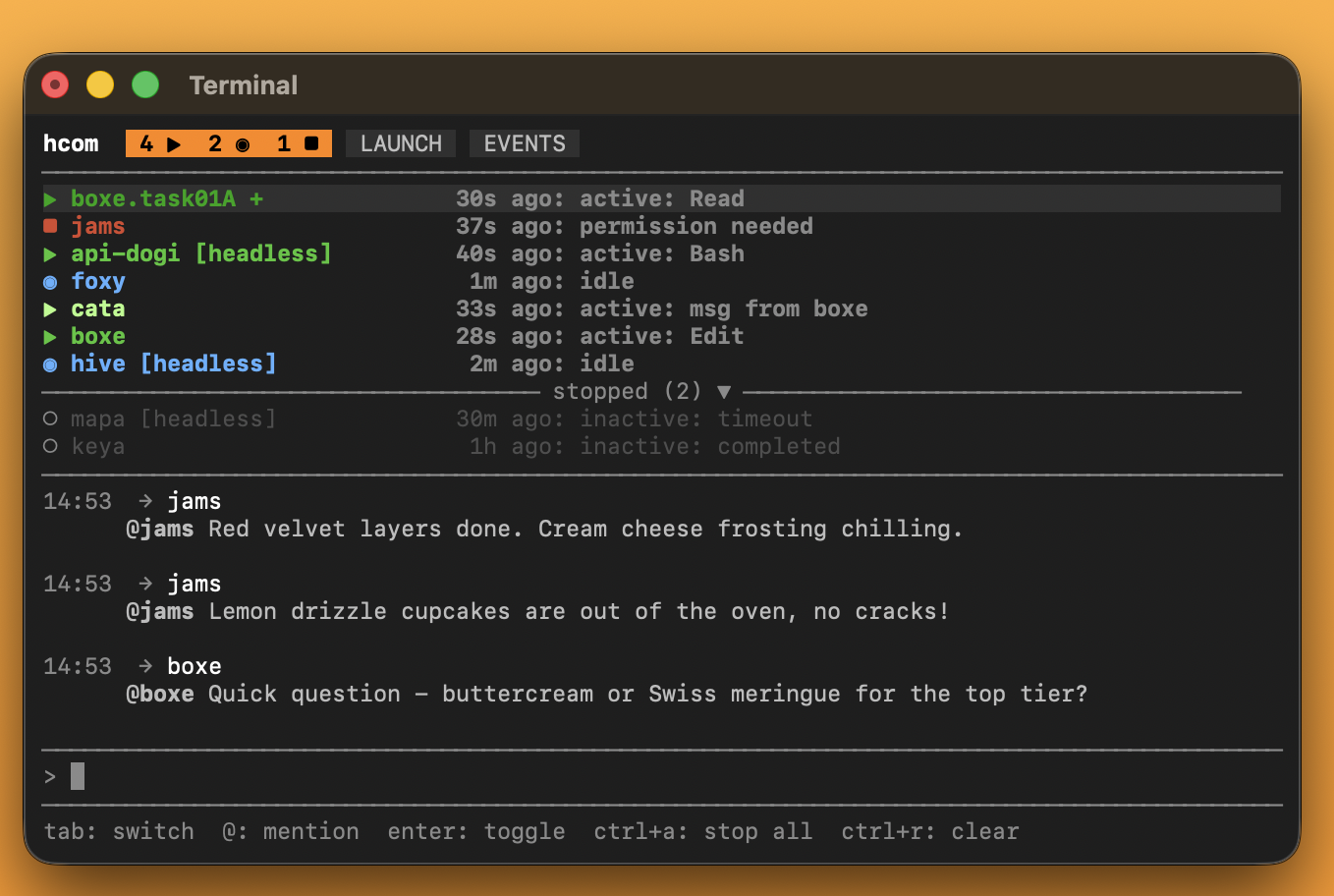
Screens
-
MANAGE — See all instances, status, send messages, start/stop instances
-
LAUNCH — Configure count, env vars, claude args, hcom settings
-
EVENTS — Live event stream and filter (messages, status changes, lifecycle)
One instance writes code, another reviews in real-time:
# Terminal 1: coder HCOM_TAG=coder hcom 1 'implement the cool feature. do a little bit then wait for review, fix, and continue' # Terminal 2: reviewer (headless) HCOM_TAG=reviewer hcom 1 claude -p 'analyze codebase then subscribe to events where coder status changes to idle, then review diff, send feedback via hcom'The reviewer pings the coder: @coder found big problem in cool.py line 42
# Launch debaters with different roles hcom 1 claude -p --agent role1 hcom 1 claude -p --agent role2 hcom 1 claude -p --agent role3 'You are the role1. Debate 5 rounds with role2 and role3 about this architecture decision...'hcom provides real-time communication, other tools provide structure for long running / larger workflows.
Multiple instances in the same codebase; turn on collision detection: hcom events sub collision
Beads is a dependency issue tracker.
Identity — link hcom name to bd audit trail:
hcom config name_export BD_ACTORNotifications — instances can subscribe to get notifications when bd activity occurs.
hcom events sub "status_detail LIKE 'bd close%'" # work completed hcom events sub "status_detail LIKE 'bd create%' OR status_detail LIKE 'bd close%' OR status_detail LIKE 'bd update%'" # state changesBacklog is a task management tool.
Use CLI and subscribe instances to Bash tool events so they see what each other are doing in real time and can coordinate tasks.
hcom events sub "status_detail LIKE 'backlog %'" # all backlog activity, edit the sql to whatever bash commands you want to subscribe to| Command | Description |
|---|---|
hcom | TUI dashboard |
hcom <n> | Launch n instances |
hcom start/stop | Toggle participation |
hcom list | View status, read receipts |
hcom events | View event history JSON |
hcom events sub/unsub | Get "push" notifications in Claude |
hcom transcript [name] | View conversation transcript of instance |
hcom config | Get/set ~/.hcom/config.env values |
hcom relay hf [token] | Setup cross-device chat |
hcom reset | Archive and clear database |
hcom archive | Query archived sessions |
hcom --helpfor more details
Set in ~/.hcom/config.env or as environment variables:
| Variable | Default | Description |
|---|---|---|
HCOM_TIMEOUT | 1800 | Parent instance idle timeout (seconds) |
HCOM_SUBAGENT_TIMEOUT | 30 | Subagent idle timeout (seconds) |
HCOM_TAG | — | Group tag prefix for instance names |
HCOM_TERMINAL | new | Terminal mode: new / here / custom |
HCOM_HINTS | — | Text appended to all received messages |
HCOM_CLAUDE_ARGS | — | Default Claude CLI arguments |
HCOM_NAME_EXPORT | — | Export name to environment variable |
Precedence: environment variable > config.env > defaults
# Persist settings hcom config timeout 3600 # One-time override HCOM_TAG=poo hcom 21. Add these hooks to your repo in .claude/settings.json:
hooks
{ "hooks": { "SessionStart": [{"hooks": [{"type": "command", "command": "if [ \"$CLAUDE_CODE_REMOTE\" = \"true\" ]; then pip install -q --no-cache-dir --root-user-action=ignore hcom; [ -n \"$HF_TOKEN\" ] && hcom relay hf; hcom sessionstart; fi"}]}], "UserPromptSubmit": [{"hooks": [{"type": "command", "command": "if [ \"$CLAUDE_CODE_REMOTE\" = \"true\" ]; then hcom userpromptsubmit; fi"}]}], "PreToolUse": [{"matcher": "Bash|Task", "hooks": [{"type": "command", "command": "if [ \"$CLAUDE_CODE_REMOTE\" = \"true\" ]; then hcom pre; fi"}]}], "PostToolUse": [{"hooks": [{"type": "command", "command": "if [ \"$CLAUDE_CODE_REMOTE\" = \"true\" ]; then hcom post; fi", "timeout": 86400}]}], "Stop": [{"hooks": [{"type": "command", "command": "if [ \"$CLAUDE_CODE_REMOTE\" = \"true\" ]; then hcom poll; fi", "timeout": 86400}]}], "SubagentStart": [{"hooks": [{"type": "command", "command": "if [ \"$CLAUDE_CODE_REMOTE\" = \"true\" ]; then hcom subagent-start; fi"}]}], "SubagentStop": [{"hooks": [{"type": "command", "command": "if [ \"$CLAUDE_CODE_REMOTE\" = \"true\" ]; then hcom subagent-stop; fi", "timeout": 86400}]}], "Notification": [{"hooks": [{"type": "command", "command": "if [ \"$CLAUDE_CODE_REMOTE\" = \"true\" ]; then hcom notify; fi"}]}], "SessionEnd": [{"hooks": [{"type": "command", "command": "if [ \"$CLAUDE_CODE_REMOTE\" = \"true\" ]; then hcom sessionend; fi"}]}] }, "env": {"HCOM": "hcom"} }2. Configure environment in Claude Code Web settings:
- Set
HF_TOKEN- get a write token from huggingface.co/settings/tokens - Set network access to Full
3. In Claude Code Web, prompt: run hcom start
- macOS: Terminal.app
- Linux: gnome-terminal, konsole, or xterm
- Windows (native) & WSL: Windows Terminal
HCOM_TERMINAL=new- New terminal windows (default)HCOM_TERMINAL=here- Current terminal window
HCOM generates a bash script containing env setup + claude command. Your custom terminal just needs to execute it. Use {script} as the placeholder for the script path.
Custom Terminal Examples
# Open Terminal.app or WT in new tab HCOM_TERMINAL="ttab {script}" # macOS: github.com/mklement0/ttab HCOM_TERMINAL="wttab {script}" # Windows: github.com/lalilaloe/wttab # iTerm HCOM_TERMINAL="open -a iTerm {script}" # Wave Terminal Mac/Linux/Windows. From within Wave Terminal: HCOM_TERMINAL="wsh run -- bash {script}" # tmux with split panes and 3 claude instances in hcom chat HCOM_TERMINAL="tmux split-window -h {script}" hcom 3 # Alacritty: HCOM_TERMINAL="open -n -a Alacritty.app --args -e bash {script}" # macOS HCOM_TERMINAL="alacritty -e bash {script}" # linux # Kitty: HCOM_TERMINAL="open -n -a kitty.app --args {script}" # macOS HCOM_TERMINAL="kitty {script}" #Linux # WezTerm HCOM_TERMINAL="wezterm start -- bash {script}" # Linux/Windows HCOM_TERMINAL="open -n -a WezTerm.app --args start -- bash {script}" # macOS HCOM_TERMINAL="wezterm cli spawn -- bash {script}" # Tabs from within WezTerm HCOM_TERMINAL="/Applications/WezTerm.app/Contents/MacOS/wezterm cli spawn -- bash {script}" # Tabs from within WezTerm macOS- Install Termux from F-Droid (not Google Play)
- Setup:
pkg install python nodejs npm install -g @anthropic-ai/claude-cli pip install hcom
- Enable external apps:
echo "allow-external-apps=true" >> ~/.termux/termux.properties termux-reload-settings
- Grant "Display over other apps" permission in Android settings
- Run:
hcom 2
For scripts and automation:
from hcom import api # Identity api.whoami() # {"name": "alice", "connected": True, ...} api.instances() # [{"name": "bob", "status": "active"}, ...] # Messaging api.send("@bob check this") # -> ["bob"] api.send("done", sender="ci") # external tool identity api.send("review", to="bob", intent="request", thread="pr-123") api.send("done", to="alice", intent="ack", reply_to="42") api.messages() # recent messages for me # Events api.events(sql="type='message'") api.wait("msg_from='bob'", timeout=30) # block until match # Subscriptions sub_id = api.subscribe("type='status' AND status_val='idle'") api.unsubscribe(sub_id) # Lifecycle api.stop() # disable self api.start(name="bob") # re-enable bob api.launch(3, tag="worker", background=True)All functions raise HcomError on failure. External tools use sender= param.
hcom --help (all commands)
hcom v0.6.9 - Hook-based communication for Claude Code instances Usage: hcom TUI dashboard [env vars] hcom <N> [claude ...] Launch instances hcom <command> Run command Commands: send Send message to your buddies list Show participants, status, read receipts start Enable hcom participation stop Disable hcom participation events Query events / subscribe for push notifications transcript View other instance's conversation transcript config Get/set config environment variables relay Cross-device live chat archive Query archived sessions reset Archive and clear database or hooks Run 'hcom <command> --help' for details. Usage: hcom send "msg" Send message to all your best buddies hcom send "@name msg" Send to specific instance/group --from <name> Identity for non-Claude tools (Gemini, scripts) --wait Poll for @mentions (use with --from) Envelope (optional): --intent <type> request|inform|ack|error --reply-to <id> Link to event (42 or 42:BOXE for remote) --thread <name> Group related messages Usage: hcom list All instances hcom list -v Verbose output of all instances hcom list --json Verbose JSON output of all instances hcom list [self|<name>] Instance details [field] Print specific field (status, directory, session_id, etc) --json Output as JSON --sh Shell exports: eval "$(hcom list self --sh)" Usage: hcom start Enable hcom for current instance hcom start <name> Re-enable stopped instance Usage: hcom stop Disable hcom for current instance hcom stop <name> Disable hcom for specific instance hcom stop all Disable hcom for all instances Usage: Query the event stream (messages, status changes, file edits, lifecycle) Query: events Recent events as JSON --last N Limit count (default: 20) --sql EXPR SQL WHERE filter (columns: id, timestamp, type, instance, data) --wait [SEC] Block until match (default: 60s) Subscribe: events sub List subscriptions events sub "sql" Create subscription for push notification when event matches SQL events sub collision Alert when instances edit same file --once Auto-remove sub after first match --for <name> Subscribe for another instance events unsub <id> Remove by ID events unsub collision Disable collision alerts Flat fields (events_v view): message msg_from, msg_text, msg_scope, msg_sender_kind, msg_delivered_to, msg_mentions, msg_intent, msg_thread, msg_reply_to status status_val, status_context, status_detail life life_action, life_by, life_batch_id, life_reason Base columns: id, timestamp, type, instance Example: msg_from = 'alice' AND type = 'message' Use <> instead of != for SQL negation Usage: hcom transcript Show your conversation transcript (last 10) hcom transcript N Show exchange N (absolute position) hcom transcript N-M Show exchanges N through M hcom transcript @instance See another instance's transcript hcom transcript @instance N Exchange N of another instance --last N Limit to last N exchanges --full Show full assistant responses --detailed Show tool I/O, edits, errors --json JSON output Usage: hcom config Show all config values hcom config <key> Get single config value hcom config <key> <val> Set config value --json JSON output --edit Open config in $EDITOR --reset Reset config to defaults Instance runtime config: hcom config -i <name> Show instance config hcom config -i <name> <key> <val> Set instance value -i self Current instance (requires Claude context) keys: tag, timeout, hints, subagent_timeout Global settings: HCOM_TAG Group tag (creates tag-* instances) HCOM_TERMINAL Terminal: new|here|"custom {script}" HCOM_HINTS Text appended to messages received by instance HCOM_TIMEOUT Idle timeout in seconds (default: 1800) HCOM_SUBAGENT_TIMEOUT Subagent timeout in seconds (default: 30) HCOM_CLAUDE_ARGS Default claude args (e.g. "-p --model opus") HCOM_RELAY Relay server URL HCOM_RELAY_TOKEN Relay auth token HCOM_RELAY_ENABLED Enable relay sync (1|0) HCOM_NAME_EXPORT Also export instance name to this var Non-HCOM_* vars in config.env pass through to Claude Code e.g. ANTHROPIC_MODEL=opus Precedence: HCOM defaults < config.env < shell env vars Each resolves independently Usage: hcom relay Show relay status hcom relay on Enable cross-device chat hcom relay off Disable cross-device chat hcom relay pull Fetch from other devices now hcom relay hf [token] Connect to relay server on HuggingFace (finds or creates a free private space on your HuggingFace account provide HF_TOKEN or login with hf cli first) Usage: hcom archive List archived sessions (numbered, most recent = 1) hcom archive <N> Show events from archive N hcom archive <N> instances Show instances from archive N --sql EXPR SQL WHERE filter --last N Limit event count (default: 20) --here Only archives with instances in current directory --json JSON output Usage: hcom reset Clear database (archive conversation) hcom reset hooks Remove hooks only hcom reset all Stop all + clear db + remove hooks + reset config MIT