





Features • Installation • Usage • Configuration • Running Uncover • Join Discord
uncover is a go wrapper using APIs of well known search engines to quickly discover exposed hosts on the internet. It is built with automation in mind, so you can query it and utilize the results with your current pipeline tools.

- Query multiple search engine at once
- Available Search engine support
- Multiple API key input support
- Automatic API key randomization
- stdin / stdout support for input
uncover requires go1.21 to install successfully. Run the following command to get the repo -
go install -v github.com/projectdiscovery/uncover/cmd/uncover@latestuncover -hThis will display help for the tool. Here are all the flags it supports:
Usage: ./uncover [flags] Flags: INPUT: -q, -query string[] search query, supports: stdin,file,config input (example: -q 'example query', -q 'query.txt') -e, -engine string[] search engine to query (shodan,shodan-idb,fofa,censys,quake,hunter,zoomeye,netlas,criminalip,publicwww,hunterhow,google,driftnet) (default shodan) -asq, -awesome-search-queries string[] use awesome search queries to discover exposed assets on the internet (example: -asq 'jira') SEARCH-ENGINE: -s, -shodan string[] search query for shodan (example: -shodan 'query.txt') -sd, -shodan-idb string[] search query for shodan-idb (example: -shodan-idb 'query.txt') -ff, -fofa string[] search query for fofa (example: -fofa 'query.txt') -cs, -censys string[] search query for censys (example: -censys 'query.txt') -qk, -quake string[] search query for quake (example: -quake 'query.txt') -ht, -hunter string[] search query for hunter (example: -hunter 'query.txt') -ze, -zoomeye string[] search query for zoomeye (example: -zoomeye 'query.txt') -ne, -netlas string[] search query for netlas (example: -netlas 'query.txt') -cl, -criminalip string[] search query for criminalip (example: -criminalip 'query.txt') -pw, -publicwww string[] search query for publicwww (example: -publicwww 'query.txt') -hh, -hunterhow string[] search query for hunterhow (example: -hunterhow 'query.txt') -gg, -google string[] search query for google (example: -google 'query.txt') -on, -onyphe string[] search query for onyphe (example: -onyphe 'query.txt') -df, -driftnet string[] search query for driftnet (example: -driftnet 'query.txt') CONFIG: -pc, -provider string provider configuration file (default "$CONFIG/uncover/provider-config.yaml") -config string flag configuration file (default "$CONFIG/uncover/config.yaml") -timeout int timeout in seconds (default 30) -rl, -rate-limit int maximum number of http requests to send per second -rlm, -rate-limit-minute int maximum number of requests to send per minute -retry int number of times to retry a failed request (default 2) -proxy string http proxy to use with uncover OUTPUT: -o, -output string output file to write found results -f, -field string field to display in output (ip,port,host) (default "ip:port") -j, -json write output in JSONL(ines) format -r, -raw write raw output as received by the remote api -l, -limit int limit the number of results to return (default 100) -nc, -no-color disable colors in output DEBUG: -silent show only results in output -version show version of the project -v show verbose outputExample of using uncover as library is provided in examples directory.
The default provider configuration file should be located at $CONFIG/uncover/provider-config.yaml and has the following contents as an example.
Note: API keys are required and must be configured before running uncover.
shodan: - SHODAN_API_KEY_1 - SHODAN_API_KEY_2 censys: - CENSYS_API_TOKEN_1:CENSYS_ORGANIZATION_ID_1 - CENSYS_API_TOKEN_2:CENSYS_ORGANIZATION_ID_2 fofa: - FOFA_EMAIL_1:FOFA_KEY_1 - FOFA_EMAIL_2:FOFA_KEY_2 quake: - QUAKE_TOKEN_1 - QUAKE_TOKEN_2 hunter: - HUNTER_API_KEY_1 - HUNTER_API_KEY_2 zoomeye: - ZOOMEYE_API_KEY_1 - ZOOMEYE_API_KEY_2 netlas: - NETLAS_API_KEY_1 - NETLAS_API_KEY_2 criminalip: - CRIMINALIP_API_KEY_1 - CRIMINALIP_API_KEY_2 publicwww: - PUBLICWWW_API_KEY_1 - PUBLICWWW_API_KEY_2 hunterhow: - HUNTERHOW_API_KEY_1 - HUNTERHOW_API_KEY_2 google: - GOOGLE_API_KEY_1:Google_API_CX_1 - GOOGLE_API_KEY_2:Google_API_CX_2 onyphe: - ONYPHE_API_KEY_1 - ONYPHE_API_KEY_2 driftnet: - DRIFTNET_API_KEY_1 - DRIFTNET_API_KEY_2When multiple keys/credentials are specified for same provider in the config file, random key will be used for each execution.
alternatively you can also set the API key as environment variable in your bash profile.
export SHODAN_API_KEY=xxx export CENSYS_API_TOKEN=xxx export CENSYS_ORGANIZATION_ID=xxx export FOFA_EMAIL=xxx export FOFA_KEY=xxx export QUAKE_TOKEN=xxx export HUNTER_API_KEY=xxx export ZOOMEYE_API_KEY=xxx export NETLAS_API_KEY=xxx export CRIMINALIP_API_KEY=xxx export PUBLICWWW_API_KEY=xxx export HUNTERHOW_API_KEY=xxx export GOOGLE_API_KEY=xxx export GOOGLE_API_CX=xxx export ONYPHE_API_KEY=xxx export DRIFTNET_API_KEY=xxxRequired API keys can be obtained by signing up on following platform Shodan, Censys, Fofa, Quake, Hunter, ZoomEye, Netlas, CriminalIP, Publicwww, Google [1],[2], Onyphe and Driftnet.
uncover supports multiple ways to make the query including stdin or q flag, as default shodan engine is used for search if no engine is specified.
echo 'ssl:"Uber Technologies, Inc."' | uncover __ ______ _________ _ _____ _____ / / / / __ \/ ___/ __ \ | / / _ \/ ___/ / /_/ / / / / /__/ /_/ / |/ / __/ / \__,_/_/ /_/\___/\____/|___/\___/_/ v0.0.9 projectdiscovery.io [WRN] Use with caution. You are responsible for your actions [WRN] Developers assume no liability and are not responsible for any misuse or damage. [WRN] By using uncover, you also agree to the terms of the APIs used. 107.180.12.116:993 107.180.26.155:443 104.244.99.31:443 161.28.20.79:443 104.21.8.108:443 198.71.233.203:443 104.17.237.13:443 162.255.165.171:443 12.237.119.61:443 192.169.250.211:443 104.16.251.50:443Running uncover with file input containing multiple search queries per line.
cat dorks.txt ssl:"Uber Technologies, Inc." title:"Grafana"uncover -q dorks.txt __ ______ _________ _ _____ _____ / / / / __ \/ ___/ __ \ | / / _ \/ ___/ / /_/ / / / / /__/ /_/ / |/ / __/ / \__,_/_/ /_/\___/\____/|___/\___/_/ v0.0.9 projectdiscovery.io [WRN] Use with caution. You are responsible for your actions [WRN] Developers assume no liability and are not responsible for any misuse or damage. [WRN] By using uncover, you also agree to the terms of the APIs used. 107.180.12.116:993 107.180.26.155:443 104.244.99.31:443 161.28.20.79:443 104.21.8.108:443 198.71.233.203:443 2607:7c80:54:3::74:3001 104.198.55.35:80 46.101.82.244:3000 34.147.126.112:80 138.197.147.213:8086uncover supports multiple search engine, as default shodan is used, -e flag can be used to run same query against any or all search engines.
echo jira | uncover -e shodan,censys,fofa,quake,hunter,zoomeye,netlas,criminalip,driftnet __ ______ _________ _ _____ _____ / / / / __ \/ ___/ __ \ | / / _ \/ ___/ / /_/ / / / / /__/ /_/ / |/ / __/ / \__,_/_/ /_/\___/\____/|___/\___/_/ v0.0.9 projectdiscovery.io [WRN] Use with caution. You are responsible for your actions [WRN] Developers assume no liability and are not responsible for any misuse or damage. [WRN] By using uncover, you also agree to the terms of the APIs used. 176.31.249.189:5001 13.211.116.80:443 43.130.1.221:631 192.195.70.29:443 52.27.22.181:443 117.48.120.226:8889 106.52.115.145:49153 13.69.135.128:443 193.35.99.158:443 18.202.109.218:8089 101.36.105.97:21379 42.194.226.30:2626uncover -shodan 'http.component:"Atlassian Jira"' -censys 'services.software.product=`Jira`' -fofa 'app="ATLASSIAN-JIRA"' -quake 'Jira' -hunter 'Jira' -zoomeye 'app:"Atlassian JIRA"' -netlas 'jira' -criminalip 'Jira' -driftnet 'field=product-tag:jira' __ ______ _________ _ _____ _____ / / / / __ \/ ___/ __ \ | / / _ \/ ___/ / /_/ / / / / /__/ /_/ / |/ / __/ / \__,_/_/ /_/\___/\____/|___/\___/_/ v0.0.9 projectdiscovery.io [WRN] Use with caution. You are responsible for your actions [WRN] Developers assume no liability and are not responsible for any misuse or damage. [WRN] By using uncover, you also agree to the terms of the APIs used. 104.68.37.129:443 162.222.160.42:443 34.255.84.133:443 52.204.121.166:443 23.198.29.120:443 136.156.180.95:443 54.194.233.15:443 104.117.55.155:443 149.81.4.6:443 54.255.218.95:443 3.223.137.57:443 83.228.124.171:443 23.202.195.82:443 52.16.59.25:443 18.159.145.227:443 104.105.53.236:443uncover supports shodan-internetdb API to pull available ports for given IP/CIDR input.
shodan-idb used as default engine when IP/CIDR is provided as input, otherwise shodan search engine is used.
echo 51.83.59.99/24 | uncover __ ______ _________ _ _____ _____ / / / / __ \/ ___/ __ \ | / / _ \/ ___/ / /_/ / / / / /__/ /_/ / |/ / __/ / \__,_/_/ /_/\___/\____/|___/\___/_/ v0.0.9 projectdiscovery.io [WRN] Use with caution. You are responsible for your actions [WRN] Developers assume no liability and are not responsible for any misuse or damage. [WRN] By using uncover, you also agree to the terms of the APIs used. 51.83.59.1:53 51.83.59.1:10000 51.83.59.2:53 51.83.59.3:25 51.83.59.3:80 51.83.59.3:389 51.83.59.3:443 51.83.59.3:465 51.83.59.3:587 51.83.59.3:993uncover supports using driftnet API for a fast lookup of open ports for given IP/CIDR input.
echo 8.8.8.8/20 | uncover -e driftnet __ ______ _________ _ _____ _____ / / / / __ \/ ___/ __ \ | / / _ \/ ___/ / /_/ / / / / /__/ /_/ / |/ / __/ / \__,_/_/ /_/\___/\____/|___/\___/_/ v0.0.9 projectdiscovery.io [WRN] Use with caution. You are responsible for your actions [WRN] Developers assume no liability and are not responsible for any misuse or damage. [WRN] By using uncover, you also agree to the terms of the APIs used. ... 8.8.4.4:443 8.8.4.4:53 8.8.4.4:853 8.8.6.29:443 8.8.6.40:443 8.8.6.70:443 8.8.6.94:443 8.8.11.1:22 8.8.11.253:22 8.8.11.64:443 8.8.8.8:443 8.8.8.8:53 8.8.8.8:853 ...-f, -field flag can be used to indicate which fields to return, currently, ip, port, and host are supported and can be used to return desired fields.
uncover -q jira -f host -silent ec2-44-198-22-253.compute-1.amazonaws.com ec2-18-246-31-139.us-west-2.compute.amazonaws.com tasks.devrtb.com leased-line-91-149-128-229.telecom.by 74.242.203.213.static.inetbone.net ec2-52-211-7-108.eu-west-1.compute.amazonaws.com ec2-54-187-161-180.us-west-2.compute.amazonaws.com 185-2-52-226.static.nucleus.be ec2-34-241-80-255.eu-west-1.compute.amazonaws.comuncover has a -f, -field flag that can be used to customize the output format. For example, in the case of uncover -f https://ip:port/version, ip:port will be replaced with results in the output while keeping the format defined, It can also be used to specify a known scheme/path/file in order to prepare the output so that it can be immediately passed as input to other tools in the pipeline.
echo kubernetes | uncover -f https://ip:port/version -silent https://35.222.229.38:443/version https://52.11.181.228:443/version https://35.239.255.1:443/version https://34.71.48.11:443/version https://130.211.54.173:443/version https://54.184.250.232:443/versionOutput of uncover can be further piped to other projects in workflow accepting stdin as input, for example:
uncover -q example -f ip | naabu- Runs naabu for port scanning on the found host.uncover -q title:GitLab | httpx- Runs httpx for web server probing the found result.uncover -q 51.83.59.99/24 | httpx- Runs httpx on host/ports obtained from shodan-internetdb.
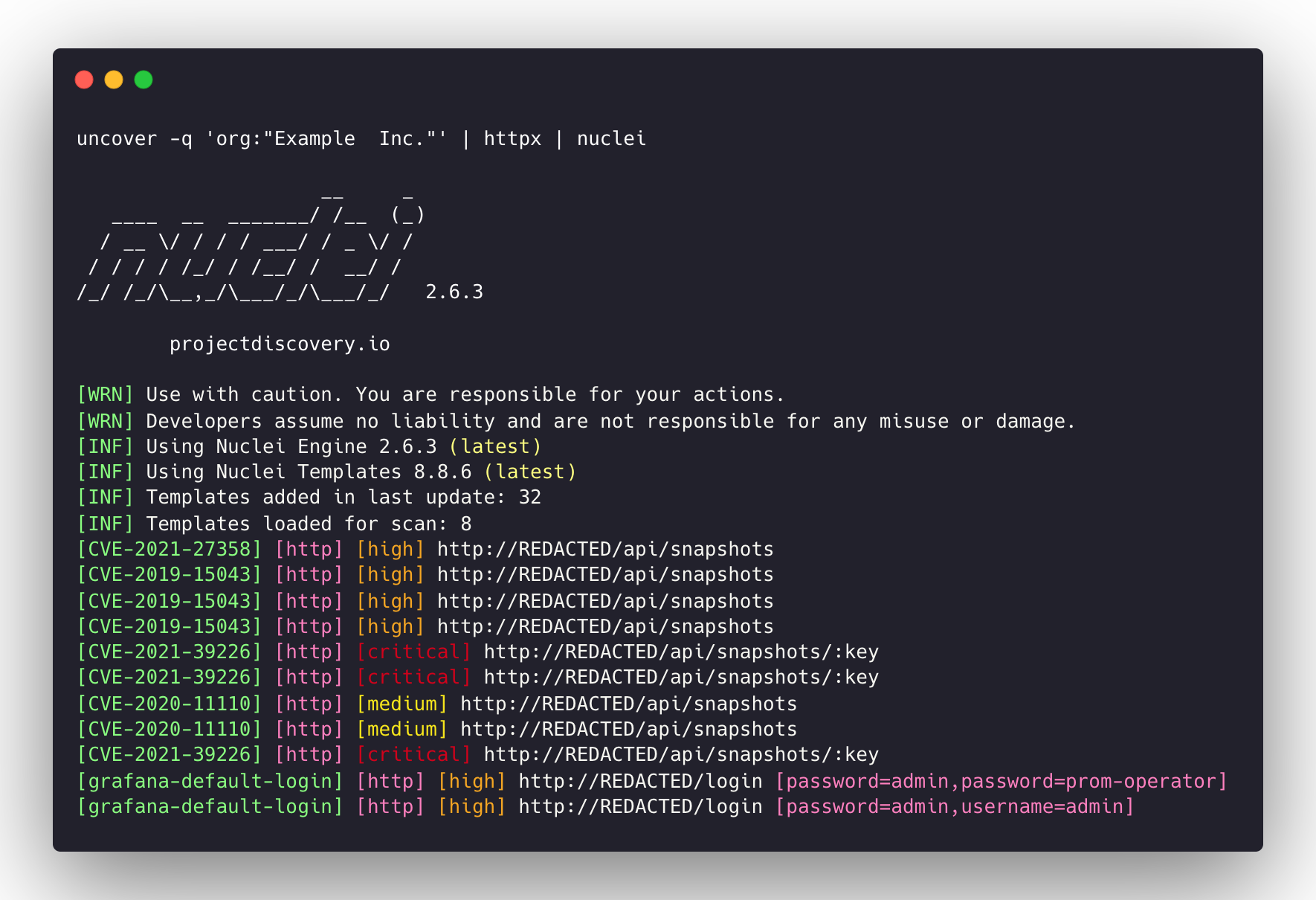
uncover -q http.title:GitLab -silent | httpx -silent https://15.185.150.109 https://139.162.137.16 https://164.68.115.243 https://135.125.215.186 https://163.172.59.119 http://15.236.10.197 https://129.206.117.248uncover -q 'org:"Example Inc."' | httpx | nuclei- Runs httpx / nuclei for vulnerability assessment.
- keys/ credentials are required to configure before running or using this project.
queryflag supports all and only filters supported by search engine.- results are limited to
100as default and can be increased withlimitflag. shodan-idbAPI doesn't requires an API key and works out of the box.shodan-idbAPI is used as default engine when IP/CIDR is provided as input.
uncover is made with 🖤 by the projectdiscovery team.
![@dependabot[bot]](https://avatars.githubusercontent.com/in/29110?s=64&v=4)


