Deploying Ghost 3.0 to AWS using EC2 Auto Scaling, RDS and Terraform.
This cover the Architecture design , Security , Documentation.I Have used an automated solution and deployed a Ghost blog on EC2 instances behind an Auto Scaling group, RDS and Terraform for high availability and ease of management. the solution able to adapt to traffic spikes, and scalabcould be increases of up to 4 times the typical load.
Solution url: http://blog.jowry.click/
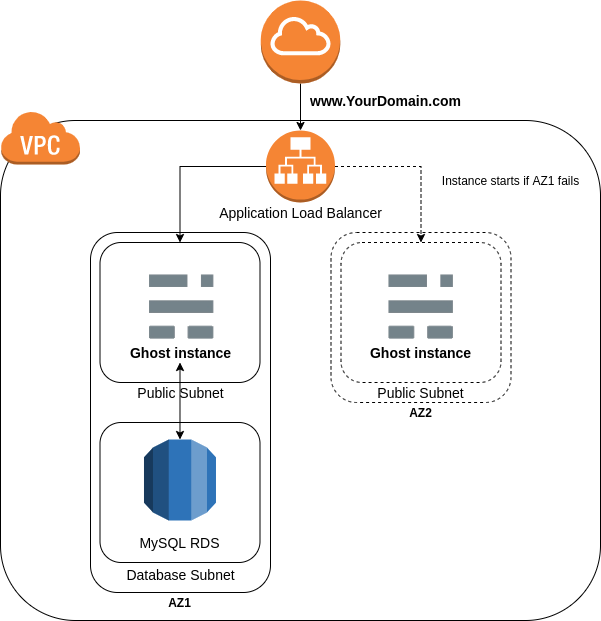
To make sure that the ASG always keep 1 healthy instance at all time, Buissness case expected that during the new product launch or marketing campaigns there could be increases of up to 4 times the typical load, so you can define the AutoScaling Group asg_min_size and asg_max_size variables value to 4.
This module will allow deploy a single instance behind an Auto Scaling group and RDS using Terraform for high availability and ease of management.
ALB it supports many different features for web applications supports client TLS session termination (http & https, layer 7),the application will return consistent results across sessions.
Its very important and highly recommend that you look into this before you decide to make this application public facing. You will basically need to create a certificate / import it into the Amazon Certificate Manager, validate it, and add it to your new alb HTTPS listener. This process can vary according to your domain register.
Still we need to create an HTTPS listener, which uses encrypted connections (also known as SSL offload). This feature enables traffic encryption between your load balancer and the clients that initiate SSL or TLS sessions. Application Load Balancer supports client TLS session termination. This enables you to offload TLS termination tasks to the load balancer, while preserving the source IP address for your back-end applications. You can choose from predefined security policies for your TLS listeners in order to meet compliance and security standards. AWS Certificate Manager (ACM) or AWS Identity and Access Management (IAM) can be used to manage your server certificates.
Here are some improvements we could make for this Ghost deployment (HTTPS and Sensitive Variables being mandatory):
-
Add a Cloudfront Distribution to better deliver our static content, potentially with S3.
-
Warning! It is highly recommended that you enable Bucket Versioning on the S3 bucket to allow for state recovery in the case of accidental deletions and human error.
-
Avoid having secrets in Terraform state, You can user Secrets Management for Terraform
-
It is not best practices to write database password in the variables.tf, you might find the rds database password but i reset the master user password for my (Amazon RDS) DB instance by modifying the master user password from RDS console then have edited the ghost DB setup by running (ghost setup) command on the EC2 to provide Ghost my new DB password.
https://learn.hashicorp.com/tutorials/terraform/sensitive-variables, https://secrethub.io/docs/guides/terraform/,https://secrethub.io/docs/guides/terraform/
https://aws.amazon.com/blogs/database/cross-region-disaster-recovery-of-amazon-rds-for-sql-server/
Cross-Region disaster recovery, Create snapshots of your Amazon RDS for SQL Server based upon a pre-defined schedule. Copy the snapshots to your DR Region. The frequency of snapshot copying is determined based on the RPO requirement. When you test or execute your DR plan in case of a disaster, you can restore the snapshot to a new Amazon RDS for SQL Server instance. Amazon RDS for SQL Server provides a Multi-AZ deployment, which replicates data synchronously across AZs. This highly available Multi-AZ deployment is usually sufficient for a DR strategy within one region in an AWS cloud environment. In addition, with the in-Region read replica capability of Amazon RDS for SQL Server, you can use read replicas as a warm standby solution in a different AZ. This provides another in-Region DR strategy.
Before you consider a cross-region DR strategy, we need to evaluate whether an in-Region DR solution meets your needs or not.
Recovery point objective (RPO), recovery time objective (RTO), and cost are three key metrics to consider when developing your DR strategy. Based upon these three metrics, you can define your DR strategy ranging from a cold DR (backup and restore) to a hot DR (active to active). A reliable and effective cross-region DR strategy keeps your business in operation with little or no disruption even if an entire region goes offline.
Cross-Region DR strategy A cross-Region DR strategy consists of two approaches: snapshot and restore, and continuous replication.
Snapshot and restore If you have less stringent RTO and RPO requirements for your RDS SQL servers, using cross-Region snapshot and restore is one of the most cost effective cross-Region DR strategies.
We can use the user_data file in case we need it for a new deployment (Dev,Testing,Production)later on.
Set up simple continuous integration of Ghost theme to deploy directly to your Ghost website with GitHub Actions. Share code snippets with GitHub Gists. https://ghost.org/integrations/github/
This GitHub action allows you to automatically build and deploy your Ghost Theme from GitHub to any Ghost install, via the Ghost Admin API! https://github.com/marketplace/actions/deploy-ghost-theme
In the source Region of my Amazon RDS for SQL Server, I recommend to perform the following actions in case Ghost Instance failed and recreated (ASG), every time you make custom modifications to the theme used and other static content, we can create a custom AMI of our instance and its volume. To do this, go to EC2 > Instances, click on the ghost instance, and at the top right your windows, click on Actions > Image and templates > Create image.
You can then enter an image name you can easily identify, and click on Create image. Once this is done, go to EC2 > Images > AMIs to grab your newly created image ID, so we can update our launch configuration to update the image used by our instances and remove the user_data,
You can keep the user_data file in case you need it for a new deployment later on.
- RDS Performance Insights aggregates performance data. https://docs.aws.amazon.com/AmazonRDS/latest/AuroraUserGuide/USER_PerfInsights.Overview.html
- AWS Systems Manager is the operations hub for you AWS applications and resource.https://aws.amazon.com/systems-manager/
- CloudWatch Application Insights helps you monitor your applications that use Amazon EC2 instances along with other application resources. It identifies and sets up key metrics, logs, and alarms across your application resources and technology stack (for example, your Microsoft SQL Server database, web (IIS) and application servers, OS, load balancers, and queues). https://docs.aws.amazon.com/AmazonCloudWatch/latest/monitoring/appinsights-what-is.html
- Amazon QuickSight https://aws.amazon.com/quicksight/.
Unlike other blogging applications which require specific mods or plugins to perform the so-called “Hard Reset”, Ghost has a built-in switch that allows you to delete all the posts and tags with a single click. This can be useful when you were working on a project, but you are not happy with how the content turned out, and you would like a fresh start, without having to install a new Ghost instance. Another useful scenario where this functionality can come in handy is when you want to migrate content from a different blog, and you want to wipe the current posts and tags, so they do not interfere with the new stuff you are about to deploy.
As a part of Amazon RDS for MySQL database performance monitoring, it’s important to keep an eye on slow query logs and error logs in addition to default monitoring. Slow query logs help you find slow-performing queries in the database so you can investigate the reasons behind the slowness and tune the queries if needed. Error logs help you to find the query errors, which further helps you find the changes in the application due to those errors. However, monitoring these logs manually through log files (on the Amazon RDS console or by downloading locally) is a time-consuming process.
Pre-requisites: Before you get started, you must complete the following prerequisites:
Since we have an RDS for MySQL instance already created, you can enable log exports to publish to CloudWatch by modifying the instance. https://aws.amazon.com/premiumsupport/knowledge-center/rds-aurora-mysql-logs-cloudwatch/
Make sure the CloudWatch log group is created and logs are published to CloudWatch by looking at the log groups. You can also encrypt log data using AWS Key Management Service (AWS KMS). For instructions, see Encrypt Log Data in CloudWatch Logs Using AWS Key Management Service. https://docs.aws.amazon.com/AmazonCloudWatch/latest/logs/encrypt-log-data-kms.html
This section focuses on creating the CloudWatch dashboard using a template that creates the same widgets from the previous section. On the Amazon RDS console, under Databases, find the DB identifier name and Region of your database.
The template code located in the project repository (CloudWatchDashboard.json) open it using any text editor. Replace with your DB identifier name. If your Region isn’t us-east-1, replace with your current Region.
follow this guide to Replace the default with the preceding template code: https://aws.amazon.com/blogs/database/creating-an-amazon-cloudwatch-dashboard-to-monitor-amazon-rds-and-amazon-aurora-mysql/
- An AWS account already setup
- A S3 bucket already defined for the Terraform state
- Terraform v0.14.x installed
Use Terraform to deploy the multiple infrastructure components within AWS.
This will deploy everything from scratch, including:
- A VPC with required subnets and other networking components
- An EC2 Auto Scaling group to self heal in case of hardware failure
- An Application Load Balancer to direct trafic to the active instance
- A RDS instance as our managed DB solution.
- Automate the deployment of Install Ghost on instance using the EC2 user data /user_data/ghost_init.sh
-
Export your AWS credentials using the CLI or tools like Awsume
-
Provide your remote state information in backend.tf i used s3 as my default backend since its a demo project s3 server-side encryption with AWS Key Management Service (SSE-KMS) not enabled during this demo, its highy recommended to consider in the futures projects.
-
Update all the default values in variables.tf such as the website URL.
-
Go to the terraform folder and apply the code
cd terraform terraform init terraform apply
To access your blog, you will need to retrieve the DNS name of your application load balancer, in EC2 > Load Balancers > Description. You can also use your registered domain name if you setup a CNAME record pointing at the load balancer DNS name.