单点登录(英语:Single sign-on,缩写为 SSO),又译为单一签入,一种对于许多相互关连,但是又是各自独立的软件系统,提供访问控制的属性。当拥有这项属性时,当用户登录时,就可以获取所有系统的访问权限,不用对每个单一系统都逐一登录。这项功能通常是以轻型目录访问协议(LDAP)来实现,在服务器上会将用户信息存储到LDAP数据库中。相同的,单一注销(single sign-off)就是指,只需要单一的注销动作,就可以结束对于多个系统的访问权限。
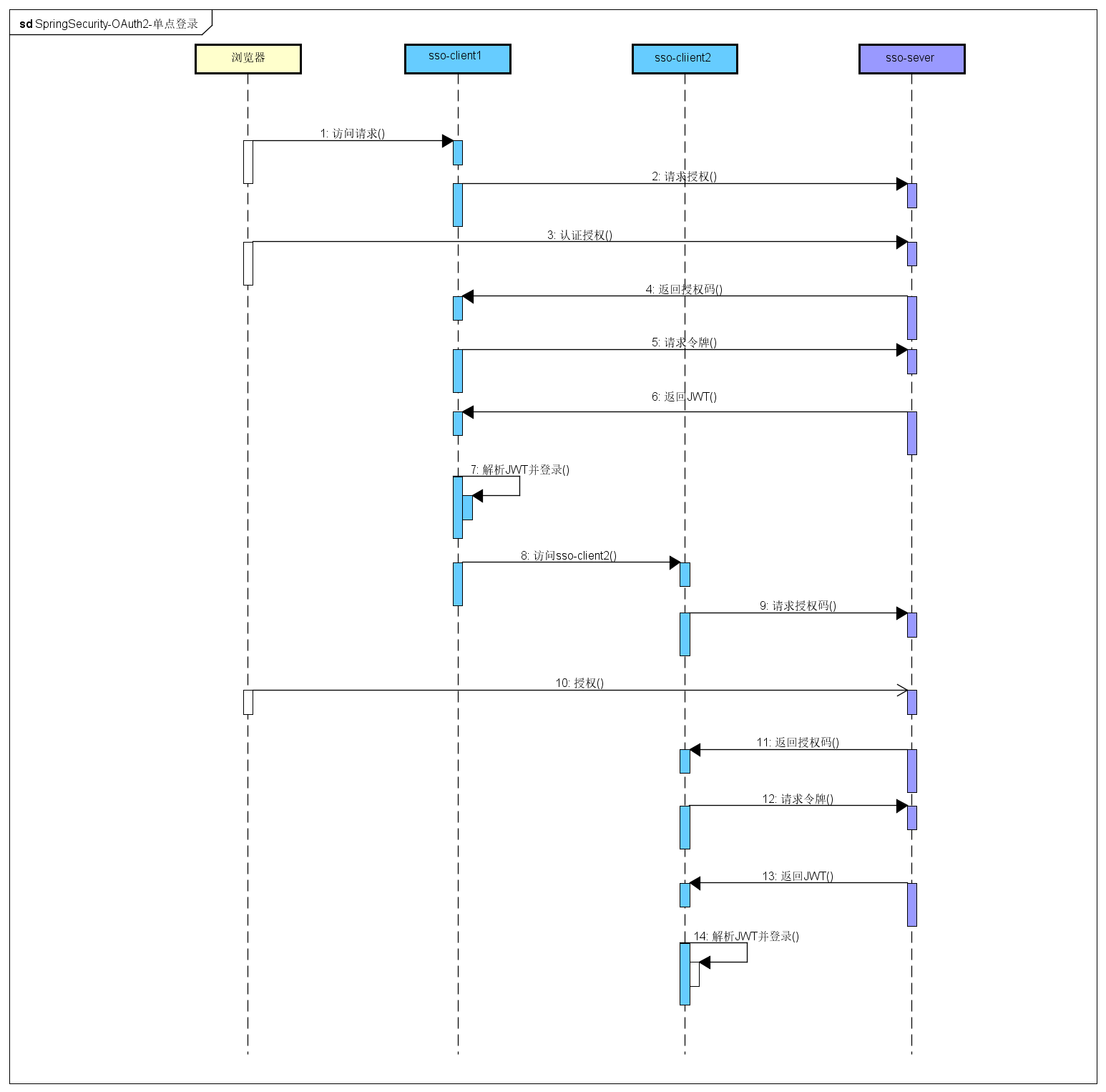
- 访问client1
client1将请求导向sso-server- 同意授权
- 携带授权码
code返回client1 client1拿着授权码请求令牌- 返回
JWT令牌 client1解析令牌并登录client1访问client2client2将请求导向sso-server- 同意授权
- 携带授权码
code返回client2 client2拿着授权码请求令牌- 返回
JWT令牌 client2解析令牌并登录
用户的登录状态是由sso-server认证中心来保存的,登录界面和账号密码的验证也是sso-server认证中心来做的(client1和clien2返回token是不同的,但解析出来的用户信息是同一个用户)。
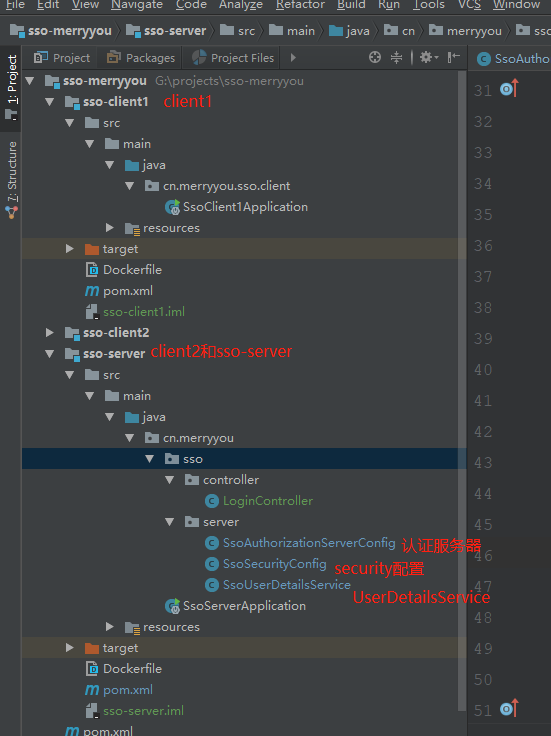
@Configuration @EnableAuthorizationServer public class SsoAuthorizationServerConfig extends AuthorizationServerConfigurerAdapter { /** * 客户端一些配置 * @param clients * @throws Exception */ @Override public void configure(ClientDetailsServiceConfigurer clients) throws Exception { clients.inMemory() .withClient("merryyou1") .secret("merryyousecrect1") .authorizedGrantTypes("authorization_code", "refresh_token") .scopes("all") .and() .withClient("merryyou2") .secret("merryyousecrect2") .authorizedGrantTypes("authorization_code", "refresh_token") .scopes("all"); } /** * 配置jwttokenStore * @param endpoints * @throws Exception */ @Override public void configure(AuthorizationServerEndpointsConfigurer endpoints) throws Exception { endpoints.tokenStore(jwtTokenStore()).accessTokenConverter(jwtAccessTokenConverter()); } /** * springSecurity 授权表达式,访问merryyou tokenkey时需要经过认证 * @param security * @throws Exception */ @Override public void configure(AuthorizationServerSecurityConfigurer security) throws Exception { security.tokenKeyAccess("isAuthenticated()"); } /** * JWTtokenStore * @return */ @Bean public TokenStore jwtTokenStore() { return new JwtTokenStore(jwtAccessTokenConverter()); } /** * 生成JTW token * @return */ @Bean public JwtAccessTokenConverter jwtAccessTokenConverter(){ JwtAccessTokenConverter converter = new JwtAccessTokenConverter(); converter.setSigningKey("merryyou"); return converter; } }@Configuration public class SsoSecurityConfig extends WebSecurityConfigurerAdapter { @Autowired private UserDetailsService userDetailsService; @Bean public PasswordEncoder passwordEncoder() { return new BCryptPasswordEncoder(); } @Override protected void configure(HttpSecurity http) throws Exception { http.formLogin().loginPage("/authentication/require") .loginProcessingUrl("/authentication/form") .and().authorizeRequests() .antMatchers("/authentication/require", "/authentication/form", "/**/*.js", "/**/*.css", "/**/*.jpg", "/**/*.png", "/**/*.woff2" ) .permitAll() .anyRequest().authenticated() .and() .csrf().disable(); // http.formLogin().and().authorizeRequests().anyRequest().authenticated(); } @Override protected void configure(AuthenticationManagerBuilder auth) throws Exception { auth.userDetailsService(userDetailsService).passwordEncoder(passwordEncoder()); } }@Component public class SsoUserDetailsService implements UserDetailsService { @Autowired private PasswordEncoder passwordEncoder; @Override public UserDetails loadUserByUsername(String username) throws UsernameNotFoundException { return new User(username, passwordEncoder.encode("123456"), AuthorityUtils.commaSeparatedStringToAuthorityList("ROLE_USER")); } }server: port: 8082 context-path: /uaa spring: freemarker: allow-request-override: false allow-session-override: false cache: true charset: UTF-8 check-template-location: true content-type: text/html enabled: true expose-request-attributes: false expose-session-attributes: false expose-spring-macro-helpers: true prefer-file-system-access: true suffix: .ftl template-loader-path: classpath:/templates/@SpringBootApplication @RestController @EnableOAuth2Sso public class SsoClient1Application { @GetMapping("/user") public Authentication user(Authentication user) { return user; } public static void main(String[] args) { SpringApplication.run(SsoClient1Application.class, args); } }auth-server: http://localhost:8082/uaa # sso-server地址 server: context-path: /client1 port: 8083 security: oauth2: client: client-id: merryyou1 client-secret: merryyousecrect1 user-authorization-uri: ${auth-server}/oauth/authorize #请求认证的地址 access-token-uri: ${auth-server}/oauth/token #请求令牌的地址 resource: jwt: key-uri: ${auth-server}/oauth/token_key #解析jwt令牌所需要密钥的地址效果如下: 
- 启动sso-server
- 启动sso-client1
- 启动sso-client2
- http://localhost:8083/client1/ 用户名随意,密码123456
- http://localhost:8083/client1/user 查看当前的用户信息
增加sso-resource(支持sso-client1资源服务器)
由laungcisin提供SsoAuthorizationServerConfig自动授权配置autoApprove(true)
添加docker-compose启动方式,需在本地host文件中添加127.0.0.1 sso-login sso-taobao sso-tmall sso-resource.访问地址为:http://sso-taobao:8083/client1