
A dropwizard-based server displaying number of Pull Request Comments performed by an organization's GitHub users, to help organizations identify and celebrate top reviewers. Counts all recent in-code comments on organization's opened and closed Pull Requests, excluding comments on one's own Pull Requests. Queries GitHub API every X minutes and displays the result.
Live Demo: GitHub Organization's Top Reviewers
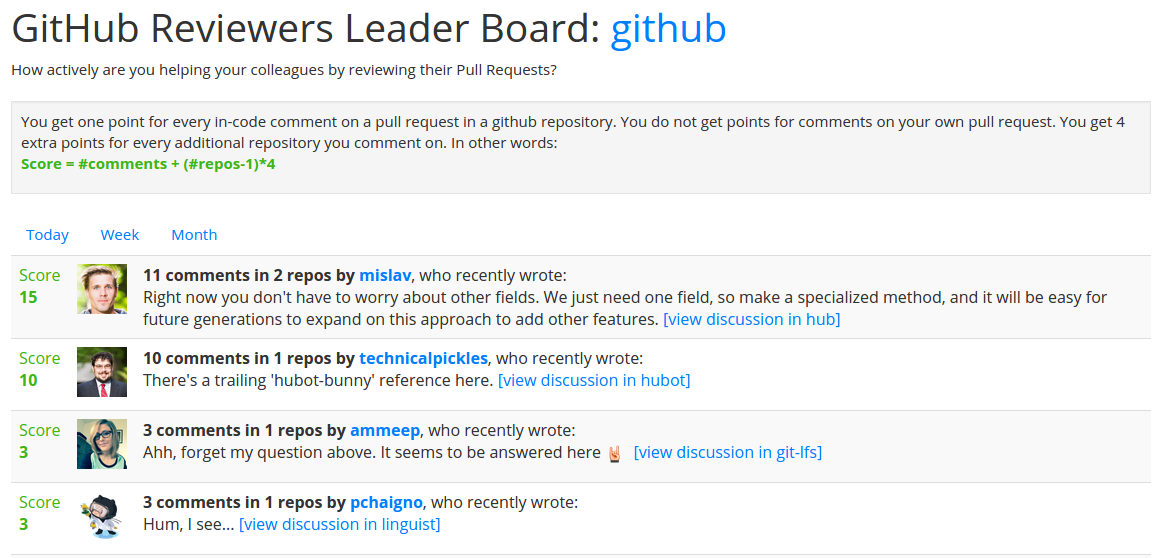
There are three deployment options:
- Using Heroku: if you have a Heroku account, that's the easiest way, skip to Heroku Deployment
- Build from source code, after adjusting Configuration
- Using latest release:
- Download latest zip and yml file from releases page
- Unzip the zip file, e.g.:
unzip ~/Downloads/leaderboard-server-0.1.57.zip - Copy yml file into unzipped folder, e.g.:
cd leaderboard-server-0.1.57 && cp ~/Downloads/leaderboard-server.yml . - Edit the yml file per insructions in Configuration section
- Run the server:
./bin/leaderboard-server server leaderboard-server.yml
Edit the leaderboard-server.yml file with the following configuration:
gitHubCredentials: # change these to any valid github credentials; requires # either a username/password combination or a token username: my-user password: my-pass token: my-oauth-token organization: my-org # organization to show stats for repositories: # subset of repositories to consider. If - repo1 # empty will read all repositories in the org. - repo2 refreshRateMinutes: 10 # interval between API activationsSpecify either a token or a username and password.
If you're using a locally-hosted GitHub instance, you can override the default API endpoint URL by adding something like this to your yml file:
gitHubApiUrl: https://github.corp.xyzcompany.com/api/v3/To run the tests, you'll need to supply credentials, since some of the tests require a github user to activate the API. Here and elsewhere, you can either pass your GitHub username and password as credentials or pass a single OAuth token associated with your account.
./gradlew clean build -Dusername=<a github user> -Dpassword=<her password> -Dtoken=<an OAuth token> (If your user account has two-factor authentication enabled, only token-based access will work.)
To run the server locally (without running tests, and after properly setting Configuration), run:
./gradlew run To build an artifact you can deploy elsewhere, run:
./gradlew distZip The zipfile will be created by Gradle's application plugin with a ./bin/leaderboard-server file that can be used to start the server as follows:
./bin/leaderboard-server server leaderboard-server.yml NOTE: Heroku-deployed web servers are public by default, so use wisely, or choose another deployment method if you wish to keep your commenters/comments private.
Assuming you have a Heroku account, and Heroku toolbelt installed, run this from the project root to build, deploy, and run the application:
heroku login # type user and password when prompted... heroku create heroku config:set ORG_NAME=<your org name> heroku config:set GH_USER=<username> # skip if using token heroku config:set GH_PASS=<password> # skip if using token heroku config:set GH_TOKEN=<token> # skip if using user+password git push heroku master # this will take a while... heroku open The last command should open the app page in your default browser.