My cheat sheet for vue.js most basic stuff. The goal wasn't to make another Vue documentation, because the official one is already badass. Big thank you to boussadjra for making this cheat sheet available as a website
Contributions and PRs are very welcome.
"You must type each of these exercises in, manually. If you copy and paste, you might as well not even do them. The point of these exercises is to train your hands, your brain, and your mind in how to read, write, and see code. If you copy-paste, you are cheating yourself out of the effectiveness of the lessons." - Zed A.
Sources:
Useful Chrome extensions:
Stuff that might get handy in almost every Vue.js project:
<html> <head> <meta charset="utf8"> <title>VueJS example</title> <link href="style.css" rel="stylesheet" /> <script src="https://cdn.jsdelivr.net/npm/vue"></script> </head> <body> <div id="vue-app"> <p> {{ hello() }} </p> <p> {{ name }} </p> <p> {{ age + 1 }} </p> <p> {{ age < 18 ? "Youngster" : "Adult"}} </p> </div> <script src="app.js"></script> </body> </html>new Vue({ el: '#vue-app', // contoled element data: { name: "Matej", age: 27, sleepy: true }, methods: { hello: function () { return "Hello"; }, computed:{} } });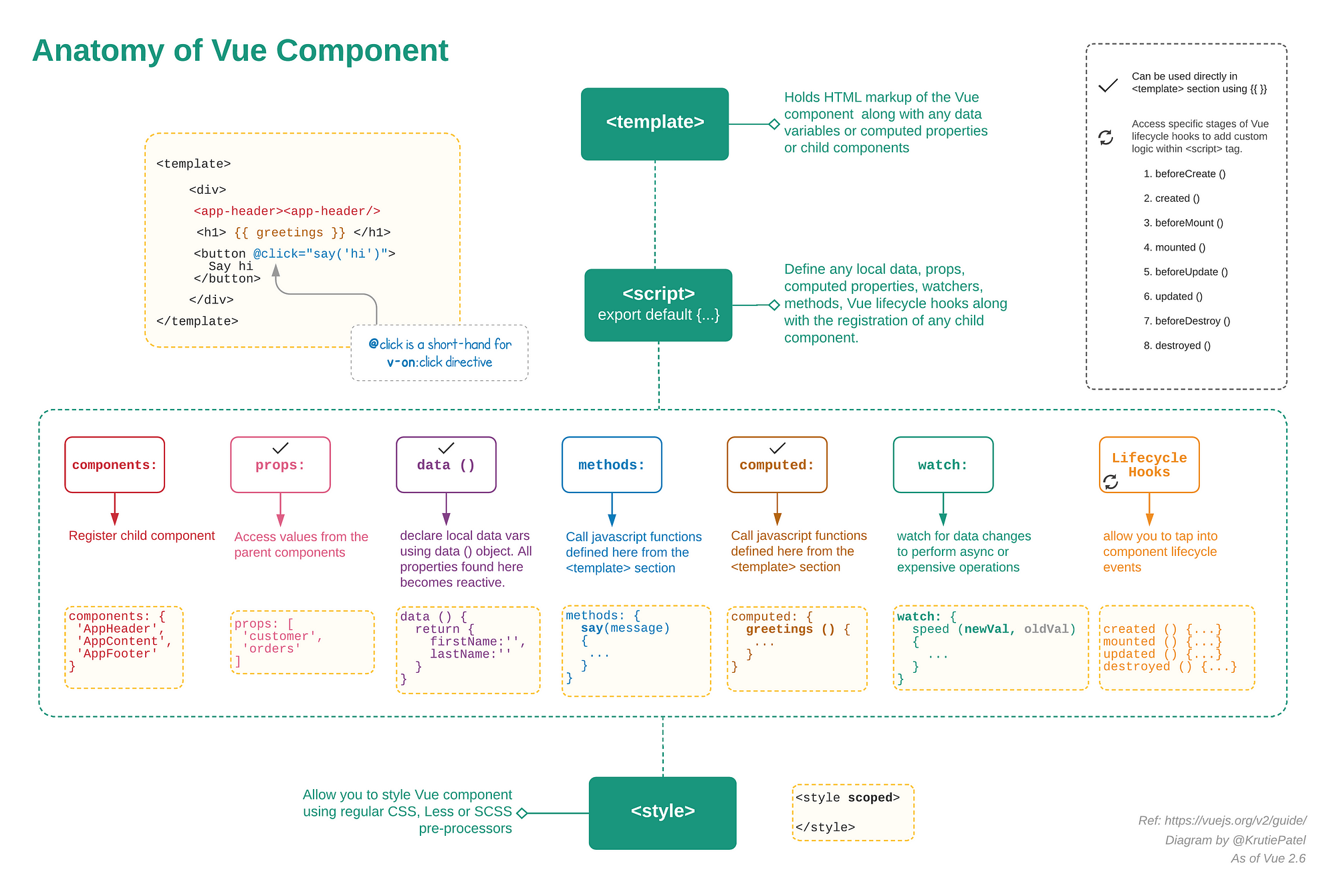
where available is a boolean variable in the js
<div v-show="available">Stuff</div>where available is a boolean variable in the js
<div v-show="available = !available">Stuff</div>where available is a boolean variable in the js
<div v-if="available">Stuff</div> <div v-else>Smth else</div>Remember to check if the element exists with v-if before looping over it
<ul> <li v-for="(element, index) in elements">{{index}} {{element}}</li> </ul><ul> <li v-if="employee" v-for="employee in employees">{{employee.name}} - {{employee.age}}</li> </ul><table> <tr> <th>Amount</th> <th>Asset</th> <th>Created</th> </tr> <template v-for="u in users"> <tr v-for="t in u.transfers">> <td>{{ t.amount }}</td> <td>{{ t.asset }}</td> <td>{{ t.timestamp }}</td>> </tr> </template> </table><li v-for="id in users" :key="id" :set="item = getUserData(id)"> <img :src="item.avatar" /><br /> {{ item.name }}<br /> {{ item.homepage }} </li><span v-text="name"></span><span v-html="name"></span><input v-model="name" type="text" /> <p>My name is: {{name}}</p>... data:{ name: "" } ...Computed properties are cached, and only re-computed on reactive dependency changes. Note that if a certain dependency is out of the instance’s scope (i.e. not reactive), the computed property will not be updated. In other words, imagine a computed property as a method (but it's not really a method) in the
data()that always returns a value. That "method" will be called whenever a property (variable fromdata()) used in that method is changed.
<html> <head> <meta charset="utf8"> <title>VueJS example</title> <script src="https://cdn.jsdelivr.net/npm/vue"></script> </head> <body> <div id="vue-app"> <button v-on:click="a++">Counter 1++</button> <button v-on:click="a--">Counter 1--</button> <button v-on:click="b++">Counter 2++</button> <p>Counter 1: {{ a }}</p> <p>Counter 2: {{ b }}</p> <!--The result() method is invoked whenever the Counter 1 button is clicker or the Counter 2 button is clicked--> <!--The output() method is invoked only when the Counter 2 button is clicked--> <p>Result: {{ result() }} | {{ output }}</p> </div> <script src="main.js"></script> </body> </html>new Vue({ el: '#vue-app', data: { a: 0, b: 0 }, methods: { result: function () { // this function is not interested in the "b" variable, yet it runs every time when the result needs to be changed console.log("methods"); return this.a < 0 ? "Negative" : "Positive"; } }, computed: { // these methods are invoked like attributes, without () // this method runs only when the "a" variable is changed output: function () { console.log("computed"); return this.a < 0 ? "Negative" : "Positive"; } } });var vm = new Vue({ data: { a: 1 }, computed: { // get only aDouble: function () { return this.a * 2 }, // both get and set aPlus: { get: function () { return this.a + 1 }, set: function (v) { this.a = v - 1 } } } }) vm.aPlus // => 2 vm.aPlus = 3 vm.a // => 2 vm.aDouble // => 4<p v-bind:style="{ property: value }">...</p>this div will have the red class if the userFound variable is set to true
<div v-bind:class="{ red: userFound }">...</div>this div will have the red class if the isAdmin variable is set to true
<div :class="[isAdmin ? 'red' : 'blue']">...</div>where method is a custom method in the js
<button v-on:click="method">Add</button>where method is a custom method in the js
<button @click="method">Add</button>method is called when ALT+ENTER is pressed
<input ref="name" v-on:keyuop.alt.enter="method" type="text" />The method sendModey will be called only if the condition amount > 0 has been met.
<button @click="amount > 0 && sendMoney()">Send money</button>// fire custom event this.$emit("eventName", data);<!-- $event == event data when _eventName_ event happens, call _functionName_ function --> <p v-on:eventName="functionName($event)"></p>// main.js // create new event bus export const bus = new Vue();// Header.vue import {bus} from "../main";// Footer.vue import {bus} from "../main";// listen to bus event in first component // usually in .created() function bus.$on("eventName", (data) => { // callback // use data }) // fire bus event in second component bus.$emit("eventName", data);<div id="app"> <!-- <component is="signature"></component> --> <signature></signature> <signature></signature> </div>// global registration Vue.component('signature', { template: '<p>Regards. Matej.</p>' });<!--App.vue--> <template> <div> <app-header></app-header> <app-ninjas v-bind:ninjas="ninjas"></app-ninjas> <app-footer></app-footer> </div> </template> <script> // import import Header from './components/Header.vue'; import Footer from './components/Footer.vue'; import Ninjas from './components/Ninjas.vue'; export default { // register components components:{ // added app- prefix // because header and footer tags already exist "app-header": Header, "app-footer": Footer, "app-ninjas": Ninjas }, data () { return { ninjas:[ {name: "ninja1", speciality: "vuejs", show: false}, {name: "ninja2", speciality: "nodejs", show: false}, {name: "ninja3", speciality: "react", show: false}, {name: "ninja4", speciality: "js", show: false}, {name: "ninja5", speciality: "css3", show: false}, {name: "ninja6", speciality: "ps", show: false} ] } } } </script><!--Ninjas.vue--> <template> <div id="ninjas"> <ul> <li v-for="ninja in ninjas" v-on:click="ninja.show = !ninja.show"> <h2>{{ninja.name}}</h2> <h3 v-show="ninja.show">{{ninja.speciality}}</h3> </li> </ul> </div> </template> <script> export default { // what is it receiving props: ["ninjas"], data: function () { return { } } } </script><!--Header.vue--> <template> <header> <h1>{{title}}</h1> </header> </template> <script> export default { data: function () { return { title: "Welcome!" } } } </script><!--Footer.vue--> <template> <footer> <p>{{copyright}}</p> </footer> </template> <script> export default { data: function () { return { copyright: "Copyright 2017 " } } } </script>export default { props:{ ninjas:{ type: Array, required: true } } }<h1>{{title | to-uppercase}}</h1>// main.js Vue.filter("to-uppercase", function ( value ) { return value.toUpperCase(); });Reuse some piece if code (or function) so that it doesn't need to be written in more separate files.
<input ref="name" type="text" />var name = this.$refs.name;dynamically change component based on variable component value rememberto use keep-alive tag to remember data from the destroyed component
<template> <div> <component> v-bind:is="componentName"></component> </div> </template> import formOne from "./components/formOne.vue"; import formTwo from "./components/formTwo.vue"; ... data: function() { return { component: "form-two" } }$ vue init webpack-simple my-project $ cd project-name $ npm install $ npm run dev this will make a dist folder with minified js
$ npm run build - new Vue();
- .beforeCreate();
- .created();
- .beforeMount();
- .updated();
- .beforeUpdate();
- .beforeDestroy();
- .destroyed();

<div> <label for="">Newsletters</label> <input type="checkbox" value="newsletter" v-model="categories"> <label for="">New posts</label> <input type="checkbox" value="post" v-model="categories"> <label for="">New DMs</label> <input type="checkbox" value="dm" v-model="categories"> <label for="">New pokes</label> <input type="checkbox" value="pokes" v-model="categories"> </div>data: function () { categories: [] }<div> <select v-model="town"> <option value="osijek">Osijek</option> <option value="zagreb">Zagreb</option> <option value="varazdin">Varazdin</option> </select> <select v-model="town"> <option v-for="t in towns">{{ t }}</option> </select> </div>data: function () { town: "", towns: ["Zagreb", "Osijek", "Varazdin", "Split", "Rijeka", "Dubrovnik"] }Important: if sending nested objects, be sure to JSON.stringify first!
import VueResource from 'vue-resource' Vue.use(VueResource);post: function () { this.$http.post("http://localhost:3000/users", { title: this.blog.title, body: this.blog.body, userId: 1 }).then( res => { // promise console.log("Response: ", res); }, error => { console.log("Error: ", error); }); }post: function () { this.$http.get("http://localhost:3000/users").then( function ( res ){ // promise console.log("Response: ", res) }); }// router.js import login from "./components/login.vue"; import registration from "./components/Registration.vue"; import user from "./components/user.vue";// main.js import VueRouter from 'vue-router'; import { routes } from "./routes"; Vue.use(VueRouter); const router = new VueRouter({ routes }); new Vue({ el: '#app', router: router, render: h => h(App) })// routes.js import Login from "./components/Login.vue"; import Registration from "./components/Registration.vue"; import User from "./components/User.vue"; export const routes = [ { path: "", component: Login }, { path: "/registration", component: Registration }, { path: "/users/", component: Users, children: [ { path: "", component: UserStart }, { path: ":id", component: UserDetail }, { path: ":id/edit", component: UserEdit } ] }, {path: "*", redirect: "/"} // handle all uncovered routes ]<template> <router-view></router-view> </template><!-- user.vue --> <template> <div id="user"> <h1></h1> <div></div> </div> </template> <script> export default { data: function () { return { id: this.$route.params.id, user: {} } }, created(){ this.$http.get("http://url/user/" + this.id).then(function(res){ this.user = res.body; }); } } </script><ul class="nav"> <router-link to="/" tag="li" active-class="active" exact><a>Home</a></router-link> <router-link to="/users" tag="li" active-class="active" ><a>Users</a></router-link> </ul><router-link v-bind:to='"/user/" + user.id' tag="li" v-for="(user, index) in users"> {{ user.username }}</router-link>this.$router.push({ path: "/home"});watch: { "$route": function (to, form){ this.id = to.params.id } } watch: { picked: { handler(val, oldVal) { console.log('changed: ', oldVal); console.log('new: ', val); }, deep: true, immediate: true } }To not let someone access e.g. /dashboard if the user is not logged in.
// add requiresAuth to certain components export const routes = [ { path: "", component: Login }, { path: "/dashboard", component: Dashboard, meta: {requiresAuth: true} } ];// configure vue-router // important: do not turn on history mode const router = new VueRouter({ routes, // mode: "history" }) router.beforeEach((to, from, next) => { if (to.matched.some(record => record.meta.requiresAuth)) { if ( CHECK_FOR_USER_IN_LOCALSTORAGE_ETC ) { // handle restricted access next({ path: '/login', }); } else { next(); } } else { // do nothing with components without meta: {requiresAuth: true} next(); } })<!--input field for search query--> <input type="text" v-model="searchQuery" placeholder="Search..."> <!--loop like this, instead of classic for user in users--> <tr v-for="user in filterUsers">// users array and search query variable data: function () { return { searchQuery: "", users: [] }; }, ... // computed method for filtering users by // email, last name and first name computed: { filterUsers () { return this.users.filter(user => { return (user.email.toLowerCase().indexOf(this.searchQuery.toLowerCase()) > -1 || user.lastName.toLowerCase().indexOf(this.searchQuery.toLowerCase()) > -1 || user.firstName.toLowerCase().indexOf(this.searchQuery.toLowerCase()) > -1) }) } }// add needed variables data: function () { return { ascending: false, sortColumn: '', users: [], }; }, methods: { // sort method "sortTable": function sortTable ( col ) { if ( this.sortColumn === col ) { this.ascending = !this.ascending; } else { this.ascending = true; this.sortColumn = col; } let ascending = this.ascending; this.users.sort(function ( a, b ) { if ( a[col] >= b[col] ) { return ascending ? 1 : -1 } else if ( a[col] < b[col] ) { return ascending ? -1 : 1 } return 0; }) } }<!--call sortTable method on column with corresponding property in users object--> <tr> <th @click="sortTable('email')">Username</th> <th @click="sortTable('firstName')">First Name</th> <th @click="sortTable('lastName')">Last Name</th> <th @click="sortTable('address')">Address</th> <th>Phone number</th> </tr> searchVideos() { let filtered = this.videos; // search by keyword if (this.filters.searchQuery) { filtered = this.videos.filter( v => v.title.toLowerCase().indexOf(this.filters.searchQuery) > -1 ); } // filter by date range if (this.filters.startDate && this.filters.endDate) { filtered = filtered.filter(v => { var time = new Date(v.created_at).getTime(); return (new Date(this.filters.startDate).getTime() < time && time < new Date(this.filters.endDate).getTime()); }); } // filter by property value if (this.filters.filterVal) { if (this.filters.filterVal === 'female') { filtered = filtered.filter( v => v.gender === this.filters.filterVal ); } // sort by property if (this.filters.sortValue === 'most_popular') { filtered.sort(function(a, b) { return a.views - b.views; }); } } return filtered; }An async function returns a promise. When you want to call this function you prepend await, and the calling code will stop until the promise is resolved or rejected.
// example const doSomethingAsync = () => { return new Promise((resolve) => { setTimeout(() => resolve('I did something'), 3000) }) } const doSomething = async () => { console.log(await doSomethingAsync()) console.log('I did something again!') } doSomething() // result: // I did something! // I did something again!// example import Vue from 'vue' import Vuex from 'vuex' Vue.use(Vuex) export default new Vuex.Store({ state: { data: null }, mutations: { setData: (state, payload) => { state.resource = payload } }, actions: { async getData({ commit }) { let res = null try { res = await fetch( 'https://api.coindesk.com/v1/bpi/currentprice.json' ) } catch (err) { console.log('err: ', err) return } // Handle success console.log('waiting for data...'); const data = await res.json() console.log('data: ', data) commit('setData', data) } } })// config.js // example config file var apiPort = 5566; var currHost = window.location.protocol + '//' + window.location.hostname + ':' + apiPort + '/api/v1'; var url = window.location.host !== 'localhost:8080' ? 'http://PROD-URL/' : currHost; export var cfg = { version: "0.1.0", api: { endpoint: url } };// main.js import * as config from './config' window._cfg = config.cfgmounted() { this.$refs.myInput.focus(); }- v-once - render the element and component only once
- v-if - conditionally render the element
- Difference between computed and methods
- watch - specify what property to listen for changes and then execute some code without returning values
- v-model modifiers
- .lazy - fire event when user lefts the field
- .number - force the value to be converted to a integer
- .trim - delete whitespace