
Laravel使用command在Linux系统中跑定时任务
6 / 2 / 创建于 4年前 /
 tomlibao 的个人博客
 一、前言
在windows系统中我们通常使用系统自带的
计划任务来执行定时任务,在Linux系统中我们通常配合crontab使用shell脚本或者访问url来完成定时任务,laravel的command在Linux中使用很方便,并且laravel中的command也提供了多种时间调度方法。
二、新建command文件
执行:php artisan make:command Luckinman命令,会在app\console\commands命令下生成一个Luckinman.php的文件。
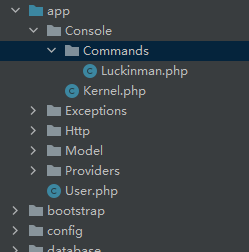
三、写业务逻辑
其中:
$signature为这个类定义一个执行名称。$description为这个类增加信息描述。handle方法中写自己的业务逻辑。
<?php namespace App\Console\Commands; use Illuminate\Console\Command; use App\Model\Student; use Illuminate\Support\Facades\Log; class Luckinman extends Command { /** * The name and signature of the console command. * * @var string */ protected $signature = 'test'; /** * The console command description. * * @var string */ protected $description = 'this is test'; /** * Create a new command instance. * * @return void */ public function __construct() { parent::__construct(); } /** * Execute the console command. * * @return mixed */ public function handle() { try { Log::info('测试定时任务:'.date('Y-m-d H:i:s')); }catch (\Exception $e){ Log::info($e->getMessage()); } } } 在控制台中执行该类的handle方法,使用命令:php artisan test即可。其中test为$signature中定义的名称。
四、框架中配置调度频率
在commands同级目录下有一个kernel.php:
<?php namespace App\Console; use Illuminate\Console\Scheduling\Schedule; use Illuminate\Foundation\Console\Kernel as ConsoleKernel; class Kernel extends ConsoleKernel { /** * The Artisan commands provided by your application. * * @var array */ protected $commands = [ \App\Console\Commands\Luckinman::class, ]; /** * Define the application's command schedule. * * @param \Illuminate\Console\Scheduling\Schedule $schedule * @return void */ protected function schedule(Schedule $schedule) { $schedule->command('test')->everyFiveMinutes(); } /** * Register the commands for the application. * * @return void */ protected function commands() { $this->load(__DIR__.'/Commands'); require base_path('routes/console.php'); } } 在$commands属性里引入我们创建的定时测试类,并在schedule方法中进行配置任务调度时间。
其中everyFiveMinutes代表每分钟执行一次。
五、Linux中开启任务调度
例如,一分钟执行一次:
* * * * * /www/server/php/73/bin/php /www/wwwroot/lars.wangchuangcode.cn/artisan schedule:run >> /dev/null 2>&1其中,/www/server/php/73/bin/php是我php的运行配置文件所在路径,根据自己的填写。/www/wwwroot/lars.wangchuangcode.cn/是我的项目根目录。
至此,command定时调度配置成功。
如果想把crontab每次运行记录到日志中,在后面指定一个文件即可:* * * * * /www/server/php/73/bin/ php /www/wwwroot/lar.wangchuangcode.cn/artisan schedule:run >> /dev/null 2>&1 >> /www/wwwroot/1.txt
本作品采用《CC 协议》,转载必须注明作者和本文链接





 关于 LearnKu


 粤公网安备 44030502004330号
第四点中的单词拼写有误。
让 windows 也能用 linux 的 crontab 表达式 github.com/hezhizheng/go-crontab