
DcatAdmin 简单实现导入Excel
211 / 7 / 创建于 3年前 /
 slowlyo 的个人博客
 前提
安装 dcat/easy-excel
composer require dcat/easy-excel或者你想用maatwebsite/excel之类的其他的工具也可以, 差不太多看个人喜好
实现
新建一个工具表单, 用来上传Excel
文档
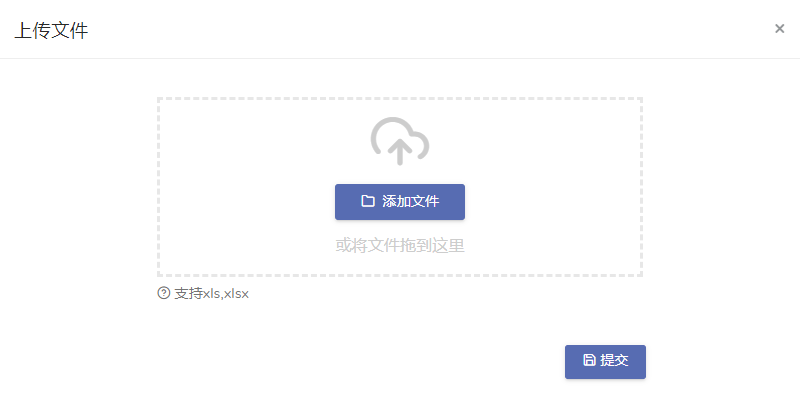
<?php namespace App\Admin\Forms; use Dcat\EasyExcel\Excel; use Dcat\Admin\Widgets\Form; class TestImportForm extends Form { /** * Handle the form request. * * @param array $input * * @return \Dcat\Admin\Http\JsonResponse */ public function handle(array $input) { // 获取上传的文件路径 $file_path = storage_path('app/public' . $input['import_file']); // 如果用的是maatwebsite/excel或者其他, 把读取数据这一步改改就好了 // 读取excel文件 $data = Excel::import($file_path)->toArray(); // [ // "Sheet1" => [ // 2 => [ // "姓名" => "张三", // "电话" => 123456789, // ], // 3 => [ // "姓名" => "李四", // "电话" => 987654321, // ], // ], // ] // 处理数据 //... // 入库 //... return $this->response()->success('ok')->refresh(); } /** * Build a form here. */ public function form() { // 禁用重置表单按钮 $this->disableResetButton(); // 文件上传 $this->file('import_file', ' ') ->disk('public') ->accept('xls,xlsx') ->uniqueName() ->autoUpload() ->move('/import') ->help('支持xls,xlsx'); } }新建一个Action, 用来下载导入模板
文档
<?php namespace App\Admin\Actions; use Dcat\Admin\Actions\Action; use Dcat\Admin\Actions\Response; /** * 下载导入模板 * Class DownloadTemplate * * @package App\Admin\Actions */ class DownloadTemplate extends Action { /** * @return string */ protected $title = '<button class="btn btn-primary"><i class="feather icon-download"></i> 下载导入模板</button>'; /** * Handle the action request. * * @return Response */ public function handle() { return $this->response()->download('你的导入模板.xlsx'); } } 在列表增加操作按钮
文档
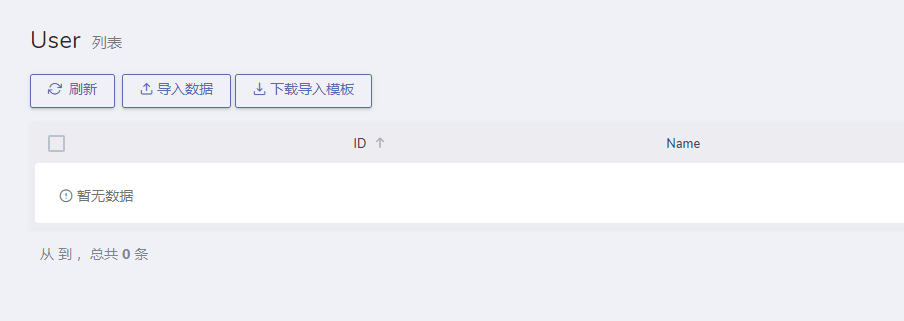
/** * Make a grid builder. * * @return Grid */ protected function grid() { return Grid::make(new User(), function (Grid $grid) { // 在工具栏添加操作按钮,用于上传Excel文件及下载导入模板 $grid->tools(function (Grid\Tools $tools) { $tools->append(Modal::make() // 大号弹窗 ->lg() // 弹窗标题 ->title('上传文件') // 按钮 ->button('<button class="btn btn-primary"><i class="feather icon-upload"></i> 导入数据</button>') // 弹窗内容 ->body(TestImportForm::make())); // 下载导入模板 $tools->append(DownloadTemplate::make()->setKey('test_question')); }); $grid->column('id')->sortable(); $grid->column('name'); $grid->column('email'); // ... }); } 效果
本作品采用《CC 协议》,转载必须注明作者和本文链接













 关于 LearnKu


 粤公网安备 44030502004330号
6666,感谢大佬分享
这么写,我也干过,一次导入超过500条记录,内存直接爆了。
哪里配置从第几行开始读取呀
导入csv key值乱码有解决方案吗?大佬