
Tinymce7富文本编辑器配置,微信公众号文章等一些网站复制图文,实现图片自动上传
16 / 2 / 创建于 1年前 /
 ljheisenberg 的个人博客
 一直想找一款简洁又优雅的富文本编辑器,之前用过百度ueditor,wangEditor,忽然发现了tinymce编辑器,有一个网站是基于它做的,各方面体验不错,然后我就参考研究了一下,也参考了本站的文章Laravel 使用 TinyMCE 以及處理上傳圖片(驗證,防呆)
话不多说,贴出代码
1、控制器
<?php namespace App\Http\Controllers; use App\Handlers\FileUploadHandler; use App\Handlers\ImageUploadHandler; use App\Handlers\MediaUploadHandler; use Illuminate\Http\Request; use Illuminate\Support\Facades\Storage; use Illuminate\Support\Facades\Validator; use Illuminate\Support\Str; class DemoController extends Controller { public function uploadImage(Request $request, ImageUploadHandler $uploader) { $validator = Validator::make($request->all(), [ 'file' => 'mimes:png,jpg,gif,jpeg,webp|max:5120', ], [ 'file.mimes' => '目前只支持png/jpg/gif/jpeg/webp格式图片', 'file.max' => '图片大小不能超过5M', ]); if($validator->fails()) { return response()->json([ 'error' => $validator->errors()->all(), ], 200, [], JSON_UNESCAPED_UNICODE); } $data = []; $file = $request->file('file'); $result = $uploader->save($file, 'articles', 1080); if($result) { $data['location'] = $result['path']; } return response()->json($data); } public function uploadFile(Request $request, FileUploadHandler $uploader) { $validator = Validator::make($request->all(), [ 'file' => 'mimes:pdf,txt,zip,rar,7z,doc,docx,xls,xlsx,ppt,pptx|max:10240', ], [ 'file.mimes' => '目前只支持pdf/txt/zip/rar/7z/doc/docx/xls/xlsx/ppt/pptx格式附件', 'file.max' => '附件大小不能超过10M', ]); if($validator->fails()) { return response()->json([ 'error' => $validator->errors()->all(), ], 200, [], JSON_UNESCAPED_UNICODE); } $data = []; $file = $request->file('file'); $result = $uploader->save($file, 'articles'); if($result) { $data['location'] = $result['path']; } return response()->json($data); } public function uploadMedia(Request $request, MediaUploadHandler $uploader) { $validator = Validator::make($request->all(), [ 'file' => 'mimes:mp3,mp4|max:51200', ], [ 'file.mimes' => '目前只支持mp3/mp4格式媒体文件', 'file.max' => '媒体文件大小不能超过50M', ]); if($validator->fails()) { return response()->json([ 'error' => $validator->errors()->all(), ], 200, [], JSON_UNESCAPED_UNICODE); } $data = []; $file = $request->file('file'); $result = $uploader->save($file, 'articles'); if($result) { $data['location'] = $result['path']; } return response()->json($data); } public function deleteUpload(Request $request) { $fileName = $request->input('fileName'); if(Storage::disk('public')->exists($fileName)) { Storage::disk('public')->delete($fileName); } return response()->json(['success' => '删除成功']); } public function pasteImage(Request $request) { $data = json_decode(file_get_contents('php://input'), true); $imageUrls = $data['urls']; $uploadedUrls = []; foreach ($imageUrls as $url) { // 处理图片链接的html实体字符,比如网易新闻的图片链接 $url = htmlspecialchars_decode($url); // 使用curl获取图像内容 $ch = curl_init(); curl_setopt($ch, CURLOPT_URL, $url); curl_setopt($ch, CURLOPT_RETURNTRANSFER, true); curl_setopt($ch, CURLOPT_HEADER, 0); $imageData = curl_exec($ch); curl_close($ch); // 获取图片扩展名 $extension = $this->guessImageTypeFromUrl($url); $folder_name = "uploads/images/articles/" . date("Y/m/d", time()); // 检查文件夹是否存在 if(!file_exists($folder_name)) { mkdir($folder_name, 0755, true); } $upload_path = public_path() .'/'. $folder_name; $fileName = time() . '_' . Str::random(10) . '.' . $extension; // 保存图片到本地 file_put_contents($upload_path .'/'. $fileName, $imageData); // 保存图片url到数组 $uploadedUrls[] = config('app.url')."/$folder_name/$fileName"; } // 返回上传的所有图片url return json_encode(['locations' => $uploadedUrls]); } public function guessImageTypeFromUrl($url) { // 尝试从URL中提取文件名部分 $parsedUrl = parse_url($url); $path = $parsedUrl['path'] ?? ''; $filenameParts = explode('/', $path); $filename = end($filenameParts); // 检查文件名中是否包含明确的扩展名 $extension = strtolower(pathinfo($filename, PATHINFO_EXTENSION)); if (!empty($extension) && in_array($extension, ['png', 'jpg', 'jpeg', 'gif', 'webp', 'bmp', 'tiff', 'svg'])) { return $extension; } // 检查URL的查询字符串中是否有关于图片类型的线索 parse_str($parsedUrl['query'] ?? '', $queryParams); foreach ($queryParams as $k => $v) { switch ($k) { case 'wx_fmt': // 微信公众号文章 case 'type': // 网易新闻 return strtolower($v); } } // 如果没有找到明确的类型,返回一个默认值 return 'png'; } }2、视图文件
<!DOCTYPE html> <html lang="en"> <head> <meta charset="UTF-8"> <meta name="viewport" content="width=device-width, initial-scale=1"> <script src="https://code.jquery.com/jquery-3.7.1.min.js" integrity="sha256-/JqT3SQfawRcv/BIHPThkBvs0OEvtFFmqPF/lYI/Cxo=" crossorigin="anonymous"></script> <script src="{{ asset('tinymce/tinymce.min.js') }}" referrerpolicy="origin"></script> <script> const removeTagAttribute = (tags, tagName) => { // 找到所有标签的属性 for (let i = 0; i < tags.length; i++) { if(tagName === 'img') { let src = tags[i].getAttribute('src'); tags[i].setAttribute('src', src); } // 移除所有标签的属性 let attributes = tags[i].attributes; for (let j = attributes.length - 1; j >= 0; j--) { let attributeName = attributes[j].name; if(tagName === 'img') { if (attributeName !== 'src') { tags[i].removeAttribute(attributeName); } }else { tags[i].removeAttribute(attributeName); } } if(tagName === 'img') { // 图片自动居中 tags[i].setAttribute('style', 'display: block;margin-left: auto;margin-right: auto;'); } } }, tinymce.init({ selector: '#content', body_class: 'content', content_css: 'tinymce/content.css', license_key: 'gpl', menubar: false, statusbar: false, toolbar_sticky: true, plugins: 'image media link lists table autoresize wordcount autolink', toolbar: 'undo redo fontsize styles image bold italic underline alignleft aligncenter alignright bullist numlist media link table blockquote', font_size_formats: '12px 16px 18px 20px', style_formats: [ { title: '一级标题', block: 'h2', styles: {'font-size':'20px'} }, { title: '二级标题', block: 'h3', styles: {'font-size':'18px'} }, { title: '正文', block: 'p', styles: {'font-size':'16px'} }, { title: '标注', block: 'p', styles: {'font-size':'12px', color:'#888888'} }, ], link_default_target: '_blank', link_title: false, pad_empty_with_br: true, table_toolbar: 'tableprops tablerowprops | tableinsertrowbefore tableinsertrowafter tabledeleterow | tableinsertcolbefore tableinsertcolafter tabledeletecol | tabledelete', table_appearance_options: false, table_advtab: false, table_row_advtab: false, table_cell_advtab: false, table_row_class_list: [ {title: '无', value: ''}, {title: '深底白字', value: 'table-dark-row'}, {title: '浅底黑字', value: 'table-light-row'}, {title: '浅底白字', value: 'table-light-white-row'}, ], paste_data_images: true, entity_encoding: 'raw', invalid_elements: 'strong,span,em', min_height: 600, language: 'zh_CN', language_url: 'tinymce/lang/zh_CN.js', paste_preprocess: (editor, args) => { let tempDiv = document.createElement('div'); tempDiv.innerHTML = args.content.replace(/<section|<h1|<h4|<h5|<h6/g, "<p").replace(/<\/section>|<\/h1>|<\/h4>|<\/h5>|<\/h6>/g, "</p>").replace(/<h2>/g, '<h2 style="font-size:20px;">').replace(/<h3>/g, '<h3 style="font-size:18px;">'); // 找到所有img标签,只保留src属性 let imgTags = tempDiv.getElementsByTagName('img'); removeTagAttribute(imgTags, 'img'); // 找到所有p标签,移除所有属性 let pTags = tempDiv.getElementsByTagName('p'); removeTagAttribute(pTags, 'p'); // 删除p多余空标签 args.content = tempDiv.innerHTML.replace(/<p><\/p>/g, ''); // Extract image URLs from pasted content let imageUrls = []; let imgRegex = /<img[^>]+src="(https?:\/\/[^">]+)"/g; let match; while (match = imgRegex.exec(args.content)) { imageUrls.push(match[1]); } // Process each image URL (could also send all URLs to server at once) if (imageUrls.length > 0) { fetch('{{ route('editor.paste_image') }}', { method: 'POST', headers: { 'Content-Type': 'application/json', 'X-CSRF-TOKEN': '{{ csrf_token() }}' }, body: JSON.stringify({ urls: imageUrls }) }).then(response => { return response.json(); }).then(data => { if (data && data.locations) { let currentContent = editor.getContent(); data.locations.forEach((location, index) => { currentContent = currentContent.replace(imageUrls[index], location); }); editor.setContent(currentContent); console.log('Replace content:', currentContent); } }).catch(error => { console.error('Error uploading images:', error); }); } console.log('Original content:', args.content); }, images_upload_url: '{{ route('editor.upload_image') }}', images_upload_handler: (blobInfo, progress) => new Promise((resolve, reject) => { const xhr = new XMLHttpRequest(); xhr.withCredentials = false; xhr.open('POST', '{{ route('editor.upload_image') }}'); xhr.setRequestHeader('X-CSRF-TOKEN', '{{ csrf_token() }}'); xhr.upload.onprogress = (e) => { progress(e.loaded / e.total * 100); }; xhr.onload = () => { if (xhr.status === 403) { reject({ message: 'HTTP Error: ' + xhr.status, remove: true }); return; } if (xhr.status < 200 || xhr.status >= 300) { reject('HTTP Error: ' + xhr.status); return; } const json = JSON.parse(xhr.responseText); if (json.error) { reject(json.error.join('\n')); return; } if (!json || typeof json.location != 'string') { reject('Invalid JSON: ' + xhr.responseText); return; } resolve(json.location); }; xhr.onerror = () => { reject('Image upload failed due to a XHR Transport error. Code: ' + xhr.status); }; const formData = new FormData(); formData.append('file', blobInfo.blob(), blobInfo.filename()); xhr.send(formData); }), file_picker_callback: function (callback, value, meta) { //文件分类 let filetype = '.pdf, .txt, .zip, .rar, .7z, .doc, .docx, .xls, .xlsx, .ppt, .pptx, .mp3, .mp4, .MOV'; //后端接收上传文件的地址 let upUrl = '{{ route('editor.upload_file') }}'; //为不同插件指定文件类型及后端地址 switch (meta.filetype) { case 'image': filetype = '.jpg, .jpeg, .png, .gif, .webp'; upUrl = '{{ route('editor.upload_image') }}'; break; case 'media': filetype = '.mp3, .mp4'; upUrl = '{{ route('editor.upload_media') }}'; break; case 'file': default: } //模拟出一个input用于添加本地文件 const input = document.createElement('input'); input.setAttribute('type', 'file'); input.setAttribute('accept', filetype); input.click(); input.onchange = function () { const file = this.files[0]; let xhr, formData; console.log(file.name); xhr = new XMLHttpRequest(); xhr.withCredentials = false; xhr.open('POST', upUrl); xhr.setRequestHeader('X-CSRF-TOKEN', '{{ csrf_token() }}') xhr.onload = function () { if (xhr.status === 403) { alert({ message: 'HTTP Error: ' + xhr.status, remove: true }); return; } if (xhr.status < 200 || xhr.status >= 300) { alert('HTTP Error: ' + xhr.status); return; } const json = JSON.parse(xhr.responseText); if (json.error) { alert(json.error.join('\n')); return; } if (!json || typeof json.location != 'string') { alert('Invalid JSON: ' + xhr.responseText); return; } callback(json.location); }; xhr.onerror = () => { alert('File upload failed due to a XHR Transport error. Code: ' + xhr.status); }; formData = new FormData(); formData.append('file', file, file.name); xhr.send(formData); } }, setup: function(editor) { editor.on("keydown", function(e){ if ((e.keyCode === 8 || e.keyCode === 46) && tinymce.activeEditor.selection) { let selectedNode = tinymce.activeEditor.selection.getNode(); console.log(selectedNode); if (selectedNode) { let path = ''; switch (selectedNode.nodeName) { case 'IMG': path = selectedNode.src; // 图片文件 break; case 'A': path = selectedNode.href; // 链接文件 break; default: let child = selectedNode.children[0]; if(child) { if(child.nodeName === 'AUDIO') { // 音频文件 path = child.src; }else if(child.nodeName === 'VIDEO') { // 视频文件 if(child.children.length > 0 && child.children[0].nodeName === 'SOURCE') { path = child.children[0].src; }else { path = child.src; } } } break; } console.log(path); path = path.replace('{{ config('app.url') }}', ''); if(path) { axios.delete('{{ route('editor.delete_upload') }}', { params: { fileName: path }}).then(function (response) { if (response.status === 200) { console.log('删除成功'); } }).catch(function (error) { console.log('删除失败'); }); } } } }); }, }); </script> @vite('resources/js/app.js') </head> <body> <h1>TinyMCE Quick Start Guide</h1> <form method="post" action="{{ route('editor.store') }}" onsubmit="return false;"> {{ csrf_field() }} <label for="content"></label><textarea id="content" class="content">Hello, World!</textarea> </form> </body> </html>3、路由文件
<?php use App\Http\Controllers\AuthController; use Illuminate\Support\Facades\Route; use App\Http\Controllers\DemoController; use Illuminate\Routing\Router; /* |-------------------------------------------------------------------------- | Web Routes |-------------------------------------------------------------------------- | | Here is where you can register web routes for your application. These | routes are loaded by the RouteServiceProvider and all of them will | be assigned to the "web" middleware group. Make something great! | */ Route::get('editor', [DemoController::class, 'editor'])->name('editor'); Route::post('editor/store', [DemoController::class, 'store'])->name('editor.store'); Route::post('editor/upload_image', [DemoController::class, 'uploadImage'])->name('editor.upload_image'); Route::post('editor/upload_file', [DemoController::class, 'uploadFile'])->name('editor.upload_file'); Route::post('editor/upload_media', [DemoController::class, 'uploadMedia'])->name('editor.upload_media'); Route::delete('editor/delete_upload', [DemoController::class, 'deleteUpload'])->name('editor.delete_upload'); Route::post('editor/paste_image', [DemoController::class, 'pasteImage'])->name('editor.paste_image'); 4、图片处理器
<?php namespace App\Handlers; use Illuminate\Support\Str; use Intervention\Image\ImageManager; use Intervention\Image\Drivers\Gd\Driver; class ImageUploadHandler { public function save($file, $folder, $max_width = false) { // 构建存储的文件夹规则,值如:uploads/images/articles/2024/07/02/ // 文件夹切割能让查找效率更高。 $folder_name = "uploads/images/$folder/" . date("Y/m/d", time()); // 文件具体存储的物理路径,`public_path()` 获取的是 `public` 文件夹的物理路径。 // 值如:/home/vagrant/Code/laravel/public/uploads/images/articles/2024/07/02/ $upload_path = public_path() . '/' . $folder_name; // 获取文件的后缀名,因图片从剪贴板里黏贴时后缀名为空,所以此处确保后缀一直存在 $extension = strtolower($file->getClientOriginalExtension()) ?: 'png'; // 拼接文件名,加前缀是为了增加辨析度,前缀可以是相关数据模型的 ID // 值如:1_1493521050_7BVc9v9ujP.png $filename = time() . '_' . Str::random(10) . '.' . $extension; // 将图片移动到我们的目标存储路径中 $file->move($upload_path, $filename); // 如果限制了图片宽度,就进行裁剪 if ($max_width && $extension != 'gif') { // 此类中封装的函数,用于裁剪图片 $this->reduceSize($upload_path . '/' . $filename, $max_width); } return [ 'path' => config('app.url') . "/$folder_name/$filename" ]; } public function reduceSize($file_path, $max_width) { // 先实例化,传参是文件的磁盘物理路径 $manager = ImageManager::withDriver(Driver::class); $image = $manager->read($file_path); // 进行大小调整的操作,限制最大宽度 $image->scaleDown($max_width); // 对图片修改后进行保存 $image->save(); } }另外两个文件,FileUploadHandler.php、MediaUploadHandler.php和图片处理文件差不多
5、filesystems文件
<?php return [ // 没有用storage目录,改到public目录下了 'disks' => [ 'public' => [ 'driver' => 'local', 'root' => public_path(), 'url' => env('APP_URL'), 'visibility' => 'public', 'throw' => false, ], ], ];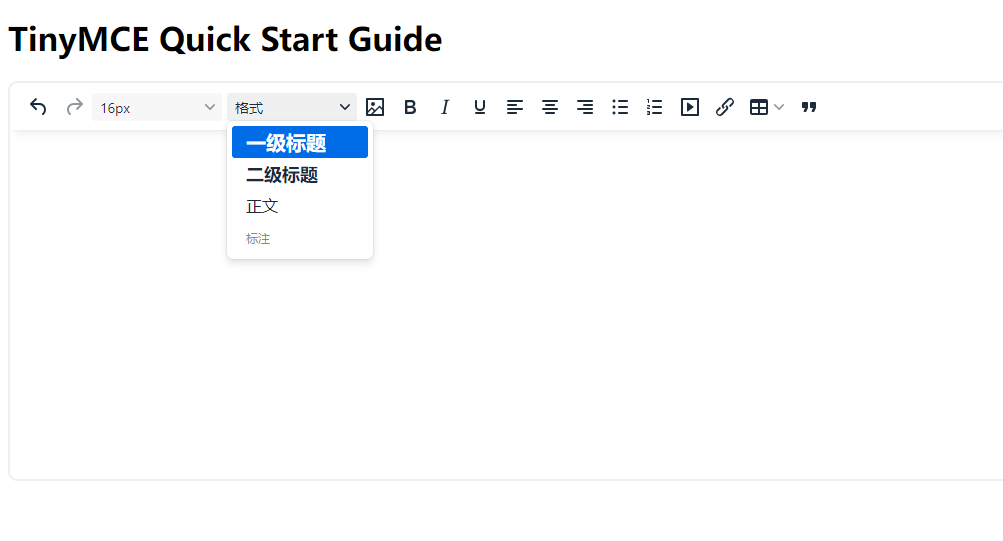
进行了一些基本配置和简化,把常用的放出来了,图片支持通过整体复制自动粘贴图片到对应位置,然后格式本身TinyMCE就默认有一个过滤,目前试了一下微信公众号、网易新闻、搜狐新闻、虎嗅、36氪、凤凰网、今日头条,这些网站的图片都可以自动粘贴,其他的如果有的话,注意看控制器里面的url是不是有特殊处理,不过有的网站似乎图片扩展名不好获取,默认给的png格式,这种也能显示,就是格式有修改,比如直接放到PS里面是没法读取的,需要另存为才行
本作品采用《CC 协议》,转载必须注明作者和本文链接










 关于 LearnKu


 粤公网安备 44030502004330号
本站的md使用啥做的?