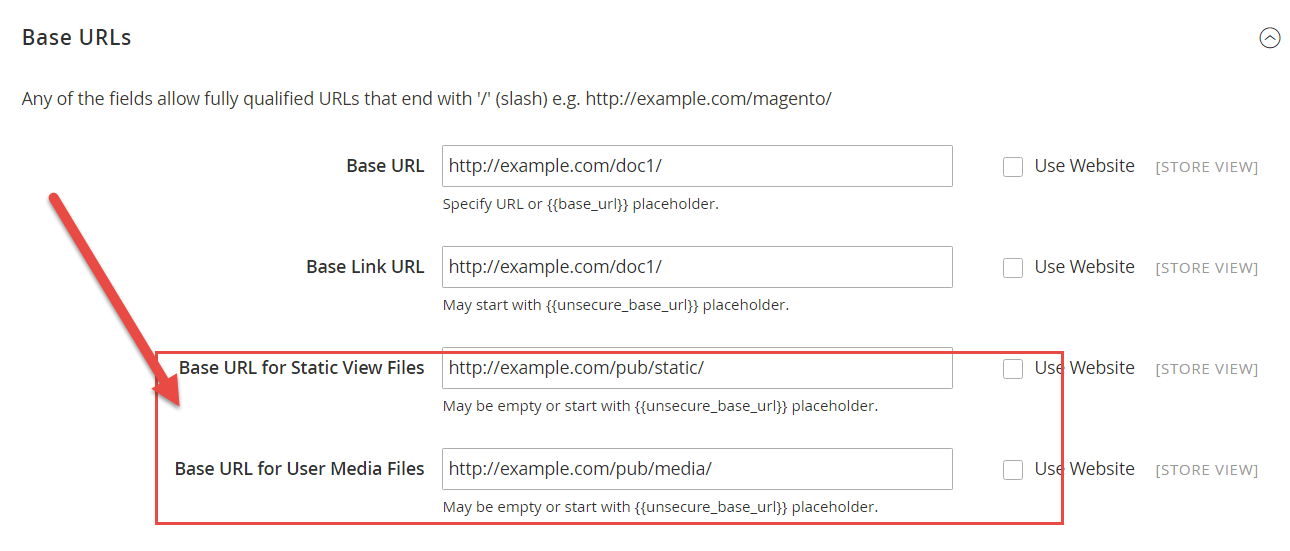
I am working on magento 2 and try to create multi web site.
Web site created properly but JS and CSS not loading properly for www.example.com/doc1 and www.example.com/doc2. For www.example.com JS and CSS are working fine.
Site folder structure is bellow
/htdocs/ www.example.com [magento root] /htdocs/doc1/ www.example.com/doc1 [index.php and .htaccess] /htdocs/doc2/ www.example.com [index.php and .htaccess] index.php for www.example.com/doc1
<?php try { require __DIR__ . '/../app/bootstrap.php'; } catch (\Exception $e) { echo <<<HTML <div style="font:12px/1.35em arial, helvetica, sans-serif;"> <div style="margin:0 0 25px 0; border-bottom:1px solid #ccc;"> <h3 style="margin:0;font-size:1.7em;font-weight:normal;text-transform:none;text-align:left;color:#2f2f2f;"> Autoload error</h3> </div> <p>{$e->getMessage()}</p> </div> HTML; exit(1); } $params = $_SERVER; $params[\Magento\Store\Model\StoreManager::PARAM_RUN_CODE] = 'doc1'; //Webite code as same in admin panel $params[\Magento\Store\Model\StoreManager::PARAM_RUN_TYPE] = 'website'; $bootstrap = \Magento\Framework\App\Bootstrap::create(BP, $params); /** @var \Magento\Framework\App\Http $app */ $app = $bootstrap->createApplication('Magento\Framework\App\Http'); $bootstrap->run($app); and .htaccess file is here. I have not change any thing in .htaccess file its default magento 2 file copy from root.
# All explanations you could find in .htaccess.sample file DirectoryIndex index.php <IfModule mod_php5.c> php_value memory_limit 768M php_value max_execution_time 18000 php_flag session.auto_start off php_flag suhosin.session.cryptua off </IfModule> <IfModule mod_php7.c> php_value memory_limit 768M php_value max_execution_time 18000 php_flag session.auto_start off php_flag suhosin.session.cryptua off </IfModule> <IfModule mod_security.c> SecFilterEngine Off SecFilterScanPOST Off </IfModule> <IfModule mod_ssl.c> SSLOptions StdEnvVars </IfModule> <IfModule mod_rewrite.c> Options +FollowSymLinks RewriteEngine on RewriteRule .* - [E=HTTP_AUTHORIZATION:%{HTTP:Authorization}] RewriteCond %{REQUEST_METHOD} ^TRAC[EK] RewriteRule .* - [L,R=405] RewriteCond %{REQUEST_FILENAME} !-f RewriteCond %{REQUEST_FILENAME} !-d RewriteCond %{REQUEST_FILENAME} !-l RewriteRule .* index.php [L] </IfModule> AddDefaultCharset Off AddType 'text/html; charset=UTF-8' html <IfModule mod_expires.c> ExpiresDefault "access plus 1 year" ExpiresByType text/html A0 ExpiresByType text/plain A0 </IfModule> RedirectMatch 403 /\.git <Files composer.json> order allow,deny deny from all </Files> <Files composer.lock> order allow,deny deny from all </Files> <Files .gitignore> order allow,deny deny from all </Files> <Files .htaccess> order allow,deny deny from all </Files> <Files .htaccess.sample> order allow,deny deny from all </Files> <Files .php_cs> order allow,deny deny from all </Files> <Files .travis.yml> order allow,deny deny from all </Files> <Files CHANGELOG.md> order allow,deny deny from all </Files> <Files CONTRIBUTING.md> order allow,deny deny from all </Files> <Files COPYING.txt> order allow,deny deny from all </Files> <Files Gruntfile.js> order allow,deny deny from all </Files> <Files LICENSE.txt> order allow,deny deny from all </Files> <Files LICENSE_AFL.txt> order allow,deny deny from all </Files> <Files nginx.conf.sample> order allow,deny deny from all </Files> <Files package.json> order allow,deny deny from all </Files> <Files php.ini.sample> order allow,deny deny from all </Files> <Files README.md> order allow,deny deny from all </Files> <Files magento_umask> order allow,deny deny from all </Files> ErrorDocument 404 /pub/errors/404.php ErrorDocument 403 /pub/errors/404.php <IfModule mod_headers.c> Header set X-UA-Compatible "IE=edge" <FilesMatch "\.(appcache|atom|bbaw|bmp|crx|css|cur|eot|f4[abpv]|flv|geojson|gif|htc|ico|jpe?g|js|json(ld)?|m4[av]|manifest|map|mp4|oex|og[agv]|opus|otf|pdf|png|rdf|rss|safariextz|svgz?|swf|topojson|tt[cf]|txt|vcard|vcf|vtt|webapp|web[mp]|webmanifest|woff2?|xloc|xml|xpi)$"> Header unset X-UA-Compatible </FilesMatch> </IfModule> I have setup store view url like bellow 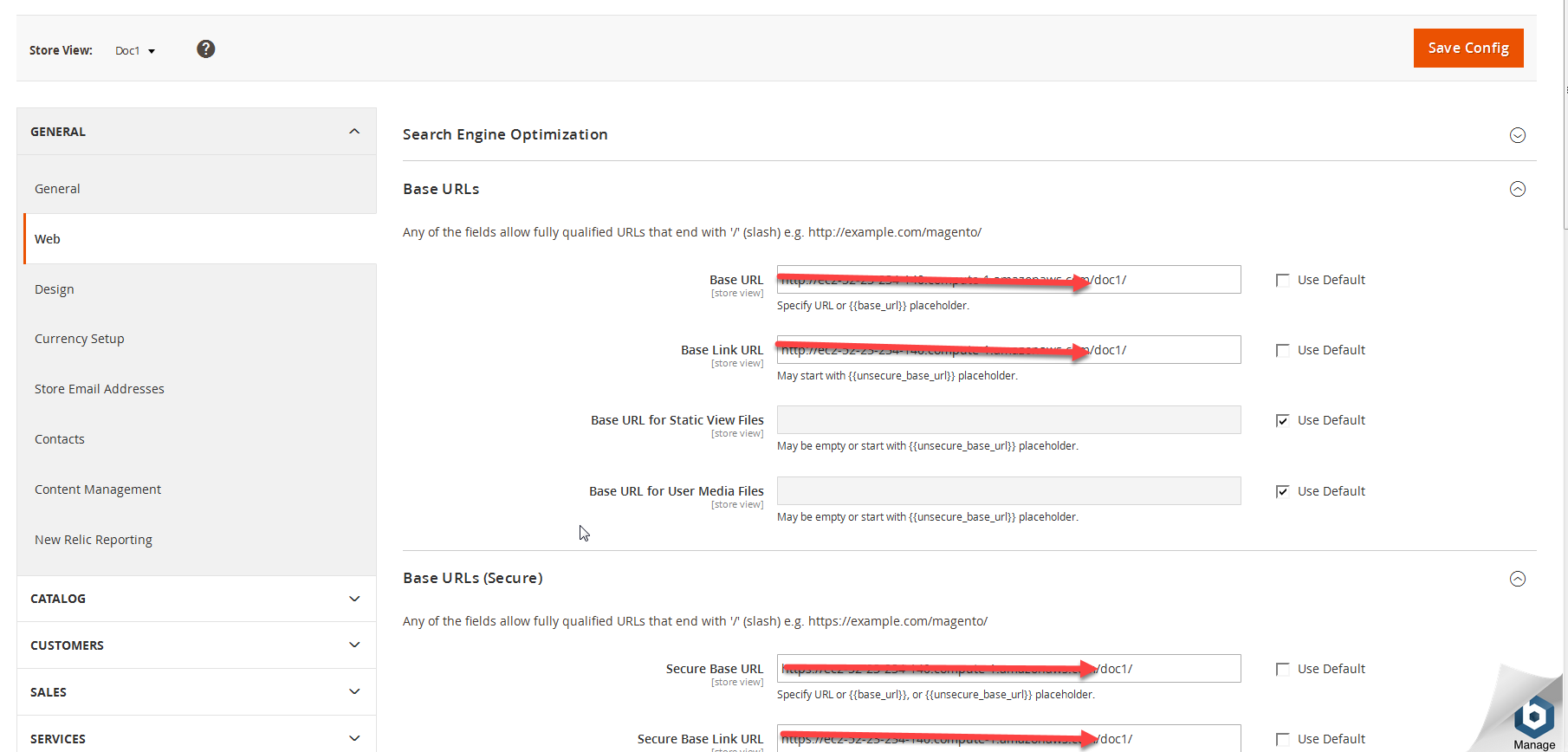
Please check my error screenshot here.

Let me know if any suggestion is there. I have added simlinks
ln -s /home/example/example.com/html/app/ app ln -s /home/example/example.com/html/lib/ lib ln -s /home/example/example.com/html/pub/ pub ln -s /home/example/example.com/html/var/ var