
I am trying to add a second cms block in the category backend just below the default one. I copied and altered the category_form.xml and CategorySetup.php from core into a separate module.
I think I may be close as I can create the attribute and get a select element on the page. The issue is that the select box is empty - there are no options:
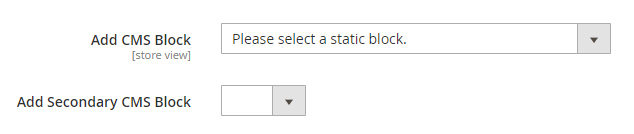
I am assuming I need to copy a source model or something like that but haven't found anything helpful online. Does anyone have some insight on this? I am running Magento EE 2.1.8.
Here is my relevant code:
InstallData.php
<?php namespace [Vendor]\[Module]\Setup; use Magento\Eav\Setup\EavSetup; use Magento\Eav\Setup\EavSetupFactory; use Magento\Framework\Setup\InstallDataInterface; use Magento\Framework\Setup\ModuleContextInterface; use Magento\Framework\Setup\ModuleDataSetupInterface; class InstallData implements InstallDataInterface { private $eavSetupFactory; /** * Init * * @param EavSetupFactory $eavSetupFactory */ public function __construct(EavSetupFactory $eavSetupFactory) { $this->eavSetupFactory = $eavSetupFactory; } /** * {@inheritdoc} * @SuppressWarnings(PHPMD.ExcessiveMethodLength) */ public function install(ModuleDataSetupInterface $setup, ModuleContextInterface $context) { /** @var EavSetup $eavSetup */ $eavSetup = $this->eavSetupFactory->create(['setup' => $setup]); /** * Add attributes to the eav/attribute - landing_page_secondary **/ $eavSetup->addAttribute( \Magento\Catalog\Model\Category::ENTITY, 'landing_page_secondary', [ 'type' => 'int', 'label' => 'Secondary CMS Block', 'input' => 'select', 'source' => 'Magento\Catalog\Model\Category\Attribute\Source\Page', 'required' => false, 'sort_order' => 25, 'global' => \Magento\Eav\Model\Entity\Attribute\ScopedAttributeInterface::SCOPE_STORE, 'group' => 'Display Settings', ] ); } } category_form.xml
<?xml version="1.0" encoding="UTF-8"?> <!-- /** * Copyright © 2013-2017 Magento, Inc. All rights reserved. * See COPYING.txt for license details. */ --> <form xmlns:xsi="http://www.w3.org/2001/XMLSchema-instance" xsi:noNamespaceSchemaLocation="urn:magento:module:Magento_Ui:etc/ui_configuration.xsd"> <fieldset name="content"> <field name="landing_page_secondary"> <argument name="data" xsi:type="array"> <item name="config" xsi:type="array"> <item name="sortOrder" xsi:type="number">65</item> <item name="dataType" xsi:type="string">string</item> <item name="formElement" xsi:type="string">select</item> <item name="label" xsi:type="string" translate="true">Add Secondary CMS Block</item> </item> </argument> </field> </fieldset> </form> Additionally, in Catalog/Block/Category/View.php I found this code for outputting the cms block. It does not reference the landing_page category attribute which is another reason why I think there are a few more classes I need to override/duplicate.
/** * @return mixed */ public function getCmsBlockHtml() { if (!$this->getData('cms_block_html')) { $html = $this->getLayout()->createBlock( 'Magento\Cms\Block\Block' )->setBlockId( $this->getCurrentCategory()->getLandingPage() )->toHtml(); $this->setData('cms_block_html', $html); } return $this->getData('cms_block_html'); } 

CMS Static Blockwidget. This gives you multiple blocks wrapped as one, no need to modify anything.