Convert Media Files
Privately in Your Browser
Convert Box is a free browser-based file converter that helps you transform images, audio, and video files without uploading them to a server. Everything runs locally on your device, so you get fast conversions, more privacy, and better control over your media.
- No uploads required
- Batch conversion for multiple files
- Audio extraction & trim controls
- Offline-ready app experience
Why Choose Convert Box?
Convert Box gives creators, marketers, students, and teams a simple way to convert media files without sending sensitive content to third-party servers. Whether you need to turn JPG into PNG, extract MP3 from MP4, compress WEBM for sharing, or export multiple files at once, Convert Box keeps the workflow fast and private.
Private by Design
Your files are processed locally in the browser and never leave your device.
Free to Use
No account or sign-up required. Open the app and start converting immediately.
Fast Conversion
No upload delay. Conversions run in your browser and finish in seconds.
Batch Workflows
Queue multiple files and download everything together as a ZIP archive.
Convert Files
Without Uploading Them
Convert Box processes your media locally in the browser, which means your files stay on your device from start to finish. No third-party upload step, no round-trip wait times, and no risk of sensitive content reaching a remote server.
- No third-party upload step required
- Better privacy for personal and business files
- Useful for confidential media workflows
- Ideal for teams that need a lightweight local tool

Image, Audio, and Video Support
Convert Box focuses on the media formats people use most often. Convert common image, audio, and video files in one place without jumping between separate single-task tools.
Images
JPG, PNG, WEBP, GIF, BMP, TIFF, and more
Audio
MP3, WAV, OGG, AAC, M4A, FLAC, WMA
Video
MP4, WEBM, MOV, AVI, MKV, WMV, FLV
One Interface
All formats handled in a single workflow
Batch Conversion & ZIP Downloads
Handle multiple files in a single run and download the finished outputs together when you are done. Batch workflows make Convert Box ideal for preparing social assets, exporting clips, or processing entire media folders.
- Queue multiple files at once
- Keep converted files visible in the queue
- Download outputs individually on demand
- Download all converted files as a ZIP archive
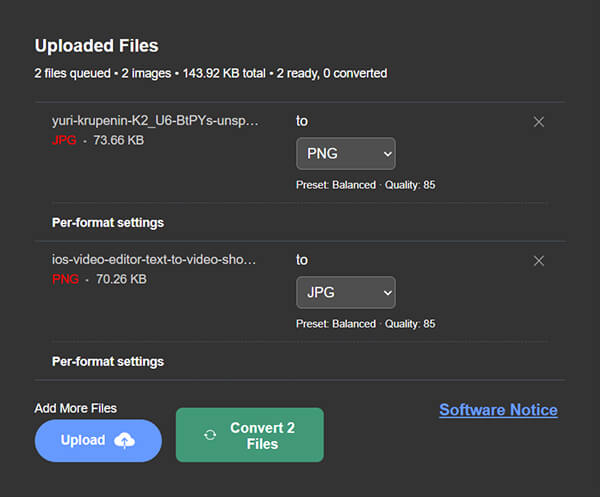

Per-File Presets & Compression Controls
Every file can have its own output format and settings. Use balanced, smaller-size, or high-quality presets to speed up decisions, then fine-tune only when needed.
Image Controls
Quality and compression settings per file
Video CRF & Bitrate
Encoder preset and bitrate controls
Audio Bitrate
Sample rate and channel controls
Resize Controls
Resize image and video outputs on export
Audio Extraction & Trim Tools
Need audio from a video file? Convert Box lets you switch a video into an audio output format and export just the sound. Trim start and end points to produce shorter clips for podcasts, previews, or social posts.
- Extract MP3 or WAV from video files
- Trim start and end times before export
- Export lighter audio-only deliverables
- Useful for clips, voice notes, interviews, and highlights

Offline-Ready PWA Experience
Convert Box is designed as an installable, offline-ready web app. After the app shell is cached, returning users get a faster experience and can keep working even without a stable internet connection.
How Convert Box Works
Convert media files locally in your browser through three simple steps. No account required, no uploads, no waiting.
Select Your Files
Drag and drop images, audio tracks, or video clips directly into the queue interface.
Choose Format & Settings
Pick the output format for each file. Apply presets or fine-tune compression, bitrate, and trim controls.
Convert & Download
Convert runs locally in your browser. Download files one by one or bundle everything into a ZIP archive.
Ready to try it? Open Convert Box and start converting files for free — no sign-up needed.
Open Convert Box No format left behind.
Convert Images, Audio, and Video.
Whether you are compressing assets for the web, extracting audio for a podcast, or converting raw files for editing, Convert Box handles it instantly.
JPG to PNG
WEBP to JPG
MP4 to MP3
WEBM to MP4
MOV to MP4
WAV to MP3
HEIC to JPG
+ Dozens more...
Built for Everyday Workflows
From marketing teams to developers, Convert Box handles the format conversions you need to keep moving.
Ecommerce Products
Convert product images into standardized formats for faster ecommerce uploads seamlessly.
Interview Transcripts
Extract lightweight audio from heavy recorded video interviews quickly for transcription or archiving.
Social Media Clips
Trim and compress social media clips properly before publishing them to various platforms.
Image Optimization
Turn raw screenshots and heavy photos into lighter, web-friendly formats to save space and bandwidth.
Marketing Campaigns
Export multiple assets for multi-channel marketing campaigns in one unified batch zip.
Web Assets
Prepare media files correctly for websites, emails, and landing pages to ensure fast load times.
Online File Converter FAQ
Everything you need to know about Convert Box and how it works.
Is Convert Box free to use?
Do I need to upload my files?
Which file types does Convert Box support?
Can I convert multiple files at once?
Can I extract audio from video files?
Can I control output quality?
Can I trim audio or video-related exports?
Can I download everything together?
Does Convert Box support document conversion?
Does Convert Box work offline?
Convert Media Faster
Without Uploading Anywhere
Use Convert Box to convert, compress, trim, and export image, audio, and video files directly in your browser. Keep your files local, save time with batch tools, and download finished outputs in just a few clicks.