

SDK
Log ML experiments and artifacts at scale
W&B SDK, the core library powering W&B Models, allows you to log metrics, hyperparameters, datasets, and model checkpoints quickly and efficiently for training and fine-tuning AI models at scale.
import wandb # 1. Start a W&B run run = wandb.init(project="my_first_project") # 2. Save model inputs and hyperparameters config = wandb.config config.learning_rate = 0.01 # 3. Log metrics to visualize performance over time for i in range(10): run.log({"loss": 2**-i}) 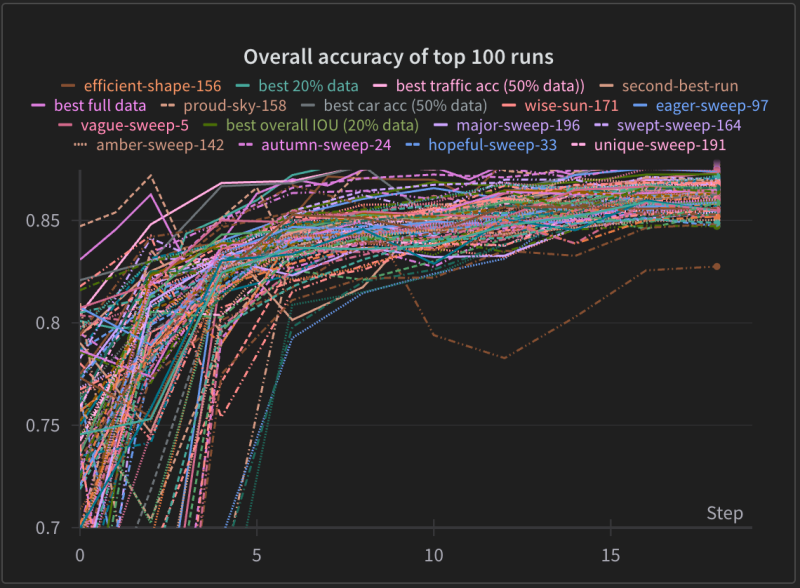
Performance at scale
Whether you run a few experiments or hundreds of thousands in parallel, the W&B SDK provides fast logging performance, boosting ML engineer productivity.
Experimentation in the era of generative AI models
Run large-scale, long-running experiments with extensive data logging on local machines or massively distributed infrastructure. Quickly upload and download large model files at frontier AI scale.
import wandb # 1. Start a W&B run run = wandb.init(project="my_first_project") # 2. Save model inputs and hyperparameters config = wandb.config config.learning_rate = 0.01 # 3. Log metrics to visualize performance over time for i in range(10): run.log({"loss": 2**-i}) import weave from langchain_core.prompts import PromptTemplate from langchain_openai import ChatOpenAI # Initialize Weave with your project name weave.init("langchain_demo") llm = ChatOpenAI() prompt = PromptTemplate.from_template("1 + {number} = ") llm_chain = prompt | llm output = llm_chain.invoke({"number": 2}) print(output) import weave from llama_index.core.chat_engine import SimpleChatEngine # Initialize Weave with your project name weave.init("llamaindex_demo") chat_engine = SimpleChatEngine.from_defaults() response = chat_engine.chat( "Say something profound and romantic about fourth of July" ) print(response) import wandb # 1. Start a new run run = wandb.init(project="gpt5") # 2. Save model inputs and hyperparameters config = run.config config.dropout = 0.01 # 3. Log gradients and model parameters run.watch(model) for batch_idx, (data, target) in enumerate(train_loader): ... if batch_idx % args.log_interval == 0: # 4. Log metrics to visualize performance run.log({"loss": loss}) import wandb # 1. Define which wandb project to log to and name your run run = wandb.init(project="gpt-5", run_name="gpt-5-base-high-lr") # 2. Add wandb in your `TrainingArguments` args = TrainingArguments(..., report_to="wandb") # 3. W&B logging will begin automatically when your start training your Trainer trainer = Trainer(..., args=args) trainer.train() from lightning.pytorch.loggers import WandbLogger # initialise the logger wandb_logger = WandbLogger(project="llama-4-fine-tune") # add configs such as batch size etc to the wandb config wandb_logger.experiment.config["batch_size"] = batch_size # pass wandb_logger to the Trainer trainer = Trainer(..., logger=wandb_logger) # train the model trainer.fit(...) import wandb # 1. Start a new run run = wandb.init(project="gpt4") # 2. Save model inputs and hyperparameters config = wandb.config config.learning_rate = 0.01 # Model training here # 3. Log metrics to visualize performance over time with tf.Session() as sess: # ... wandb.tensorflow.log(tf.summary.merge_all()) import wandb from wandb.keras import ( WandbMetricsLogger, WandbModelCheckpoint, ) # 1. Start a new run run = wandb.init(project="gpt-4") # 2. Save model inputs and hyperparameters config = wandb.config config.learning_rate = 0.01 ... # Define a model # 3. Log layer dimensions and metrics wandb_callbacks = [ WandbMetricsLogger(log_freq=5), WandbModelCheckpoint("models"), ] model.fit( X_train, y_train, validation_data=(X_test, y_test), callbacks=wandb_callbacks, ) import wandb wandb.init(project="visualize-sklearn") # Model training here # Log classifier visualizations wandb.sklearn.plot_classifier(clf, X_train, X_test, y_train, y_test, y_pred, y_probas, labels, model_name="SVC", feature_names=None) # Log regression visualizations wandb.sklearn.plot_regressor(reg, X_train, X_test, y_train, y_test, model_name="Ridge") # Log clustering visualizations wandb.sklearn.plot_clusterer(kmeans, X_train, cluster_labels, labels=None, model_name="KMeans") import wandb from wandb.xgboost import wandb_callback # 1. Start a new run run = wandb.init(project="visualize-models") # 2. Add the callback bst = xgboost.train(param, xg_train, num_round, watchlist, callbacks=[wandb_callback()]) # Get predictions pred = bst.predict(xg_test) Built-in integrations
Easily integrate with your existing ML development stack with no vendor or framework lock-in. With thousands of integrations for the most commonly used ML frameworks, libraries, and repos, the W&B SDK works with the tools your team uses every day.
Extensive system metrics tracking
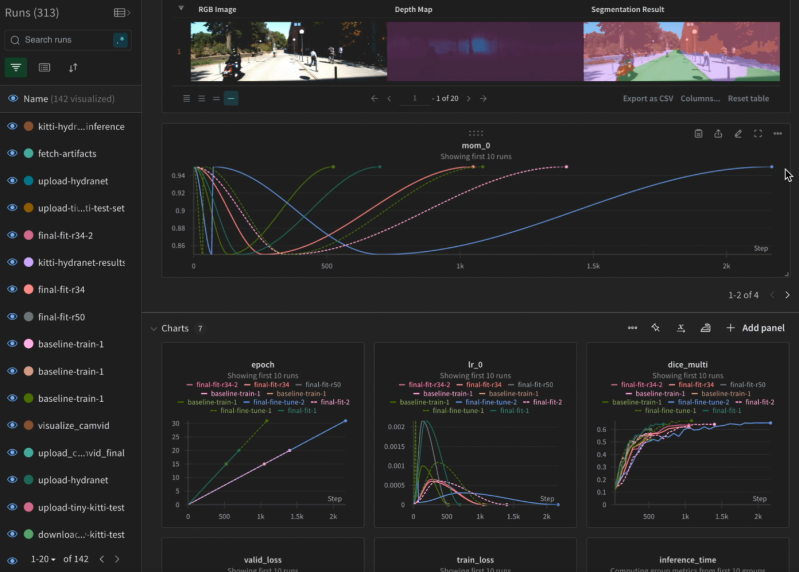
The W&B SDK comes pre-integrated with hardware platforms like NVIDIA, tracking a full range of GPU/CPU system metrics out of the box. Using W&B Models, you can visualize this data side by side with other metrics to maximize GPU utilization and cut training costs. No hassle of setting up system metrics logging yourself.
Data reliability
W&B SDK is designed to handle high resource contention for memory and compute. This reduces the likelihood of system crashes and ensures consistent operation. W&B SDK provides redundancy controls to prevent data loss in the event of a system failure or network issue.
Easy customization
Designed to be adaptable to any development environment and tech stack, W&B SDK offers flexibility to customize your ML workflow as needed. Add just a few lines of code to your script and start logging a wide range of data from scalars and tables to images, audio, code, and files. The lightweight SDK works with any Python script.
Try the W&B SDK
The Weights & Biases end-to-end AI developer platform
Weave
Models
The Weights & Biases platform helps you streamline your workflow from end to end
Models
Experiments
Track and visualize your ML experiments
Sweeps
Optimize your hyperparameters
Registry
Publish and share your ML models and datasets
Automations
Trigger workflows automatically
Weave
Traces
Explore and
debug LLMs
Evaluations
Rigorous evaluations of GenAI applications