0

I am trying to scrape sample sentences from an online Japanese dictionary using IMPORTXML in a spreadsheet.
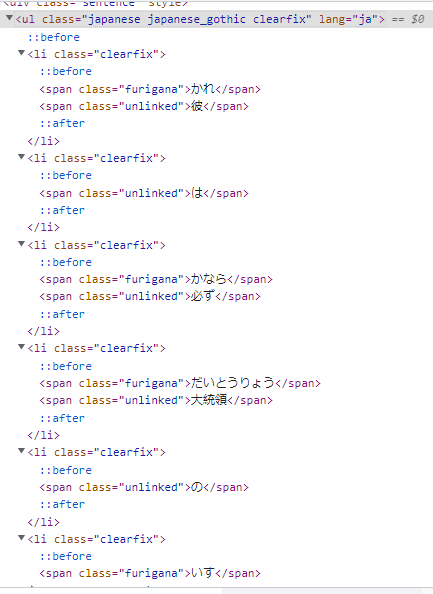
Screenshoot of HTML code

As shown on the image above, some ul descendants are categorized by 2 different span @classes, or has sibling, from some li parents.

<span class="furigana">

<span class="unlinked">

[for those who don't know] furigana, in Japanese, is basically their assigned phonetic character as reading aid for their Kanji letters (characters borrowed or adapted from Chinese writing)*

And on the other hand, other li parents has 1 child only, and that is <span class="unlinked">

My goal is to split @class='furigana' and @class='unlinked' into 2 separate columns and those 'unlinked' characters that doesn't have any 'furigana' counterpart will be replaced with symbol instead of a blank cell.

I haven't done any filtering on my formula yet, but here it is:

= IMPORTXML( "https://jisho.org/word/%E6%A4%85%E5%AD%90", "//span[@class='furigana']/ancestor::ul[@class='japanese japanese_gothic clearfix']/li[@class='clearfix']" )
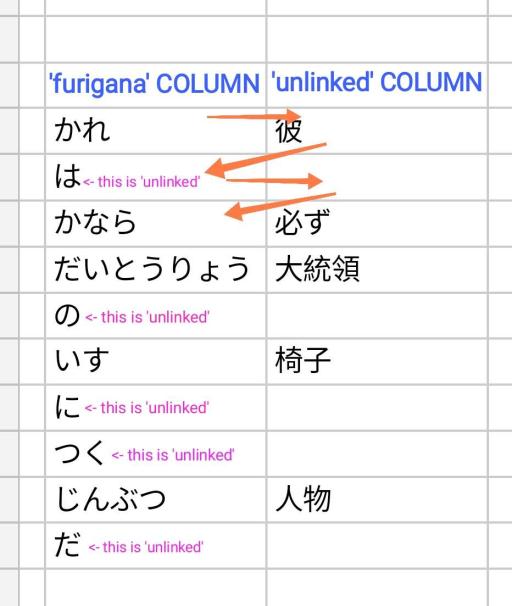
enter image description here

What happened was my formula miraculously gave me 2 columns for some reason that I don't understand, which is somewhat beneficial on my part, and seemingly already separated some 'unlinked' characters from the 'furigana' column. But I think it only segregated the characters in zigzag order, that's why some 'unlinked' characters are on the 'furigana' side.

I hope someone could help me and provide some simple formula that I could easily comprehend.

1 Answer 1

1

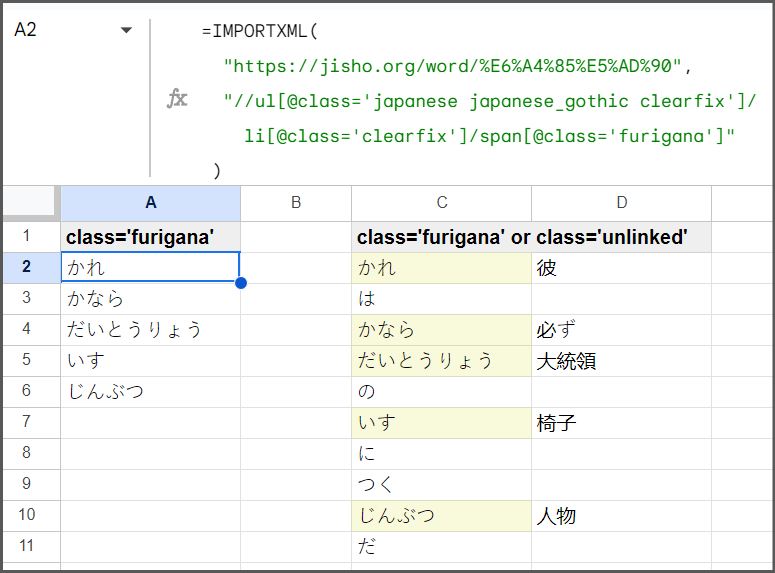
What you are seeing is the array returned by your search.

The <li> items are being returned as rows, and each <span> within the <li> represents a column in said row. Which value is returned in column 1 vs column 2 is dictated by the order of the spans in the HTML code, not the class name. If there is only one <span> in an <li> it will be in column 1 regardless of the class name.

If you want to return only the <span class='furigana'> your formula would be

=IMPORTXML( "https://jisho.org/word/%E6%A4%85%E5%AD%90", "//ul[@class='japanese japanese_gothic clearfix']/ li[@class='clearfix']/span[@class='furigana']" ) 

<ul class="japanese japanese_gothic clearfix" lang="ja"> <li class="clearfix"> <span class="furigana">かれ</span> <span class="unlinked">彼</span> </li> <li class="clearfix"> <span class="unlinked">は</span> </li> <li class="clearfix"> <span class="furigana">かなら</span> <span class="unlinked">必ず</span> </li> <li class="clearfix"> <span class="furigana">だいとうりょう</span> <span class="unlinked">大統領</span> </li> <li class="clearfix"> <span class="unlinked">の</span> </li> <li class="clearfix"> <span class="furigana">いす</span> <span class="unlinked"><span class="hit">椅子</span></span> </li> <li class="clearfix"> <span class="unlinked">に</span> </li> <li class="clearfix"> <span class="unlinked">つく</span> </li> <li class="clearfix"> <span class="furigana">じんぶつ</span> <span class="unlinked">人物</span> </li> <li class="clearfix"> <span class="unlinked">だ</span> </li> </ul> 

Start asking to get answers

Find the answer to your question by asking.

Ask question

Explore related questions

See similar questions with these tags.