Remote Play
Description[edit | edit source]
This feature allows interaction with the Playstation XMB as well as supported PS3 Games/Software and PS1 games. A few settings on XMB are hidden during remote play or can not be accessed. PS3 can provide video and sound to the device or only video to the device (when your PS3 audio output like monitor or audio system is running the sound). PS3 20GB CECHBxx models (and others but unreleased models) can be used if they are using a wired connection to a wireless router even though the internal Wi-Fi hardware is missing.
| Name | Supports |
|---|---|
| Audio Codec Ability | M4A, AT3 |
| Audio Bitrates | 72,128,144kbps |
| Audio Channels | 2 |
| Audio Clock Frequency's | 90000Hz |
| Audio SamplingRates | 48000Hz |
| Video Resolutions | 320x240,432x240,480x272,852x480 |
| Video Codec Ability | M4V/M4HD,AVC,AVC/MP,AVC/CAVLC |
| Video Bitrates | 256,384,512,768,1024kbps,2500kbps (HD) |
| Video ClockFrequency's | 90000Hz |
| Video Framerates | 7.5,10,15,30fps |
[edit | edit source]
- 1.60 Remoteplay added over LAN for PSP 3.10
- 1.80 Remoteplay over WAN added for PSP 3.50
- 2.00 Remote Start function added, to switch PS3 on/off with PSP
- 2.80 Open Remote Play exploit/homebrew on non Sony devices disabled
- 3.30 Sony Vaio laptops added to Remote Play devices
- 4.00 PS Vita System added to Remote Play devices
A flag within the SFO File indicates whether the game supports Remote Play-feature or not.
Open Remote Play[edit | edit source]
Open Remote Play is a software project enabling remote playing via PC by dashhacker & friends. This application requires a Playstation Portable for the first-time registration.
code.google.com Link: Open Remote Play Supports: Linux, Windows and OSX.
http://ps3.dashhacks.com/tag/open-remote-play
Remote Play with Playstation 3[edit | edit source]
Remote Play with Playstation 3 is a Software released by Sony allowing PS3 interaction via Vaio-Computers.
- Remote Play with PlayStation 3 1.0.1.15090
- Remote Play with PlayStation 3 Update 1.0.2.06210
- Remote Play with PlayStation 3 Update 1.0.2.06210
- Remote Play with PlayStation 3 Update X.X.X.XXXX2
- Remote Play with PlayStation 3 Update 1.1.0.12240
- Remote Play with PlayStation 3 Update 1.1.0.15070
- Remote Play with PlayStation 3 Update 1.1.0.15071
- Remote Play with PlayStation 3 Update 1.1.0.15071
Loader to enable on Non-Vaio Windows 7,8,10 PC's:
(1.0.2.06210 Loader) - Detected as Virus by windows defender - 9/18/16
(1.1.0.15070 Loader) - Detected as Virus by windows defender - 9/18/16
(1.1.0.15070 Loader) - Detected as Virus by windows defender - 9/28/18
- Instructions for the Loader:

Message when trying to run an app/game - copy rmp_launcher.exe & rmp_dll.dll to your "Remote Play with PlayStation 3"-Installation
- run rmp_launcher.exe and continue Steps
- ????
- profit!
If the program crashes while pairing, this is likely caused by not using windows 7. Open VRP.exe's Properties with right click, then check compatibility mode for windows 7 and try again.
http://esupport.sony.com/swu/7259/US/EN/
Note: Sony after all, giving finally support for remote play on PC limits everything it could. Result into not being able to play games/run homebrew via RemotePlay. In theory it could be worked-around by patching, after all.
Running the application without a loader:
create "runme.mof" and add the following, run with "mofcomp runme.mof"
#pragma namespace ("\\\\.\\root\\CIMv2") class Win32_BIOS { [key] string SMBIOSBIOSVersion; string Vendor; }; class Win32_ComputerSystemProduct { [key] string Vendor; string UUID; }; class Win32_ComputerSystem { [key] string Manufacturer; }; [DYNPROPS] instance of Win32_BIOS { SMBIOSBIOSVersion = "wow"; Vendor = "Sony Corporation"; }; [DYNPROPS] instance of Win32_ComputerSystem { Manufacturer = "Sony Corporation"; }; [DYNPROPS] instance of Win32_ComputerSystemProduct { Vendor = "Sony Corporation"; UUID = "FB1F4B20-A8C3-11DE-8D19-0024BE4424CA"; }; Patch[edit | edit source]
sprx patch (for Firmware 3.55)
complete (pack includes the pc software patch too)
sprx rex patch (rex 4.46 pack also includes screenshot vsh patch)
these patched files should enhance the Remote Play-Feature. Naughty Sony-Developers or probably some smartass manager thought official pc remote play should only be limited to 6x ps3 applications, namely:
- NPEA00135 (VidZone)
- BCES00096 (PlayTV)
- NPEA90028
- NPEA90029 (PlayTV too)
- NPJA00001 (Mainichi Issho/Everyday Together)
- NPJA00046 (Toro to Morimori)
- NPEB00342
How to:[edit | edit source]
Extract "premo_game_plugin.sprx" + "premo_plugin.sprx" from this package to:
- dev_flash\vsh\module\
now for newer firmwares this idea might work:
- use one of the ID's above for your homebrew/game/app
Successfully tested these patches with:
- Multiman
- Rebug Toolbox
- Bionic Commando Rearmed Demo
- Bejeweled 2 Demo
- Silent Hill 1 PS3
- Picture gallery
-
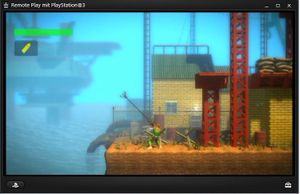 Bionic Commando Rearmed Demo in Remote Play PC
 -
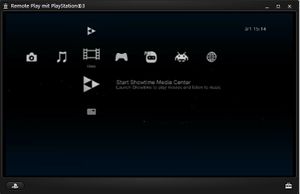 Multiman running in Remote Play PC
 -
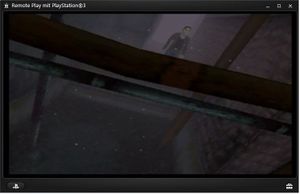 Silent Hill 1 Psx Game running in Remote Play PC
 -
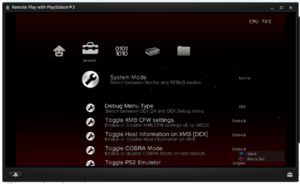 Rebug Toolbox Running in Remote Play PC
Remote Play compatibility[edit | edit source]
| Title | ID | Official RemotePlay | SFO-edit /patch | Adhoc | Notes |
|---|---|---|---|---|---|
| Adventure Time: Explore the Dungeon Because I Don't Know (BD Game) | BLES01961 | No | No | No | Cant proceed to the Game from the Main Menu (Tested with BD Game Backup on HDD) |
| Alice in madness: returns (PS3 game) | - | No | Yes | No | |
| Anarchy: Rush Hour (PSN game) | - | Yes | No | No | |
| Atomic Ninjas (PSN) | - | No | ? | No | |
| Aqua Vita/Aquatopia (PSN game) | - | Yes | No | No | |
| Assassin's Creed: Brotherhood (BD Game) | BLES00909 | No | Yes | No | (Tested with BD Game Backup on HDD) |
| Assassin's Creed: Revelations (BD Game) | - | No | Yes | No | |
| Atelier Rorona (BD game) | - | No | Yes | No | introduction video with blur images (sound ok), skip it, game itself ok. |
| Battle Fantasia (BD game) | - | No | Yes | No | |
| Battlefield 3 (BD game) | - | Yes | Yes | No | |
| Bayonetta (BD game) | - | No | Yes | No | |
| Bejeweled 2 (PSN game/demo) | - | Yes | No | No | |
| BioShock (BD Game) | - | No | ? | No | |
| BioShock Infinite (BD Game) | - | No | -- | No | |
| Biohazard revival (BD game) | - | No | Yes | No | (BD game installed as HDD game) |
| Bionic Commando Rearmed (PSN game/demo) | - | Yes | No | No | |
| BlazBlue: Calamity Trigger (BD game) | - | Yes | No | No | |
| Burnout Paradise (PSN game) | NPUB30040 | No | Yes | No | Played on the 480p+PSP resolution setting, works fine. Tested on the 1.5 version of the game. |
| Call of Duty: Black Ops II (BD game) | - | No | Yes | ? | Used WebMan to boot disc, plays well with lag on the cutscenes before zombies matches. Playing on the 480p resolution setting crashes the PS3 onto a black screen after starting the game, M4V/ATRAC setting works fine. |
| Call of Duty Classic (PSN Game) | NPUB30065 | No | Yes | No | Picture is 4:3 stretched to 16:9, avc/aac setting causes significant input use either the M4V/ATRAC or 480p+ setting instead. Shrubs and tree leaves get slightly engulfed in black squares when you get close to them, even more so when you get more closer till they're just black squares. Their textures are normal when seen at a distance. |
| Call of Duty 4: Modern Warfare (PSN game) | NPUB30588 | No | No | No | Black screen upon startup, freezes the console. Note for some reason loading via a untampered copy of the game either on ISO on the HDD (ISO extracted to HDD) or on disc the game will launch regardless whether or not you've edited the PARAM.SFO file. |
| Call of Duty: Modern Warfare 2 (BD game) | BLES00683 | No | No | No | Black screen upon startup. |
| Call of Juarez: Bound in Blood (BD game) | - | Yes | No | No | |
| Castle Crashers (PSN game) | - | No | Yes | No | |
| Crysis 2 (BD game) | - | No | Yes | No | |
| Dead Space 2 (BD game) | - | No | Yes | No | |
| Demon's Souls (BD game) | - | No | Yes | No | |
| Disgaea D2 | - | No | Yes | No | Tested with game backup on HDD; may have slight resolution problems, not sure |
| Dissidia 012 Final Fantasy (PSP game) | - | No | No | Yes | |
| Dragon Ball: Raging Blast 2 (BD game) | - | No | Yes | No | |
| Driver San Francisco (PSN game) | NPEB00632 | No | No | No | Back to XMB upon trying to start story mode or, online multiplayer. Selecting a challenge freezes the console and stops the stream. Tested on all available PARAM.SFO resolutions. |
| Emulators Next | - | No | Yes | No | |
| Everybody's Golf: World Tour (BD game) | - | Yes | No | No | |
| F1 Formula one 2010 (BD game) | - | No | Yes | No | |
| Fallout 3: GOTY edition (BD game) | - | Yes | No | No | |
| Fantasia Star Portable 2 Infinite (PSP game) | - | No | No | Yes | |
| Far Cry 2 (BD game) | - | No | Yes | No | |
| Far Cry 4 (BD game) | - | Yes | Yes | No | |
| Final Fantasy XIII (BD game) | - | No | No | No | |
| FirstPlay (PSN software) | Yes | No | No | ||
| Fist Of The North Star - Ken's Rage (BD game) | - | No | No | No | |
| Forbidden Siren: Bloodcurse (BD game) | - | No | Yes | No | |
| Fritz Chess (BD game) | - | No | Yes | No | |
| Fritz Chess (BD game) | - | Yes | No | No | |
| Gal*Gun (PSN game) | - | No | No | No | |
| GTA San Andreas (PS3 game) | - | No | Yes | No | Tested USA Disc to folder sfo edit with PSP AVC & Vita @ 480p |
| God of War III (BD game) | - | No | No | No | Back to XMB on PSP / Reported that it's not working even with PS Vita. |
| Grand Theft Auto V (PSN game) | NPUB31154 | No | No | No | Controls don't respond on v1.00 version upon loading in the game. PS button and navigating the XMB menu does work.Tested on both 480p setting and m4v/atrac setting. |
| Gran Turismo 5 Prologue (BD game) | - | No | Yes | No | Buggy controls when driving. |
| Gran Turismo 5 (BD game) | - | No | No | No | |
| Gran Turismo 6 (PSN game) | - | No | No | No | |
| Gundemonium Recollection (PSN game) | - | Yes | No | No | |
| High Stakes on the Vegas Strip: Poker Edition (PSN game) | - | Yes | No | No | |
| Hyperdimension Neptunia mk2 (PSN game) | - | No | Yes | No | Must select all resolutions, otherwise you'll get "Can't run game with selected resolution settings (80028F10)" error |
| Hyperdimension Neptunia Victory (PSN game) | - | No | Yes | No | Game audio glitches during gameplay, works fine in the menus, events, and intro/videos |
| ICO & Shadow of the Colossus Collection | - | Yes | Yes | No | Official PS Vita support only |
| Imabikisou (BD game/PSN demo) | - | Yes | No | No | |
| inFamous (BD game) | - | No | Yes | No | |
| JoJo's Bizarre Adventure: All Star Battle | - | No | Yes | No | A lot of slowdown |
| Just Cause 2 (BD game) | - | No | Yes | No | |
| KillZone 3 (BD game) | - | Yes | No | No | |
| King Of Fighters XII (BD game) | - | No | Yes | No | |
| Kingdom Hearts 1.5 HD Remix (BD game) | - | No | Yes | No | |
| Kingdom Hearts 2.5 HD Remix (BD game) | - | No | Yes | No | |
| LittleBigPlanet 3 (BD game) (BCES02068) | GB | No | No | No | Blank screen on start. |
| LEGO Batman (BD game) | - | Yes | Yes | Yes | |
| Lair (BD game) | - | Yes | No | No | |
| LEGO Star Wars: The Complete Saga (BD game) (BLES00121) | EU | No | Yes | No | |
| Life with PlayStation (PSN software) | - | Yes | No | No | |
| Mainichi Issho (PSN game) | - | Yes | No | No | |
| Marvel vs Capcom 3 (BD game) | - | No | No | No | |
| Mayhem 3D (BD game) | - | No | Yes | No | |
| Medal of Honor Frontline (PSN game) | NPUB30288 | No | No | No | PS3 freezes and reboots upon trying to load the intro FMV after viewing the logos and title sequence. |
| Metal Gear Solid 4 (BD game) | - | No | Yes | No | |
| Metal Gear Solid Peace Walker (PSN game) | NPUB30611 | No | Yes | No | Tested with the 480p+PSP:AVC resolution setting. |
| Minecraft: PlayStation®3 Edition (PSN game) | - | No | Yes | No | Rarely, the audio can lag or there might be some bugs with controls that get stuck on 480p resolution |
| Minecraft: PlayStation®3 Edition (BD game) (BLES01976) | EU | No | Yes | No | |
| Mini Ninjas (BD game) | - | No | Yes | No | |
| Misato Katsuragi's Reporting Plan (PSN game) | - | Yes | No | No | |
| Monopoly (BD game) | - | No | Yes | No | |
| Monster hunter 3rd (PSP game) | - | No | No | Yes | |
| MultiMan (Software) | - | No | Yes | No | |
| Naruto: Ultimate Ninja Storm 1 (BD game) | - | No | Yes | No | |
| Naruto: Ultimate Ninja Storm 2 (BD game) | - | No | Yes | No | |
| Need for Speed: Hot Pursuit (BD game) | - | No | Yes | No | Some cars make the audio lag |
| Need for Speed: Most Wanted 2012 (PSN game) | - | No | No | No | |
| Ni No Kuni (BD game) | - | No | Yes | No | |
| Payday The Heist (PSN game) | NPUA30073 | No | Yes | No | Tested with the 480p+PSP:AVC resolution setting, works fine. |
| Peggle (PSN game) | - | Yes | No | No | |
| Peggle Nights (PSN game add-on) | - | Yes | No | No | |
| Persona 5 | - | No | Yes | No | |
| PixelJunk Eden (PSN game/demo) | - | Yes | No | No | |
| PixelJunk Monsters (PSN game/demo) | - | Yes | No | No | |
| PixelJunk Shooter (PSN game) | - | Yes | No | No | |
| PlayStation 1 games (CD games/demos, PSN games/demos) | - | Yes | No | No | |
| Playstation Home (PSN game) | - | No | Yes | No | |
| PlayTV (BD software/PSN demo) | - | Yes | No | No | |
| Pro Evolution Soccer 2011 (BD game) | - | No | Yes | No | |
| Rayman Legends (BD game) | - | Yes | No | No | |
| Red Dead Redemption (BD game) | - | No | Yes | No | |
| Resistance 3 (BD game) | - | No | No | No | Back to XMB on PSP (Although it have official remote play support) |
| Saints Row 2 (PSN Game) | NPUB30575 | No | No | No | Gets stuck trying to load into the main menu after the logo sequences. |
| Showtime (Software/Video category) | - | No | Yes | No | Need to manually edit the sfo on latest version |
| Silent Hill: Homecoming (BD game) | - | No | Yes | No | |
| SingStar (BD game) | - | Yes | No | No | |
| SingStar ABBA (BD game) | - | Yes | No | No | |
| SingStar Vol. 2 (BD game) | - | Yes | No | No | |
| Sonic Adventure 2 (PSN game) | - | No | Yes | No | Tested with the 480p+PSP:AVC resolution setting, works fine. Note minor slowdown occurs due to the game running at 30 FPS. |
| Sonic Generations (BD game) | - | No | Yes | No | Sometimes controls register only for a split second |
| Sonic The Hedgehog (2006) | - | No | Yes | No | Tested using BD game backup on HDD |
| Super Sonic Acrobatic Rocket-Powered Battle-Cars (PSN) | EU | No | Yes | No | Game playable successfully (need edit param.sfo) |
| The Sims 3 (BD game) | - | No | Yes | No | |
| Toybox Turbos (PSN) | - | No | No | No | |
| The Last Of Us (PSN) | EU | No | No | ? | game opens and closes |
| The Amazing Spider-Man (PSN) | - | No | Yes | No | Game playable successfully (need edit param.sfo) |
| The Amazing Spider-Man 2 (PSN) | - | No | Yes | No | Game playable successfully (need edit param.sfo) |
| Tom Clancy's Rainbow Six Vegas 2 (PSN game) | NPUB30503 | No | Yes | No | AVC/AAC setting causes significant input use either the M4V/ATRAC or 480p+ setting instead. Remote play stream hangs a bit when loading in the main menu screen's background assets, and when loading into a Single Player scene or Terrorist Hunt, though after loading in the assets remote play resumes streaming. Playing on the 480p+PSP setting causes the stream to disconnect though fortunately you can connect back to the PS3 shortly afterwards once the assets have loaded in (T.Hunt and Single Player take longer to connect back). Framerate hitches sometimes when shooting 2 enemies in succession on the 480p+PSP setting, doesn't occur on the 272p resolution or at least not as often. FPS drops quite a bit in action heavy scenes, much more on the 480p+PSP setting though can be slightly remedied by using thermal goggles. |
| Tom Clancy's Splinter Cell Chaos Theory (PSN game) | NPEB00557 | No | No | No | Infinite loading screen when trying to get to load into the main menu. PS3 screen freezes then reboots. |
| Tom Clancy's Splinter Cell Double Agent (PSN game) | NPUB30636 | No | Partial | No | Can only play the training missions since loading into a single player mission or quick save freezes both the stream and briefly the PS3 before rebooting. Selecting the AVC/AAC option in the PARAM.SFO causes significant input lag using either the 480p+PSP or M4V/ATRAC option fixes this. Multiplayer and co-op seems to work fine if by applying in the network settings the following DNS settings: Primary: 146.190.205.197 Secondary: 1.1.1.1 or 8.8.8.8 |
| Transformers Fall of Cybertron (PSN game) | NPUB30824 | No | Yes | No | Playing with the 480p+PSP setting crashes the PS3 and causes a black screen upon startup. Using the M4V/ATRAC setting fixes this. Works fine with this setting (tested and completed the 1st mission in the campaign loaded into the 2nd). Use the following DNS settings in the network settings to load into escalation and multiplayer: Primary: 209.38.53.69 Secondary: 1.1.1.1 Multiplayer works fine yet to test escalation. Multiplayer character screen text is barely readable to unreadable (weapon descriptions) due to the low resolution of the stream. Other text read fine. |
| Uncharted 3 Drake's Deception Free To Play 1.19 (PSN) | US | No | No | ? | game opens and closes |
| Uncharted Drake's Fortune 1.02 (PSN) | - | No | Yes | No | Game playable successfully (need edit param.sfo) |
| Uncharted 2 Among Thives 1.10 (PSN) | - | No | No | No | |
| UNO (PSN game) (NPUB30082) | US | No | Yes | No | |
| VidZone (PSN software) | - | Yes | No | No | |
| WWE 2K14 (BD game) | - | No | Yes | No | |
| Weekly Toro Station (PSN game) | - | Yes | No | No | |
| Wet (BD game) | - | No | Yes | No | |
| Winning Eleven 2009 (BD game) | - | No | No | No | |
| Wipeout HD Fury (BD game) | - | No | Yes | No | |
| Zen Pinball (PSN game) | - | No | Yes | No | Patch don't work for this game, you need to edit SFO and then rebuild database from recovery menu |
| Zuma (PSN game/demo) | - | Yes | No | No |
PlayStation Vita's Remote Play capabilities & compatibility[edit | edit source]
During TGS 2011 Sony showed off a number of examples of how the new device can interact with the PlayStation 3:
- Killzone 3 and little big planet 2 were streamed into the device from a PlayStation 3 unit,
noting how a few of the Dual Shock buttons missing on the Vita are mapped to the touchscreen.
- A Vita streaming movie content from Japan-only PS3 TV recorder Torne.
Note:
- it is possible to pair PSVita with a Playstation 3 on lower Firmware than 4.00 (e.g 3.41/3.55, pair as mobile phone/pc/psp)
| Title | Official | SFO-edit /patch | Notes |
|---|---|---|---|
| God of war Collection | Yes | -- | Update 1.01 (FW 4.20), remote play only for PS VITA |
| ICO™ & Shadow of the Colossus™ | -- | -- |
See [ATTRIBUTE in Patches]
Limitations & Tips[edit | edit source]
- requires a memory container of 8-10mb
- the remoteplay utility creates 14 PPU Threads upon its startup
- uses 1 SPU for encoding (mp4avc/aac needs more processing power than sp/atrac mode)
- display transfered is trimmed to 90% of its size (image will be resized to 480x272, no trim on 480p)
- Officially RemotePlay compatible titles
- Nothing to fix :P
- Unofficially RemotePlay compatible BD titles
- Use the patch or edit the SFO
- Unofficially RemotePlay compatible PSN titles
- Use the patch or edit the SFO and then rebuild database from recovery menu (second method has better compatibility)
- Incompatible RemotePlay titles
- Most of the BD games in this section will launch with black screen due of the introduction video (codecs or resolutions) , ps3 reboot after a while. Can be resolved if you change the problematic videos with an other?.
- Homebrew like Frogger, puzzles collection don t function due to theirs authors decisions.
- PS2 classic unsupported, they run as new lv2 kernel, not in user-mode like remote play.
- Official Ad-hoc compatible titles
- You can play online psp games if you connect both of the devices to Playstation Network.
- RemotePlay using a PSP Go
- Because it is possible to natively pair a PS3 controller with the PSP Go, games can be controlled as they normally would when using a regular controller.
- To "refresh" the XMB
When replacing a PARAM.SFO from a game stored on the internal HDD (using a file manager, FTP, etc...), the system will not note the application as being able to be used during remote play at first. This occurs because the system will initially read a cached version of the original file, which will not reflect any of the changes made.
The most convenience and quick way is as simple as booting the game one time (by pressing X button over the icon)... inside the game press "PS" button and exit with "quit"... then you return to the XMB and the new PARAM.SFO has been loaded. So in resume... the XMB is refreshed when you boot it for first time so you need to boot it two times to load the new PARAM.SFO. (you can change something as the first letter of the title of the game to make sure visually your new SFO is loaded)
If your new SFO is stil ignored by the PS3 after refreshing (mostly fews 3.55+ PSN games and PS1 classic) or you can t boot it (TV not compatible, game order install in the wrong order, previous SFO installed or for easy shared solution purpose, you ll need to overwrite it with your 1.01 SFO from install .PKG (or install first the edited SFO)
More details about SFO:[[1]]
Last solution can be rebuild data base by using the option "rebuild database" from the recovery menu (this re-indexes all the files in the internall HDD), is long but can fix rare problems
If Error 80431064 on PSP side: restart the remote play from PSP, it can restart from previous on ps3 side.
XMB settings column is restricted while remote play[edit | edit source]
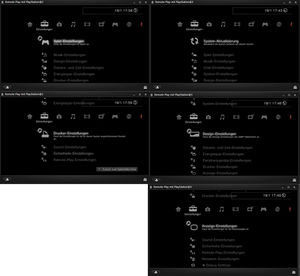
- No Update Option
- Game Settings are limited
- YS Chat Settings
- ys System Settings
- ys Peripheraldevice Settings
- YS Display Settings
- YS Remote Play Settings
- YS Network-Settings
- YS Update Option
