Web Technology By Mr. Kale O.V.
Definition  The Mechanism of communication between various computers through different languages and multimedia packages is known as web Technology.
 Examples of web technology  1) Mark-up languages like HTML, XML and HTTP  2) Programming Languages and Technologies like JAVA, Visual Basic and DOT NET.  3) Web Servers and Server Technologies that assist in sharing common network for worldwide communication.  4) Databases which are used to store information on a computer network.
 Thus,  Web Technology helps,  In providing common platform for effective communication among different users.  And different devices which are inter-related through a computer network.
HTML  1. Introduction to HTML  HYPER TEXT MARK-UP Language.  It acts as a foundation to hold every website.  It is open language which is easy to learn and works on tag system.  Each tag affects the content that has been placed in that particular tag.  HTML tags label various pieces of content as “Heading”, “Paragraph”, “Table”, and so on…  HTML Elements are known as building blocks of html page.
HTML  HTML  This language is used to create web page.
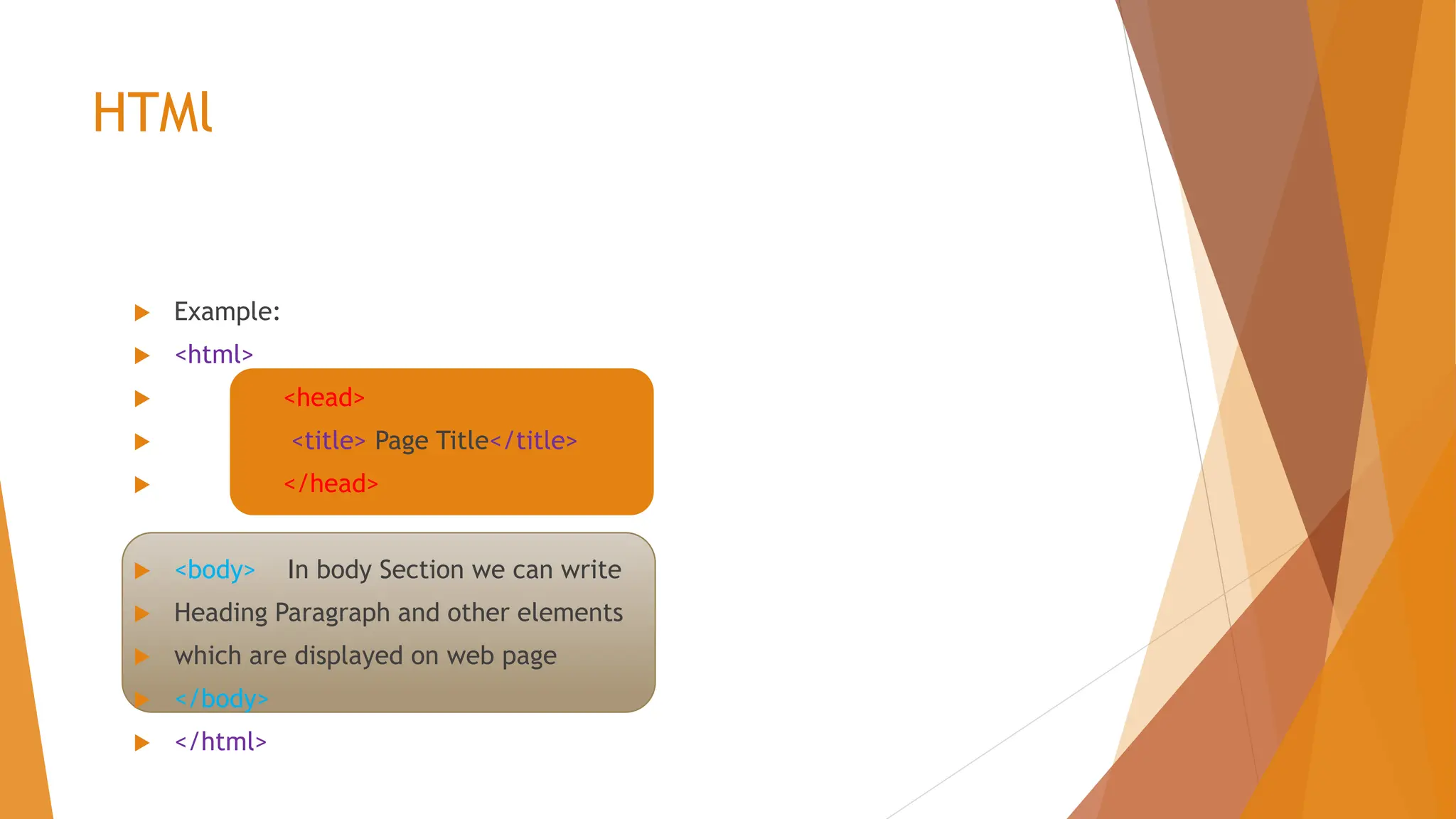
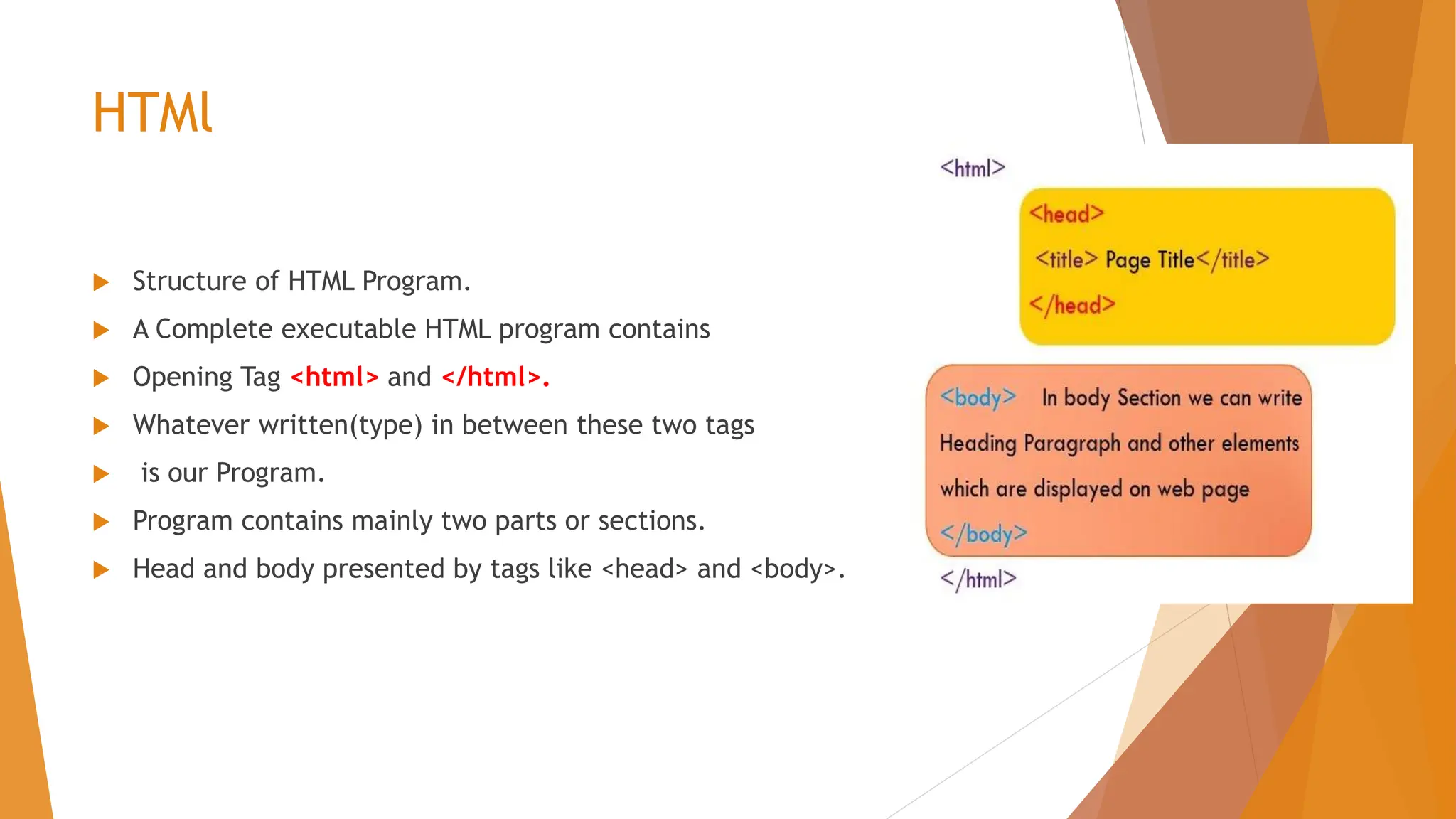
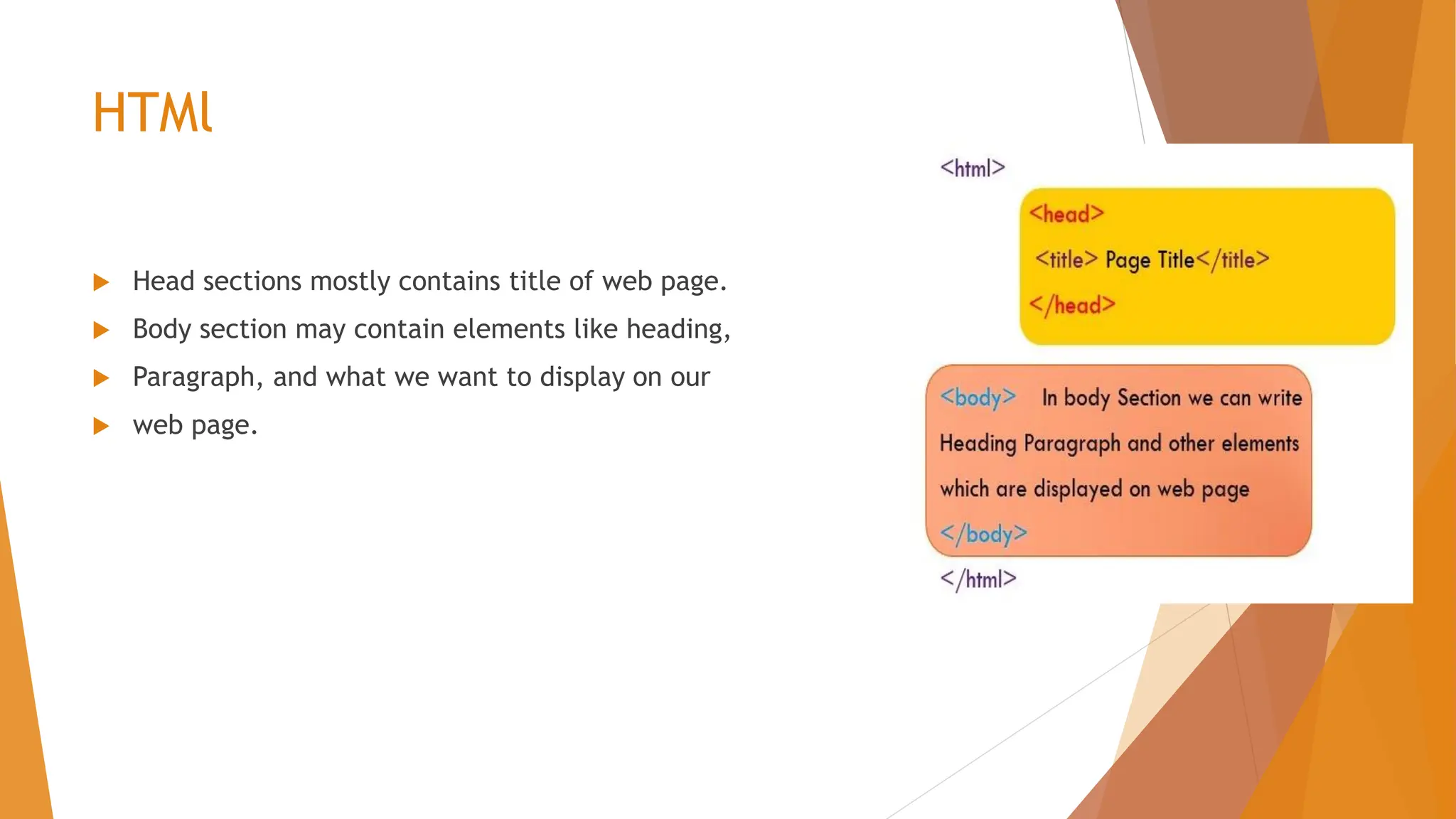
HTMl  Example:  <html>  <head>  <title> Page Title</title>  </head>  <body> In body Section we can write  Heading Paragraph and other elements  which are displayed on web page  </body>  </html>
HTMl  HTML is not a programming language.  HTML is a mark-up language that works on mark-up tags.  HTML is not a case-sensitive language.  HTML tags are elements surrounded by angular brackets. < ,>  HTML tags comes in pairs and first tag is called start tag and other is End Tag.  The End tag is written like start tag but it contains forward slash. /  Eg. Start tag is <p> and end tag is </p>.
HTMl  Structure of HTML Program.  A Complete executable HTML program contains  Opening Tag <html> and </html>.  Whatever written(type) in between these two tags  is our Program.  Program contains mainly two parts or sections.  Head and body presented by tags like <head> and <body>.
HTMl  Head sections mostly contains title of web page.  Body section may contain elements like heading,  Paragraph, and what we want to display on our  web page.
HTMl  HTML features:  It is coding language that makes web-pages;  It is the skeleton of every web page that exists.  To see what it looks like, go into web browser (e.g. Internet Explorer, Mozilla firefox, Google Chrome, Microsoft Edge etc.).  To see the html code navigate to any web page and right click on it and click on “view source”. You will see a page of code, and that is HTML.  One can create html code in text editor like notepad; save it as a.html ( a is file name; .html is extension of web page)
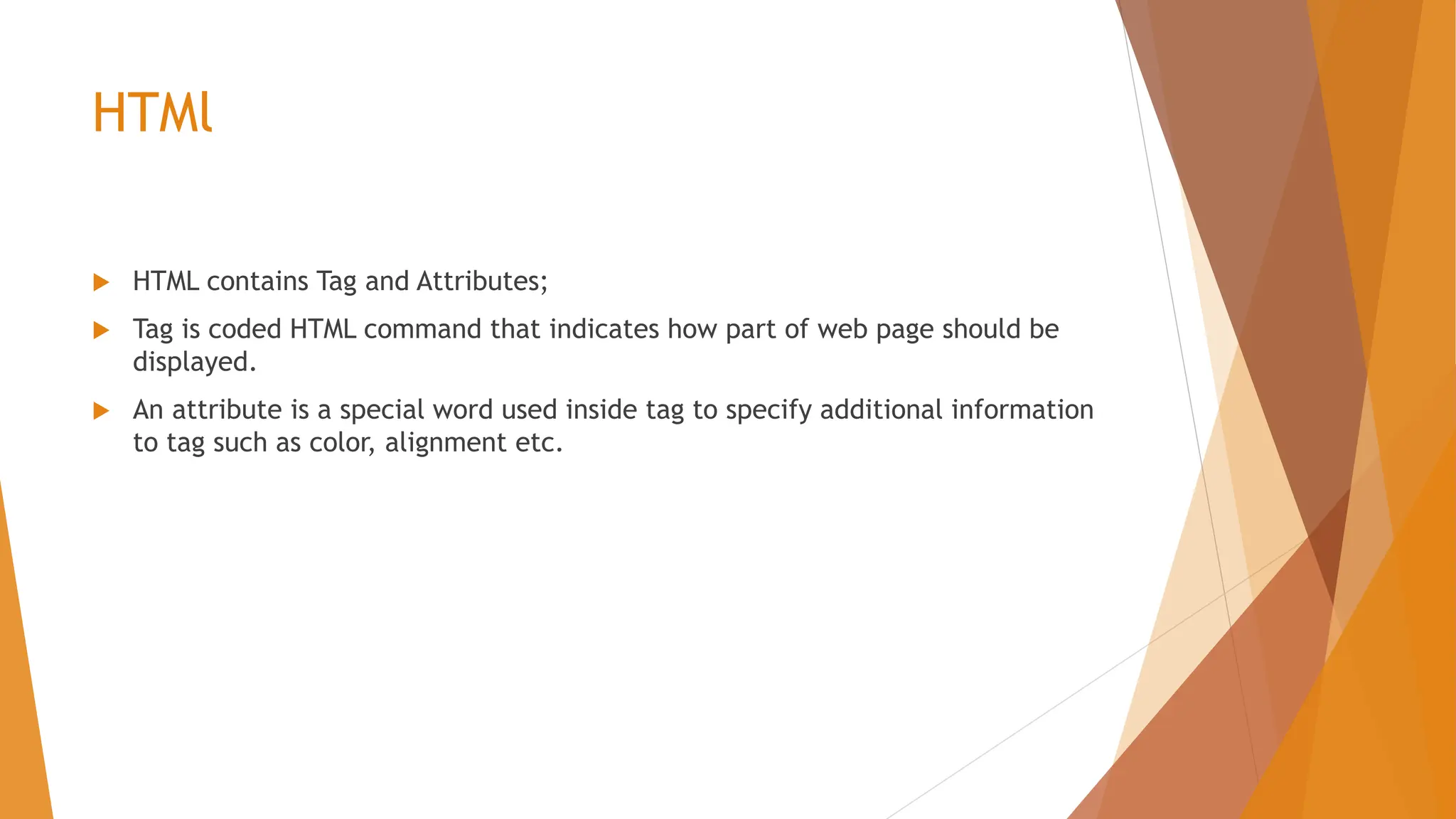
HTMl  HTML contains Tag and Attributes;  Tag is coded HTML command that indicates how part of web page should be displayed.  An attribute is a special word used inside tag to specify additional information to tag such as color, alignment etc.
HTMl  Tags are having two types basically:  Container or Non-empty Tags and Empty Tags;  Container or Non-empty Tags: are pair tags i.e. they require a starting as well as ending tags. For e.g. <html> </html>; <body></body>, <font></font>  In which end tag has used forward slash /.  And the elements or words type in between the two opening and closing tags.  Non empty tags affect the txt appearing between their start and end tags.
HTMl  Empty Tags:  It just having only one tag i.e opening tag , not required closing tag.  They are predefined tag carry out the job assigned to them.  No end tag required like </html>  E.g. <br>; <hr>
XML  Introduction to XML  XML means Extensible Markup Language.  It is another markup language like that of HTML.  The difference lies in the fact that in xml, tags are not pre-defined and one has to define his own tags.  This language is self describing and uses DTD (document Type Definition) to describe its data.  Major Difference is: XML was designed to Describe data and HTML was designed  to display Data.
XML  So, XML is complement for HTML.  XML uses certain set of rules for encoding documents that can be read by both humans and machines.  XML is used to provide information about a document.  Tags are added to the document to provide the extra information.
XML  XML, extensible markup language, is a simple and flexible markup language.  It is known as universal language for data on the web because xml documents can be created and used in any language.  It is universal standard for information interchange.  XML Technology facilitates you to create your own markup language.
XML  Benefits of XML.  Simplicity: Very easy to read and understand the information coded in xml.  Openness: it is W3C standard, endorsed by software industry market leaders.  Extensibility: it is extensible because it has no fixed set of tags. One can define them as per need.  Self-descriptive: XML documents do not need special schema set-up like traditional database to store data. Xml document can be store without such definitions, because they contain metadata in the form of tags and attributes.  Scalable: XML is not in binary format so you can create and edit files with anything and it is also easy to debug.  Fast Acess: XML documents are arranged in hierarchical form so it is comparatively faster.
XML  Uses of XML:  It has become default format for many office productivity tools.  It is used as a base language for communication protocols.  It is also used to interchange data from one computer to another through internet.  XML is used in web development.
XML  XML can separate Data from HTML.  XML is used to Exchange Data.  XML can be used to share Data.  XML can be used to store Data.  XML can make your data more useful.  XML can be used to create New *ML Language.
 Advantages of XML  XML is text(Unicode) based – Takes up less space.  - Can be transmitted efficiently.  One XML document can be displayed differently in different media.  - HTML, video, cd, dvd  - you can only have to change the XMl doc in order to change all the rest.  XML documents can be modularized. Its parts can be reused.
XML  Tags in XML  Tags in XML can be expressed in three ways-  1. Start tag as <section>;  2. End tag as </section>;  3.Empty tag as <line-break/>
XML  Example:  For a note containing simple reminder from Sam to Tom as  <note>  <to> Tom</to>  <from>Sam</from>  <heading> Reminder</heading>  <body>Don’t forget me this weekend!</body>  </note>
Difference between HTML & XML No. HTML XML 1 HTML is used to display data and focuses on how data looks. XML is a software and hardware independent tool used to transport and store data. It focuses on what data is. 2 HTML is markup language itself. XML provides a framework to define markup language. 3 HTML is not case sensitive. XML is case sensitive. 4 HTML is presentation language. XML is neither a presentation nor a programming language.
Introduction to CSS  Introduction to CSS  CSS means Cascading Style sheets.  These sheets describe how HTML elements will be displayed on the screen.  CSS can be defined as a design language which is used to make web page more presentable and easy to write.  Cascading Style sheets contains the rules for the presentation of HTML web page.  CSS was introduced to keep the presentation information separate from HTML markup(Content)
Introduction to CSS  Uses of CSS  CSS is used to design various styles for the different web pages.  It can be used to control the following elements:  1. Text color  2. Font style  3. Spacing between paragraphs  4. Layout and size of column  5.Background images  6. Background colors  7. Layout design  8. Other Effects
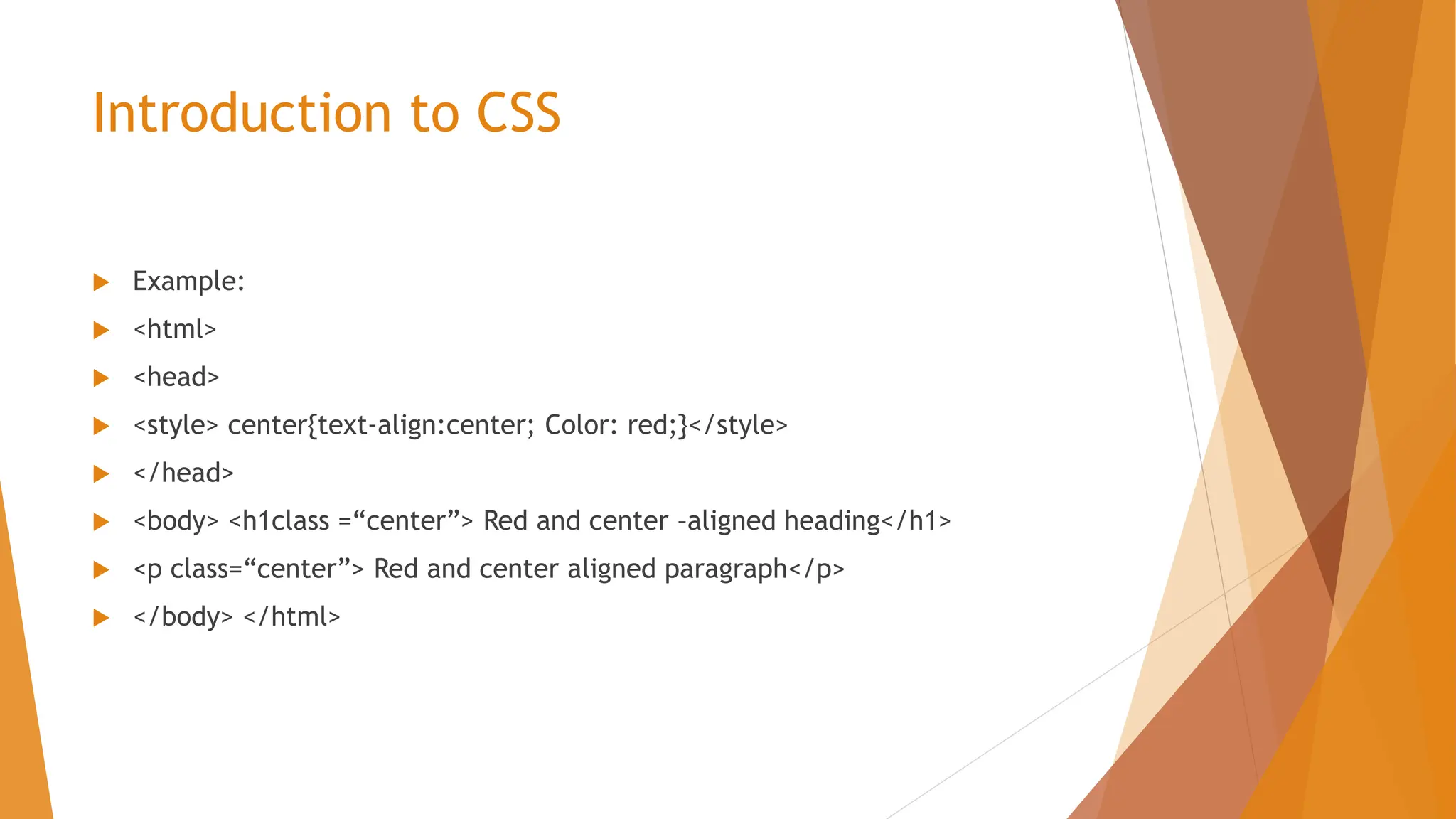
Introduction to CSS  Example:  <html>  <head>  <style> center{text-align:center; Color: red;}</style>  </head>  <body> <h1class =“center”> Red and center –aligned heading</h1>  <p class=“center”> Red and center aligned paragraph</p>  </body> </html>
Introduction to CSS  Advantages of CSS  1. These sheets save lot of time and work as they can control layout of multiple web pages.  2. CSS helps load web pages faster as you need not write HTML tag attributes every time.  3. CSS is easy to maintain. If you change the style, all other elements will be automatically updated.  4. CSS provide superior styles as compared to simple HTML.
Introduction to CSS  So,  CSS determines how the elements in our HTML document are displayed and formatted.  Designed to separate the content of a web page from the presentation of that content.  Enables us to make all pages of our website look similar and consistent (font, color)  Allows us to make site-wide formatting changes from a single location (rather than having to edit each page individually).
Introduction to Programming Language (PL)  Introduction to Programming Language (PL)  It refers to set of instructions that are provided to the computer to describe computations and generate executable programs.  Every PL has words, symbols and grammatical rules and these rules are known as syntax.  Each language has different set of syntax rules.  Different PL have been developed to execute different programs.
Introduction to Programming Language (PL)  So,  Programing language is set of rules that provides a way of telling a computer what operations to perform.  A PL is set of rules for communicating an algorithm  It provides a linguistic framework for describing computations.
Introduction to Programming Language (PL) Characteristics of PL. Characteristics of PL.  These languages are independent of computer system i.e. instead of being machine-oriented it should be more oriented towards the given problem to be solved.  Each Instruction of PL should get converted into machine language instruction.  This language should be easy to understand and should use abbreviation and words that used in everyday communication.  The PL should be written using common words and mathematical symbols.
Types Types 1. First Generation PL: This is machine dependent language that can be understood by the computer. It was mostly used to Addition and subtraction. 2. Second Generation PL: These are known as assembly languages and these need to be translated into one machine language. These were comparatively easier to write. 3. Third Generation PL – These were closer to English but included some mathematical notations as well . E.g. VB,C++, C etc . These are high level languages (HLL). 4. Fourth Generation PL- These languages required lesser instructions to complete a particular task. They are used with databases in form designers and report generators. These are very high level languages like SQL. 5. Fifth Generation PL- These are also known as declarative languages and are based on mathematical logics. They are also called as natural languages.
First Generation or Machine Language First Generation or Machine Language: The set of instruction codes which is directly understood by CPU of computer is known as machine language. It does not require any translation program. This is basic computer language. Such programs vary from computer to computer, They are machine dependent. Machine languages consist binary digits for performing internal operations which are easily understood by the computers. Having usually two parts- first part contains the command that tells what functions needs to be performed and second part contains instructions that tells where to store the data or information. Such languages are used to adding, subtracting, writing and so on.
First Generation or Machine Language Advantages of Machine Languages-  It is directly understood by the computer.  No translating program is required.  It is very fast and easy to be processed by the computer.
First Generation or Machine Language Disadvantages:  It is machine dependent and vary from one computer to another.  It is easily understood by computer but it is difficult for programmers to remember dozens of code numbers for different commands or refer to a reference card every time.  It is difficult to locate errors in machine languages and therefore it is very difficult to modify errors.
Assembly or Second generation language Assembly or Second generation language:  These are low-level languages that allow users to use various abbreviations or other words instead of binary numbers.  Each assembly language gets translated into machine instructions by assembler program;  These languages are hardware dependent.
Assembly or Second generation language Advantages of Assembly Language:  It is easier to use and understand (as compare to Machine Lang.)  It is easier to locate and rectify errors in this language.  It is quite easier to modify the programs written in these languages.
Assembly or Second generation language Disadvantages of Assembly Language  It is hardware dependent.  Knowledge of hardware is required to write program in this language.
Third Generation Language High Level Language or Third Generation Language  To overcome the difficulties with machine language and assembly language, These kind of languages were developed that allow programmers to describe various tasks in a form which is problem oriented instead of computer oriented. Such instructions that are written in high level programmers are called statements.
Third Generation Language Advantages of High Level Languages  It is independent of machine.  It is easy to use and learn.  It has reduced occurrence of errors as the programmer need not write all small steps that are being carried out by the computer.  Errors if any can be easily located in this language.  It requires less time and effort and hence reduces the cost of programming.  Instructions and commands much easier to remember by programmer.  Its logic and structure are much easier to understand.  Portable .
Third Generation Language Disadvantages of High Level languages or Third Generation PL  The programs written in these languages take more time to run and requires more main memory.  These are less flexible as they are not under much control of programmer.  They are based on more automatic features.
Fourth Generation Languages Fourth Generation Languages These are very high level languages which are more user oriented. Such languages have a lot of time for programmers as they need not write as many lines of code as they usually write for other programs. These languages are used for report generation and interactive database management system.
Fifth Generation Languages Fifth Generation Languages or Natural Languages These languages allow questions or commands that can be frames in an interactive manner. Eg. You can easily state that I want sales data of last quarter. Natural languages are part of artificial intelligence.
Introduction to Web Servers and Server Products Introduction to Web Servers and Server Products Web server is computer program that provides requested files to the users via HTTP and distributes information on worldwide web.
Introduction to Web Servers and Server Products The major function of web server is to store and process required information and provide web pages to its clients. The whole process of communication between the client and the server takes place through Hypertext Transfer Protocol(HTTP). The delivered pages are mostly in HTML format.
Introduction to Web Servers and Server Products So, Web server can also be defined as an internet server that responds to client’s request through http and deliver the required web pages. For eg. If you are sitting in front of a computer and surfing internet, you get an email from your friend asking you to check latest fashion updates and offers on http://www.myntra.com/offers. You can simply type this URL into your web browser and press enter key. The website with existing offers will open up in front of you despite the fact that website or web page is hosted anywhere else in the world.
A web server is always connected to the internet and has unique address with a series of four numbers between 0 to 255 separated by . Or periods. This unique address is known as IP address of the computer. There are different types of web servers available in internet world. Web hosting companies select any web server based on their client’s requirements as the number of clients going to work o a single server, software being used by the client and amount of traffic they would be going to generate.
Introduction to Web Servers and Server Products Types of Web servers Nginx web server Internet Information services (IIS) Lighttpd Sun JAVA System web server Jigsaw Server Apache Tomcat Google Server.
Introduction to Web Servers and Server Products Summary: Web Server is the computer on which you host your website. It is connected directly to the Internet and sends hosted web pages to the client using the Hypertext Transfer Protocol (HTTP). If you host your Front page site through an Internet Service Provider (ISP) etc. You may have different types of web servers as: Windows based servers running IIS i.e Internet Information Services. Unix based servers running APAche.
Introduction to Databases Introduction to Databases Database Refers to systematic and structured collection of data. Printed catalogues, brochures, telephone, telephone directories etc are all examples of databases. This data can be stored in the form of tables, charts,views, reports and queries. The data is usually stored on the disk and can be accessed by many users at a time.
Introduction to Databases Databases are managed by Database Management Systems (DBMS) which is a computer application including set of programs used to manage and store data in a set format.
Introduction to Databases DBMS is responsible for access of data, updation of data, security, back up, recovery, maximal availability and to support interface packages for better access to its users.
Introduction to Databases Examples: Some of the major DBMS include MySQL, Microsoft SQL Server, Oracle, SAP HANA, MemSQl, SQL Lite, IBM DB2.
Introduction to Databases Functions of DBMS:  Contains query language  Manage database structure  Controls access to data.
Introduction to Databases Benefits of DBMS- After introduction of DBMS, it has become easier for all organizations to keep a record of all necessary details. It has become faster to search information on any topic at any time and any location, which in turn has increased effectiveness of work.
Applications of DBMS: Applications of DBMS: Railway Ticket Reservation:- It has become easier to keep a track of ticket booking, availability of seats, train arrival and departures. Banking: it is because of DBMS that banks can track every transaction related to any account. Banking has become easier and we can send and receive money through our bank account while sitting at our home. Online Courses and Examination; Through, DBMS, Various Universities and colleges can provide online training and can also conduct examination at various centers at the same time. Complete record of student’s registration, fee status, grades, scores, roll numbers, passing year etc can be maintained.
Applications of DBMS: Applications of DBMS: Social Media: Today, we can see that each and every person is connected to number of friends and relatives through various social media. They can share their views and post their comments on different topics. People can connect to each other while sitting comfortably in their homes. It is all because of DBMS. Online Shopping : Due to today’s busy life style, we have seen that people are getting attracted towards online shopping as it is much easier and faster. Moreover, return policies provided by various companies further add to customer’s satisfaction. A complete record of products ordered, delivery address, dispatch date, bill, payment and return policy is kept till the product is safely delivered to each and every customer.
Who uses Computer Databases? Who uses Computer Databases?  Stores use DBMS to keep track of inventory  Customers online when shopping  Travel agents can keep up with their customers and reservations  Hospitals track patient information  Students online when researching information for school and college.
Therefore, we can say that databases and DBMS has become an integral part of our life. We are solely dependent on these systems for proper functioning of our day to day activities. These databases are the structural unit of internet without which we cannot imagine our life.
Examples of DBMS Examples of DBMS SQL : Introduction to MYSQL MySQL is a multi-user and multi-threaded DBMS which is quite popular on the web MYSQL is Structured Query Language. It is an open source relational database management system that comes in two versions : MySQL Server System and MySQL embedded system. MySQL Products: it includes Servers, GUI Tools and Drivers 1. Servers can be community server, enterprise server or embedded server. 2. GUI Tools include administrator, migration tool kit, query browser & visual studio 3. MySQL Drivers include .JDBC, .odbc, .net and .php 4. This server provides multi user access to large number of databases. 5. MySQL server is fast, reliable and easy to use server.
Benefits of MySQL Benefits of MySQL 1. It’s easy to use : While a basic knowledge of SQL is required and most relational databases require the same knowledge MySQL is very easy to use. With only a few simple SQL statements, you can build and interact with MySQL. 2. It’s secure: MySQL includes solid data security layers that protect sensitive data from intruders. Rights can be set to allow some or all privileges to individuals. Passwords are encrypted. 3. It’s inexpensive: MySQL is included for free with Netware 6.5 available by free download from MySQL Website.
Why to Use MySQL? Why to Use MySQL?  MySQL server can handle very large databases.  Offers rich and very useful set of functions.  Connectivity, speed and security make MySQL very suited for accessing databases on a network.  A lot of contributed software available. Therefore, we can say that MySQL is the most Popular SQL Databases Management System being used in development of Various web-based software applications.
Microsoft Access as DBMS Microsoft Access as DBMS. MS access is a database management System (DBMS) from Microsoft which combines relational Microsoft Jet Database Engine and graphical User Interface with software development tools. It has it’s own format to store data and it can import or link directly to data stored in other applications and databases. Various software developers use MS Access to develop Application Software. MS Access is supported by VBA (Visual Basic for Applications) which is an object based Programming Language used develop programs.
Components of MS Access: Is made up of following components.  Tables: They are considered as the backbone of the data stored in database.  Relationships: They refer to the bonds which join tables of associated elements.  Queries: They can be used to start, calculate, group, filter, sort and delete data as per requirements.  Forms: They act as an interface for the users to enter data into database.  Reports: They refer to the results generated after entering data into database  Macros: These can be referred to as an automatic way of MS Access to carry out a series of actions for the database. These actions are carried out in the order you entered the data.  Modules: it is the basis of programming language that supports MS Access.
Limitations of MS Access:  Maximum table size: 1gb  No.of fields in a record or table: 255  No.of indexes in table or record : 32  No of fields in an index: 10  No of table in query :32  Maximum size of a form or report: 22”  Characters in a memo field 64000  MDB Size 2gb  Concurrent Users 255  No. of characters in object names 64
Uses MS Access This database can be used to perform following functions  Data Management  Display complex queries and data subsets  Databases management for multiple users  Generate reports for data summarization  Automation of common events.  Access enables to arrange the data in a fixed structure. Its structure makes the information easy to: Manipulate, Sort, Display, Print.
Pharmacy drug Database: Pharmacy Drug database refers to collect and compilation of data related to various drugs that can be used by physicians and other healthcare professionals to ensure provision of best pharmaceutical services to the patients.
Examples of Pharmacy Drug database: DynaMed: It is a reference tool created by physicians that contains clinically organized summaries that can be used by other physicians and healthcare pro. Essential Evidence Plus: It is an evidence based clinical research database with access to information on different pharmaceutical topics, guidelines, abstracts, and summaries. Drugs@FDA: it refers to catalog of FDA approved drugs including both prescription and over the counter drugs. LactMed: it sis a peer-reviewed and referenced database of drugs which are considered safe for lactating mothers.
Pharmacy drug Database: Pharmacy Computer systems are used for variety of functions like printing patient records, checking drug interactions, updating patient profile and automated drug dispensing.  Right now computers and pharmacy go hand in hand  Drug and patient databases management; order entry systems; drug information; billing; purchasing; automated dispensing units; and on and on.  Today we can exchange health information and provide services across geographic, time and social boundries.
Pharmacy drug Database: Functions of Pharmacy management Systems  Patient profiles  Physician database  Pharmacy Drug Inventory
Purpose of Pharmacy Drug database Pharmacy Drug database is created in order to maintain effective and clear data saving network which can be assessed by any healthcare professional at the time of need. Such database reduces time and effort and ensures availability of best available treatment in a given situation. As complete information on any drug can be searched, a physician can simultaneously review various drug indications, side effects, contraindications, dosages, alternate options, allergic reactions etc. Hence, one can decide the most effective drug to be prescribed to a patient in hour of need.
Purpose of Pharmacy Drug database Purpose of Pharmacy Drug database Such system are required by all medical personnel to access relevant information about various drugs whether it is their dosage, usage, mode of action, side effects, drug interactions, shelf life or any such details. Such systems have helped a lot to improve the quality and quantity of drug usages at appropriate time and place. Life expectancy has increased and people have started living quality life free from various diseases.
3.web Technology and sub topics for computer applications

3.web Technology and sub topics for computer applications

  • 1.
  • 2.
    Definition  The Mechanismof communication between various computers through different languages and multimedia packages is known as web Technology.
  • 3.
     Examples ofweb technology  1) Mark-up languages like HTML, XML and HTTP  2) Programming Languages and Technologies like JAVA, Visual Basic and DOT NET.  3) Web Servers and Server Technologies that assist in sharing common network for worldwide communication.  4) Databases which are used to store information on a computer network.
  • 4.
     Thus,  WebTechnology helps,  In providing common platform for effective communication among different users.  And different devices which are inter-related through a computer network.
  • 5.
    HTML  1. Introductionto HTML  HYPER TEXT MARK-UP Language.  It acts as a foundation to hold every website.  It is open language which is easy to learn and works on tag system.  Each tag affects the content that has been placed in that particular tag.  HTML tags label various pieces of content as “Heading”, “Paragraph”, “Table”, and so on…  HTML Elements are known as building blocks of html page.
  • 6.
    HTML  HTML  Thislanguage is used to create web page.
  • 7.
    HTMl  Example:  <html> <head>  <title> Page Title</title>  </head>  <body> In body Section we can write  Heading Paragraph and other elements  which are displayed on web page  </body>  </html>
  • 8.
    HTMl  HTML isnot a programming language.  HTML is a mark-up language that works on mark-up tags.  HTML is not a case-sensitive language.  HTML tags are elements surrounded by angular brackets. < ,>  HTML tags comes in pairs and first tag is called start tag and other is End Tag.  The End tag is written like start tag but it contains forward slash. /  Eg. Start tag is <p> and end tag is </p>.
  • 9.
    HTMl  Structure ofHTML Program.  A Complete executable HTML program contains  Opening Tag <html> and </html>.  Whatever written(type) in between these two tags  is our Program.  Program contains mainly two parts or sections.  Head and body presented by tags like <head> and <body>.
  • 10.
    HTMl  Head sectionsmostly contains title of web page.  Body section may contain elements like heading,  Paragraph, and what we want to display on our  web page.
  • 11.
    HTMl  HTML features: It is coding language that makes web-pages;  It is the skeleton of every web page that exists.  To see what it looks like, go into web browser (e.g. Internet Explorer, Mozilla firefox, Google Chrome, Microsoft Edge etc.).  To see the html code navigate to any web page and right click on it and click on “view source”. You will see a page of code, and that is HTML.  One can create html code in text editor like notepad; save it as a.html ( a is file name; .html is extension of web page)
  • 12.
    HTMl  HTML containsTag and Attributes;  Tag is coded HTML command that indicates how part of web page should be displayed.  An attribute is a special word used inside tag to specify additional information to tag such as color, alignment etc.
  • 13.
    HTMl  Tags arehaving two types basically:  Container or Non-empty Tags and Empty Tags;  Container or Non-empty Tags: are pair tags i.e. they require a starting as well as ending tags. For e.g. <html> </html>; <body></body>, <font></font>  In which end tag has used forward slash /.  And the elements or words type in between the two opening and closing tags.  Non empty tags affect the txt appearing between their start and end tags.
  • 14.
    HTMl  Empty Tags: It just having only one tag i.e opening tag , not required closing tag.  They are predefined tag carry out the job assigned to them.  No end tag required like </html>  E.g. <br>; <hr>
  • 15.
    XML  Introduction toXML  XML means Extensible Markup Language.  It is another markup language like that of HTML.  The difference lies in the fact that in xml, tags are not pre-defined and one has to define his own tags.  This language is self describing and uses DTD (document Type Definition) to describe its data.  Major Difference is: XML was designed to Describe data and HTML was designed  to display Data.
  • 16.
    XML  So, XMLis complement for HTML.  XML uses certain set of rules for encoding documents that can be read by both humans and machines.  XML is used to provide information about a document.  Tags are added to the document to provide the extra information.
  • 17.
    XML  XML, extensiblemarkup language, is a simple and flexible markup language.  It is known as universal language for data on the web because xml documents can be created and used in any language.  It is universal standard for information interchange.  XML Technology facilitates you to create your own markup language.
  • 18.
    XML  Benefits ofXML.  Simplicity: Very easy to read and understand the information coded in xml.  Openness: it is W3C standard, endorsed by software industry market leaders.  Extensibility: it is extensible because it has no fixed set of tags. One can define them as per need.  Self-descriptive: XML documents do not need special schema set-up like traditional database to store data. Xml document can be store without such definitions, because they contain metadata in the form of tags and attributes.  Scalable: XML is not in binary format so you can create and edit files with anything and it is also easy to debug.  Fast Acess: XML documents are arranged in hierarchical form so it is comparatively faster.
  • 19.
    XML  Uses ofXML:  It has become default format for many office productivity tools.  It is used as a base language for communication protocols.  It is also used to interchange data from one computer to another through internet.  XML is used in web development.
  • 20.
    XML  XML canseparate Data from HTML.  XML is used to Exchange Data.  XML can be used to share Data.  XML can be used to store Data.  XML can make your data more useful.  XML can be used to create New *ML Language.
  • 21.
     Advantages ofXML  XML is text(Unicode) based – Takes up less space.  - Can be transmitted efficiently.  One XML document can be displayed differently in different media.  - HTML, video, cd, dvd  - you can only have to change the XMl doc in order to change all the rest.  XML documents can be modularized. Its parts can be reused.
  • 22.
    XML  Tags inXML  Tags in XML can be expressed in three ways-  1. Start tag as <section>;  2. End tag as </section>;  3.Empty tag as <line-break/>
  • 23.
    XML  Example:  Fora note containing simple reminder from Sam to Tom as  <note>  <to> Tom</to>  <from>Sam</from>  <heading> Reminder</heading>  <body>Don’t forget me this weekend!</body>  </note>
  • 24.
    Difference between HTML& XML No. HTML XML 1 HTML is used to display data and focuses on how data looks. XML is a software and hardware independent tool used to transport and store data. It focuses on what data is. 2 HTML is markup language itself. XML provides a framework to define markup language. 3 HTML is not case sensitive. XML is case sensitive. 4 HTML is presentation language. XML is neither a presentation nor a programming language.
  • 25.
    Introduction to CSS Introduction to CSS  CSS means Cascading Style sheets.  These sheets describe how HTML elements will be displayed on the screen.  CSS can be defined as a design language which is used to make web page more presentable and easy to write.  Cascading Style sheets contains the rules for the presentation of HTML web page.  CSS was introduced to keep the presentation information separate from HTML markup(Content)
  • 26.
    Introduction to CSS Uses of CSS  CSS is used to design various styles for the different web pages.  It can be used to control the following elements:  1. Text color  2. Font style  3. Spacing between paragraphs  4. Layout and size of column  5.Background images  6. Background colors  7. Layout design  8. Other Effects
  • 27.
    Introduction to CSS Example:  <html>  <head>  <style> center{text-align:center; Color: red;}</style>  </head>  <body> <h1class =“center”> Red and center –aligned heading</h1>  <p class=“center”> Red and center aligned paragraph</p>  </body> </html>
  • 28.
    Introduction to CSS Advantages of CSS  1. These sheets save lot of time and work as they can control layout of multiple web pages.  2. CSS helps load web pages faster as you need not write HTML tag attributes every time.  3. CSS is easy to maintain. If you change the style, all other elements will be automatically updated.  4. CSS provide superior styles as compared to simple HTML.
  • 29.
    Introduction to CSS So,  CSS determines how the elements in our HTML document are displayed and formatted.  Designed to separate the content of a web page from the presentation of that content.  Enables us to make all pages of our website look similar and consistent (font, color)  Allows us to make site-wide formatting changes from a single location (rather than having to edit each page individually).
  • 30.
    Introduction to ProgrammingLanguage (PL)  Introduction to Programming Language (PL)  It refers to set of instructions that are provided to the computer to describe computations and generate executable programs.  Every PL has words, symbols and grammatical rules and these rules are known as syntax.  Each language has different set of syntax rules.  Different PL have been developed to execute different programs.
  • 31.
    Introduction to ProgrammingLanguage (PL)  So,  Programing language is set of rules that provides a way of telling a computer what operations to perform.  A PL is set of rules for communicating an algorithm  It provides a linguistic framework for describing computations.
  • 32.
    Introduction to ProgrammingLanguage (PL) Characteristics of PL. Characteristics of PL.  These languages are independent of computer system i.e. instead of being machine-oriented it should be more oriented towards the given problem to be solved.  Each Instruction of PL should get converted into machine language instruction.  This language should be easy to understand and should use abbreviation and words that used in everyday communication.  The PL should be written using common words and mathematical symbols.
  • 33.
    Types Types 1. First GenerationPL: This is machine dependent language that can be understood by the computer. It was mostly used to Addition and subtraction. 2. Second Generation PL: These are known as assembly languages and these need to be translated into one machine language. These were comparatively easier to write. 3. Third Generation PL – These were closer to English but included some mathematical notations as well . E.g. VB,C++, C etc . These are high level languages (HLL). 4. Fourth Generation PL- These languages required lesser instructions to complete a particular task. They are used with databases in form designers and report generators. These are very high level languages like SQL. 5. Fifth Generation PL- These are also known as declarative languages and are based on mathematical logics. They are also called as natural languages.
  • 34.
    First Generation orMachine Language First Generation or Machine Language: The set of instruction codes which is directly understood by CPU of computer is known as machine language. It does not require any translation program. This is basic computer language. Such programs vary from computer to computer, They are machine dependent. Machine languages consist binary digits for performing internal operations which are easily understood by the computers. Having usually two parts- first part contains the command that tells what functions needs to be performed and second part contains instructions that tells where to store the data or information. Such languages are used to adding, subtracting, writing and so on.
  • 35.
    First Generation orMachine Language Advantages of Machine Languages-  It is directly understood by the computer.  No translating program is required.  It is very fast and easy to be processed by the computer.
  • 36.
    First Generation orMachine Language Disadvantages:  It is machine dependent and vary from one computer to another.  It is easily understood by computer but it is difficult for programmers to remember dozens of code numbers for different commands or refer to a reference card every time.  It is difficult to locate errors in machine languages and therefore it is very difficult to modify errors.
  • 37.
    Assembly or Secondgeneration language Assembly or Second generation language:  These are low-level languages that allow users to use various abbreviations or other words instead of binary numbers.  Each assembly language gets translated into machine instructions by assembler program;  These languages are hardware dependent.
  • 38.
    Assembly or Secondgeneration language Advantages of Assembly Language:  It is easier to use and understand (as compare to Machine Lang.)  It is easier to locate and rectify errors in this language.  It is quite easier to modify the programs written in these languages.
  • 39.
    Assembly or Secondgeneration language Disadvantages of Assembly Language  It is hardware dependent.  Knowledge of hardware is required to write program in this language.
  • 40.
    Third Generation Language HighLevel Language or Third Generation Language  To overcome the difficulties with machine language and assembly language, These kind of languages were developed that allow programmers to describe various tasks in a form which is problem oriented instead of computer oriented. Such instructions that are written in high level programmers are called statements.
  • 41.
    Third Generation Language Advantagesof High Level Languages  It is independent of machine.  It is easy to use and learn.  It has reduced occurrence of errors as the programmer need not write all small steps that are being carried out by the computer.  Errors if any can be easily located in this language.  It requires less time and effort and hence reduces the cost of programming.  Instructions and commands much easier to remember by programmer.  Its logic and structure are much easier to understand.  Portable .
  • 42.
    Third Generation Language Disadvantagesof High Level languages or Third Generation PL  The programs written in these languages take more time to run and requires more main memory.  These are less flexible as they are not under much control of programmer.  They are based on more automatic features.
  • 43.
    Fourth Generation Languages FourthGeneration Languages These are very high level languages which are more user oriented. Such languages have a lot of time for programmers as they need not write as many lines of code as they usually write for other programs. These languages are used for report generation and interactive database management system.
  • 44.
    Fifth Generation Languages FifthGeneration Languages or Natural Languages These languages allow questions or commands that can be frames in an interactive manner. Eg. You can easily state that I want sales data of last quarter. Natural languages are part of artificial intelligence.
  • 45.
    Introduction to WebServers and Server Products Introduction to Web Servers and Server Products Web server is computer program that provides requested files to the users via HTTP and distributes information on worldwide web.
  • 46.
    Introduction to WebServers and Server Products The major function of web server is to store and process required information and provide web pages to its clients. The whole process of communication between the client and the server takes place through Hypertext Transfer Protocol(HTTP). The delivered pages are mostly in HTML format.
  • 47.
    Introduction to WebServers and Server Products So, Web server can also be defined as an internet server that responds to client’s request through http and deliver the required web pages. For eg. If you are sitting in front of a computer and surfing internet, you get an email from your friend asking you to check latest fashion updates and offers on http://www.myntra.com/offers. You can simply type this URL into your web browser and press enter key. The website with existing offers will open up in front of you despite the fact that website or web page is hosted anywhere else in the world.
  • 48.
    A web serveris always connected to the internet and has unique address with a series of four numbers between 0 to 255 separated by . Or periods. This unique address is known as IP address of the computer. There are different types of web servers available in internet world. Web hosting companies select any web server based on their client’s requirements as the number of clients going to work o a single server, software being used by the client and amount of traffic they would be going to generate.
  • 49.
    Introduction to WebServers and Server Products Types of Web servers Nginx web server Internet Information services (IIS) Lighttpd Sun JAVA System web server Jigsaw Server Apache Tomcat Google Server.
  • 50.
    Introduction to WebServers and Server Products Summary: Web Server is the computer on which you host your website. It is connected directly to the Internet and sends hosted web pages to the client using the Hypertext Transfer Protocol (HTTP). If you host your Front page site through an Internet Service Provider (ISP) etc. You may have different types of web servers as: Windows based servers running IIS i.e Internet Information Services. Unix based servers running APAche.
  • 51.
    Introduction to Databases Introductionto Databases Database Refers to systematic and structured collection of data. Printed catalogues, brochures, telephone, telephone directories etc are all examples of databases. This data can be stored in the form of tables, charts,views, reports and queries. The data is usually stored on the disk and can be accessed by many users at a time.
  • 52.
    Introduction to Databases Databasesare managed by Database Management Systems (DBMS) which is a computer application including set of programs used to manage and store data in a set format.
  • 53.
    Introduction to Databases DBMSis responsible for access of data, updation of data, security, back up, recovery, maximal availability and to support interface packages for better access to its users.
  • 54.
    Introduction to Databases Examples: Someof the major DBMS include MySQL, Microsoft SQL Server, Oracle, SAP HANA, MemSQl, SQL Lite, IBM DB2.
  • 55.
    Introduction to Databases Functionsof DBMS:  Contains query language  Manage database structure  Controls access to data.
  • 56.
    Introduction to Databases Benefitsof DBMS- After introduction of DBMS, it has become easier for all organizations to keep a record of all necessary details. It has become faster to search information on any topic at any time and any location, which in turn has increased effectiveness of work.
  • 57.
    Applications of DBMS: Applicationsof DBMS: Railway Ticket Reservation:- It has become easier to keep a track of ticket booking, availability of seats, train arrival and departures. Banking: it is because of DBMS that banks can track every transaction related to any account. Banking has become easier and we can send and receive money through our bank account while sitting at our home. Online Courses and Examination; Through, DBMS, Various Universities and colleges can provide online training and can also conduct examination at various centers at the same time. Complete record of student’s registration, fee status, grades, scores, roll numbers, passing year etc can be maintained.
  • 58.
    Applications of DBMS: Applicationsof DBMS: Social Media: Today, we can see that each and every person is connected to number of friends and relatives through various social media. They can share their views and post their comments on different topics. People can connect to each other while sitting comfortably in their homes. It is all because of DBMS. Online Shopping : Due to today’s busy life style, we have seen that people are getting attracted towards online shopping as it is much easier and faster. Moreover, return policies provided by various companies further add to customer’s satisfaction. A complete record of products ordered, delivery address, dispatch date, bill, payment and return policy is kept till the product is safely delivered to each and every customer.
  • 59.
    Who uses ComputerDatabases? Who uses Computer Databases?  Stores use DBMS to keep track of inventory  Customers online when shopping  Travel agents can keep up with their customers and reservations  Hospitals track patient information  Students online when researching information for school and college.
  • 60.
    Therefore, we cansay that databases and DBMS has become an integral part of our life. We are solely dependent on these systems for proper functioning of our day to day activities. These databases are the structural unit of internet without which we cannot imagine our life.
  • 61.
    Examples of DBMS Examplesof DBMS SQL : Introduction to MYSQL MySQL is a multi-user and multi-threaded DBMS which is quite popular on the web MYSQL is Structured Query Language. It is an open source relational database management system that comes in two versions : MySQL Server System and MySQL embedded system. MySQL Products: it includes Servers, GUI Tools and Drivers 1. Servers can be community server, enterprise server or embedded server. 2. GUI Tools include administrator, migration tool kit, query browser & visual studio 3. MySQL Drivers include .JDBC, .odbc, .net and .php 4. This server provides multi user access to large number of databases. 5. MySQL server is fast, reliable and easy to use server.
  • 62.
    Benefits of MySQL Benefitsof MySQL 1. It’s easy to use : While a basic knowledge of SQL is required and most relational databases require the same knowledge MySQL is very easy to use. With only a few simple SQL statements, you can build and interact with MySQL. 2. It’s secure: MySQL includes solid data security layers that protect sensitive data from intruders. Rights can be set to allow some or all privileges to individuals. Passwords are encrypted. 3. It’s inexpensive: MySQL is included for free with Netware 6.5 available by free download from MySQL Website.
  • 63.
    Why to UseMySQL? Why to Use MySQL?  MySQL server can handle very large databases.  Offers rich and very useful set of functions.  Connectivity, speed and security make MySQL very suited for accessing databases on a network.  A lot of contributed software available. Therefore, we can say that MySQL is the most Popular SQL Databases Management System being used in development of Various web-based software applications.
  • 64.
    Microsoft Access asDBMS Microsoft Access as DBMS. MS access is a database management System (DBMS) from Microsoft which combines relational Microsoft Jet Database Engine and graphical User Interface with software development tools. It has it’s own format to store data and it can import or link directly to data stored in other applications and databases. Various software developers use MS Access to develop Application Software. MS Access is supported by VBA (Visual Basic for Applications) which is an object based Programming Language used develop programs.
  • 65.
    Components of MSAccess: Is made up of following components.  Tables: They are considered as the backbone of the data stored in database.  Relationships: They refer to the bonds which join tables of associated elements.  Queries: They can be used to start, calculate, group, filter, sort and delete data as per requirements.  Forms: They act as an interface for the users to enter data into database.  Reports: They refer to the results generated after entering data into database  Macros: These can be referred to as an automatic way of MS Access to carry out a series of actions for the database. These actions are carried out in the order you entered the data.  Modules: it is the basis of programming language that supports MS Access.
  • 66.
    Limitations of MSAccess:  Maximum table size: 1gb  No.of fields in a record or table: 255  No.of indexes in table or record : 32  No of fields in an index: 10  No of table in query :32  Maximum size of a form or report: 22”  Characters in a memo field 64000  MDB Size 2gb  Concurrent Users 255  No. of characters in object names 64
  • 67.
    Uses MS Access Thisdatabase can be used to perform following functions  Data Management  Display complex queries and data subsets  Databases management for multiple users  Generate reports for data summarization  Automation of common events.  Access enables to arrange the data in a fixed structure. Its structure makes the information easy to: Manipulate, Sort, Display, Print.
  • 68.
    Pharmacy drug Database: PharmacyDrug database refers to collect and compilation of data related to various drugs that can be used by physicians and other healthcare professionals to ensure provision of best pharmaceutical services to the patients.
  • 69.
    Examples of PharmacyDrug database: DynaMed: It is a reference tool created by physicians that contains clinically organized summaries that can be used by other physicians and healthcare pro. Essential Evidence Plus: It is an evidence based clinical research database with access to information on different pharmaceutical topics, guidelines, abstracts, and summaries. Drugs@FDA: it refers to catalog of FDA approved drugs including both prescription and over the counter drugs. LactMed: it sis a peer-reviewed and referenced database of drugs which are considered safe for lactating mothers.
  • 70.
    Pharmacy drug Database: PharmacyComputer systems are used for variety of functions like printing patient records, checking drug interactions, updating patient profile and automated drug dispensing.  Right now computers and pharmacy go hand in hand  Drug and patient databases management; order entry systems; drug information; billing; purchasing; automated dispensing units; and on and on.  Today we can exchange health information and provide services across geographic, time and social boundries.
  • 71.
    Pharmacy drug Database: Functionsof Pharmacy management Systems  Patient profiles  Physician database  Pharmacy Drug Inventory
  • 72.
    Purpose of PharmacyDrug database Pharmacy Drug database is created in order to maintain effective and clear data saving network which can be assessed by any healthcare professional at the time of need. Such database reduces time and effort and ensures availability of best available treatment in a given situation. As complete information on any drug can be searched, a physician can simultaneously review various drug indications, side effects, contraindications, dosages, alternate options, allergic reactions etc. Hence, one can decide the most effective drug to be prescribed to a patient in hour of need.
  • 73.
    Purpose of PharmacyDrug database Purpose of Pharmacy Drug database Such system are required by all medical personnel to access relevant information about various drugs whether it is their dosage, usage, mode of action, side effects, drug interactions, shelf life or any such details. Such systems have helped a lot to improve the quality and quantity of drug usages at appropriate time and place. Life expectancy has increased and people have started living quality life free from various diseases.