1 © 2017 The MathWorks, Inc. Deep Learning for Computer Vision Applications Using MATLAB Elza John Training Engineer Arun Mathamkode Application Support Engineer
2 What is deep learning?- Overview Why deep learning? Pretrained networks and Network layers Building your own network Transfer learning with CNNs Agenda
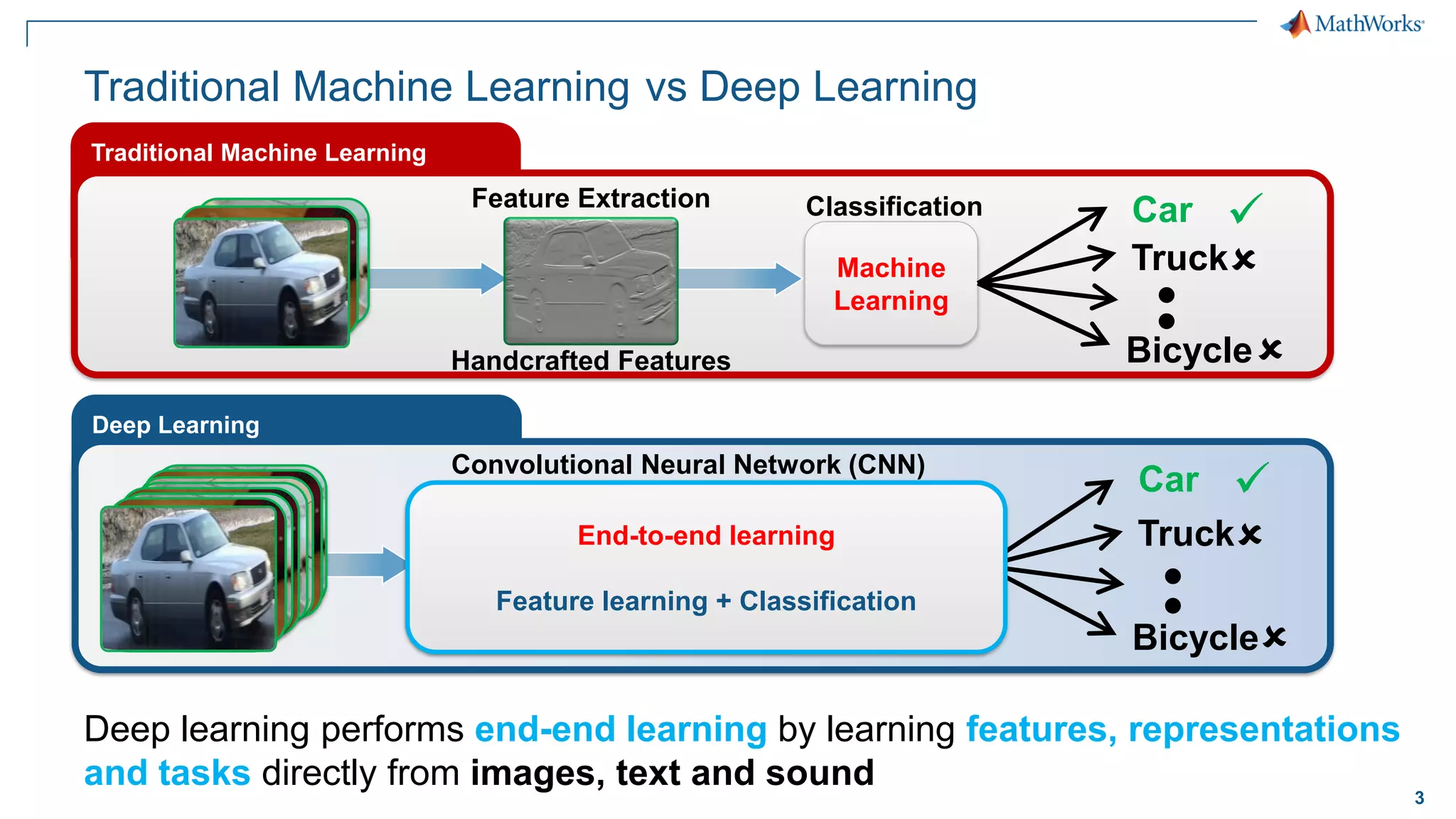
3 Traditional Machine Learning Deep learning performs end-end learning by learning features, representations and tasks directly from images, text and sound Traditional Machine Learning Machine Learning Classification Feature Extraction Truck Car ✓ Bicycle   Handcrafted Features Deep Learning … 𝟗𝟓% 𝟑%   𝟐% Truck Car ✓ Bicycle   Convolutional Neural Network (CNN) Learned features End-to-end learning Feature learning + Classification vs Deep Learning
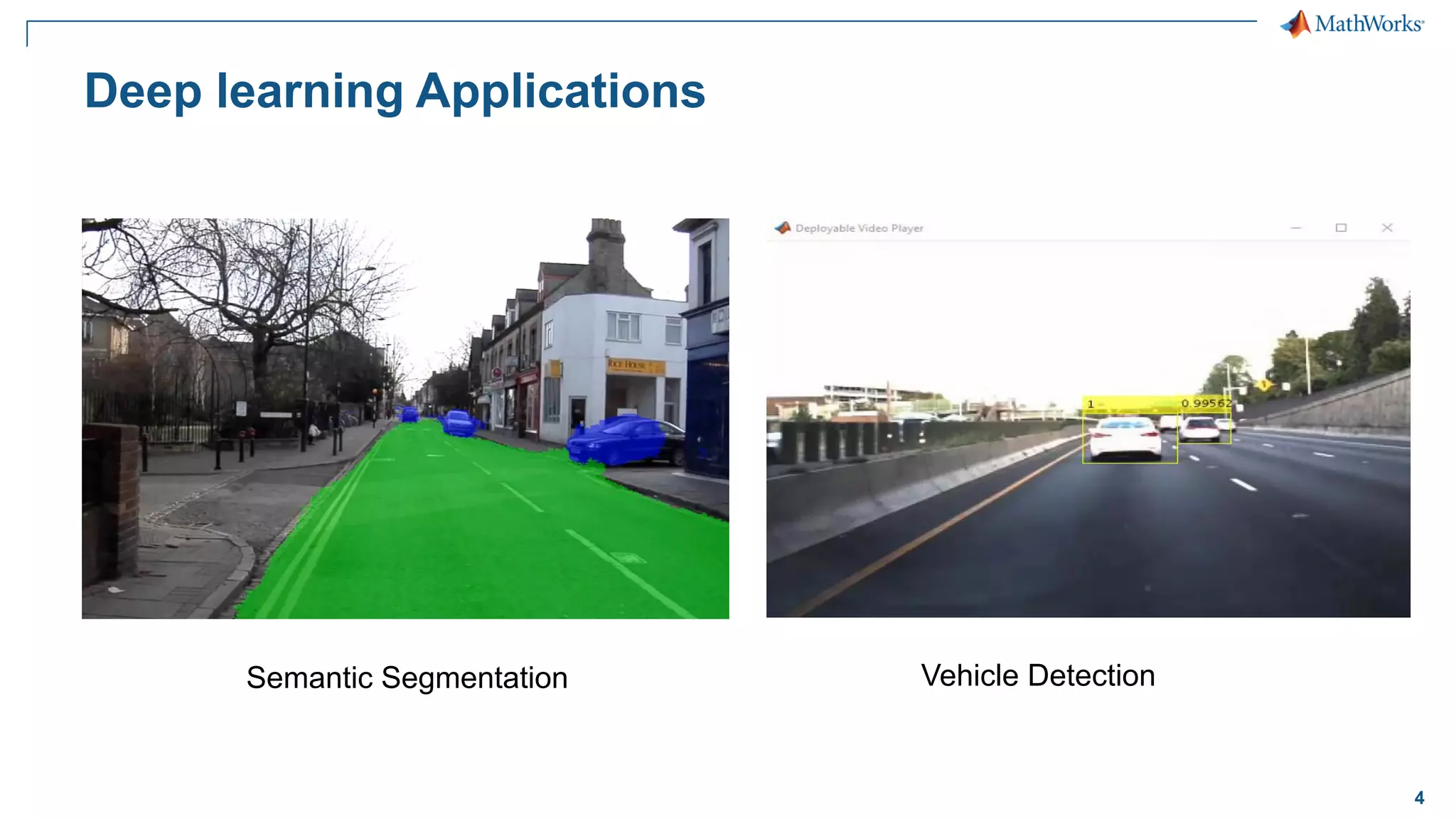
4 Deep learning Applications Semantic Segmentation Vehicle Detection
5 What is deep learning?- Overview Why deep learning? Pretrained networks and Network layers Building your own network Transfer learning with CNNs Agenda
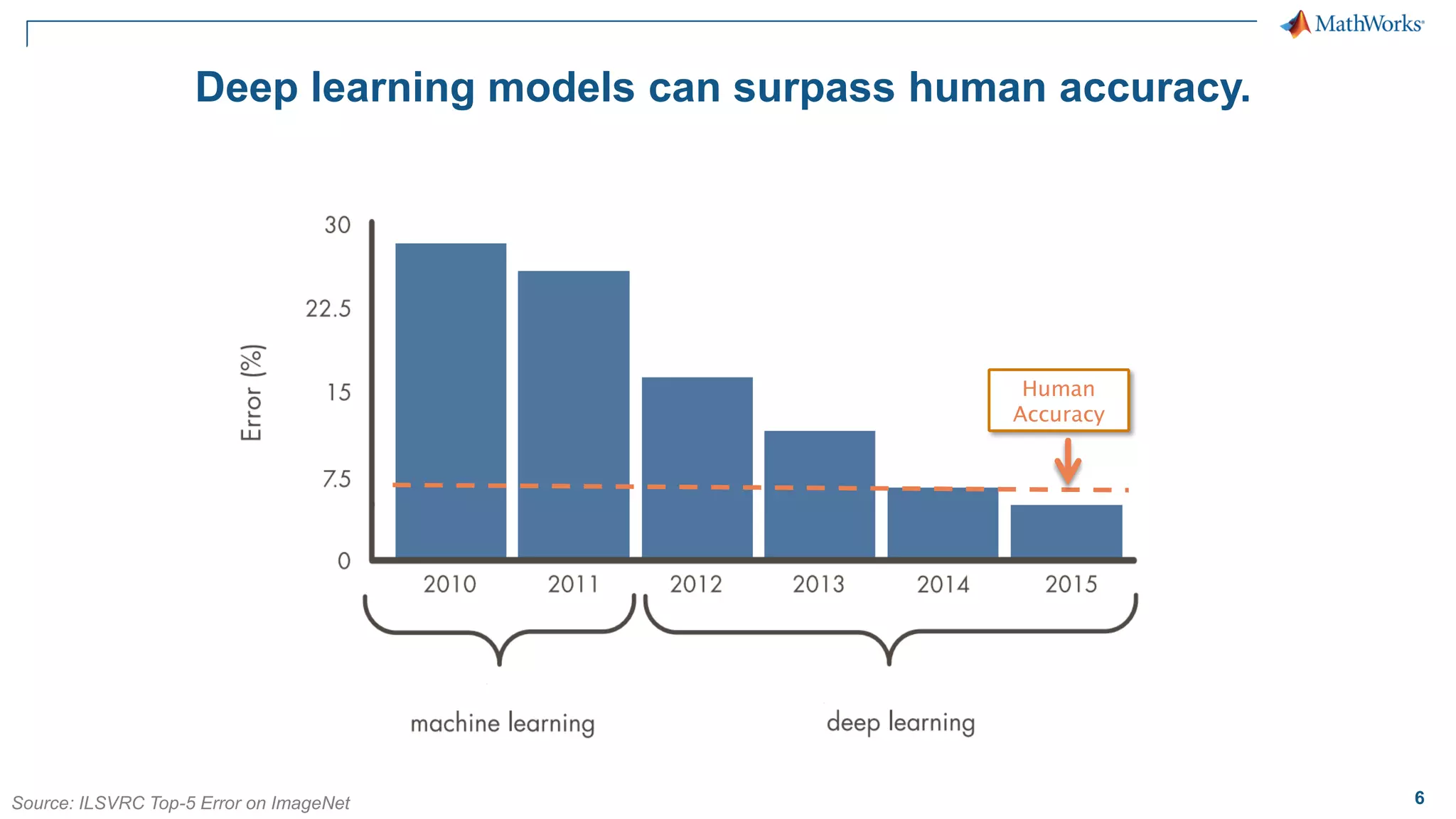
6 Deep learning models can surpass human accuracy. Human Accuracy Source: ILSVRC Top-5 Error on ImageNet
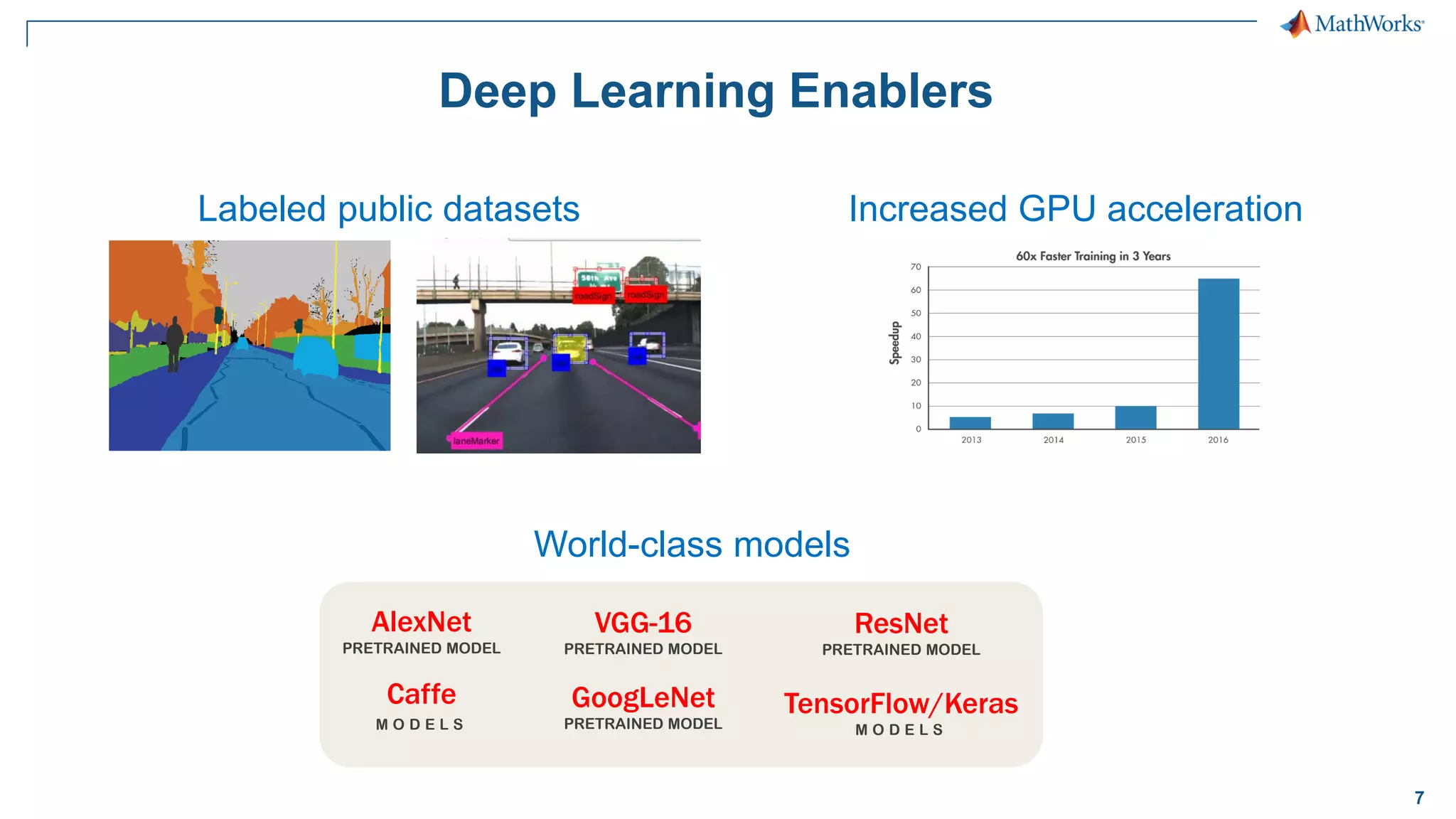
7 Deep Learning Enablers Labeled public datasets Increased GPU acceleration World-class models AlexNet PRETRAINED MODEL Caffe M O D E L S ResNet PRETRAINED MODEL TensorFlow/Keras M O D E L S VGG-16 PRETRAINED MODEL GoogLeNet PRETRAINED MODEL
8 Let’s try it out! Exercise: SS_DeepLearningIn5Lines.mlx
9 What is deep learning?- Overview Why deep learning? Pretrained networks and Network layers Building your own network Transfer learning with CNNs Agenda
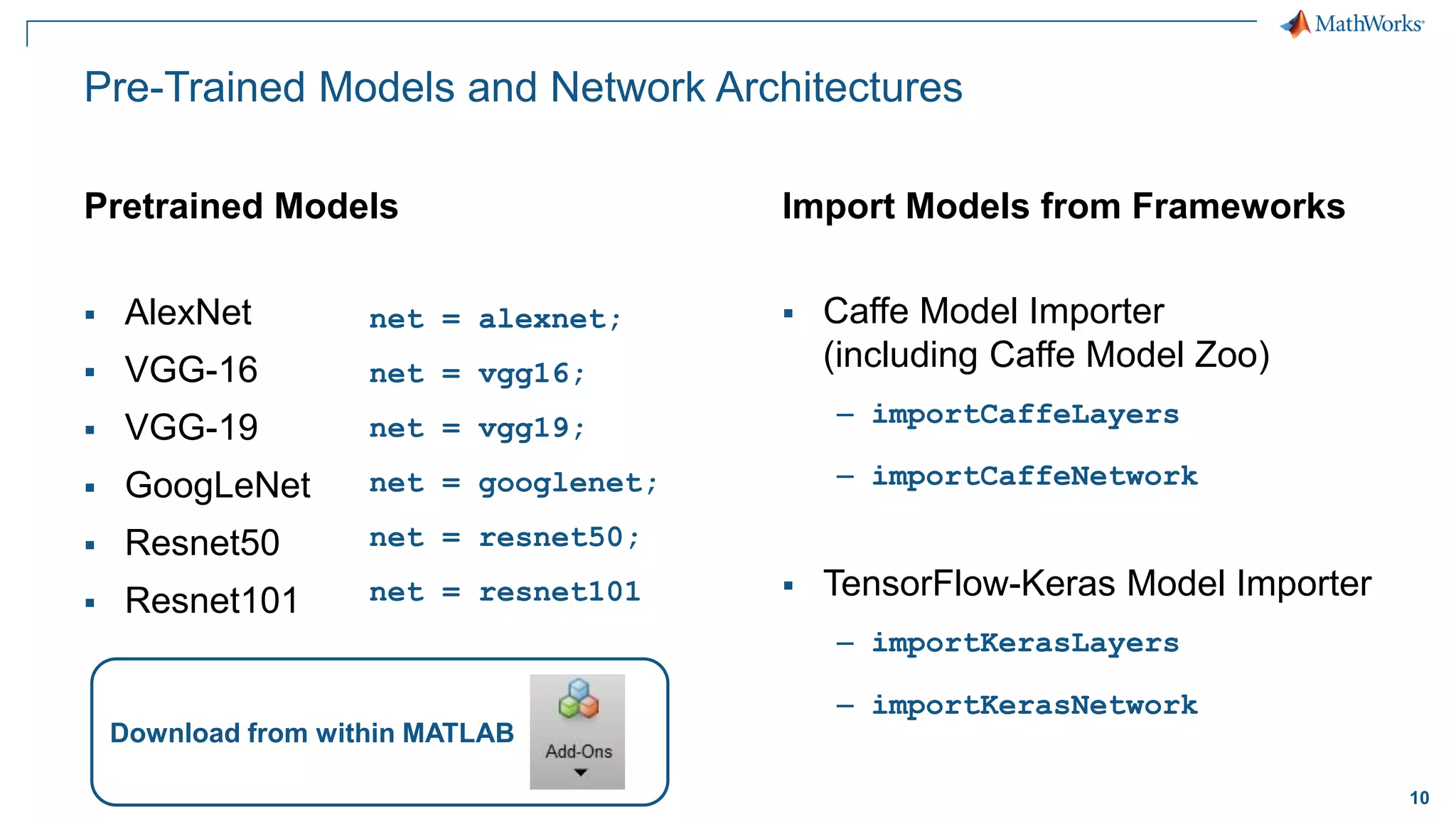
10 Pre-Trained Models and Network Architectures Pretrained Models ▪ AlexNet ▪ VGG-16 ▪ VGG-19 ▪ GoogLeNet ▪ Resnet50 ▪ Resnet101 Import Models from Frameworks ▪ Caffe Model Importer (including Caffe Model Zoo) – importCaffeLayers – importCaffeNetwork ▪ TensorFlow-Keras Model Importer – importKerasLayers – importKerasNetwork Download from within MATLAB net = alexnet; net = vgg16; net = vgg19; net = googlenet; net = resnet50; net = resnet101
11 Deep Learning Uses a Neural Network Architecture Input Layer Hidden Layers (n) Output Layer
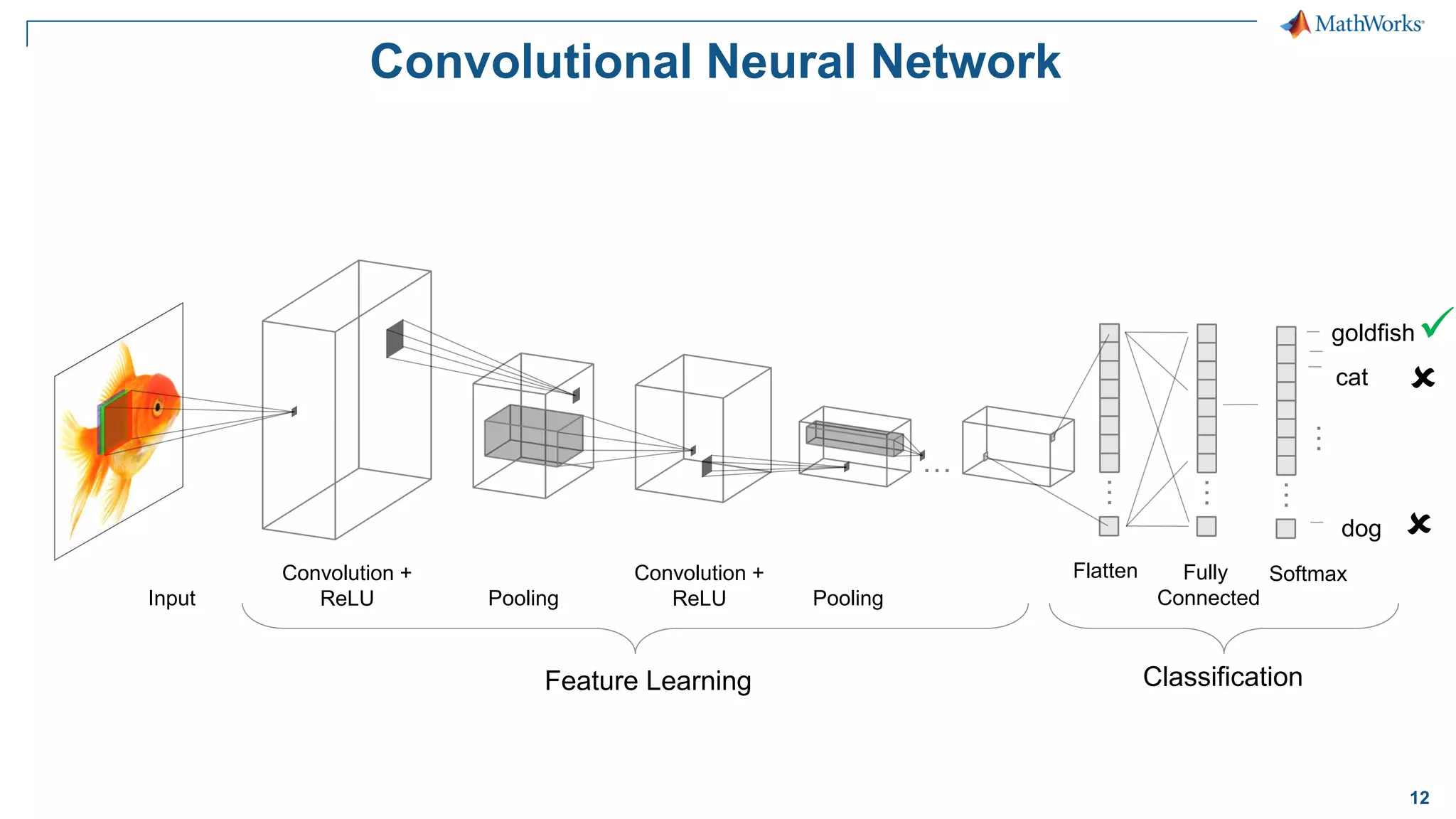
12 Convolutional Neural Network Convolution + ReLU Pooling Input Convolution + ReLU Pooling … … Flatten Fully Connected Softmax dog … cat … … Feature Learning Classification goldfish✓  
14 Takeaways ▪ Pre-trained networks have a pre-determined layer order that makes them effective for classifying images – Typically trained to classify lots of images ▪ Great starting point, but not consistently accurate – We’ll fix this later with transfer learning!
15 What is deep learning?- Overview Why deep learning? Pretrained networks and Network layers Building your own network Transfer learning with CNNs Agenda
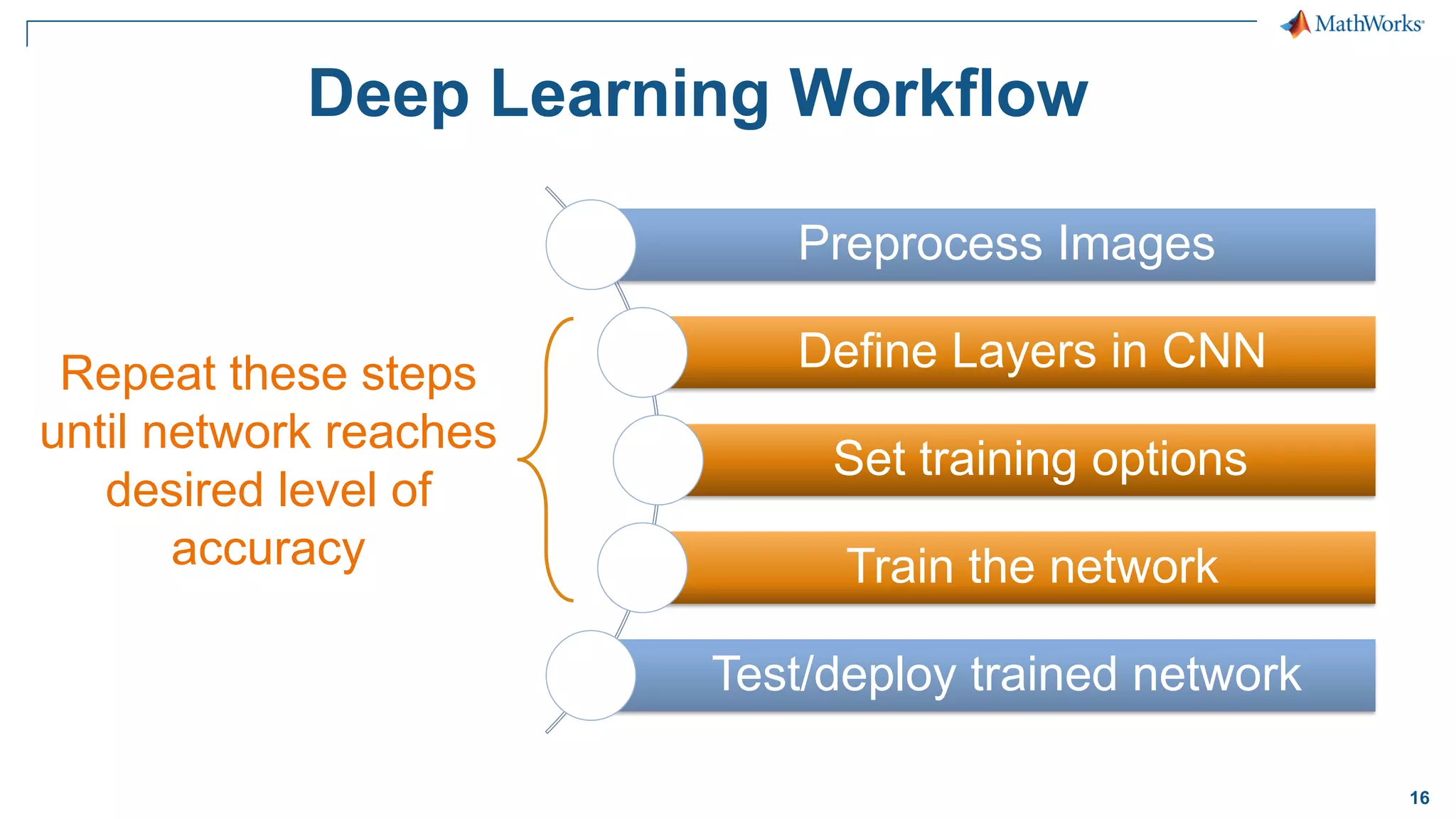
16 Deep Learning Workflow Preprocess Images Define Layers in CNN Set training options Train the network Test/deploy trained network Repeat these steps until network reaches desired level of accuracy
17 Let’s try it out! Exercise: SS_MNIST_HandwritingRecognition.mlx
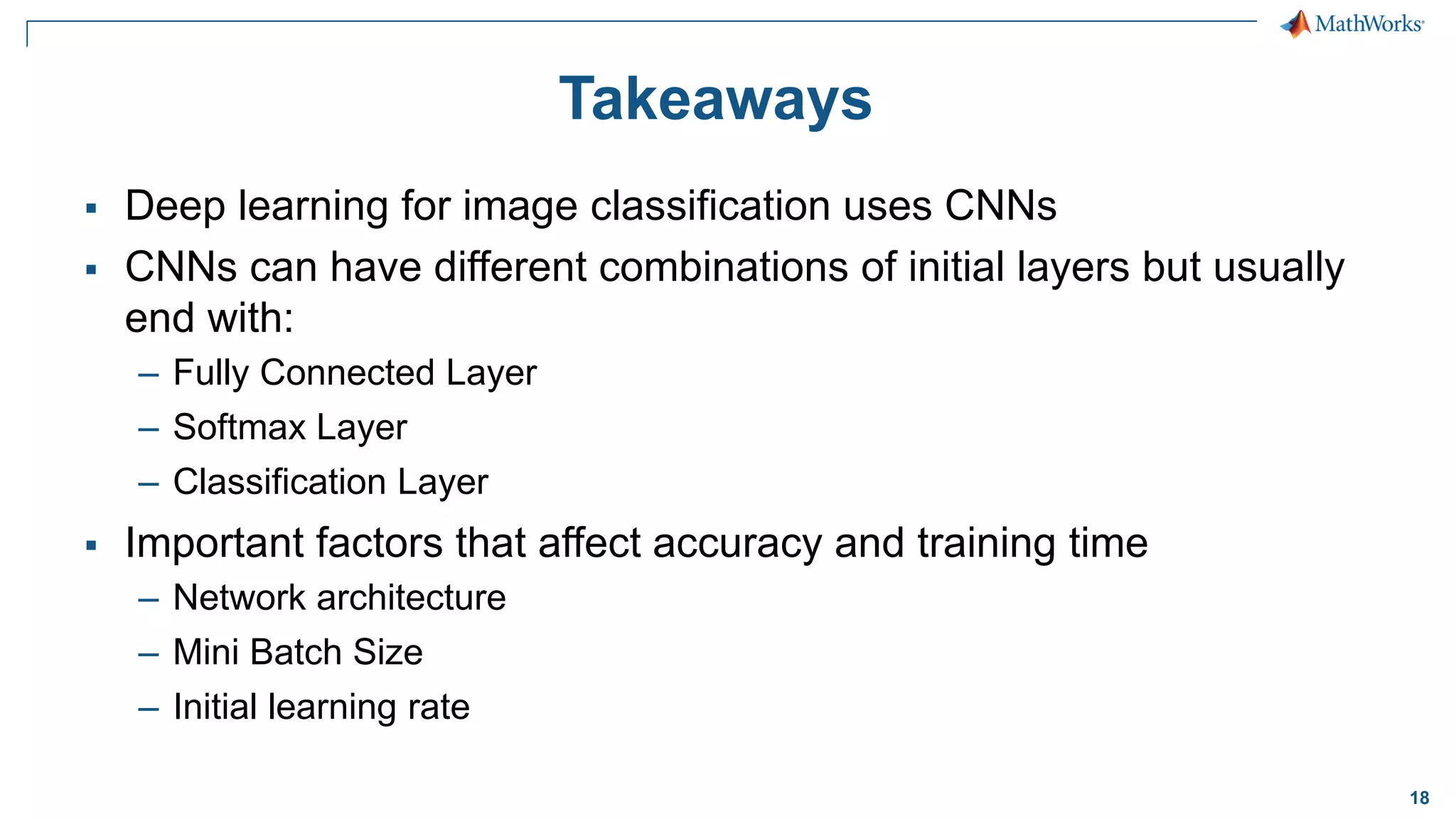
18 Takeaways ▪ Deep learning for image classification uses CNNs ▪ CNNs can have different combinations of initial layers but usually end with: – Fully Connected Layer – Softmax Layer – Classification Layer ▪ Important factors that affect accuracy and training time – Network architecture – Mini Batch Size – Initial learning rate
19 What is deep learning?- Overview Why deep learning? Pretrained networks and Network layers Building your own network Transfer learning with CNNs Agenda
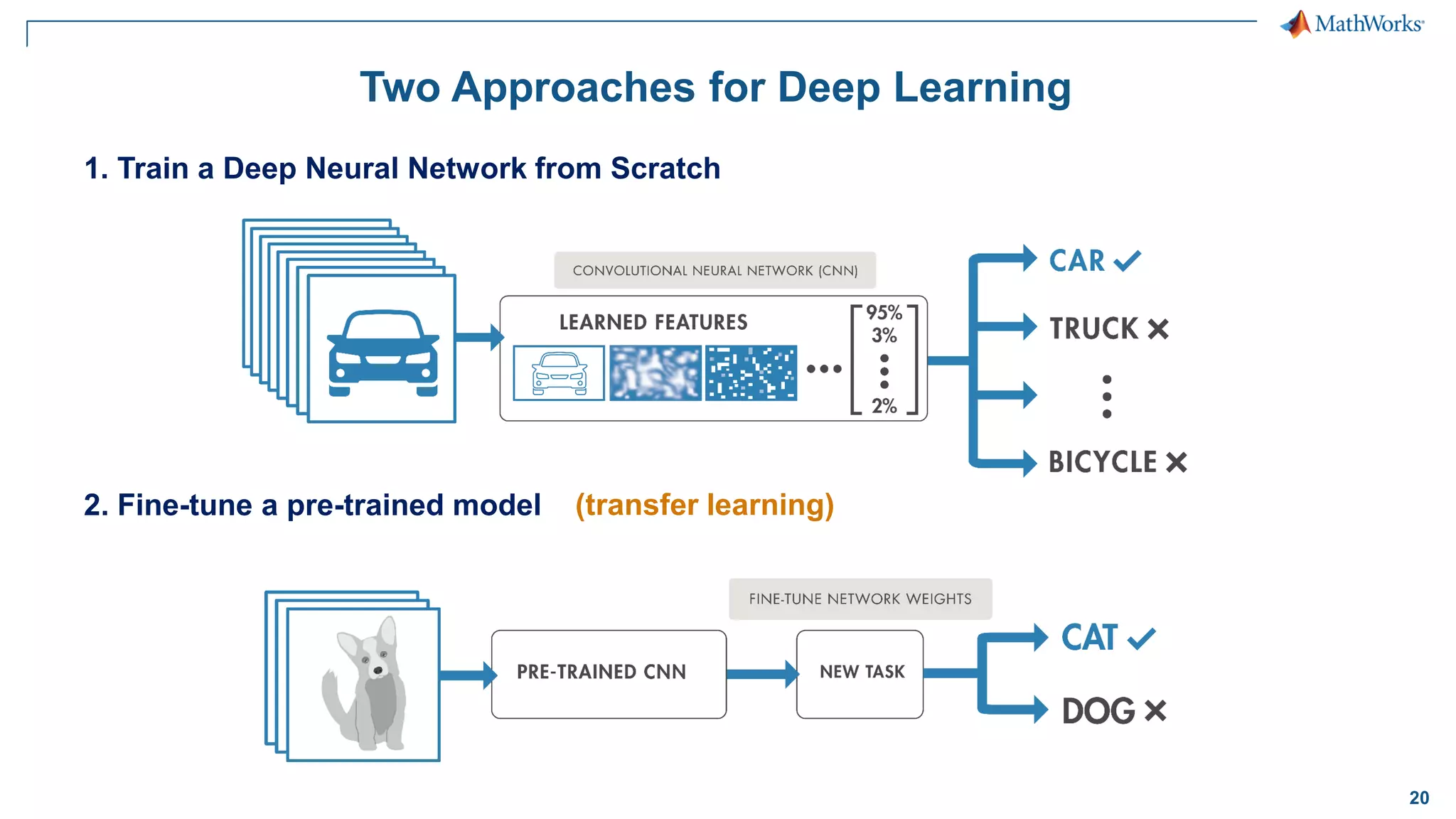
20 Two Approaches for Deep Learning 2. Fine-tune a pre-trained model 1. Train a Deep Neural Network from Scratch (transfer learning)
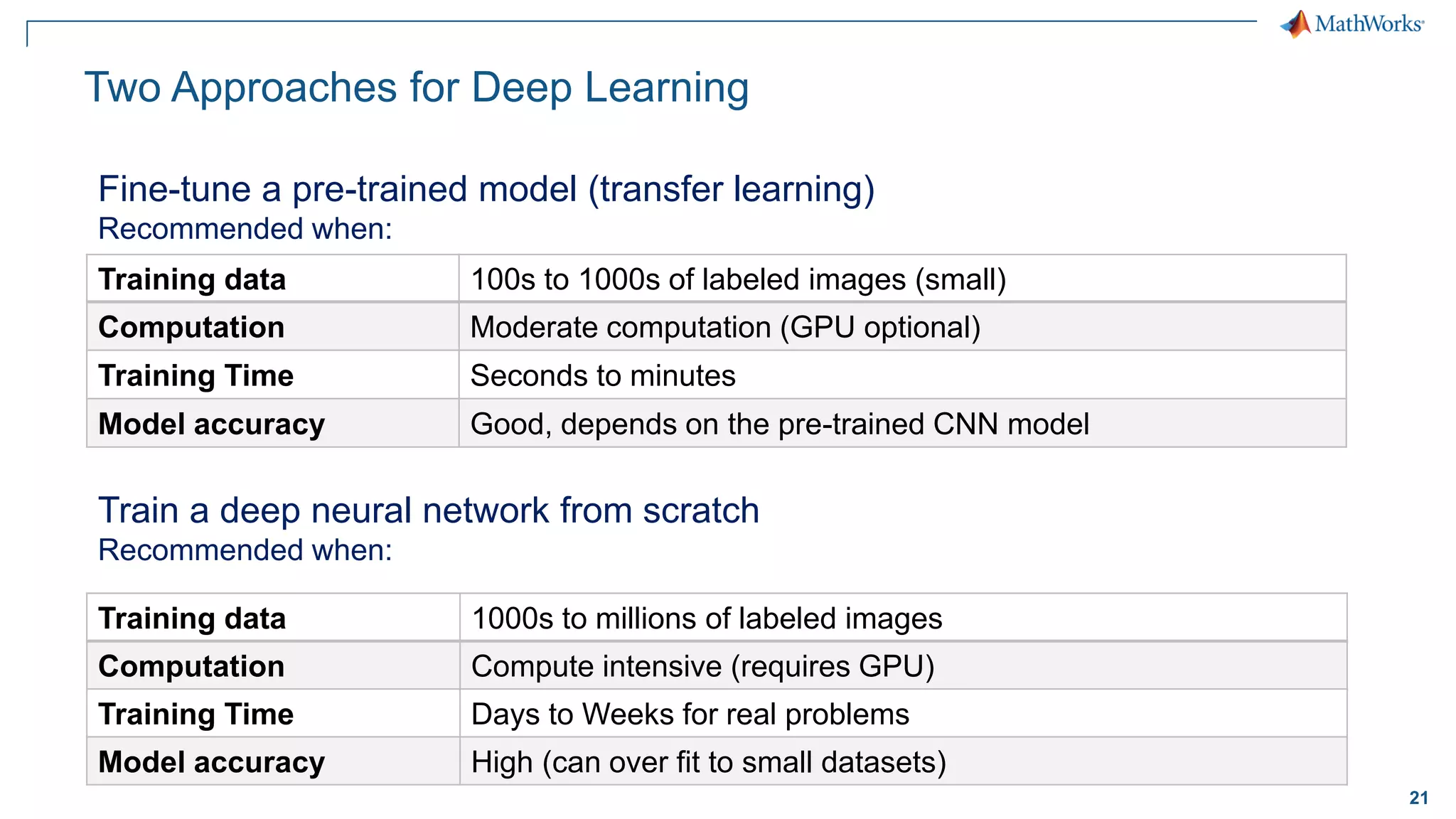
21 Fine-tune a pre-trained model (transfer learning) Recommended when: Training data 100s to 1000s of labeled images (small) Computation Moderate computation (GPU optional) Training Time Seconds to minutes Model accuracy Good, depends on the pre-trained CNN model Train a deep neural network from scratch Recommended when: Training data 1000s to millions of labeled images Computation Compute intensive (requires GPU) Training Time Days to Weeks for real problems Model accuracy High (can over fit to small datasets) Two Approaches for Deep Learning
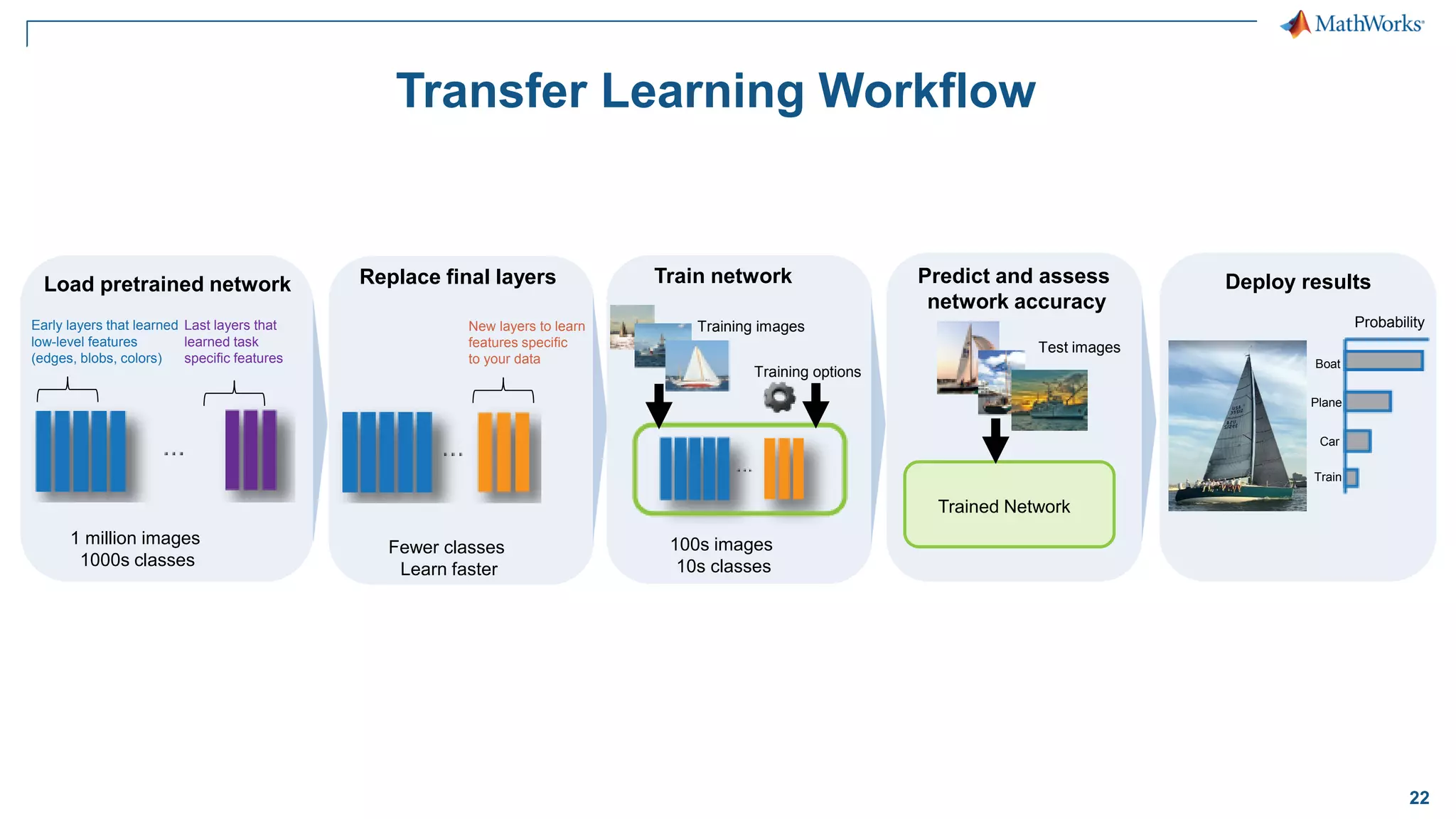
22 Transfer Learning Workflow Probability Boat Plane Car Train Deploy results Early layers that learned low-level features (edges, blobs, colors) Last layers that learned task specific features 1 million images 1000s classes Load pretrained network Fewer classes Learn faster New layers to learn features specific to your data Replace final layers 100s images 10s classes Training images Training options Train network Test images Trained Network Predict and assess network accuracy
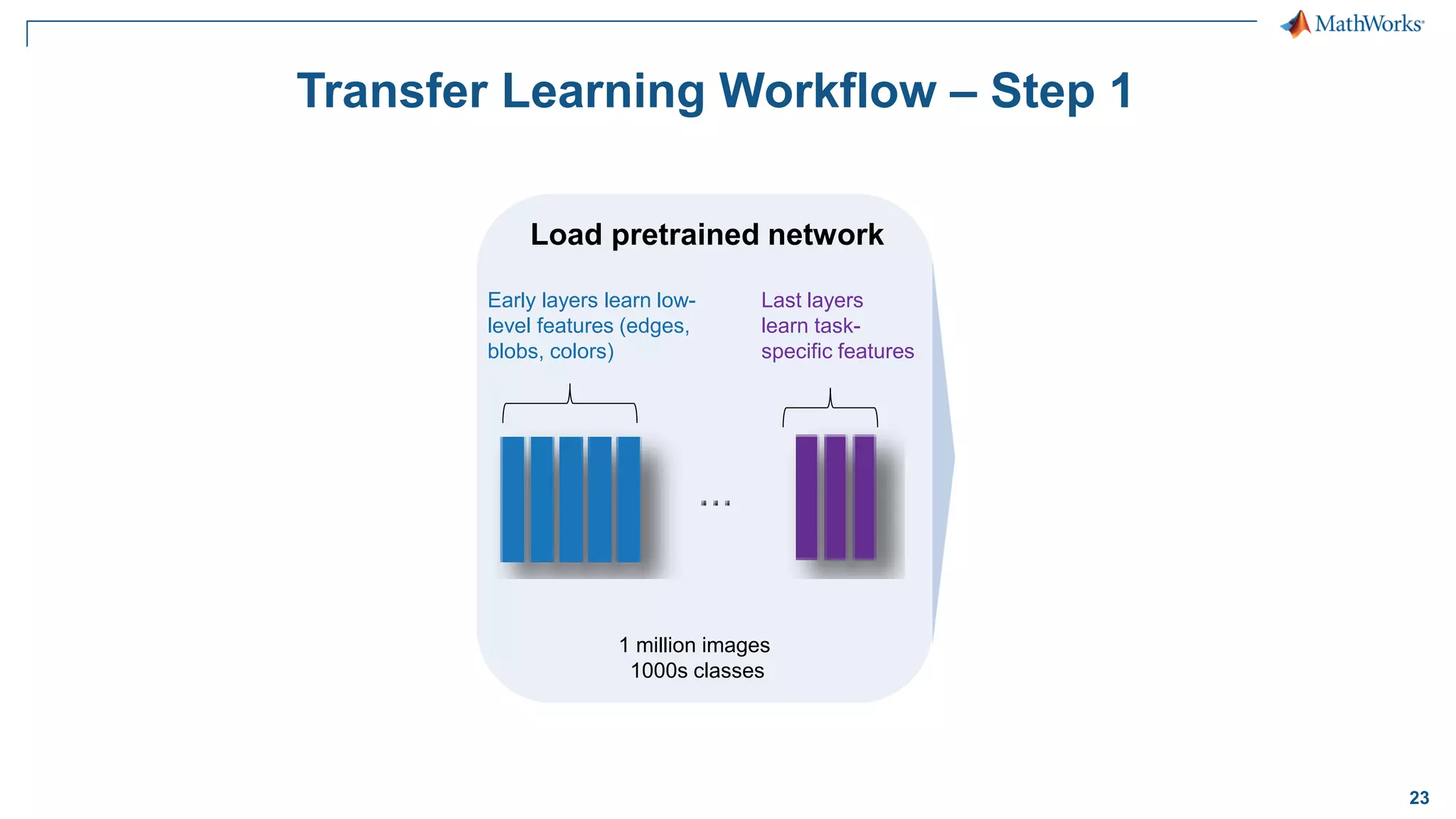
23 Transfer Learning Workflow – Step 1 Early layers learn low- level features (edges, blobs, colors) Last layers learn task- specific features 1 million images 1000s classes Load pretrained network
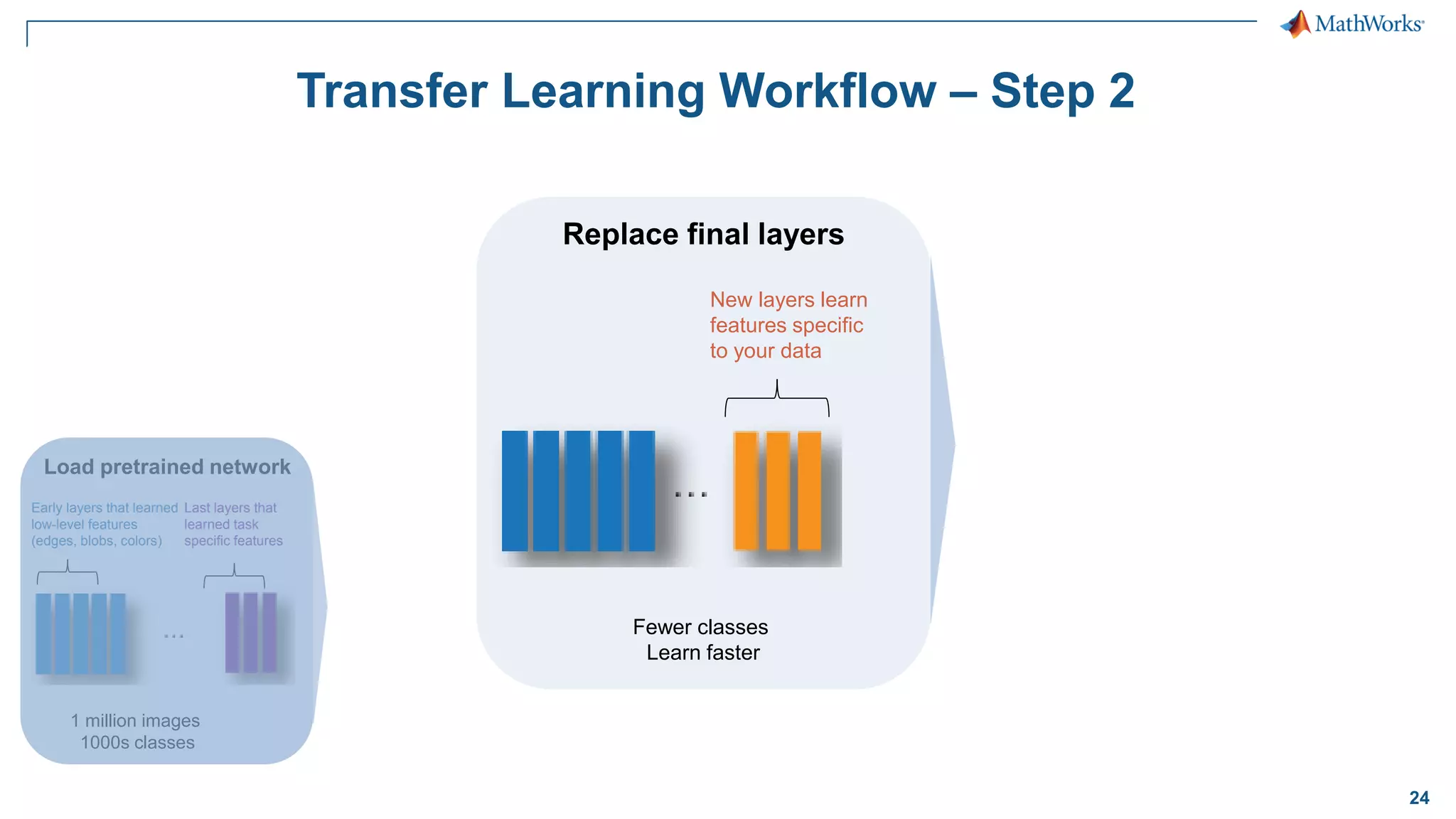
24 Transfer Learning Workflow – Step 2 Early layers that learned low-level features (edges, blobs, colors) Last layers that learned task specific features 1 million images 1000s classes Load pretrained network Fewer classes Learn faster New layers learn features specific to your data Replace final layers
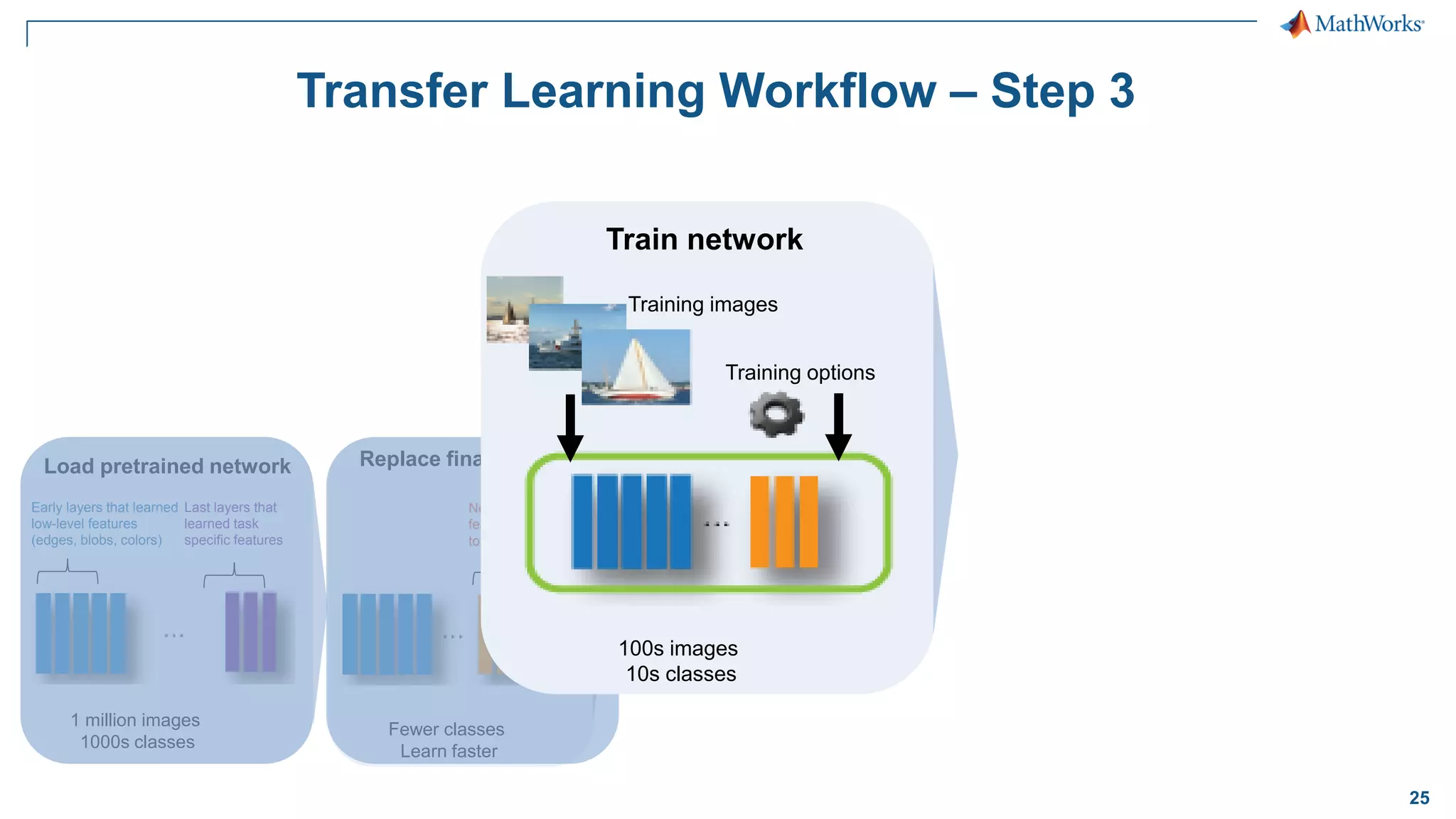
25 Transfer Learning Workflow – Step 3 Early layers that learned low-level features (edges, blobs, colors) Last layers that learned task specific features 1 million images 1000s classes Load pretrained network Fewer classes Learn faster New layers to learn features specific to your data Replace final layers 100s images 10s classes Training images Training options Train network
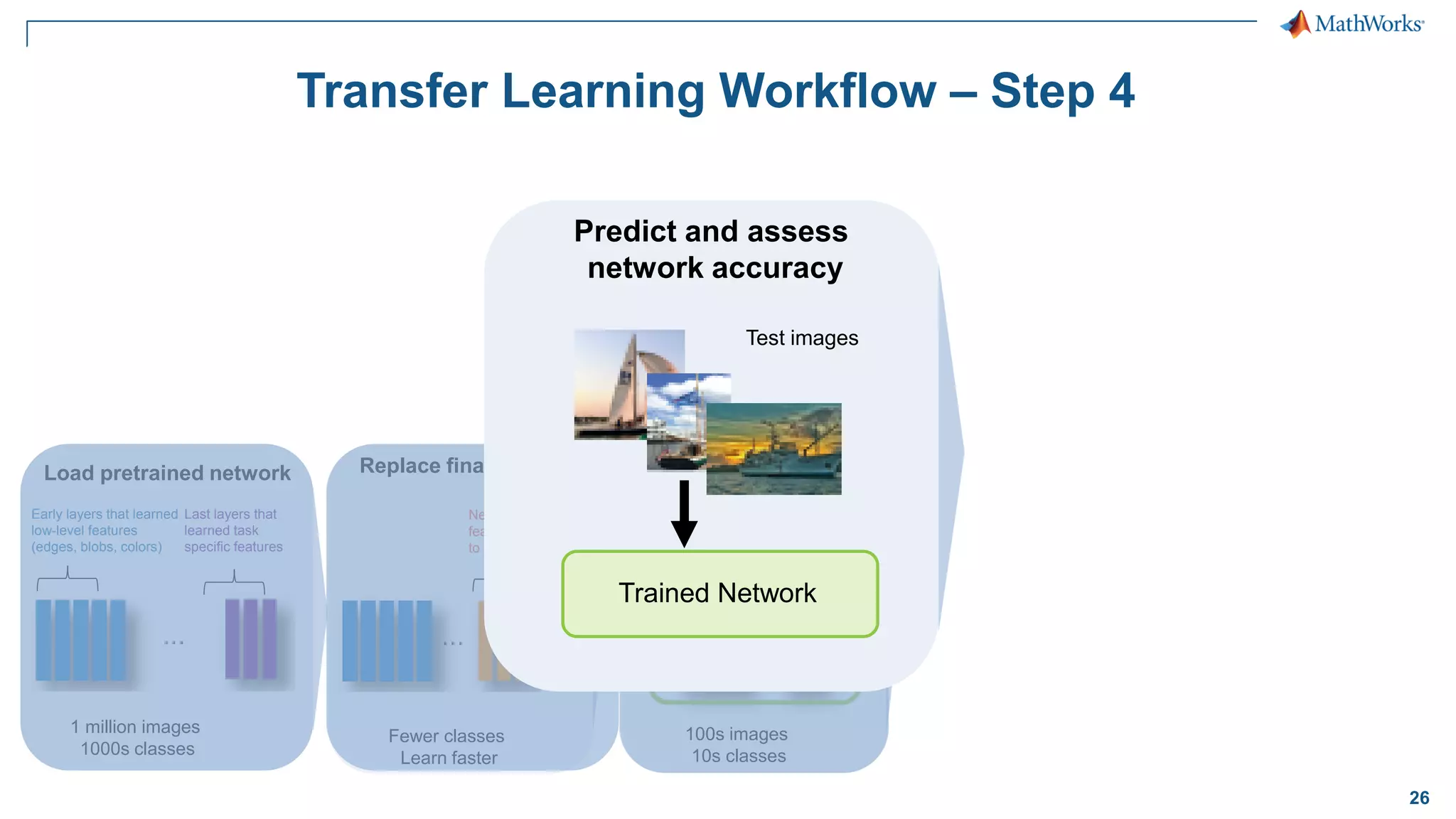
26 100s images 10s classes Training images Training options Train network Transfer Learning Workflow – Step 4 Early layers that learned low-level features (edges, blobs, colors) Last layers that learned task specific features 1 million images 1000s classes Load pretrained network Fewer classes Learn faster New layers to learn features specific to your data Replace final layers Test images Trained Network Predict and assess network accuracy
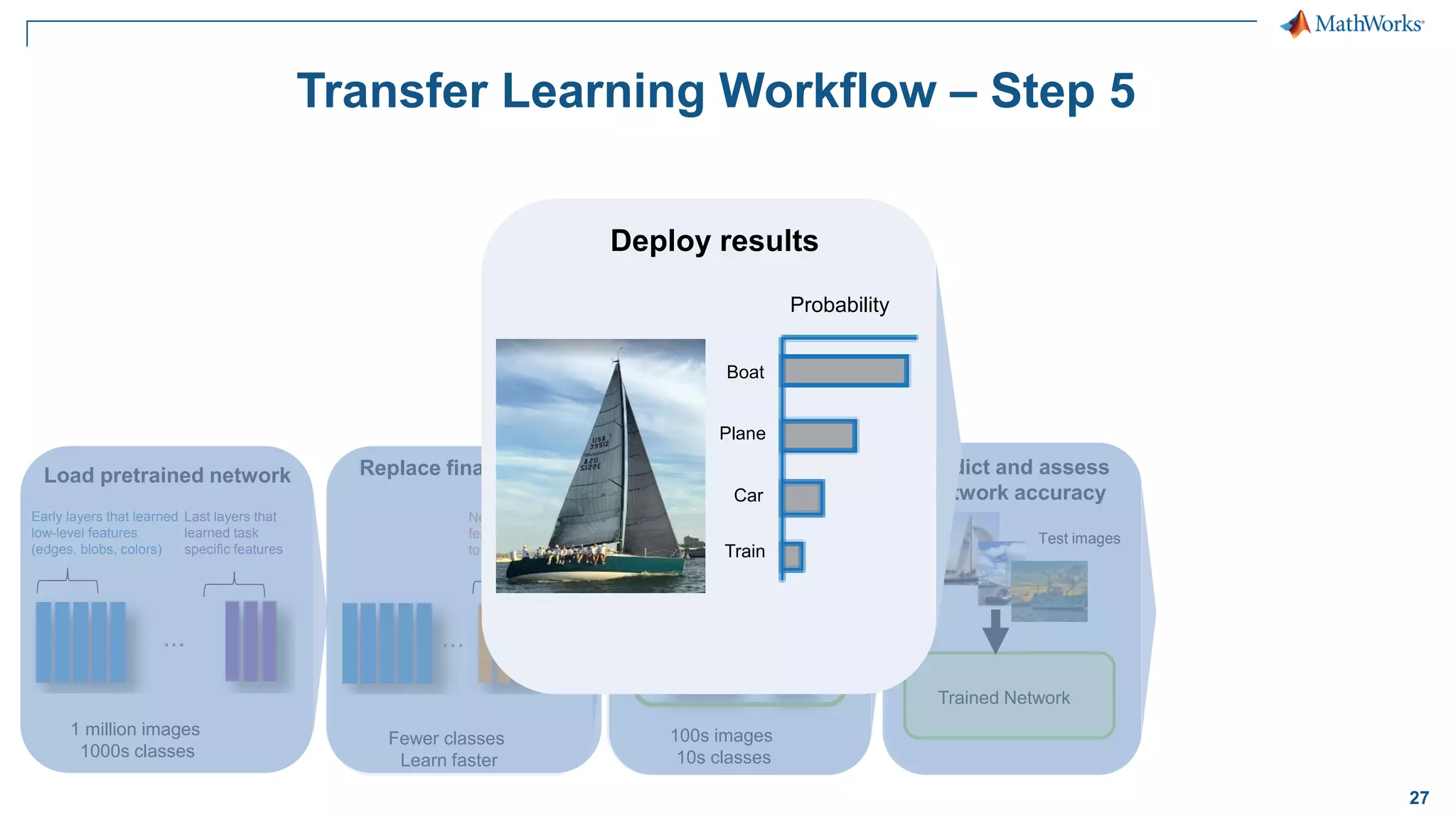
27 Transfer Learning Workflow – Step 5 Early layers that learned low-level features (edges, blobs, colors) Last layers that learned task specific features 1 million images 1000s classes Load pretrained network Fewer classes Learn faster New layers to learn features specific to your data Replace final layers 100s images 10s classes Training images Training options Train network Test images Trained Network Predict and assess network accuracy Test images Trained Network Predict and assess network accuracy Probability Boat Plane Car Train Deploy results
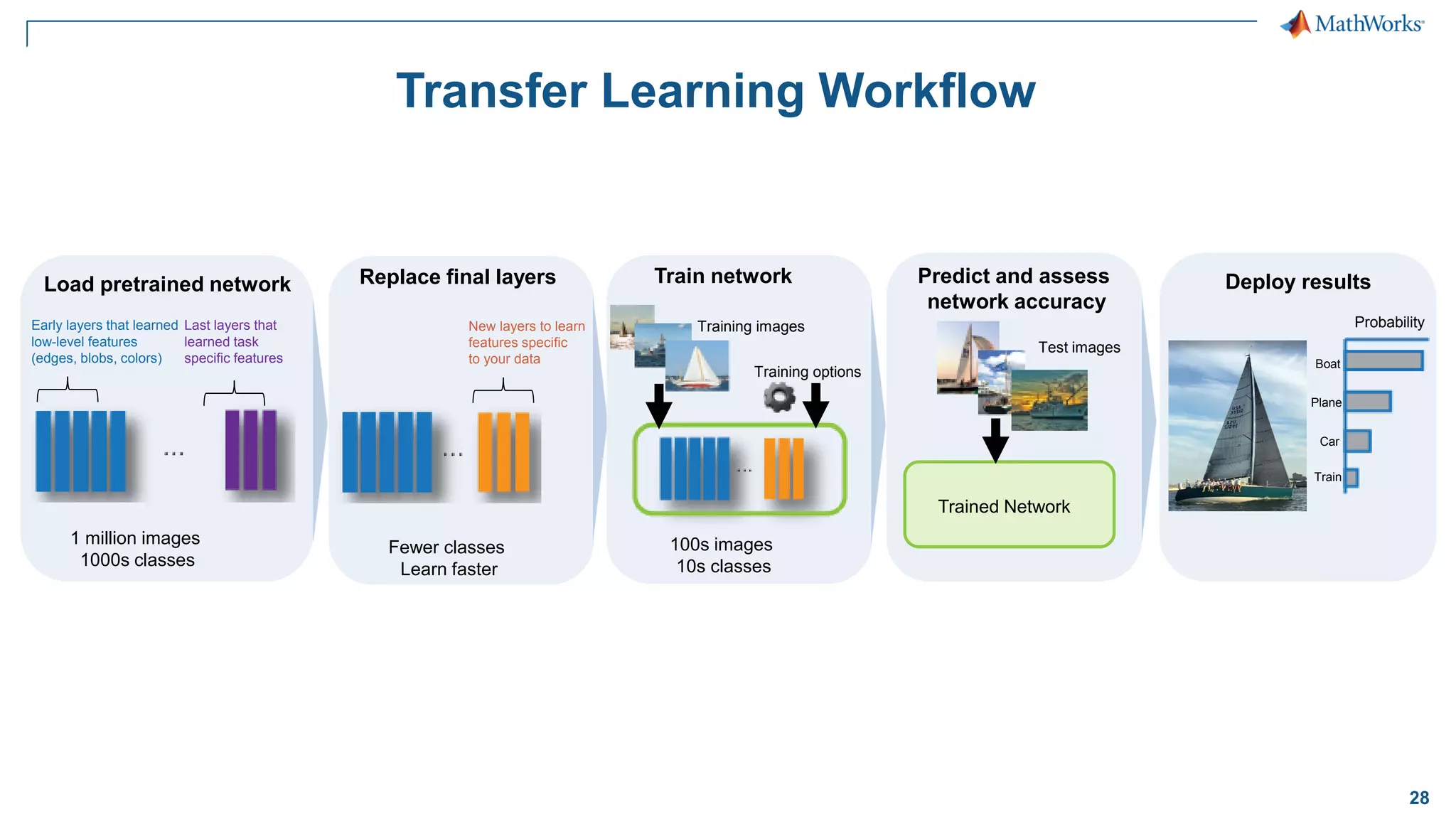
28 Transfer Learning Workflow Probability Boat Plane Car Train Deploy results Early layers that learned low-level features (edges, blobs, colors) Last layers that learned task specific features 1 million images 1000s classes Load pretrained network Fewer classes Learn faster New layers to learn features specific to your data Replace final layers 100s images 10s classes Training images Training options Train network Test images Trained Network Predict and assess network accuracy
29 Let’s try it out! Exercise: SS_SeeFoodTransferLearning.mlx
30 Takeaways – Transfer Learning ▪ Replace last layers with our own layers ▪ Efficient way to modify pre-trained models to our needs ▪ Use an Image datastore when working with lots of images
31 One Step Left – Deployment! Access Data Preprocess Select Network Train Image Acquisition Image Processing Computer Vision System Neural Network Parallel Computing GPU Coder Deploy
32 What Next?
33 Training Services Exploit the full potential of MathWorks products Flexible delivery options: ▪ Public training available in several cities ▪ Onsite training with standard or customized courses ▪ Web-based training with live, interactive instructor-led courses More than 48 course offerings: ▪ Introductory and intermediate training on MATLAB, Simulink, Stateflow, code generation, and Polyspace products ▪ Specialized courses in control design, signal processing, parallel computing, code generation, communications, financial analysis, and other areas www.mathworks.in/training
34 Thank You!
35 Questions?

Deep-learning-for-computer-vision-applications-using-matlab.pdf

  • 1.
    1 © 2017 TheMathWorks, Inc. Deep Learning for Computer Vision Applications Using MATLAB Elza John Training Engineer Arun Mathamkode Application Support Engineer
  • 2.
    2 What is deeplearning?- Overview Why deep learning? Pretrained networks and Network layers Building your own network Transfer learning with CNNs Agenda
  • 3.
    3 Traditional Machine Learning Deeplearning performs end-end learning by learning features, representations and tasks directly from images, text and sound Traditional Machine Learning Machine Learning Classification Feature Extraction Truck Car ✓ Bicycle   Handcrafted Features Deep Learning … 𝟗𝟓% 𝟑%   𝟐% Truck Car ✓ Bicycle   Convolutional Neural Network (CNN) Learned features End-to-end learning Feature learning + Classification vs Deep Learning
  • 4.
    4 Deep learning Applications SemanticSegmentation Vehicle Detection
  • 5.
    5 What is deeplearning?- Overview Why deep learning? Pretrained networks and Network layers Building your own network Transfer learning with CNNs Agenda
  • 6.
    6 Deep learning modelscan surpass human accuracy. Human Accuracy Source: ILSVRC Top-5 Error on ImageNet
  • 7.
    7 Deep Learning Enablers Labeledpublic datasets Increased GPU acceleration World-class models AlexNet PRETRAINED MODEL Caffe M O D E L S ResNet PRETRAINED MODEL TensorFlow/Keras M O D E L S VGG-16 PRETRAINED MODEL GoogLeNet PRETRAINED MODEL
  • 8.
    8 Let’s try itout! Exercise: SS_DeepLearningIn5Lines.mlx
  • 9.
    9 What is deeplearning?- Overview Why deep learning? Pretrained networks and Network layers Building your own network Transfer learning with CNNs Agenda
  • 10.
    10 Pre-Trained Models andNetwork Architectures Pretrained Models ▪ AlexNet ▪ VGG-16 ▪ VGG-19 ▪ GoogLeNet ▪ Resnet50 ▪ Resnet101 Import Models from Frameworks ▪ Caffe Model Importer (including Caffe Model Zoo) – importCaffeLayers – importCaffeNetwork ▪ TensorFlow-Keras Model Importer – importKerasLayers – importKerasNetwork Download from within MATLAB net = alexnet; net = vgg16; net = vgg19; net = googlenet; net = resnet50; net = resnet101
  • 11.
    11 Deep Learning Usesa Neural Network Architecture Input Layer Hidden Layers (n) Output Layer
  • 12.
    12 Convolutional Neural Network Convolution+ ReLU Pooling Input Convolution + ReLU Pooling … … Flatten Fully Connected Softmax dog … cat … … Feature Learning Classification goldfish✓  
  • 13.
    14 Takeaways ▪ Pre-trained networkshave a pre-determined layer order that makes them effective for classifying images – Typically trained to classify lots of images ▪ Great starting point, but not consistently accurate – We’ll fix this later with transfer learning!
  • 14.
    15 What is deeplearning?- Overview Why deep learning? Pretrained networks and Network layers Building your own network Transfer learning with CNNs Agenda
  • 15.
    16 Deep Learning Workflow PreprocessImages Define Layers in CNN Set training options Train the network Test/deploy trained network Repeat these steps until network reaches desired level of accuracy
  • 16.
    17 Let’s try itout! Exercise: SS_MNIST_HandwritingRecognition.mlx
  • 17.
    18 Takeaways ▪ Deep learningfor image classification uses CNNs ▪ CNNs can have different combinations of initial layers but usually end with: – Fully Connected Layer – Softmax Layer – Classification Layer ▪ Important factors that affect accuracy and training time – Network architecture – Mini Batch Size – Initial learning rate
  • 18.
    19 What is deeplearning?- Overview Why deep learning? Pretrained networks and Network layers Building your own network Transfer learning with CNNs Agenda
  • 19.
    20 Two Approaches forDeep Learning 2. Fine-tune a pre-trained model 1. Train a Deep Neural Network from Scratch (transfer learning)
  • 20.
    21 Fine-tune a pre-trainedmodel (transfer learning) Recommended when: Training data 100s to 1000s of labeled images (small) Computation Moderate computation (GPU optional) Training Time Seconds to minutes Model accuracy Good, depends on the pre-trained CNN model Train a deep neural network from scratch Recommended when: Training data 1000s to millions of labeled images Computation Compute intensive (requires GPU) Training Time Days to Weeks for real problems Model accuracy High (can over fit to small datasets) Two Approaches for Deep Learning
  • 21.
    22 Transfer Learning Workflow Probability Boat Plane Car Train Deployresults Early layers that learned low-level features (edges, blobs, colors) Last layers that learned task specific features 1 million images 1000s classes Load pretrained network Fewer classes Learn faster New layers to learn features specific to your data Replace final layers 100s images 10s classes Training images Training options Train network Test images Trained Network Predict and assess network accuracy
  • 22.
    23 Transfer Learning Workflow– Step 1 Early layers learn low- level features (edges, blobs, colors) Last layers learn task- specific features 1 million images 1000s classes Load pretrained network
  • 23.
    24 Transfer Learning Workflow– Step 2 Early layers that learned low-level features (edges, blobs, colors) Last layers that learned task specific features 1 million images 1000s classes Load pretrained network Fewer classes Learn faster New layers learn features specific to your data Replace final layers
  • 24.
    25 Transfer Learning Workflow– Step 3 Early layers that learned low-level features (edges, blobs, colors) Last layers that learned task specific features 1 million images 1000s classes Load pretrained network Fewer classes Learn faster New layers to learn features specific to your data Replace final layers 100s images 10s classes Training images Training options Train network
  • 25.
    26 100s images 10s classes Trainingimages Training options Train network Transfer Learning Workflow – Step 4 Early layers that learned low-level features (edges, blobs, colors) Last layers that learned task specific features 1 million images 1000s classes Load pretrained network Fewer classes Learn faster New layers to learn features specific to your data Replace final layers Test images Trained Network Predict and assess network accuracy
  • 26.
    27 Transfer Learning Workflow– Step 5 Early layers that learned low-level features (edges, blobs, colors) Last layers that learned task specific features 1 million images 1000s classes Load pretrained network Fewer classes Learn faster New layers to learn features specific to your data Replace final layers 100s images 10s classes Training images Training options Train network Test images Trained Network Predict and assess network accuracy Test images Trained Network Predict and assess network accuracy Probability Boat Plane Car Train Deploy results
  • 27.
    28 Transfer Learning Workflow Probability Boat Plane Car Train Deployresults Early layers that learned low-level features (edges, blobs, colors) Last layers that learned task specific features 1 million images 1000s classes Load pretrained network Fewer classes Learn faster New layers to learn features specific to your data Replace final layers 100s images 10s classes Training images Training options Train network Test images Trained Network Predict and assess network accuracy
  • 28.
    29 Let’s try itout! Exercise: SS_SeeFoodTransferLearning.mlx
  • 29.
    30 Takeaways – TransferLearning ▪ Replace last layers with our own layers ▪ Efficient way to modify pre-trained models to our needs ▪ Use an Image datastore when working with lots of images
  • 30.
    31 One Step Left– Deployment! Access Data Preprocess Select Network Train Image Acquisition Image Processing Computer Vision System Neural Network Parallel Computing GPU Coder Deploy
  • 31.
  • 32.
    33 Training Services Exploit thefull potential of MathWorks products Flexible delivery options: ▪ Public training available in several cities ▪ Onsite training with standard or customized courses ▪ Web-based training with live, interactive instructor-led courses More than 48 course offerings: ▪ Introductory and intermediate training on MATLAB, Simulink, Stateflow, code generation, and Polyspace products ▪ Specialized courses in control design, signal processing, parallel computing, code generation, communications, financial analysis, and other areas www.mathworks.in/training
  • 33.
  • 34.