GwtQuery: A jQuery clone for GWT, and much more ... Manuel Carrasco Moñino manolo@apache.org @dodotis
About me ● Apache James ● HUPA ● GWT ● Gquery & Gquery-plugins ● GwtExporter ● GwtUpload ● Chronoscope ● Jenkins ● Performance plugin ● Emma plugin ● Linux ● LXP a light and visual window manager based on icewm
Contents ● What is GWT ● What is Gquery ● Learning Gquery – GQuery, $(), Function – Collections & grabbing Values – Selectors – Traversing the DOM – Method Chaining – CSS – Events – Effects – Ajax – Data binding – Plugins ● Js Size ● jsQuery
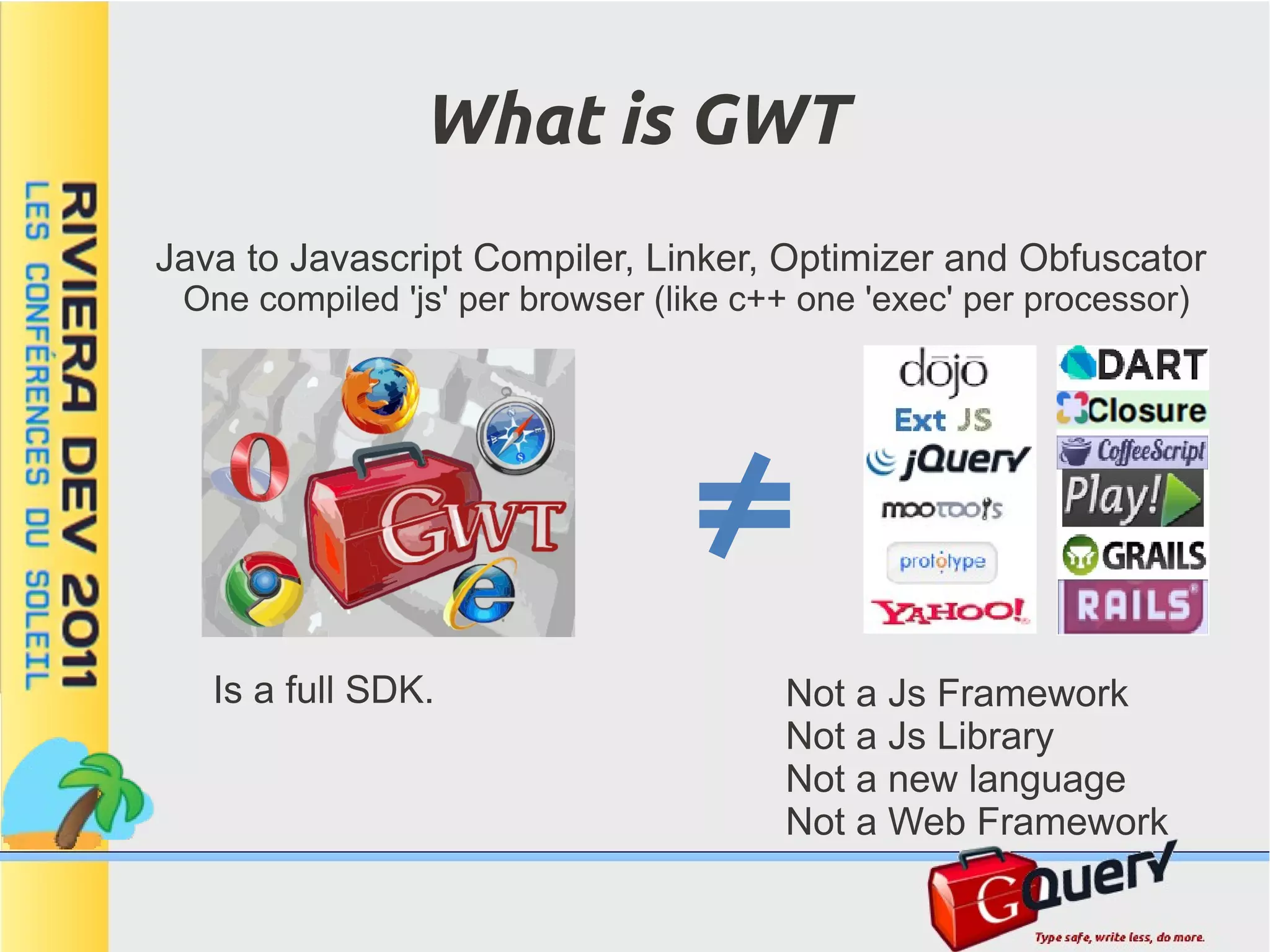
What is GWT Java to Javascript Compiler, Linker, Optimizer and Obfuscator One compiled 'js' per browser (like c++ one 'exec' per processor) Is a full SDK. Not a Js Framework Not a Js Library Not a new language Not a Web Framework
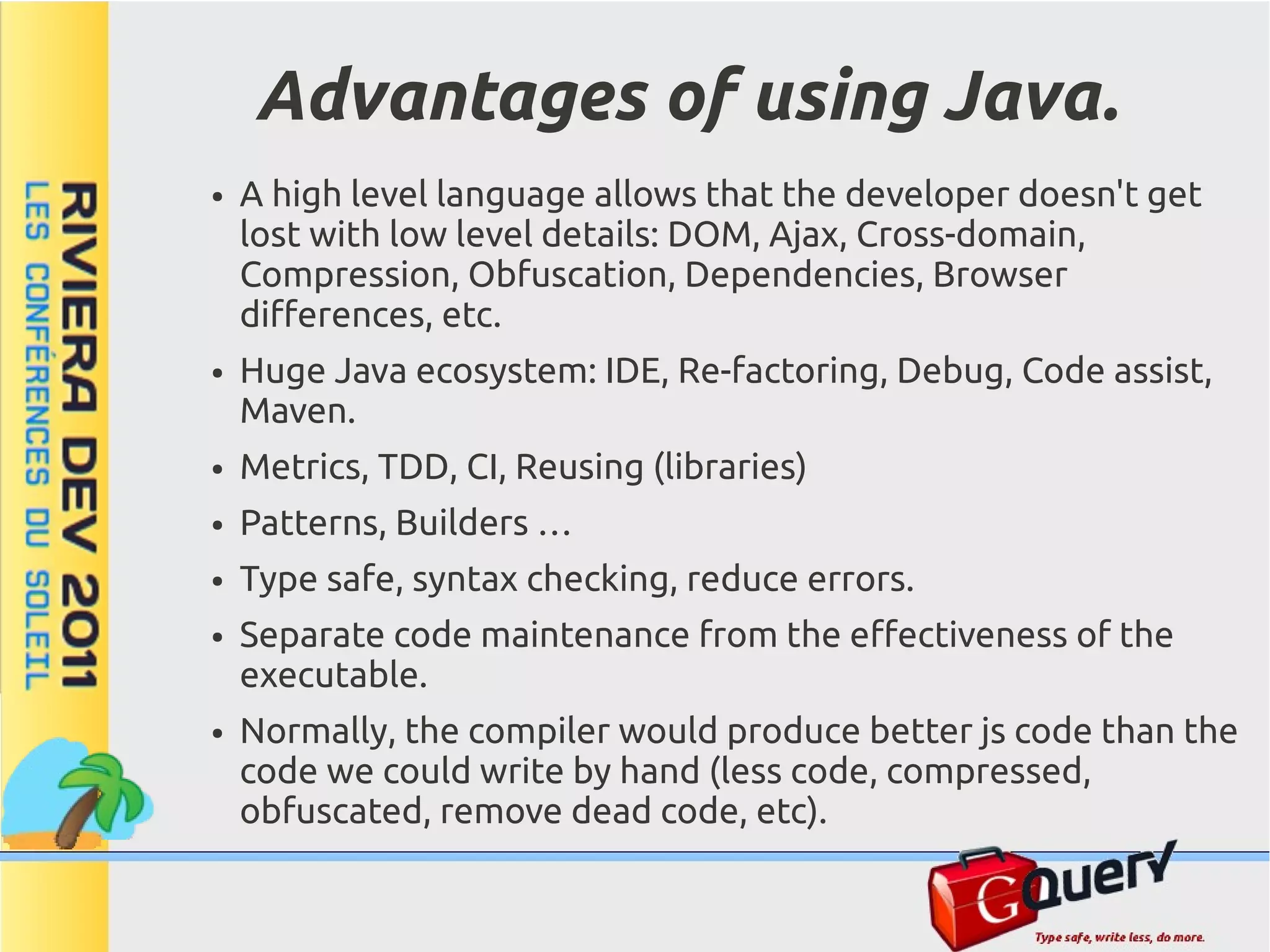
Advantages of using Java. ● A high level language allows that the developer doesn't get lost with low level details: DOM, Ajax, Cross-domain, Compression, Obfuscation, Dependencies, Browser differences, etc. ● Huge Java ecosystem: IDE, Re-factoring, Debug, Code assist, Maven. ● Metrics, TDD, CI, Reusing (libraries) ● Patterns, Builders … ● Type safe, syntax checking, reduce errors. ● Separate code maintenance from the effectiveness of the executable. ● Normally, the compiler would produce better js code than the code we could write by hand (less code, compressed, obfuscated, remove dead code, etc).
What does the Gwt SDK provide ● Generators, Compiler, Linker, Optimizer, Obfuscater. ● Client side libraries: DOM, XML, JSON, RPC, RF, I18n, MVP, Widgets ● Server libraries: RPC, RF ● Eclipse plugin ● Multi-browser Dev mode ● Unit testing and Debug tools. ● Performance tools (speed tracer) ● Compiler Statistics ● Everything is open sourced (Apache v2.0)
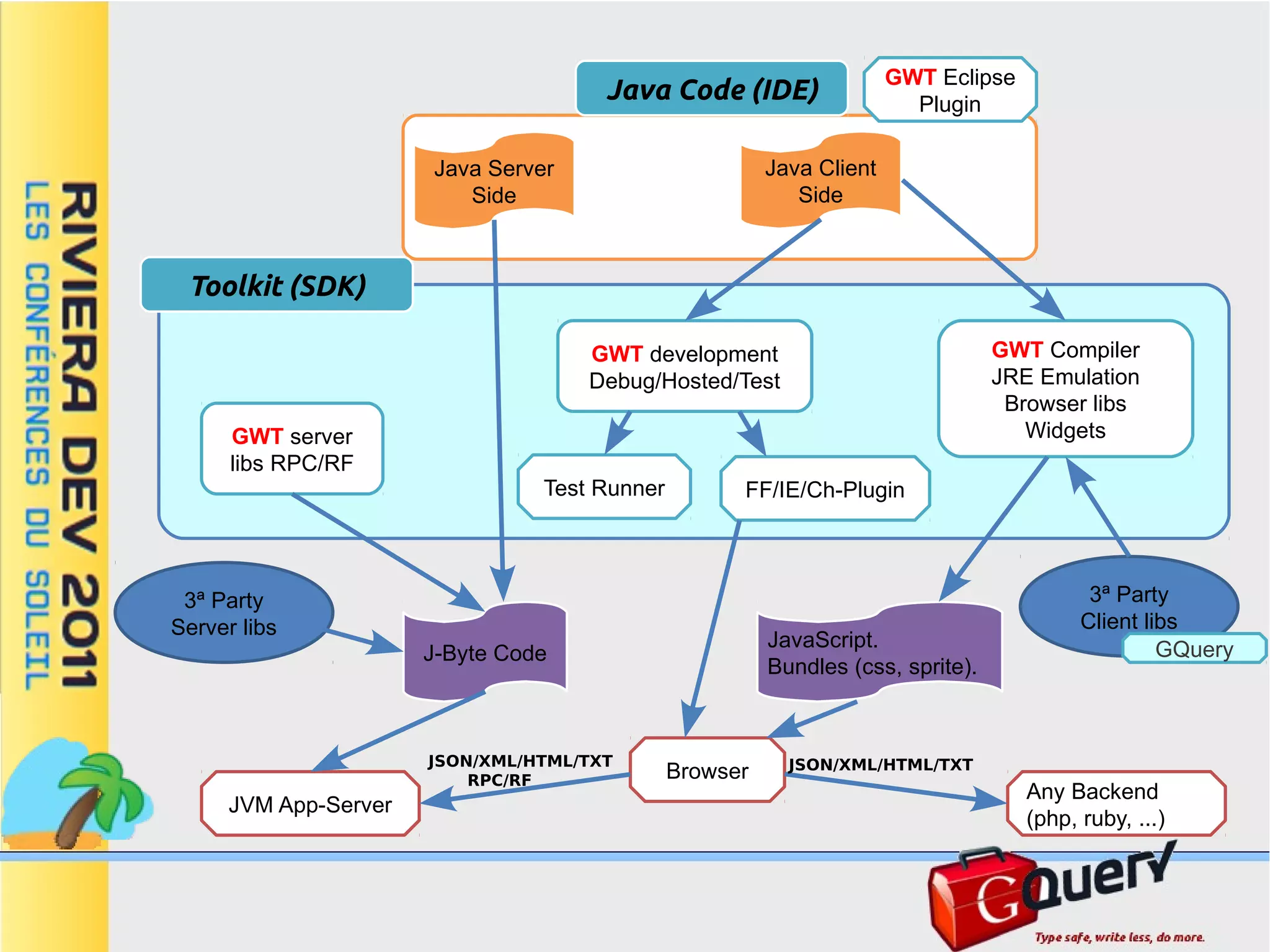
GWT Eclipse Java Code (IDE) Plugin Java Server Java Client Side Side Toolkit (SDK) GWT development GWT Compiler Debug/Hosted/Test JRE Emulation Browser libs GWT server Widgets libs RPC/RF Test Runner FF/IE/Ch-Plugin 3ª Party 3ª Party Server libs Client libs JavaScript. GQuery J-Byte Code Bundles (css, sprite). JSON/XML/HTML/TXT JSON/XML/HTML/TXT RPC/RF Browser Any Backend JVM App-Server (php, ruby, ...)
What is GQuery ● A library for GWT ● Provides jQuery API and syntax (small differences) ● Entirely re-written in java, not a wrapper, optimized for Gwt. ● Has many features not available in jQuery. – Data binding generators – Type-safe structures – Compile selectors ● It is a useful complement for Gwt. – CSS selectors – Widget finders – Light weight collections – DOM and Widget enhancers. ● Can be used as an alternative to traditional Gwt developing (progressive enhancement) ● Performance in mind, Unit tested. ● Extensible via Plugins
Easy to getting started ● Use the gquery maven Archetype. mvn archetype:generate -DarchetypeGroupId=com.googlecode.gwtquery -DarchetypeArtifactId=gquery-archetype -DarchetypeVersion=1.1.2 -DgroupId=fr.rivieradev -DartifactId=hello -DprojectName=HelloWorld ● Maven Ready (see README.txt). mvn clean package mvn gwt:run
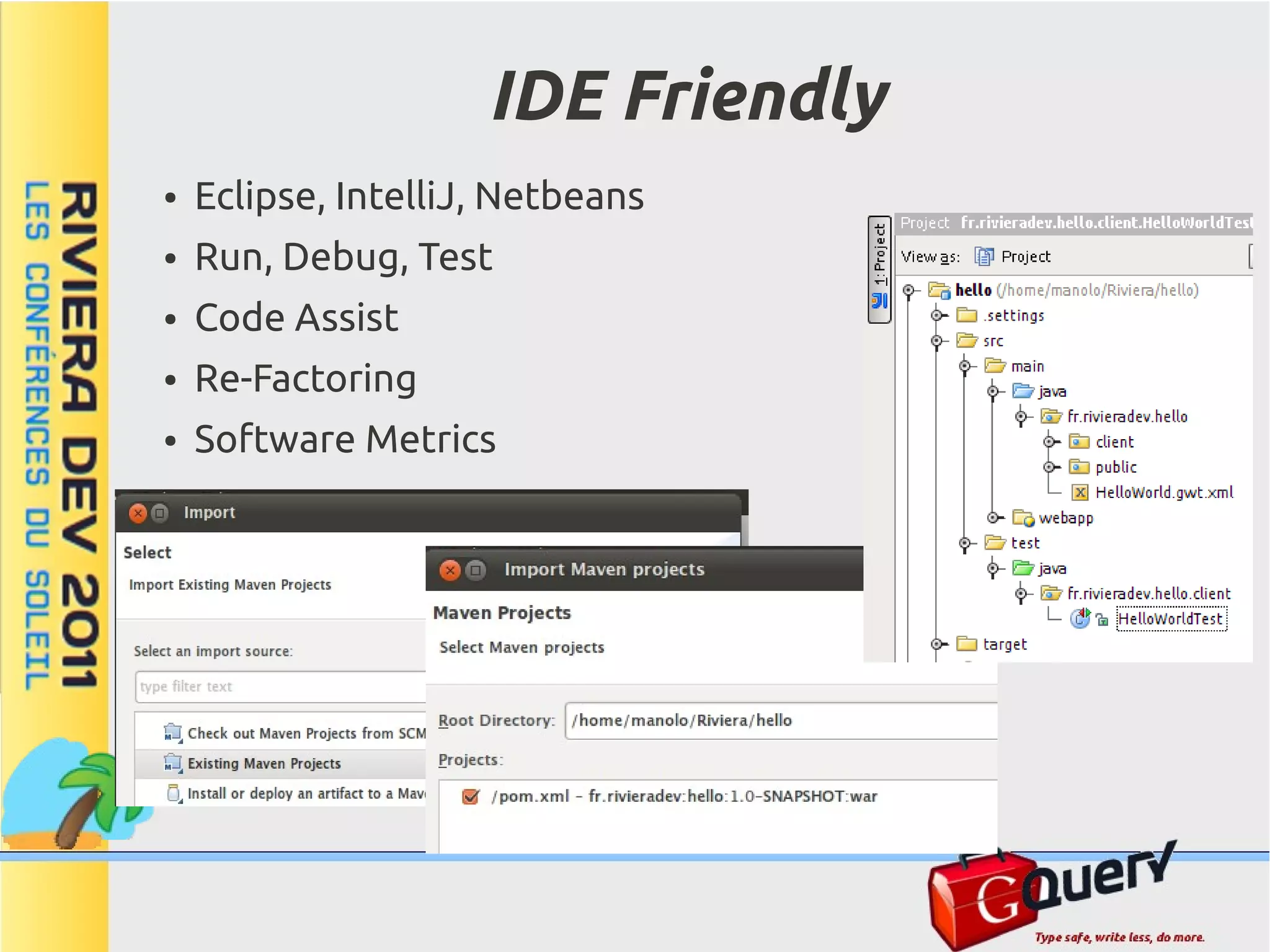
IDE Friendly ● Eclipse, IntelliJ, Netbeans ● Run, Debug, Test ● Code Assist ● Re-Factoring ● Software Metrics
The GQuery Object ● Like in jQuery ... ● Selectors return an object ... ● Which represents a collection of Elements ... ● And each has plenty of useful methods. ● Most methods return the object itself so you can chain them. ● Other methods return a value of the first element GQuery g = $("img.photo"); g.attr("src", "/default.png"); String color = g.css("color"); int size = $("img.photo").css("border", "none").size();
The Dollar '$()' Method ● As in Javascript, the symbol '$' is legal for methods and classes. ● But The Gwt Compiler disallows it for class names, So we use GQuery. // Import GQuery utility methods statically // it should be ...client.$.* but the compiler complains import static com.google.gwt.query.client.GQuery.*; // The '$' method always returns a GQuery object GQuery g; // Use '$' to create new DOM elements g = $("<div>hello</div>"); // Use '$' to select DOM elements g = $("div:hidden"); // Use '$' to wrap existing elements g = $(document); // Use '$' to wrap Gwt widgets Button button = new Button(); g = $(button); // '$' can handle other arguments: // Function, Event, Element[], NodeList ...
Functions ● java hasn't got closures. ● We use 'Function' inner class to emulate javascript function ● Override the appropriate 'f()' to write your code
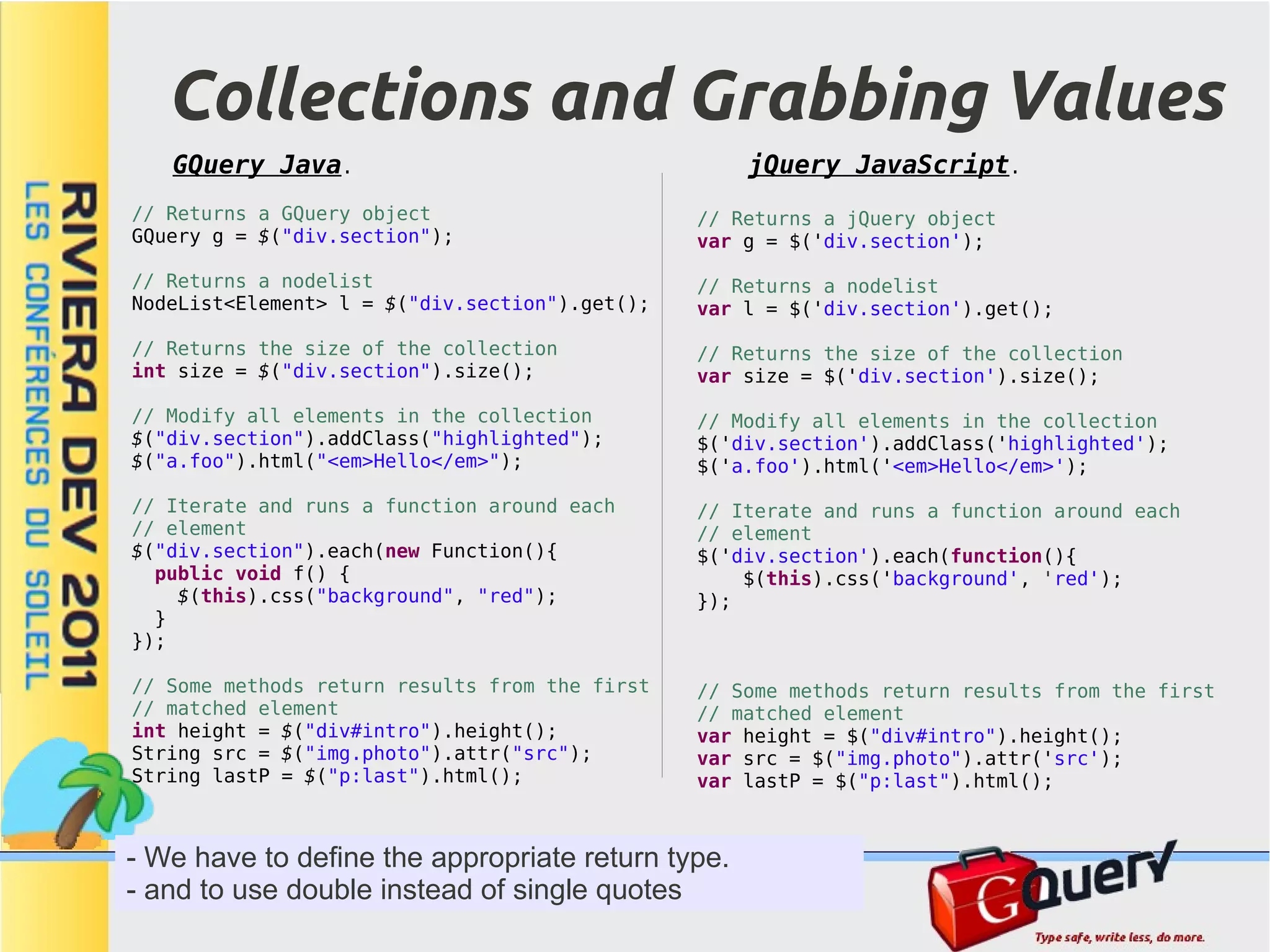
Collections and Grabbing Values GQuery Java. jQuery JavaScript. // Returns a GQuery object // Returns a jQuery object GQuery g = $("div.section"); var g = $('div.section'); // Returns a nodelist // Returns a nodelist NodeList<Element> l = $("div.section").get(); var l = $('div.section').get(); // Returns the size of the collection // Returns the size of the collection int size = $("div.section").size(); var size = $('div.section').size(); // Modify all elements in the collection // Modify all elements in the collection $("div.section").addClass("highlighted"); $('div.section').addClass('highlighted'); $("a.foo").html("<em>Hello</em>"); $('a.foo').html('<em>Hello</em>'); // Iterate and runs a function around each // Iterate and runs a function around each // element // element $("div.section").each(new Function(){ $('div.section').each(function(){ public void f() { $(this).css('background', 'red'); $(this).css("background", "red"); }); } }); // Some methods return results from the first // Some methods return results from the first // matched element // matched element int height = $("div#intro").height(); var height = $("div#intro").height(); String src = $("img.photo").attr("src"); var src = $("img.photo").attr('src'); String lastP = $("p:last").html(); var lastP = $("p:last").html(); - We have to define the appropriate return type. - and to use double instead of single quotes
Selectors ● Both GQuery and jQuery are built around selectors. ● Both support CSS standard selectors plus extra selectors (:text :password :hidden etc). ● jQuery uses the sizzle engine. A javascript engine which works with any browser and has optimizations per browser. ● GQuery has optimized engines written in java. ● The more appropriate engine is selected in compile time. ● GQuery uses a modified sizzle version for IE6/7 ● GQuery adds compile-time optimizations when using compiled selectors.
Dynamic selectors $("#note"); ● Use $(string) with dynamic selectors $(".note"); $("body"); $("div p"); ● Add the context if the target $("div + p"); $("div .example"); elements have not been attached yet $("div > div"); $("div ~ p"); or to improve performance. $("h1[id]:contains(Selectors)"); $("tr:first"); $("tr:last"); ● It supports XML documents as well $("*:checked"); $("*:visible"); $("a[href][lang][class]"); $("div:not(.example)"); $("div[class]"); $("div[class*=e]"); String className = "note"; $("div[class=example]"); $("." + className); $("div[class~=dialog]"); $("div[class^=exa]"); // Specify the context to improve performance $("div[class$=mple]"); Element e = DOM.getElementById("whatever"); $("p:first-child"); $(".note", e); $("p:last-child"); $("p:nth-child(n)"); // Use the context with unattached elements $("p:nth-child(2n)"); Widget w = new MyWidget(); $("p:nth-child(2n+1)"); $(".note", w); $("p:nth-child(even)"); $("p:nth-child(odd)"); $("p:only-child"); [...]
Compiled Selectors ● Use them with immutable selectors. ● And when selector performance is a goal in your application. ● Context is supported interface MySelectors extends Selectors { @Selector("*:checked") GQuery allChecked(); @Selector("*:checked") GQuery allChecked(Node context); } public void onModuleLoad() { MySelectors selectors = GWT.create(MySelectors.class); selectors.allChecked(); Element e = DOM.getElementById("whatever"); selectors.allChecked(e); }
Selectors Performance → Click to open the benchmarking application
Selectors Performance ● GQuery in compiled mode produces the faster javascript code to select DOM elements. ● GQuery dynamic selectors are, in most cases, faster or equal than any other library.
Traversing the Dom ● Like jQuery, GQuery provides enhanced methods for traversing the DOM GQuery nextSibling = $("div.section").next(); GQuery prevSibling = $("div.section").prev(); GQuery prevAnchorSibling = $("div.section").prev("a"); GQuery firstParent = $("div.section").parent(); GQuery allParents = $("div.section").parents(); ● Additionally it provides useful method to locate Gwt Widgets. // We can traverse the DOM to locate widgets // Return the CellTree widget whose id is myTree CellTree tree = $("#myTree").widget(); // Now we can use the instance tree.addCloseHandler(...); // Return all gwt Labels in the dom List<Label> allLabels = $("div").widgets(Label.class);
Chaining Methods ● Most GQuery methods return another GQuery object often representing the same collection. This means that you can chain methods together. $("div.section").show().addClass("comeBack"); ● Crazy chaining. $("form#login") // hide all the labels inside the form with the "optional" class .find("label.optional").hide().end() // add a red border to any password fields in the form .find("input:password").css("border", "1px solid red").end() // add a submit handler to the form .submit(new Function(){ public boolean f(Event e) { return confirm("Are you sure you want to submit?"); } });
CSS // jQuery like syntax: property, value $("#myId") .css("color", "red"); // jQuery like syntax: javascript object $("#myId") .css($$("top: '50px', left: '25px', color: 'red'")); // Additionally GQuery supports css style-sheet syntax (copy and paste) $("#myId") .css($$("margin: 3px; padding: 3px; font-size: small;")); // Many properties require a strict syntax: // background: color url repeat attachment position $("#myId").css("background", "transparent url('back.jpg') no-repeat scroll center"); // border: width style color $("#myId").css("border", "medium dotted #cdcd"); - We use the '$$' method to generate javascript property structures
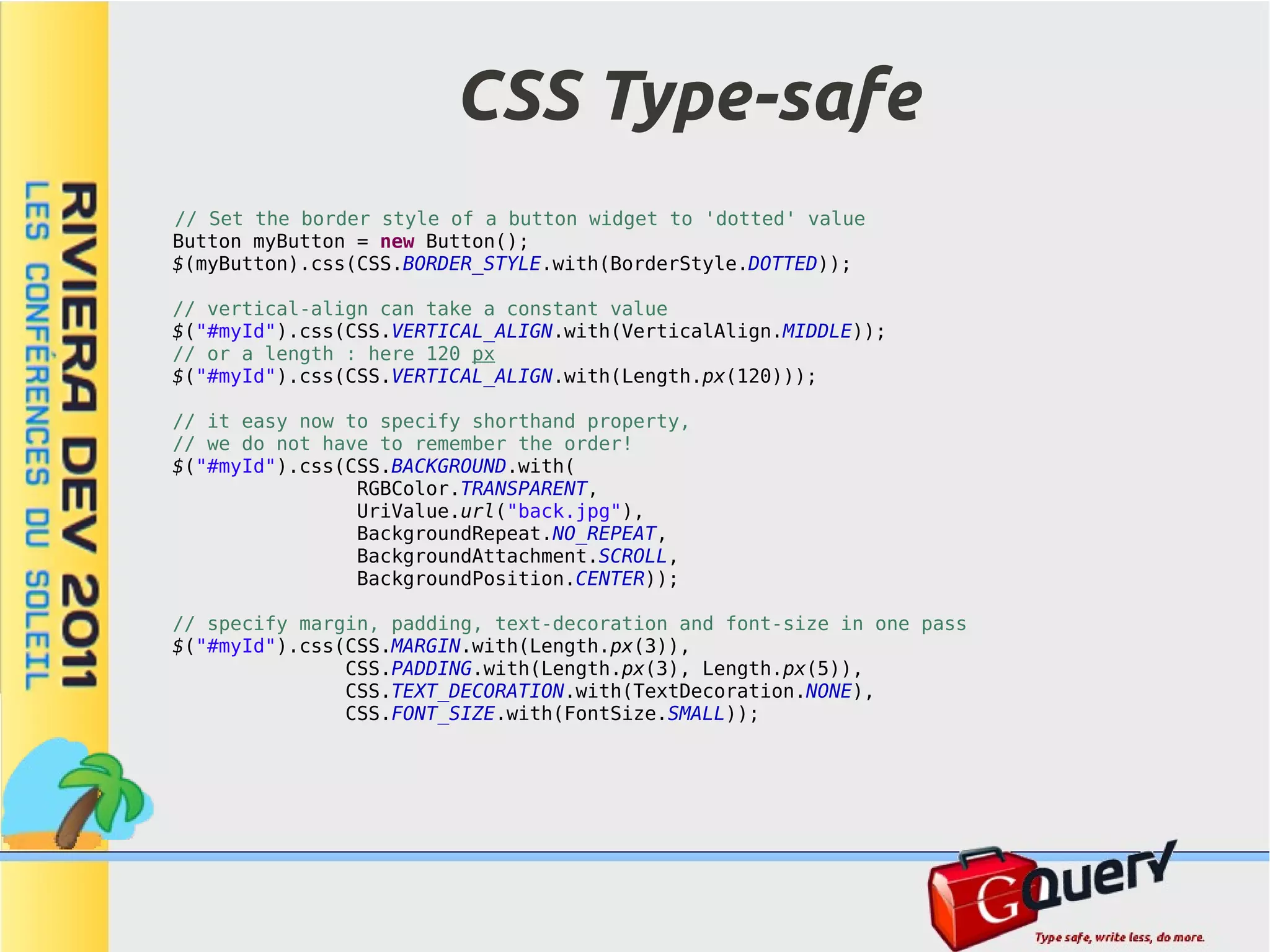
CSS Type-safe // Set the border style of a button widget to 'dotted' value Button myButton = new Button(); $(myButton).css(CSS.BORDER_STYLE.with(BorderStyle.DOTTED)); // vertical-align can take a constant value $("#myId").css(CSS.VERTICAL_ALIGN.with(VerticalAlign.MIDDLE)); // or a length : here 120 px $("#myId").css(CSS.VERTICAL_ALIGN.with(Length.px(120))); // it easy now to specify shorthand property, // we do not have to remember the order! $("#myId").css(CSS.BACKGROUND.with( RGBColor.TRANSPARENT, UriValue.url("back.jpg"), BackgroundRepeat.NO_REPEAT, BackgroundAttachment.SCROLL, BackgroundPosition.CENTER)); // specify margin, padding, text-decoration and font-size in one pass $("#myId").css(CSS.MARGIN.with(Length.px(3)), CSS.PADDING.with(Length.px(3), Length.px(5)), CSS.TEXT_DECORATION.with(TextDecoration.NONE), CSS.FONT_SIZE.with(FontSize.SMALL));
Events ● GQuery provides methods for assigning event in a cross-browser way. ● GQuery event system is compatible with Gwt. ● issues: – When Gwt detaches a widget, events added via GQuery are lost. – If you use 'live' for future elements, consider performance (be carefully with 'onmouse...' events)
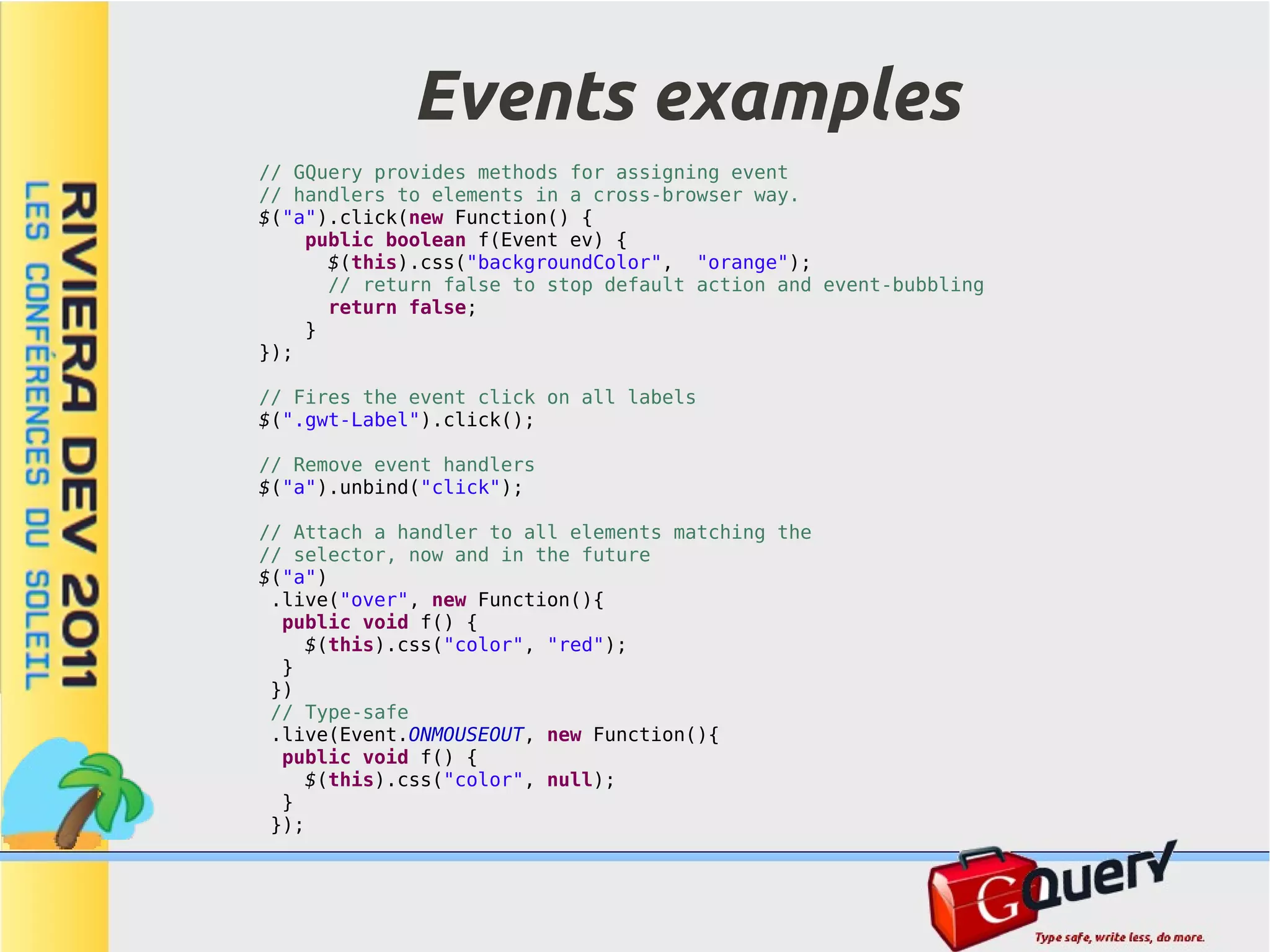
Events examples // GQuery provides methods for assigning event // handlers to elements in a cross-browser way. $("a").click(new Function() { public boolean f(Event ev) { $(this).css("backgroundColor", "orange"); // return false to stop default action and event-bubbling return false; } }); // Fires the event click on all labels $(".gwt-Label").click(); // Remove event handlers $("a").unbind("click"); // Attach a handler to all elements matching the // selector, now and in the future $("a") .live("over", new Function(){ public void f() { $(this).css("color", "red"); } }) // Type-safe .live(Event.ONMOUSEOUT, new Function(){ public void f() { $(this).css("color", null); } });
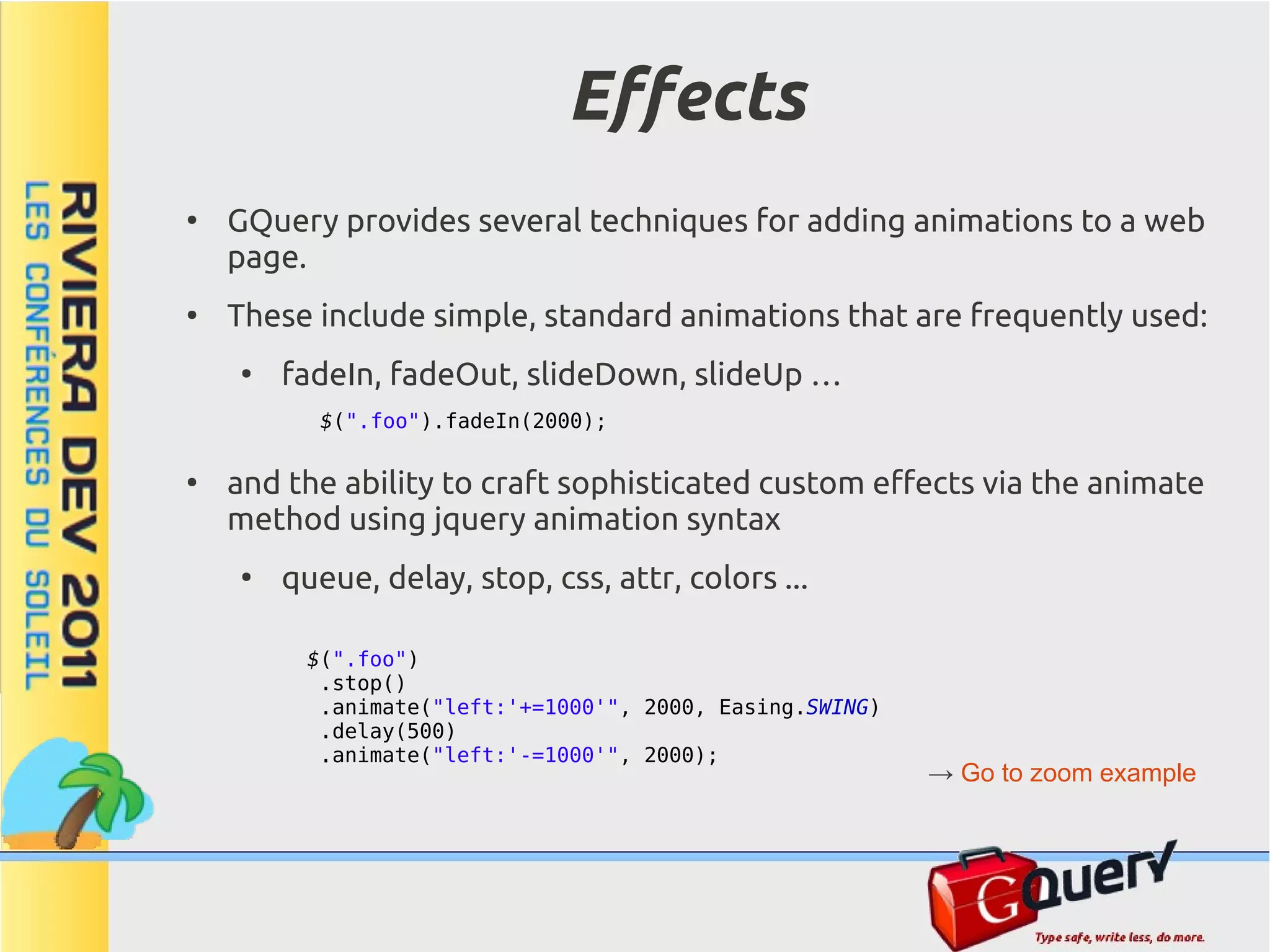
Effects ● GQuery provides several techniques for adding animations to a web page. ● These include simple, standard animations that are frequently used: ● fadeIn, fadeOut, slideDown, slideUp … $(".foo").fadeIn(2000); ● and the ability to craft sophisticated custom effects via the animate method using jquery animation syntax ● queue, delay, stop, css, attr, colors ... $(".foo") .stop() .animate("left:'+=1000'", 2000, Easing.SWING) .delay(500) .animate("left:'-=1000'", 2000); → Go to zoom example
Ajax ● Gwt includes its own facilities for performing communications with the server: ● RPC, Request Factory (Only Java) ● Request Builder ● But GQuery complements it adding: ● jQuery syntax. ● Builders to handle JSON and XML.
Ajax methods GQuery Java. jQuery JavaScript. // Load a remote html fragment in a set of // Load a remote html fragment in a set of // dom elements // dom elements $("#c").load("file.html #mid"); $('#c').load('file.html #mid'); // Unsupported in GQuery // More advanced methods $.getScript(url, callback); GQuery.get("file.html", null, new Function(){ public void f() { // More advanced methods alert("success " + getData()[0]); $.get('file.php', null, function(data){ } alert("success " + data); }); }); GQuery.post("file.html",$$("name:'John',time:'2pm'"), $.post('file.php', {name: 'John', time: '2pm'}, new Function(){ public void f() { function(data){ alert("success " + getData()[0]); alert("success" + data); }}); }); GQuery.getJSON("file.html",$$("name:'John',time:'2pm'"), $.getJSON('file.php', {name: 'John', time: '2pm'}, new Function(){ public void f() { function(data){ alert("success " + getData()[0]); alert("success" + data); }}); }); - Gwt compiler disallows a class named '$', so we use 'GQuery'
Data binding ● Although Gquery – provides the class 'Properties' to handle Json objects... Properties p = $$("key1: 'value1', key2: [1,2]"); String v1 = p.getStr("key1"); – and it is able to inspect Xml objects using css selector engine... Element e = JsUtils.parseXML("<root><message>hello</message></root>"); String txt = $("root message", e).text(); GQuery provides generators to produce builders and handle Xml and Json as 'java' objects. ● Data binding objects support getters, setters and attribute renaming via annotations ● The usage of data binding makes the code more readable, type- safe, checks null conditions, castings, etc.
Data binding example // GQuery generator will create the implementation interface Site extends JsonBuilder { long getId(); String getUrl(); String[] getTags(); // change the name to fix the misspelling @Name("referer") Site getReferrer(); String getTitle(); [{ "id": 1234, "referer": {"id": 2, "url": "http://google.com"}, //NOTE: Setters not displayed to simplify "url": "http://mochikit.com/interpreter/index.html", } "title": "Interpreter", "tags": [ GQuery.getJSON("test.json", null, new Function() { "mochikit","webdev","tool","tools", public void f() { "javascript","interactive","interpreter","repl" // Create the Site instance ] Site s = GWT.create(Site.class); }] // Load the data got from the server s.load(getData()[0]); // We can use standard getters and setters, // making the code more readable and type-safe alert("OK " + s.getUrl() + " " + s.getTags()[0] + " " + s.getReferrer().getUrl()); } }); // Alternative: handle data using GQuery Properties class Properties p = (Properties)getData()[0]; alert ("OK " + p.getStr("url") + " " + p.getArray("tags").getString(0) + " " + ((Properties)p.getJavaScriptObject("referer")).getStr("url"));
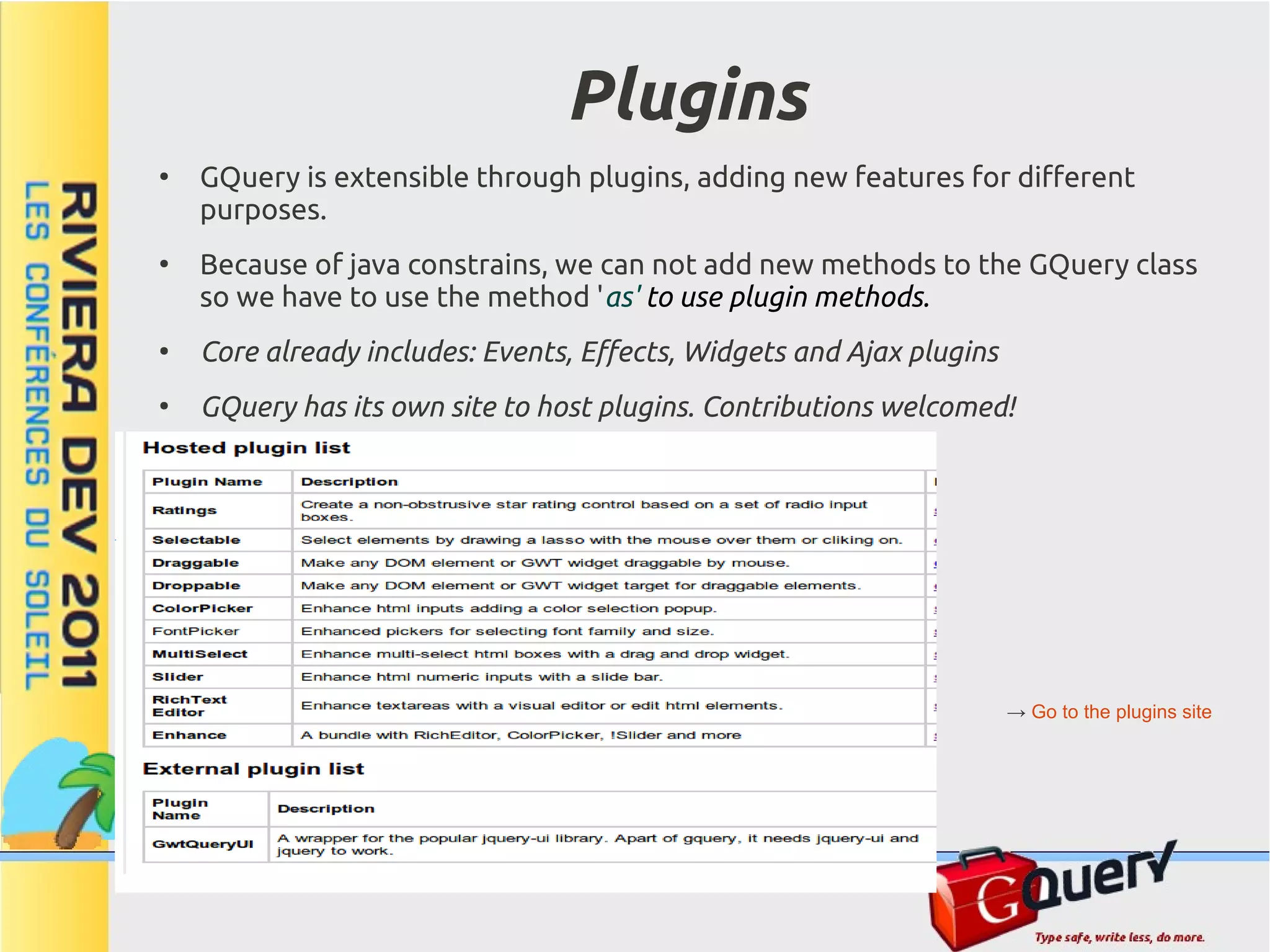
Plugins ● GQuery is extensible through plugins, adding new features for different purposes. ● Because of java constrains, we can not add new methods to the GQuery class so we have to use the method 'as' to use plugin methods. ● Core already includes: Events, Effects, Widgets and Ajax plugins ● GQuery has its own site to host plugins. Contributions welcomed! → Go to the plugins site
Plugins: Create and Usage Usage a Plugin. // jQuery syntax $("h1").as(MyPlugin).newMethod(); $("h1").newMethod(); Develop a Plugin. public static class MyPlugin extends GQuery { // Register the plugin in the GQuery plugin system public static final Class<MyPlugin> MyPlugin = Gquery.registerPlugin(MyPlugin.class, new Plugin<MyPlugin>() { public MyPlugin init(GQuery gq) { return new MyPlugin(gq); } }); // Initialization protected MyPlugin(GQuery gq) { super(gq); } // Add a new methods to GQuery objects public GQuery newMethod() { // Write your code here return this; } }
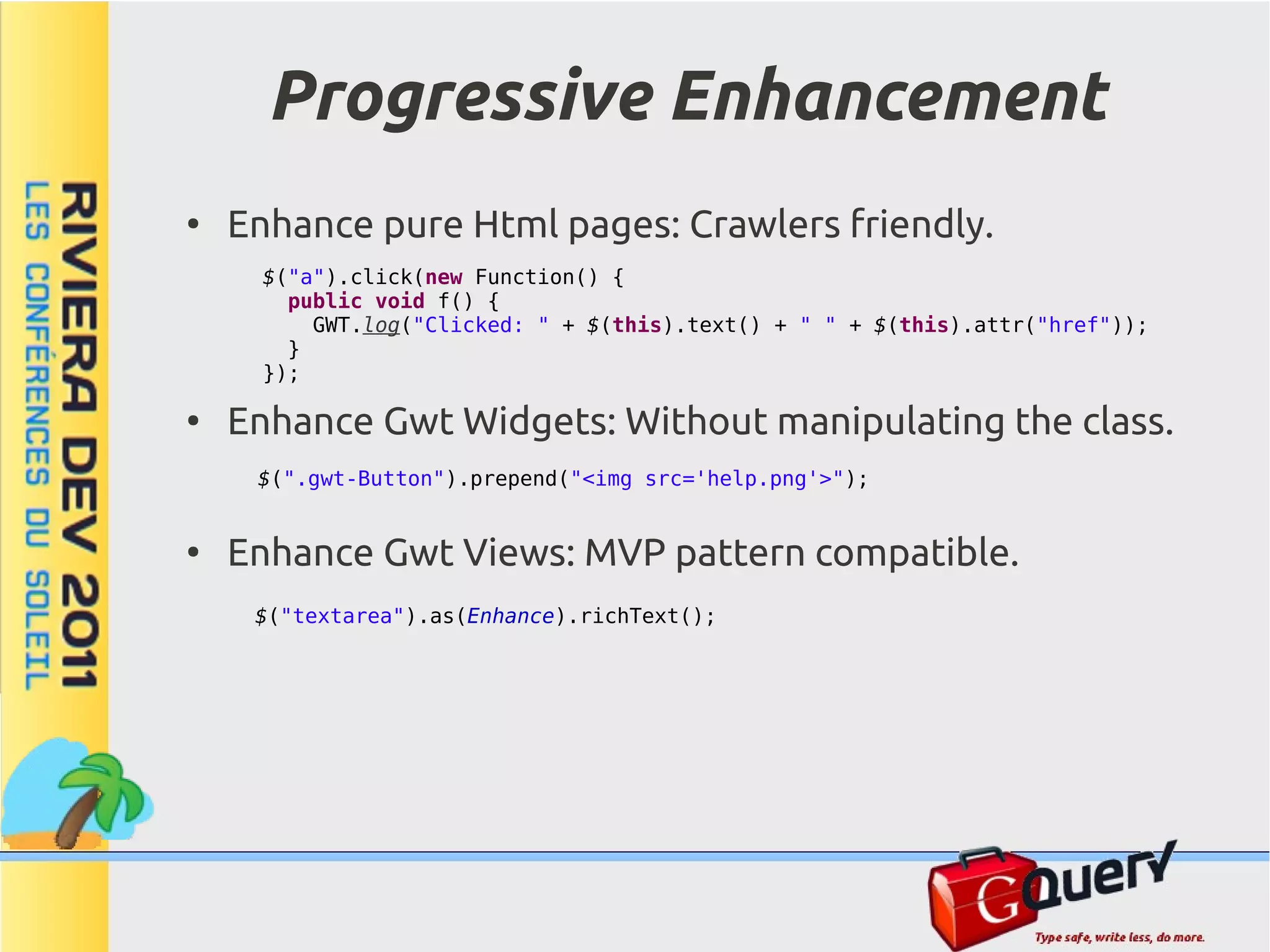
Progressive Enhancement ● Enhance pure Html pages: Crawlers friendly. $("a").click(new Function() { public void f() { GWT.log("Clicked: " + $(this).text() + " " + $(this).attr("href")); } }); ● Enhance Gwt Widgets: Without manipulating the class. $(".gwt-Button").prepend("<img src='help.png'>"); ● Enhance Gwt Views: MVP pattern compatible. $("textarea").as(Enhance).richText();
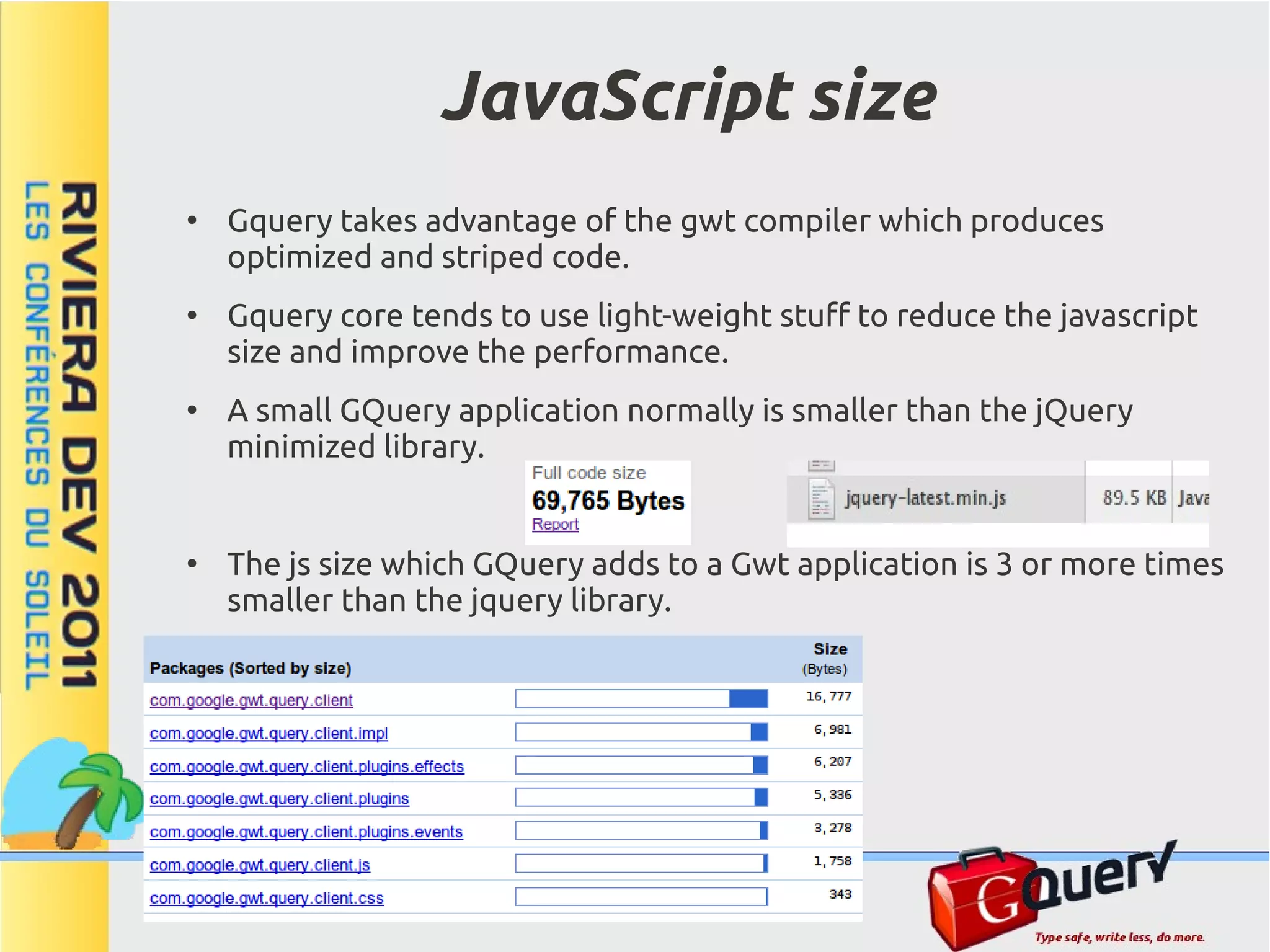
JavaScript size ● Gquery takes advantage of the gwt compiler which produces optimized and striped code. ● Gquery core tends to use light-weight stuff to reduce the javascript size and improve the performance. ● A small GQuery application normally is smaller than the jQuery minimized library. ● The js size which GQuery adds to a Gwt application is 3 or more times smaller than the jquery library.
Comparing sizes ● The ImageZoom Example needs a 17% less of javascript code (FF). ● When using deflate-gzip in webserver, gwt js code is pre-ordered so the compression factor is better.
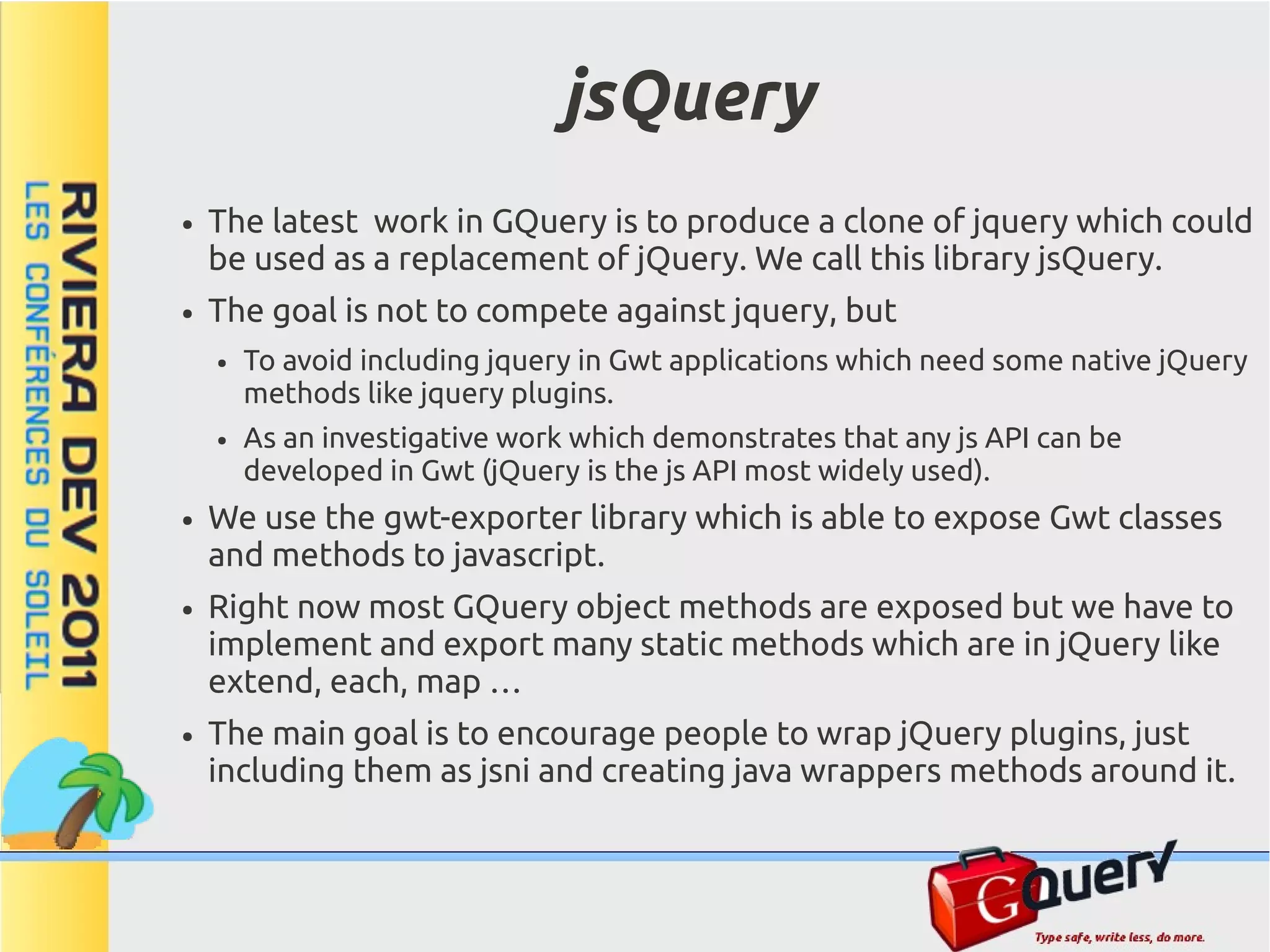
jsQuery ● The latest work in GQuery is to produce a clone of jquery which could be used as a replacement of jQuery. We call this library jsQuery. ● The goal is not to compete against jquery, but ● To avoid including jquery in Gwt applications which need some native jQuery methods like jquery plugins. ● As an investigative work which demonstrates that any js API can be developed in Gwt (jQuery is the js API most widely used). ● We use the gwt-exporter library which is able to expose Gwt classes and methods to javascript. ● Right now most GQuery object methods are exposed but we have to implement and export many static methods which are in jQuery like extend, each, map … ● The main goal is to encourage people to wrap jQuery plugins, just including them as jsni and creating java wrappers methods around it.
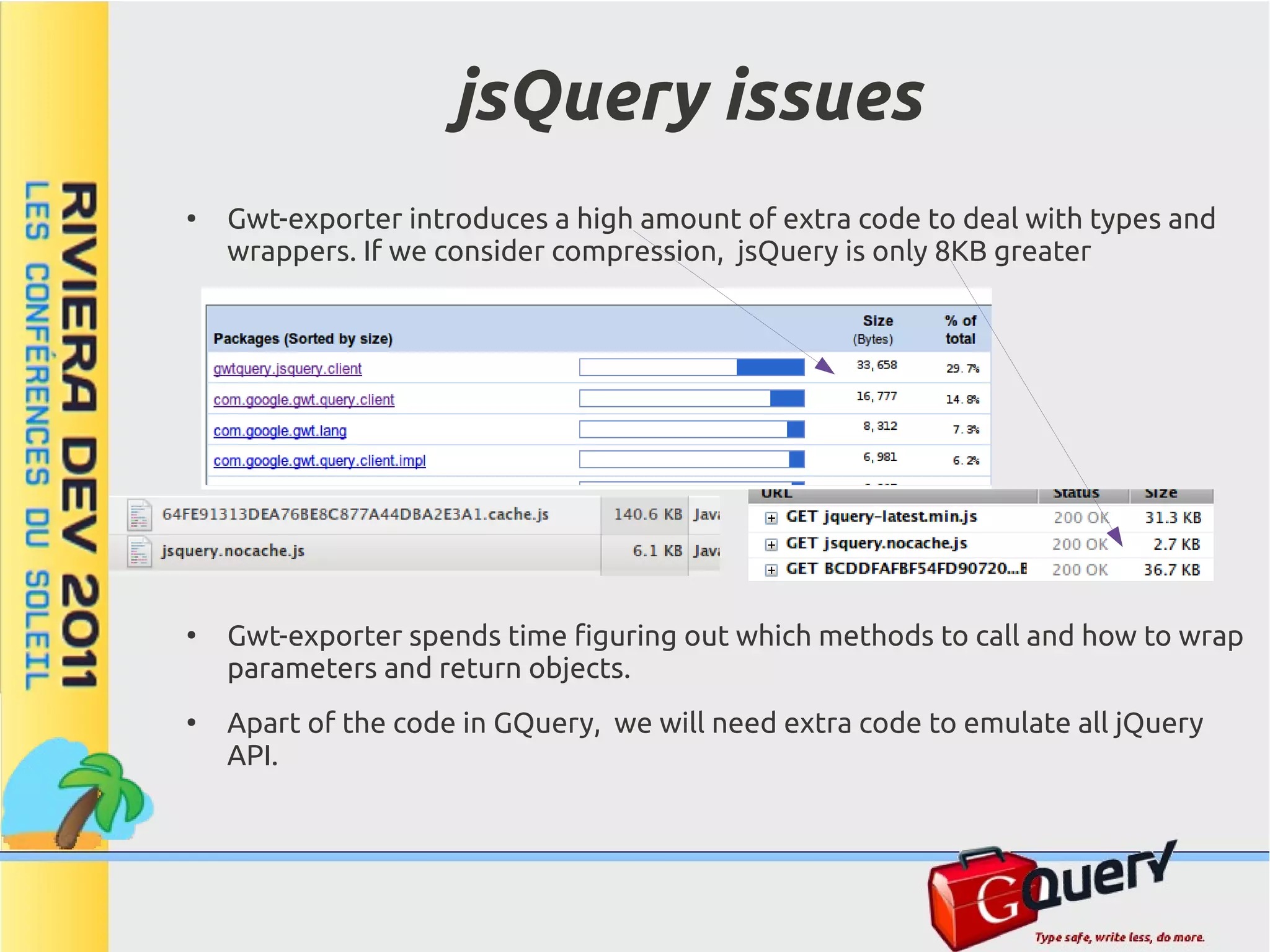
jsQuery issues ● Gwt-exporter introduces a high amount of extra code to deal with types and wrappers. If we consider compression, jsQuery is only 8KB greater ● Gwt-exporter spends time figuring out which methods to call and how to wrap parameters and return objects. ● Apart of the code in GQuery, we will need extra code to emulate all jQuery API.
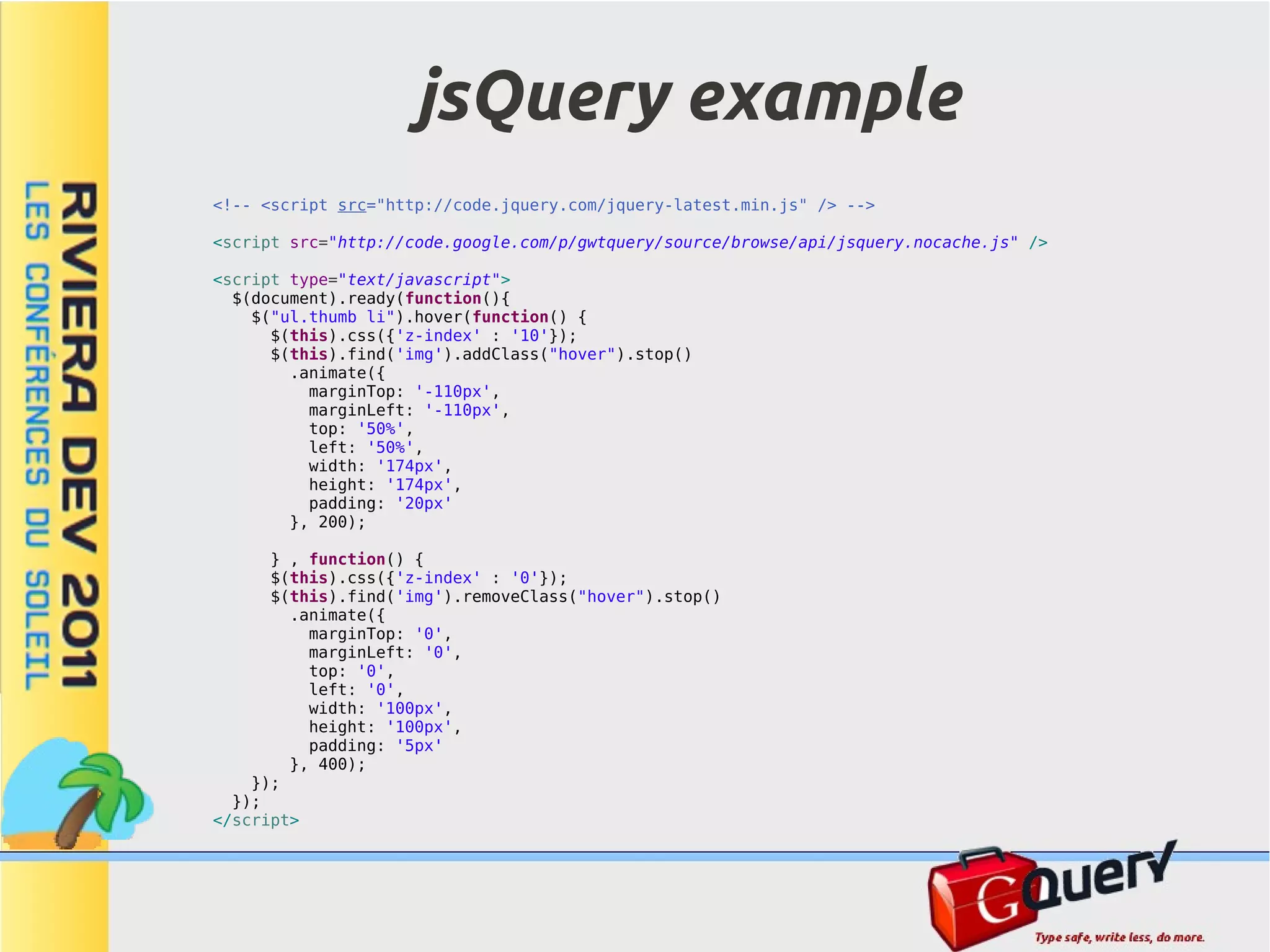
jsQuery example <!-- <script src="http://code.jquery.com/jquery-latest.min.js" /> --> <script src="http://code.google.com/p/gwtquery/source/browse/api/jsquery.nocache.js" /> <script type="text/javascript"> $(document).ready(function(){ $("ul.thumb li").hover(function() { $(this).css({'z-index' : '10'}); $(this).find('img').addClass("hover").stop() .animate({ marginTop: '-110px', marginLeft: '-110px', top: '50%', left: '50%', width: '174px', height: '174px', padding: '20px' }, 200); } , function() { $(this).css({'z-index' : '0'}); $(this).find('img').removeClass("hover").stop() .animate({ marginTop: '0', marginLeft: '0', top: '0', left: '0', width: '100px', height: '100px', padding: '5px' }, 400); }); }); </script>
Links GwtQuery http://code.google.com/p/gwtquery/ http://gwtquery.googlecode.com/svn/trunk/gwtquery-core/javadoc/com/google/gwt/query/client/GQuery.html http://code.google.com/p/gwtquery/w/list http://code.google.com/p/gwtquery-plugins/ Plugins http://gwtquery-plugins.googlecode.com/svn/trunk/ratings/demos/Ratings/RatingsSample.html http://gwtquery-plugins.googlecode.com/svn/trunk/enhance/demos/Enhance/EnhanceSample.html http://gwtquery-plugins.googlecode.com/svn/trunk/droppable/demo/GFinderSample/GFinderSample.html http://gwtquery-plugins.googlecode.com/svn/trunk/droppable/demo/GwtPortletSample/GwtPortletSample.html http://gwtquery-ui.googlecode.com/svn/demos/GwtQueryUi.html Application http://talkwheel.com
Conclusions ● People knowing jquery can easily use GQuery because share the API. ● GQuery uses java : – Type safe, discover errors early (compile time instead of runtime) – Advanced IDE (code completion, refactoring) – Most people knows java but only a few js. ● GQuery uses gwt: – Do not worry about compression, obfuscation … – TDD, Debug – Many libraries available ● GQuery complements the Gwt world making easier code: write less, do more. ● GQuery helps to develop applications using the jquery paradigm based on Enhancement, instead of the Gwt one based on Widgets. ● GQuery is mature, just released version 1.1.0, and well documented. ● The GQuery plugin system is simple. ● Contributors are Welcome !!!
Announcement GQuery 1.1.0 released today ! We wanted to match the new release announcement with the RivieraDev event.

GQuery a jQuery clone for Gwt, RivieraDev 2011

  • 1.
    GwtQuery: A jQuery clonefor GWT, and much more ... Manuel Carrasco Moñino manolo@apache.org @dodotis
  • 2.
    About me ● Apache James ● HUPA ● GWT ● Gquery & Gquery-plugins ● GwtExporter ● GwtUpload ● Chronoscope ● Jenkins ● Performance plugin ● Emma plugin ● Linux ● LXP a light and visual window manager based on icewm
  • 3.
    Contents ● What is GWT ● What is Gquery ● Learning Gquery – GQuery, $(), Function – Collections & grabbing Values – Selectors – Traversing the DOM – Method Chaining – CSS – Events – Effects – Ajax – Data binding – Plugins ● Js Size ● jsQuery
  • 4.
    What is GWT Javato Javascript Compiler, Linker, Optimizer and Obfuscator One compiled 'js' per browser (like c++ one 'exec' per processor) Is a full SDK. Not a Js Framework Not a Js Library Not a new language Not a Web Framework
  • 5.
    Advantages of usingJava. ● A high level language allows that the developer doesn't get lost with low level details: DOM, Ajax, Cross-domain, Compression, Obfuscation, Dependencies, Browser differences, etc. ● Huge Java ecosystem: IDE, Re-factoring, Debug, Code assist, Maven. ● Metrics, TDD, CI, Reusing (libraries) ● Patterns, Builders … ● Type safe, syntax checking, reduce errors. ● Separate code maintenance from the effectiveness of the executable. ● Normally, the compiler would produce better js code than the code we could write by hand (less code, compressed, obfuscated, remove dead code, etc).
  • 6.
    What does theGwt SDK provide ● Generators, Compiler, Linker, Optimizer, Obfuscater. ● Client side libraries: DOM, XML, JSON, RPC, RF, I18n, MVP, Widgets ● Server libraries: RPC, RF ● Eclipse plugin ● Multi-browser Dev mode ● Unit testing and Debug tools. ● Performance tools (speed tracer) ● Compiler Statistics ● Everything is open sourced (Apache v2.0)
  • 7.
    GWT Eclipse Java Code (IDE) Plugin Java Server Java Client Side Side Toolkit (SDK) GWT development GWT Compiler Debug/Hosted/Test JRE Emulation Browser libs GWT server Widgets libs RPC/RF Test Runner FF/IE/Ch-Plugin 3ª Party 3ª Party Server libs Client libs JavaScript. GQuery J-Byte Code Bundles (css, sprite). JSON/XML/HTML/TXT JSON/XML/HTML/TXT RPC/RF Browser Any Backend JVM App-Server (php, ruby, ...)
  • 8.
    What is GQuery ● A library for GWT ● Provides jQuery API and syntax (small differences) ● Entirely re-written in java, not a wrapper, optimized for Gwt. ● Has many features not available in jQuery. – Data binding generators – Type-safe structures – Compile selectors ● It is a useful complement for Gwt. – CSS selectors – Widget finders – Light weight collections – DOM and Widget enhancers. ● Can be used as an alternative to traditional Gwt developing (progressive enhancement) ● Performance in mind, Unit tested. ● Extensible via Plugins
  • 9.
    Easy to gettingstarted ● Use the gquery maven Archetype. mvn archetype:generate -DarchetypeGroupId=com.googlecode.gwtquery -DarchetypeArtifactId=gquery-archetype -DarchetypeVersion=1.1.2 -DgroupId=fr.rivieradev -DartifactId=hello -DprojectName=HelloWorld ● Maven Ready (see README.txt). mvn clean package mvn gwt:run
  • 10.
    IDE Friendly ● Eclipse, IntelliJ, Netbeans ● Run, Debug, Test ● Code Assist ● Re-Factoring ● Software Metrics
  • 11.
    The GQuery Object ● Like in jQuery ... ● Selectors return an object ... ● Which represents a collection of Elements ... ● And each has plenty of useful methods. ● Most methods return the object itself so you can chain them. ● Other methods return a value of the first element GQuery g = $("img.photo"); g.attr("src", "/default.png"); String color = g.css("color"); int size = $("img.photo").css("border", "none").size();
  • 12.
    The Dollar '$()'Method ● As in Javascript, the symbol '$' is legal for methods and classes. ● But The Gwt Compiler disallows it for class names, So we use GQuery. // Import GQuery utility methods statically // it should be ...client.$.* but the compiler complains import static com.google.gwt.query.client.GQuery.*; // The '$' method always returns a GQuery object GQuery g; // Use '$' to create new DOM elements g = $("<div>hello</div>"); // Use '$' to select DOM elements g = $("div:hidden"); // Use '$' to wrap existing elements g = $(document); // Use '$' to wrap Gwt widgets Button button = new Button(); g = $(button); // '$' can handle other arguments: // Function, Event, Element[], NodeList ...
  • 13.
    Functions ● java hasn't got closures. ● We use 'Function' inner class to emulate javascript function ● Override the appropriate 'f()' to write your code
  • 14.
    Collections and GrabbingValues GQuery Java. jQuery JavaScript. // Returns a GQuery object // Returns a jQuery object GQuery g = $("div.section"); var g = $('div.section'); // Returns a nodelist // Returns a nodelist NodeList<Element> l = $("div.section").get(); var l = $('div.section').get(); // Returns the size of the collection // Returns the size of the collection int size = $("div.section").size(); var size = $('div.section').size(); // Modify all elements in the collection // Modify all elements in the collection $("div.section").addClass("highlighted"); $('div.section').addClass('highlighted'); $("a.foo").html("<em>Hello</em>"); $('a.foo').html('<em>Hello</em>'); // Iterate and runs a function around each // Iterate and runs a function around each // element // element $("div.section").each(new Function(){ $('div.section').each(function(){ public void f() { $(this).css('background', 'red'); $(this).css("background", "red"); }); } }); // Some methods return results from the first // Some methods return results from the first // matched element // matched element int height = $("div#intro").height(); var height = $("div#intro").height(); String src = $("img.photo").attr("src"); var src = $("img.photo").attr('src'); String lastP = $("p:last").html(); var lastP = $("p:last").html(); - We have to define the appropriate return type. - and to use double instead of single quotes
  • 15.
    Selectors ● Both GQuery and jQuery are built around selectors. ● Both support CSS standard selectors plus extra selectors (:text :password :hidden etc). ● jQuery uses the sizzle engine. A javascript engine which works with any browser and has optimizations per browser. ● GQuery has optimized engines written in java. ● The more appropriate engine is selected in compile time. ● GQuery uses a modified sizzle version for IE6/7 ● GQuery adds compile-time optimizations when using compiled selectors.
  • 16.
    Dynamic selectors $("#note"); ● Use $(string) with dynamic selectors $(".note"); $("body"); $("div p"); ● Add the context if the target $("div + p"); $("div .example"); elements have not been attached yet $("div > div"); $("div ~ p"); or to improve performance. $("h1[id]:contains(Selectors)"); $("tr:first"); $("tr:last"); ● It supports XML documents as well $("*:checked"); $("*:visible"); $("a[href][lang][class]"); $("div:not(.example)"); $("div[class]"); $("div[class*=e]"); String className = "note"; $("div[class=example]"); $("." + className); $("div[class~=dialog]"); $("div[class^=exa]"); // Specify the context to improve performance $("div[class$=mple]"); Element e = DOM.getElementById("whatever"); $("p:first-child"); $(".note", e); $("p:last-child"); $("p:nth-child(n)"); // Use the context with unattached elements $("p:nth-child(2n)"); Widget w = new MyWidget(); $("p:nth-child(2n+1)"); $(".note", w); $("p:nth-child(even)"); $("p:nth-child(odd)"); $("p:only-child"); [...]
  • 17.
    Compiled Selectors ● Use them with immutable selectors. ● And when selector performance is a goal in your application. ● Context is supported interface MySelectors extends Selectors { @Selector("*:checked") GQuery allChecked(); @Selector("*:checked") GQuery allChecked(Node context); } public void onModuleLoad() { MySelectors selectors = GWT.create(MySelectors.class); selectors.allChecked(); Element e = DOM.getElementById("whatever"); selectors.allChecked(e); }
  • 18.
    Selectors Performance → Click to open the benchmarking application
  • 19.
    Selectors Performance ● GQuery in compiled mode produces the faster javascript code to select DOM elements. ● GQuery dynamic selectors are, in most cases, faster or equal than any other library.
  • 20.
    Traversing the Dom ● Like jQuery, GQuery provides enhanced methods for traversing the DOM GQuery nextSibling = $("div.section").next(); GQuery prevSibling = $("div.section").prev(); GQuery prevAnchorSibling = $("div.section").prev("a"); GQuery firstParent = $("div.section").parent(); GQuery allParents = $("div.section").parents(); ● Additionally it provides useful method to locate Gwt Widgets. // We can traverse the DOM to locate widgets // Return the CellTree widget whose id is myTree CellTree tree = $("#myTree").widget(); // Now we can use the instance tree.addCloseHandler(...); // Return all gwt Labels in the dom List<Label> allLabels = $("div").widgets(Label.class);
  • 21.
    Chaining Methods ● Most GQuery methods return another GQuery object often representing the same collection. This means that you can chain methods together. $("div.section").show().addClass("comeBack"); ● Crazy chaining. $("form#login") // hide all the labels inside the form with the "optional" class .find("label.optional").hide().end() // add a red border to any password fields in the form .find("input:password").css("border", "1px solid red").end() // add a submit handler to the form .submit(new Function(){ public boolean f(Event e) { return confirm("Are you sure you want to submit?"); } });
  • 22.
    CSS // jQuery likesyntax: property, value $("#myId") .css("color", "red"); // jQuery like syntax: javascript object $("#myId") .css($$("top: '50px', left: '25px', color: 'red'")); // Additionally GQuery supports css style-sheet syntax (copy and paste) $("#myId") .css($$("margin: 3px; padding: 3px; font-size: small;")); // Many properties require a strict syntax: // background: color url repeat attachment position $("#myId").css("background", "transparent url('back.jpg') no-repeat scroll center"); // border: width style color $("#myId").css("border", "medium dotted #cdcd"); - We use the '$$' method to generate javascript property structures
  • 23.
    CSS Type-safe // Setthe border style of a button widget to 'dotted' value Button myButton = new Button(); $(myButton).css(CSS.BORDER_STYLE.with(BorderStyle.DOTTED)); // vertical-align can take a constant value $("#myId").css(CSS.VERTICAL_ALIGN.with(VerticalAlign.MIDDLE)); // or a length : here 120 px $("#myId").css(CSS.VERTICAL_ALIGN.with(Length.px(120))); // it easy now to specify shorthand property, // we do not have to remember the order! $("#myId").css(CSS.BACKGROUND.with( RGBColor.TRANSPARENT, UriValue.url("back.jpg"), BackgroundRepeat.NO_REPEAT, BackgroundAttachment.SCROLL, BackgroundPosition.CENTER)); // specify margin, padding, text-decoration and font-size in one pass $("#myId").css(CSS.MARGIN.with(Length.px(3)), CSS.PADDING.with(Length.px(3), Length.px(5)), CSS.TEXT_DECORATION.with(TextDecoration.NONE), CSS.FONT_SIZE.with(FontSize.SMALL));
  • 24.
    Events ● GQuery provides methods for assigning event in a cross-browser way. ● GQuery event system is compatible with Gwt. ● issues: – When Gwt detaches a widget, events added via GQuery are lost. – If you use 'live' for future elements, consider performance (be carefully with 'onmouse...' events)
  • 25.
    Events examples // GQueryprovides methods for assigning event // handlers to elements in a cross-browser way. $("a").click(new Function() { public boolean f(Event ev) { $(this).css("backgroundColor", "orange"); // return false to stop default action and event-bubbling return false; } }); // Fires the event click on all labels $(".gwt-Label").click(); // Remove event handlers $("a").unbind("click"); // Attach a handler to all elements matching the // selector, now and in the future $("a") .live("over", new Function(){ public void f() { $(this).css("color", "red"); } }) // Type-safe .live(Event.ONMOUSEOUT, new Function(){ public void f() { $(this).css("color", null); } });
  • 26.
    Effects ● GQuery provides several techniques for adding animations to a web page. ● These include simple, standard animations that are frequently used: ● fadeIn, fadeOut, slideDown, slideUp … $(".foo").fadeIn(2000); ● and the ability to craft sophisticated custom effects via the animate method using jquery animation syntax ● queue, delay, stop, css, attr, colors ... $(".foo") .stop() .animate("left:'+=1000'", 2000, Easing.SWING) .delay(500) .animate("left:'-=1000'", 2000); → Go to zoom example
  • 27.
    Ajax ● Gwt includes its own facilities for performing communications with the server: ● RPC, Request Factory (Only Java) ● Request Builder ● But GQuery complements it adding: ● jQuery syntax. ● Builders to handle JSON and XML.
  • 28.
    Ajax methods GQuery Java. jQuery JavaScript. // Load a remote html fragment in a set of // Load a remote html fragment in a set of // dom elements // dom elements $("#c").load("file.html #mid"); $('#c').load('file.html #mid'); // Unsupported in GQuery // More advanced methods $.getScript(url, callback); GQuery.get("file.html", null, new Function(){ public void f() { // More advanced methods alert("success " + getData()[0]); $.get('file.php', null, function(data){ } alert("success " + data); }); }); GQuery.post("file.html",$$("name:'John',time:'2pm'"), $.post('file.php', {name: 'John', time: '2pm'}, new Function(){ public void f() { function(data){ alert("success " + getData()[0]); alert("success" + data); }}); }); GQuery.getJSON("file.html",$$("name:'John',time:'2pm'"), $.getJSON('file.php', {name: 'John', time: '2pm'}, new Function(){ public void f() { function(data){ alert("success " + getData()[0]); alert("success" + data); }}); }); - Gwt compiler disallows a class named '$', so we use 'GQuery'
  • 29.
    Data binding ● Although Gquery – provides the class 'Properties' to handle Json objects... Properties p = $$("key1: 'value1', key2: [1,2]"); String v1 = p.getStr("key1"); – and it is able to inspect Xml objects using css selector engine... Element e = JsUtils.parseXML("<root><message>hello</message></root>"); String txt = $("root message", e).text(); GQuery provides generators to produce builders and handle Xml and Json as 'java' objects. ● Data binding objects support getters, setters and attribute renaming via annotations ● The usage of data binding makes the code more readable, type- safe, checks null conditions, castings, etc.
  • 30.
    Data binding example // GQuery generator will create the implementation interface Site extends JsonBuilder { long getId(); String getUrl(); String[] getTags(); // change the name to fix the misspelling @Name("referer") Site getReferrer(); String getTitle(); [{ "id": 1234, "referer": {"id": 2, "url": "http://google.com"}, //NOTE: Setters not displayed to simplify "url": "http://mochikit.com/interpreter/index.html", } "title": "Interpreter", "tags": [ GQuery.getJSON("test.json", null, new Function() { "mochikit","webdev","tool","tools", public void f() { "javascript","interactive","interpreter","repl" // Create the Site instance ] Site s = GWT.create(Site.class); }] // Load the data got from the server s.load(getData()[0]); // We can use standard getters and setters, // making the code more readable and type-safe alert("OK " + s.getUrl() + " " + s.getTags()[0] + " " + s.getReferrer().getUrl()); } }); // Alternative: handle data using GQuery Properties class Properties p = (Properties)getData()[0]; alert ("OK " + p.getStr("url") + " " + p.getArray("tags").getString(0) + " " + ((Properties)p.getJavaScriptObject("referer")).getStr("url"));
  • 31.
    Plugins ● GQuery is extensible through plugins, adding new features for different purposes. ● Because of java constrains, we can not add new methods to the GQuery class so we have to use the method 'as' to use plugin methods. ● Core already includes: Events, Effects, Widgets and Ajax plugins ● GQuery has its own site to host plugins. Contributions welcomed! → Go to the plugins site
  • 32.
    Plugins: Create andUsage Usage a Plugin. // jQuery syntax $("h1").as(MyPlugin).newMethod(); $("h1").newMethod(); Develop a Plugin. public static class MyPlugin extends GQuery { // Register the plugin in the GQuery plugin system public static final Class<MyPlugin> MyPlugin = Gquery.registerPlugin(MyPlugin.class, new Plugin<MyPlugin>() { public MyPlugin init(GQuery gq) { return new MyPlugin(gq); } }); // Initialization protected MyPlugin(GQuery gq) { super(gq); } // Add a new methods to GQuery objects public GQuery newMethod() { // Write your code here return this; } }
  • 33.
    Progressive Enhancement ● Enhance pure Html pages: Crawlers friendly. $("a").click(new Function() { public void f() { GWT.log("Clicked: " + $(this).text() + " " + $(this).attr("href")); } }); ● Enhance Gwt Widgets: Without manipulating the class. $(".gwt-Button").prepend("<img src='help.png'>"); ● Enhance Gwt Views: MVP pattern compatible. $("textarea").as(Enhance).richText();
  • 34.
    JavaScript size ● Gquery takes advantage of the gwt compiler which produces optimized and striped code. ● Gquery core tends to use light-weight stuff to reduce the javascript size and improve the performance. ● A small GQuery application normally is smaller than the jQuery minimized library. ● The js size which GQuery adds to a Gwt application is 3 or more times smaller than the jquery library.
  • 35.
    Comparing sizes ● The ImageZoom Example needs a 17% less of javascript code (FF). ● When using deflate-gzip in webserver, gwt js code is pre-ordered so the compression factor is better.
  • 36.
    jsQuery ● The latest work in GQuery is to produce a clone of jquery which could be used as a replacement of jQuery. We call this library jsQuery. ● The goal is not to compete against jquery, but ● To avoid including jquery in Gwt applications which need some native jQuery methods like jquery plugins. ● As an investigative work which demonstrates that any js API can be developed in Gwt (jQuery is the js API most widely used). ● We use the gwt-exporter library which is able to expose Gwt classes and methods to javascript. ● Right now most GQuery object methods are exposed but we have to implement and export many static methods which are in jQuery like extend, each, map … ● The main goal is to encourage people to wrap jQuery plugins, just including them as jsni and creating java wrappers methods around it.
  • 37.
    jsQuery issues ● Gwt-exporter introduces a high amount of extra code to deal with types and wrappers. If we consider compression, jsQuery is only 8KB greater ● Gwt-exporter spends time figuring out which methods to call and how to wrap parameters and return objects. ● Apart of the code in GQuery, we will need extra code to emulate all jQuery API.
  • 38.
    jsQuery example <!-- <scriptsrc="http://code.jquery.com/jquery-latest.min.js" /> --> <script src="http://code.google.com/p/gwtquery/source/browse/api/jsquery.nocache.js" /> <script type="text/javascript"> $(document).ready(function(){ $("ul.thumb li").hover(function() { $(this).css({'z-index' : '10'}); $(this).find('img').addClass("hover").stop() .animate({ marginTop: '-110px', marginLeft: '-110px', top: '50%', left: '50%', width: '174px', height: '174px', padding: '20px' }, 200); } , function() { $(this).css({'z-index' : '0'}); $(this).find('img').removeClass("hover").stop() .animate({ marginTop: '0', marginLeft: '0', top: '0', left: '0', width: '100px', height: '100px', padding: '5px' }, 400); }); }); </script>
  • 39.
    Links GwtQuery http://code.google.com/p/gwtquery/ http://gwtquery.googlecode.com/svn/trunk/gwtquery-core/javadoc/com/google/gwt/query/client/GQuery.html http://code.google.com/p/gwtquery/w/list http://code.google.com/p/gwtquery-plugins/ Plugins http://gwtquery-plugins.googlecode.com/svn/trunk/ratings/demos/Ratings/RatingsSample.html http://gwtquery-plugins.googlecode.com/svn/trunk/enhance/demos/Enhance/EnhanceSample.html http://gwtquery-plugins.googlecode.com/svn/trunk/droppable/demo/GFinderSample/GFinderSample.html http://gwtquery-plugins.googlecode.com/svn/trunk/droppable/demo/GwtPortletSample/GwtPortletSample.html http://gwtquery-ui.googlecode.com/svn/demos/GwtQueryUi.html Application http://talkwheel.com
  • 40.
    Conclusions ● People knowing jquery can easily use GQuery because share the API. ● GQuery uses java : – Type safe, discover errors early (compile time instead of runtime) – Advanced IDE (code completion, refactoring) – Most people knows java but only a few js. ● GQuery uses gwt: – Do not worry about compression, obfuscation … – TDD, Debug – Many libraries available ● GQuery complements the Gwt world making easier code: write less, do more. ● GQuery helps to develop applications using the jquery paradigm based on Enhancement, instead of the Gwt one based on Widgets. ● GQuery is mature, just released version 1.1.0, and well documented. ● The GQuery plugin system is simple. ● Contributors are Welcome !!!
  • 41.
    Announcement GQuery 1.1.0 released today ! We wanted to match the new release announcement with the RivieraDev event.