Downloaded 40 times


![Running Hadoop on Ubuntu Linux (Single-Node Cluster) [1] Prerequisites • jdk-8uversion-linux-x64.tar.gz (Download) • Directory modification • % tar zxvf jdk-8uversion-linux-x64.tar.gz Hadoop system user $ sudo addgroup hadoop $ sudo adduser --ingroup hadoop hduser Disabling IPv6 /etc/sysctl.conf net.ipv6.conf.all.disable_ipv6 = 1 net.ipv6.conf.default.disable_ipv6 = 1 net.ipv6.conf.lo.disable_ipv6 = 1 Configuring SSH $ sudo mkdir -p /app/hadoop/tmp $ sudo chown hduser:hadoop /app/hadoop/tmp $ sudo chmod 750 /app/hadoop/tmp $ ssh-keygen -t rsa -P "" $ cat $HOME/.ssh/id_rsa.pub >> $HOME/.ssh/authorized_keys $ ssh localhost Generate an SSH key for the hduser hduser@ubuntu:~$ cat $HOME/.ssh/id_rsa.pub >> $HOME/.ssh/authorized_keys Create an RSA key pair with an empty password References: [1], [2] 3](https://image.slidesharecdn.com/implementationofk-meansalgorithmonhadoop-170807090256/75/Implementation-of-k-means-algorithm-on-Hadoop-3-2048.jpg)
![Running Hadoop on Ubuntu Linux (Single-Node Cluster) [2] Hadoop configuration $ cd /usr/local $ sudo tar xzf hadoop-2.7.3.tar.gz $ sudo mv hadoop-2.7.3 hadoop $ sudo chown -R hduser:hadoop hadoop Configuration conf/core-site.xml <configuration> <property> <name>hadoop.tmp.dir</name> <value>/app/hadoop/tmp</value> </property> <property> <name>fs.defaultFS</name> <value>hdfs://localhost:9000</value> </property> </configuration> $ sudo mkdir -p /app/hadoop/tmp $ sudo chown hduser:hadoop /app/hadoop/tmp $ sudo chmod 750 /app/hadoop/tmp ownerships and permissions export JAVA_HOME="/usr/lib/jvm/java-8-openjdk-amd64“ hadoop-env.sh <configuration> <property> <name>mapreduce.framework.name</name> <value>yarn</value> </property> </configuration> conf/mapred-site.xml References: [1], [2] 4](https://image.slidesharecdn.com/implementationofk-meansalgorithmonhadoop-170807090256/75/Implementation-of-k-means-algorithm-on-Hadoop-4-2048.jpg)
![Running Hadoop on Ubuntu Linux (Single-Node Cluster) [3] hdfs-site.xml <configuration> <property> <name>dfs.replication</name> <value>1</value> <description>Default block replication. The actual number of replications can be specified when the file is created. The default is used if replication is not specified in create time. </description> </property> <property> <name>hadoop.tmp.dir</name> <value>/app/hadoop/tmp</value> <description>A base for other temporary directories.</description> </property> </configuration> <configuration> <property> <name>yarn.scheduler.minimum-allocation-mb</name> <value>128</value> </property> <property> <name>yarn.scheduler.maximum-allocation-mb</name> <value>2048</value> </property> <property> <name>yarn.scheduler.minimum-allocation-vcores</name> <value>1</value> </property> <property> <name>yarn.scheduler.maximum-allocation-vcores</name> <value>2</value> </property> <property> <name>yarn.nodemanager.resource.memory-mb</name> <value>4096</value> </property> <property> <name>yarn.nodemanager.resource.cpu-vcores</name> <value>4</value> </property> <property> <name>yarn.nodemanager.aux-services</name> <value>mapreduce_shuffle</value> </property> </configuration> yarn-site.xml References: [1], [2] 5](https://image.slidesharecdn.com/implementationofk-meansalgorithmonhadoop-170807090256/75/Implementation-of-k-means-algorithm-on-Hadoop-5-2048.jpg)
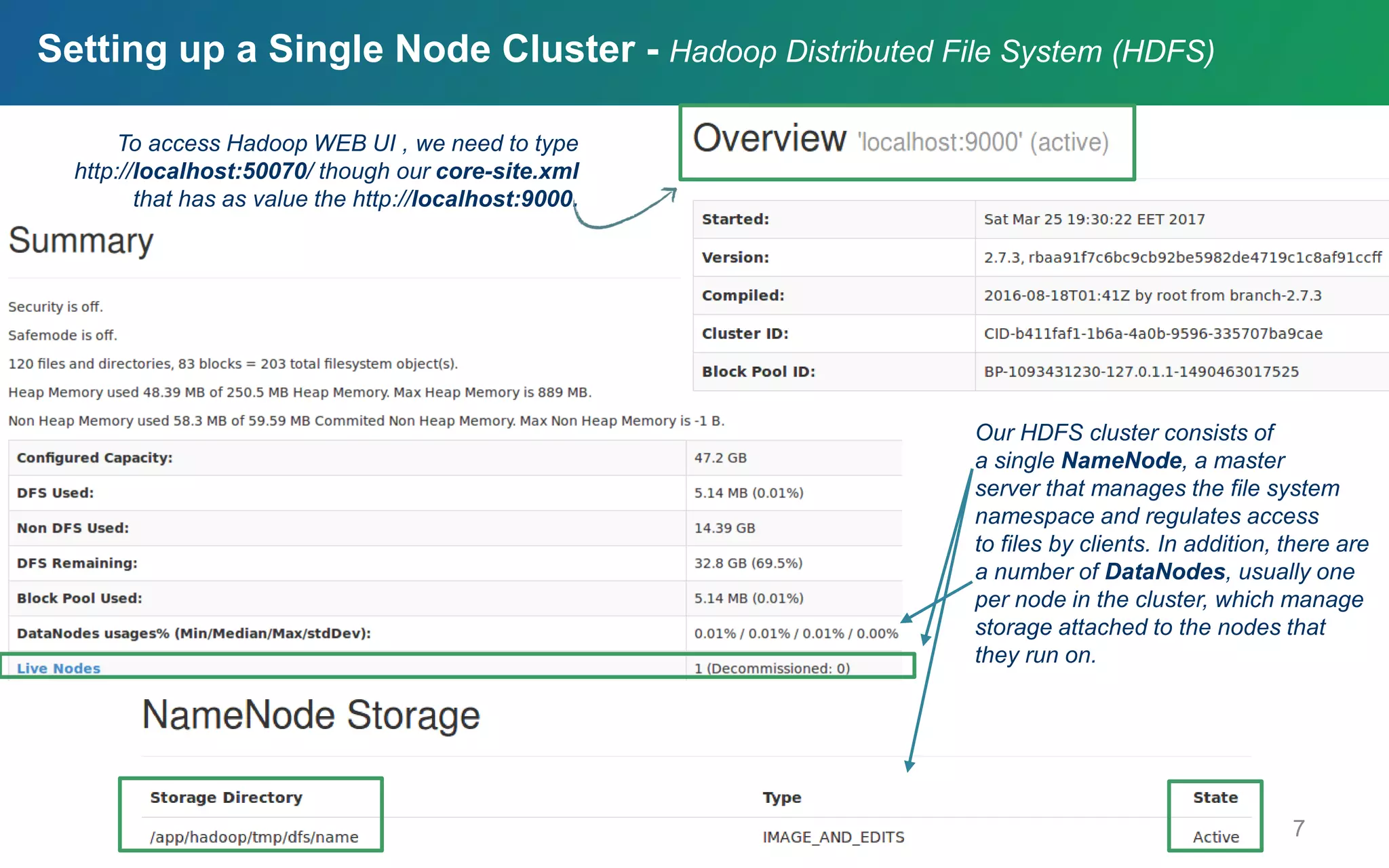
![Running Hadoop on Ubuntu Linux (Single-Node Cluster) [4] conf/hdfs-site.xml <configuration> <property> <name>dfs.replication</name> <value>1</value> </property> <property> <name>hadoop.tmp.dir</name> <value>/app/hadoop/tmp</value> </property> </configuration> hduser@ubuntu:~$ /usr/local/hadoop/bin/hadoop namenode -format Formatting the HDFS filesystem via the NameNode hduser@ubuntu:~$ /usr/local/hadoop/bin/start- all.sh Starting your single-node cluster hduser@ubuntu:~$ /usr/local/hadoop/bin/stop-all.sh Stopping your single-node cluster References: [1], [2] 6](https://image.slidesharecdn.com/implementationofk-meansalgorithmonhadoop-170807090256/75/Implementation-of-k-means-algorithm-on-Hadoop-6-2048.jpg)

![Data Generation • Isotropic Gaussian blobs • 2.000.000 points • centers = [[25, 25], [-1, -1], [-25, -25]] • cluster_std = 3.5 9](https://image.slidesharecdn.com/implementationofk-meansalgorithmonhadoop-170807090256/75/Implementation-of-k-means-algorithm-on-Hadoop-9-2048.jpg)
![K-means++ : Calculation of initial centroids Reference: [3] 10](https://image.slidesharecdn.com/implementationofk-meansalgorithmonhadoop-170807090256/75/Implementation-of-k-means-algorithm-on-Hadoop-10-2048.jpg)
![K-means : Clustering algorithm References: [4], [5] 11](https://image.slidesharecdn.com/implementationofk-meansalgorithmonhadoop-170807090256/75/Implementation-of-k-means-algorithm-on-Hadoop-11-2048.jpg)
![K-means using Map Reduce Do Map Input is a data point and k centers are broadcasted Finds the closest center among k centers for the input point Reduce Input is one of k centers and all data points having this center as their closest center. Calculates the new center using data points Until all of new centers are not changed Reference: [6] 12](https://image.slidesharecdn.com/implementationofk-meansalgorithmonhadoop-170807090256/75/Implementation-of-k-means-algorithm-on-Hadoop-12-2048.jpg)
![K-means using Map Reduce [1] k = 3 map map map . . . Centroids are broadcasted to every map function key value [centroid1, point1] [centroid2, point3] [centroid3, point10] [centroid2, point45] . . . . . . . . . . . . . . . . [centroidx, pointx] Mapper map map map . . . Reference: [6] 13](https://image.slidesharecdn.com/implementationofk-meansalgorithmonhadoop-170807090256/75/Implementation-of-k-means-algorithm-on-Hadoop-13-2048.jpg)
![K-means using Map Reduce [2] combine combine combine . . . key values [centroid1, partialsum1] [centroid2, partialsum1] [centroid3, partialsum1] [centroid2, partialsum2] . . . . . . . . . . . . . . . . [centroidx, partialsumx] Combiner key values [centroid1, point1, point4] [centroid2, point3, point7, point9] [centroid3, point10] [centroid2, point45, point 73] . . . . . . . . . . . . . . . . [centroid3, pointx, . . . ] Reference: [6] 14](https://image.slidesharecdn.com/implementationofk-meansalgorithmonhadoop-170807090256/75/Implementation-of-k-means-algorithm-on-Hadoop-14-2048.jpg)
![K-means using Map Reduce [3] reduce reduce reduce . . . key value [centroid1, centroid1’] [centroid2, centroid2’] [centroid3, centroid3’] Reducer key values [centroid1, partialsum1, . . . ] [centroid2, partialsum1, . . . ] [centroid3, partialsum1, . . . ] Reference: [6] 15](https://image.slidesharecdn.com/implementationofk-meansalgorithmonhadoop-170807090256/75/Implementation-of-k-means-algorithm-on-Hadoop-15-2048.jpg)
![Python Coding [1] The initial task of the project is to generate a set of more than one million data points to be used later as an input for the k-means clustering algorithm. Using this python script three isotropic Gaussian blobs for clustering are generated. More specifically, the centers are the following data points [25, 25], [-1, -1], [-25, -25]. The silhouette score constitutes a useful criterion for determining the proper number of clusters. A silhouette close to 1 implies the datum is in an appropriate cluster, while a silhouette close to −1 implies the datum is in the wrong cluster. The specific python script calculates the silhouette score for different numbers of clusters ranging from 2 to 6. 17](https://image.slidesharecdn.com/implementationofk-meansalgorithmonhadoop-170807090256/75/Implementation-of-k-means-algorithm-on-Hadoop-17-2048.jpg)
![Python Coding [2] 18 In order to implement k-means algorithm on hadoop mrjob is used. Mrjob is a python package, which allows to write multi-step MapReduce jobs in pure Python and run them on a hadoop cluster. In our case mrjob run on a single-node cluster. • The mapper function returns each data point and the cluster, to which it belongs. • The combiner function returns partial sums of batches of data points belonging to the same cluster. • The reducer returns the new centroids of each cluster. • If the centroids remain unchanged the algorithm terminates. Otherwise, the steps are repeated from the beginning. This python script calls the k-means algorithm implemented on hadoop. However, before implementing k-means the initial centroids are computed using the k-means++ algorithm proposed in 2007 by Arthur and Vassilvitskii.](https://image.slidesharecdn.com/implementationofk-meansalgorithmonhadoop-170807090256/75/Implementation-of-k-means-algorithm-on-Hadoop-18-2048.jpg)
![Coding Running [1] 19](https://image.slidesharecdn.com/implementationofk-meansalgorithmonhadoop-170807090256/75/Implementation-of-k-means-algorithm-on-Hadoop-19-2048.jpg)
![Coding Running [2] kmeans 20](https://image.slidesharecdn.com/implementationofk-meansalgorithmonhadoop-170807090256/75/Implementation-of-k-means-algorithm-on-Hadoop-20-2048.jpg)
![Coding Running [3] 21](https://image.slidesharecdn.com/implementationofk-meansalgorithmonhadoop-170807090256/75/Implementation-of-k-means-algorithm-on-Hadoop-21-2048.jpg)
![References [1]: Noll, M. Running Hadoop On Ubuntu Linux (Single-Node Cluster) - Michael G. Noll. [online] Available at: http://www.michael-noll.com/tutorials/running-hadoop-on-ubuntu-linux-single-node-cluster/ [Accessed 29 Mar. 2017]. [2]: Stackoverflow.com. (2017). Error launching job using mrjob on Hadoop. [online] Available at: http://stackoverflow.com/questions/25358793/error-launching-job-using-mrjob-on-hadoop [Accessed 29 Mar. 2017]. [3]: David Arthur, and Sergei Vassilvitskii, (2007). k-means++: the advantages of careful seeding - Proceedings of the eighteenth annual ACM-SIAM Symposium on Discrete Algorithms, New Orleans, LA, January 7-9, 2007. 1st ed. New York: ACM, pp.1027–1035. [4]: Nlp.stanford.edu. K-means. Available at: http://nlp.stanford.edu/IR-book/html/htmledition/k-means-1.html [Accessed 15 Mar. 2017] [5]: Home.deib.polimi.it. (n.d.). Clustering - K-means. [online] Available at: http://home.deib.polimi.it/matteucc/Clustering/tutorial_html/kmeans.html [Accessed 8 Mar. 2017]. [6]: Kyuseok Shim, "MapReduce Algorithms for Big Data Analysis", VLDB Conference, 2012 | lkoutsokera@gmail.com | stratos.gounidellis@gmail.com Lamprini Koutsokera Stratos Gounidellis BDSMasters 22](https://image.slidesharecdn.com/implementationofk-meansalgorithmonhadoop-170807090256/75/Implementation-of-k-means-algorithm-on-Hadoop-22-2048.jpg)

The document provides a comprehensive guide for implementing the k-means clustering algorithm using Hadoop on a single-node Ubuntu cluster. It includes detailed instructions for setting up Hadoop, configuring necessary files, and executing the k-means algorithm with initial centroid calculation using k-means++. Additionally, it discusses the process of data generation and how to utilize mrjob to manage multi-step MapReduce jobs in Python for clustering analysis.