SignalR Real-time Messaging MINH NGUYEN @LINKNODE APRIL, 2015
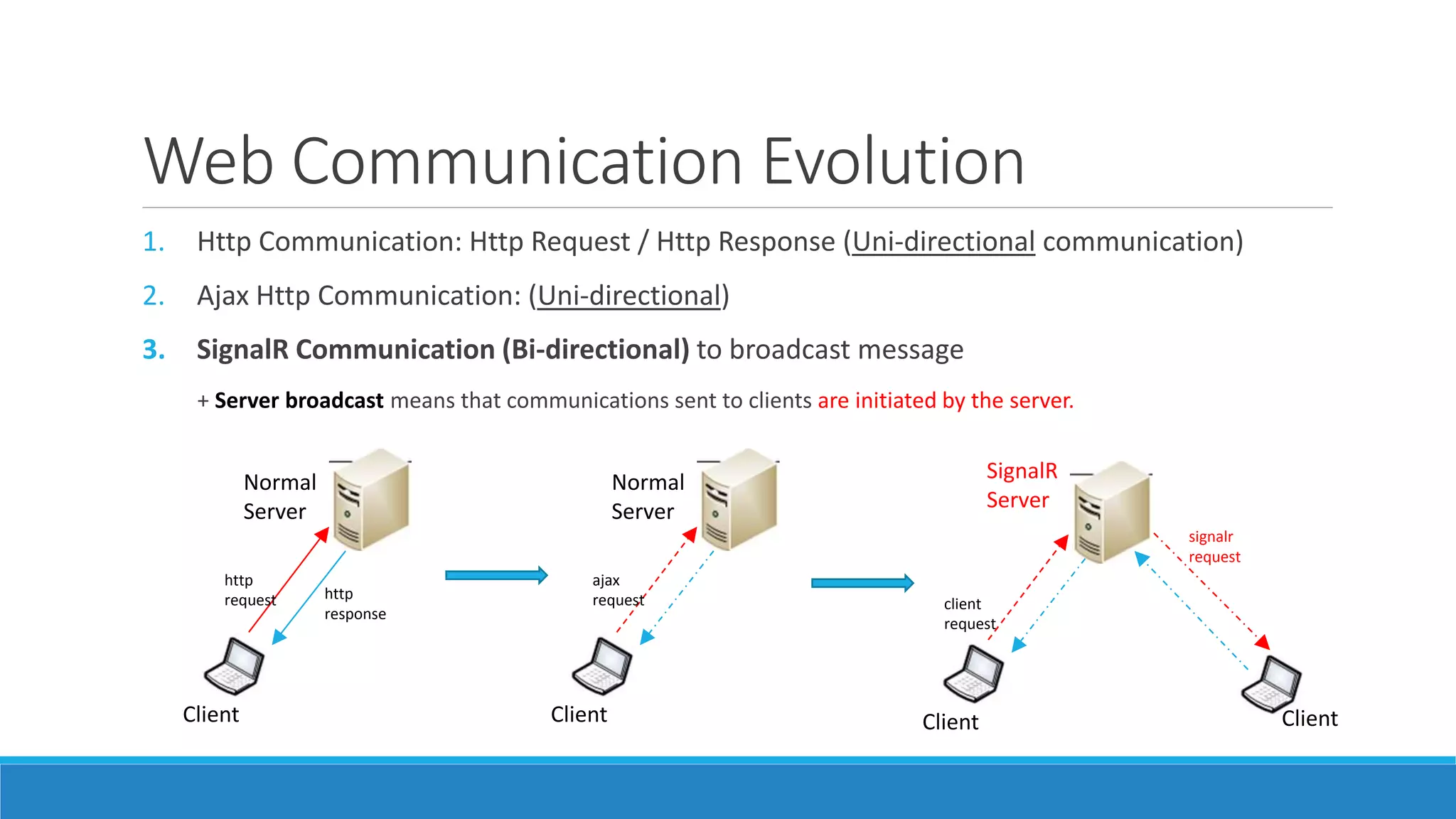
Web Communication Evolution 1. Http Communication: Http Request / Http Response (Uni-directional communication) 2. Ajax Http Communication: (Uni-directional) 3. SignalR Communication (Bi-directional) to broadcast message + Server broadcast means that communications sent to clients are initiated by the server. Client Normal Server SignalR Server http request http response signalr request ClientClient client request Client Normal Server ajax request
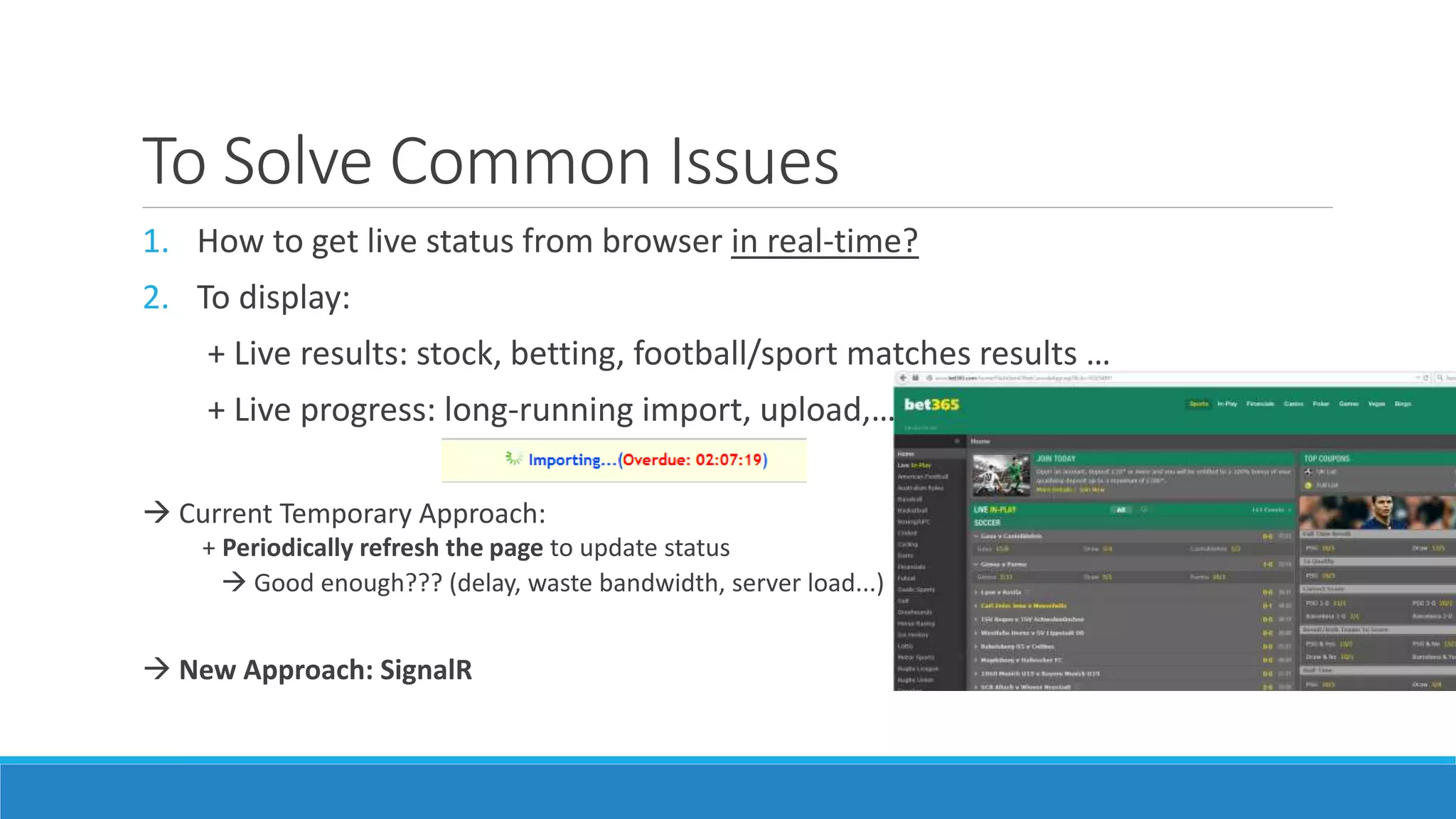
To Solve Common Issues 1. How to get live status from browser in real-time? 2. To display: + Live results: stock, betting, football/sport matches results … + Live progress: long-running import, upload,…  Current Temporary Approach: + Periodically refresh the page to update status  Good enough??? (delay, waste bandwidth, server load...)  New Approach: SignalR
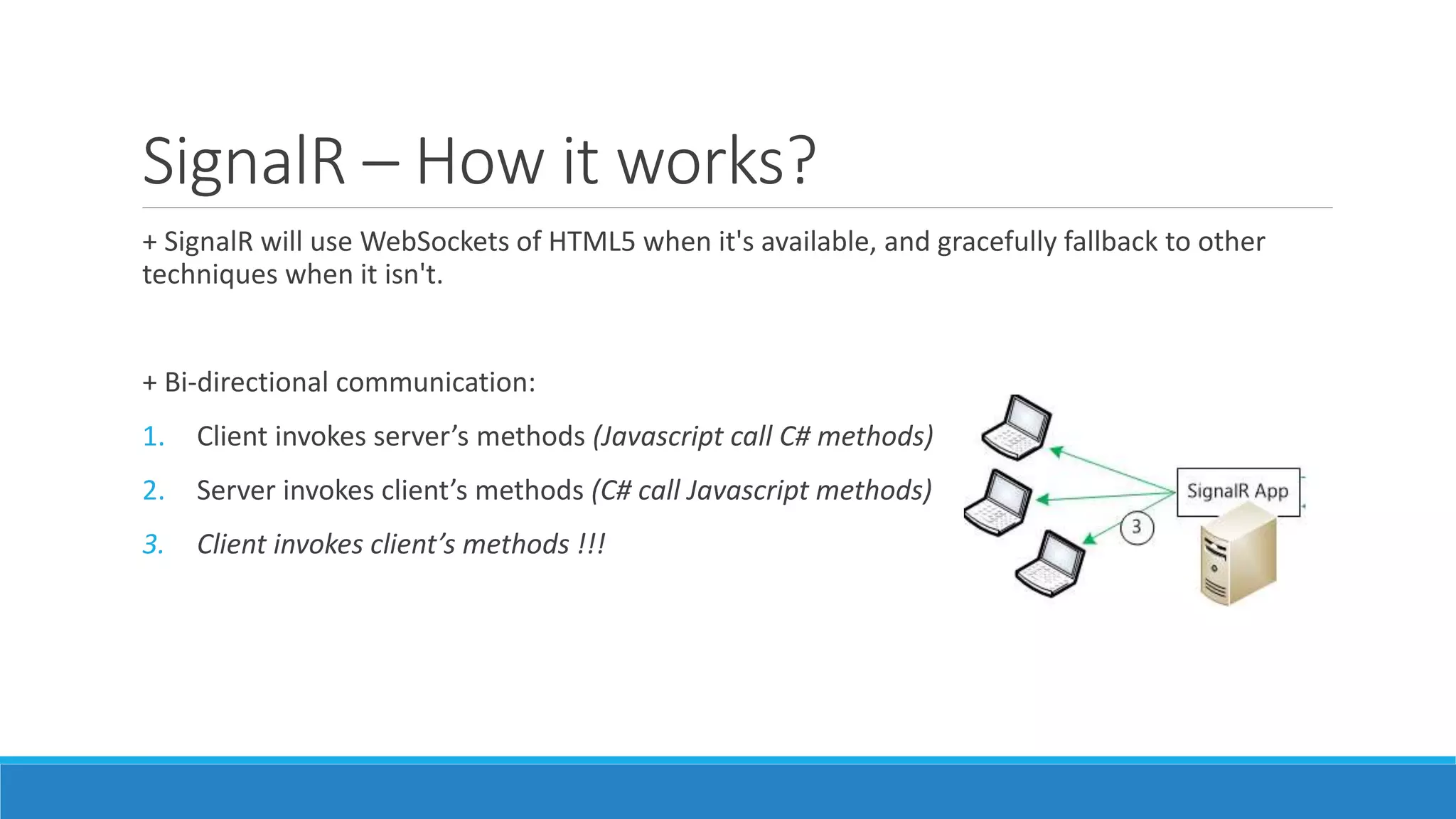
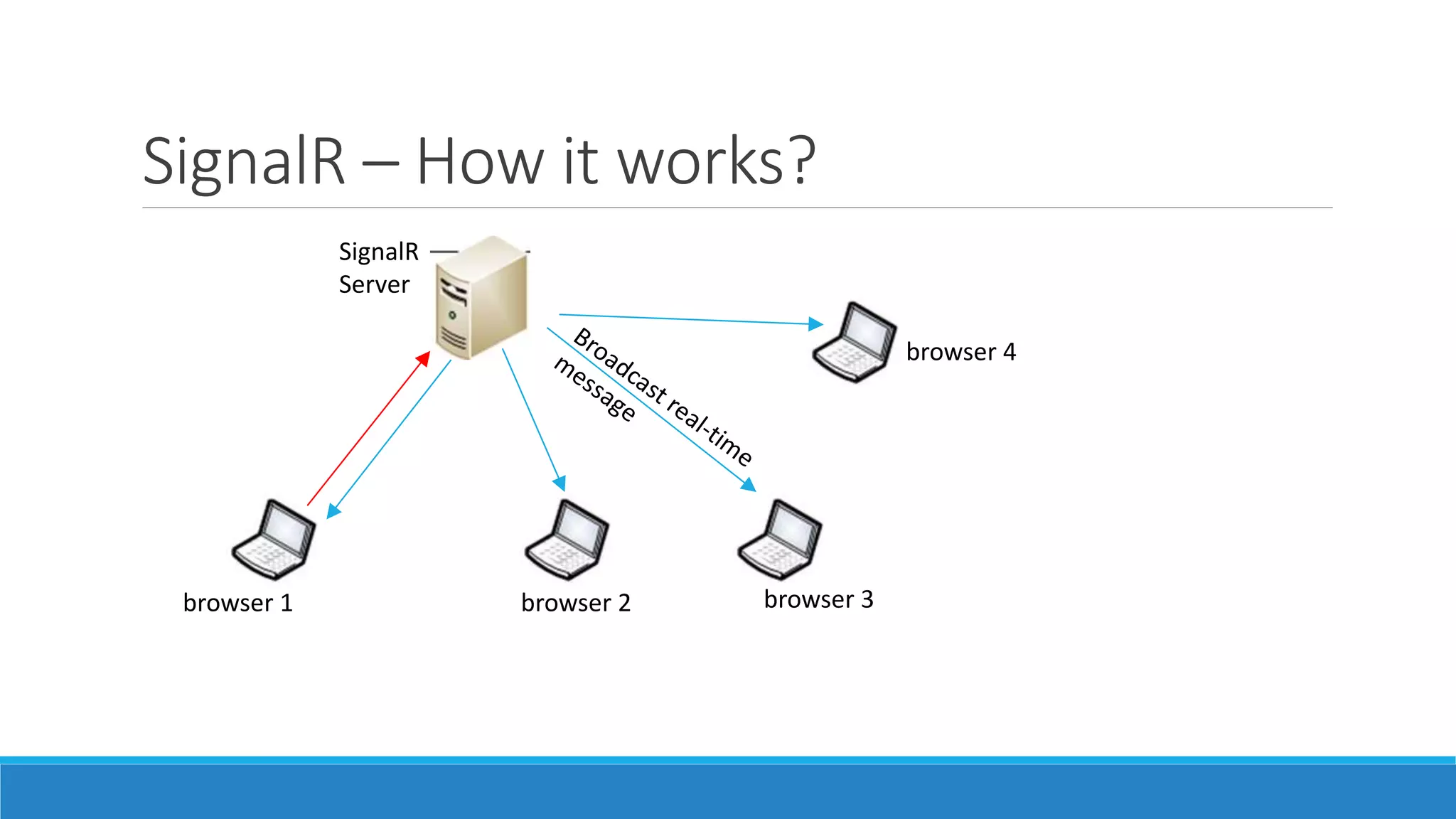
SignalR – How it works? + SignalR will use WebSockets of HTML5 when it's available, and gracefully fallback to other techniques when it isn't. + Bi-directional communication: 1. Client invokes server’s methods (Javascript call C# methods) 2. Server invokes client’s methods (C# call Javascript methods) 3. Client invokes client’s methods !!!
SignalR – How it works? browser 1 browser 2 browser 3 browser 4 SignalR Server
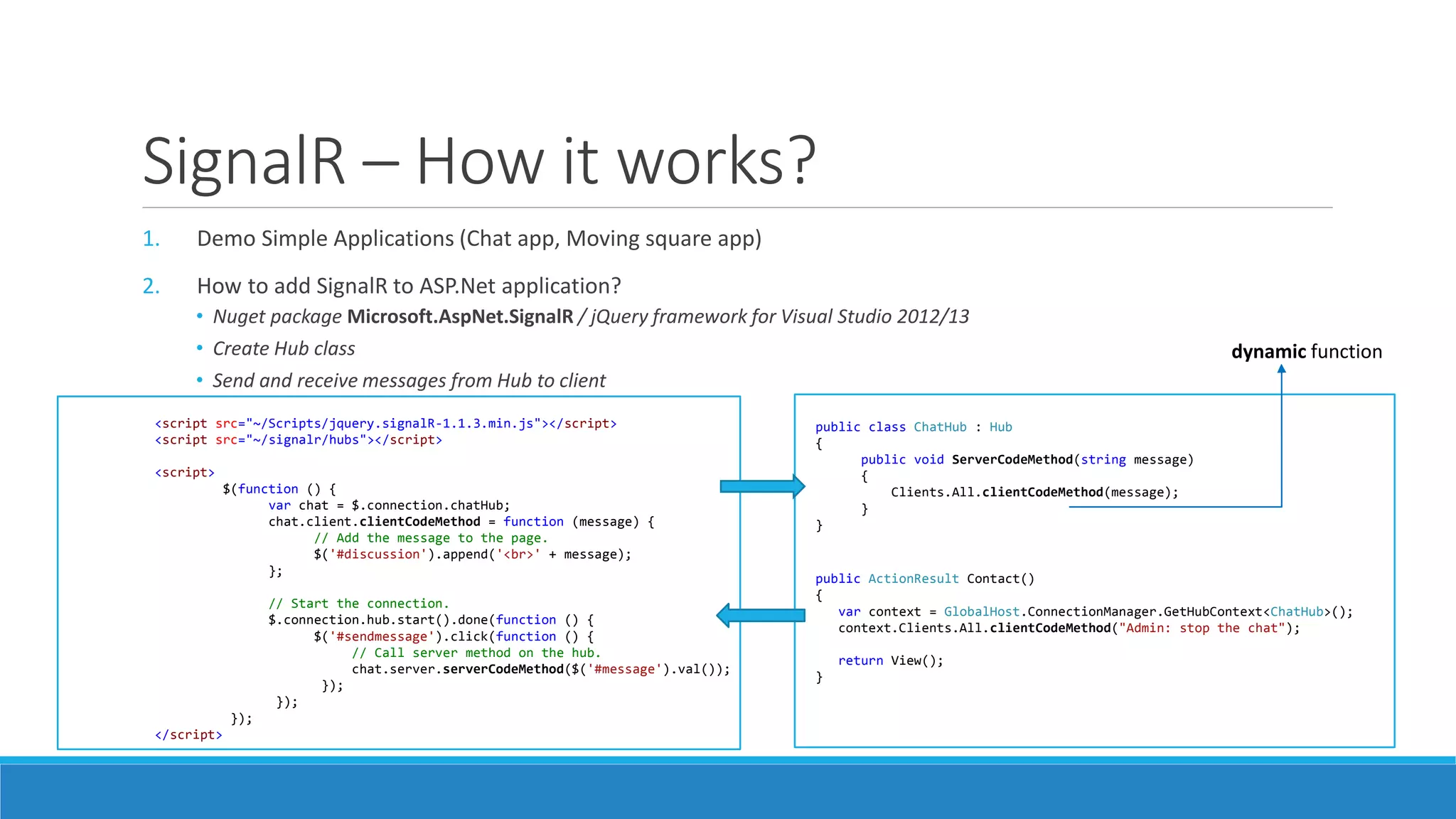
SignalR – How it works? 1. Demo Simple Applications (Chat app, Moving square app) 2. How to add SignalR to ASP.Net application? • Nuget package Microsoft.AspNet.SignalR / jQuery framework for Visual Studio 2012/13 • Create Hub class • Send and receive messages from Hub to client <script src="~/Scripts/jquery.signalR-1.1.3.min.js"></script> <script src="~/signalr/hubs"></script> <script> $(function () { var chat = $.connection.chatHub; chat.client.clientCodeMethod = function (message) { // Add the message to the page. $('#discussion').append('<br>' + message); }; // Start the connection. $.connection.hub.start().done(function () { $('#sendmessage').click(function () { // Call server method on the hub. chat.server.serverCodeMethod($('#message').val()); }); }); }); </script> public ActionResult Contact() { var context = GlobalHost.ConnectionManager.GetHubContext<ChatHub>(); context.Clients.All.clientCodeMethod("Admin: stop the chat"); return View(); } public class ChatHub : Hub { public void ServerCodeMethod(string message) { Clients.All.clientCodeMethod(message); } } dynamic function
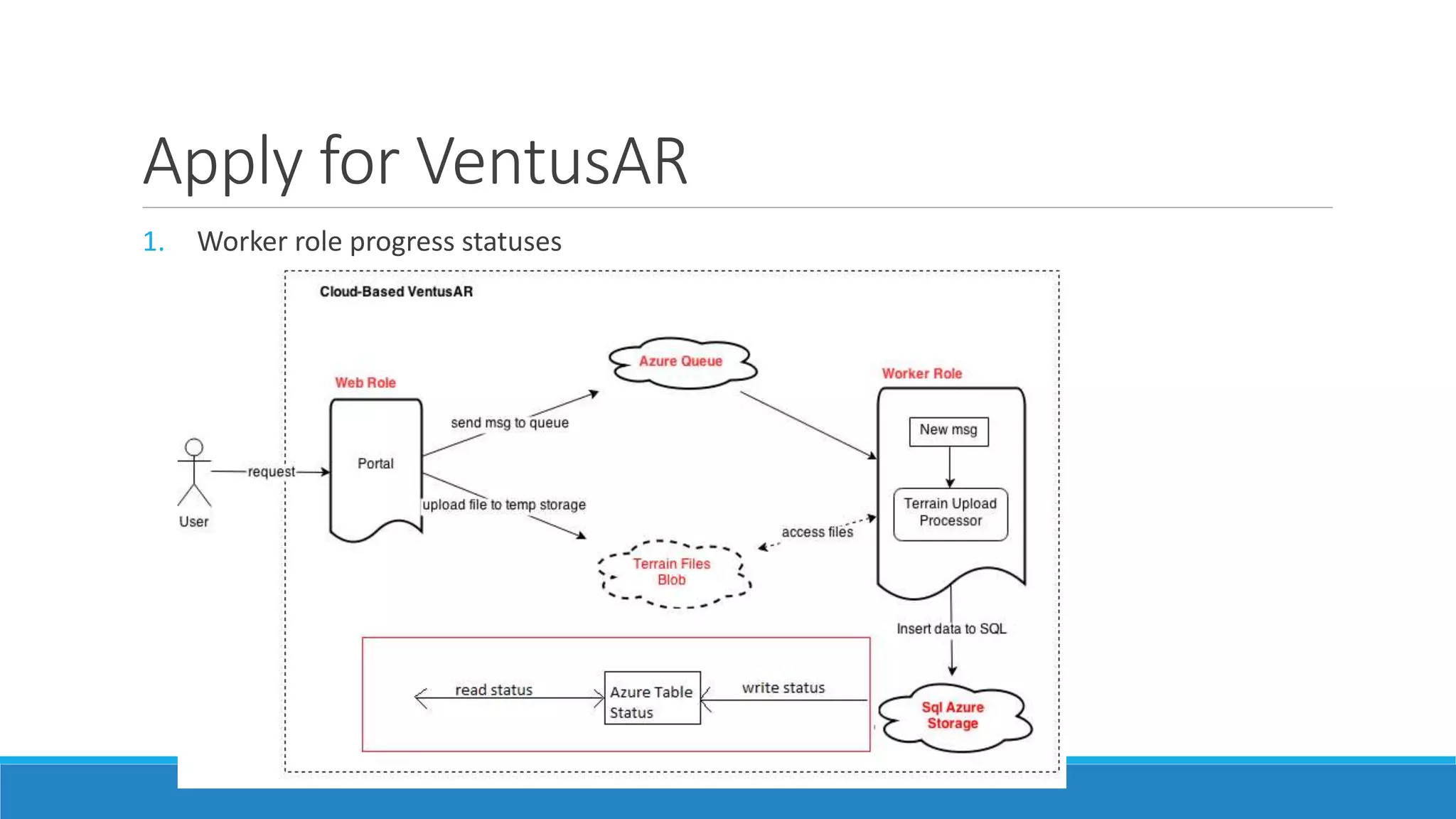
Apply for VentusAR 1. Worker role progress statuses
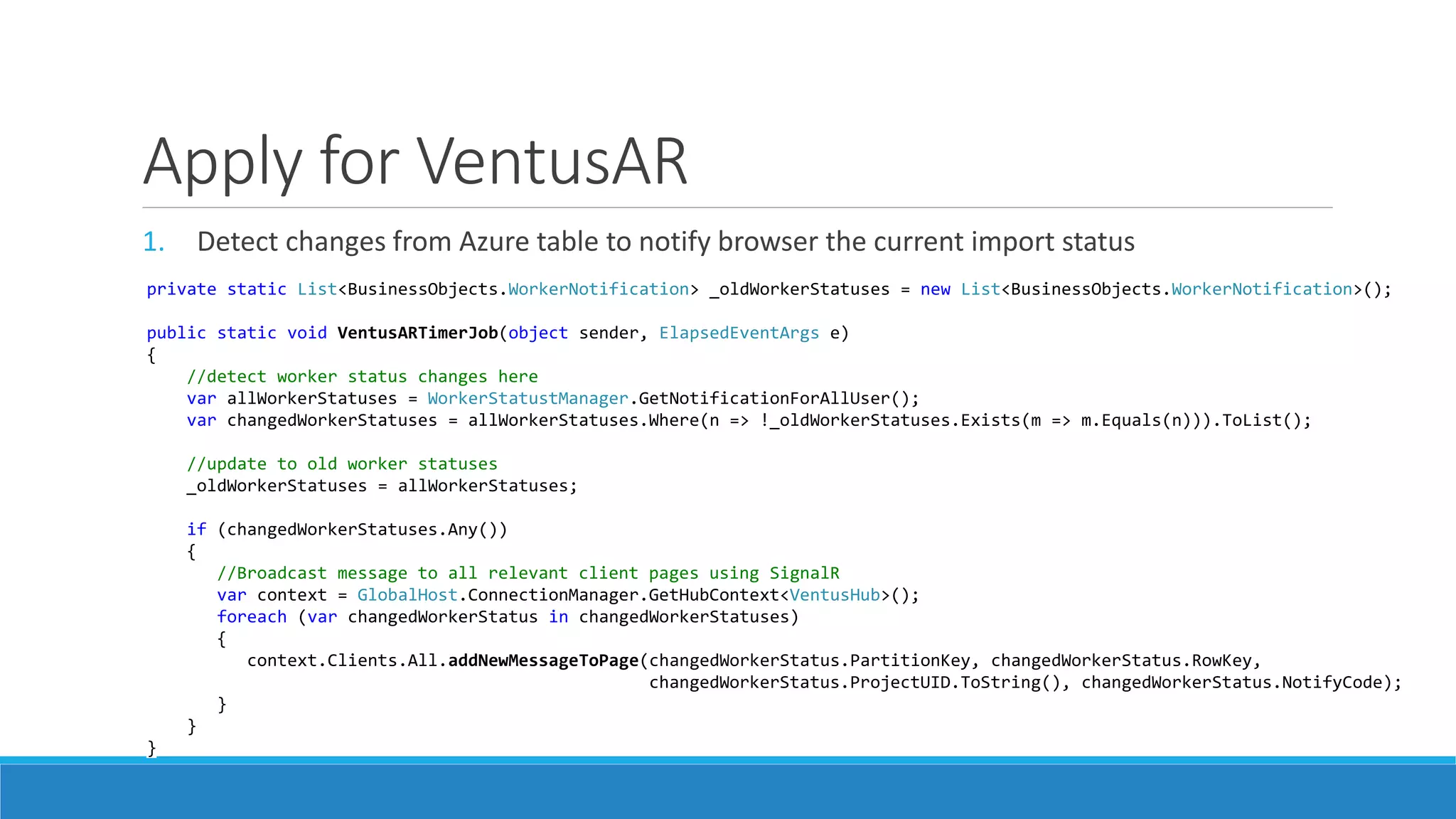
Apply for VentusAR 1. Detect changes from Azure table to notify browser the current import status private static List<BusinessObjects.WorkerNotification> _oldWorkerStatuses = new List<BusinessObjects.WorkerNotification>(); public static void VentusARTimerJob(object sender, ElapsedEventArgs e) { //detect worker status changes here var allWorkerStatuses = WorkerStatustManager.GetNotificationForAllUser(); var changedWorkerStatuses = allWorkerStatuses.Where(n => !_oldWorkerStatuses.Exists(m => m.Equals(n))).ToList(); //update to old worker statuses _oldWorkerStatuses = allWorkerStatuses; if (changedWorkerStatuses.Any()) { //Broadcast message to all relevant client pages using SignalR var context = GlobalHost.ConnectionManager.GetHubContext<VentusHub>(); foreach (var changedWorkerStatus in changedWorkerStatuses) { context.Clients.All.addNewMessageToPage(changedWorkerStatus.PartitionKey, changedWorkerStatus.RowKey, changedWorkerStatus.ProjectUID.ToString(), changedWorkerStatus.NotifyCode); } } }
SignalR with Azure Mobile Service 1. Azure mobile service makes use of SingalR to push notification from Mobile service to all connected apps.

SignalR tutorial & best practices

  • 1.
  • 2.
    Web Communication Evolution 1.Http Communication: Http Request / Http Response (Uni-directional communication) 2. Ajax Http Communication: (Uni-directional) 3. SignalR Communication (Bi-directional) to broadcast message + Server broadcast means that communications sent to clients are initiated by the server. Client Normal Server SignalR Server http request http response signalr request ClientClient client request Client Normal Server ajax request
  • 3.
    To Solve CommonIssues 1. How to get live status from browser in real-time? 2. To display: + Live results: stock, betting, football/sport matches results … + Live progress: long-running import, upload,…  Current Temporary Approach: + Periodically refresh the page to update status  Good enough??? (delay, waste bandwidth, server load...)  New Approach: SignalR
  • 4.
    SignalR – Howit works? + SignalR will use WebSockets of HTML5 when it's available, and gracefully fallback to other techniques when it isn't. + Bi-directional communication: 1. Client invokes server’s methods (Javascript call C# methods) 2. Server invokes client’s methods (C# call Javascript methods) 3. Client invokes client’s methods !!!
  • 5.
    SignalR – Howit works? browser 1 browser 2 browser 3 browser 4 SignalR Server
  • 6.
    SignalR – Howit works? 1. Demo Simple Applications (Chat app, Moving square app) 2. How to add SignalR to ASP.Net application? • Nuget package Microsoft.AspNet.SignalR / jQuery framework for Visual Studio 2012/13 • Create Hub class • Send and receive messages from Hub to client <script src="~/Scripts/jquery.signalR-1.1.3.min.js"></script> <script src="~/signalr/hubs"></script> <script> $(function () { var chat = $.connection.chatHub; chat.client.clientCodeMethod = function (message) { // Add the message to the page. $('#discussion').append('<br>' + message); }; // Start the connection. $.connection.hub.start().done(function () { $('#sendmessage').click(function () { // Call server method on the hub. chat.server.serverCodeMethod($('#message').val()); }); }); }); </script> public ActionResult Contact() { var context = GlobalHost.ConnectionManager.GetHubContext<ChatHub>(); context.Clients.All.clientCodeMethod("Admin: stop the chat"); return View(); } public class ChatHub : Hub { public void ServerCodeMethod(string message) { Clients.All.clientCodeMethod(message); } } dynamic function
  • 7.
    Apply for VentusAR 1.Worker role progress statuses
  • 8.
    Apply for VentusAR 1.Detect changes from Azure table to notify browser the current import status private static List<BusinessObjects.WorkerNotification> _oldWorkerStatuses = new List<BusinessObjects.WorkerNotification>(); public static void VentusARTimerJob(object sender, ElapsedEventArgs e) { //detect worker status changes here var allWorkerStatuses = WorkerStatustManager.GetNotificationForAllUser(); var changedWorkerStatuses = allWorkerStatuses.Where(n => !_oldWorkerStatuses.Exists(m => m.Equals(n))).ToList(); //update to old worker statuses _oldWorkerStatuses = allWorkerStatuses; if (changedWorkerStatuses.Any()) { //Broadcast message to all relevant client pages using SignalR var context = GlobalHost.ConnectionManager.GetHubContext<VentusHub>(); foreach (var changedWorkerStatus in changedWorkerStatuses) { context.Clients.All.addNewMessageToPage(changedWorkerStatus.PartitionKey, changedWorkerStatus.RowKey, changedWorkerStatus.ProjectUID.ToString(), changedWorkerStatus.NotifyCode); } } }
  • 9.
    SignalR with AzureMobile Service 1. Azure mobile service makes use of SingalR to push notification from Mobile service to all connected apps.