
Help us keep the list up to date and submit new video software here.
Tool
Description
Type
Rating
Reviews
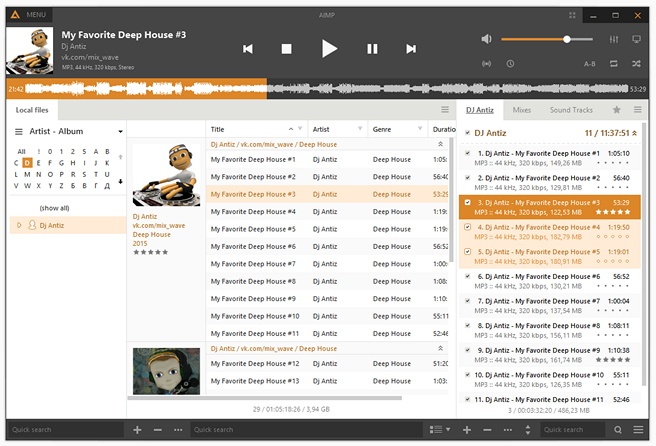
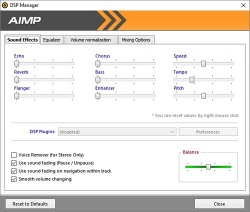
AIMP is a free audio player. Multiformat Playback. Output supports. Built-in sound effects. Reverb, Flanger, Chorus, Pitch, Tempo, Echo, Speed, Bass, Enhancer, Voice Remover. Work with multiple playlists. While one plays - you work with another. Creating bookmarks and playback queue. CUE Sheets supports. Support for plugins. LastFM Scrobbler. Multi-user mode support. Multilanguage interface. Hotkeys. Configure local and global hotkeys as you wish! Files search. Search files on all opened playlists.
Freeware
OS:

File size: 18MB
Beta version
Portable version
Old versions
Version history
Alternative software
OS:
File size: 18MB
Beta version
Portable version
Old versions
Version history
Alternative software
Screenshots
Latest version Download
Download AIMP 5.40.2715 Windows 64-bit 21MB Win64
Download AIMP 5.40.2715 Windows 18MB Win
Download AIMP 5.40.2715 Linux Linux
Download Beta, Portable and other versions
Portable 
Download AIMP 5.40.2715 Portable Windows 18MB Win
Portable Download AIMP 6.00.3055 Beta 2 Windows 64-bit 21MB Win64
Download AIMP 6.00.3055 Beta 2 Windows 21MB Win
Download AIMP 6.00.3055 Beta 2 Linux Linux
Download old versions

Software License
Supported operating systems
Linux Version history / Release notes / Changelog / What's New
AIMP v5.40.2715 (11.04.2026)
Sound Engine: preloading next track starts halfway through the track and at least a minute before the end
Fixed: sound engine - player does not jump to the next track when playing very short tracks
Fixed: Skin Engine - showing of the DropWheel dialog may block mouse control on Wine / Windows 11
Fixed: Tag editor - renaming - selecting the "skip" or "skip all" on duplicate file cancels the operation
Fixed: tag editor - renaming - incorrect iteration with CUE-splitted files
Fixed: plugins - podcasts - data located exclusively in the RSS-feed is not shown in UI
Fixed: issues from incoming crash-reports
AIMP v6.00.3055 Beta 2 (06.04.2026)
General: native Linux x86-64 support
General: app appearance has been updated
General: the %StrPart macro has been added
General: the %Tag(A) macro has been added to access to custom tag field of playing track
Sound engine: resampler algorithm has been improved
Player: an ability to abort connecting operation to Internet radiostation
Player: mouse wheel on the icon in notification area now adjusts volume
Tag editor: an ability to disable escaping the meta due batch file renaming
Tag editor: rename files - usability has been improved
Skin Engine: an ability to specify individual scaling factor for a window
Music Library: add the "not contain" operator
Music Library: grouping tree - ability to define few fields on single level using composite field
Music library: an ability to disable grouping by Ctrl+Click on cell value
Music library: new view in the table - rows with thumbnails
Plugins: inputFFmpeg - support for E-AC3
Plugins: inputFFmpeg - support for HE-AAC
Plugins: InputFFmpeg - support for MLP (streaming mode only)
Plugins: InputFFmpeg - the FFmpeg libraries has been updated to v7.11
Fixed: music library - file modification date not updated after changing rating in file tags
Fixed: issues from incoming crash-reports
Sound Engine: preloading next track starts halfway through the track and at least a minute before the end
Fixed: sound engine - player does not jump to the next track when playing very short tracks
Fixed: Skin Engine - showing of the DropWheel dialog may block mouse control on Wine / Windows 11
Fixed: Tag editor - renaming - selecting the "skip" or "skip all" on duplicate file cancels the operation
Fixed: tag editor - renaming - incorrect iteration with CUE-splitted files
Fixed: plugins - podcasts - data located exclusively in the RSS-feed is not shown in UI
Fixed: issues from incoming crash-reports
AIMP v6.00.3055 Beta 2 (06.04.2026)
General: native Linux x86-64 support
General: app appearance has been updated
General: the %StrPart macro has been added
General: the %Tag(A) macro has been added to access to custom tag field of playing track
Sound engine: resampler algorithm has been improved
Player: an ability to abort connecting operation to Internet radiostation
Player: mouse wheel on the icon in notification area now adjusts volume
Tag editor: an ability to disable escaping the meta due batch file renaming
Tag editor: rename files - usability has been improved
Skin Engine: an ability to specify individual scaling factor for a window
Music Library: add the "not contain" operator
Music Library: grouping tree - ability to define few fields on single level using composite field
Music library: an ability to disable grouping by Ctrl+Click on cell value
Music library: new view in the table - rows with thumbnails
Plugins: inputFFmpeg - support for E-AC3
Plugins: inputFFmpeg - support for HE-AAC
Plugins: InputFFmpeg - support for MLP (streaming mode only)
Plugins: InputFFmpeg - the FFmpeg libraries has been updated to v7.11
Fixed: music library - file modification date not updated after changing rating in file tags
Fixed: issues from incoming crash-reports
View full changelog
All features
Main features and functions
* Multiformat Playback:
.CDA, .AAC, .AC3, .APE, .DTS, .FLAC, .IT, .MIDI, .MO3, .MOD, .M4A, .M4B, .MP1, .MP2, .MP3, .MPC, .MTM, .OFR, .OGG, .RMI, .S3M, .SPX, .TAK, .TTA, .UMX, .WAV, .WMA, .WV, .XM
* Output supports
DirectSound / ASIO / WASAPI
* 18-band equalizer and built-in sound effects
Reverb, Flanger, Chorus, Pitch, Tempo, Echo, Speed, Bass, Enhancer, Voice Remover
* 64-bit audio processing
For the best quality!
* Work with multiple playlists
While one plays - you work with another
* Great functionality and user-friendly interface
* Creating bookmarks and playback queue
* CUE Sheets supports
* Support for plugins
You can add new utils or extend already existing
* LastFM Scrobbler
* Multi-user mode support
Are several users working with one computer? This is no problem!
* Multilanguage interface
* Hotkeys
Configure local and global hotkeys as you wish!
* Files search
Search files on all opened playlists
* Flexible programm options
Tag Editor
* Tag Editor
You can easily edit tags of audio files and rename group of files, sort files by template or apply tags to a group of files
Audio Library
* Audio Library
Represents the music files organizer, which allows you easily organize your music, set marks for listened Tracks, keeping playback statistics.
Internet radio
* Internet radio
Listen and capture internet-radio stations to OGG / WAV / MP3 / AAC / AAC+ formats
Capture stream as is for MP3 / AAC / AAC+ formats
* Online Radio Browser
View catalogs of Shoutcast and Icecast services
CoverArt Downloader
* CoverArt Downloader
Search and download album covers from the Internet
Simple Scheduler
* Alarm Clock
You can choose playback start time of selected track with smooth volume increasing
* Auto shutdown the computer
You can sleep while listening favorite music, just set the timer to shutdown the computer at given time or on playback finish.
* Multiformat Playback:
.CDA, .AAC, .AC3, .APE, .DTS, .FLAC, .IT, .MIDI, .MO3, .MOD, .M4A, .M4B, .MP1, .MP2, .MP3, .MPC, .MTM, .OFR, .OGG, .RMI, .S3M, .SPX, .TAK, .TTA, .UMX, .WAV, .WMA, .WV, .XM
* Output supports
DirectSound / ASIO / WASAPI
* 18-band equalizer and built-in sound effects
Reverb, Flanger, Chorus, Pitch, Tempo, Echo, Speed, Bass, Enhancer, Voice Remover
* 64-bit audio processing
For the best quality!
* Work with multiple playlists
While one plays - you work with another
* Great functionality and user-friendly interface
* Creating bookmarks and playback queue
* CUE Sheets supports
* Support for plugins
You can add new utils or extend already existing
* LastFM Scrobbler
* Multi-user mode support
Are several users working with one computer? This is no problem!
* Multilanguage interface
* Hotkeys
Configure local and global hotkeys as you wish!
* Files search
Search files on all opened playlists
* Flexible programm options
Tag Editor
* Tag Editor
You can easily edit tags of audio files and rename group of files, sort files by template or apply tags to a group of files
Audio Library
* Audio Library
Represents the music files organizer, which allows you easily organize your music, set marks for listened Tracks, keeping playback statistics.
Internet radio
* Internet radio
Listen and capture internet-radio stations to OGG / WAV / MP3 / AAC / AAC+ formats
Capture stream as is for MP3 / AAC / AAC+ formats
* Online Radio Browser
View catalogs of Shoutcast and Icecast services
CoverArt Downloader
* CoverArt Downloader
Search and download album covers from the Internet
Simple Scheduler
* Alarm Clock
You can choose playback start time of selected track with smooth volume increasing
* Auto shutdown the computer
You can sleep while listening favorite music, just set the timer to shutdown the computer at given time or on playback finish.
Sections/Browse similar tools
Alternative to AIMP
(Latest version updated)foobar2000 (Mar 26, 2026)
LameXP (Feb 28, 2026)
WACUP (Mar 1, 2026)
Winamp (Apr 26, 2023)
Guides and How to's
Notify me when software updated or report software
| 22 reviews, Showing 1 to 5 reviews |
Simply awesome
This music is nothing we can't do with Player
It has great support, it really is a perfect player
This music is nothing we can't do with Player
It has great support, it really is a perfect player
Review by bilek on Jul 15, 2025 Version: v5.40 OS: Windows 11 64-bit Ease of use: 10/10 Functionality: 10/10 Value for money: 10/10 Overall: 10/10
Just downloaded AIMP Player, in the process of fun-testing it on a Windows 10 computer.
Sounds better and better with various audio file formats up to dsf played through a Sony hi-fi audio system/speakers and iFi Diablo 2 portable DAC/JVC Solidege HA-FD01 earphones. Better than foobar and Pot Player
Sounds better and better with various audio file formats up to dsf played through a Sony hi-fi audio system/speakers and iFi Diablo 2 portable DAC/JVC Solidege HA-FD01 earphones. Better than foobar and Pot Player
Review by max on Dec 1, 2024 Version: 5.30.2563 OS: Windows 10 64-bit Ease of use: 8/10 Functionality: 8/10 Value for money: 10/10 Overall: 8/10
I like. Knows everything.
Review by sledding felicity on Jan 22, 2023 Version: 5.10 OS: Windows 10 64-bit Ease of use: 10/10 Functionality: 10/10 Value for money: 10/10 Overall: 10/10
64 bit ?
Review by hey on Apr 26, 2022 Version: 5.02 OS: Windows 10 64-bit Ease of use: 9/10 Functionality: 9/10 Value for money: 9/10 Overall: 9/10
Sounds great with excessive options to modify the sound but very, very difficult to configure. After two weeks I still cannot get it to recognize internet radio stations. Very frustrating!
Review by Norman on Feb 5, 2022 Version: 5.01.2358 Portable OS: Windows 7 64-bit Ease of use: 1/10 Functionality: 4/10 Value for money: 10/10 Overall: 7/10
| 22 reviews, Showing 1 to 5 reviews |
| 1 tool hits, Showing 1 to 1 tools |
Explanation:
NEW SOFTWARE= New tool since your last visit
NEW VERSION= New version since your last visit
NEW REVIEW= New review since your last visit
NEW VERSION= New version
Latest version
Version number / Beta version number / Update version number and when it whas released.
Type and download
NO MORE UPDATES? = The software hasn't been updated in over 2 years.
NO LONGER DEVELOPED = The software hasn't been updated in over 5 years.
RECENTLY UPDATED = The software has been updated the last 31 days.
Freeware = Download Free software.
Freeware Trialware = Download Free software but some parts are trial/shareware.
Free software = Download Free software and also open source code also known as FOSS (Free and Open Source Software).
Free software Trialware = Download Free software and also open source code but some parts are trial/shareware.
Freeware Ads = Download Free software but supported by advertising, usually with a included browser toolbar. It may be disabled when installing or after installation.
Free software Ads = Free Download software and open source code but supported by advertising, usually with a included browser toolbar. It may be disabled when installing or after installation.
Trialware = Also called shareware or demo. Free Trial version available for download and testing with usually a time limit or limited functions.
Payware = No demo or trial available.
Portable version = A portable/standalone version is available. No installation is required.
v1.0.1 = Latest version available.
Download beta = It could be a Beta, RC(Release Candidate) or an Alpha / Nightly / Unstable version of the software.
Download 15MB = A direct link to the software download.
Win = Windows download version for 32-bit and 64-bit Windows.
Win64 = Windows 64-bit download version for 64-bit Windows.
WinARM64 = Windows 64-bit ARM download version for Windows ARM64/AArch64.
Mac = Mac download version for 64-bit Mac OS Intel/ARM64/AArch64.
MacARM64 = Mac Silicon download version for 64-bit Mac OS ARM64/AArch64.
Mac64 = Mac OS download version for 64-bit Intel Mac OS.
Linux = Linux download version.
Linux64 = Linux download version for 64bit Linux.
Linux ARM = Linux download version for Linux ARM64/AArch64.
Portable = Portable version. No installation is required.
Ad-Supported = The software is bundled with advertising. Be careful when you install the software and disable addons that you don't want!
Visit developers site = A link to the software developer site.
Download (mirror link) = A mirror link to the software download. It may not contain the latest versions.
Download old versions = Free downloads of previous versions of the program.
Download 64-bit version = If you have a 64bit operating system you can download this version.
Download portable version = Portable/Standalone version meaning that no installation is required, just extract the files to a folder and run directly.
Portable version available = Download the portable version and you can just extract the files and run the program without installation.
Old versions available = Download old versions of the program.
Version history available = Complete changelog on our site.
= Windows version available.
 = Mac OS version available.
= Linux version available.
Our hosted software are virus and malware scanned with several antivirus programs using www.virustotal.com. (NOTE! Just one virustotal warning is 99.9% a false positive. And some software might receive 2-6 warnings but it's if they are not all same virus/trojan then it's 99% false positives.)
Rating
Rating from 0-10.
NEW SOFTWARE= New tool since your last visit
NEW VERSION= New version since your last visit
NEW REVIEW= New review since your last visit
NEW VERSION= New version
Latest version
Version number / Beta version number / Update version number and when it whas released.
Type and download
NO MORE UPDATES? = The software hasn't been updated in over 2 years.
NO LONGER DEVELOPED = The software hasn't been updated in over 5 years.
RECENTLY UPDATED = The software has been updated the last 31 days.
Freeware = Download Free software.
Freeware Trialware = Download Free software but some parts are trial/shareware.
Free software = Download Free software and also open source code also known as FOSS (Free and Open Source Software).
Free software Trialware = Download Free software and also open source code but some parts are trial/shareware.
Freeware Ads = Download Free software but supported by advertising, usually with a included browser toolbar. It may be disabled when installing or after installation.
Free software Ads = Free Download software and open source code but supported by advertising, usually with a included browser toolbar. It may be disabled when installing or after installation.
Trialware = Also called shareware or demo. Free Trial version available for download and testing with usually a time limit or limited functions.
Payware = No demo or trial available.
Portable version = A portable/standalone version is available. No installation is required.
v1.0.1 = Latest version available.
Download beta = It could be a Beta, RC(Release Candidate) or an Alpha / Nightly / Unstable version of the software.
Download 15MB = A direct link to the software download.
Win = Windows download version for 32-bit and 64-bit Windows.
Win64 = Windows 64-bit download version for 64-bit Windows.
WinARM64 = Windows 64-bit ARM download version for Windows ARM64/AArch64.
Mac = Mac download version for 64-bit Mac OS Intel/ARM64/AArch64.
MacARM64 = Mac Silicon download version for 64-bit Mac OS ARM64/AArch64.
Mac64 = Mac OS download version for 64-bit Intel Mac OS.
Linux = Linux download version.
Linux64 = Linux download version for 64bit Linux.
Linux ARM = Linux download version for Linux ARM64/AArch64.
Portable = Portable version. No installation is required.
Ad-Supported = The software is bundled with advertising. Be careful when you install the software and disable addons that you don't want!
Visit developers site = A link to the software developer site.
Download (mirror link) = A mirror link to the software download. It may not contain the latest versions.
Download old versions = Free downloads of previous versions of the program.
Download 64-bit version = If you have a 64bit operating system you can download this version.
Download portable version = Portable/Standalone version meaning that no installation is required, just extract the files to a folder and run directly.
Portable version available = Download the portable version and you can just extract the files and run the program without installation.
Old versions available = Download old versions of the program.
Version history available = Complete changelog on our site.
= Windows version available. = Mac OS version available. = Linux version available.Our hosted software are virus and malware scanned with several antivirus programs using www.virustotal.com. (NOTE! Just one virustotal warning is 99.9% a false positive. And some software might receive 2-6 warnings but it's if they are not all same virus/trojan then it's 99% false positives.)
Rating
Rating from 0-10.
Browse software by sections
All In One Blu-ray Converters (9)
All In One DVD Converters (12)
All In One MKV to MP4, Blu-ray, UHD (11)
All In One Video Converters (19)
Animation (3D, 2D Animation) (12)
Audio Editors (22)
Audio Encoders (80)
Audio Players (19)
Authoring (Blu-ray, UHD, AVCHD) (13)
Authoring (DivX) (4)
Authoring (DVD) (26)
Authoring (SVCD, VCD) (9)
Bitrate Calculators (7)
Blu-ray to AVI, MKV, MP4 (15)
Blu-ray to Blu-ray, AVCHD (10)
Burn (CD,DVD,Blu-ray) (24)
Camcorders, DV, HDV, AVCHD (31)
Capture TV, DVD, VCR (30)
CD, DVD, Blu-ray recovery (3)
Codec Packs (6)
All In One DVD Converters (12)
All In One MKV to MP4, Blu-ray, UHD (11)
All In One Video Converters (19)
Animation (3D, 2D Animation) (12)
Audio Editors (22)
Audio Encoders (80)
Audio Players (19)
Authoring (Blu-ray, UHD, AVCHD) (13)
Authoring (DivX) (4)
Authoring (DVD) (26)
Authoring (SVCD, VCD) (9)
Bitrate Calculators (7)
Blu-ray to AVI, MKV, MP4 (15)
Blu-ray to Blu-ray, AVCHD (10)
Burn (CD,DVD,Blu-ray) (24)
Camcorders, DV, HDV, AVCHD (31)
Capture TV, DVD, VCR (30)
CD, DVD, Blu-ray recovery (3)
Codec Packs (6)
Codec, Video Identifiers (30)
Codecs (67)
Decrypters (DVD Rippers) (16)
Decrypters (UHD, Blu-ray Rippers) (8)
DigitalTV, DVB, IPTV (39)
DVD to DVD (20)
DVD to MP4, MKV, H264, H265 (16)
DVD to VCD, SVCD (5)
DVD to XviD, AVI, DivX (16)
ISO, Image (15)
Linux Video Tools (208)
MacOS Video Tools (244)
Media (Blu-ray, DVD, CD) (9)
Media Center, HTPC (24)
Other Useful Tools (140)
Photo Blu-ray, DVD, SlideShow (8)
Portable (Mobile, PSP) (35)
Region Free Tools (5)
Screen capture , Screen recording (27)
Screenshots , Thumbnails (13)
Codecs (67)
Decrypters (DVD Rippers) (16)
Decrypters (UHD, Blu-ray Rippers) (8)
DigitalTV, DVB, IPTV (39)
DVD to DVD (20)
DVD to MP4, MKV, H264, H265 (16)
DVD to VCD, SVCD (5)
DVD to XviD, AVI, DivX (16)
ISO, Image (15)
Linux Video Tools (208)
MacOS Video Tools (244)
Media (Blu-ray, DVD, CD) (9)
Media Center, HTPC (24)
Other Useful Tools (140)
Photo Blu-ray, DVD, SlideShow (8)
Portable (Mobile, PSP) (35)
Region Free Tools (5)
Screen capture , Screen recording (27)
Screenshots , Thumbnails (13)
Subtitle Editors, Converters (72)
Tag Editors (4)
Video De, Multiplexers (66)
Video Editors (Advanced, NLE) (35)
Video Editors (Basic) (56)
Video Editors (H264, MP4, MKV, MTS) (19)
Video Editors (Lossless) (4)
Video Editors (MPG, DVD) (16)
Video Editors (WMV, AVI) (15)
Video Encoders (AV1, VP8, VP9) (2)
Video Encoders (AVI, WMV) (38)
Video Encoders (H264, H265, MP4, MKV) (45)
Video Encoders (MPG, DVD) (23)
Video Encoders , Converters (155)
Video Frameservers (9)
Video Players (49)
Video Repair, Fix (24)
Video Scripting (10)
Video Streaming (21)
Video Streaming Downloaders (101)
Tag Editors (4)
Video De, Multiplexers (66)
Video Editors (Advanced, NLE) (35)
Video Editors (Basic) (56)
Video Editors (H264, MP4, MKV, MTS) (19)
Video Editors (Lossless) (4)
Video Editors (MPG, DVD) (16)
Video Editors (WMV, AVI) (15)
Video Encoders (AV1, VP8, VP9) (2)
Video Encoders (AVI, WMV) (38)
Video Encoders (H264, H265, MP4, MKV) (45)
Video Encoders (MPG, DVD) (23)
Video Encoders , Converters (155)
Video Frameservers (9)
Video Players (49)
Video Repair, Fix (24)
Video Scripting (10)
Video Streaming (21)
Video Streaming Downloaders (101)