1

I have a working application of labels to a point array - but the size of the text is not relative to the map scale. This decreases the readability of labels when panning and zooming.

To resolve~

How would one implement a text-size based on MapUnits?

 field = str(csvGridFieldNames[index]) csvGrid = ftools_utils.getMapLayerByName(unicode('mfLayer1_Grid'))#str(activeLayer))) textSize = 7 valLabel = QgsPalLayerSettings() valLabel.readFromLayer(csvGrid) valLabel.enabled = True valLabel.fieldName = field valLabel.placement= QgsPalLayerSettings.OverPoint valLabel.setDataDefinedProperty(QgsPalLayerSettings.Size,True,True,'%f' %(textSize),'') valLabel.writeToLayer(csvGrid) iface.legendInterface().refreshLayerSymbology(csvGrid) iface.mapCanvas().refresh() 

This question appears related, but having some trouble understanding the doc's...

"...lables 'Data Defined' section in pyqgis"

...and FWIW:

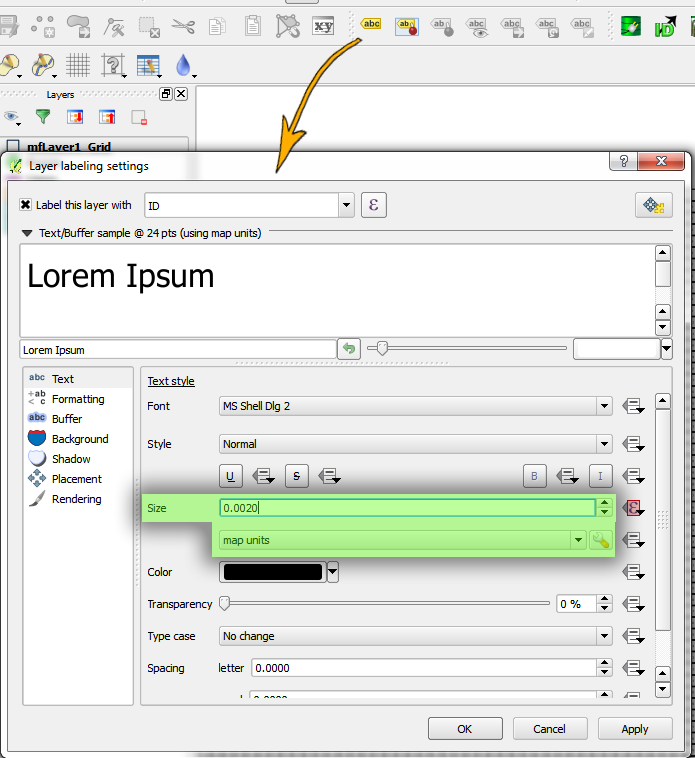
A screen shot of the Qgis tool, with the two (needed) PyQgis settable parameters highlighted in green: lable settings
Updates following underdark's advice:

Input syntax errors (on my part) are not raising error flags - but are also not implementing MapUnit based font/label size...

 valLabel.SizeUnit = QgsPalLayerSettings.MapUnits valLabel.setDataDefinedProperty(QgsPalLayerSettings.FontSizeUnit,True,True,':%f' %(textSize),'') 

LAST UPDATE [SOLVED] (final working code below):

 textSize = (abs(scale[0]-scale[1]))/4 valLabel = QgsPalLayerSettings() valLabel.readFromLayer(csvGrid) valLabel.enabled = True valLabel.fontSizeInMapUnits = True valLabel.fieldName = field valLabel.placement = QgsPalLayerSettings.OverPoint valLabel.setDataDefinedProperty(QgsPalLayerSettings.Size,True,True,'%f' %(textSize),'') valLabel.writeToLayer(csvGrid) iface.legendInterface().refreshLayerSymbology(csvGrid) iface.mapCanvas().refresh() 
0

1 Answer 1

2

Works for me:

valLabel=QgsPalLayerSettings() valLabel.readFromLayer(iface.activeLayer()) valLabel.fontSizeInMapUnits=True // change to map units valLabel.textFont.setPointSize(100000) // set font size valLabel.writeToLayer(iface.activeLayer()) iface.mapCanvas().refresh() 

For the data-defined way check QgsPalLayerSettings::DataDefinedProperties FontSizeUnit

and enum QgsPalLayerSettings::SizeUnit

Units used for option sizes, before being converted to rendered sizes.

Enumerator

Points
MM
MapUnits
Percent

7
  • Thank you underdark! Added some edits per your advice. Although, it seems syntax errors might be present - as desired effect is not implaced. Commented Dec 31, 2014 at 12:28
  • Wow - way simpler than I was making things to be. This seems right 'valLabel.fontSizeInMapUnits=True' although having secondary problems setting actual measure. Thanks for speedy wisdom from that side of the pond! Commented Dec 31, 2014 at 12:54
  • COMMENT REMOVED: figured it out, the data-defined 'size' is still used following the advice you gave. Thanks'again Commented Dec 31, 2014 at 13:19
  • "valLabel.textFont.setPointSize(100000) // set font size " Even simpler than the working implemented data-defined method I had. Nice Crown! Commented Dec 31, 2014 at 13:53
  • For some reason, my variable 'textSize' doesn't scale properly when using the setPointSize() method. Ergo - if I change the 'scale' distance [textSize = (abs(scale[0]-scale[1]))/4], the text becomes oversized. Yet if I stick with the data-defined means, scale is maintained. Not to sure at the moment why this is the case - but figured it might be useful for others if they have a variable input setting their font size. Commented Dec 31, 2014 at 13:59

Start asking to get answers

Find the answer to your question by asking.

Ask question

Explore related questions

See similar questions with these tags.