1

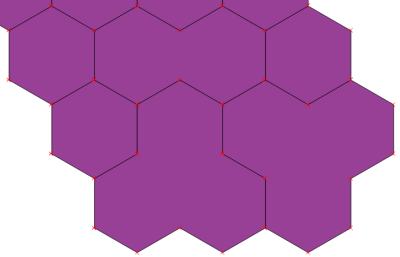
I'm trying to understand (and solve) the following issue in QGIS (2.16.3): I have a shapefile with hexagons which I want to merge. Doing so works, but certain "borders" (not sure about the correct term, sorry) inside the polygon remain, and I cannot figure out how to remove them (see below).

input:

enter image description here

output:

enter image description here

5
  • 1
    If you want to remove all polygon 'borders', you could try running the Dissolve tool on your layer. Commented Oct 17, 2016 at 13:41
  • thanks joseph - i've tried that but it leads to the same result. Commented Oct 17, 2016 at 14:41
  • May be you have geometry issues Commented Oct 17, 2016 at 14:51
  • Probably the vertices of adjacent polygons are not exactly the same and therefore the boundaries are not merged. You should snap the vertices with a reasonable tolerance as the first step. Commented Oct 17, 2016 at 15:38
  • thanks for your comments, which gave me some ideas. the vertices are ok, the problem was with the projection. Commented Oct 17, 2016 at 17:15

1 Answer 1

1

ok, in the end there was some problem with the projection. i rerun the projection on the file and suddenly it worked.

thanks for your input and sorry for the bother, since the shapefile looked perfectly normal in qgis i never thought that the problem was there - or even that a faulty projection could prevent a proper merge.

Start asking to get answers

Find the answer to your question by asking.

Ask question

Explore related questions

See similar questions with these tags.