2

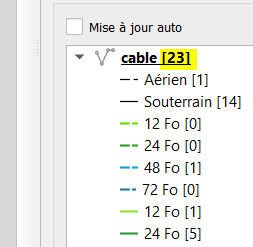
In the legend below I have included the feature counts on a polyline layer with a basic categorised style.

However, I would like to get rid of the total count in the layer title (highlighted in yellow) but keep the feature count just on the different categories.
enter image description here

I have tried removing the feature count and adding a formula directly into the categories labels - but the categories labels do not seem to accept formulas (sadly). I've already dug through SE but I haven't really found what I'm looking for. They are mostly about how to modify the feature counts based on the extent of the map - which doesn't answer my question.

Does anyone know if it's possible via the interface and if so how?

2 Answers 2

5

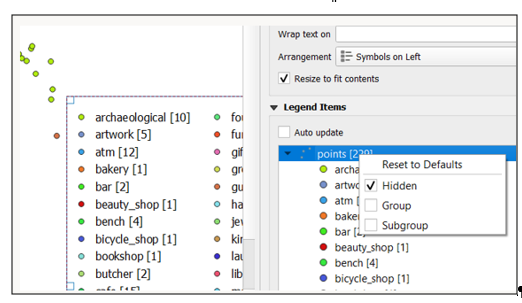
if you have the Auto update off - you should be able to right click on the legend title and hide it - but the name of the layer will be missing: enter image description here

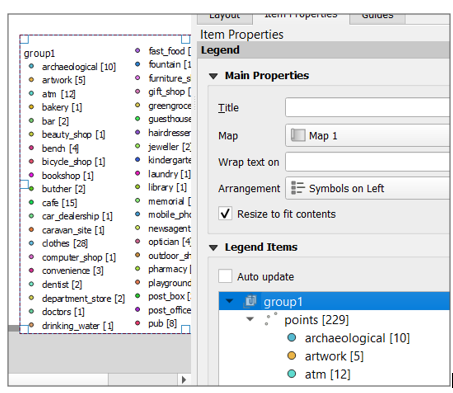
and as etrimaille suggests - add layer to a group - and put the name of the layer as the group name: enter image description here

2
  • Then you can the layer to a group with this single layer. Commented Jun 23, 2020 at 16:36
  • Thanks that's great ! Commented Jun 24, 2020 at 6:34
0

If you go back to your Layer Panel, you can select all of the layers and right-click. On the top of the sidebar, you can uncheck "Show Feature Count" and it will erase this count.

Furthermore, you can selectively choose to have the count of features shown for select layers.

Start asking to get answers

Find the answer to your question by asking.

Ask question

Explore related questions

See similar questions with these tags.