2

In ArcGIS Desktop 10.7 I am attempting to make a custom border for each polygon where there is a:

  • shared, custom border
  • unique border color
  • transparent fill

Here is what I tried: In Properties under the Symbology tab I selected Categories: Unique Values. The default settings shows <all other values> and I edited the symbol to create the custom border. Then I 'Add All Values' and the features populate with the custom border. However, the selected Color Ramp does not apply to the border but instead to the fill. Each border is black with a unique fill.
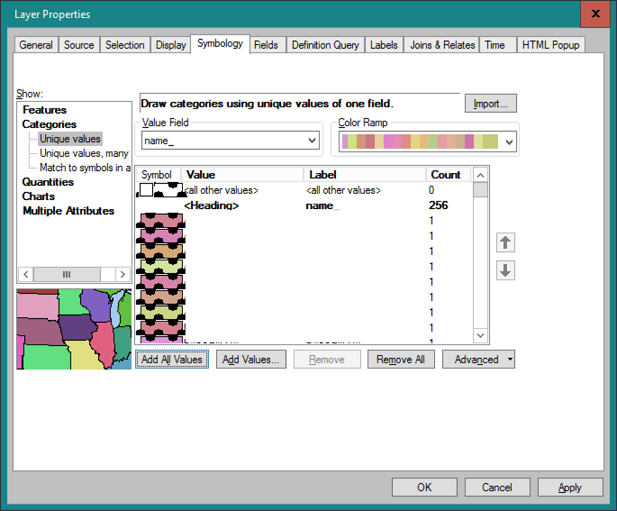
enter image description here

2
  • 1
    Not clear what you want to achieve. Maybe apply Polygon to Lines and remove all lines with LEFT_FID = -1 Commented Jul 30, 2020 at 5:20
  • 1
    This post about new features in ArcPro 2.3 implies that applying color ramps to outlines is available in Pro as of that version. pro.arcgis.com/en/pro-app/get-started/… Commented Jul 31, 2020 at 14:32

1 Answer 1

0

Credit to @ycartwhelen for realizing this is an ArcGIS Pro feature. Here is the documentation how-to (Set the color scheme target):

https://pro.arcgis.com/en/pro-app/help/mapping/layer-properties/unique-value.htm

Start asking to get answers

Find the answer to your question by asking.

Ask question

Explore related questions

See similar questions with these tags.