1

I use QGIS 2.14.10

I am trying to clip a raster with a vector layer mask (shapefile)using the clipper tool (gdal). There is an offset betwween the resulting raster and the vector mask (see picture below).

I also tried with the saga script : clip raster with polygon. This one is working correctly but can only open a temporary file. If i try to save hard file i have this message : "ERROR 1: Can't load requested DLL: C:\PROGRA~1\QGIS2~1.14\apps\saga\dll\gdal_MrSID.dll 127: La procédure spécifiée est introuvable."

I need to clip a raster with a polygon ina script.
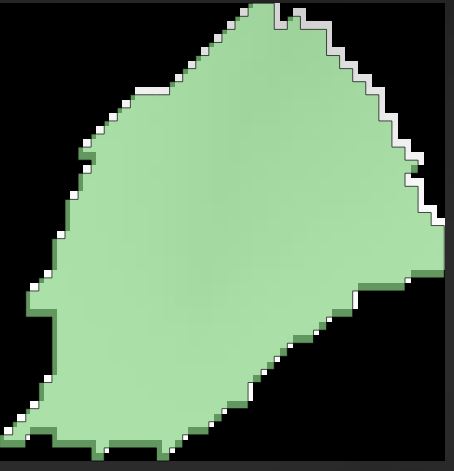
enter image description here

7
  • Your datasets probably have different coordinate systems Commented Jan 9, 2017 at 16:14
  • I don't think it come from that. I have the same coordinate system Commented Jan 9, 2017 at 16:55
  • And the project and output too? Commented Jan 9, 2017 at 16:58
  • yes. I Use the same coordinate system for project and all layers. And when i try to use the SAGA script "clip raster with polygon" i don't have this problem Commented Jan 9, 2017 at 17:00
  • If you look at the top of the picture. You'll see that the result is not only shift but also that it is not exactly the same shape Commented Jan 9, 2017 at 17:04

1 Answer 1

1

Actually, it's coming from the rasterize command : the polygon vertices are on the center of each raster source pixel. When the polygon is rasterized, the pixel are shift of 1/2 pixel.

Start asking to get answers

Find the answer to your question by asking.

Ask question

Explore related questions

See similar questions with these tags.