So i have tried couple of things, data pulled from the REST api works fine without trouble, but when i put it to Flatlist, it does not scroll. Tried countless things I saw on the internet, and still , it does not seem to work.
Below is a snippet i used, to display data from the REST api to the application :
<View> {isLoading ? <ActivityIndicator/> : <FlatList style={{fontFamily: 'Poppins-Medium', top: 170, left: 23}} ItemSeparatorComponent={this.FlatListItemSeparator} data={transaction_details} renderItem={({item}) => ( <View style={{paddingTop: 20,flexDirection: 'row', height: 75}}> <Image source={{uri: item.avatar}} style={{width:50, height:50, borderRadius:25,overflow:'hidden'}}/> <Text style={styles.PayeeName}>{item.name}{" "}</Text> <Text style={styles.date_ofTransaction}>{item.date}</Text> <Text style={styles.amountValue}>{item.amount}</Text> </View> )} keyExtractor={(item) => item.id .toString()} scrollEnabled={true} />} </View> Looking over, i saw something like View style={{flex:1}} should I have to try this, the whole thing disappears speedily. I dont know what else I have to try hence, this.
I need help with this. Thank you!
New Edits
done the edit you asked me to, now there are still some spaces there. Do not know how they came about,
I looks like this now so far
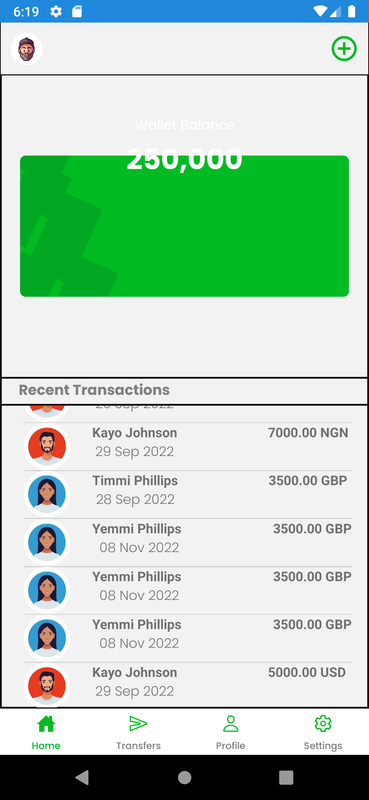
Here is the new Source code
import React, {useEffect, useState} from 'react'; import { ActivityIndicator, Image, ImageBackground, SafeAreaView, StyleSheet, Text, View, } from 'react-native'; import {Header, Avatar, Icon, Card} from '@rneui/themed'; import {FlatList, ScrollView} from 'react-native-gesture-handler'; import {Tab} from '@rneui/base'; const HomePage = () => { const [transaction_details, setTransaction_details] = useState([]); const[isLoading,setLoading] = useState(true); const Item = ({title}) => ( <View style={styles.item}> <Text style={styles.title}>{title}</Text> </View> ); FlatListItemSeparator = () => { return ( <View style={{ height: 1, width: 350, backgroundColor: '#D3D3D3', }} /> ); }; useEffect(() => { fetch('https://brotherlike-navies.000webhostapp.com/people/people.php', { method: 'GET', headers: { Accept: 'application/json', 'Content-type': 'application/json', }, }) .then(response => response.json()) .then(responseJson => { setTransaction_details(responseJson); setLoading(false); }); }, []); return ( <View style={{flex:1, borderWidth:1}}> <Header containerStyle={{ backgroundColor: 'transparent', justifyContent: 'space-around', }} leftComponent={ <Avatar small rounded source={{ uri: 'https://encrypted-tbn0.gstatic.com/images?q=tbn:ANd9GcSiRne6FGeaSVKarmINpum5kCuJ-pwRiA9ZT6D4_TTnUVACpNbzwJKBMNdiicFDChdFuYA&usqp=CAU', }} onPress={() => console.log('Left Clicked!')} activeOpacity={0.7} /> } rightComponent={ <Icon name={'add-circle-outline'} color={'#00BB23'} size={32} onPress={() => console.log('Right Clicked!')} /> }></Header> <View style={{ flex: 1, justifyContent: 'center', borderadius: 9, alignItems: 'center', borderWidth:1 }}> <ImageBackground source={{ uri: 'asset:/logo/bg.JPG', }} imageStyle={{borderRadius: 6}} style={{ width: 350, height: 150, borderadius: 9, justifyContent: 'center', alignItems: 'center', }}> <View> <Text style={styles.accText}>Wallet Balance</Text> <Text style={styles.text}> 250,000 </Text> </View> </ImageBackground> </View> <View style={{borderWidth:1}}> <Text style={{ fontFamily: 'Poppins-Bold', flexDirection: 'row', fontSize: 15, left: 18, color: 'gray', }}> Recent Transactions </Text> </View> <View style={{flex:1, borderWidth:1}}> {isLoading ? <ActivityIndicator/> : <FlatList style={{fontFamily: 'Poppins-Medium', left: 23}} ItemSeparatorComponent={this.FlatListItemSeparator} data={transaction_details} renderItem={({item}) => ( <View style={{flex:1,flexDirection: 'row'}}> <Image source={{uri: item.avatar}} style={{width:50, height:50, borderRadius:25,overflow:'hidden'}}/> <Text style={styles.PayeeName}>{item.name}{" "}</Text> <Text style={styles.date_ofTransaction}>{item.date}</Text> <Text style={styles.amountValue}>{item.amount}</Text> </View> )} keyExtractor={(item) => item.id .toString()} />} </View> </View> ); }; export default HomePage; const styles = StyleSheet.create({ container: { flex: 1, justifyContent: 'center', padding: 20, }, date_ofTransaction: { marginTop: 20, alignItems:'flex-start', alignItems:'center', left: -75, fontFamily: 'Poppins-Light', size: 4, }, paragraph: { fontSize: 18, fontWeight: 'bold', textAlign: 'center', padding: 20, }, text: { top: -85, fontSize: 30, color: 'white', textAlign: 'center', fontFamily: 'Poppins-Bold', }, mainContainer: { paddingTop: 90, justifyContent: 'center', alignItems: 'center', }, accText: { top: -85, paddingTop: 10, justifyContent: 'center', alignItems: 'center', fontFamily: 'Poppins-Medium', color: 'white', textAlign: 'center', }, PayeeName: { justifyContent: 'flex-start', alignItems:'center', left: 23, fontFamily: 'Poppins-Medium', size: 800, fontWeight:'bold' }, amountValue: { alignItems: 'flex-end', alignItems:'center', right: -25, fontFamily: 'Poppins-Medium', size: 800, fontWeight:'bold' } }); 


