3

I would like to add a simple text button to my c++ win32 application. I'm creating the button using CreateWindowEx function, but can't figure out the correct style to do so. I would like to display a text only button and be able to recive messages when the user clicks on it. The style i would like to get is identical to the text button in windows 7 system volume control (where it says "Mixer"). If possible i would like to display a tooltip also.
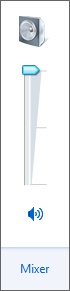
enter image description here

3 Answers 3

5

That mixer control looks more like a hyperlink control than a button. I'd go for the SysLink control if that's what you need.

Sign up to request clarification or add additional context in comments.

Comments

3

You could create a "Button" class window with the BS_OWNERDRAW style and handle the WM_DRAWITEM messages. In your WM_DRAWITEM message handler you can simply display the text.

1 Comment

You'd need to make it only respond to clicks on the text and do hot link handling.
3

Actually that button is an owner draw button - it listens to mouse move messages and when you hover over it, it underlines the text (the syslink control doesn't have this behavior). Otherwise it's a stock button.

3 Comments

Why did you choose owner draw button rather than SysLink? Presumably you could have persuaded the SysLink team to add hot tracking support? Or is there some advantage of the owner draw button? Accessibility perhaps.
One advantage is that it lets you solve your problem right now instead of filing a feature request with the SysLink team, and then watching them postpone the decision for months until they finally realize that they don't have time to do it after all and respond to the request with "Sorry, we ran out of time" and now you've created a completely avoidable emergency on your end: Now you have to fix a bug at the last minute.
Thanks Raymond, it's exactly the answer I would have given. The button in question is about 150-200 lines of code, the vast majority of which is spent handling the case where theming is disabled.

Start asking to get answers

Find the answer to your question by asking.

Ask question

Explore related questions

See similar questions with these tags.