Files Handling
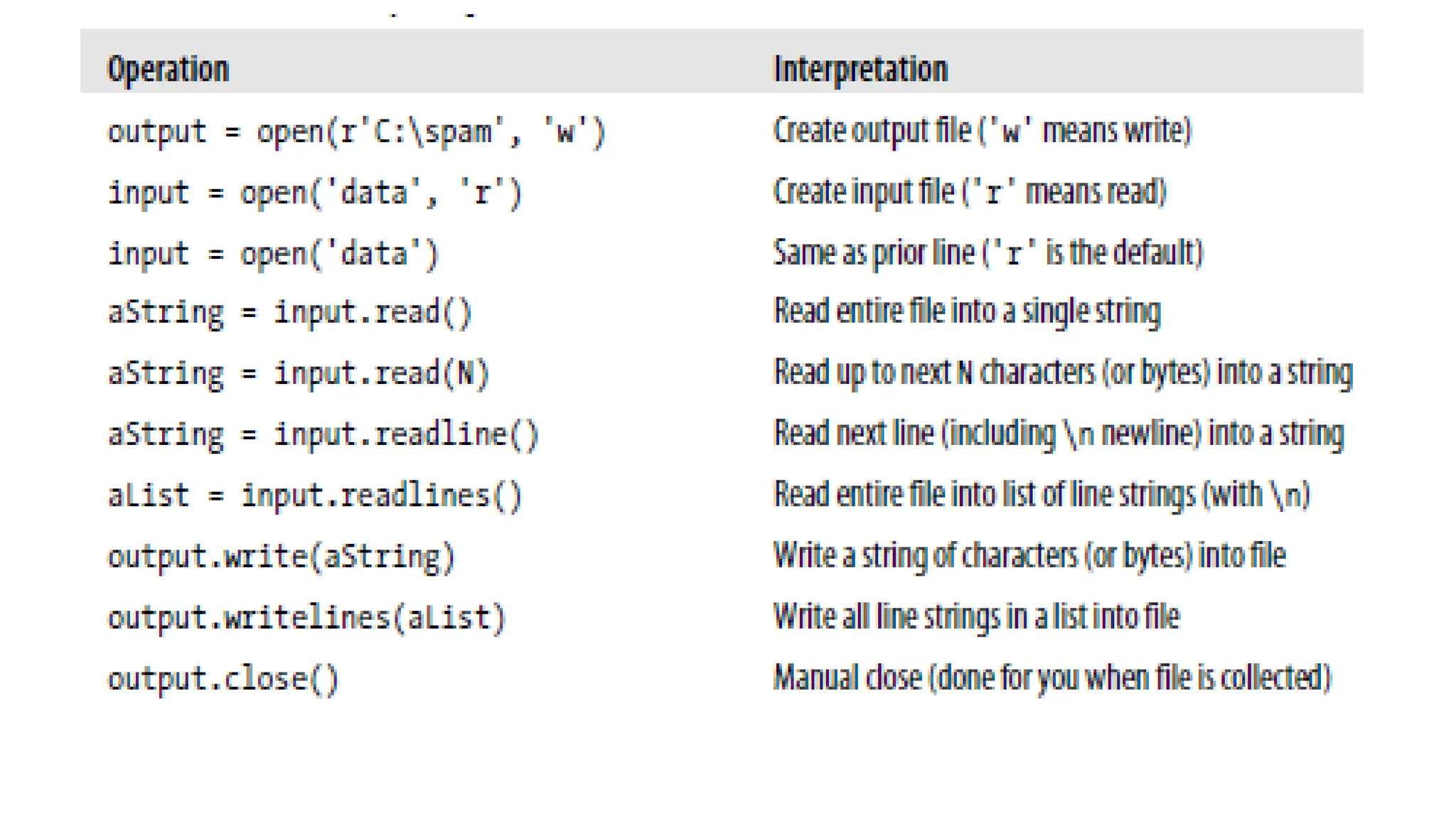
Files • Most file methods are concerned with performing input from and output to the external file associated with a file object, but other file methods allow us to seek to a new position in the file, flush output buffers, and so on. Table summarizes common file operations.
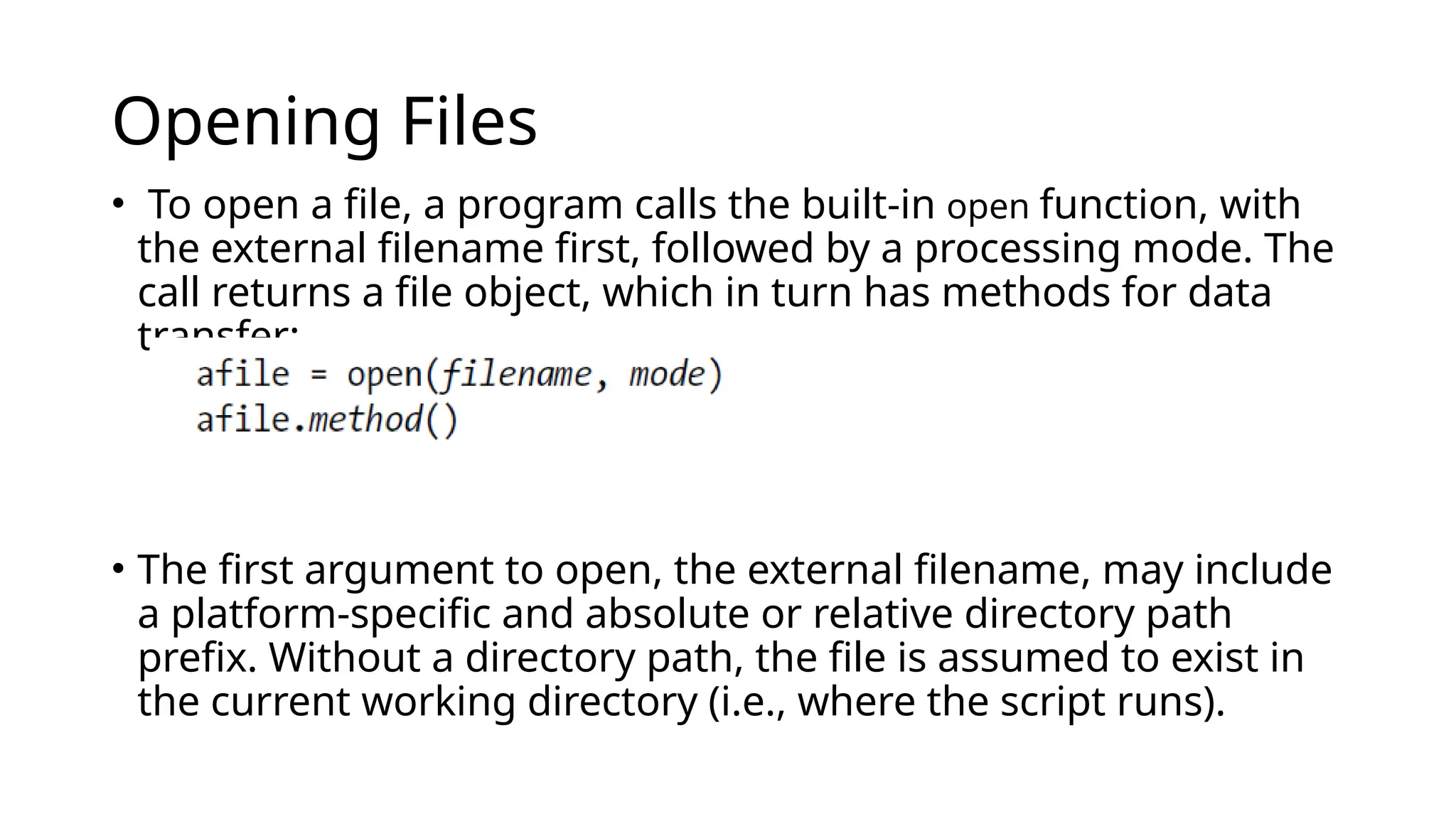
Opening Files • To open a file, a program calls the built-in open function, with the external filename first, followed by a processing mode. The call returns a file object, which in turn has methods for data transfer: • The first argument to open, the external filename, may include a platform-specific and absolute or relative directory path prefix. Without a directory path, the file is assumed to exist in the current working directory (i.e., where the script runs).
• The second argument to open, processing mode, is typically the string 'r' to open for text input (the default), 'w' to create and open for text output, or 'a' to open for appending text to the end (e.g., for adding to logfiles). • The processing mode argument can specify additional options:  • Adding a b to the mode string allows for binary data (end-of- line translations and 3.X Unicode encodings are turned off). • Adding a + opens the file for both input and output (i.e., you can both read and write to the same file object, often in conjunction with seek operations to reposition in the file). Both of the first two arguments to open must be Python strings. An optional third argument can be used to control output buffering—passing a zero means that output is unbuffered
• Once you make a file object with open, you can call its methods to read from or write to the associated external file. In all cases, file text takes the form of strings in Python programs; reading a file returns its content in strings, and content is passed to the write methods as strings. • File iterators are best for reading lines • Content is strings, not objects: data read from a file always comes back to your script as a string, so you’ll have to convert it to a different type of Python object if a string is not what you need.
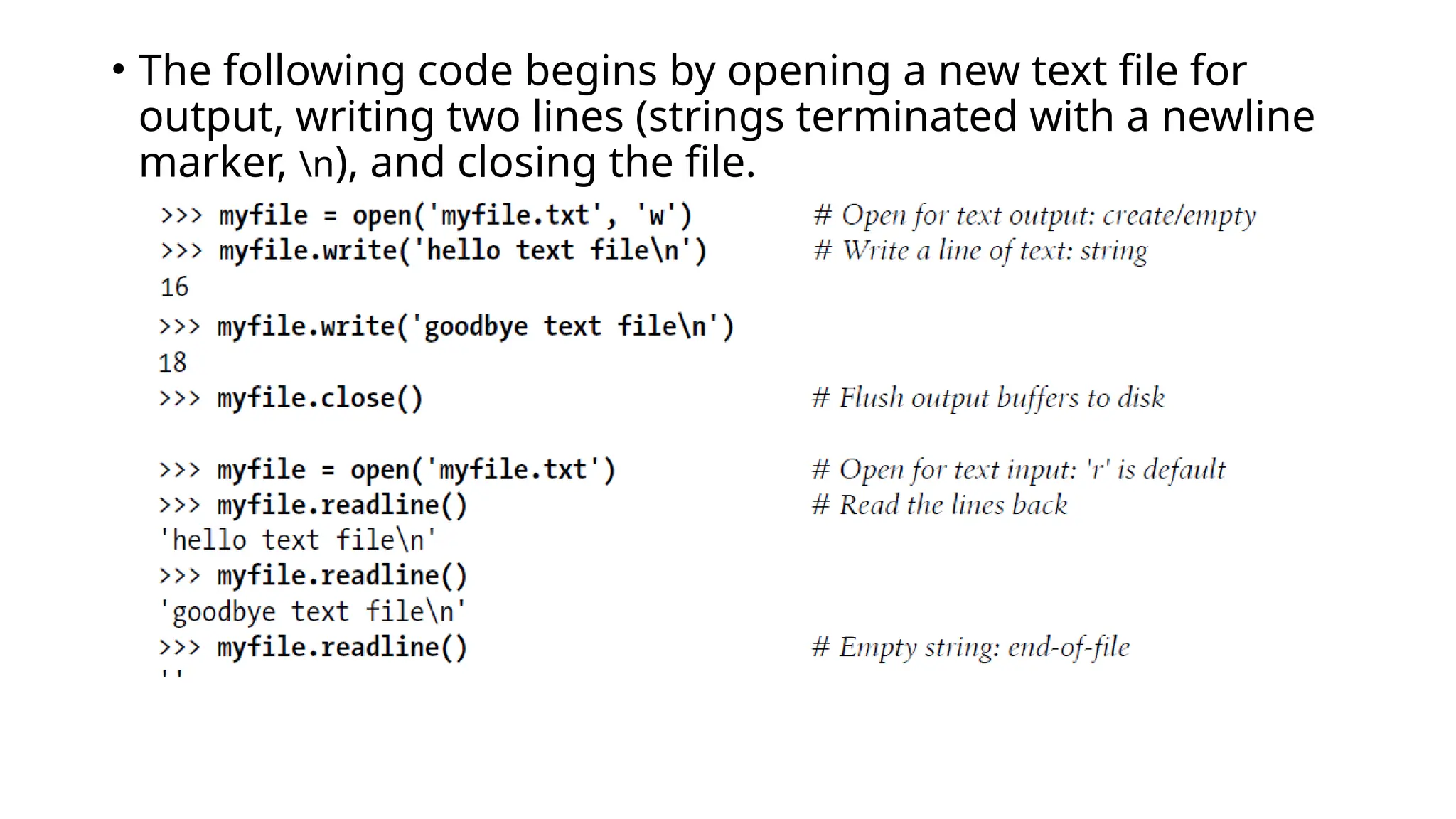
• The following code begins by opening a new text file for output, writing two lines (strings terminated with a newline marker, n), and closing the file.
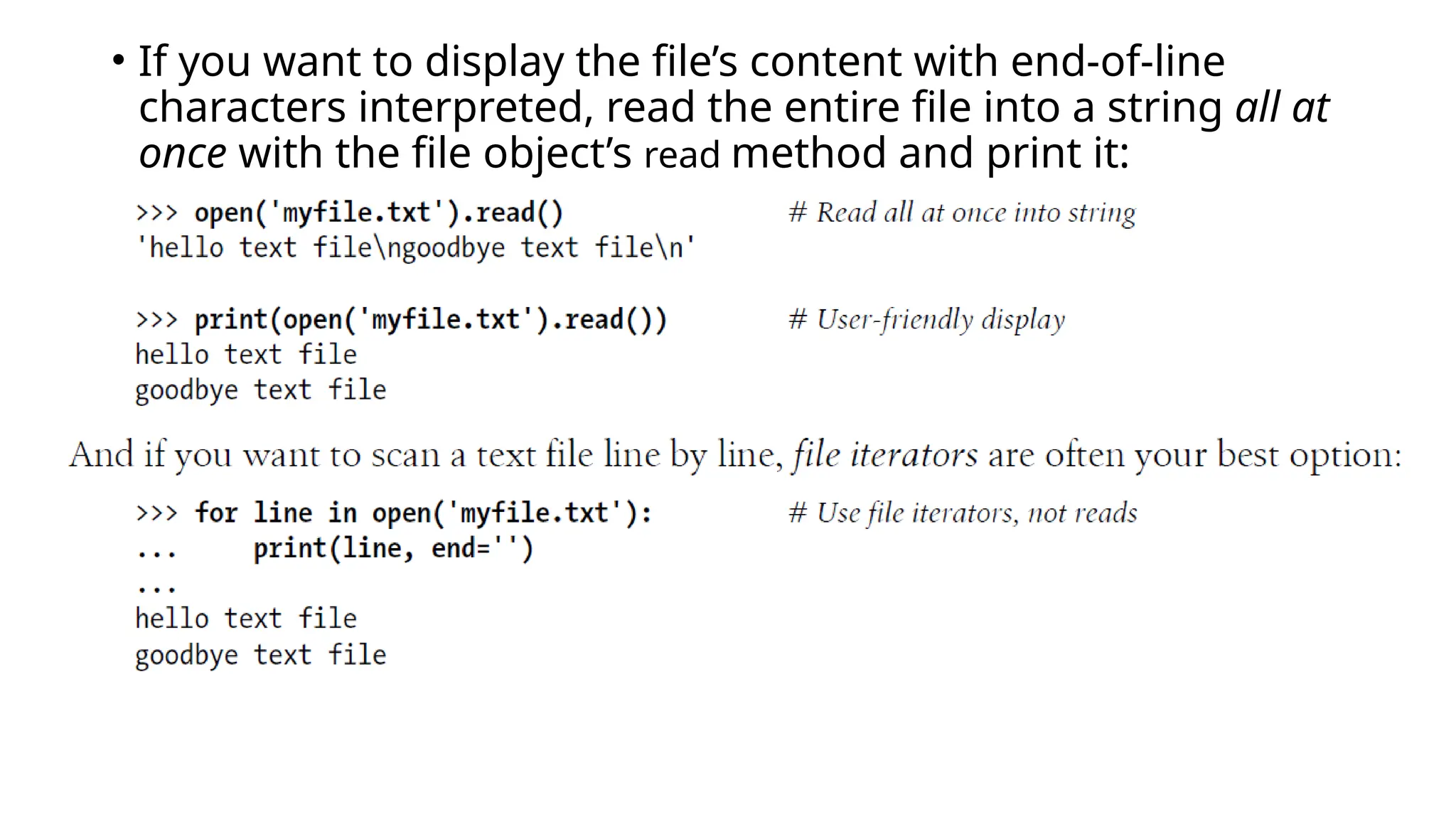
• If you want to display the file’s content with end-of-line characters interpreted, read the entire file into a string all at once with the file object’s read method and print it:
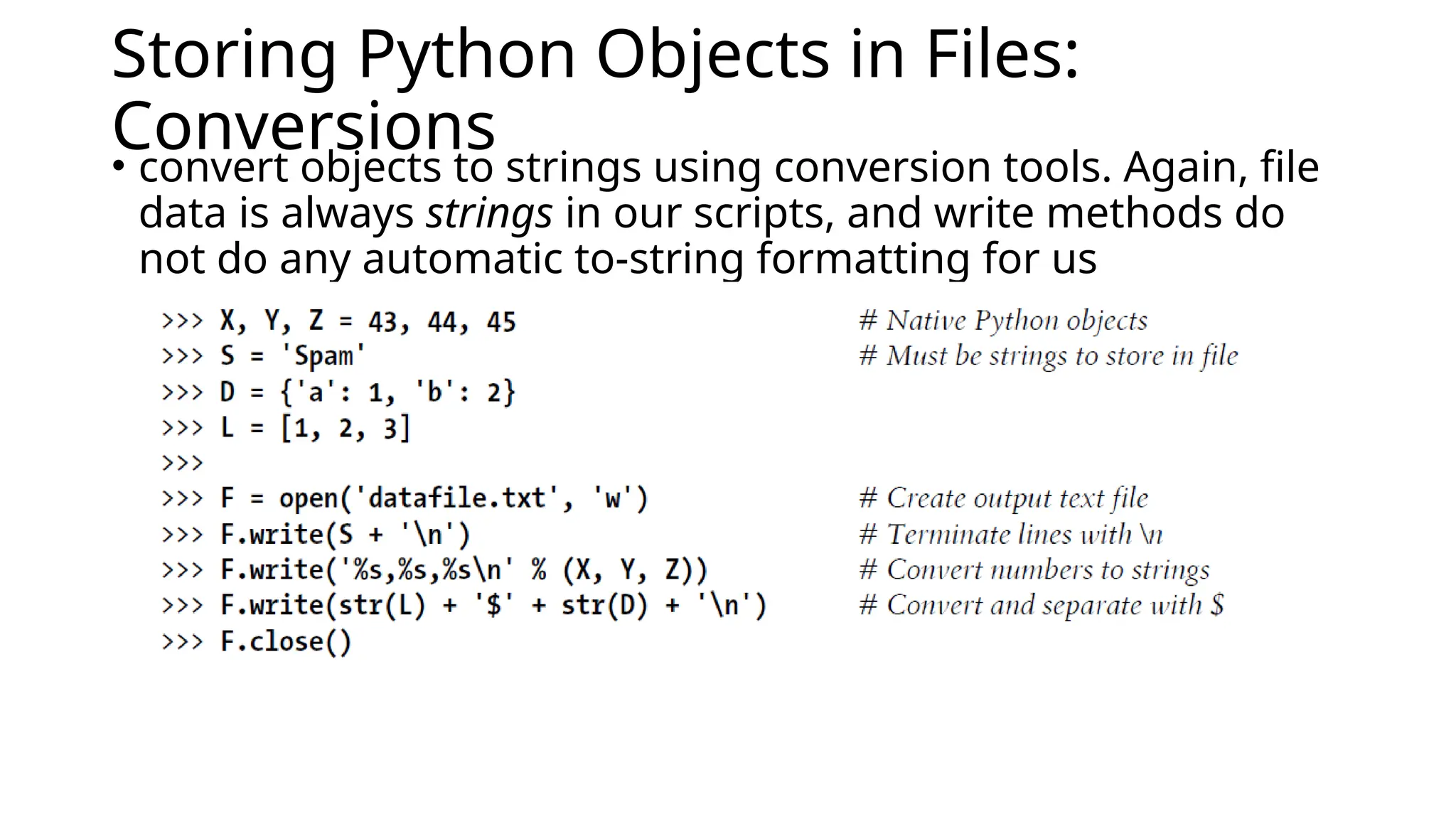
Storing Python Objects in Files: Conversions • convert objects to strings using conversion tools. Again, file data is always strings in our scripts, and write methods do not do any automatic to-string formatting for us
• the interactive echo gives the exact byte contents, while the print operation interprets embedded end-of-line characters to render a more user-friendly display: We now have to use other conversion tools to translate from the strings in the text file to real Python objects. As Python never converts strings to numbers (or other types of objects) automatically, this is required if we need to gain access to normal object tools like indexing, addition, and so on:
For this first line, we used the string rstrip method to get rid of the trailing end-of-line character; a line[: 1] − slice would work, too, but only if we can be sure all lines end in the n character (the last line in a file sometimes does not). We still must convert from strings to integers, though, if we wish to perform math on these:
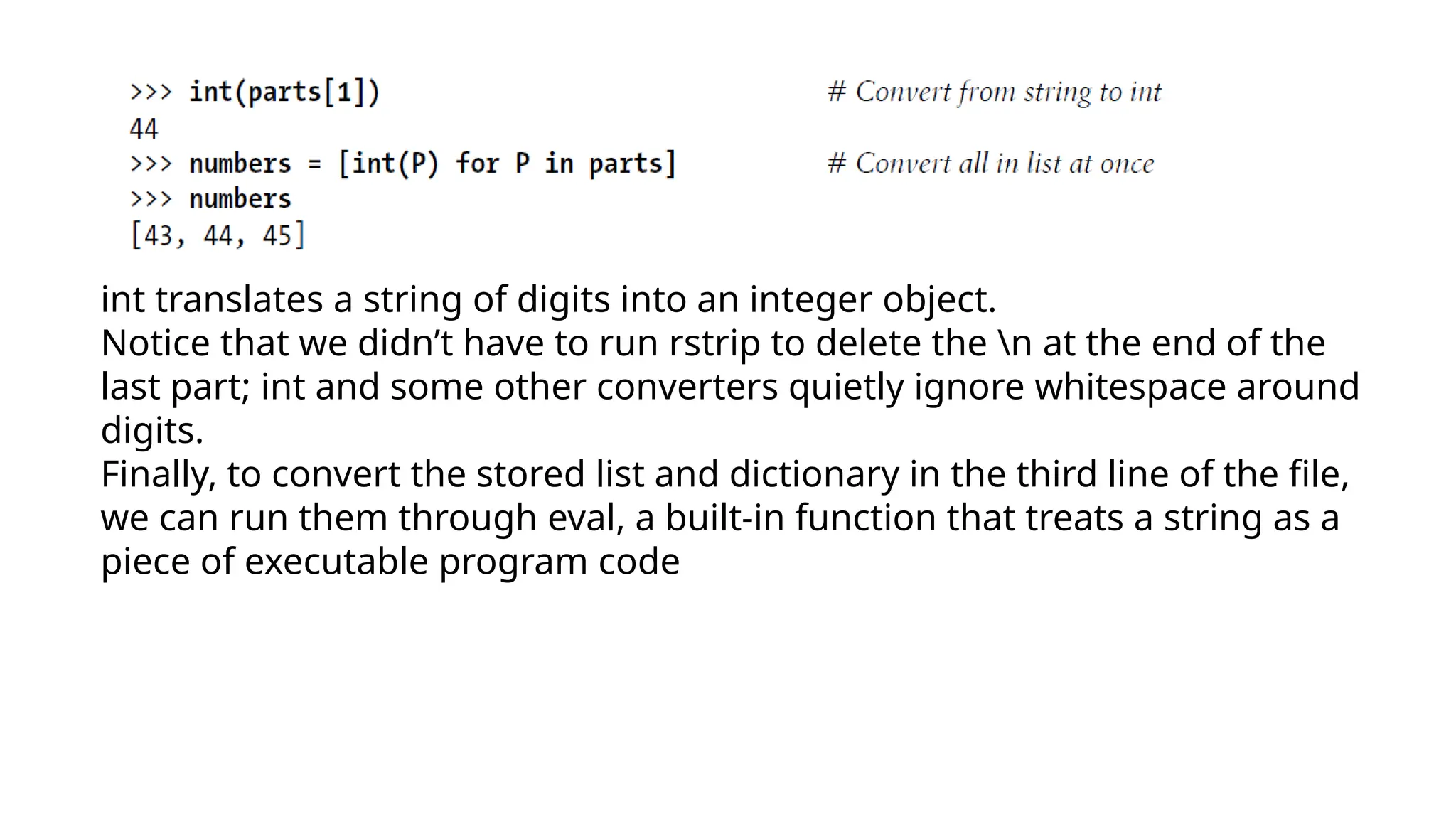
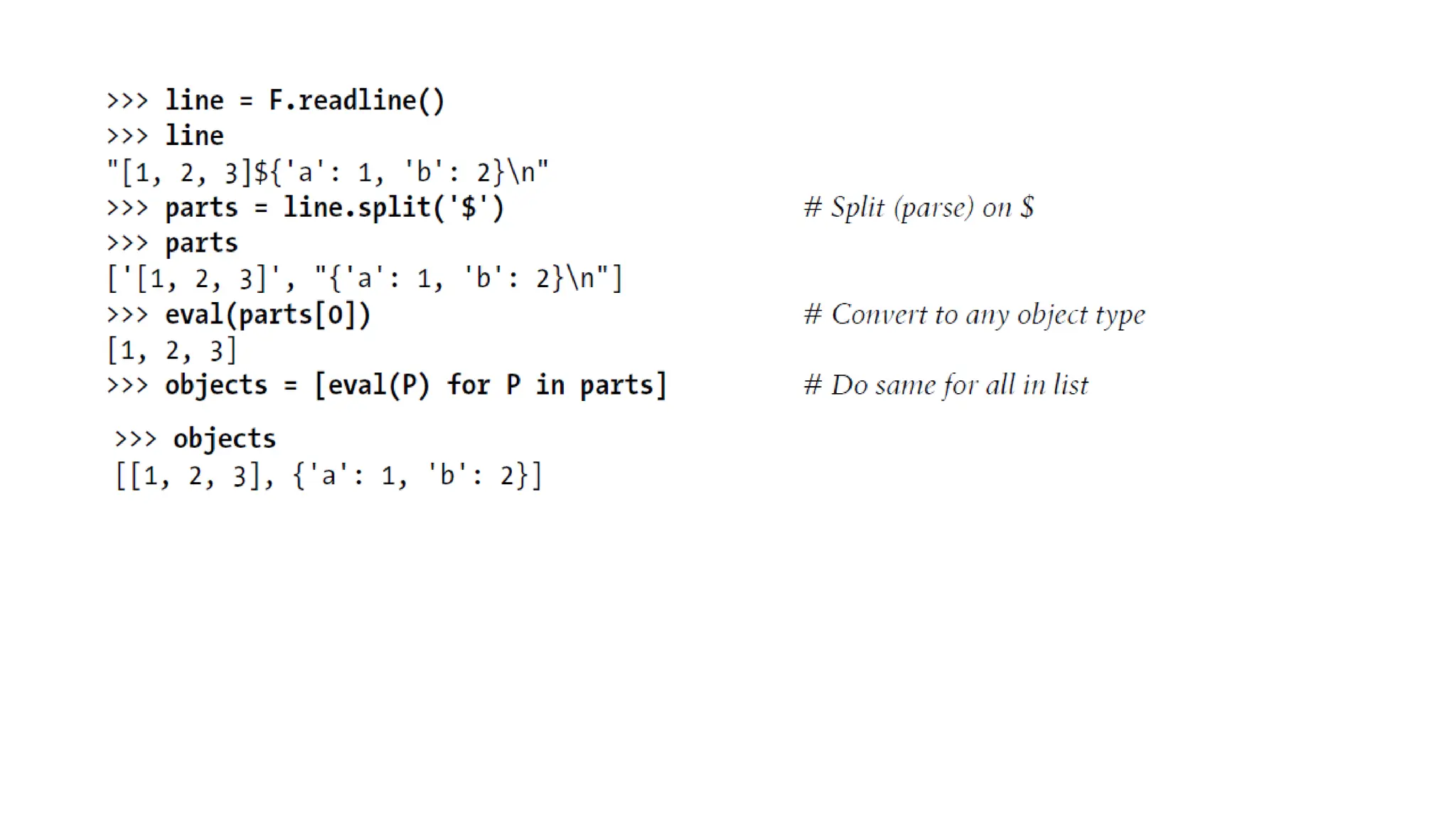
int translates a string of digits into an integer object. Notice that we didn’t have to run rstrip to delete the n at the end of the last part; int and some other converters quietly ignore whitespace around digits. Finally, to convert the stored list and dictionary in the third line of the file, we can run them through eval, a built-in function that treats a string as a piece of executable program code
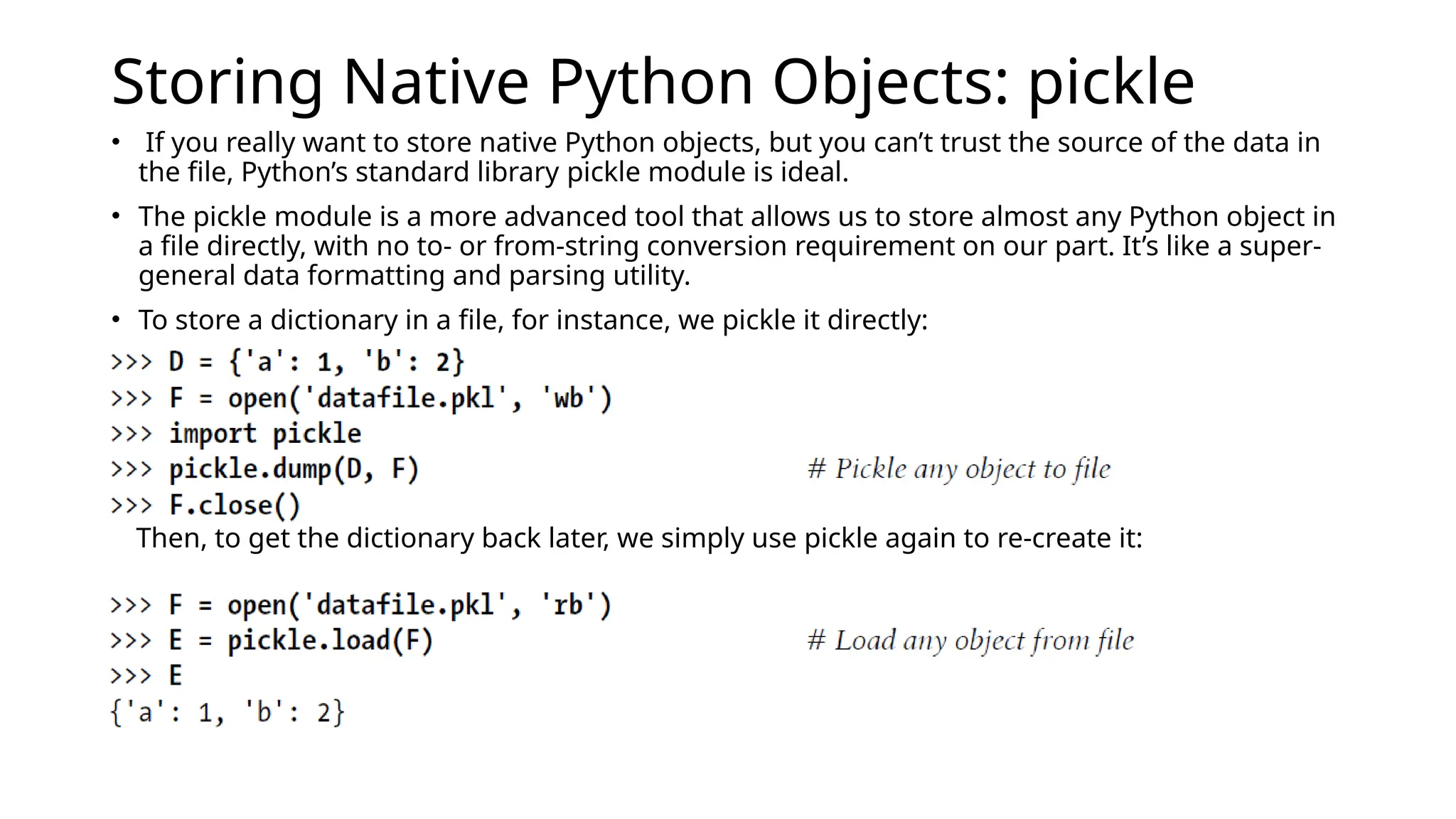
Storing Native Python Objects: pickle • If you really want to store native Python objects, but you can’t trust the source of the data in the file, Python’s standard library pickle module is ideal. • The pickle module is a more advanced tool that allows us to store almost any Python object in a file directly, with no to- or from-string conversion requirement on our part. It’s like a super- general data formatting and parsing utility. • To store a dictionary in a file, for instance, we pickle it directly: Then, to get the dictionary back later, we simply use pickle again to re-create it:
Files handling using python language.pptx

Files handling using python language.pptx

  • 1.
  • 2.
    Files • Most filemethods are concerned with performing input from and output to the external file associated with a file object, but other file methods allow us to seek to a new position in the file, flush output buffers, and so on. Table summarizes common file operations.
  • 4.
    Opening Files • Toopen a file, a program calls the built-in open function, with the external filename first, followed by a processing mode. The call returns a file object, which in turn has methods for data transfer: • The first argument to open, the external filename, may include a platform-specific and absolute or relative directory path prefix. Without a directory path, the file is assumed to exist in the current working directory (i.e., where the script runs).
  • 5.
    • The secondargument to open, processing mode, is typically the string 'r' to open for text input (the default), 'w' to create and open for text output, or 'a' to open for appending text to the end (e.g., for adding to logfiles). • The processing mode argument can specify additional options:  • Adding a b to the mode string allows for binary data (end-of- line translations and 3.X Unicode encodings are turned off). • Adding a + opens the file for both input and output (i.e., you can both read and write to the same file object, often in conjunction with seek operations to reposition in the file). Both of the first two arguments to open must be Python strings. An optional third argument can be used to control output buffering—passing a zero means that output is unbuffered
  • 6.
    • Once youmake a file object with open, you can call its methods to read from or write to the associated external file. In all cases, file text takes the form of strings in Python programs; reading a file returns its content in strings, and content is passed to the write methods as strings. • File iterators are best for reading lines • Content is strings, not objects: data read from a file always comes back to your script as a string, so you’ll have to convert it to a different type of Python object if a string is not what you need.
  • 7.
    • The followingcode begins by opening a new text file for output, writing two lines (strings terminated with a newline marker, n), and closing the file.
  • 8.
    • If youwant to display the file’s content with end-of-line characters interpreted, read the entire file into a string all at once with the file object’s read method and print it:
  • 9.
    Storing Python Objectsin Files: Conversions • convert objects to strings using conversion tools. Again, file data is always strings in our scripts, and write methods do not do any automatic to-string formatting for us
  • 10.
    • the interactiveecho gives the exact byte contents, while the print operation interprets embedded end-of-line characters to render a more user-friendly display: We now have to use other conversion tools to translate from the strings in the text file to real Python objects. As Python never converts strings to numbers (or other types of objects) automatically, this is required if we need to gain access to normal object tools like indexing, addition, and so on:
  • 11.
    For this firstline, we used the string rstrip method to get rid of the trailing end-of-line character; a line[: 1] − slice would work, too, but only if we can be sure all lines end in the n character (the last line in a file sometimes does not). We still must convert from strings to integers, though, if we wish to perform math on these:
  • 12.
    int translates astring of digits into an integer object. Notice that we didn’t have to run rstrip to delete the n at the end of the last part; int and some other converters quietly ignore whitespace around digits. Finally, to convert the stored list and dictionary in the third line of the file, we can run them through eval, a built-in function that treats a string as a piece of executable program code
  • 14.
    Storing Native PythonObjects: pickle • If you really want to store native Python objects, but you can’t trust the source of the data in the file, Python’s standard library pickle module is ideal. • The pickle module is a more advanced tool that allows us to store almost any Python object in a file directly, with no to- or from-string conversion requirement on our part. It’s like a super- general data formatting and parsing utility. • To store a dictionary in a file, for instance, we pickle it directly: Then, to get the dictionary back later, we simply use pickle again to re-create it:

Editor's Notes

  • #13 Using eval to convert from strings to objects, as demonstrated in the preceding code, is a powerful tool. In fact, sometimes it’s too powerful. eval will happily run any Python expression—even one that might delete all the files on your computer, given the necessary permissions!
  • #14 Using eval to convert from strings to objects, as demonstrated in the preceding code, is a powerful tool. In fact, sometimes it’s too powerful. eval will happily run any Python expression—even one that might delete all the files on your computer, given the necessary permissions!