Quick Test Professional info@quontrasolutions.com www.quontrasolutions.com Ph. -(314)-825-3887
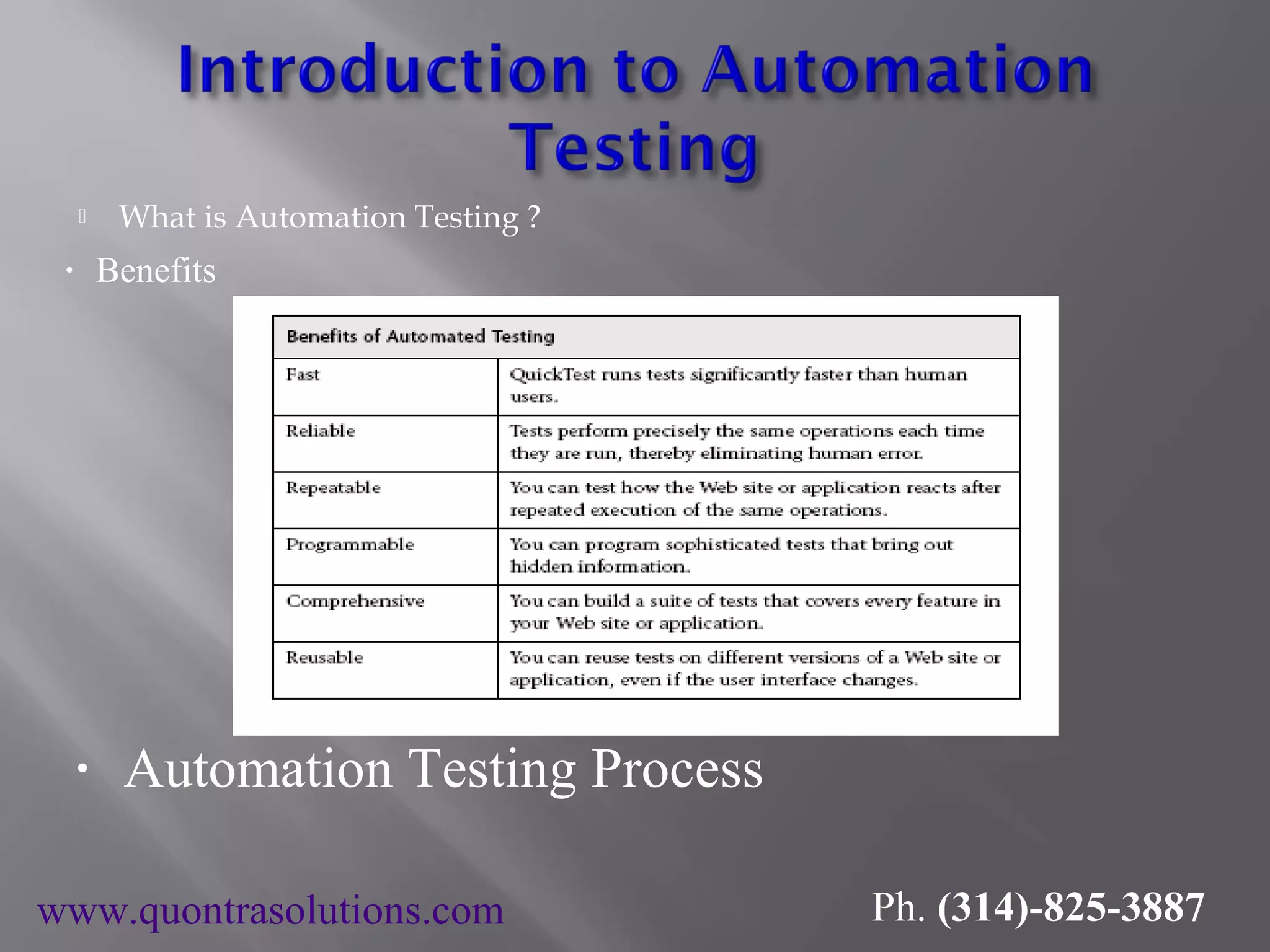
 What is Automation Testing ? • Benefits • Automation Testing Process www.quontrasolutions.com Ph. (314)-825-3887
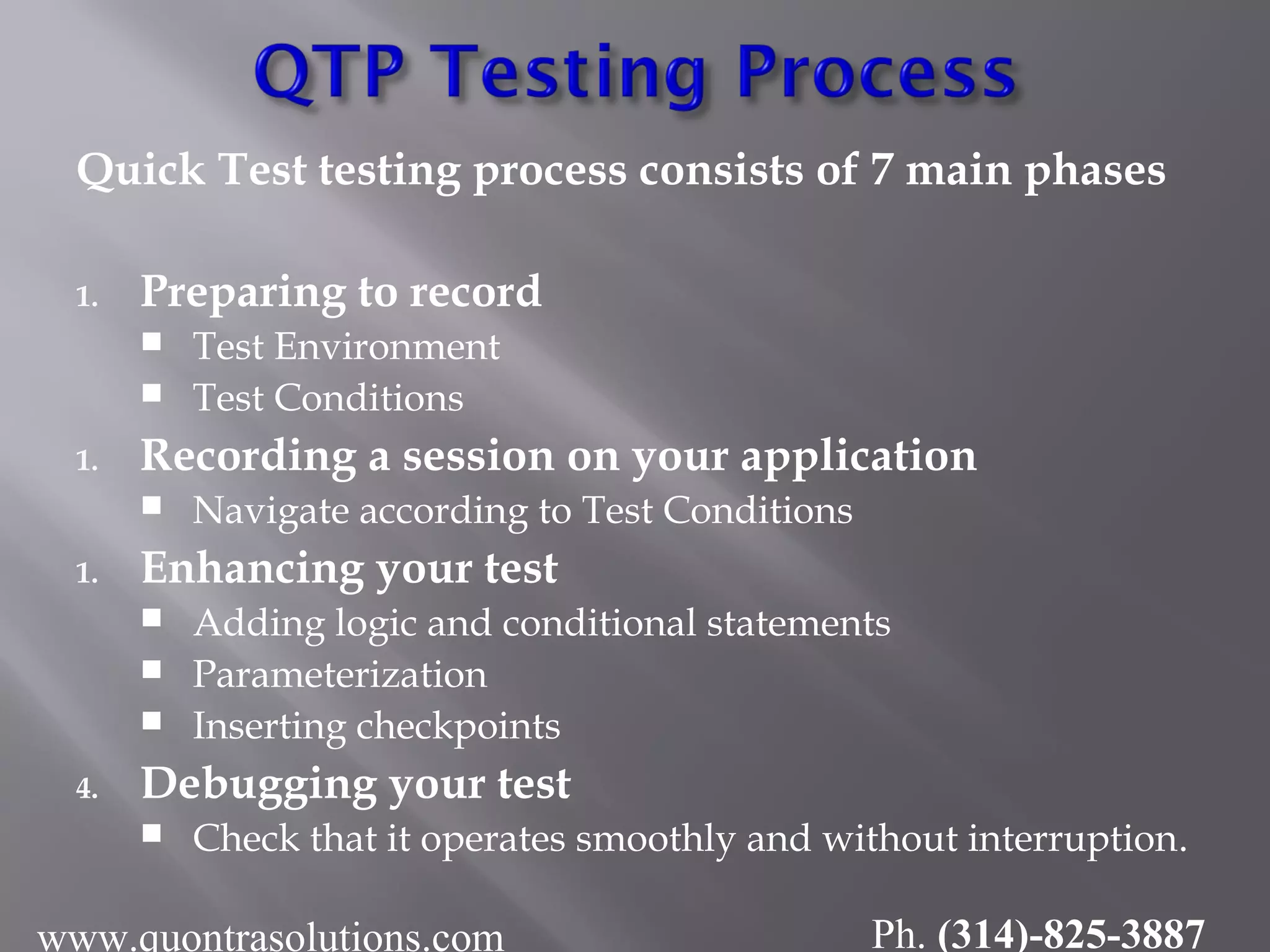
Quick Test testing process consists of 7 main phases 1. Preparing to record  Test Environment  Test Conditions 1. Recording a session on your application  Navigate according to Test Conditions 1. Enhancing your test  Adding logic and conditional statements  Parameterization  Inserting checkpoints 4. Debugging your test  Check that it operates smoothly and without interruption. www.quontrasolutions.com Ph. (314)-825-3887
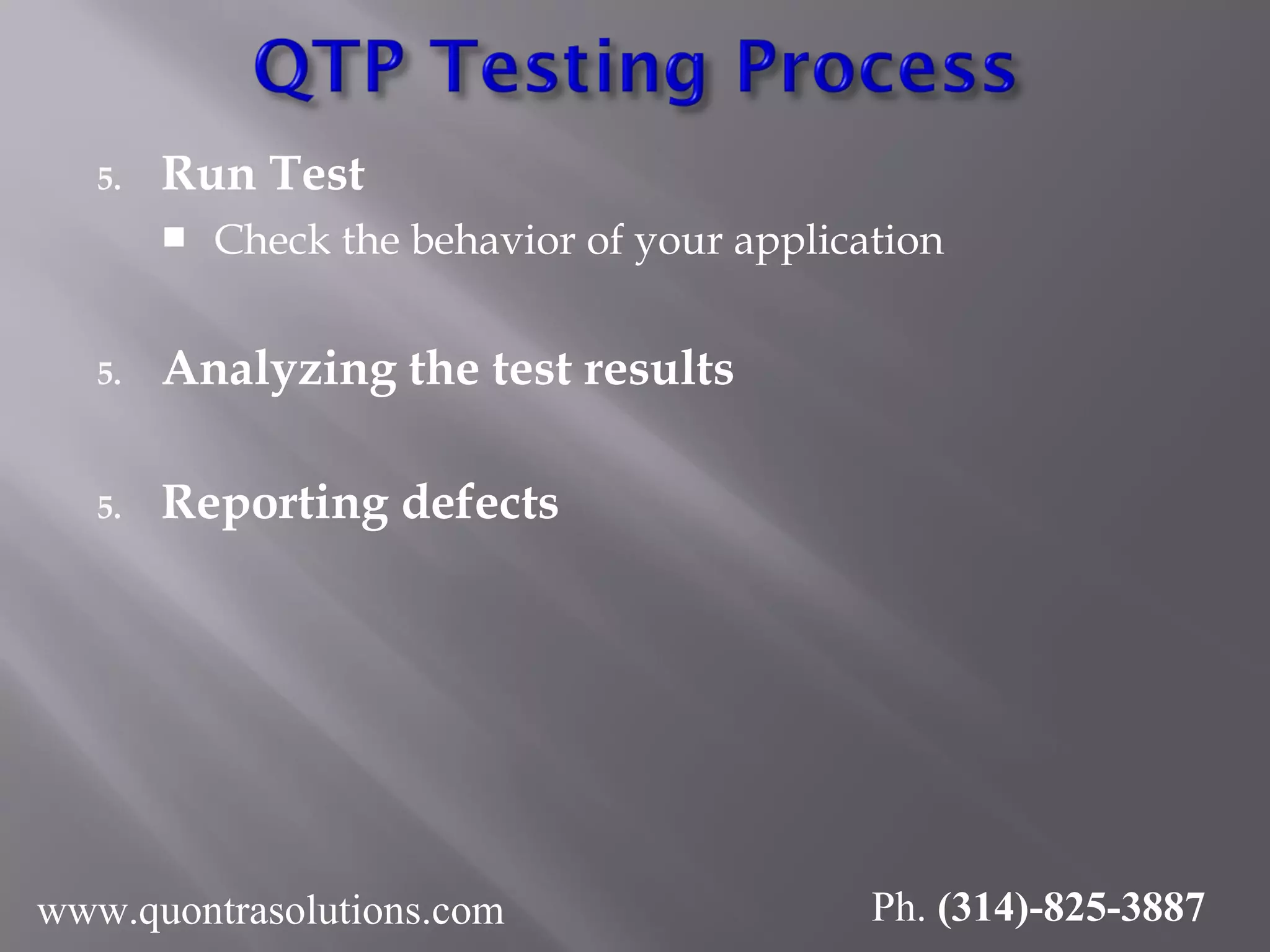
5. Run Test  Check the behavior of your application 5. Analyzing the test results 5. Reporting defects www.quontrasolutions.com Ph. (314)-825-3887
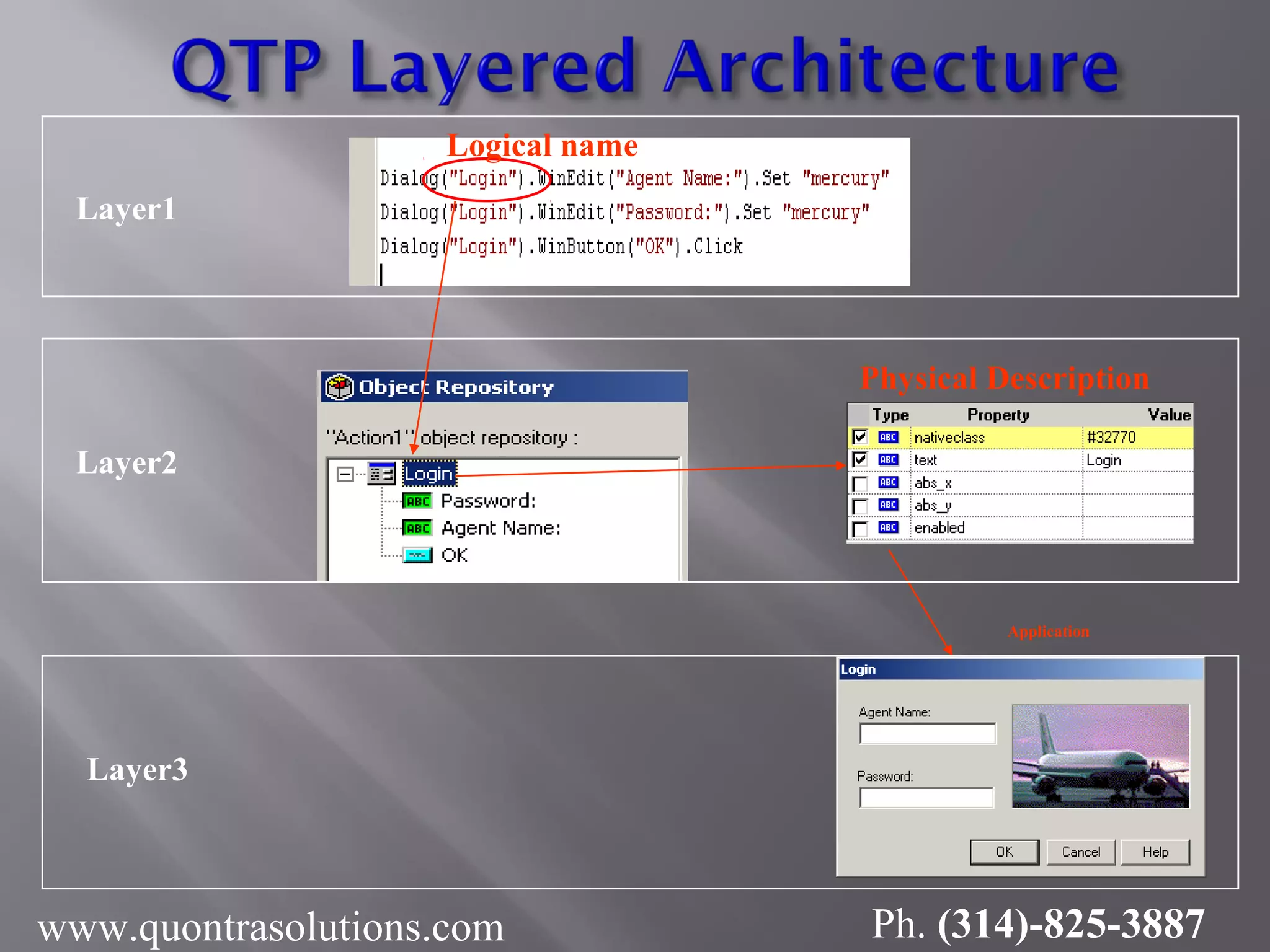
Logical name Physical Description Application Layer1 Layer2 Layer3 www.quontrasolutions.com Ph. (314)-825-3887
www.quontrasolutions.com Ph. (314)-825-3887
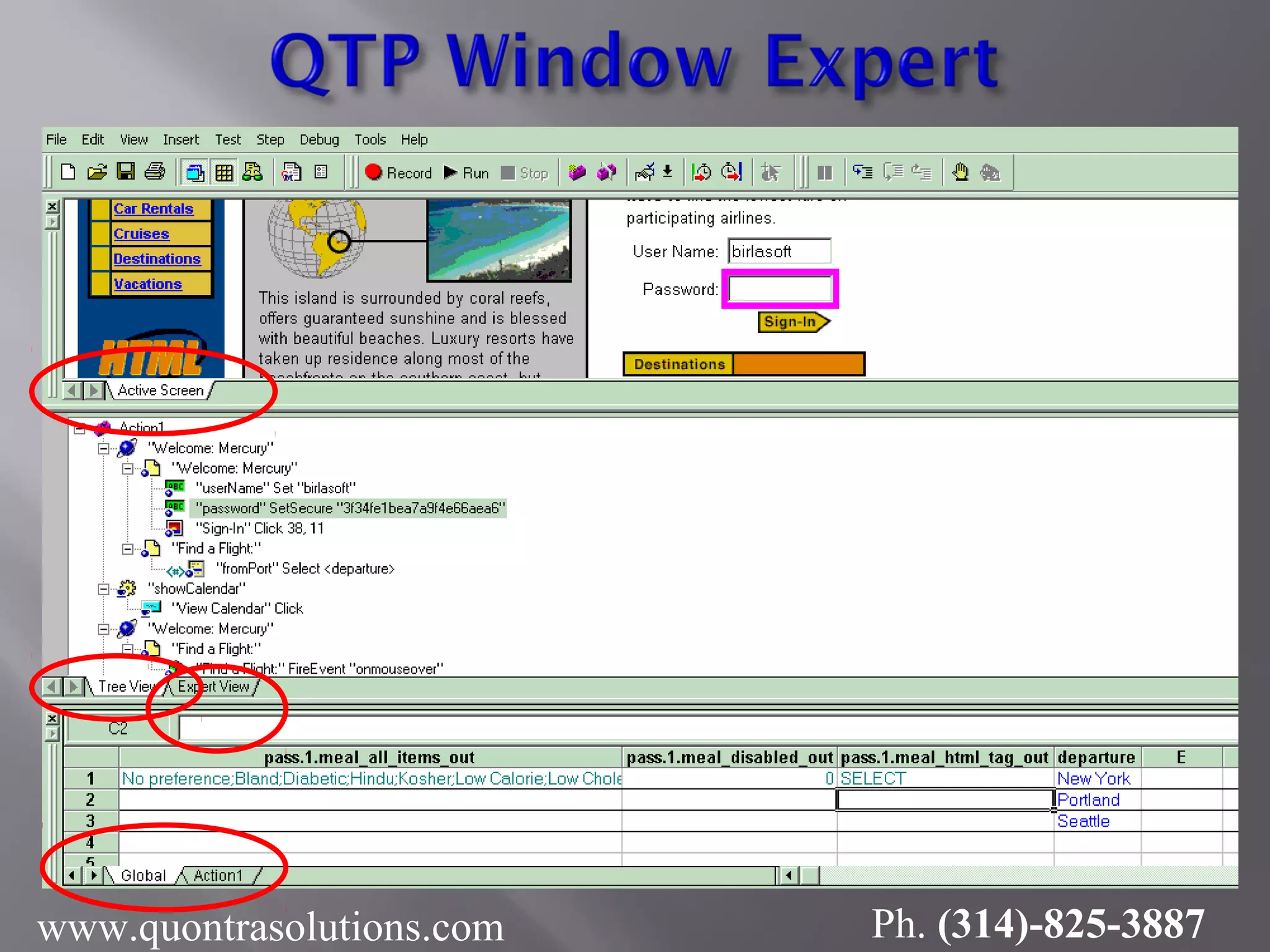
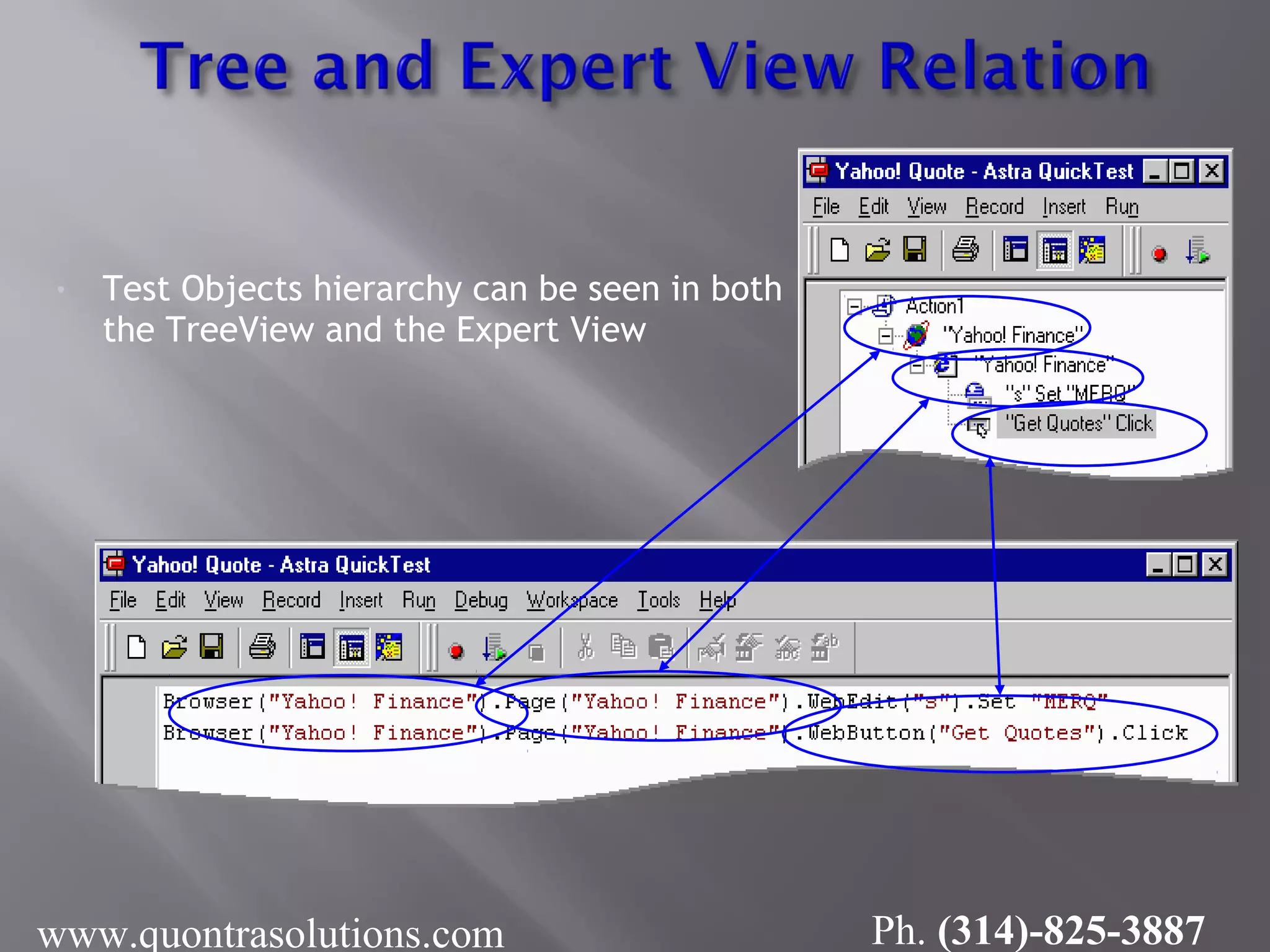
• Test Objects hierarchy can be seen in both the TreeView and the Expert View www.quontrasolutions.com Ph. (314)-825-3887
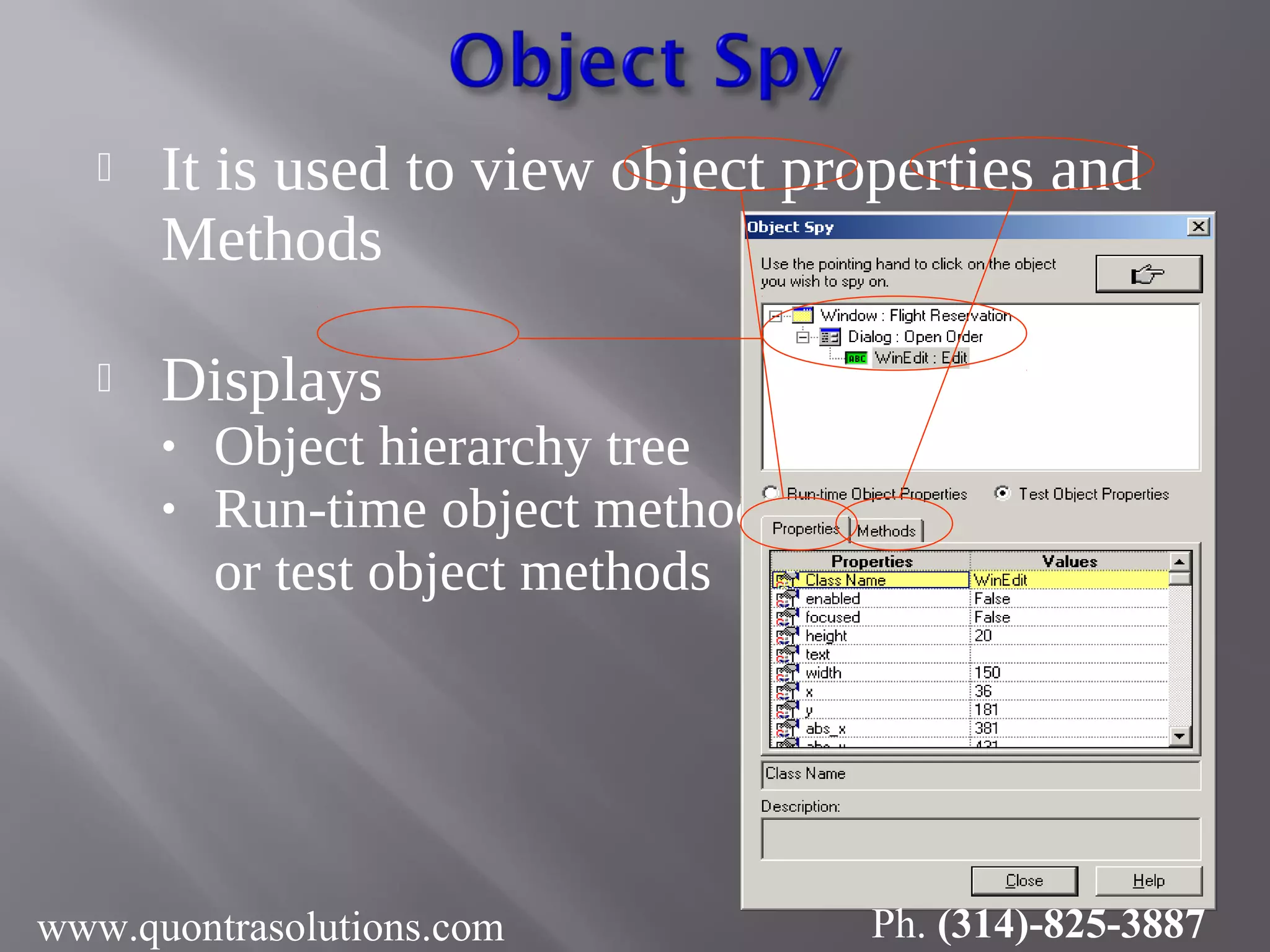
 It is used to view object properties and Methods  Displays • Object hierarchy tree • Run-time object methods or test object methods www.quontrasolutions.com Ph. (314)-825-3887
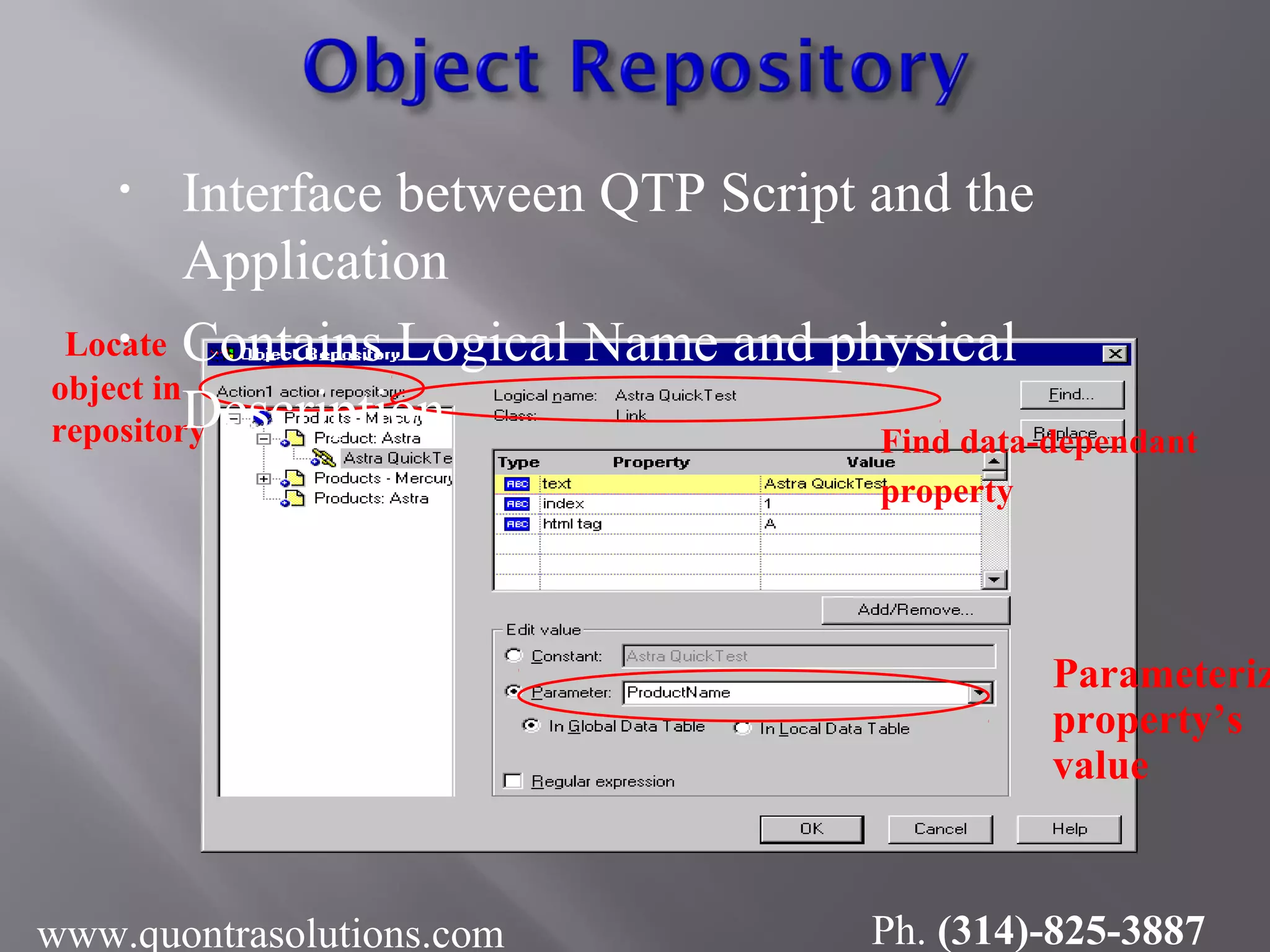
Locate object in repository Find data-dependant property Parameteriz property’s value • Interface between QTP Script and the Application • Contains Logical Name and physical Description www.quontrasolutions.com Ph. (314)-825-3887
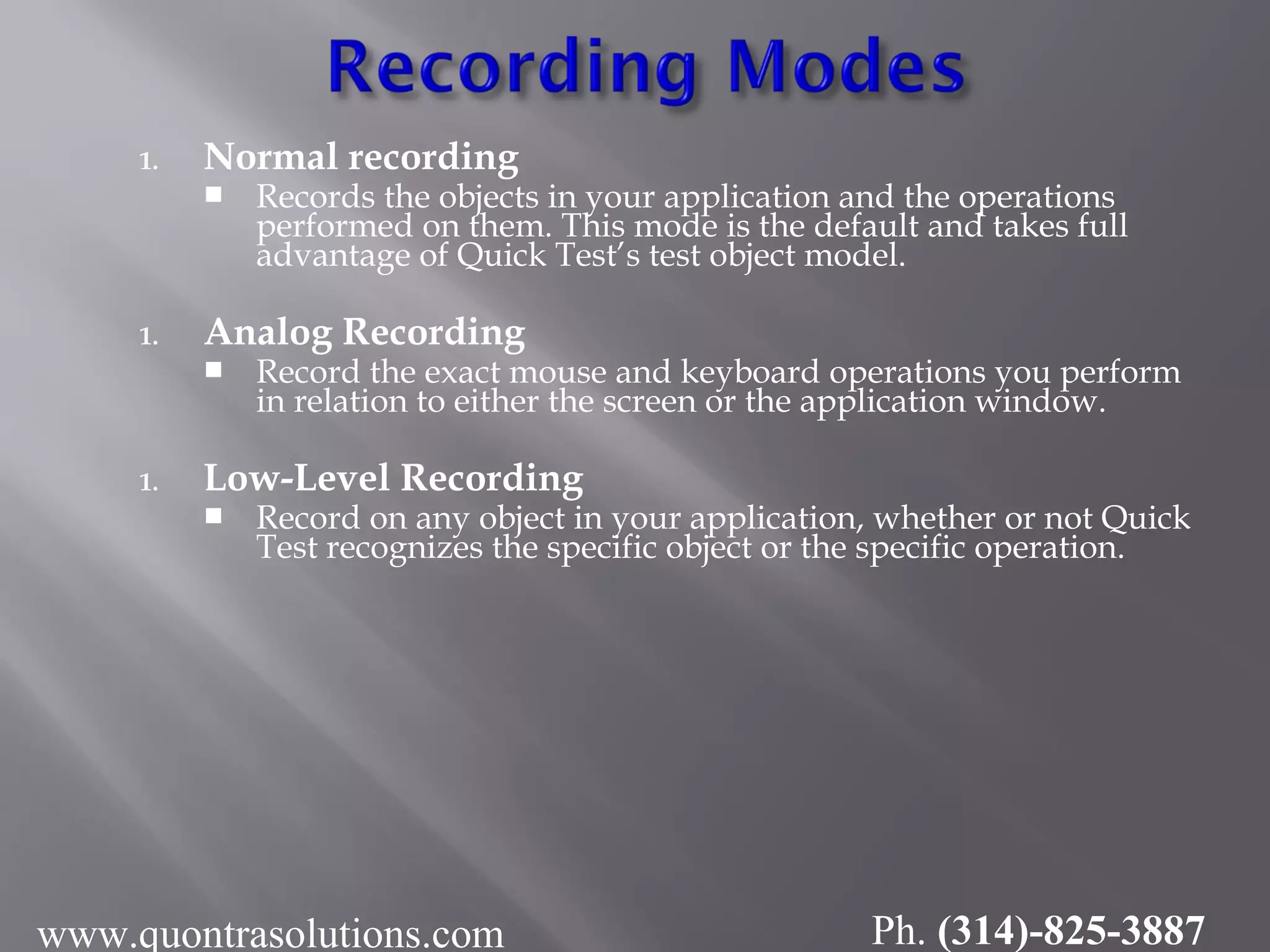
1. Normal recording  Records the objects in your application and the operations performed on them. This mode is the default and takes full advantage of Quick Test’s test object model. 1. Analog Recording  Record the exact mouse and keyboard operations you perform in relation to either the screen or the application window. 1. Low-Level Recording  Record on any object in your application, whether or not Quick Test recognizes the specific object or the specific operation. www.quontrasolutions.com Ph. (314)-825-3887
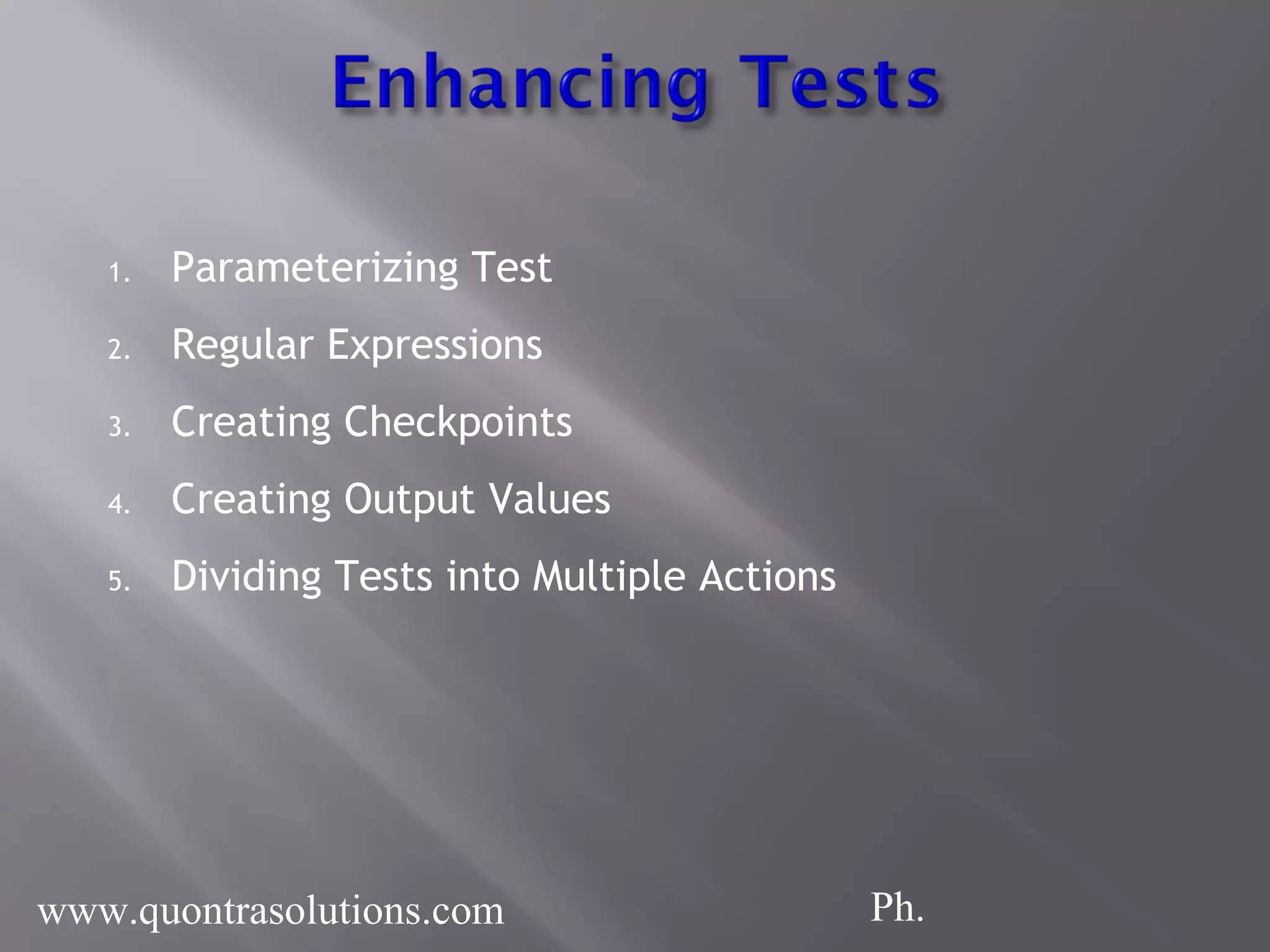
1. Parameterizing Test 2. Regular Expressions 3. Creating Checkpoints 4. Creating Output Values 5. Dividing Tests into Multiple Actions www.quontrasolutions.com Ph.
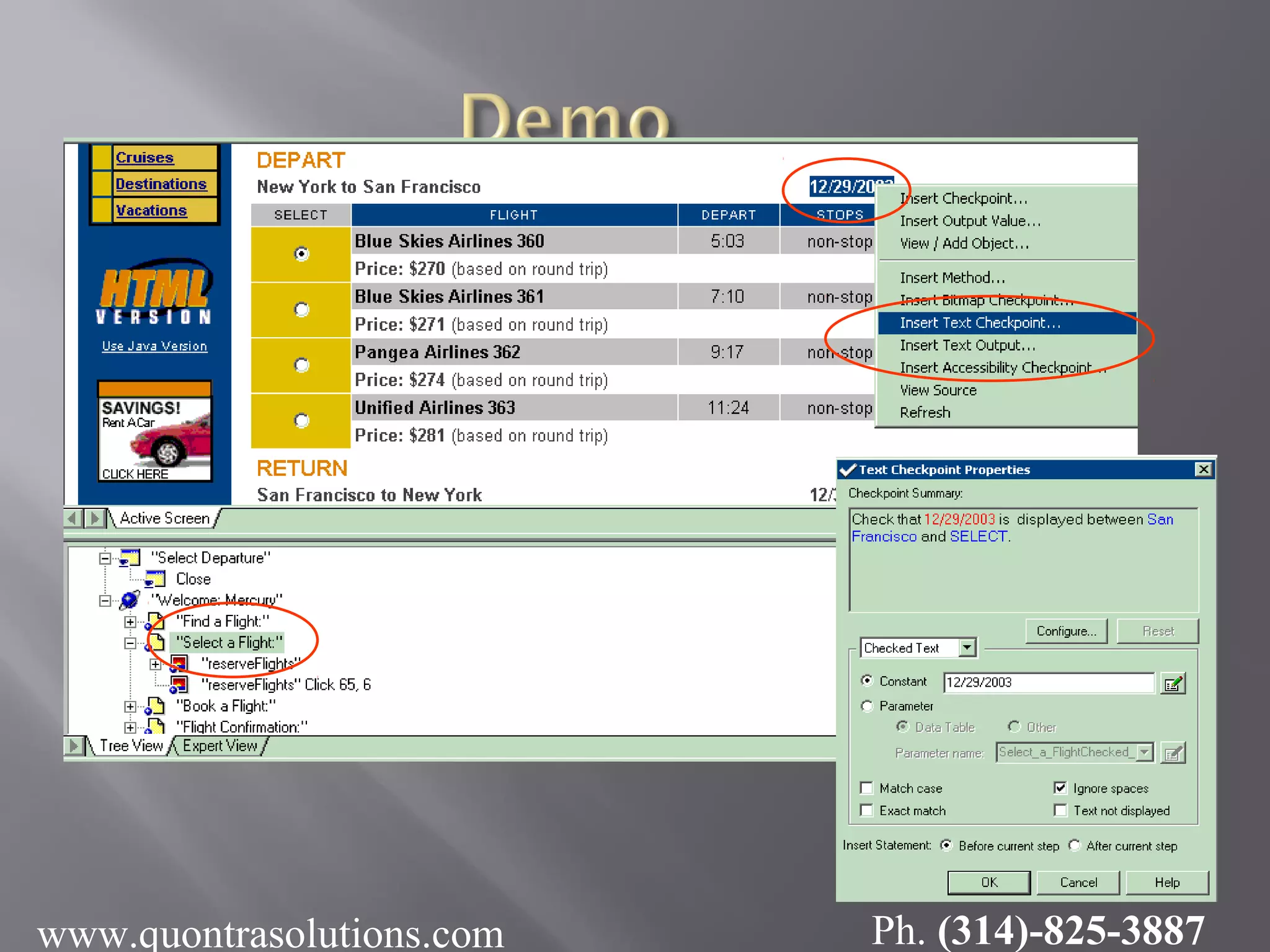
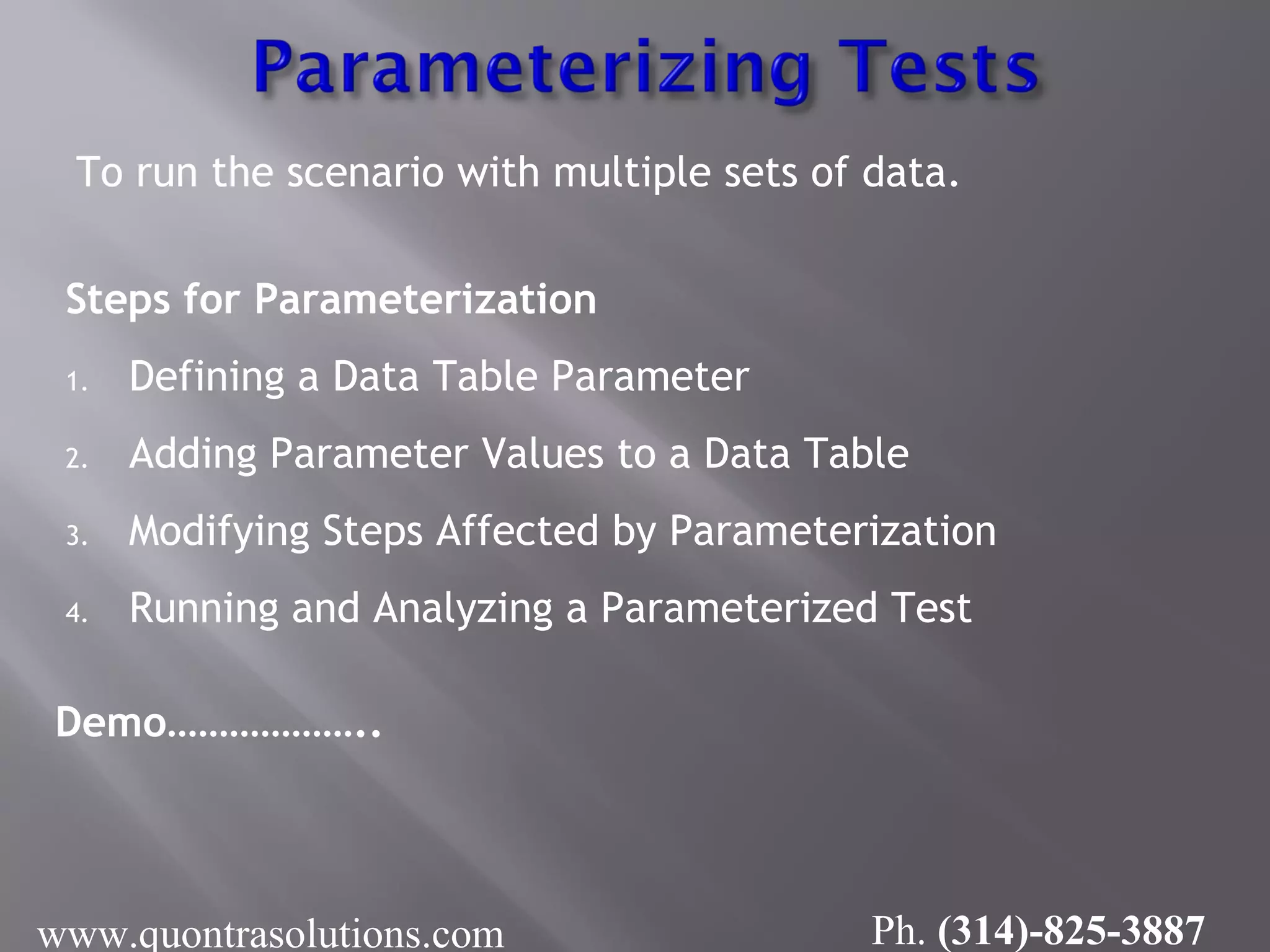
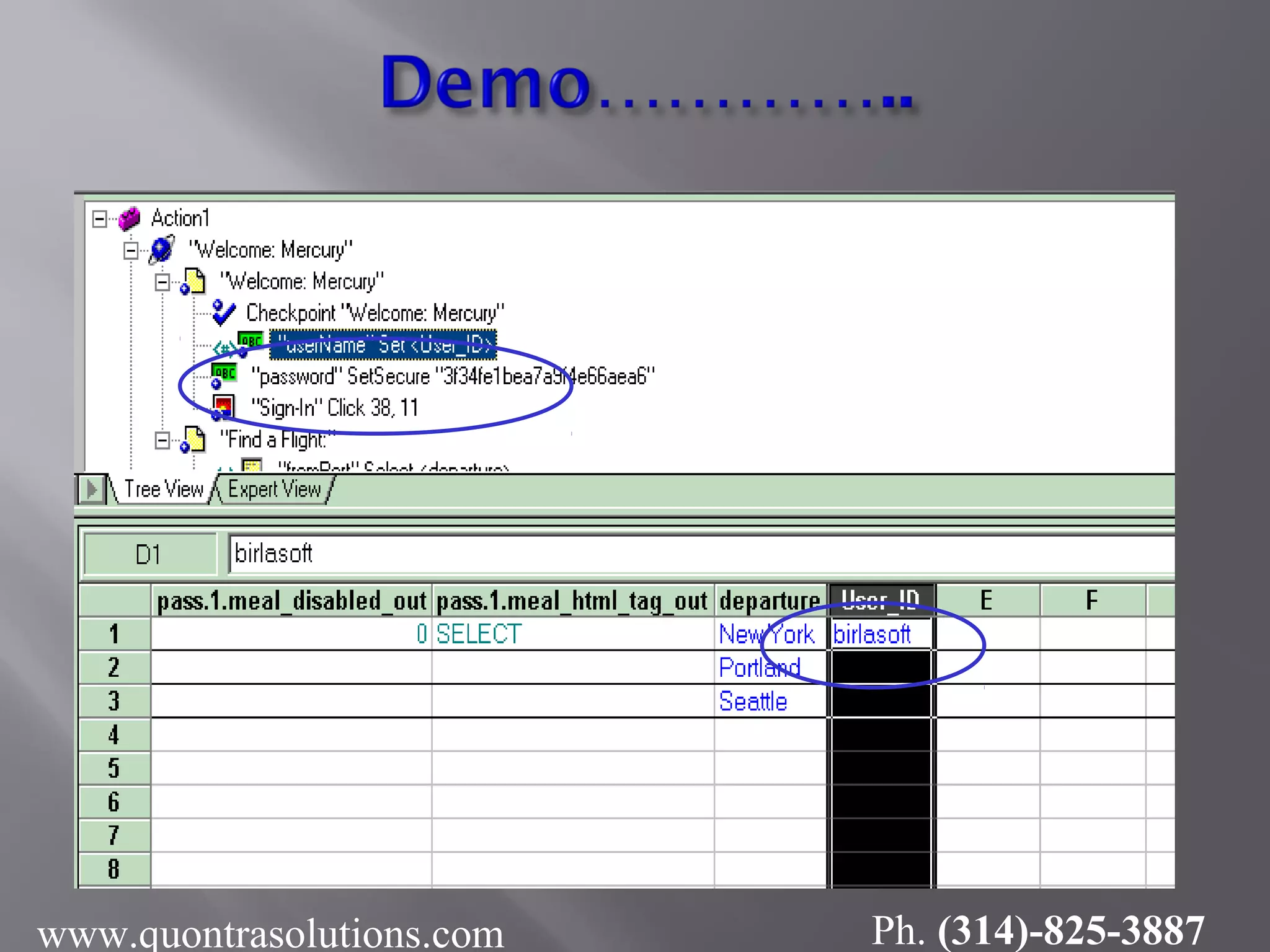
To run the scenario with multiple sets of data. Steps for Parameterization 1. Defining a Data Table Parameter 2. Adding Parameter Values to a Data Table 3. Modifying Steps Affected by Parameterization 4. Running and Analyzing a Parameterized Test Demo……………….. www.quontrasolutions.com Ph. (314)-825-3887
How to provide the data to the respective Parameter through Tree View www.quontrasolutions.com Ph. (314)-825-3887
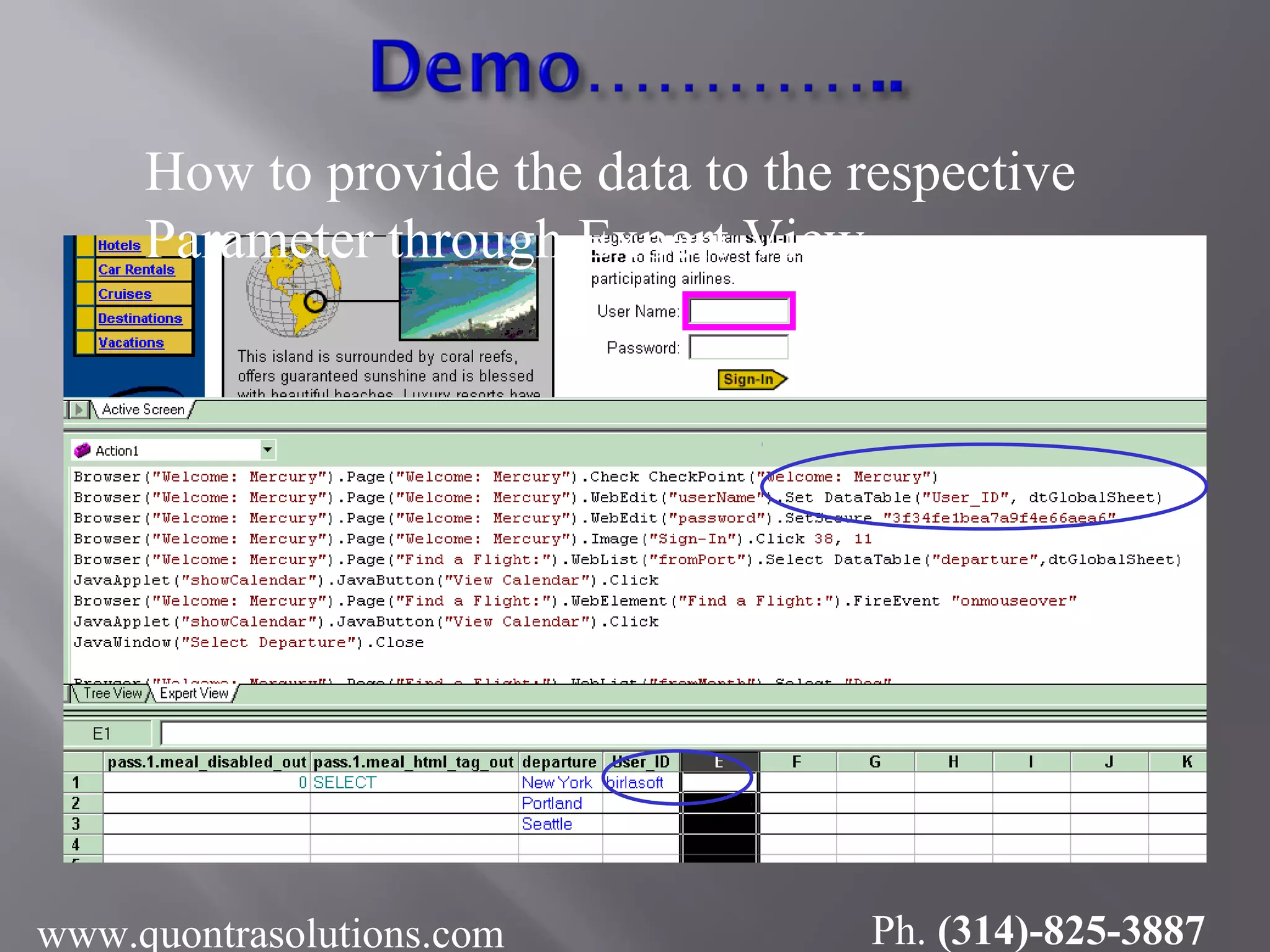
How to provide the data to the respective Parameter through Expert View www.quontrasolutions.com Ph. (314)-825-3887
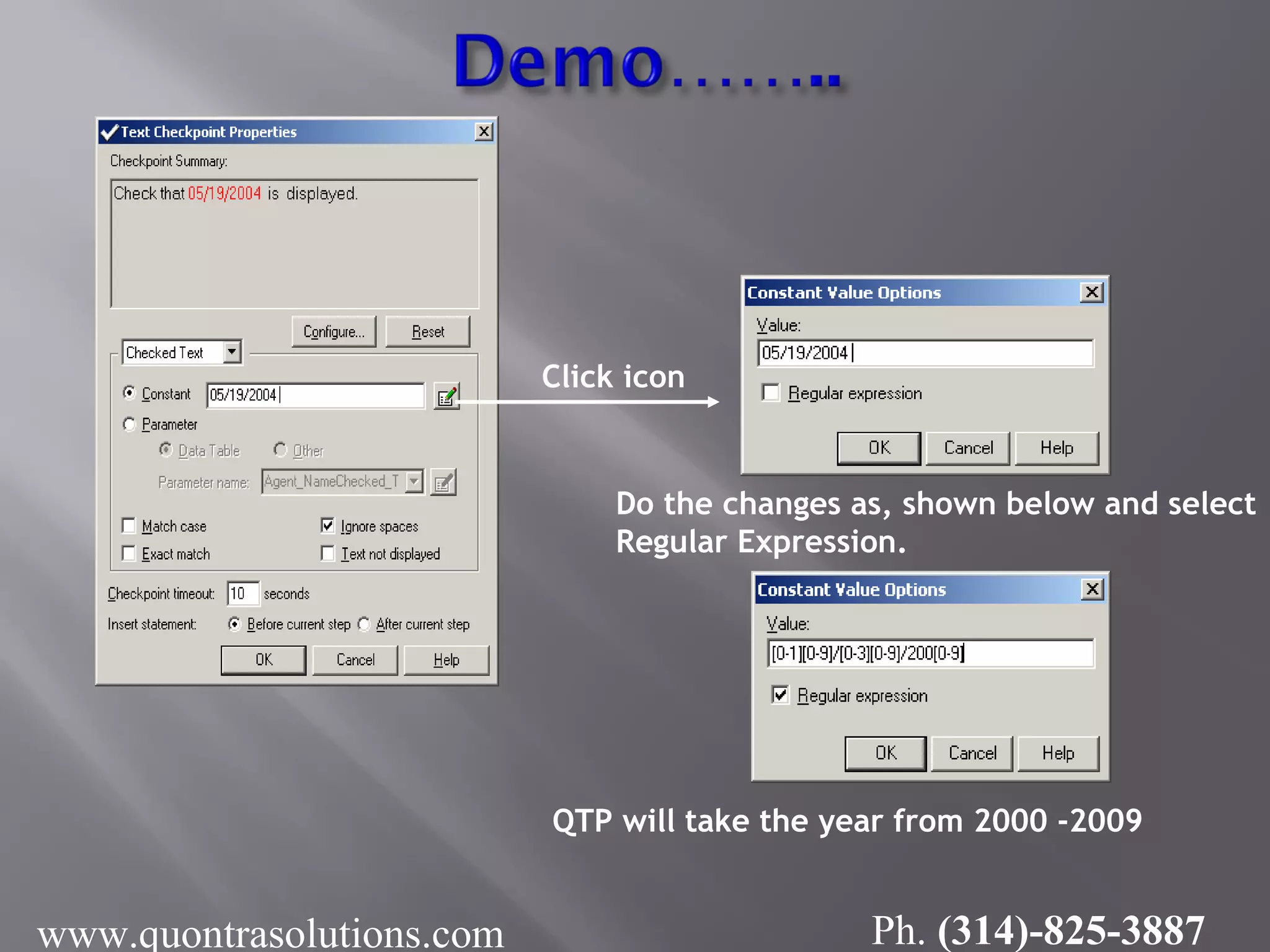
 Regular expressions enable Quick Test to identify Objects and text strings with varying values.  User has to identify the data projected to be change, like dates, so to accepts any dates, user can use regular expression. Example : Actual Date format : 05/19/2004 (mm/dd/yyyy) After Regular Expression: [0-1][0-9]/[0-3][0-9]/200[0-9] www.quontrasolutions.com Ph. (314)-825-3887
www.quontrasolutions.com Ph. (314)-825-3887
Click icon Do the changes as, shown below and select Regular Expression. QTP will take the year from 2000 -2009 www.quontrasolutions.com Ph. (314)-825-3887
Used to check the current behavior of the application with the expected behavior.  Text /Text Area Checkpoint  Standard Checkpoint  Table Checkpoint  Page checkpoint  Database Checkpoint  Image Checkpoint  Accessibility Checkpoint  Bitmap Checkpoint  XML Checkpoint
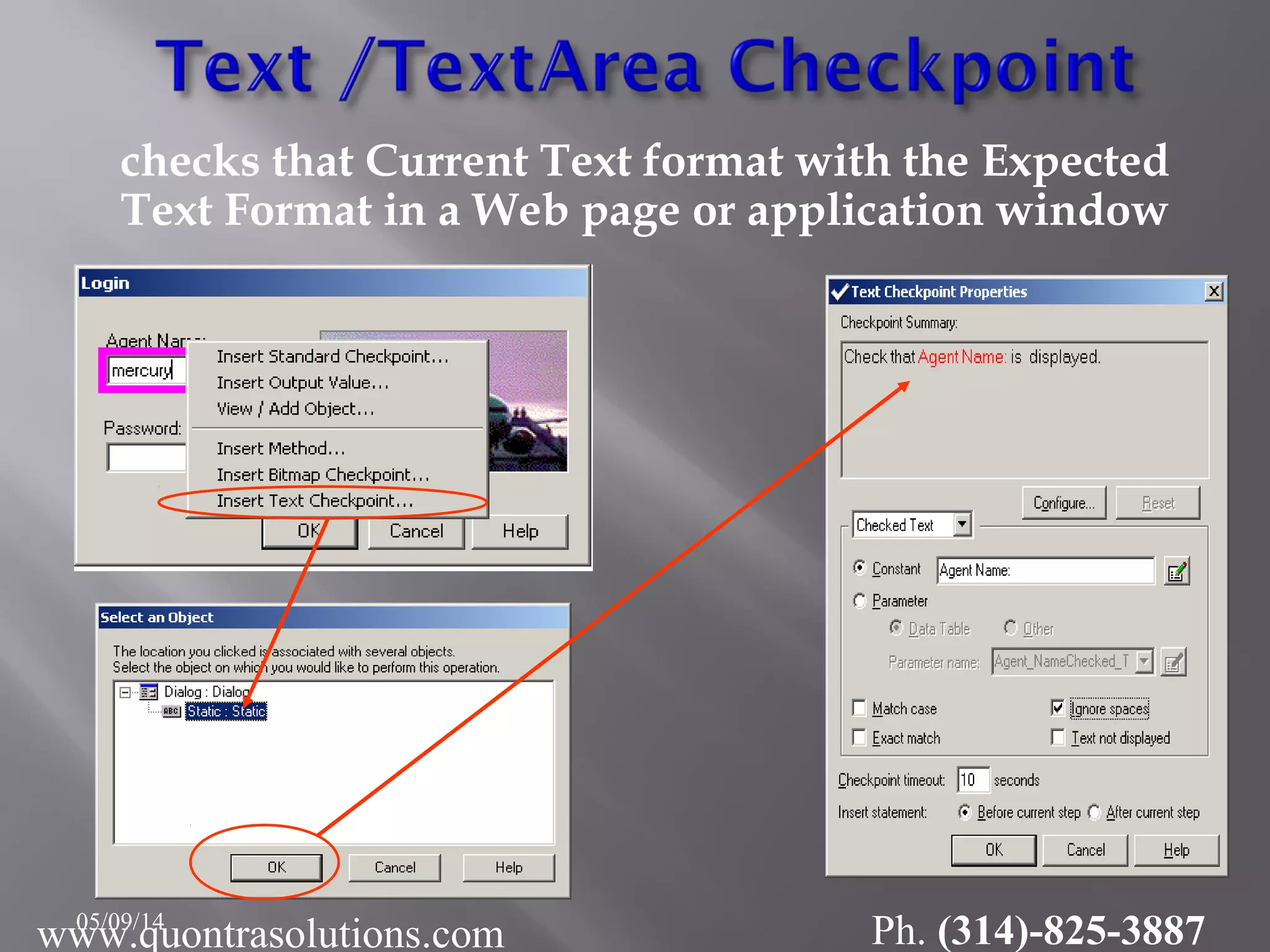
checks that Current Text format with the Expected Text Format in a Web page or application window 05/09/14 www.quontrasolutions.com Ph. (314)-825-3887
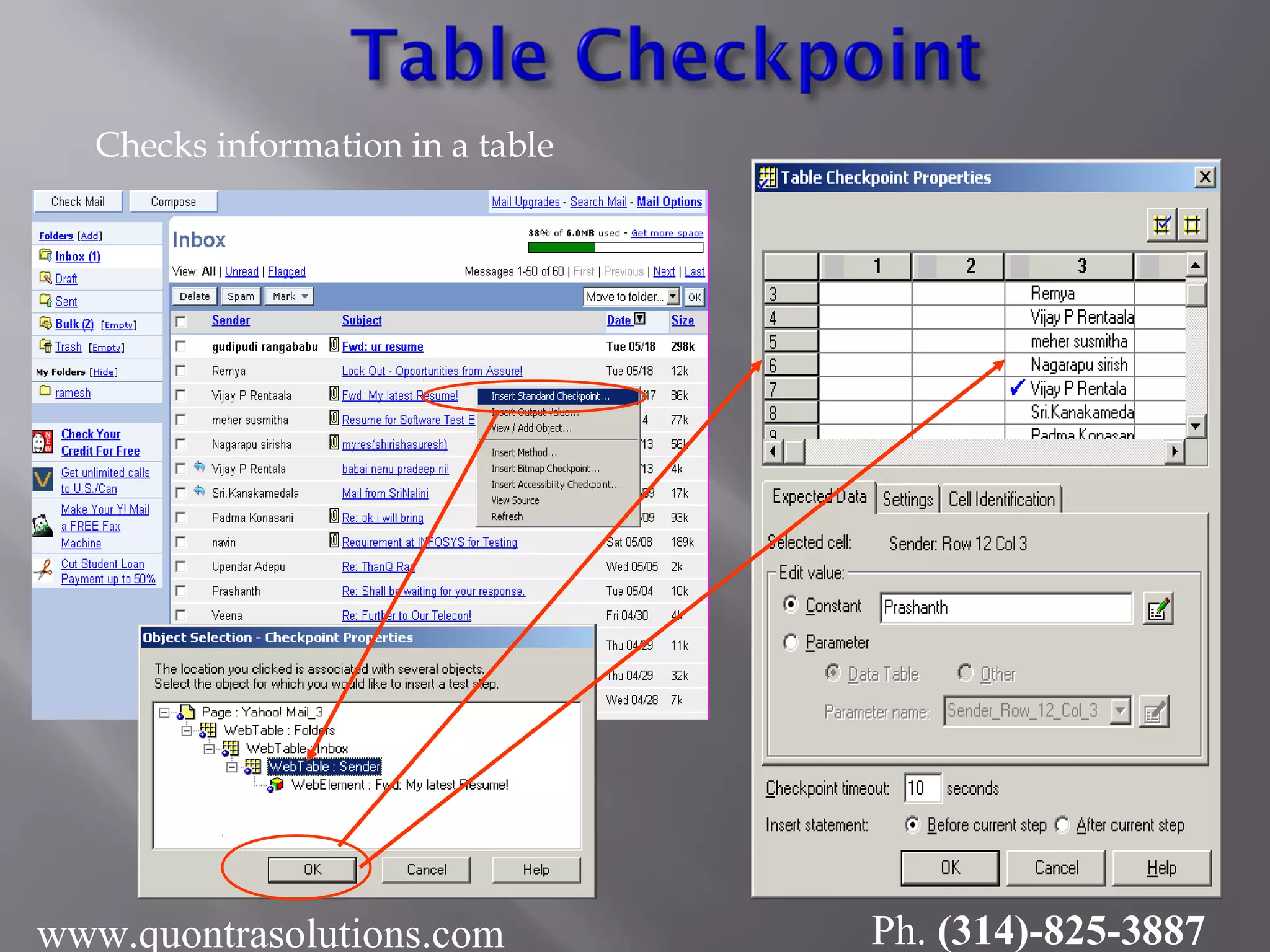
Checks information in a table www.quontrasolutions.com Ph. (314)-825-3887
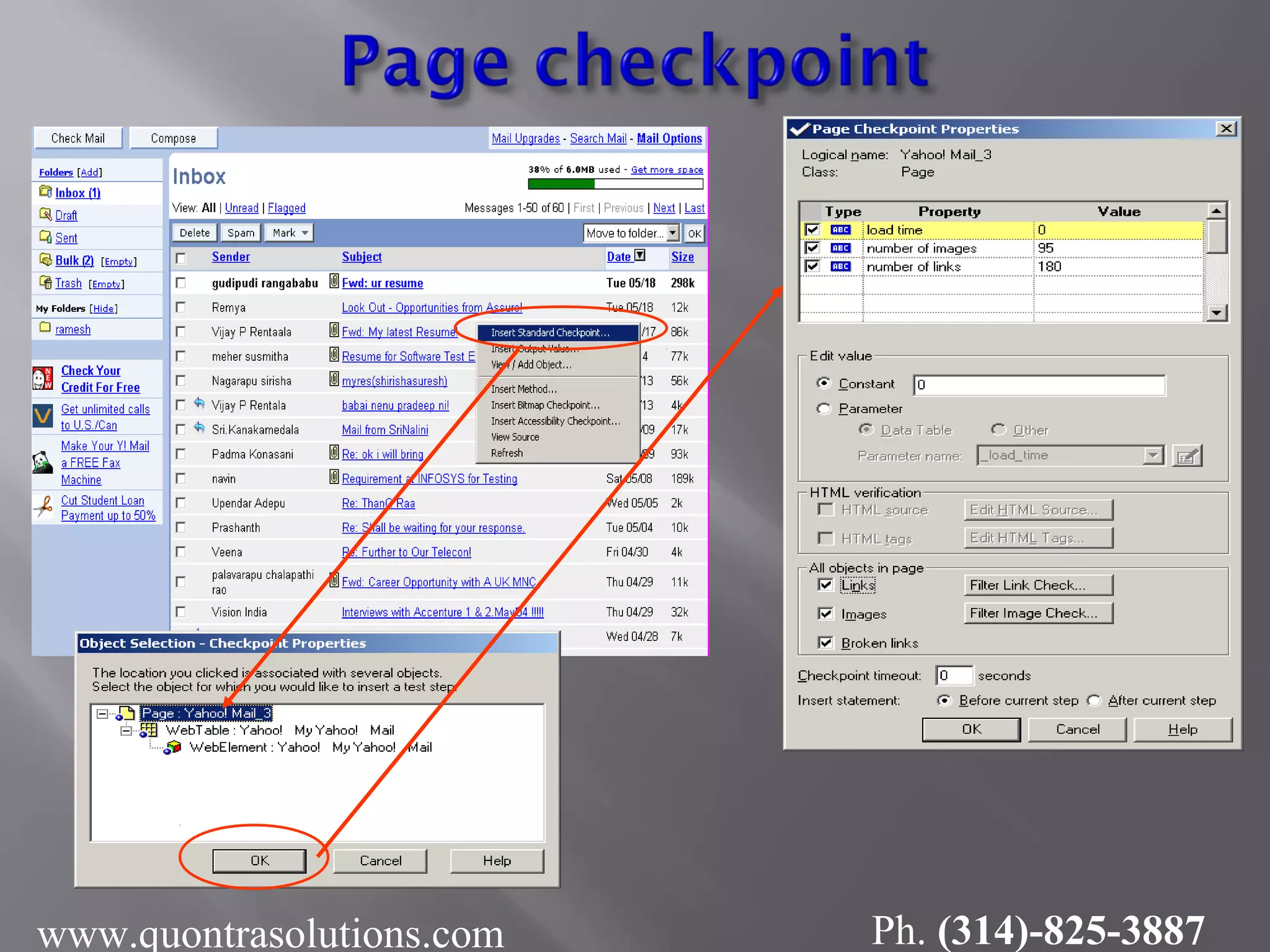
 Checks the characteristics of a page  Check how long a Web page takes to load or if a Web page contains broken links. www.quontrasolutions.com Ph. (314)-825-3887
www.quontrasolutions.com Ph. (314)-825-3887
 Used to check current Database data with the Expected Database data.  Check that the value in a database query is correct.  Demo……… www.quontrasolutions.com Ph. (314)-825-3887
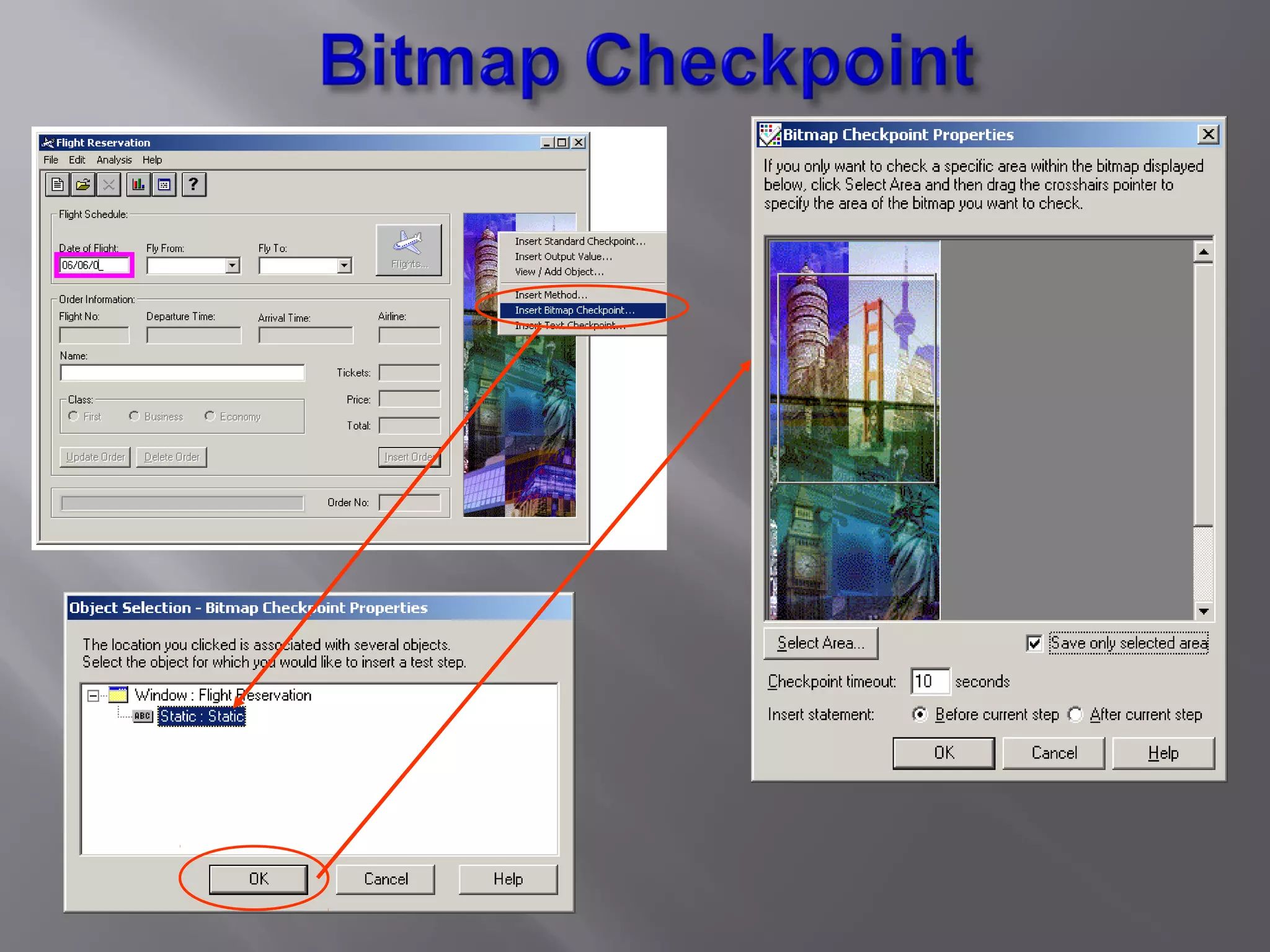
 Checks an area of a Web page or application after capturing it as a bitmap  Check that a Web page (or any portion of it) is displayed as expected.  Demo…………. www.quontrasolutions.com Ph. (314)-825-3887
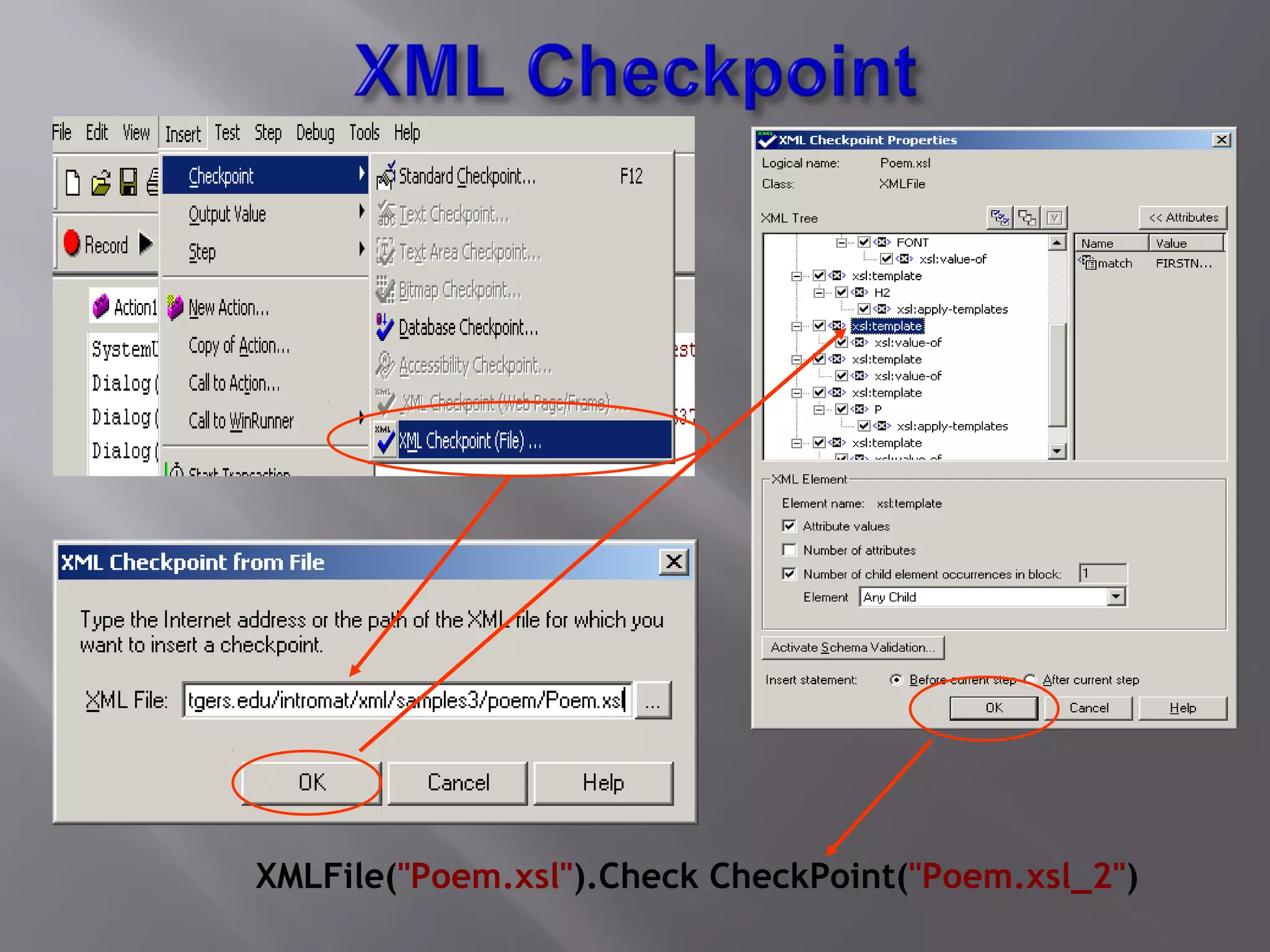
 Checks the data content of XML documents  XML file checkpoints are used to check a specified XML file; XML application checkpoints are used to check an XML document within a Web page.  Demo…………. www.quontrasolutions.com Ph. (314)-825-3887
XMLFile("Poem.xsl").Check CheckPoint("Poem.xsl_2")
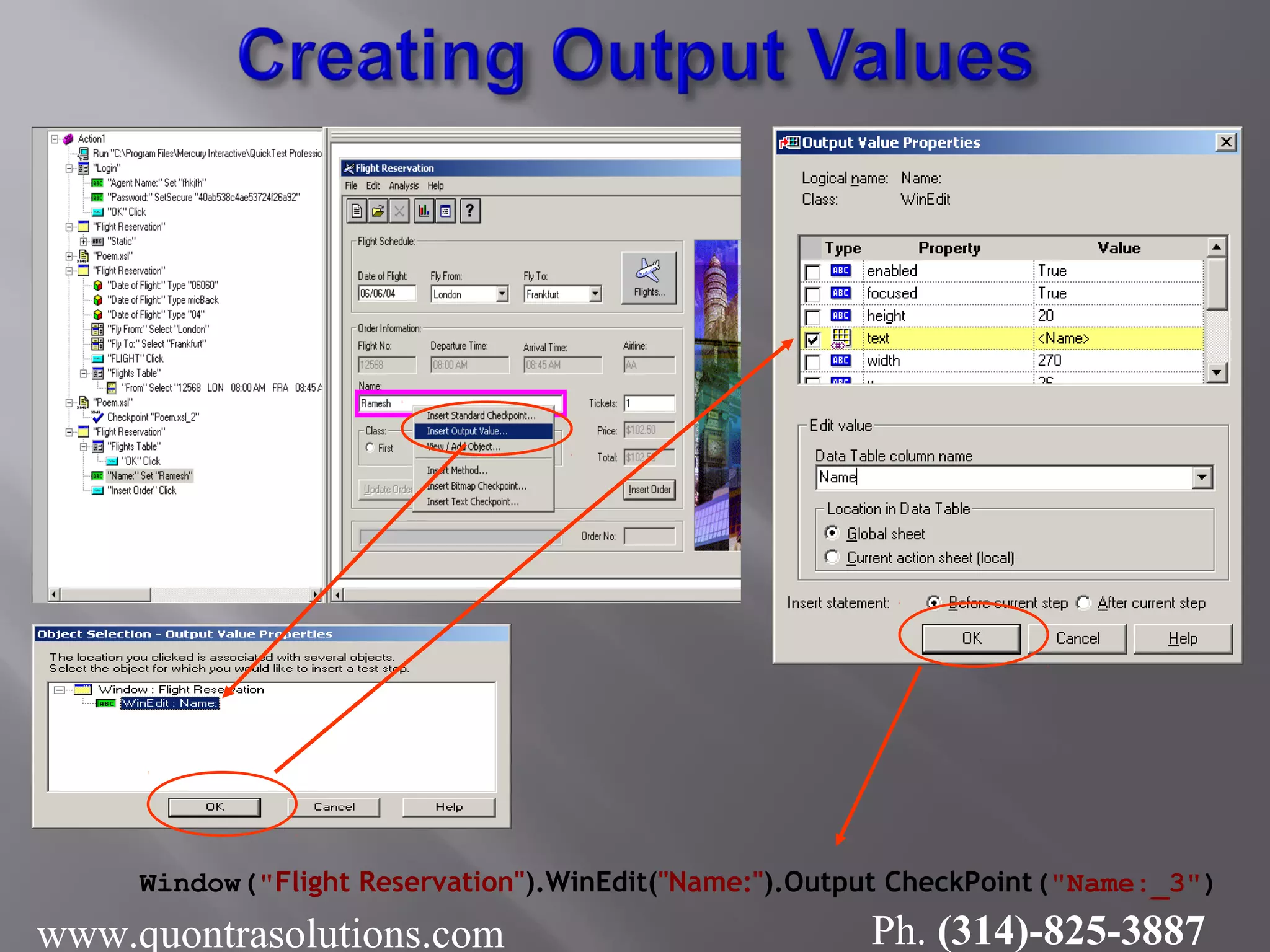
 This is just reverse to the Parameterization, In this case QTP takes the data from the application and displays the same in the Data Table. www.quontrasolutions.com Ph. (314)-825-3887
Window("Flight Reservation").WinEdit("Name:").Output CheckPoint("Name:_3") www.quontrasolutions.com Ph. (314)-825-3887
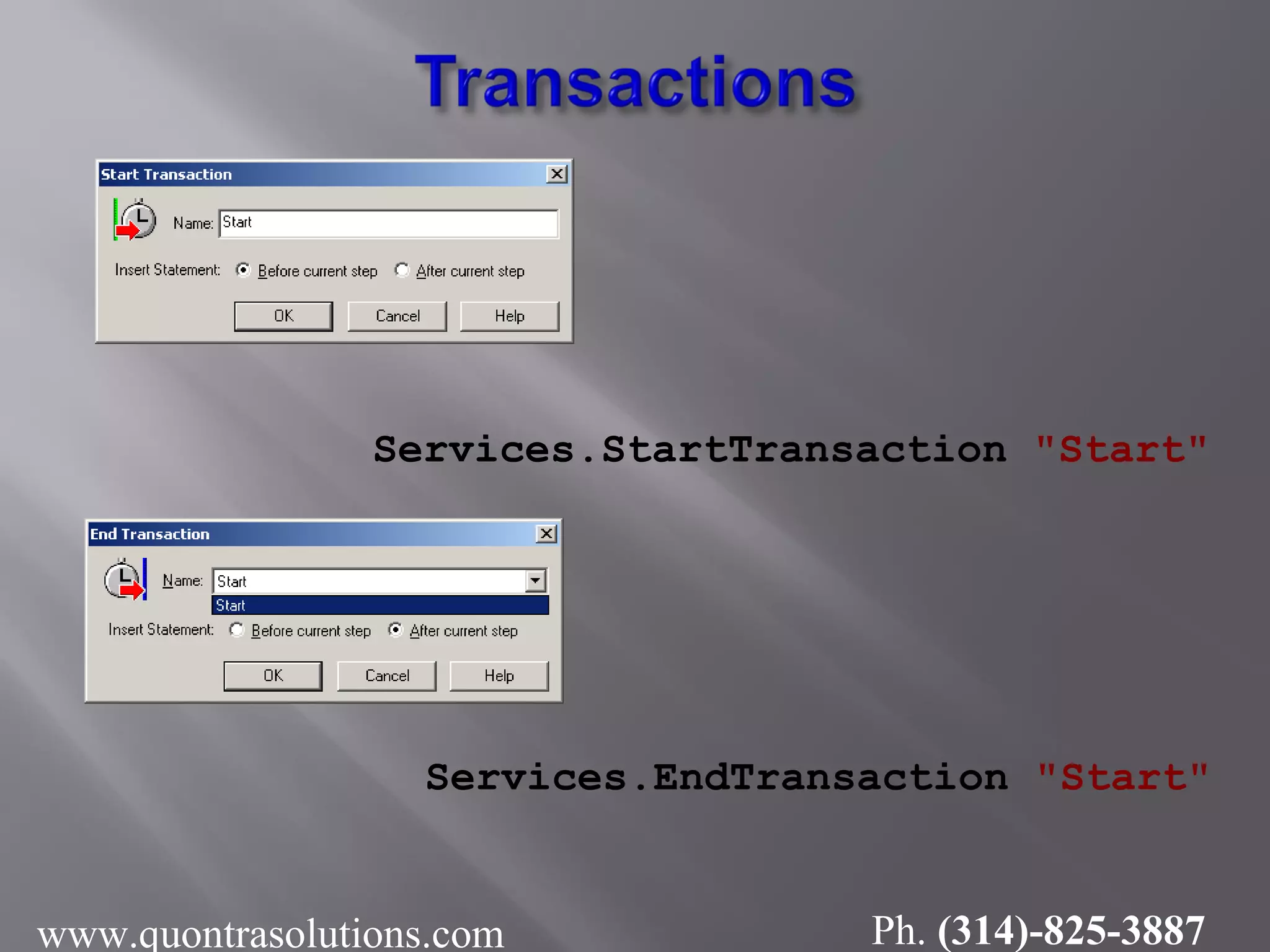
 A transaction represents the business process that you are interested in measuring  You can measure how long it takes to run a section of your test by defining transactions.  User can Plan the Scenario as transaction and use the Start Transaction and End Transaction while Recording. www.quontrasolutions.com Ph. (314)-825-3887
Services.StartTransaction "Start" Services.EndTransaction "Start" www.quontrasolutions.com Ph. (314)-825-3887
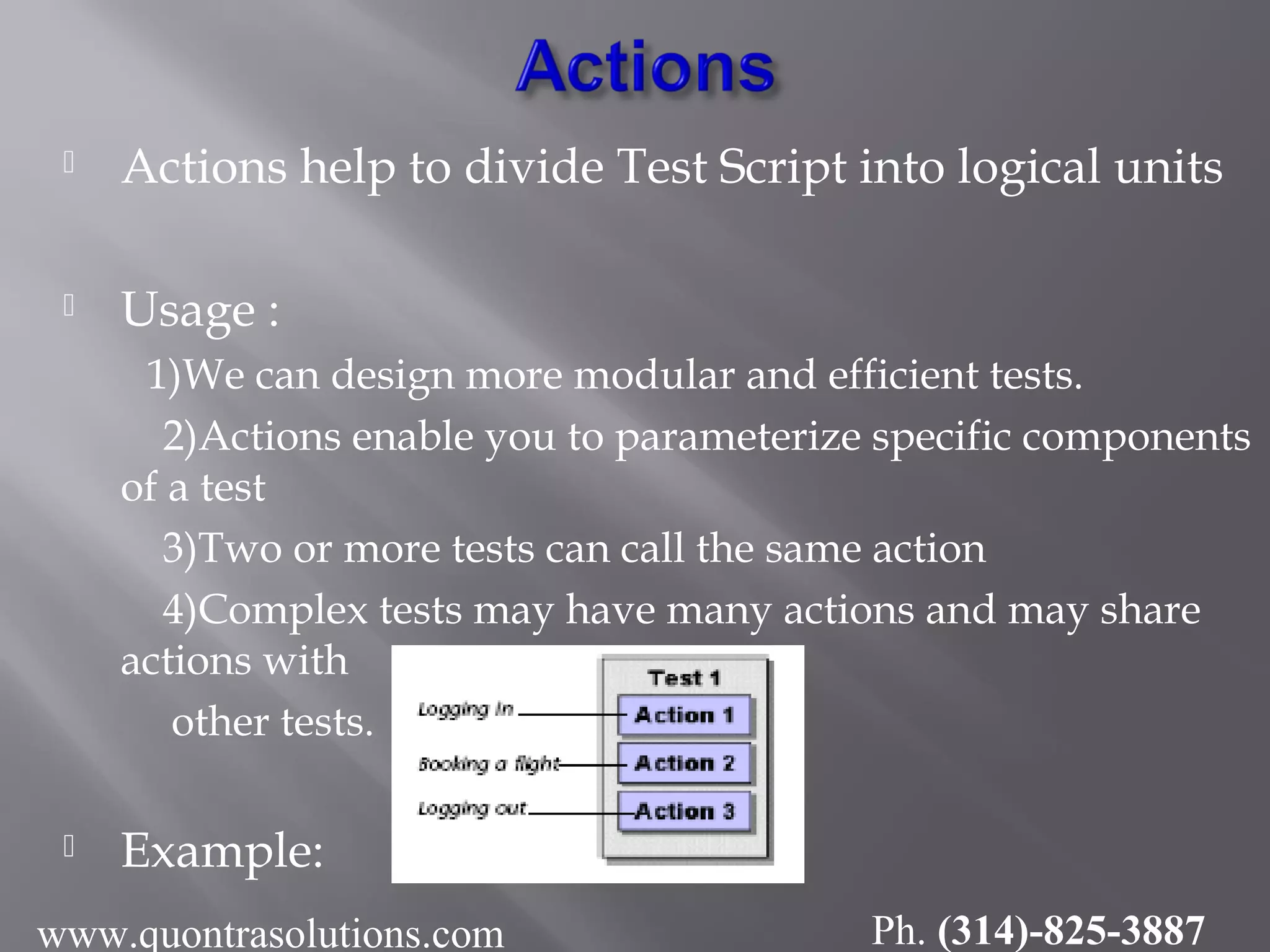
 Actions help to divide Test Script into logical units  Usage : 1)We can design more modular and efficient tests. 2)Actions enable you to parameterize specific components of a test 3)Two or more tests can call the same action 4)Complex tests may have many actions and may share actions with other tests.  Example: www.quontrasolutions.com Ph. (314)-825-3887
We can divide Test Script into multiple actions by creating new actions or by inserting existing actions. Kinds of actions:  Non-Reusable Action : An action that can be used only in the test in which it was created, and only once.  Reusable Action : An action that can be called multiple times by the test in which it was created (the local test) as well as by other tests.  External Action : A reusable action created in another test. External actions are read-only in the calling test. They can be modified only in the test in which they were created. www.quontrasolutions.com Ph. (314)-825-3887
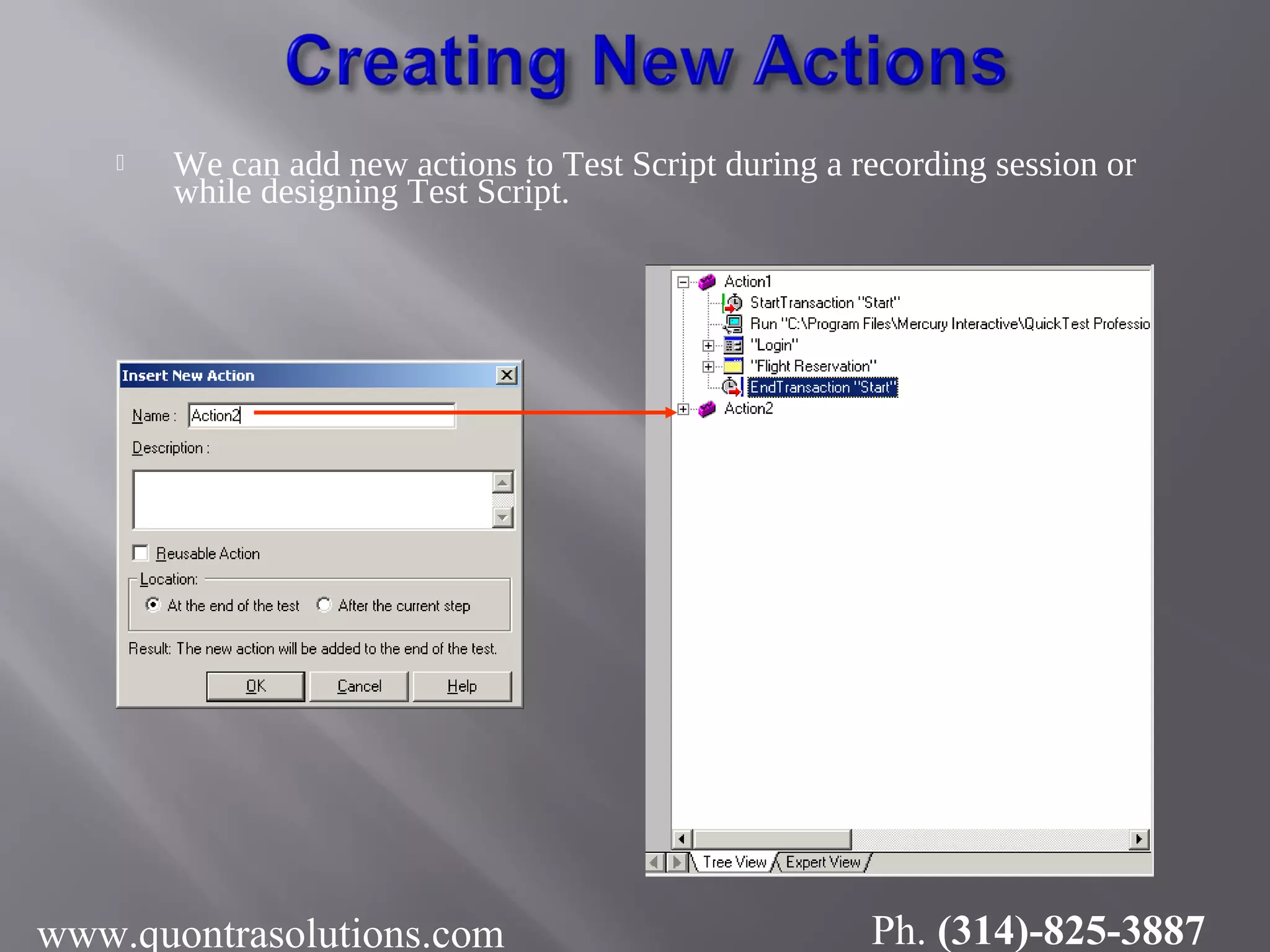
 We can add new actions to Test Script during a recording session or while designing Test Script. www.quontrasolutions.com Ph. (314)-825-3887
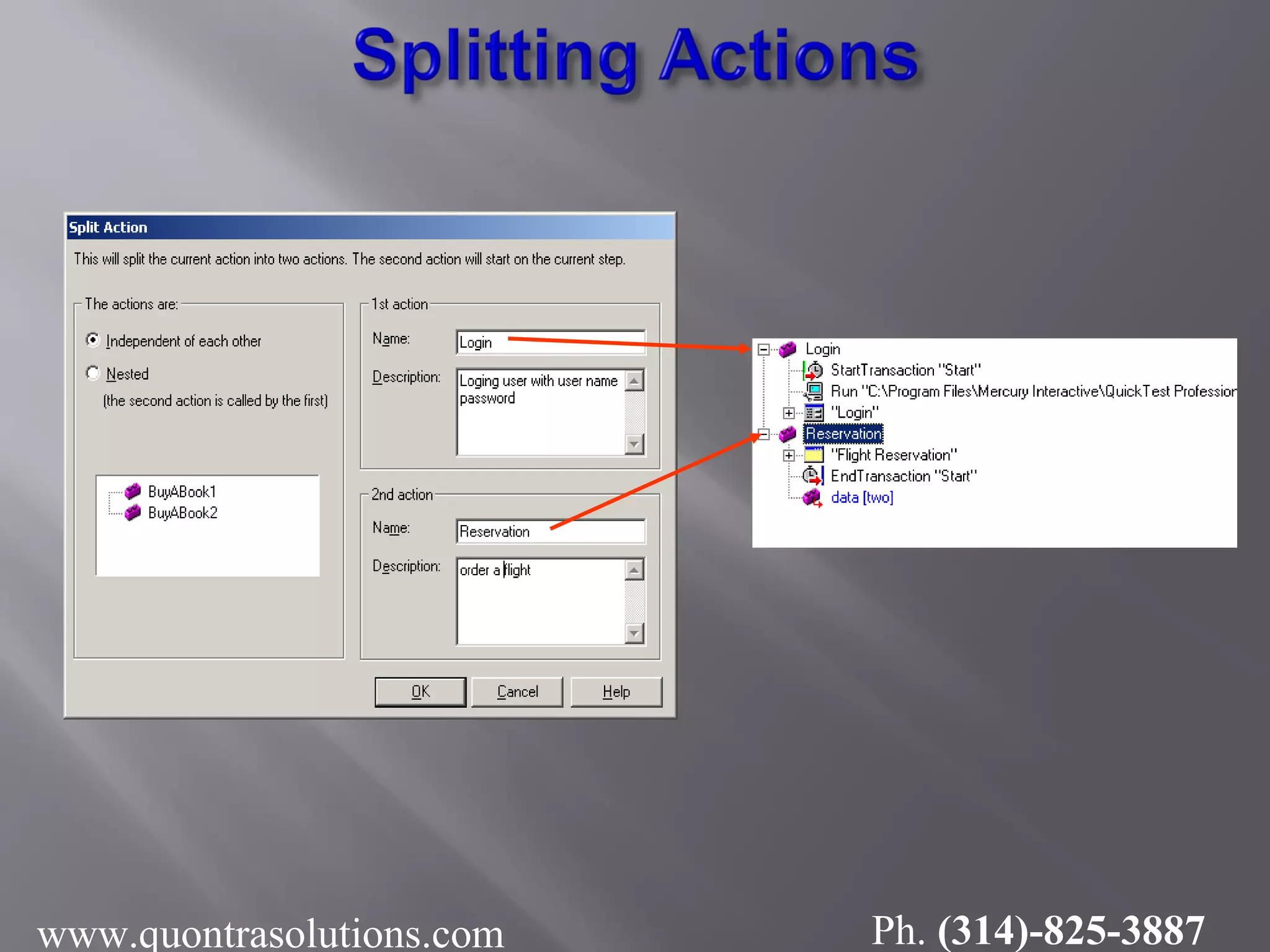
We can split an existing action into two sibling actions or into parent-child nested actions. We cannot split an action and the option is disabled  when an external action is selected  when the first line of the action is selected  while recording a test  while running a test  when you are working with a read-only test www.quontrasolutions.com Ph. (314)-825-3887
www.quontrasolutions.com Ph. (314)-825-3887
fo@quontrasolutions.co.uk Phone : (314)-825-3887 email: info@quontrasolutions.com httP://www.quontrasolutions.com www.quontrasolutions.com Ph. (314)-825-3887

Qtp manual testing tutorials by QuontraSolutions

  • 1.
  • 2.
     What isAutomation Testing ? • Benefits • Automation Testing Process www.quontrasolutions.com Ph. (314)-825-3887
  • 3.
    Quick Test testingprocess consists of 7 main phases 1. Preparing to record  Test Environment  Test Conditions 1. Recording a session on your application  Navigate according to Test Conditions 1. Enhancing your test  Adding logic and conditional statements  Parameterization  Inserting checkpoints 4. Debugging your test  Check that it operates smoothly and without interruption. www.quontrasolutions.com Ph. (314)-825-3887
  • 4.
    5. Run Test Check the behavior of your application 5. Analyzing the test results 5. Reporting defects www.quontrasolutions.com Ph. (314)-825-3887
  • 5.
  • 6.
  • 7.
    • Test Objectshierarchy can be seen in both the TreeView and the Expert View www.quontrasolutions.com Ph. (314)-825-3887
  • 8.
     It isused to view object properties and Methods  Displays • Object hierarchy tree • Run-time object methods or test object methods www.quontrasolutions.com Ph. (314)-825-3887
  • 9.
    Locate object in repository Finddata-dependant property Parameteriz property’s value • Interface between QTP Script and the Application • Contains Logical Name and physical Description www.quontrasolutions.com Ph. (314)-825-3887
  • 10.
    1. Normal recording Records the objects in your application and the operations performed on them. This mode is the default and takes full advantage of Quick Test’s test object model. 1. Analog Recording  Record the exact mouse and keyboard operations you perform in relation to either the screen or the application window. 1. Low-Level Recording  Record on any object in your application, whether or not Quick Test recognizes the specific object or the specific operation. www.quontrasolutions.com Ph. (314)-825-3887
  • 11.
    1. Parameterizing Test 2.Regular Expressions 3. Creating Checkpoints 4. Creating Output Values 5. Dividing Tests into Multiple Actions www.quontrasolutions.com Ph.
  • 12.
    To run thescenario with multiple sets of data. Steps for Parameterization 1. Defining a Data Table Parameter 2. Adding Parameter Values to a Data Table 3. Modifying Steps Affected by Parameterization 4. Running and Analyzing a Parameterized Test Demo……………….. www.quontrasolutions.com Ph. (314)-825-3887
  • 13.
    How to providethe data to the respective Parameter through Tree View www.quontrasolutions.com Ph. (314)-825-3887
  • 14.
    How to providethe data to the respective Parameter through Expert View www.quontrasolutions.com Ph. (314)-825-3887
  • 15.
     Regular expressionsenable Quick Test to identify Objects and text strings with varying values.  User has to identify the data projected to be change, like dates, so to accepts any dates, user can use regular expression. Example : Actual Date format : 05/19/2004 (mm/dd/yyyy) After Regular Expression: [0-1][0-9]/[0-3][0-9]/200[0-9] www.quontrasolutions.com Ph. (314)-825-3887
  • 16.
  • 17.
    Click icon Do thechanges as, shown below and select Regular Expression. QTP will take the year from 2000 -2009 www.quontrasolutions.com Ph. (314)-825-3887
  • 18.
    Used to checkthe current behavior of the application with the expected behavior.  Text /Text Area Checkpoint  Standard Checkpoint  Table Checkpoint  Page checkpoint  Database Checkpoint  Image Checkpoint  Accessibility Checkpoint  Bitmap Checkpoint  XML Checkpoint
  • 19.
    checks that CurrentText format with the Expected Text Format in a Web page or application window 05/09/14 www.quontrasolutions.com Ph. (314)-825-3887
  • 20.
    Checks information ina table www.quontrasolutions.com Ph. (314)-825-3887
  • 21.
     Checks thecharacteristics of a page  Check how long a Web page takes to load or if a Web page contains broken links. www.quontrasolutions.com Ph. (314)-825-3887
  • 22.
  • 23.
     Used tocheck current Database data with the Expected Database data.  Check that the value in a database query is correct.  Demo……… www.quontrasolutions.com Ph. (314)-825-3887
  • 24.
     Checks anarea of a Web page or application after capturing it as a bitmap  Check that a Web page (or any portion of it) is displayed as expected.  Demo…………. www.quontrasolutions.com Ph. (314)-825-3887
  • 26.
     Checks thedata content of XML documents  XML file checkpoints are used to check a specified XML file; XML application checkpoints are used to check an XML document within a Web page.  Demo…………. www.quontrasolutions.com Ph. (314)-825-3887
  • 27.
  • 28.
     This isjust reverse to the Parameterization, In this case QTP takes the data from the application and displays the same in the Data Table. www.quontrasolutions.com Ph. (314)-825-3887
  • 29.
  • 30.
     A transactionrepresents the business process that you are interested in measuring  You can measure how long it takes to run a section of your test by defining transactions.  User can Plan the Scenario as transaction and use the Start Transaction and End Transaction while Recording. www.quontrasolutions.com Ph. (314)-825-3887
  • 31.
  • 32.
     Actions helpto divide Test Script into logical units  Usage : 1)We can design more modular and efficient tests. 2)Actions enable you to parameterize specific components of a test 3)Two or more tests can call the same action 4)Complex tests may have many actions and may share actions with other tests.  Example: www.quontrasolutions.com Ph. (314)-825-3887
  • 33.
    We can divideTest Script into multiple actions by creating new actions or by inserting existing actions. Kinds of actions:  Non-Reusable Action : An action that can be used only in the test in which it was created, and only once.  Reusable Action : An action that can be called multiple times by the test in which it was created (the local test) as well as by other tests.  External Action : A reusable action created in another test. External actions are read-only in the calling test. They can be modified only in the test in which they were created. www.quontrasolutions.com Ph. (314)-825-3887
  • 34.
     We canadd new actions to Test Script during a recording session or while designing Test Script. www.quontrasolutions.com Ph. (314)-825-3887
  • 35.
    We can splitan existing action into two sibling actions or into parent-child nested actions. We cannot split an action and the option is disabled  when an external action is selected  when the first line of the action is selected  while recording a test  while running a test  when you are working with a read-only test www.quontrasolutions.com Ph. (314)-825-3887
  • 36.
  • 37.
    fo@quontrasolutions.co.uk Phone : (314)-825-3887 email:info@quontrasolutions.com httP://www.quontrasolutions.com www.quontrasolutions.com Ph. (314)-825-3887