Showing posts with label calculators. Show all posts

2025-04-21

Just one more calculator, bro, just one more, I swear it's the last one


I'm not much of a collector of things. Long ago I decided that on the retro-computing front I would not collect any machines that weren't very significant to me. So, my "collection" consists of a KIM-1, Sharp MZ-80K, Research Machines 380Z and 480Z, BBC Micro Model B, an IBM ThinkPad 701C, and a Minitel (well, two).

But calculators are where I come closest to not being able to resist. Calculators are there for you. They don't change UI because of the whim of some product manager. They don't need updating because their underlying OS is on some new, crazy version. Nothing gets in the way of you using them: no popups, enticements to buy some extra thing, no notifications, nothing. In an insane world, they are the sanest choice.

I've written in the past about restoring my Rockwell 8R and Commodore P50 (and a fun discovery that Sir Roger Penrose had the same calculator and wrote the same program as me: mine was faster, his more elegant (which is probably some sort of metaphor)). And I have my Casio fx-3600p which I used extensively at school.

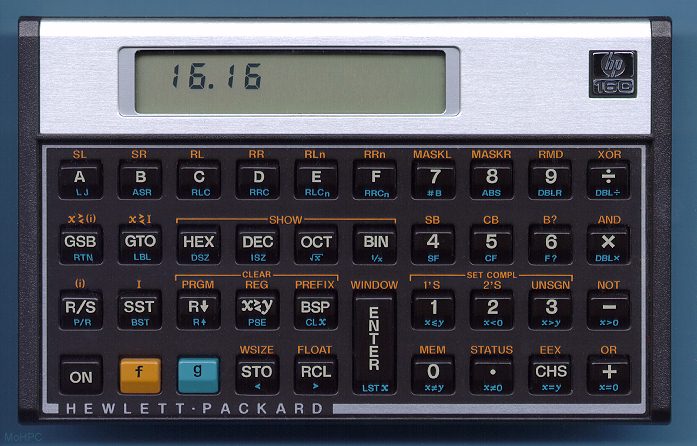
I also have an original HP 16C (the one for programmers).

Some time ago I discovered a company called SwissMicros that makes modern replicas of classic HP calculators. I bought two of them. I have their version of the HP-42S:


But recently they started making a credit card-sized version of the HP-16C and I was unable to resist ordering one. And so, after dealing with Portuguese Customs, I got this:


And now I have full size and card size side by side:


I'll try to stop collecting calculators there.

2023-11-15

My primality testing code is 6x faster than Sir Roger Penrose's

But, I guess he did win the Nobel Prize for Physics in 2020 so I can't really brag.

However, it was a great surprise when looking at two pages from Penrose's notebooks that two columns of code for a Commodore P50 calculator leapt off the page at me. It's a UNIX system. I know this! And furthermore that the right hand column is code for testing whether a number is prime.

Here's the page from the notebook:

(If you weren't familiar with this code, Penrose has written what it does and the fact that it runs on the Commodore P50)

I have a great love for the Commodore P50 because I had one in the late 1970s and recently restored it. And Penrose's code was of great interest to me because I also wrote a primality testing program for it. This is quite hard to do because of the limited memory in the calculator. The maximum length of a program on the Commodore P50 is 24 steps, and register space is... well, read on.

There's a neat trick in Penrose's code that I couldn't use because of how I chose to test factors. It makes his code incredibly slow but doesn't require a kind of ugly mechanism for storing state that mine does.

Here's my code (on the left) and Penrose's (on the right) side by side.

   My code                      Sir Roger Penrose's

   lrn                          lrn
   00 RCL                       00 STO
   01 -                         01 
√x
   02 INT
                       02 INT
   03 *
                         03 +/-
   04 4
                         04 x<->y
   05 10^x
                      05 RCL
   06 /
                         06 x<->y
   07 RCL
                       07 x<->M
   08 INT
                       08 x<->M
   09 -
                         09 M+
   10 INT                       10 x<->M
   11 =                         11 SKZ
   12 SKZ                       12 GOTO
   13 GOTO                      13 15
   14 18                        14 R/S
   15 RCL                       15 SKN
   16 INT                       16 GOTO
   17 R/S                       17 08
   18 1                         18 1
   19 +/-                       19 M+
   20 M+                        20 x<->y
   21 GOTO                      21 x<->M
   22 00                        22 GOTO
   lrn                          23 04
                                lrn

Both these programs work by doing trial division of factors starting from INT(√x) and working down to trying to find a factor. My code does this with actual division (step 06), Penrose does it using repeated subtraction (the M+ of the factor which is made negative by the +/- in step 03). His use of repeated subtraction makes his code slow, but it also means he isn't forced to store the number being tested (and the current factor being tried) in the weird encoding I had to use (see original blog post, but in short I use the memory to store a decimal number where the integer part is the number being tested and the decimal the current factor divided by 10,000).

Running my code testing if 199 is prime gives the result (it is!) in 1m44s; Penrose's code takes 10m37s. I'm six times faster than Mr. Nobel over there! But he gets to use a neat trick that I don't. 

The Commodore P50 has one register that the programmer can use: the memory. The memory is accessed through the STO (store in the memory), RCL (recall from memory), M+ (add to memory), and Mx (multiply memory) buttons. But there are two temporary registers called x and y. x is the value that's currently on screen and y is the other operand for a two operand operation like 6 + 7

For example, in 6 + 7 the 7 on screen will be in x and the 6 in y. It's actually possible to access y through the x <-> y button which swaps them. Penrose's trick is to never use an operation requiring two operands. By using M+ exclusively to do repeated subtraction (and increment the trial factor each time round the loop), the y register is never touched and therefore he gets to use it for storage.

So, he stores either the number being tested or the current factor in y. And by careful use of x <-> M (which swaps the on screen number and memory) he's able to keep both numbers he needs without resorting to my encoding trickery.

It's very elegant (if slow).

The other thing that's nice about his code is that it requires no set up (whereas mine requires first storing the number and INT(√x) in the encoded form).

(If you enjoyed this you might enjoy Double-checking Dawkins)

2023-09-05

SwissMicros' beautiful "HP" calculators

I love calculators and have written about old calculators that I've owned over the years (including my Commodore P50 (and programming it to do primality testing in just 23 steps) and Rockwell 8R). Growing up I never had access to Hewlett Packard's wonderful line up of RPN calculators. After all, the HP calculators were professional devices and well out of the reach of my (and my parents') small pocketbook in the UK.

So, I had to make do with my trusty Casio fx-3600P. I had great fun programming it and it got me through A-levels and whatever parts of my undergraduate degree required calculations (which given that I was mostly studying mathematics is almost nothing).


Later I was able to find a genuine HP-16C "Programmer's Calculator" on eBay. It was the first calculator for doing hex, decimal, octal and binary that I'd owned and found it useful but kind of slow. The Casio felt way snappier to work with.


But, even though it felt slow, it felt solid, like it was a real tool made for real work. As much as I loved the Commodore, Rockwell and Casio, they all felt a little flimsy compared to the HP. Sadly, HP's range of calculators is very small these days.

Luckily, a company called SwissMicros has stepped in to make beautiful modern equivalents of many classic HP calculators. And by using modern CPUs and software they are fast and a joy to use. On top of that they amazingly feel even more robust and made for "real work" than the originals.

I own the equivalent of the HP-16C from SwissMicros, called the DM16L.


On my phone I have an emulator of the HP-42S called the Plus42 which is wonderful but there's nothing like the feel of the real keys on the calculator so I also have SwissMicros' equivalent calculator: the DM42.


I guess it might seem weirdly anachronistic to use a physical calculator rather than the virtual one on my phone, but there's something about the physicality and 3D-ness of the SwissMicros devices that makes them a pleasure to use. And they are a rare, modern device that makes me feel like someone really cared about building it.

2022-11-18

Restoring my Commodore P50 calculator with a little solder and a 3D printer

Hot on the heels of me restoring my Rockwell 8R calculator with a small amount of cleaning and a little 3D print, it was time to restore my other 1970s calculator: the Commodore P50. But this restoration required a little more work. 

Once again, I'd lost the battery cover but its shape was much more complex than the Rockwell's. Also, the actual battery connector was broken and the keyboard a bit flaky.


Fixing the battery connector is pretty simple. It's soldered onto two huge pads on the left and it's just a matter of unsoldering, cleaning up and soldering a new one in place.


Next up is dismantling the keyboard and cleaning it. The main circuit board is held down by eight screws. Once removed the keyboard comes apart into individual buttons and the rubberized sheet that makes the contacts and makes them spring.

First step was to clean the contacts with alcohol on a cotton bud.


Then I washed and dried the very dirty rubber components which had been gathering crud since the 1970s.


Lastly, the missing battery cover. For this I recreated it (or something like it) in OpenSCAD and 3D printed it. Here are the OpenSCAD instructions for it:

// w is the width of the entire cover

w = 54.5;

// cover is the main part of the cover without the hook or clip.
module cover() {
    linear_extrude(w) hull() {
        translate([0, 28, 0]) square(1.5);
        square(1.5);
        translate([8.5, -5, 0]) square(1.5);
    }
}

hook_width = 20;

// hook is the part the catches at the bottom of the angled piece 
// of the cover
module hook() {
    translate([9.5, -4.5, (w-hook_width)/2])
        linear_extrude(hook_width)
            square([0.5, 4]);
}

clip_width = 13;

// clip is the part that clips in place inside the
// calculator housing
module clip() {
    translate([1.5, 24, (w-clip_width)/2]) union() {
        linear_extrude(clip_width) union() {
            square([2, 12]);
            translate([-1, 8, 0]) square([2, 0.5]);
        }
    }
}

finger_width = 10;

// finger is a small indentation to help you remove the cover
module finger() {
    translate([1, 10, (w-finger_width)/2])
        rotate(180)
            linear_extrude(finger_width)
                polygon([[1, 5], [1, 0], [0, 5]]);
}

difference() {
    cover();
    translate([1.5, 1.5, 0]) cover();
    finger();
}
 
hook();
clip();

And here's what that looks like:


And once printed (I only had black and not brown) looks like this:


And fits beautifully onto the calculator with a satisfying click as the clip locks into place.


And with it all back together I can go off and do important things like program it to identify prime numbers in its incredibly limited space (24 program steps max!).

2022-11-17

Restoring my Rockwell 8R calculator with a 3D printer

I've owned a Rockwell 8R calculator for a very long time. It was released in 1975 and it seems to have survived the intervening 47 years pretty well. Except that when I was a child I liked to take it apart to examine its innards. Along the way I lost all four screws and the battery cover.


The inside of the calculator consists of a main board with attached screen (with those lovely bubble LEDs) and a keyboard that attaches with spikes around the edge.


The only restoration I did was clean those spikes with some sandpaper and alcohol. But the calculator needed a battery cover. It's a fairly simple design so I whipped one up in OpenSCAD with the following code:

difference() {
    union() {
        linear_extrude(1) square([50.5, 32], true);
        translate([-22.75,0,-1])  linear_extrude(1) 
            square([5, 29], true);
        translate([23.75,0,-2.5]) linear_extrude(3) 
            square([3, 29], true);
    }

    translate([-24.75,0,0]) linear_extrude(1) 
        square([1, 12], true);
}

translate([23.5,10.5,-2.5])  linear_extrude(1) square([4, 4]);
translate([23.5,-2,-2.5])    linear_extrude(1) square([4, 4]);
translate([23.5,-14.5,-2.5]) linear_extrude(1) square([4, 4]);

and then 3D printed it. 


The 3D print (on my Toybox printer) needs support material and has to be separated into two parts (the top part here is the support material that is discarded):


With four screws added the Rockwell 8R is finally whole again:


And can be placed in its protective, padded case for another 47 years of use:


If you like calculators you can read about my Commodore P50 (which I'm currently in the process of restoring also... I lost the battery cover for that too!)

2022-11-06

Primality testing on the Commodore P50 programmable calculator with one register and 23 steps

Partly because of when I started writing code (the 1970s), and partly because of money, a lot of my early coding was in very constrained environments. I've written before about programming some industrial machinery using a KIM-1. However, the most constrained environment I've coded on is the Commodore P50 programmable calculator in the late 1970s.

Its programming capabilities are very, very limited. There's a single 'register' (the standard memory function of the calculator) and only 24 steps (which are for the most part single presses of a key) are programmable. For example, if your program needs the constant 1234 that's four steps out of 24 taken up!


It was great for writing a program that is just a function that you need to evaluate for multiple values of x. For example, you can store the function sin(1/x) like this:

   lrn
   1/x
   SIN
   R/S
   GOTO 00
   
lrn

And then enter a number and press R/S to evaluate sin(1/x). lrn puts the calculator in programming mode and then can accept up to 24 keystrokes. R/S causes the program to terminate. 

Adding in line numbers shows that the GOTO takes the program back to the start. This is done because if you run a program and hit R/S again it continues where it left off which could result in an error if the program previously terminated in the middle somewhere.

      lrn
   00 1/x
   01 SIN
   02 R/S
   03 GOTO
   04 00
      
lrn

Notice how GOTO 00 takes two of 24 steps!

Loops

You can easily write simple loops. For example, if you wanted to plot sin(1/x) for x starting at 0.001 in increments of 0.001 you'd write (STO stores a number in the memory, RCL gets it from memory)

      lrn
   00 0
   01 STO
   02 RCL
   03 +
   04 .
   05 0
   06 0
   07 1
   08 =
   09 STO
   10 1/x
   11 SIN
   12 R/S
   13 GOTO
   14 02
      lrn

This program uses the memory to store 0.001, 0.002, 0.003, ... and stops outputting sin(1/0.001), sin(1/0.002), sin(1/0.003), ... Hitting R/S obtains the next result.

Conditional branching

The calculator also has three conditional branch operations SKZ, SKN, SKP (skip zero, skip negative, skip positive) which simply skip the next instruction if the displayed number is zero, negative or positive. Here's a program that calculates x modulo y. x is the number on screen when the program is run and y should be stored in the memory beforehand.

Since  SKZSKNSKP only skip the next instruction they are most commonly followed by a GOTO somewhere else.

      lrn
   00 -
   01 RCL
   02 =
   03 SKN
   04 GOTO 
   05 00
   06 +
   07 RCL
   08 =
   09 R/S
   10 GOTO
   11 00
      lrn

This program runs extremely slowly even though it just does integer addition and subtraction. 89 modulo 5 takes almost 12 seconds to calculate. 

Is this number a prime?

But I'm not letting that deter me. Here's a complete program that returns 1 if the number being tested is prime, or returns a number that divides it if not.

The program divides the x by numbers from sqrt(x) to 2 looking for a divisor. 

      lrn
   00 RCL
   01 -
   02 INT
   03 *
   04 4
   05 10^x
   06 

   07 RCL
   08 INT
   09 -
   10 INT
   11 =
   12 SKZ
   13 GOTO 
   14 18
   15 RCL
   16 INT
   17 R/S
   18 1
   19 +/-
   20 M+
   21 GOTO
   22 00
      lrn

Unfortunately, it requires a little bit of set up by the user. Because the calculator has only one register (the memory) I am forced to store both the original number, x, being divided, and the current divisor, d, being tested in the memory. This is done by storing d + x/10000 in the memory. Thus the program only works to test numbers up to 9,999 (it can easily be extended by changing the number in step 4 above).

Lines 00 to 08 retrieve the number and trial divisor from memory and divides the former by the latter. Lines 09 to 12 determine whether the result is an integer or not (by subtracting the integer part of the result from itself). Lines 15 to 17 are where the program halts when a divisor is found. Lines 18 to 22 subtract one from the trial divisor and loop back to the start.

So, suppose the program is testing if 11 divides 198. The memory would contain 11.0198. Here's what's on screen at each program step (note that the display does not show anything when really running a program but will if you use the single step, SSTP, key) 

Since 11 does divide 198 the program will terminate at step 17.

   00 RCL               11.0198
   01 -                 11.0198
   02 INT               11
   03 *                  0.0198 
   04 4                  4
   05 10^x           10000
   06 
               198
   07 RCL               11.0198
   08 INT               11
   09 -                 18
   10 INT               18
   11 =                  0
   12 SKZ
   13 GOTO 
   14 18
   15 RCL               11.0198
   16 INT               11
   17 R/S               11
   18 1
   19 +/-
   20 M+
   21 GOTO
   22 00

Now, here's what happens when testing if 12 divides 198 (which it doesn't). The memory would contain 12.0198. Once again, here's the step by step.

   00 RCL               12.0198
   01 -                 12.0198
   02 INT               12
   03 *                  0.0198 
   04 4                  4
   05 10^x           10000
   06 ➗                198
   07 RCL               12.0198
   08 INT               12
   09 -                 16.5
   10 INT               16
   11 =                  0.5
   12 SKZ
   13 GOTO 
   14 18
   15 RCL               
   16 INT               
   17 R/S               
   18 1                  1
   19 +/-               -1
   20 M+                -1
   21 GOTO
   22 00

This time the SKZ doesn't happen so the GOTO 18 occurs. The memory is decremented by 1 and the program loops back to the start with 11.0198 in memory.

To use the program the operator needs to store the number being tested and its square root in the memory. Thus they need to perform the following to set up the memory correctly after entering the number they want tested.

   STO
   √x
   INT 
   *
   4
   10^x
   =
   M+
   4
   +/-
   10^x
   Mx

They can then hit R/S and wait... a long time. For example, determining if 199 is prime (it is) takes... 1m44s.


But, at least I know it is possible to fit a primality testing program in 23 steps with a single register.

2006-06-22

How I love my HP-16C

A while ago I bought an HP-16C calculator on eBay. It wasn't cheap and there was no manual; the calculator itself works fine and is in almost mint condition. Since then I've fallen in love with the device.


You probably think I'm nuts to be using a calculator that was discontinued in 1989 and only 203 bytes of memory. And I had to pay extra to get a PDF version of the scanned original manual.

Perhaps I am crazy, but here's why I love this little machine:

1. RPN. You either love this or hate it. This is my first RPN calculator and for me RPN is the right way to use a calculator. I read a short introduction to RPN tricks (of which there are very few, but filling the stack for repeated operations is one and using LST x to prevent the stack from moving is another).

2. The industrial design of HP calculators is pure art. They are the right size for your hand, the keyboard is clearly marked, keys are spaced far apart (which avoids fat fingers like mine) and the keys give good feedback on being pressed. And the calculator is slightly slanted so that when it's on the desk it's easy to type on.

3. Floating point with fixed display of decimal places. Just right for balancing your check book.

4. Hex/Dec/Oct/Bin modes plus the nice 'show' feature which can display a number in one of the other bases for a few seconds without changing base. Very handy when debugging.

5. And my favorite thing... the HP 16C is 128 mm wide and 79 mm deep. Notice anything interesting? 128 ENTER 79 / is... 1.62. Or the Golden Ratio. No wonder I love that thing so much.