Showing posts with label IPython. Show all posts

Sunday, April 20, 2025

Feedback loops in Python

How fast can we get useful feedback on the Python code we write?

This is a walk-through of some of the feedback loops we can get from our ways of working and developer tools. The goal of this post is to find a both Developer friendly and fast way to learn if the Python code we write actually does what we want it to.

What's a Feedback Loop?

From my point of view, feedback loops for software is about running code with optional input and verifying the output. Basically, run a Python function and investigate the result from that function.

Feedback Loop 1: Ship it to Production

Write some code & deploy it. When the code is up & running, you (or your customers) can verify if it works as expected or not. This is usually a very slow feedback loop cycle.

You might have some Continuous Integration (CI) already set up, with rules that should pass before the deployment. If your code doesn't pass the rules, the CI tool will let you know. As a feedback loop, it's slow. By slow, I mean that it takes a long time before you will know the result. Especially when there are setup & teardown steps happening in the CI process. As a guard, just before releasing code, CI with deployment rules is valuable and sometimes a life saver.

Commit, Push & Merge

Pull Requests: just before hitting the merge button, you will get a chance to review the code changes. This type of visual review is a manual feedback loop. It's good, because you often take a step back and reflect on the written code. Will the code do the thing right? Does the code do the right thing? One drawback is that you review all changes. For large Pull Requests, it can be overwhelming. From a feedback loop perspective, it's not that fast.

Testing and debugging

Obviously, this is a very common way for feedback on software. Either manual or automated. The manual is mostly a slower way to find out if the code does what expected or not, than an automated test. There's the integration-style automated tests, and the unit tests targeting the different parts. Integration-style tests often require mocking and more setup than unit tests. Both run fast, but the unit tests are more likely to be faster. You can have your development environment setup to automatically run the tests when something changes. Now we're getting close, this workflow can be fast.

I usually avoid the integration-type of tests, and rather write unit tests. I try to write small, focused and simple unit tests. The tests help me write small, focused and simple code too.

Test Driven Development

An even faster way to get feedback about the code is to write software in a test driven way (TDD): write a test that initially fails, write some code to make the test pass, refactor the test and refactor the code. For me, this workflow usually means jumping back-and-forth between the test and the code. Like a Ping Pong game.

TDD Deluxe

I'm not that strict about the TDD workflow. I don't always type the first lines of code in a test, or sometimes the test is halfway done when I begin to implement some of the code that should make the test pass. That's not pure TDD, I am aware. A few years ago, I found a new workflow that fits my sloppy approach very well. It's a thing called RDD (REPL Driven Development).

With RDD, you interactively write code. What does that even mean? For me, it's about writing small portions of code and evaluate it (i.e. run it) in the code editor. This gives me almost instant feedback on the code I just wrote. It's like the Ping Pong game with TDD, but even faster. Often, I also write inline code that later on evolves into a unit test. Adding some test data, evaluating a function with that test data, grab the response and assert it. The line between the code and the test is initially blurry, becoming clearer along the way. Should I keep the scratch-like code I wrote to evaluate a function? If yes, I have a unit test already. If not, I delete the code.

Interactive Python for fast Feedback Loops

I have written about the basic flows of REPL Driven Development before:

REPL - the Read Eval Print Feedback Loop

When starting a REPL session from within a virtual environment, you will have access to all the app-specific code. You can incrementally add code to the REPL session by importing modules, adding variables and functions. You can also redefine variables and functions within the session.

With REPL Driven Development, you have a running shell within your code editor. You mostly use the REPL shell to evaluate the code, not for writing code. You write the code as usual in your code editor, with the REPL/shell running there in the background. IPython is an essential tool for RDD in Python. It's configurable to auto-reload changed submodules, so you don't have to restart your REPL. Otherwise, it would have been very annoying.

Even more Interactive Python feedback loops

We can take this setup even further: modifying and evaluating an externally running Python program from your code editor. You can change the behavior of the program, without any app restarts, and check the current state of the app from within your IDE. The Are we there yet? post describes the main idea with this kind of setup and how I’ve configured my favorite code editor for it.

Jupyter, the Kernel and IPython

You might have heard of or already use Jupyter notebooks. To simplify, there's two parts involved: a kernel and a client. The Kernel is the Python environment. The client is the actual notebook. This type of setup can be used with REPL Driven Development too, having the code editor as the client and feeding the kernel or inspecting the current state by evaluating code. For this, we need a Kernel specification, a running Kernel, and we need to connect to the running Kernel from the IDE.

Creating a kernel specification

You can do this in several ways, but I find it most straightforward to add ipykernel as a dev dependency to the project.

 # Add the dependency (example using Poetry) poetry add ipykernel --group dev # generate the kernel specification python -m ipykernel install --user --name=the-python-project-name 

The above commands will generate a kernel specification and is only run once. Now you have a ready-to-go kernel spec.

Start the Kernel
 jupyter kernel --kernel=the-python-project-name 

The above command will start a kernel, using the specification we have generated. Please note the output from the command, with instructions on how to connect to it. Use the kernel path from the output to connect your client.

The tooling support I have added is as of this writing for Emacs. Have a look at this recording for a 13-minute demo on how to use this setup for a Fast & Developer Friendly Python Feedback Loop.


Top Photo by Timothy Dykes on Unsplash

Sunday, March 23, 2025

Are we there yet?

Continuing with the work on tooling support for interactive & fun development with Python.

A while ago, I wrote an article about my current attempts to make development in Python more interactive, more "test" driven and more fun.

My North Star is the developer experience in Clojure, where you have everything at your fingertips. Evaluating expressions (i.e. code) is a common thing for Lisp languages in general. I've found that it is sometimes difficult to explain this thing to fellow developers with no experience from Clojure development. The REPL is in most languages an external thing you do in a terminal window, detached from the work you usually do in your IDE. But that's not the case with REPL Driven Development (RDD).

Along the way, I have learned how to write and evaluate Python code within the code editor by using already existing tools and how to configure them. Here's my first post and second post (with setup guides) about it. You'll find information about the basic idea with RDD and guides on how to setup your IDE or code editor for Python development.

Can it be improved?

This has been the way I have done Python development most of the time, described in the posts above. But I have always wanted to find ways to improve this workflow, such as actually see the evaluated result in an overlay right next to the code. Not too long ago, I developed support for it in Emacs and it has worked really well! You can read about it and see examples of it here.

What about AI?

While writing Python code, and doing the RDD workflow, there's often a manual step to add some test or example data to variables and function input parameters. Recently, I got the idea to automate it using an LLM. I wrote a simple code editor command that prompts an AI to generate random (but relevant) values and then populate the variables with those. Nowadays, when I want to test Python code, I can prepare it with example data in a simple way by using a key combination. And then evaluate the code as before.

Are we there yet?

One important thing with RDD, that I haven't been able to figure out until now, is how to modify and evaluate code from an actual running program. This is how things are done in Clojure, you write code and have the running app, service, software constantly being changed while you develop it. Without any restarts. It is modified while it is running. Tools like NRepl does this in the background, with a client-server kind of architecture. I haven't dig that deep into how NRepl works, but believe it is similar to LSP (Language Server Protocol).

The workflow of changing a running program is really cool and something I've only seen before as a Clojure developer. So far I have used IPython as the underlying tool for REPL Driven Development (as described in the posts above).

A solution: the Kernel

In Python, we have something similar to NRepl: Jupyter. Many developers use Notebooks for interactive programming, and that is closely related to what I am trying to achieve. With a standard REPL session, you can add, remove and modify the Python code that lives in the session. That's great. But a sesssion is not the same as an actual running program.

A cool thing with Jupyter is that you can start a Python Kernel that clients can connect to. A client can be a shell, a Notebook - or a Code Editor.

jupyter kernel

By running the jupyter kernel command, you have a running Python program and can interactively add things to it, such as initiating and starting up a Python backend REST service. Being able to connect to the Jupyter kernel is very useful. While connected to the kernel, you can add, remove, modify the Python code - and the kernel will keep on running. This means that you can modify and test your REST service, without any restarts. With this, we are doing truly interactive Python programming. You will get instant feedback on the code you write, by evaluating the code in your editor or when testing the endpoint from a browser or shell.

"Dude, ever heard about debugging?"

Yes, of course. Debugging is closly related to this workflow, but it is not the same thing. Debugging is usually a one way flow. A timeline: you run code, pause the execution with breakpoints where you can inspect things, and then continue until the request is finalized. The RDD workflow, with modifying and evaluating a running program, doesn't have a one-way timeline. It's timeless. And you don't add breakpoints.

REPL Driven tooling support

I have developed tooling support for this new thing with connecting to a Jupyter Kernel, and so far it works well! Python is different from languages like Clojure: namespaces are relative to where the actual module is placed in the folder structure of a repo. This means that those connected to a Kernel need to have the full namespace (i.e. the full python path) for the items to inspect. This is what I have added in the tooling, so I can keep the RDD flow with the nice overlays and all.

I am an Emacs user, and the tooling I've written is for Emacs. But it shouldn't be too difficult to add it to your favorite code editor. Have a look at the code. You might even learn some Lisp along the way.


UPDATE: I have recorded a very much improvised video (with sound) explaining what is happening and how you start things up.

Resources

Top Photo by David Vujic

Friday, January 3, 2025

Better Python Developer Productivity with RDD

"REPL Driven Development is an interactive development experience with fast feedback loops”

I have written about REPL Driven Development (RDD) before, and I use it in my daily workflow. You will find setups for Python development in Emacs, VS Code and PyCharm in this post from 2022. That's the setup I have used since then.

But there's one particular thing that I missed ever since I begun with RDD in Python. I learned this interactive REPL kind of writing code when developing services and apps with Clojure. When you evaluate code in Clojure - such as function calls or vars - the result of the evaluation nicely pops up as an overlay in your code editor, right next to the actual code. This is great, because that's also where the eyes are and what the brain is currently focused on.

The setup from my previous post will output the evaluated result in a separate window (or buffer, as it is called in Emacs). Still within the code editor, but in a separate view. That works well and has improved my Python Developing Productivity a lot, but I don't like the context switching. Can this Python workflow be improved?

Can I improve this somehow?

I've had that question in the back of my mind for quite some time. My Elisp skills are unfortunately not that great, and I think that has been a blocker for me. I've managed to write my own Emacs config, but that's about it. Until now. During the Christmas Holidays I decided to try learning some Emacs Lisp, to be able to develop something that reminds of the great experience from Clojure development.

I used an LLM find out how to do this, and along the way learned more about what's in the language. I'm not a heavy LLM/GPT/AI user at all. In fact, I rarely use it. But here it made sense to me, and I have used it to learn how to write and understand code in this particular language and environment.

I have done rewrites and a lot of refactoring of the result on my own (my future self will thank me). The code is refactored from a few, quite large and nested Lisp functions into several smaller and logically separated ones. Using an LLM to just get stuff done and move on without learning would be depressing. The same goes for copy-pasting code from StackOverflow, without reflecting on what the code actually does. Don't do that.

Ok, back to the RDD improvements. I can now do this, with new feature that is added to my code editor:

Selecting a variable, and inspecting what it contains by evaluating and displaying the result in an overlay.
Selecting a function, execute it and evaluate the result.

The overlay content is syntax highlighted as Python, and will be rendered into several rows when it's a lot of data.

The actual code evaluation is still performed in the in-editor IPython shell. But the result is extracted from the shell output, formatted and rendered as an overlay. I've chosen to also truncate the result if it's too large. The full result will still be printed in the Python shell anyway.
The Emacs Lisp code does this in steps:

  1. Adding a hook for a specific command (it's the elpy-shell-send-buffer-or-region command). The Emacs shortcut is C-c C-c.
  2. Capture the contents of the Python shell.
  3. Create an overlay with the evaluated result, based on the current cursor position.
  4. Remove the overlay when the cursor moves.

This is very much adapted to my current configuration, and I guess the real world testing of this new addition will be done after the holidays, starting next week. So far, so good!

Future improvements?

I'm currently looking into the possibilities of starting an external IPython or Jupyter/kernel session, and how to connect to it from within the code editor. I think that could enable even more REPL Driven Development productivity improvements.

You'll find the Emacs Lisp code at GitHub, in this repo, where I store my current Emacs setup.

Top Photo by Nicolai Berntsen on Unsplash

Monday, August 22, 2022

Joyful Python with the REPL

REPL Driven Development is a workflow that makes coding both joyful and interactive. The feedback loop from the REPL is a great thing to have at your fingertips.

"If you can improve just one thing in your software development, make it getting faster feedback."
Dave Farley

Just like Test Driven Development (TDD), it will help you write testable code. I have also noticed a nice side effect from this workflow: REPL Driven Development encourages a functional programming style.

REPL Driven Development is an everyday thing among Clojure developers and doable in Python, but far less known here. I'm working on making it an everyday thing in Python development too.

But what is REPL Driven Development?

What is it?

You evaluate variables, code blocks, functions - or an entire module - and get instant feedback, just by a hitting a key combination in your favorite code editor. There's no reason to leave the IDE for a less featured shell to accomplish all of that. You already have autocomplete, syntax highlighting and the color theme set up in your editor. Why not use that, instead of a shell?

Evaluate code and get feedback, without leaving the code editor.

Ideally, the result of an evaluation pops up right next to the cursor, so you don't have to do any context switches or lose focus. It can also be printed out in a separate frame right next to the code. This means that testing the code you currently write is at your fingertips.

Easy setup

With some help from IPython, it is possible to write, modify & evaluate Python code in a REPL Driven way. I would recommend to install IPython globally, to make it accessible from anywhere on your machine.

pip install ipython

Configure IPython to make it ready for REPL Driven Development:

c.InteractiveShellApp.exec_lines = ["%autoreload 2"] c.InteractiveShellApp.extensions = ["autoreload"] c.TerminalInteractiveShell.confirm_exit = False

You will probably find the configuration file here: ~/.ipython/profile_default/ipython_config.py

You are almost all set.

Emacs setup

Emacs is my favorite editor. I'm using a couple of Python specific packages to make life as a Python developer in general better, such as elpy. The auto-virtualenv package will also help out making REPL Driven Developer easier. It will find local virtual environments automatically and you can start coding without any python-path quirks.

Most importantly, set IPython as the default shell in Emacs. Have a look at my Emacs setup for the details.

VS Code setup

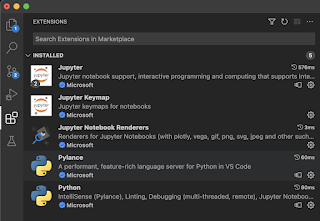
I am not a VS Code user. But I wanted to learn how well supported REPL Driven Development is in VS Code, so I added these extensions:

You would probably want to add keyboard shortcuts to get the true interactive feel of it. Here, I'm just trying things out by selecting code, right clicking and running it in an interactive window. It seems to work pretty well! I haven't figured out if the interactive window is picking up the global IPython config yet, or if it already refreshes a submodule when updated.

Evaluating code in the editor with fast feedback loops.
It would be great to have keyboard commands here, though.

Current limitations

In Clojure, you connect to & modify an actually running program by re-evaluating the source code. That is a wonderful thing for the developer experience in general. I haven't been able to do that with Python, and believe Python would need something equivalent to NRepl to get that kind of magic powers.

Better than TDD

I practice REPL Driven Development in my daily Python work. For me, it has become a way to quickly verify if the code I currently write is working as expected. I usually think of this REPL driven thing as Test Driven Development Deluxe. Besides just evaluating the code, I often write short-lived code snippets to test out some functionality. By doing that, I can write code and test it interactively. Sometimes, these code snippets are converted to proper unit tests.

For a live demo, have a look at my five minute lightning talk from PyCon Sweden about REPL Driven Development in Python.

Never too late to learn

I remember it took me almost a year learning & developing Clojure before I actually "got it". Before that, I sometimes copied some code and pasted it into a REPL and then ran it. But that didn't give me a nice developer experience at all. Copy-pasting code is cumbersome and will often fail because of missing variables, functions or imports. Don't do that.

I remember the feeling when figuring out the REPL Driven Development workflow, I finally had understood how software development should be done. It took me about 20 years to get there. It is never too late to learn new things. 😁


Top photo by ckturistando on Unsplash

Wednesday, September 29, 2021

Can we have that in Python too?

(REPL Driven Development)

REPL Driven what? 😐

REPL Driven Development is about fast feedback loops during development. It is not about typing code into a terminal window. Don’t do that. A Read Eval Print Loop (REPL) is often described as a shell tool that you use to try out a programming language. That’s not what I mean with REPL Driven Development.

What is it then?

With this workflow, the REPL is acting behind the scenes. You don’t have to type code in a shell. Yes, a Read Eval Print Loop process is running, but in an interactive mode. You do all the work in your code editor. That’s where you have autocomplete, syntax highlighting, your favorite color theme and everything.

⚡ The Workflow ⚡

The feedback loop is fast in REPL Driven Development. You evaluate code blocks and functions as soon as you have typed them. The result of an evaluation is printed out on your screen. A common thing with REPL Driven Development is to write some short lived code snippets next to the actual code that you are developing. With this, you are able to quickly run a function with some test data as input and verify the output.

This workflow is similar to Test Driven Development (TDD), but the feedback loop is much faster. After a while, you might discover that those code snippets should actually be a proper unit test. Well, wrap the code in a test function, move it to a separate file and your’e all good.

So, REPL Driven Development is lazy TDD?

Yeah, that’s probably right. Another way of looking at it might be that it is Test Driven Development Deluxe.

The Interactive REPL is an essential tool in the Clojure & ClojureScript ecosystems. It is a superpower I’ve not seen before anywhere else. Once learned, it is something you’ll want in other languages too. But is that even possible, outside of a Lisp environment?

Evaluating vars, state and functions in real time with ClojureScript

Can we have that in Python too?

I think I have found something similar to the Clojure way of writing software, that works really well. You can pass an entire buffer, a selected region or a function from the code editor into a running IPython process, that quickly evaluates the code and prints the result. I have replaced the standard Python shell with IPython. I’ll explain why.

When evaluating code, IPython will output the result while the cursor remains in the code editor. That is what I mean with fast feedback loops. Evaluated functions, variables and imports can also be redefined - without having to restart anything. I’ve configured IPython to auto-reload sub modules when changed, to avoid having to restart the process. That feature is essential for this kind of workflow and the main reason why I’ve switched out the standard Python shell.

REPL Driven development in Python

It would be really cool to have the output pop up in the editor, right next to the actual code (as when evaluating Clojure or ClojureScript). I think that’s mainly a tooling thing, currently not available.

Also, I haven’t yet figured out how to connect to an actual running Python program and redefine functions or variables while the program is running (as you do in Clojure).

However, IPython is closely related to Jupyter, often referred to as an interactive notebook. There’s a thing called the kernel, handling code evaluation and returning result to connected clients. Sounds a bit like NRepl & Cider! I should probably dig deeper into and learn more about the possibilities with Jupyter.

Joyful Python

To summarize, even though there are some limitations, I think the REPL Driven Development workflow makes writing Python code joyful. The fast feedback loop is a great thing to have at your fingertips. Just like TDD, REPL Driven Development can be very helpful when writing testable, simplistic and functional code.

And it is fun too. 😁

Update: have a look at this post of mine from 2022, for more info about how to setup your code editor. You'll also find a 5-minute video in there about this style of development.


Top photo by Hitesh Choudhary on Unsplash