
Showing posts with label Programming. Show all posts

Monday, August 22, 2022

Joyful Python with the REPL

REPL Driven Development is a workflow that makes coding both joyful and interactive. The feedback loop from the REPL is a great thing to have at your fingertips.

"If you can improve just one thing in your software development, make it getting faster feedback."
Dave Farley

Just like Test Driven Development (TDD), it will help you write testable code. I have also noticed a nice side effect from this workflow: REPL Driven Development encourages a functional programming style.

REPL Driven Development is an everyday thing among Clojure developers and doable in Python, but far less known here. I'm working on making it an everyday thing in Python development too.

But what is REPL Driven Development?

What is it?

You evaluate variables, code blocks, functions - or an entire module - and get instant feedback, just by a hitting a key combination in your favorite code editor. There's no reason to leave the IDE for a less featured shell to accomplish all of that. You already have autocomplete, syntax highlighting and the color theme set up in your editor. Why not use that, instead of a shell?

Evaluate code and get feedback, without leaving the code editor.

Ideally, the result of an evaluation pops up right next to the cursor, so you don't have to do any context switches or lose focus. It can also be printed out in a separate frame right next to the code. This means that testing the code you currently write is at your fingertips.

Easy setup

With some help from IPython, it is possible to write, modify & evaluate Python code in a REPL Driven way. I would recommend to install IPython globally, to make it accessible from anywhere on your machine.

pip install ipython

Configure IPython to make it ready for REPL Driven Development:

c.InteractiveShellApp.exec_lines = ["%autoreload 2"] c.InteractiveShellApp.extensions = ["autoreload"] c.TerminalInteractiveShell.confirm_exit = False

You will probably find the configuration file here: ~/.ipython/profile_default/ipython_config.py

You are almost all set.

Emacs setup

Emacs is my favorite editor. I'm using a couple of Python specific packages to make life as a Python developer in general better, such as elpy. The auto-virtualenv package will also help out making REPL Driven Developer easier. It will find local virtual environments automatically and you can start coding without any python-path quirks.

Most importantly, set IPython as the default shell in Emacs. Have a look at my Emacs setup for the details.

VS Code setup

I am not a VS Code user. But I wanted to learn how well supported REPL Driven Development is in VS Code, so I added these extensions:
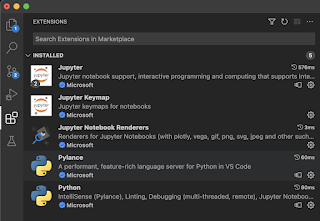
You would probably want to add keyboard shortcuts to get the true interactive feel of it. Here, I'm just trying things out by selecting code, right clicking and running it in an interactive window. It seems to work pretty well! I haven't figured out if the interactive window is picking up the global IPython config yet, or if it already refreshes a submodule when updated.

Evaluating code in the editor with fast feedback loops.
It would be great to have keyboard commands here, though.

Current limitations

In Clojure, you connect to & modify an actually running program by re-evaluating the source code. That is a wonderful thing for the developer experience in general. I haven't been able to do that with Python, and believe Python would need something equivalent to NRepl to get that kind of magic powers.

Better than TDD

I practice REPL Driven Development in my daily Python work. For me, it has become a way to quickly verify if the code I currently write is working as expected. I usually think of this REPL driven thing as Test Driven Development Deluxe. Besides just evaluating the code, I often write short-lived code snippets to test out some functionality. By doing that, I can write code and test it interactively. Sometimes, these code snippets are converted to proper unit tests.

For a live demo, have a look at my five minute lightning talk from PyCon Sweden about REPL Driven Development in Python.

Never too late to learn

I remember it took me almost a year learning & developing Clojure before I actually "got it". Before that, I sometimes copied some code and pasted it into a REPL and then ran it. But that didn't give me a nice developer experience at all. Copy-pasting code is cumbersome and will often fail because of missing variables, functions or imports. Don't do that.

I remember the feeling when figuring out the REPL Driven Development workflow, I finally had understood how software development should be done. It took me about 20 years to get there. It is never too late to learn new things. 😁


Top photo by ckturistando on Unsplash

Tuesday, December 29, 2020

The 12 stages of learning Clojure

In 2020, I've been on quite a learning journey. I joined a team where we write code in Clojure, a very different language from what I’m used to. It turns out writing Clojure is a very nice developer experience, but it could take a while to get it.

You might have to go through some (or all) of the 12 stages of learning Clojure.

😮
1. "I have no idea what I'm looking at."

😬
2. "Where does that code end? Where does it begin? Why are there so many parentheses?"

🤪
3. "I'm totally lost."

😳
4. "Will I ever learn? Am I smart enough?"

😭
5. "I will never learn. I'm not smart enough. I want ice cream!"

🤔
6. "Hmmm, wait a minute ... map, reduce, filter. This is something I recognize."

🙂
7. "Yes. Clojure, yes, yes."

🤯
8. "OMG, this language is so powerful. OMG, I even understand some of it."

🙃
9. "defn, keywords, multi-methods, macros, juxt, slurp, ha ha ha ha ..."

😀
10. "Pretty clean. Yeah, I've learned the keyboard shortcut to nicely format the code. And threading macros are nice!"

😍
11. "I ❤️ Clojure. Everything about it makes sense. It's is the language I've been searching for all my life."

🧘
12. "Empty your mind, be formless, shapeless - like water. Now you put water into a cup, it becomes the cup. You put water into a bottle, it becomes the bottle. You put it in a teapot, it becomes the teapot. Water can flow, or it can crash. Be water, my friend." *


You might wonder what stage I'm currently in. Well, probably somewhere between 🙂 and 😀.

Here's some of the sources that I have learned a lot from:

I'm sure I will keep trying, failing, learning and mostly smiling in 2021 ✨


* Yes, Bruce Lee said that.

Wednesday, January 4, 2017

You might (not) need a JavaScript library

JavaScript today is like:
"Yeah great, and now you need Webpack, Babel, npm, yarn, React ...".

Redux? Relax.

Developing a front end web project of today can be a bit intimidating, especially when the home base is back end development. What about all those frameworks and tools, why use them?

I am currently learning about React, and I like it. React have JSX, ES2017 and a nice logo. That is cool, but my favorite thing with React is how code is organized. A user interface is built with components: small and isolated "packages" of html & JavaScript. That is a pattern I like.

Components with vanilla JavaScript?
When learning about React patterns, I started thinking about how this could be done without using React, ES2017, Webpack or any of the other libraries and frameworks out there. Is that even possible?

Okay, but why?
I want to learn and understand the problems that are solved using a library. Also, I want to find out what problems can be solved without an npm install. One way of doing that is to write all code with plain old vanilla JavaScript, html, css and find out what pain is removed by which library. Also, I think it would be a fun challenge!

Example code
You will find all code referenced in this blog post at my GitHub page

No build step required
So, I spent some late nights coding and learning. The code in the main branch of this repo does not require any build steps or npm package downloads. The "listItem component" is made of two parts: JavaScript in a code file and an html template in a separate file. The render function will create a DOM object containing html from the template, with data that is passed in to it, and return it in a callback.

code from listItem.js:
 function render(props, done) { // load the template using a helper templates.load('/src/listItem/listItem.html', function (el) { // 'el' is the html template element el.textContent = props.data; el.addEventListener('click', props.onClick); // pass the element to be added to the DOM if (done) { done(el); } }); } return { render: render }; 
The listItem.html template:
 <li class="listItem" title="the listItem component"></li> 
This is of course a very simplistic example with a single tag html template, but I think it already highlights issues: where's the data added? To understand where data is added, we have to read & understand the contents of the render function. I think it would be nice if the data to be rendered is visible in the actual template.

Time to grow a Mustache?
A template render engine can solve that. Here's the same component, using a template engine called Mustache.js. You will find the code in a separate branch of the GitHub repo.
 function render(props, done) { // pass data to a modified template loader templates.load('/src/listItem/listItem.html', props, function (el) { el.addEventListener('click', props.onClick); if (done) { done(el); } }); } 
compare with the vanilla code

The templates helper now use Mustache to render the html from the template and the data. It is now possible to write html templates with placeholders for data like this:
 <li class="listItem" title="the listItem component">{{data}}</li> 
code from the templates.js file:
 container.innerHTML = Mustache.render(template, data); 
More issues?
If you look at the source code in the main branch you'll notice the JavaScript files is written with a coding style called IIFE (immediately invoked function expression). It is used to isolate code and makes it possible to write modules without using any framework. Also, every single file is added with a script tag in the html body of the main page (index.html). Some modules depend on others and have to be added in the correct order. That's not great.
 <script src="src/templates.js"></script> <script src="src/listItem/listItem.js"></script> <script src="src/list/list.js"></script> <script src="src/terminal/terminal.js"></script> <script src="src/nav/nav.js"></script> <script src="src/logView/logView.js"></script> <script src="src/app.js"></script> 
Solution: JavaScript AMD modules
In a separate branch, I have converted all of the immediately invoked function expressions (IIFE) to AMD modules. I use Require.js that takes care of module loading and dependencies. Instead of a very long list of html script tags, there is only an entry point defined.

from the index.html file
 <script data-main="src/app" src="lib/vendor/requirejs.js"></script> 
Here is the listItem component as an AMD module:
 define(['templates'], function (templates) { function render(props, done) { templates.load('/src/listItem/listItem.html', props, function (el) { el.addEventListener('click', props.onClick); if (done) { done(el); } }); } return { render: render }; }); 
compare it with the previous branch

But wait. Don't we have native modules in Javascript now?
Oh, I forgot. It is 2017 and ECMAScript 2015 was released almost two years ago. A nice module system was included in it. Finally there is a common standard in the language! I have rewritten the code to ES2017 style - with arrow functions, the const keyword and most importantly, the ES import/export feature. Now, the listItem component looks like this:
 import load from 'templates'; export function render(props, done) { load('/src/listItem/listItem.html', props, (el) => { el.addEventListener('click', props.onClick); if (done) { done(el); } }); } 
compare the ES2017 code with old school JavaScript

I think the code has improved a bit. ES2017 is great, but there are trade offs to be aware of. Many browsers don't have enough support for this version of JavaScript yet. To make it work in all kinds of browsers and devices we need to introduce a build step: the code need to be compiled from ES2017 to vanilla JavaScript with Babel.

The package.json file in the project has quite a few scripts compared to the original framework-and-build-step-free version. In addition to dependencies like Mustache.js and Require.js, there is a compile step and a Babel polyfill dependency added:
 "scripts": { "deps:lib": "mkdir -p -v lib/vendor", "deps:requirejs": "cp node_modules/requirejs/require.js ... "deps:mustache": "cp node_modules/mustache/mustache.min.js ... "deps:polyfill": "cp node_modules/babel-polyfill/dist/polyfill... "deps": "npm run deps:lib && npm run deps:requirejs && npm run ... "transpile": "babel src --out-dir lib --source-maps", "lint": "eslint src", "build": "npm run lint && npm run transpile && npm run deps", "start": "npm run build && live-server" } 
More frameworks, more problems?
When browsing the page there is now a couple of third party libraries loaded to the client, besides our own modules. This might cause a not so great experience for users with a slow connection.

Bundling & minification
While we're at it, why not add another build step that will bundle all JavaScript files to one single file? This will reduce the number of requests from the browser. With minification we also will get rid of a couple of Kilobytes. The entry point is now one bundled and minified JavaScript file.
 <script data-main="lib/bundle/main" src="lib/vendor/requirejs.js"></script> 
The source code in this branch is compiled from ES2017 to browser friendly AMD modules. With Require.js, there is a tool for bundling & minification included (called R.js) and used in this branch. compare the branches

Heard about Webpack?
The scripts section of the package.json file is quite massive now and probably difficult to understand. By using Webpack, most of those build steps are no longer necessary. Webpack does a lot of things, it's like a swiss army knife (that's both good and bad, I guess).

package.json with Webpack:
 "scripts": { "lint": "eslint src", "build": "npm run lint && webpack", "start": "webpack-dev-server" } 
compare the two branches, with bundling vs with Webpack

Where did it all go, how is that even possible? Okay, I forgot to mention Webpack.config. Sorry. Some of the build magic live in that file now.

So, did Webpack make any difference?
One nice thing with Webpack is that there is no longer any need for Require.js. Webpack will resolve ES2017 modules and convert them to plain vanilla JavaScript before the bundling & minification. Also, Webpack has a local dev server feature (with auto reloading on file change) that I like.

Add React to the mix
This is how the listItem component looks like when converted to React. The template files are gone, everything is written in the JavaScript modules using the JSX syntax. There is no longer need for a custom template loader or mustaches. Compared to the source code in the previous branch, this one has less code. I like less code.
 import React from 'react'; function ListItem(props) { return <li className='listItem' title='the listItem component' onClick={props.onClick}>{props.data}</li>; } export default ListItem; 
React: Before vs After

Conclusion
By experimenting with one library at a time, I have learned about the value added and also some of the trade offs that comes with using a tool or a framework. Sometimes, plain vanilla JavaScript is just enough, and sometimes a framework or library will make life easier. You might (not) need a JavaScript library.

Wednesday, March 9, 2016

JavaScript async: the future looks promising

In the beginning there was the Pyramids.

Okay, that was not exactly true. We actually had Ajax before that. With ajax, we also got callbacks. Some of the mighty callback pyramids were built and are still standing.

About one year ago, ECMAScript 2015 (aka ES 6) was released and brought native support for Promises to JavaScript. Does that mean that it now is possible to build smaller callback pyramids, instead of the mighty ones? Yes. We also have a standardized and more reliable way of writing async JavaScript code. We can write async code that behaves in a more predictable way when things go wrong.

Here's an example.

// the async consumer code, passing an url and a callback
get('path/to/my/serverside/api', (response) => {
// handle the response here
});


// the callback based ajax library that we use
function get(url, onSuccess, onFail) {
// ajax things here
// pass the result to the provided callback function
onSuccess(result);
}

What if the ajax library at some point would ... go crazy?

onSuccess(result);
onSuccess(result);
onSuccess(result);


The callback will be executed several times and it is out of our control. However, this problem can be solved by using promises. Wrap the ajax library in a promise function and consume the wrapper instead:


// the wrapper
function promiseGet(url) {
    
    return new Promise ((resolve, reject) => {
        get(url, resolve, reject);
    });
}


// consume the promisified version
promiseGet('path/to/my/serverside/api')
.then((response) => {
    // handle the response here
});

The promise will be resolved only once, even if the ajax library goes bananas.


The bus stop
This reminds me of when I was on the bus with the kids a couple of days ago. The little one wanted to press the shiny "bus-will-stop" button. When we got closer to our stop, the kid pressed the button and got the expected feedback (a "bus-will-stop" signal!). That was fun! So, he pressed the button again. But nothing happened. Naturally, he tried a couple of times more. Nothing happened.

Just like the "bus-will-stop" button, a promise is resolved only once. I think the bus driver (and passengers) appreciate the feature.


The async brain?
Async JavaScript code - with or without Promises - isn't always the easiest thing to understand. Promises does not really solve the mismatch between how our brains are wired and the flow of callbacks & thenable functions. We have learned how to write async code, and sometimes even understand it. But wouldn't it be cool if we could write something sequential like this?


var result = get('path/to/my/serverside/api');

console.log(result);


Of course, the code above won't work. 

I will try again, by using some of the magic of generators. A generator enable pause and continue functionality to a function. You can jump back and forth between a generator and the consumer code.


function* myGenerator() {

    var result = yield get('path/to/my/serverside/api');
    console.log(result);

}


That code won't work out of the box either. We need some help from a library. This library (the run function) will help us go back and forth between the generator and the consumer code, and resolve promises.


import run from 'async-runner';

run(function* myGenerator() {

    var result = yield get('path/to/my/serverside/api');
    console.log(result);

});


This will work. (here's the code used in this post)

Sequential async?
Okay, cool. It looks nice and sequential, at least when focusing on the rows within the function. But wait. Will people understand code with funky star functions and weird libraries? There has to be another way. I think the upcoming ECMAScript async & await feature can help us write easy to understand sequential code, without funky star functions or weird libraries.

Let's remove some code from our previous example:

import run from 'async-runner';

run(function* myGenerator() {

    var result = yield get('path/to/my/serverside/api');
    console.log(result);

});


And add some sweet futuristic async & await JavaScript syntax sugar:

async function myAsyncCode() {

    var result = await get('path/to/my/serverside/api');
    console.log(result);

};

With this, I think it actually is possible to use the words "readable" and "async" in the same sentence. Behind the scene, the async & await feature is a combination of Promises and Generators. I think the future of async programming looks very promising. Maybe we don't have to wait for it either. The transpiler Babel has already support for async & await today. Perhaps it is time to go back to the future?


here's the code used in this post

Monday, July 27, 2015

Coding in the dark: ES2015 and TypeScript on an iPad

Coding in the dark
Summertime, and the Swedish weather is ... not great, but good enough! I have spent some of the vacation days here at the countryside of beautiful Värmland, Sweden, without writing any code at all. But ideas have popped up and I want to try them out. So, now I code when everybody is sleeping. The "Dark Theme" of the editor dim the bright screen light - and hopefully won't wake up the family in the middle of the night.

Direct link: Here's some example code I have written that will get you up and running with ES2015 and/or TypeScript on your iPad.


Offline coding
I really want to write code on my iPad mini, instead of using the laptop (that I also have with me, of course). With low bandwidth - sometimes no connection at all - remoting to & write code on a Cloud based VM is not an option here in the wilderness. Local and offline is better. The Coda for iOS app supports local offline files and the latest version has some really nice features. But why code on an iPad? Well ... why not! And it's convenient too, experimenting with code snippets is just a smart device away from being realized. The solutions I present here are of course useful for countryside coding on a laptop too.

ES2015 on the iPad
I decided to give ES2015 coding a try. Does it work, using an iPad and the app only? Yes, the built in web browser and file system of Coda for iOS makes it possible. When I figured out how to transpile and run the scripts in the web browser (by using Babel and the es6-module-loader library), I got carried away and thought it would be cool to also write TypeScript on the iPad. It turns out to be just as easy as the ES2015 setup.


TypeScript on the iPad
I found a nice library on GitHub by Basarat Ali Syed, that makes it possible to transpile TypeScript files to JavaScript in a web browser: basarat/typescript-script 

Here's some example code I have written that will get you up and running with ES2015 and/or TypeScript on your iPad.


Command line experimenting with the JavaScript Playground
One of the new features of the Coda app is a command line based JavaScript playground. Scripts can easily be loaded into it and the transpiler functions can be executed from the command line. I think it is a useful alternative to the web browser, and very helpful when I want to see the actual output from a transpilation.

Happy iPad coding!

Saturday, June 15, 2013

Hipster or neckbeard?

Man, that (asp.net) webforms thing really suck, doesnt it? We should convert all our sites to mvc. For all the new stuff we’re about to develop, there is only one way: mvc. But wait a minute. I forgot to ask.

Why?

If you are developing stuff for the EPiServer CMS product, choosing between the two is a big thing these days. I think many EPiServer developers has felt left behind (myself included), being stuck with webforms when the rest of the world writes cool and awesome stuff with mvc and the frameworks that comes with it. I guess those poor SharePoint guys feel the same, dont you think?

The times are different now. All of us can be cool these days (well, almost all of us. SharePoint will get there too some day).

Ok, so it’s about being cool?

Maybe. I would choose mvc because of one thing only: test driven development (tdd). Mvc is designed for that. Webforms isn’t. The rest is just style and preferences: design patterns, view engines, frameworks.

Is test driven development cool?

I think tdd is a great tool for helping you create both short term and long term value. The result will most likely be a product with nice and simple code. Nice & simple, as in easy to understand, maintain and refactor. Test driven development with webforms is mostly depressing. But hey, that is a different blog post.

Writing testable code, huh?

Well, Im not really talking about just writing testable code. Dont do that. Do test it & the code will follow. That's doing it the test driven way.

So who is the cool guy then, webforms or mvc?

I don’t know if anything used together with .NET and Visual Studio can be considered cool, really. We should probably check with @hipsterhacker or @neckbeardhacker about that. But don’t just settle with writing testable code with asp.net mvc. Without unit tests that proves it, the code base won’t probably be testable anyway.

So, without unit tests all that is left is choosing by style and preferences. Think about if that generates any value. Then make your decision on which way to go.


ps.
Check out my recent posts and videos on test driven development:
ds.

Monday, June 10, 2013

From the streets of Test Driven Development: JavaScript

"... Let the unit testing drive your design. Write a unit test that specifies what should be done. Do a couple of variations if necessary, and then write the code that does the job. Switch back and forth between the unit tests and the code, refactor and clarify.

If you don't trust your code, write another unit test that provokes side effects. Do that until you feel confident. Then go home and have a good night sleep. ..."

Unknown
(Okay, it's me. I said that. I just thought it would be cool having a quote as an intro to this post)


Test driven JavaScript? 

Write a simple test, write a simple function. Done. 

That was the twitter version. What about the blog version? I think test driven development (TDD) is a good tool for helping you write code with high readability and a design with ease of use in mind (sometimes).

As a tool for testing (no matter what programming language you choose) TDD is overrated and quite often misunderstood. Probably because of the word Test in it, don't you think?

Before we start, I want you to don't care about stuff like code coverage, what frameworks to use and every line of code should have a corresponding unit test. That last thing is just nonsense. Think about the result, the code that actually will run in the production environment. The result is important. No matter how many nice unit tests there are, the result should be as simple as possible. Simple, as in easy to understand, maintain and refactor.

Simple is really difficult! I have failed with that many, many times (and still do, but never give up trying). What I have learned is that having a bunch of unit tests doesn't compensate for unnecessary complex production code. With or without unit tests, complicated code still sucks.

Also, don’t start the TDD journey by evaluating all those tools and worrying about continuous integration scenarios. Leave that for later. 

Do it the Agile way: experiment and learn.

"- Cool, I know unit testing already. I use that when writing C#. But TDD with JavaScript, how?"

If you come from a C# or Java background and already write unit tests (but have little experience of JavaScript) I think test driven development will help you understand and explore the language.

TDD has helped me to break free from the mindset chains of C# and Java style programming. JavaScript is not object oriented like in those languages. There are no classes, it is a language of functions and objects (and functions are objects). Objects can inherit from other objects and every object has a force field surrounding it (aka Closures) that is really powerful. Maybe we could call JavaScript the class less society? ...Because everyone has a function there.

Enough. (Want the basics? Check out my talk "Rediscover JavaScript" from dotNetConf.)

I have made a 15 minute video on how test driven development can be done with JavaScript and tried to write the code with simplicity in mind. I have avoided the common JavaScript language gotchas, like prototype inheritance and pseudo classes with the new or this keywords. In this video I use only one tool for unit testing (QUnit).

Take a look at the video and please share your thoughts about it!


Sunday, November 25, 2012

Don't do it (share code).


"... You see, this profession is filled to the brim with unrealistic programmers. Programmers who thought their code would age like wine. If you mean it turns to vinegar, it does. If you mean it gets better with age, it don't. ..."

Marsellus Wallace (1994)

During my years as a software developer, I (and a lot of colleagues) have been thinking, talking and trying to figure out how to store and share our code. Code that we have spent time writing in the projects. I have always thought it would be nice if there was a common place to store stuff, to be reused in upcoming projects and shared between teams and local offices. That's a great idea, isn’t it?

No. It's not. It is actually a bad idea.

Recently I had a moment of enlightenment: stored code for later use is waste. When reusing code it creates waste and sometimes even confusion. Waste is expensive stuff. Confusion is risky stuff. Avoid it.

Here's an example:
Back in the .NET 1.1 days, do you remember what we needed to write to check if a string was null or empty? After a couple of projects I ended up writing a StringUtilities class with an IsEmpty method. Happy with the result I added it to a Common Utilities library in our version management system, for future use. If I remember it correctly, I also wrote my full name in the code comments section. (Today I don’t need that kind of confirmation. I have matured. I just settle with someone liking my current Facebook status.)

The next version of .NET of course had the IsNullOrEmpty method built in and that made my String Utilities code totally unnecessary. Too bad the class already had been reused all over the code base in an other project. And now people started to wonder:

- What weird stuff does that utilities code do? Why didn’t they use the built in method? Whatever. Better leave it as it is.

Another example:
Let’s say that we are about to write some c# code that should read RSS feeds and display them in a nice list. Before .NET 3.5, you would probably need to write a custom Feed class, a Feed Item class, and most likely a couple more of those custom classes. You would also need to write stuff that maps the RSS data with your custom classes. Once done, maybe it all should be stored in a Common Utilities folder for future use? 

Don’t do it!

Because in the future people will start to wonder:

- What weird stuff does that utilities code do? Why didn’t they use the built in SyndicationFeed class? I don’t understand. Better leave it as it is.

Both the string.IsNullOrEmpty method and the RSS Syndication namespace are part of the current .NET Framework. Code that is a part of the Framework is stable and (most likely) a lot more tested than our custom made ones.

Fine Code that we write today quickly turns into vinegar. Marsellus Wallace was right.

Okay, so Code is aging very quickly and that sucks. However, good ideas often stand the test of time. I think that we should rather share the ideas, and not the code. Use code only as an example to explain a concept. When understanding concepts, people will find better and modern ways to solve problems.

I think the same goes for Company policy Code Standards and Design Guidelines. Don’t spend too much time writing documents that will be buried forever in the Graveyard, aka the Intranet or Team Foundation Server.

The ideas and practices are better shared at informal lunch presentations and in blog posts. Maybe even in an Open Source project? Once the library or the blog post is out there, I mean really out there (outside the company firewalls and indexed by Google), it will be obvious to the world if it is fine wine (maintained) or vinegar (not maintained).

Got stuff to share? Invite your fellow geeks to a lunch session! Bring your laptop and start talking.


Mr Marsellus Wallace:


Wednesday, August 29, 2012

Rediscover JavaScript - Återupptäck JavaScript


Do you know the difference between x == y and x === y when coding JavaScript?
Don't Google it!

Next week I will talk about JavaScript at Add Your Color in Stockholm (in swedish). Didn't know the answer? Well, this session is made for you. 

Register at: http://www.addyourcolor.se/traaffas

Welcome!


(swedish)

Vet du (utan att googla) vad skillnaden mellan x == y och x === y är i JavaScript?

Om du inte kan svaret, är första onsdagen i september hos Add Your Color rätt forum för dig! Under en kväll återupptäcker vi JavaScript som programmeringsspråk.

Anmäl dig här: http://www.addyourcolor.se/traaffas

Välkommen!

Sunday, August 12, 2012

The Developer that turned into a Garden Gnome


A couple of months ago when I was on my way to beautiful Sigtuna (the oldest city in the kingdom of Sweden, founded in 980), excited about having a session about those Agile principles all of us follow (right?), the bus passed a nice little yellow house with a nice little garden. I froze. Right there, staring at me was at least three small garden Gnomes.

I don't like garden Gnomes. They scare me.

There was probably more of them, I was too horrified to remember. Those lifeless gnome eyes really freaked me out. But were they really lifeless? What if each of those little garden gnomes once upon a time were full of life and actually had productive days, filled with joy and laughter? What if they once were software developers? When passing by all of this, I shivered and silently said "Oh, my God...". I think the old lady with the little beige hat in front of me heard that. Did I see her nod, confirming that my assumptions were correct?

When the bus arrived to the conference centre in lovely Sigtuna I quickly shook it all off, and spent about two hours having interesting conversations and valuable sharing of agile ideas. Shortly after I had forgotten all about garden Software Developer Gnomes.

---

The Summer! The Holiday! The time for resting the Mind and feeling ashamed of the chubby and lack-of-sun-exposed Body. During my daily holiday workout, i.e. Power Walking through the country side and passing by cows, sheep, horses and very few neighbors in sweet Värmland (where the people talk with that funny and lovable Swedish accent, you know), I walked by a little yellow house. My mind in workout mode and my ears filled with the latest Nas Album (damn good album, by the way), I saw something at the corner of my eye. A Gnome. It was just standing there in the garden. Staring at me. It freaked me out.

It all came back to me, the lifeless eyes, the little garden with the yellow house, the software developers. What really happened to them? I think we have the right to know. Right? This time I looked back at the Gnome, probably with "why???" written all over my face. Maybe I've had too much of that country side fresh air (and perhaps too much of the boxed dinner wine the night before), but I thought I heard the Gnome actually talking to me. Saying: - It's My Job

Aha, that one (and a couple of variations of it) I've heard before. I could now in fast forward mode easily imagine the Transformation from the It's My Job Developer to a staring Gnome in a little garden by a little yellow house.

I kept on Power Walking passing by the house, with loud Rap music in my ears. Maybe this is what we need to do, Power Walking our software developer careers? Keep moving, learning new things. Not necessarily listening to Rap music. Not necessarily being the passionate guy that develops Open Source software during holidays and weekends. Well, Passion probably is required for this kind of job, don't you think? What about that night time/weekend coding? Don't choose it before your family. But do Power Walk with Passion.

Sounds stressful? Come on, it's walking! You set your on pace, as long as it is a challenge. It's not like running the Marathon. I think stopping, however, should cause you panic. It actually should freak you out. The Gnome Transformation might be quicker than we expect.

Learn and expose yourself to knowledge the Power Walk style and start today. There already are too many of those little creepy garden Gnomes out there. Please don't turn into one.


 (swedish version)

Utvecklaren som blev en trädgårdstomte

För några månader sedan, när jag satt på bussen på väg till Sigtuna (Sveriges första stad), hände något märkligt. Jag satt där på min plats och repeterade presentationen om agila metoder som jag skulle ha på en kursgård i närheten. Bussen åkte sakta förbi ett fint litet gult hus, med en fin liten tomt. Jag hoppade till. På gräsmattan stod (minst!) tre trädgårdstomtar utplacerade. De stod där och stirrade.

Jag gillar inte trädgårdstomtar.

De där livlösa figurerna gjorde mig faktiskt rädd. Djävligt rädd.

Bussen åkte vidare och jag pustade ut. Tänk om de där små figurerna inte är så livlösa som man kanske tror? Tänk om de en gång hade helt vanliga liv: vaknade, jobbade, hämtade på dagis? Kanske var de alla systemutvecklare, någon gång för länge, länge sedan?

"Shit asså, tänk om det stämmer..." sade jag för mig själv där på bussen. Jag tror att damen med den lilla fyrkantiga hatten framför mig hörde, för det såg ut som att hon nickade åt mig. Som att hon ville visa att jag var på rätt spår.

Framme vid konferenscentret skakade jag av mig bilderna av de små tomtarna och spenderade de två följande timmarna med att dela erfarenheter med deltagarna på kursen. Efteråt hade jag glömt bort allt om små trädgårdstomtar som kanske en gång i tiden varit systemutvecklare.

--- 

Sommartider! Semestertider! Yes! Äntligen tid för återhämtning, vila och tillfällen att skämmas för sin bleka och otränade kropp. 

Det fina vädret och den friska lantluften har faktiskt gett mig inspiration att komma i form igen. Vid ett av mina dagliga träningspass, då jag "power"-promenerade förbi ett stort gäng kossor, några får och nästan inga grannar här i härliga Värmland, såg jag något bekant i ögonvrån. Jag ryckte till och slet av misstag av mig hörlurarna. Alldeles nyss var öronen fyllda med Nas senaste (bra skiva, förresten). Men nu: tystnad. Jag hörde bara min egen puls.

Där, vid ett litet hus, i en liten trädgård, fanns en trädgårdstomte. Den stirrade. Djävlar vad rädd jag blev.

Allt kom tillbaka: det gula huset i Sigtuna (Sveriges första stad), de livlösa ögonen. Systemutvecklarna. Men den här gången tittade jag tillbaka och jag måste ha sett ut som ett stort frågetecken. Jag har kanske fått lite för mycket av den där friska luften på landet (kanske också något glas för mycket av middags-lådvinet kvällen innan), för trädgårdstomten pratade ju! 

" - Jag gör bara mitt jobb.", sade den.

Aha, det där lät bekant. Nu trillade polletten ned och jag kunde lätt se förvandlingen framför mig, från "jag gör bara mitt jobb"-utvecklaren till en stirrande trädgårdstomte på en liten gräsplätt vid ett litet hus. Jag plockade upp hörlurarna och fortsatte träningspasset.

Det kanske är så man borde göra: Power Walk:a sig fram genom jobbet? Alltid röra sig framåt, lära sig nya grejer. Kanske inte nödvändigtvis med högljudd Rap-musik i öronen. Man kanske inte heller behöver vara den där extremt passionerade typen som hackar ihop ett Open Source-verktyg på kvällar och helger. Men jag tror att passion behövs för att hålla på med programmering. PWwP - Power Walk with Passion.

Låter det stressigt? Äh, kom igen nu. Det är inte Stockholm marathon vi snackar om. Välj ditt eget tempo, så länge det är en utmaning. Stressad borde man kanske bli om man stannar, förvandlingen går fortare än man tror.

Det finns redan för många av de där små läskiga trädgårdstomtarna där ute. Bli inte en av dem, för det är inte bara ett jobb.