I'm a newbie to Joomla 3 and I have installed it on my PC using Wamp 2.5. I published an article, but the article is not showing on the website. What is the problem and how do I fix it?


- How do you try to access the article? So what do you mean by "not showing on the website"?Mainz007– Mainz0072016-01-02 11:51:59 +00:00Commented Jan 2, 2016 at 11:51
- @Mainz007: I try to access the article by going to my website. For publishing the article I go to Content--->Article Manager--->Add New Article. I publish the article but it's not visible on the website.The_Diver– The_Diver2016-01-02 12:21:01 +00:00Commented Jan 2, 2016 at 12:21
- I am not sure if is a setup failure or a bug, but none of my single articles are not displayed when are accessed in from the menugratzu– gratzu2017-11-05 18:59:45 +00:00Commented Nov 5, 2017 at 18:59
Add a comment |
1 Answer
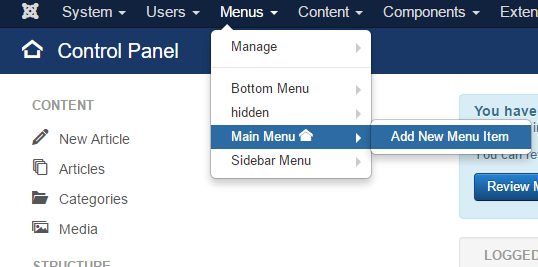
Articles in Joomla are usually displayed through Menu Items. Creating and publishing an article is only the first step, you also have to create a menu item:
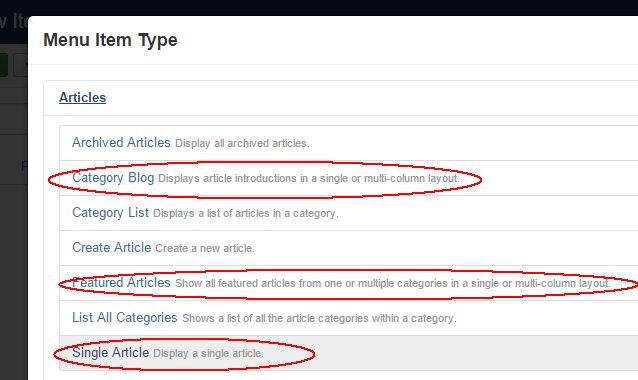
These are some of the most popular menu types:
Articles → Featured Articles
This will show all your featured articles (marked with a star in the article list).
Articles → Single article
This will let you choose a single article which will be displayed on your website for the menu item.
Articles → Category blog
This will display all articles from a chosen category. If the articles has a Readmore tag (inserted using the Read more button below the article editor), only the first part of each article will be displayed, followed by a link to the full article. This is the simplest way to create a blog in Joomla.