© People Strategists www.peoplestrategists.com Slide 1 of 76 Ajax and JQuery
© People Strategists www.peoplestrategists.com Slide 2 of 76 In this session, you will learn to: Identify AJAX Web application model Work with AJAX Work with jQuery Implement selectors Manipulate and traverse DOM Implement jQuery UI widgets Objectives
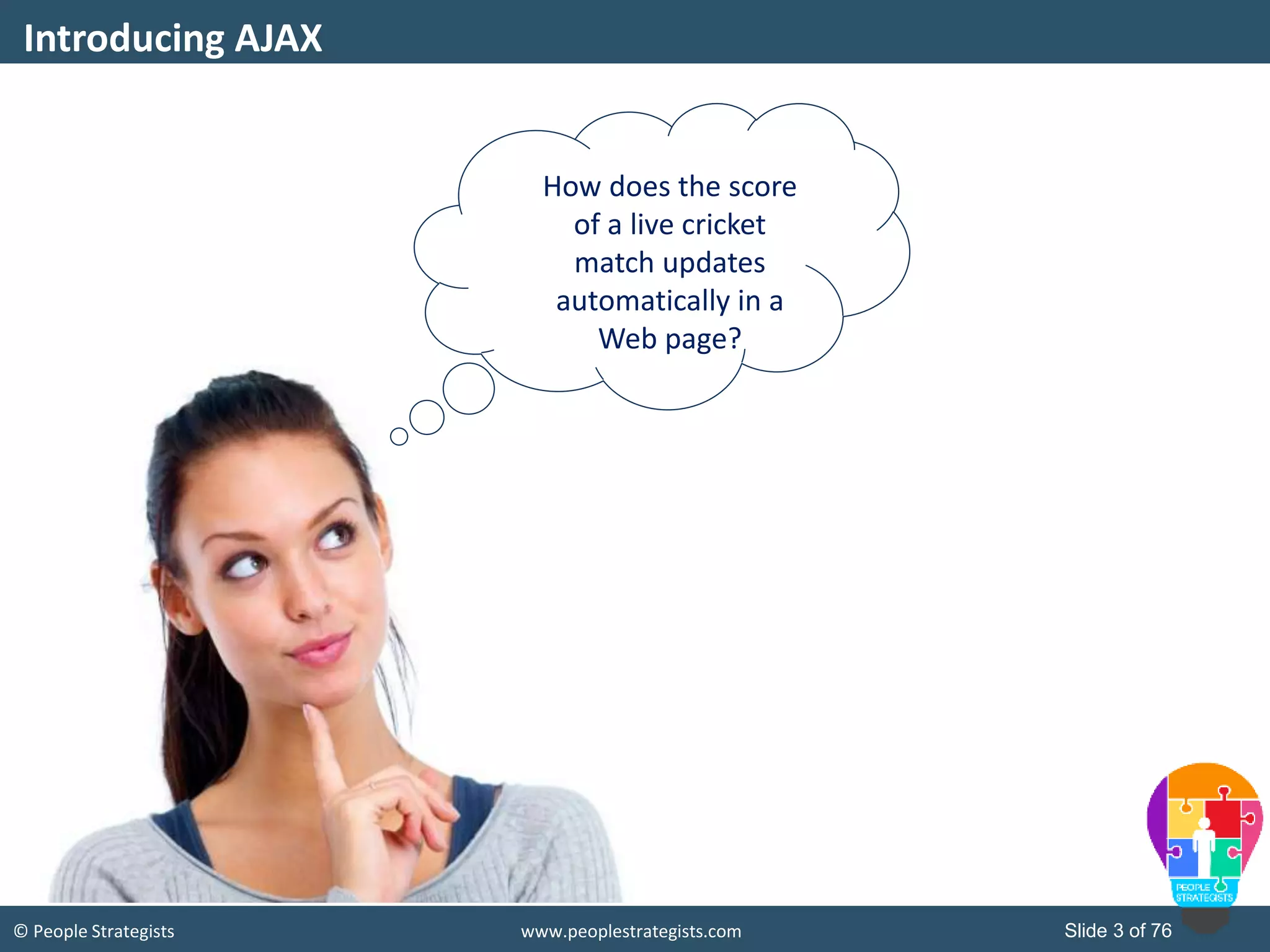
© People Strategists www.peoplestrategists.com Slide 3 of 76 Introducing AJAX How does the score of a live cricket match updates automatically in a Web page?
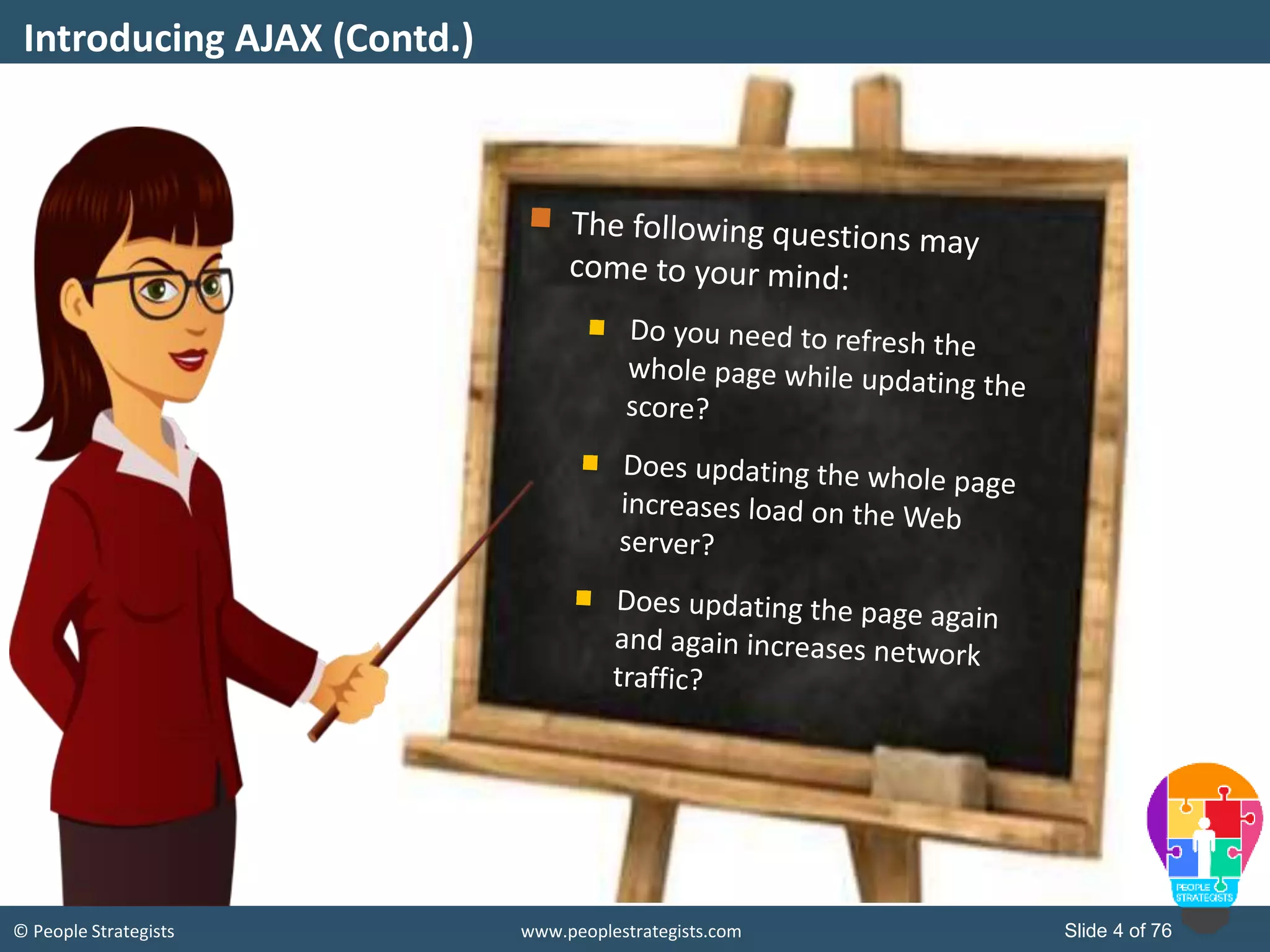
© People Strategists www.peoplestrategists.com Slide 4 of 76 Introducing AJAX (Contd.)
© People Strategists www.peoplestrategists.com Slide 5 of 76 Introducing AJAX (Contd.) How to overcome these challenges?
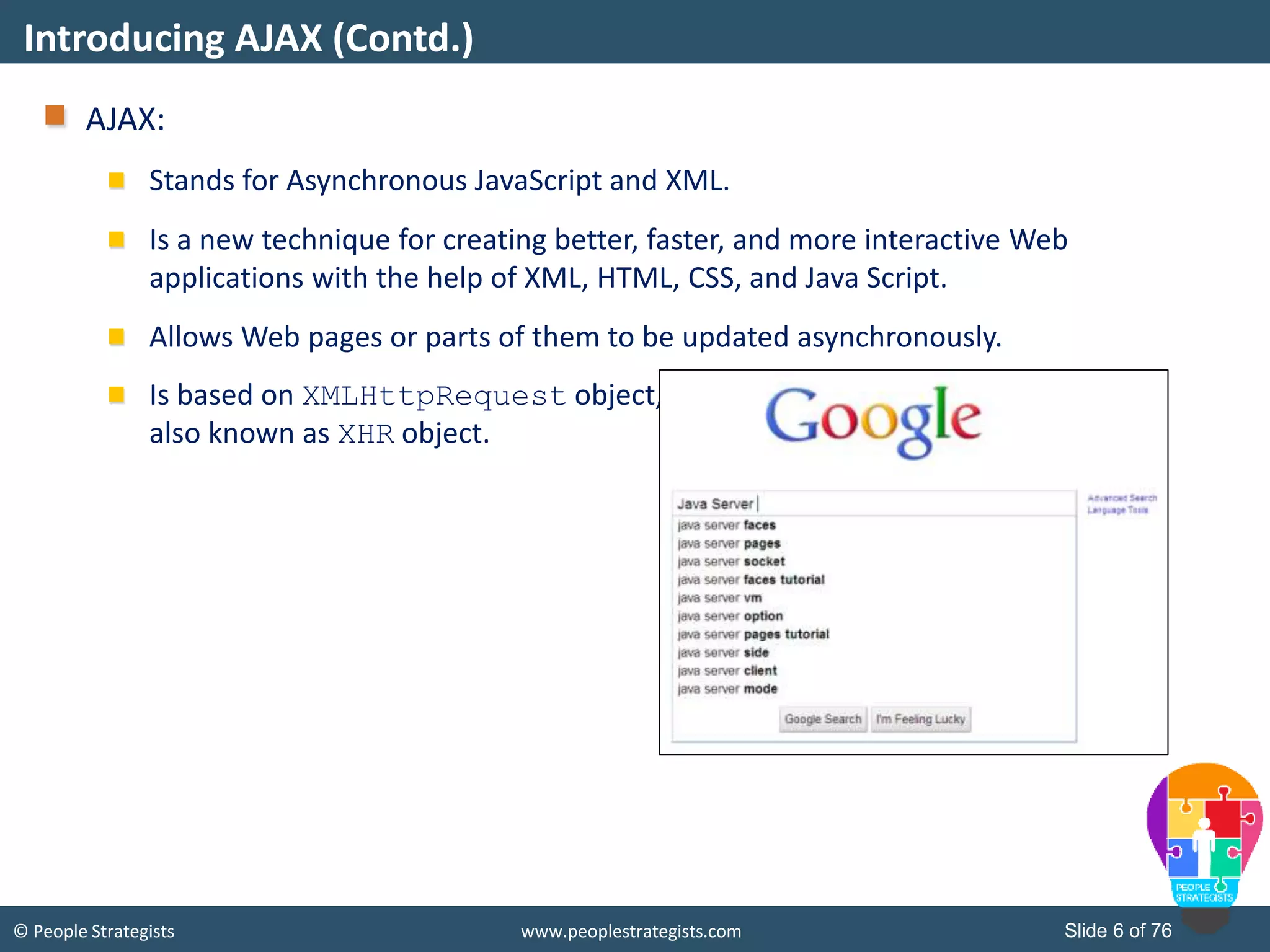
© People Strategists www.peoplestrategists.com Slide 6 of 76 AJAX: Stands for Asynchronous JavaScript and XML. Is a new technique for creating better, faster, and more interactive Web applications with the help of XML, HTML, CSS, and Java Script. Allows Web pages or parts of them to be updated asynchronously. Is based on XMLHttpRequest object, also known as XHR object. Introducing AJAX (Contd.)
© People Strategists www.peoplestrategists.com Slide 7 of 76 AJAX: Is the use of the XMLHttpRequest object to communicate with the server-side scripts. Can send as well as receive information in a variety of formats, such as JSON, XML, HTML, and even text files. Most appealing characteristic is its asynchronous nature, which means, it communicate with the Web server without having to refresh the page. This lets you update portions of a page based upon user events. Two important features includes:  Making requests to the server without reloading the page.  Receiving and working with data from the server. Benefits of Using AJAX
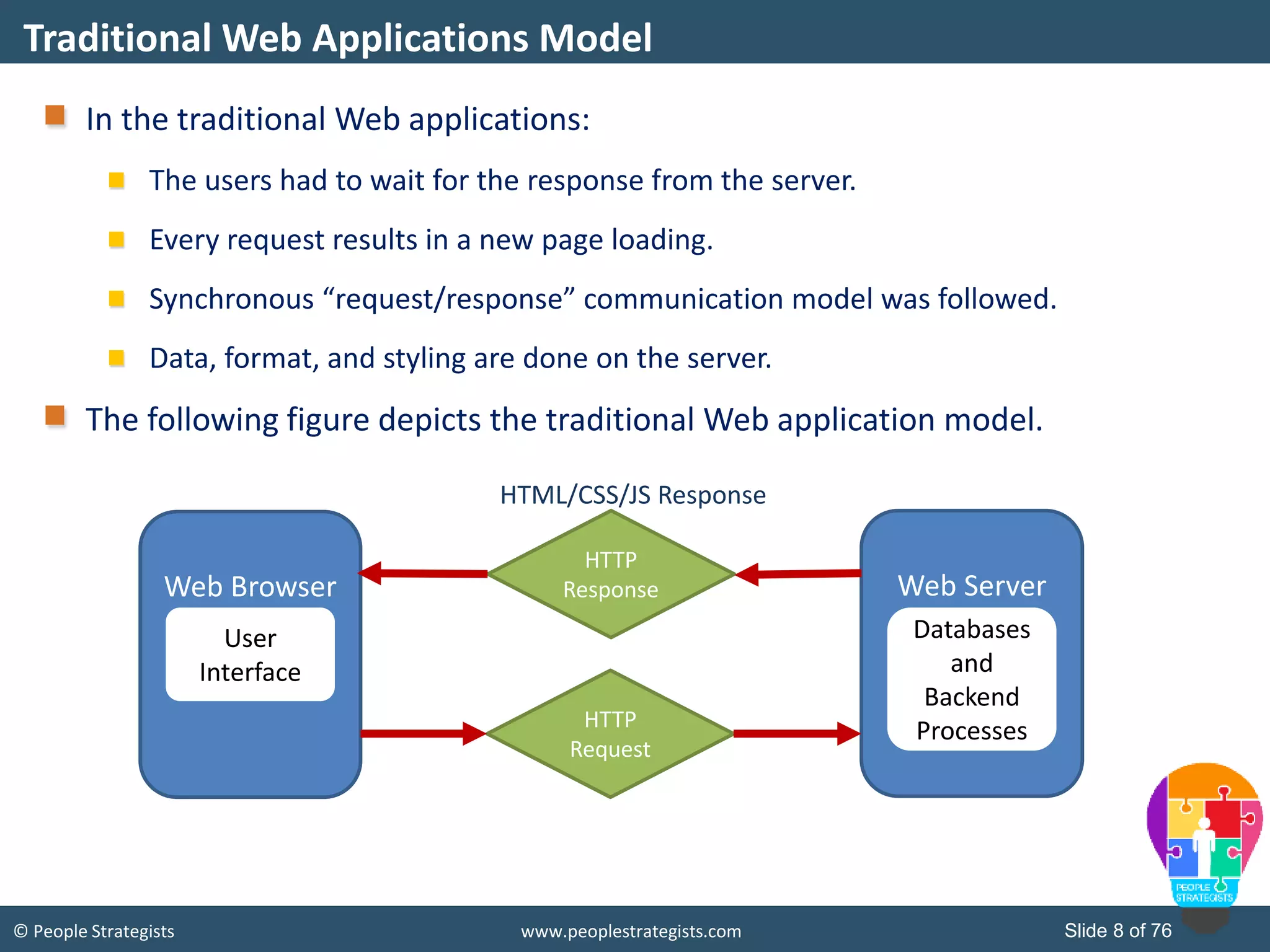
© People Strategists www.peoplestrategists.com Slide 8 of 76 In the traditional Web applications: The users had to wait for the response from the server. Every request results in a new page loading. Synchronous “request/response” communication model was followed. Data, format, and styling are done on the server. The following figure depicts the traditional Web application model. Traditional Web Applications Model Web Browser Web Server User Interface HTTP Response HTTP Request HTML/CSS/JS Response Databases and Backend Processes
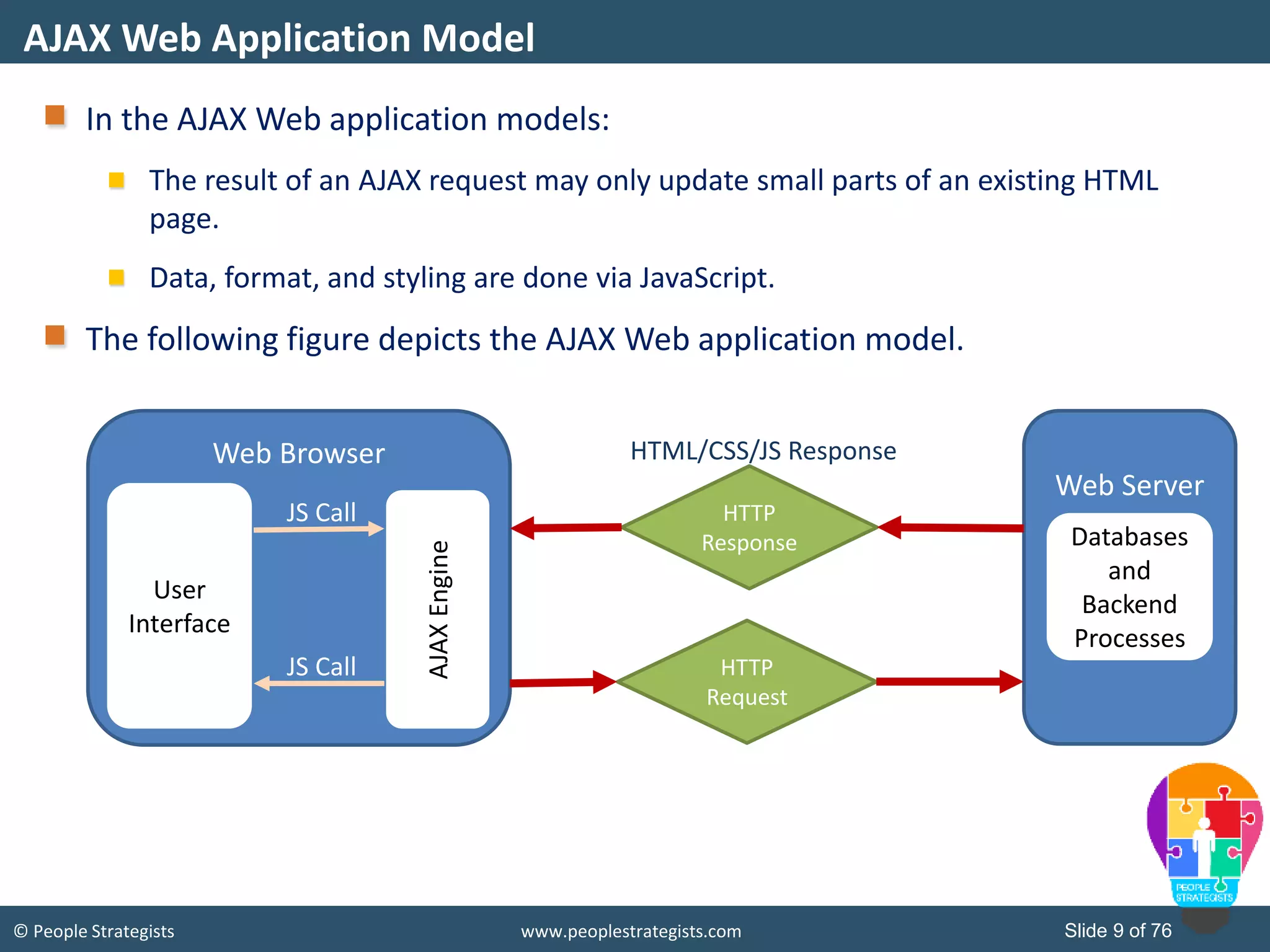
© People Strategists www.peoplestrategists.com Slide 9 of 76 In the AJAX Web application models: The result of an AJAX request may only update small parts of an existing HTML page. Data, format, and styling are done via JavaScript. The following figure depicts the AJAX Web application model. AJAX Web Application Model Web Browser Web Server User Interface HTTP Response HTTP Request HTML/CSS/JS Response Databases and Backend Processes AJAXEngine JS Call JS Call
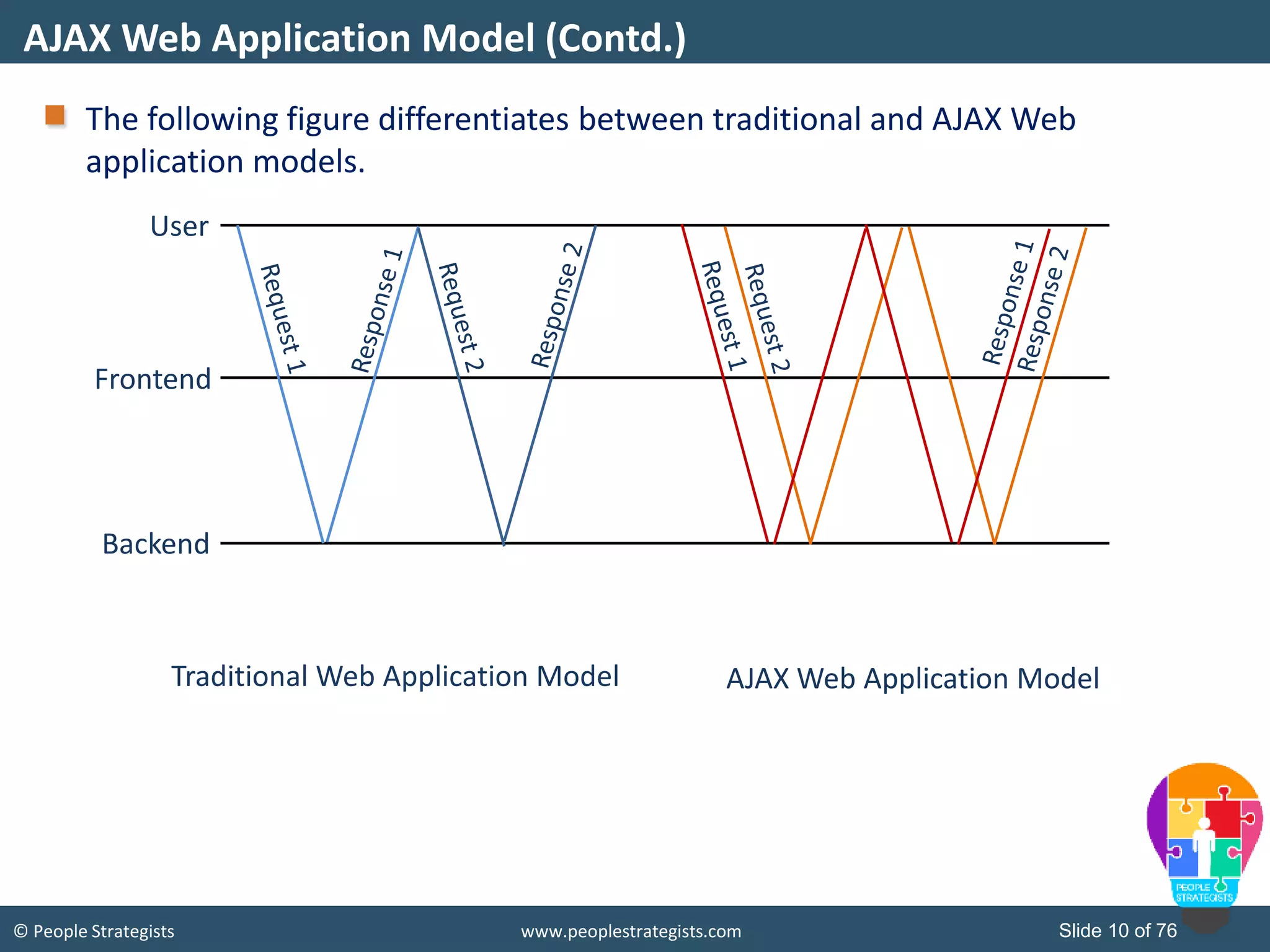
© People Strategists www.peoplestrategists.com Slide 10 of 76 The following figure differentiates between traditional and AJAX Web application models. AJAX Web Application Model (Contd.) User Frontend Backend Traditional Web Application Model AJAX Web Application Model
© People Strategists www.peoplestrategists.com Slide 11 of 76 The following figure depicts the advantages and disadvantages of using AJAX Web application model. Advantages and Disadvantages of AJAX Advantages Disadvantages Better interactivity and responsiveness. Your page will be more pleasant to use. Reduced connections to the Web server because of partial rendering. Because you only load the data you need to update the page, instead of refreshing the entire page, you save bandwidth. It helps in reducing the network traffic. The back and refresh buttons become useless. Bookmarking this page will become useless. Requires JavaScript to be enabled on the Web browser. Network latency may break usability. Data loaded through AJAX won't be indexed by any of the major search engines. Hence, making it SEO unfriendly.
© People Strategists www.peoplestrategists.com Slide 12 of 76 The following list depicts some real-life scenarios where AJAX can be helpful: Autocomplete search text boxes Cascading dropdown list box Real-time communication, such as instant messaging Real-time data updates, such as score updates Immediate forms validation feedback Auto save user information Real-Life Scenarios for Using AJAX
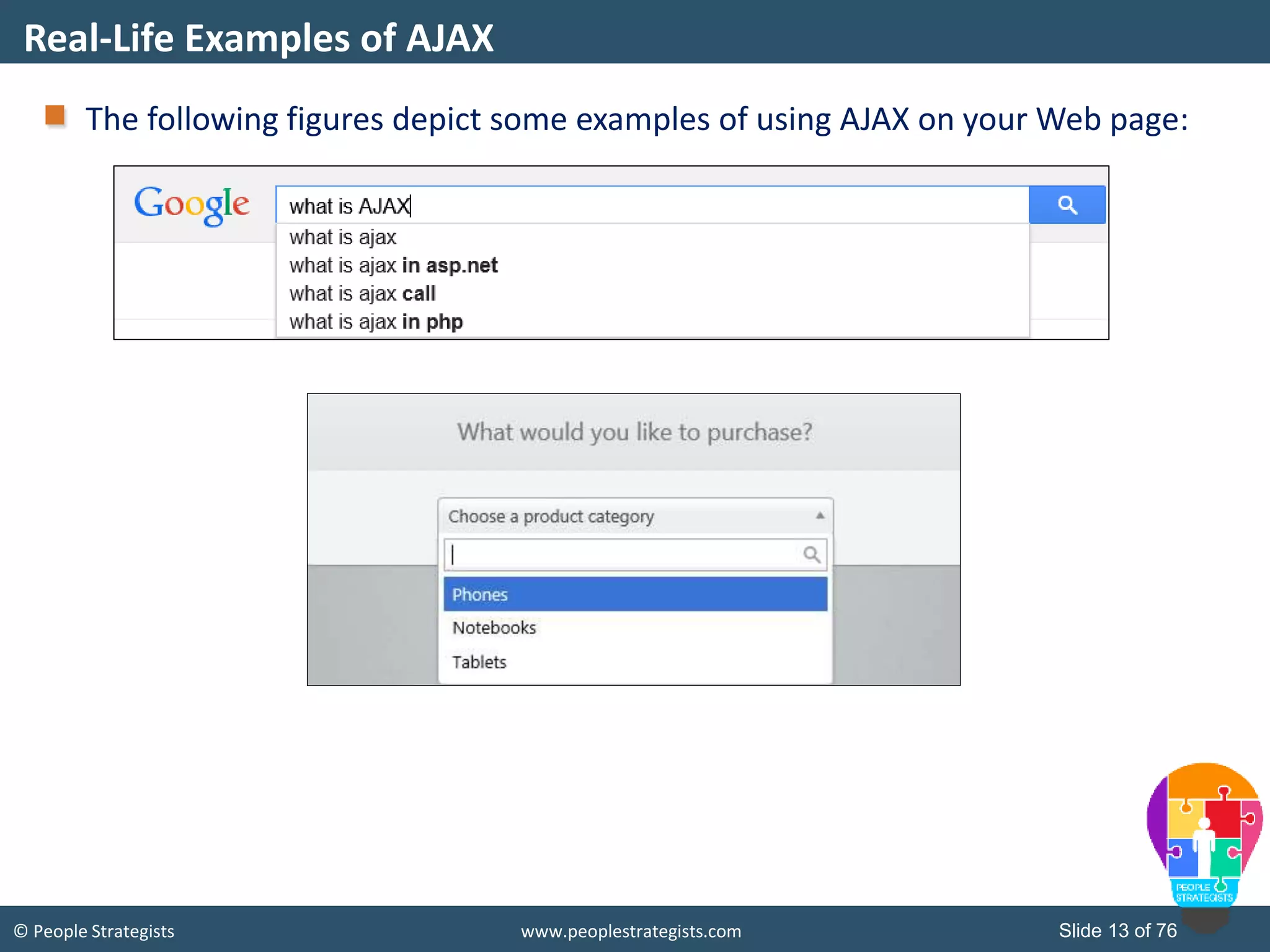
© People Strategists www.peoplestrategists.com Slide 13 of 76 The following figures depict some examples of using AJAX on your Web page: Real-Life Examples of AJAX
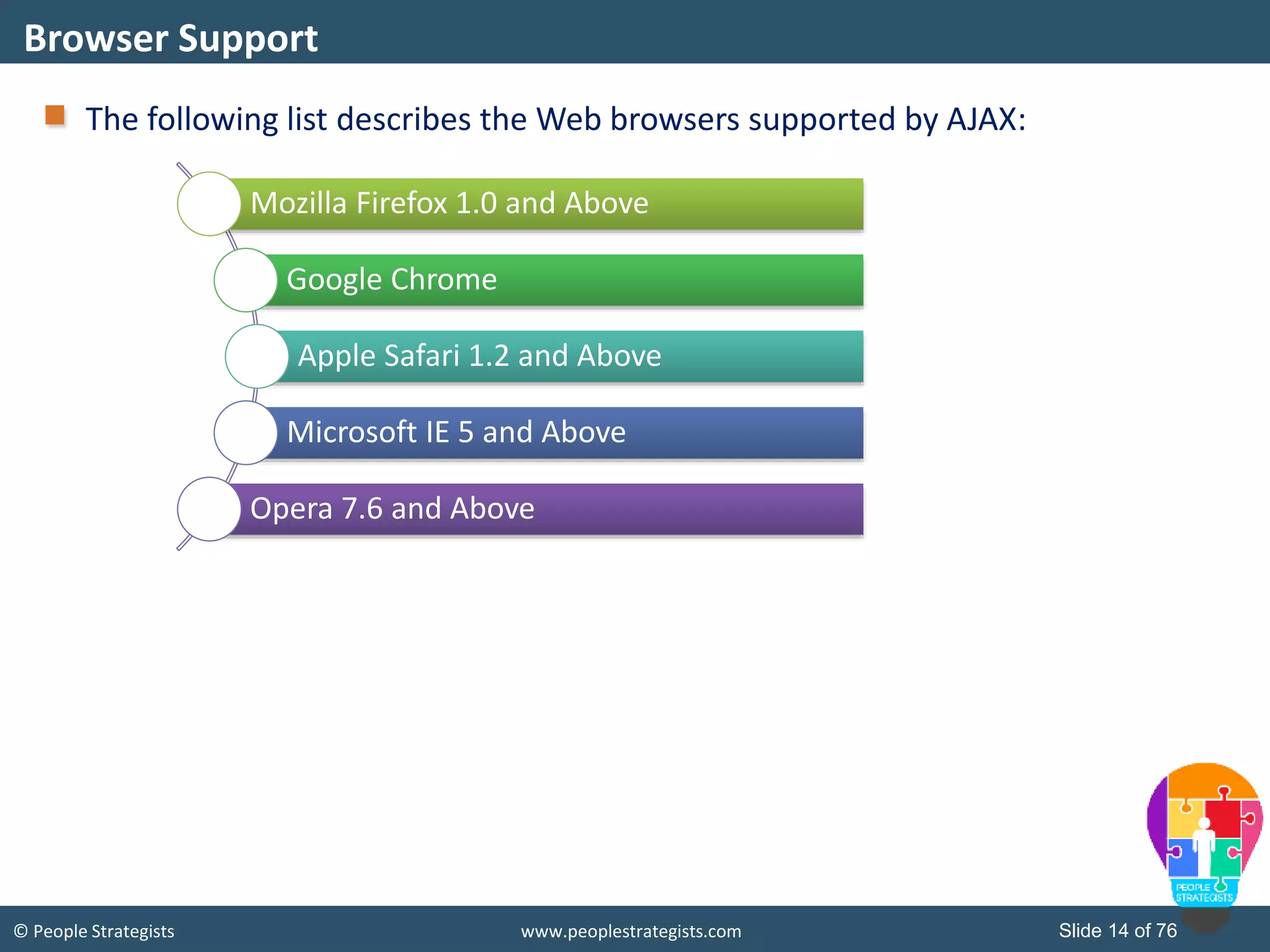
© People Strategists www.peoplestrategists.com Slide 14 of 76 The following list describes the Web browsers supported by AJAX: Browser Support Mozilla Firefox 1.0 and Above Google Chrome Apple Safari 1.2 and Above Microsoft IE 5 and Above Opera 7.6 and Above
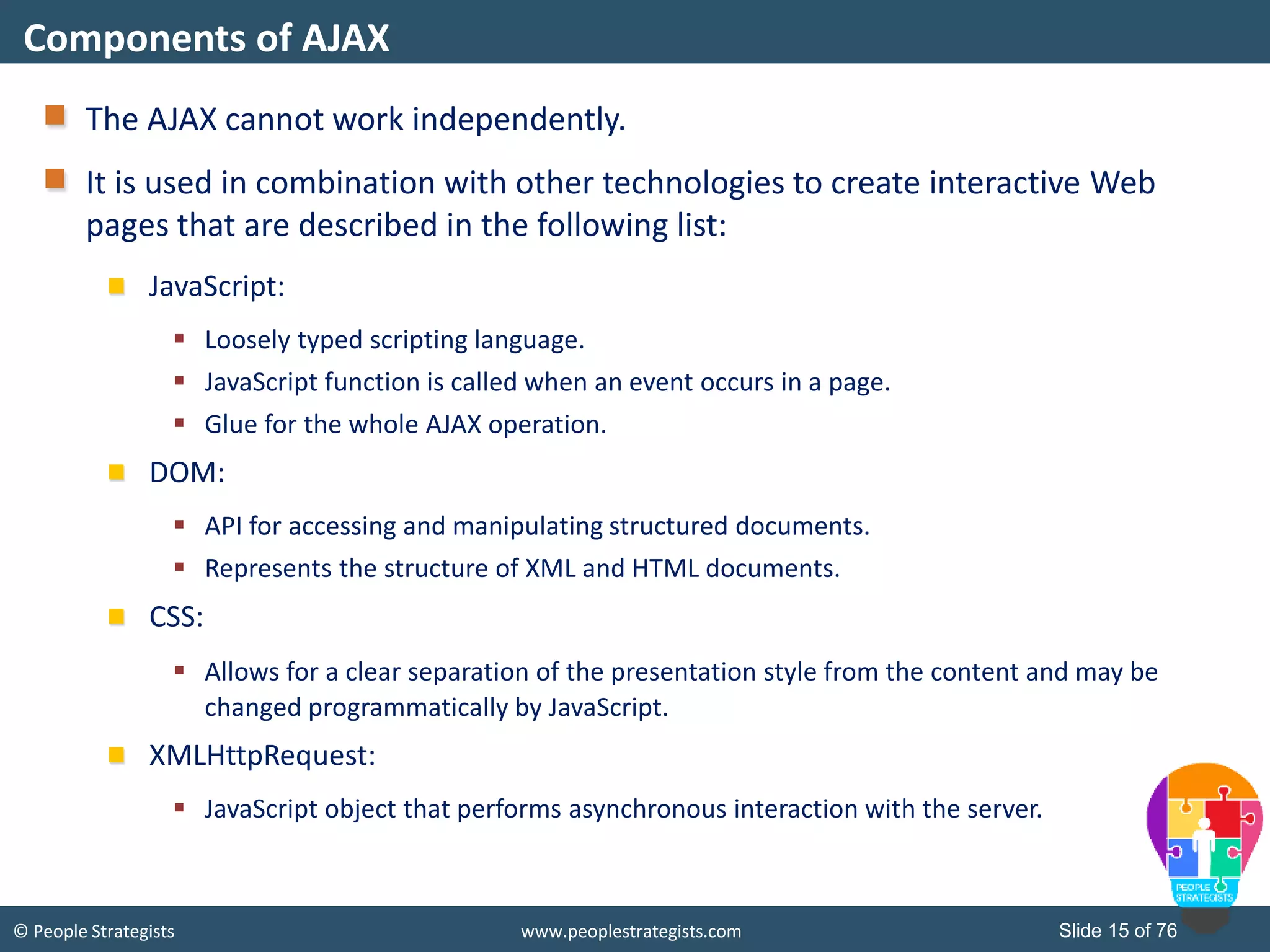
© People Strategists www.peoplestrategists.com Slide 15 of 76 The AJAX cannot work independently. It is used in combination with other technologies to create interactive Web pages that are described in the following list: JavaScript:  Loosely typed scripting language.  JavaScript function is called when an event occurs in a page.  Glue for the whole AJAX operation. DOM:  API for accessing and manipulating structured documents.  Represents the structure of XML and HTML documents. CSS:  Allows for a clear separation of the presentation style from the content and may be changed programmatically by JavaScript. XMLHttpRequest:  JavaScript object that performs asynchronous interaction with the server. Components of AJAX
© People Strategists www.peoplestrategists.com Slide 16 of 76 The XMLHttpRequest object: Is the most important component of AJAX. Has been available ever since Internet Explorer 5.5 was released in July 2000. Is an API that can be used by JavaScript, JScript, VBScript, and other Web browser scripting languages. Is used to transfer and manipulate XML data to and from a Web server using HTTP. Establishes an independent connection channel between a Web page's client-side and server-side. Besides XML, XMLHttpRequest can be used to fetch data in other formats, such as JSON or even plain text. Performs following operations:  Sends data from the client in the background.  Receives the data from the server.  Updates the webpage without reloading it. XMLHttpRequest Object
© People Strategists www.peoplestrategists.com Slide 17 of 76 The following figure depicts the process cycle of AJAX Web application model: XMLHttpRequest Object (Contd.) A client event occurs, such as a button click. An XMLHttpRequest object is created. The XMLHttpRequest object is configured. The XMLHttpRequest object makes an asynchronous request to the Web server. The Web server returns the result. The XMLHttpRequest object processes the result.
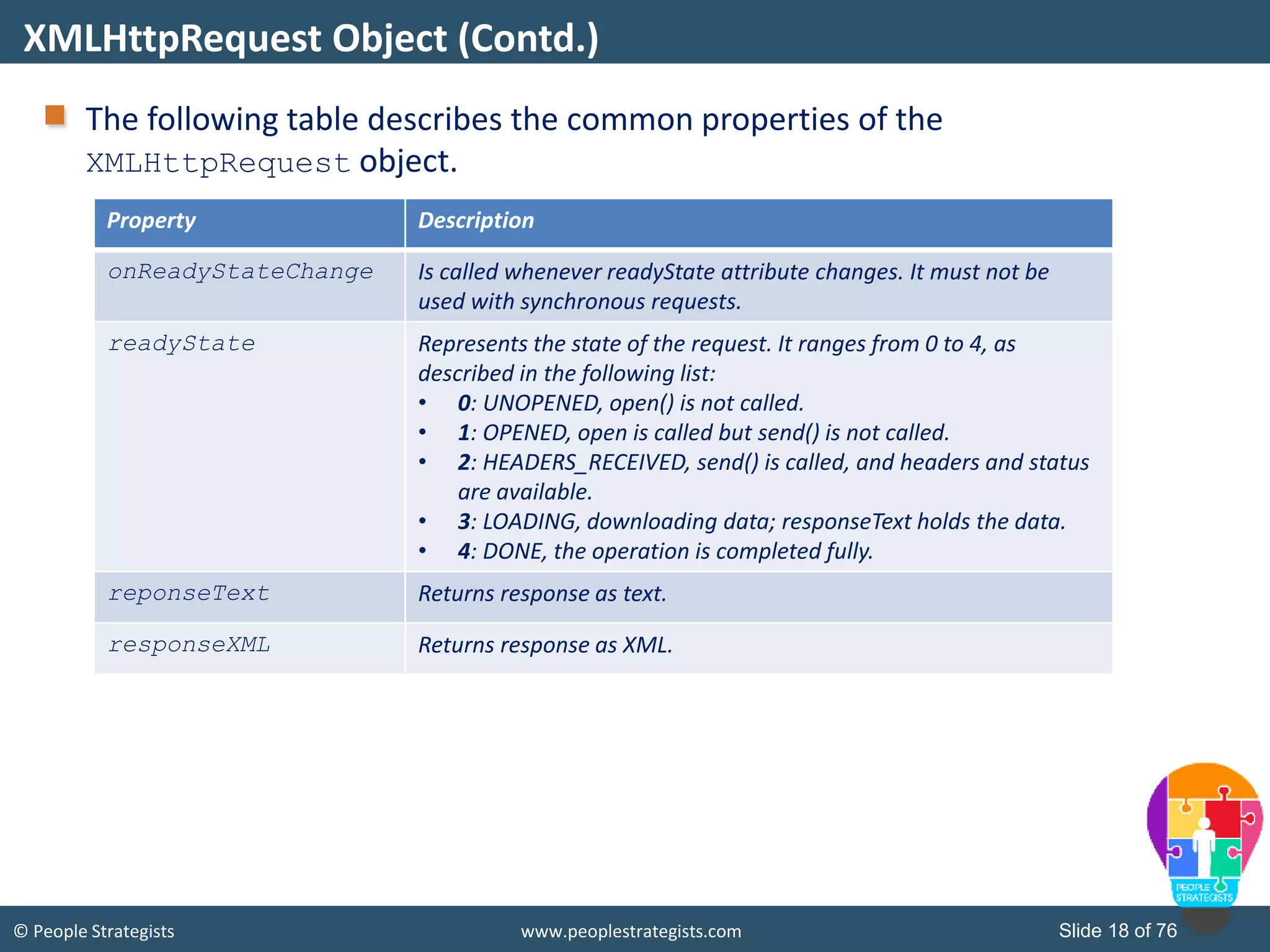
© People Strategists www.peoplestrategists.com Slide 18 of 76 The following table describes the common properties of the XMLHttpRequest object. XMLHttpRequest Object (Contd.) Property Description onReadyStateChange Is called whenever readyState attribute changes. It must not be used with synchronous requests. readyState Represents the state of the request. It ranges from 0 to 4, as described in the following list: • 0: UNOPENED, open() is not called. • 1: OPENED, open is called but send() is not called. • 2: HEADERS_RECEIVED, send() is called, and headers and status are available. • 3: LOADING, downloading data; responseText holds the data. • 4: DONE, the operation is completed fully. reponseText Returns response as text. responseXML Returns response as XML.
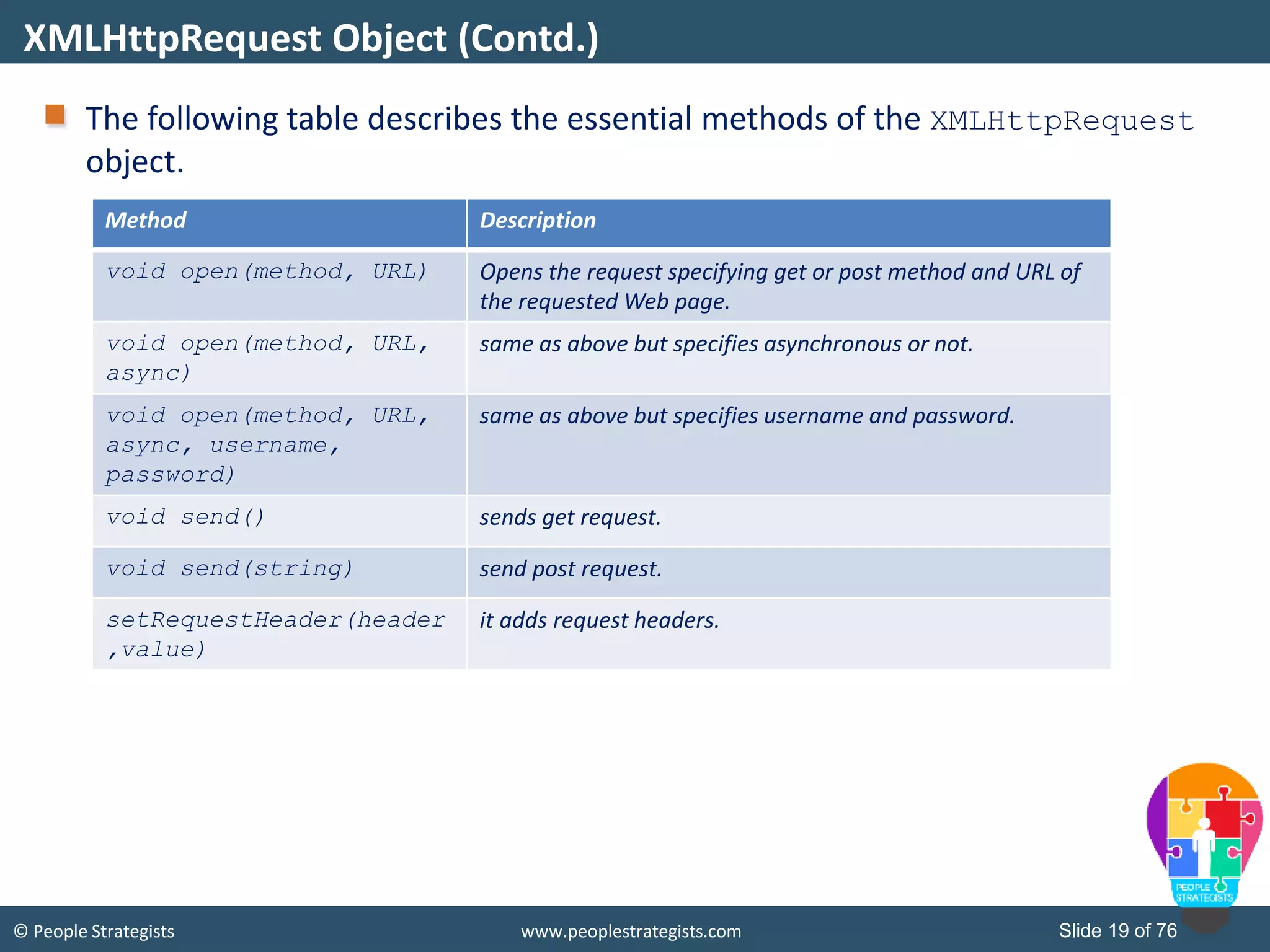
© People Strategists www.peoplestrategists.com Slide 19 of 76 The following table describes the essential methods of the XMLHttpRequest object. XMLHttpRequest Object (Contd.) Method Description void open(method, URL) Opens the request specifying get or post method and URL of the requested Web page. void open(method, URL, async) same as above but specifies asynchronous or not. void open(method, URL, async, username, password) same as above but specifies username and password. void send() sends get request. void send(string) send post request. setRequestHeader(header ,value) it adds request headers.
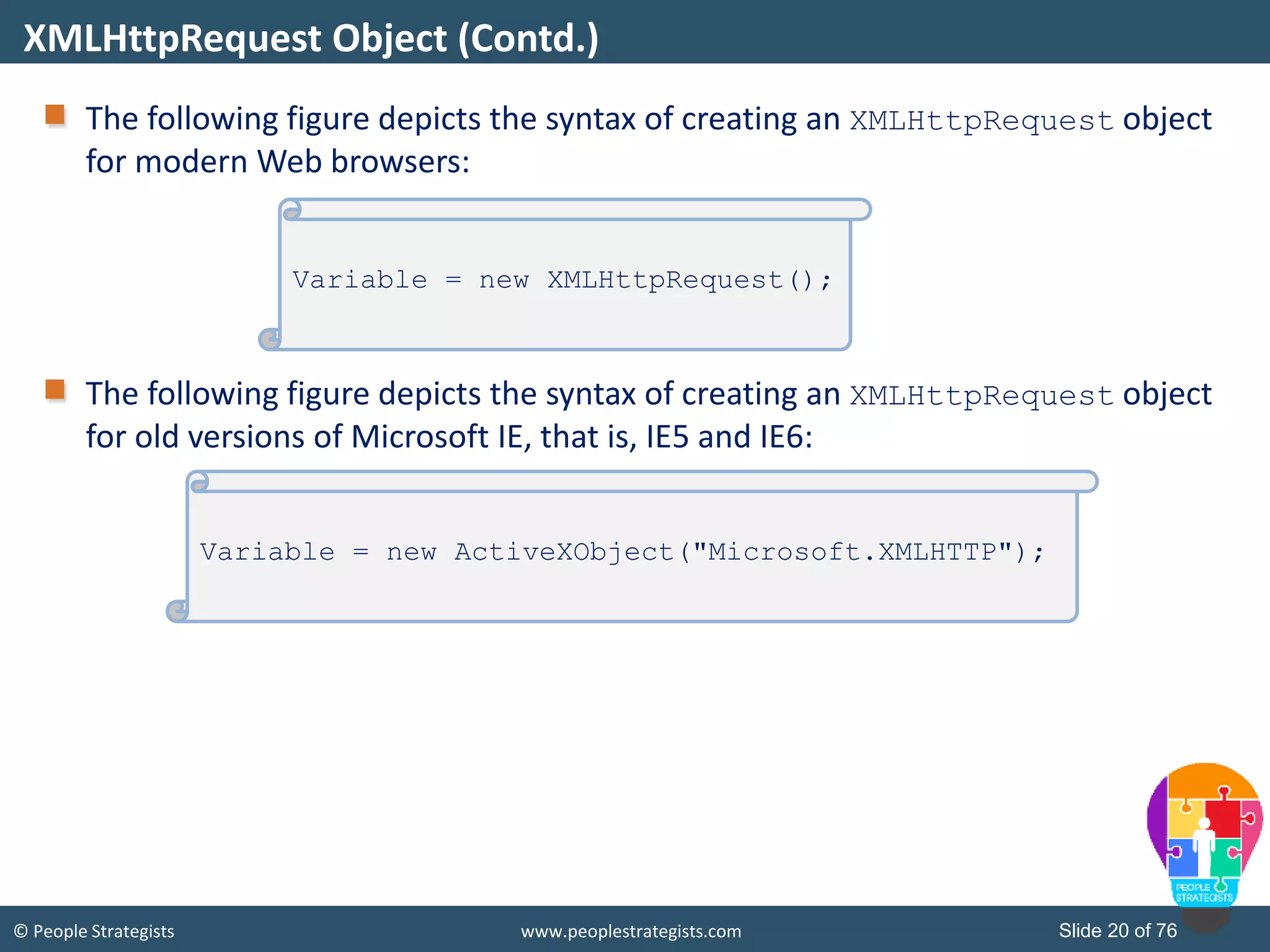
© People Strategists www.peoplestrategists.com Slide 20 of 76 The following figure depicts the syntax of creating an XMLHttpRequest object for modern Web browsers: The following figure depicts the syntax of creating an XMLHttpRequest object for old versions of Microsoft IE, that is, IE5 and IE6: XMLHttpRequest Object (Contd.) Variable = new XMLHttpRequest(); Variable = new ActiveXObject("Microsoft.XMLHTTP");
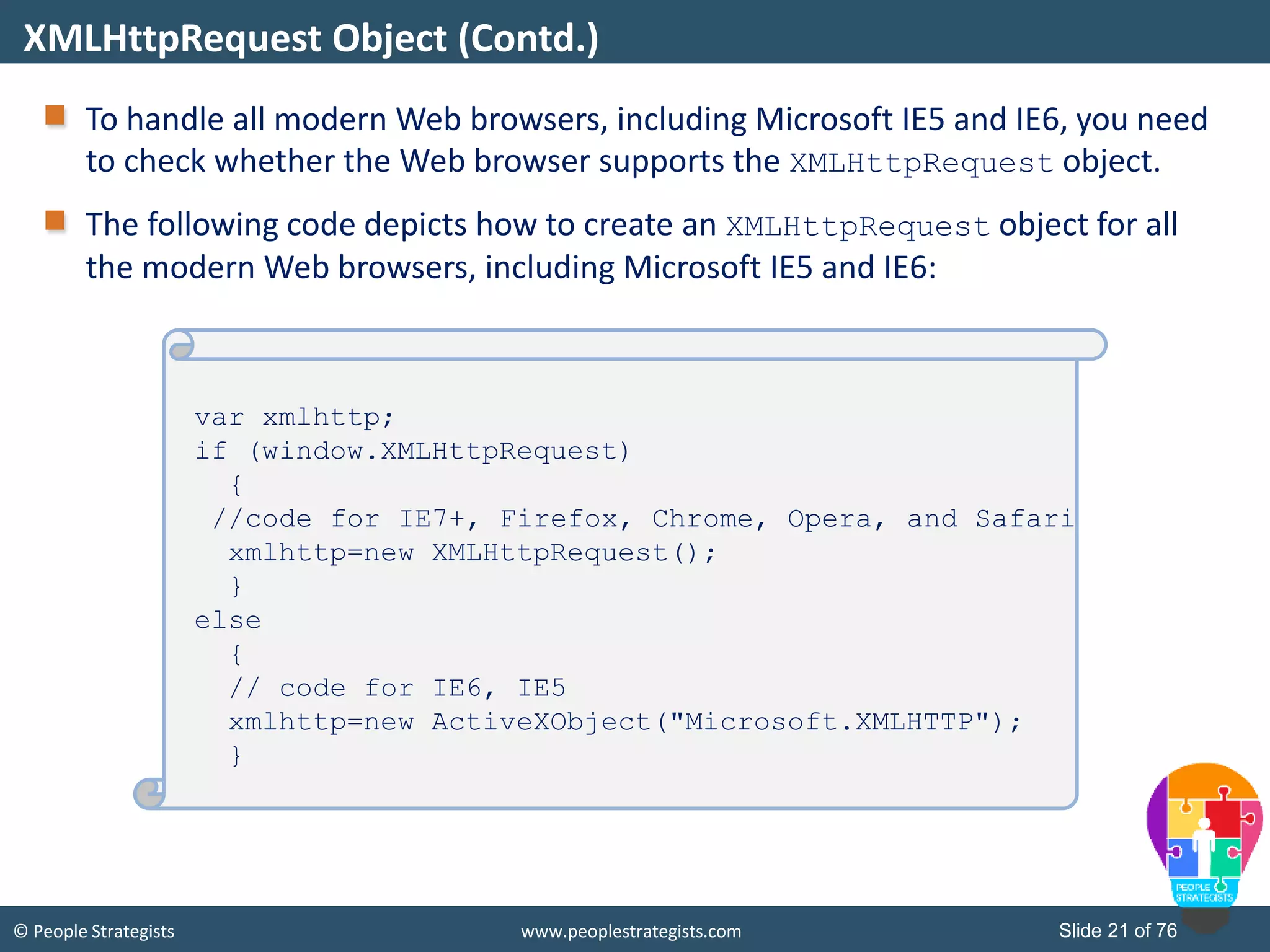
© People Strategists www.peoplestrategists.com Slide 21 of 76 To handle all modern Web browsers, including Microsoft IE5 and IE6, you need to check whether the Web browser supports the XMLHttpRequest object. The following code depicts how to create an XMLHttpRequest object for all the modern Web browsers, including Microsoft IE5 and IE6: XMLHttpRequest Object (Contd.) var xmlhttp; if (window.XMLHttpRequest) { //code for IE7+, Firefox, Chrome, Opera, and Safari xmlhttp=new XMLHttpRequest(); } else { // code for IE6, IE5 xmlhttp=new ActiveXObject("Microsoft.XMLHTTP"); }
© People Strategists www.peoplestrategists.com Slide 22 of 76 After creating an XMLHttpRequest object, you need to decide what you want to do after you receive the server response to your request. At this step, you need to define the JavaScript function, which will handle the server response. This can be done using the onreadystatechange property of the XMLHttpRequest object, as shown in the following code snippet: XMLHttpRequest Object (Contd.) xmlhttp.onreadystatechange = function(){ //process the server response };
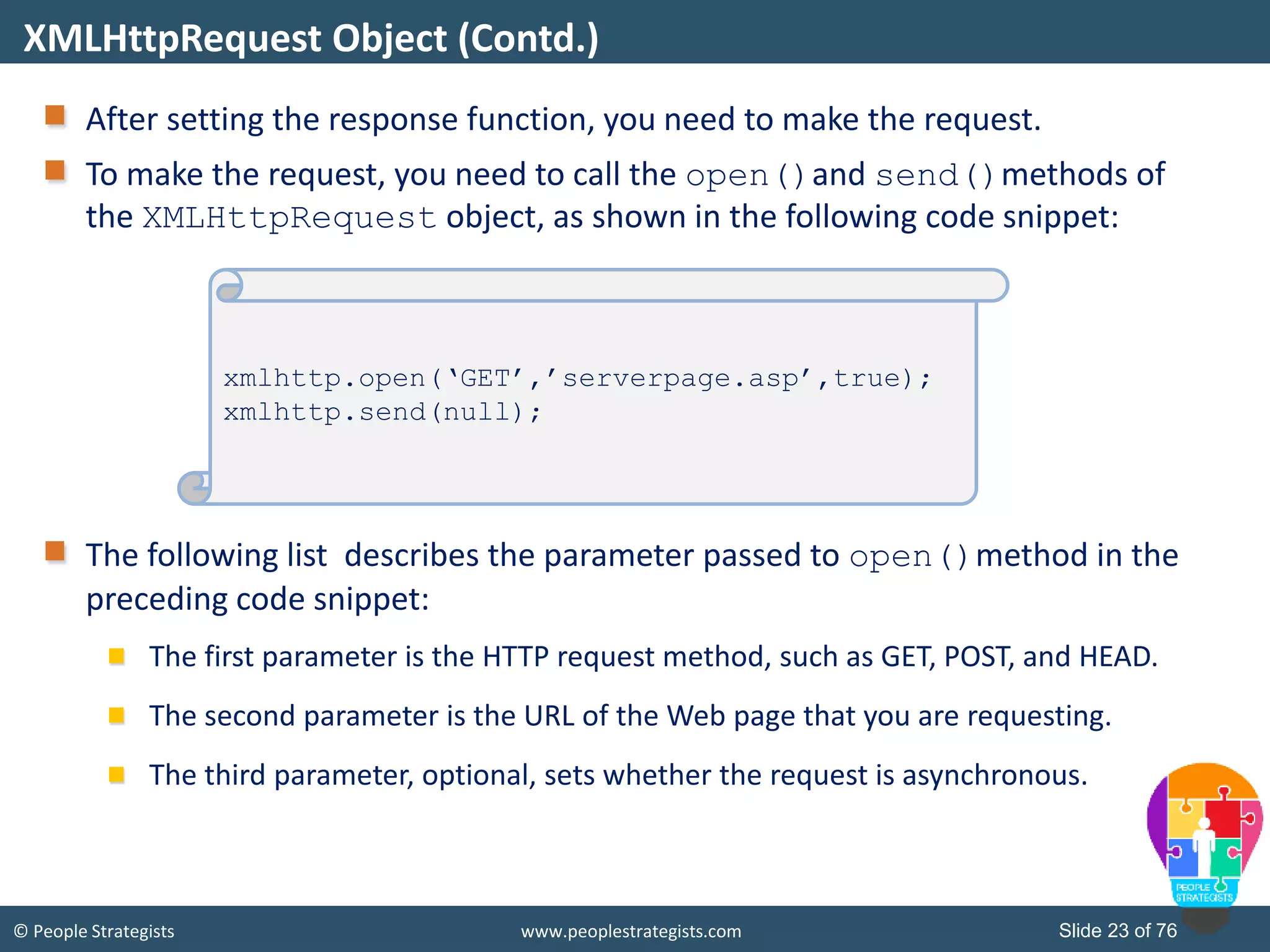
© People Strategists www.peoplestrategists.com Slide 23 of 76 After setting the response function, you need to make the request. To make the request, you need to call the open()and send()methods of the XMLHttpRequest object, as shown in the following code snippet: The following list describes the parameter passed to open()method in the preceding code snippet: The first parameter is the HTTP request method, such as GET, POST, and HEAD. The second parameter is the URL of the Web page that you are requesting. The third parameter, optional, sets whether the request is asynchronous. XMLHttpRequest Object (Contd.) xmlhttp.open(‘GET’,’serverpage.asp’,true); xmlhttp.send(null);
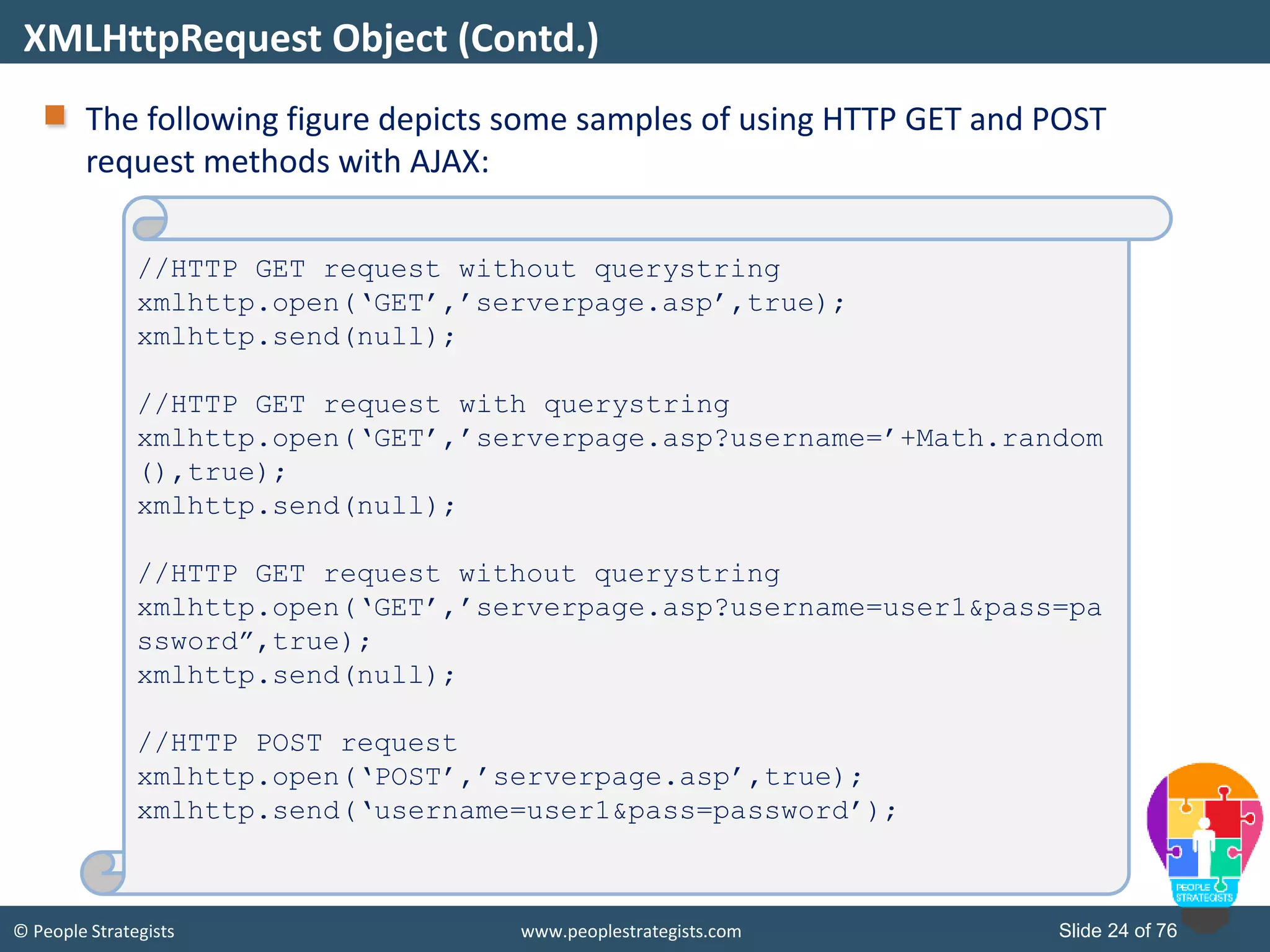
© People Strategists www.peoplestrategists.com Slide 24 of 76 The following figure depicts some samples of using HTTP GET and POST request methods with AJAX: XMLHttpRequest Object (Contd.) //HTTP GET request without querystring xmlhttp.open(‘GET’,’serverpage.asp’,true); xmlhttp.send(null); //HTTP GET request with querystring xmlhttp.open(‘GET’,’serverpage.asp?username=’+Math.random (),true); xmlhttp.send(null); //HTTP GET request without querystring xmlhttp.open(‘GET’,’serverpage.asp?username=user1&pass=pa ssword”,true); xmlhttp.send(null); //HTTP POST request xmlhttp.open(‘POST’,’serverpage.asp’,true); xmlhttp.send(‘username=user1&pass=password’);
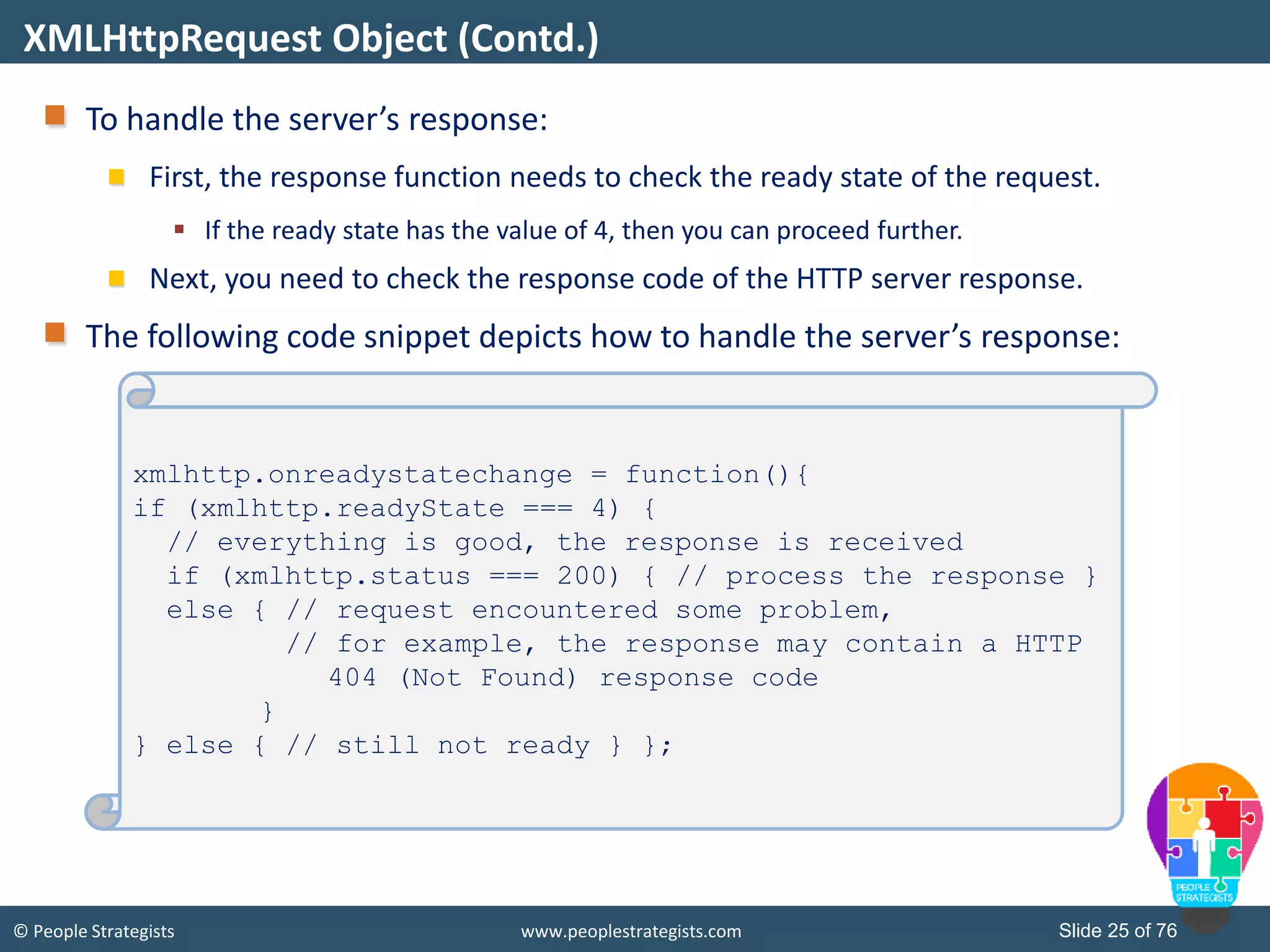
© People Strategists www.peoplestrategists.com Slide 25 of 76 To handle the server’s response: First, the response function needs to check the ready state of the request.  If the ready state has the value of 4, then you can proceed further. Next, you need to check the response code of the HTTP server response. The following code snippet depicts how to handle the server’s response: XMLHttpRequest Object (Contd.) xmlhttp.onreadystatechange = function(){ if (xmlhttp.readyState === 4) { // everything is good, the response is received if (xmlhttp.status === 200) { // process the response } else { // request encountered some problem, // for example, the response may contain a HTTP 404 (Not Found) response code } } else { // still not ready } };
© People Strategists www.peoplestrategists.com Slide 26 of 76 Fetching Data using XMLHttpRequest Object How to display the Web server’s response on a Web page?
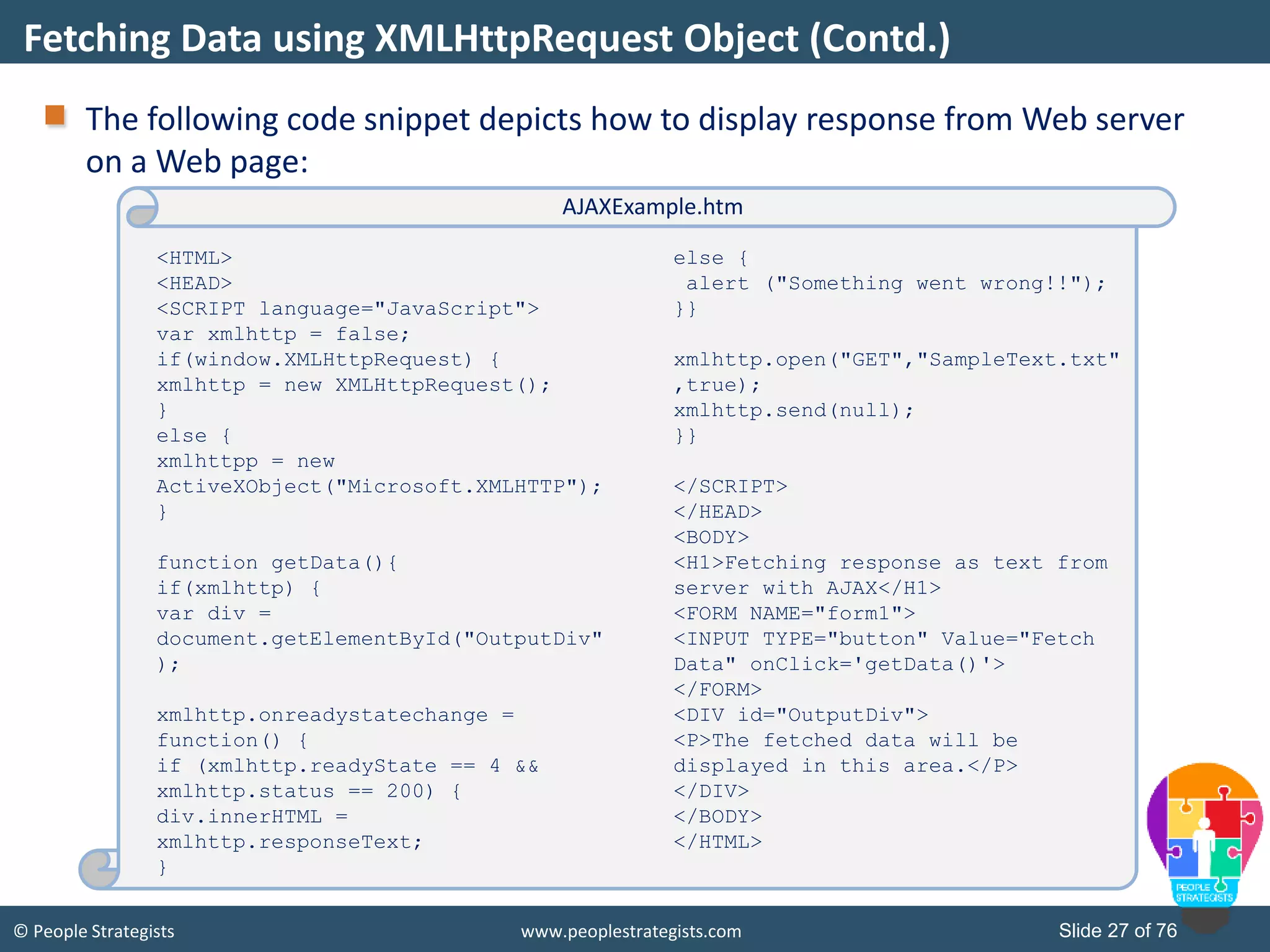
© People Strategists www.peoplestrategists.com Slide 27 of 76 The following code snippet depicts how to display response from Web server on a Web page: Fetching Data using XMLHttpRequest Object (Contd.) <HTML> <HEAD> <SCRIPT language="JavaScript"> var xmlhttp = false; if(window.XMLHttpRequest) { xmlhttp = new XMLHttpRequest(); } else { xmlhttpp = new ActiveXObject("Microsoft.XMLHTTP"); } function getData(){ if(xmlhttp) { var div = document.getElementById("OutputDiv" ); xmlhttp.onreadystatechange = function() { if (xmlhttp.readyState == 4 && xmlhttp.status == 200) { div.innerHTML = xmlhttp.responseText; } else { alert ("Something went wrong!!"); }} xmlhttp.open("GET","SampleText.txt" ,true); xmlhttp.send(null); }} </SCRIPT> </HEAD> <BODY> <H1>Fetching response as text from server with AJAX</H1> <FORM NAME="form1"> <INPUT TYPE="button" Value="Fetch Data" onClick='getData()'> </FORM> <DIV id="OutputDiv"> <P>The fetched data will be displayed in this area.</P> </DIV> </BODY> </HTML> AJAXExample.htm
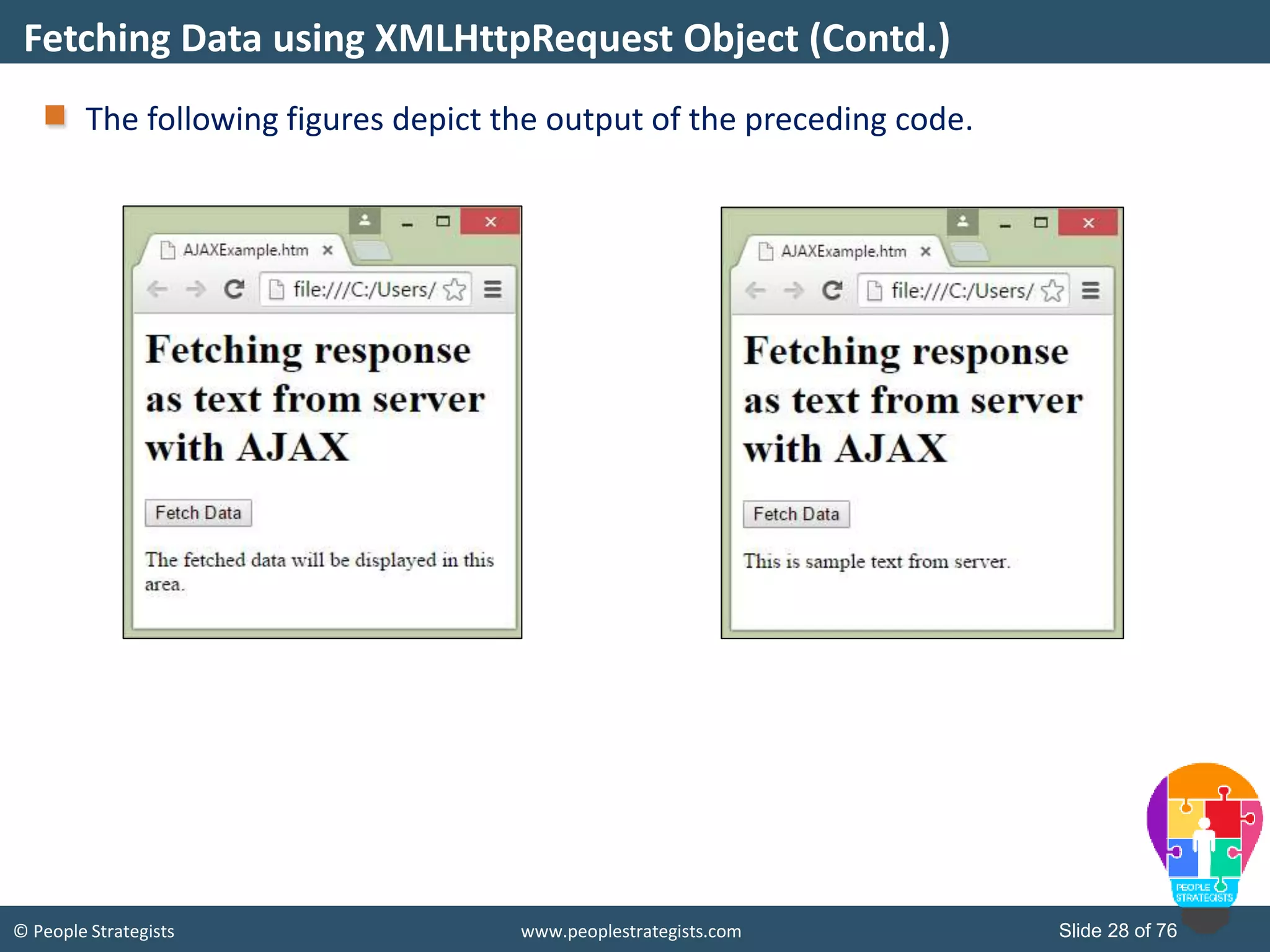
© People Strategists www.peoplestrategists.com Slide 28 of 76 The following figures depict the output of the preceding code. Fetching Data using XMLHttpRequest Object (Contd.)
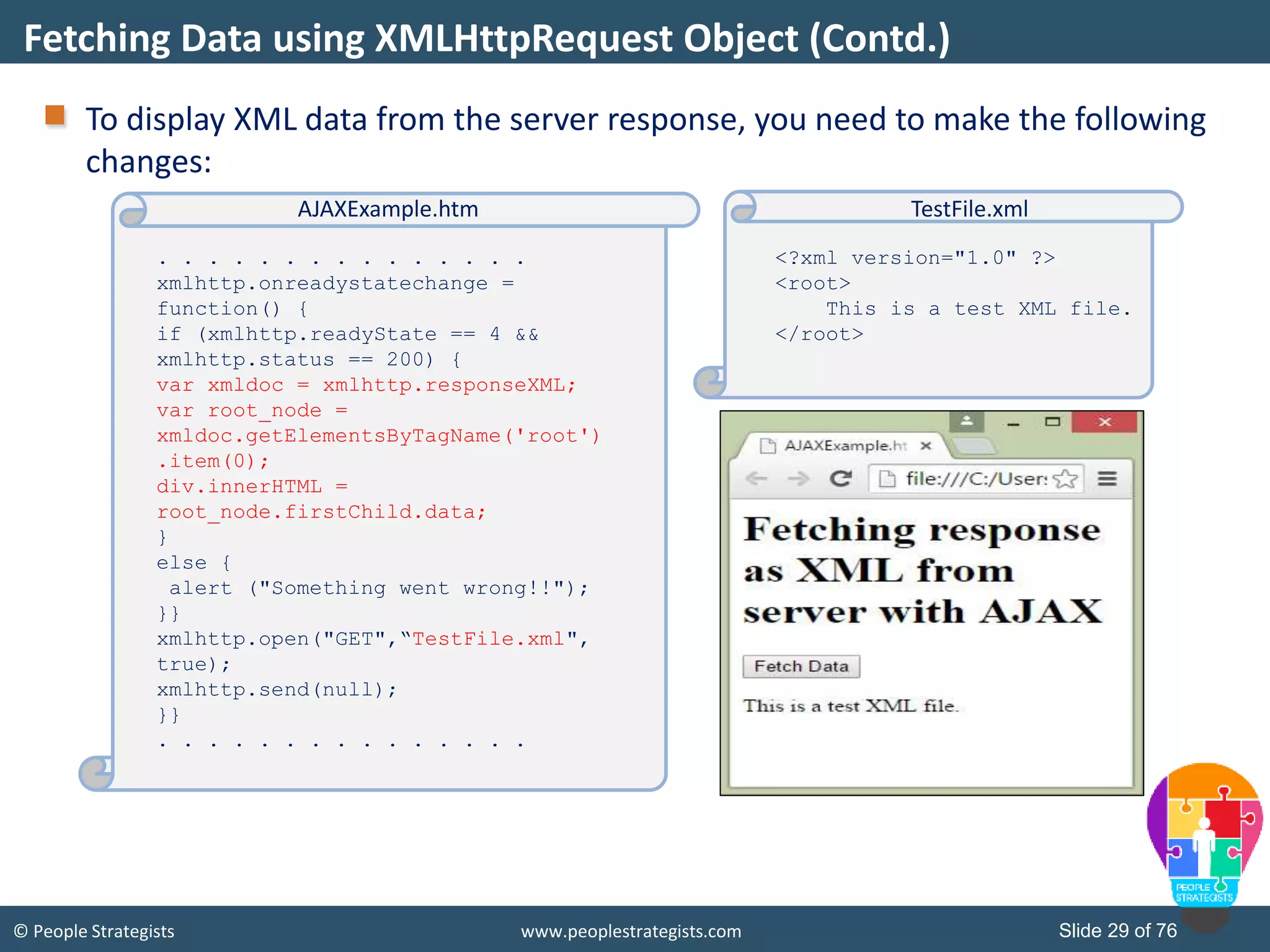
© People Strategists www.peoplestrategists.com Slide 29 of 76 To display XML data from the server response, you need to make the following changes: Fetching Data using XMLHttpRequest Object (Contd.) . . . . . . . . . . . . . . . xmlhttp.onreadystatechange = function() { if (xmlhttp.readyState == 4 && xmlhttp.status == 200) { var xmldoc = xmlhttp.responseXML; var root_node = xmldoc.getElementsByTagName('root') .item(0); div.innerHTML = root_node.firstChild.data; } else { alert ("Something went wrong!!"); }} xmlhttp.open("GET",“TestFile.xml", true); xmlhttp.send(null); }} . . . . . . . . . . . . . . . AJAXExample.htm <?xml version="1.0" ?> <root> This is a test XML file. </root> TestFile.xml
© People Strategists www.peoplestrategists.com Slide 30 of 76 jQuery Is jQuery a part of JavaScript?
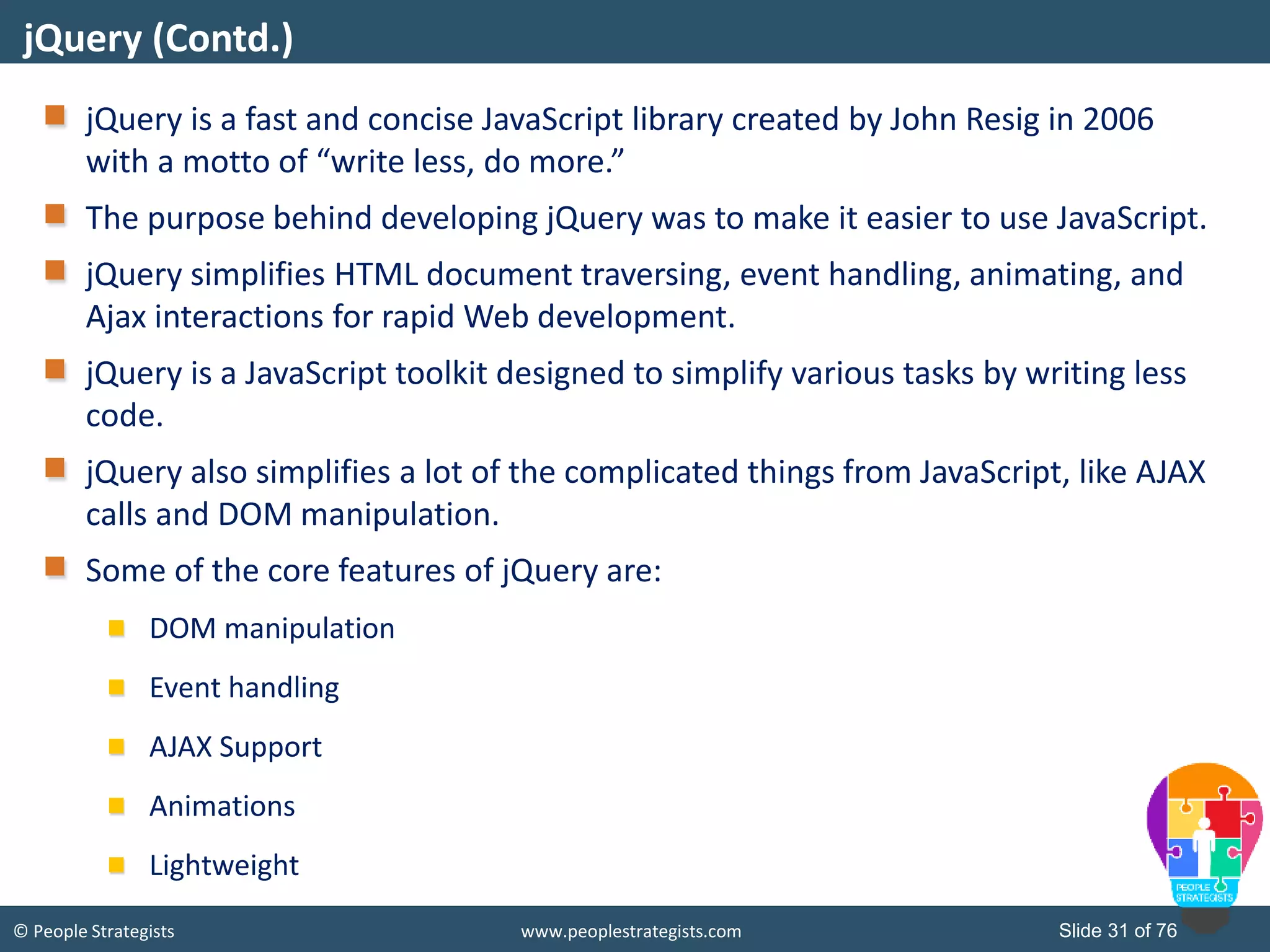
© People Strategists www.peoplestrategists.com Slide 31 of 76 jQuery is a fast and concise JavaScript library created by John Resig in 2006 with a motto of “write less, do more.” The purpose behind developing jQuery was to make it easier to use JavaScript. jQuery simplifies HTML document traversing, event handling, animating, and Ajax interactions for rapid Web development. jQuery is a JavaScript toolkit designed to simplify various tasks by writing less code. jQuery also simplifies a lot of the complicated things from JavaScript, like AJAX calls and DOM manipulation. Some of the core features of jQuery are: DOM manipulation Event handling AJAX Support Animations Lightweight jQuery (Contd.)
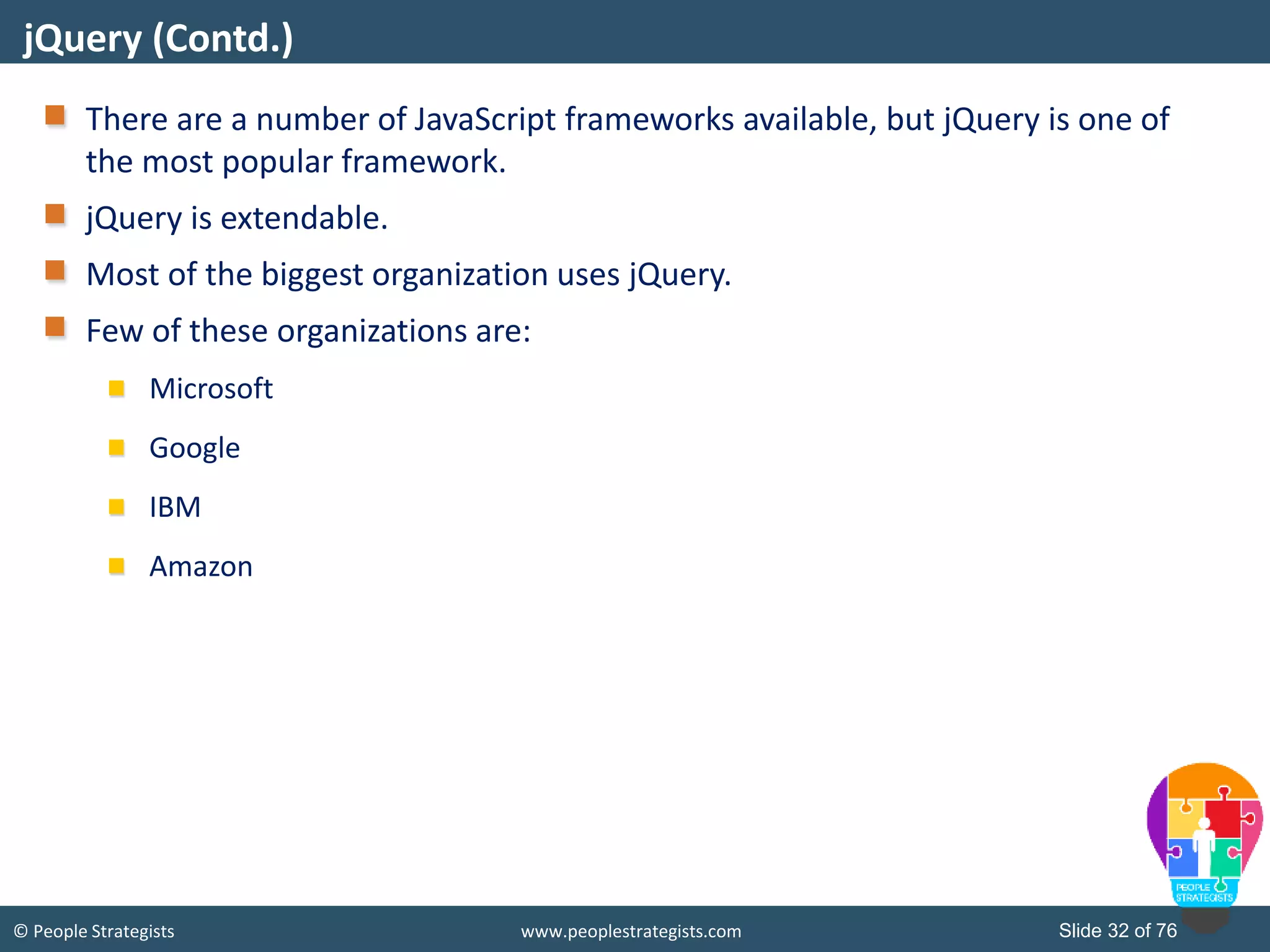
© People Strategists www.peoplestrategists.com Slide 32 of 76 There are a number of JavaScript frameworks available, but jQuery is one of the most popular framework. jQuery is extendable. Most of the biggest organization uses jQuery. Few of these organizations are: Microsoft Google IBM Amazon jQuery (Contd.)
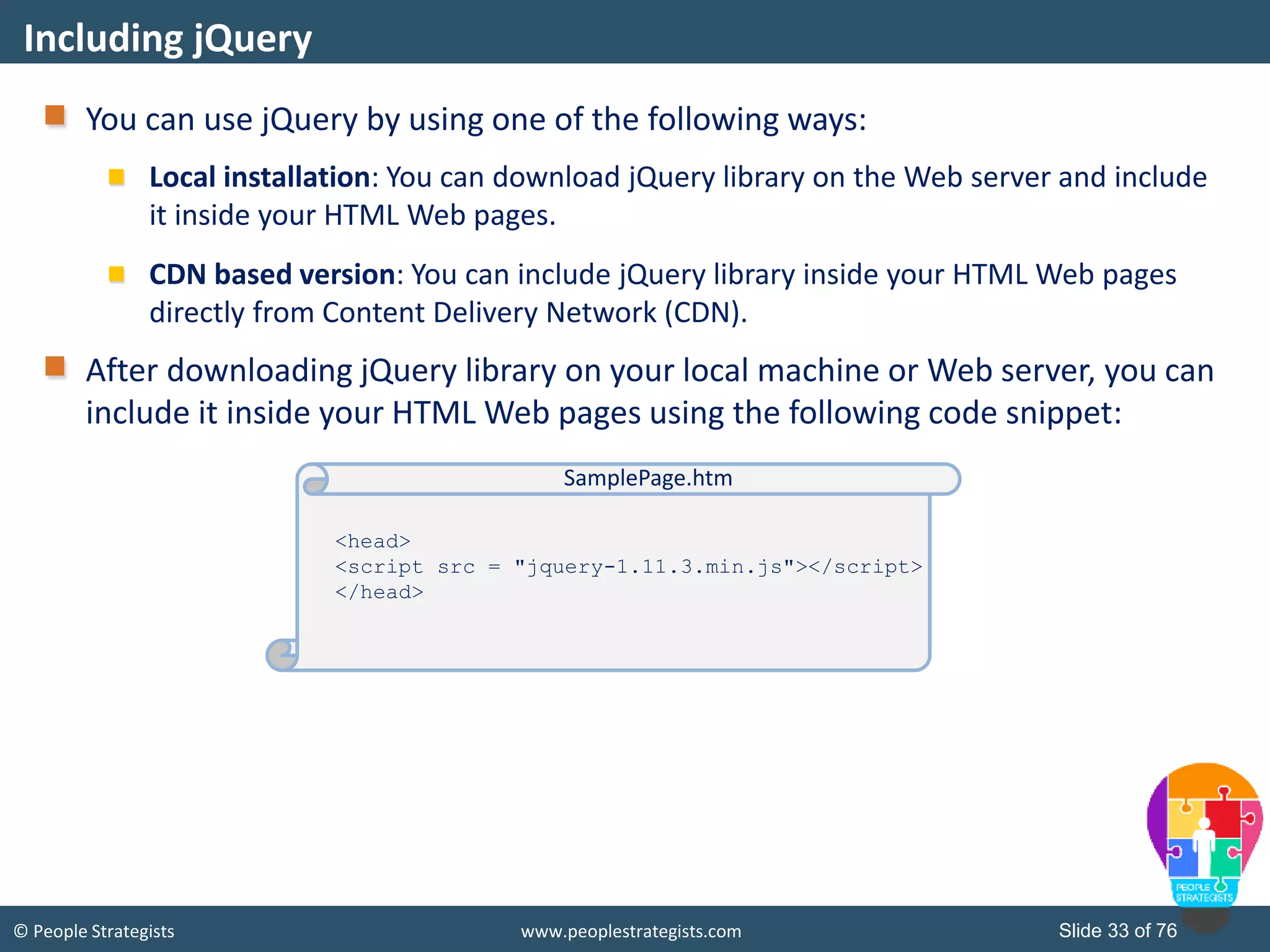
© People Strategists www.peoplestrategists.com Slide 33 of 76 You can use jQuery by using one of the following ways: Local installation: You can download jQuery library on the Web server and include it inside your HTML Web pages. CDN based version: You can include jQuery library inside your HTML Web pages directly from Content Delivery Network (CDN). After downloading jQuery library on your local machine or Web server, you can include it inside your HTML Web pages using the following code snippet: Including jQuery <head> <script src = "jquery-1.11.3.min.js"></script> </head> SamplePage.htm
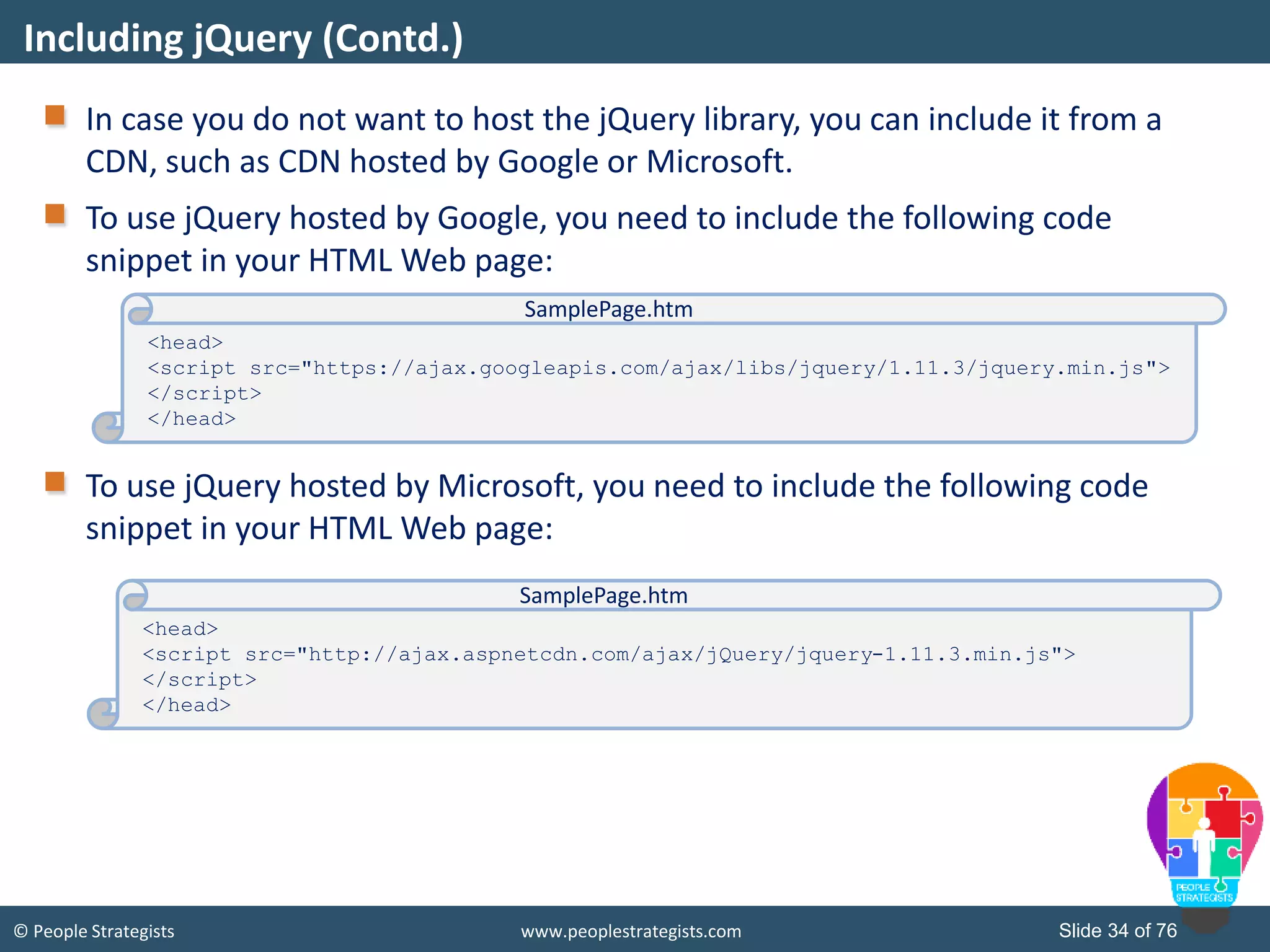
© People Strategists www.peoplestrategists.com Slide 34 of 76 In case you do not want to host the jQuery library, you can include it from a CDN, such as CDN hosted by Google or Microsoft. To use jQuery hosted by Google, you need to include the following code snippet in your HTML Web page: To use jQuery hosted by Microsoft, you need to include the following code snippet in your HTML Web page: Including jQuery (Contd.) <head> <script src="https://ajax.googleapis.com/ajax/libs/jquery/1.11.3/jquery.min.js"> </script> </head> SamplePage.htm <head> <script src="http://ajax.aspnetcdn.com/ajax/jQuery/jquery-1.11.3.min.js"> </script> </head> SamplePage.htm
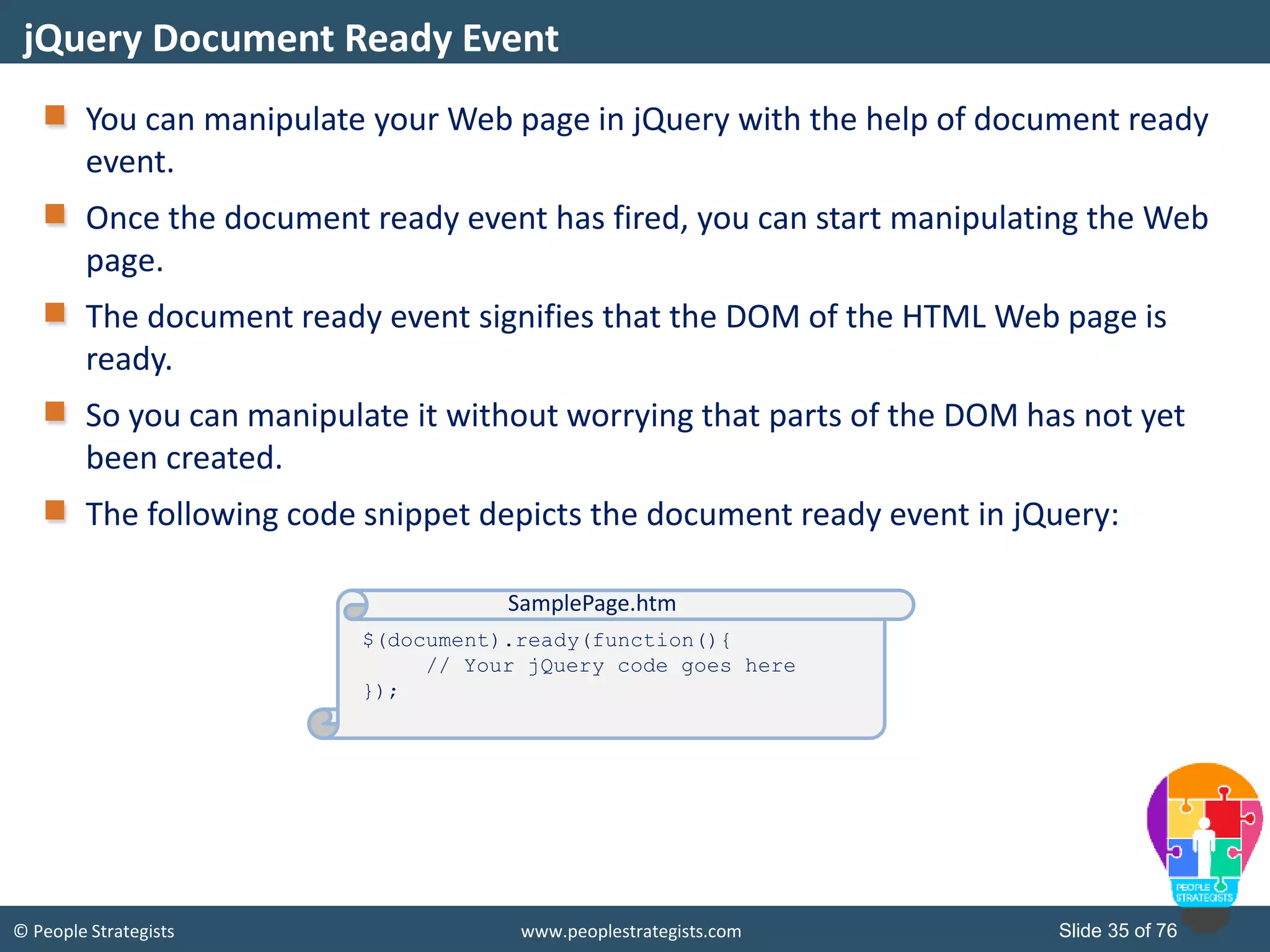
© People Strategists www.peoplestrategists.com Slide 35 of 76 You can manipulate your Web page in jQuery with the help of document ready event. Once the document ready event has fired, you can start manipulating the Web page. The document ready event signifies that the DOM of the HTML Web page is ready. So you can manipulate it without worrying that parts of the DOM has not yet been created. The following code snippet depicts the document ready event in jQuery: jQuery Document Ready Event $(document).ready(function(){ // Your jQuery code goes here }); SamplePage.htm
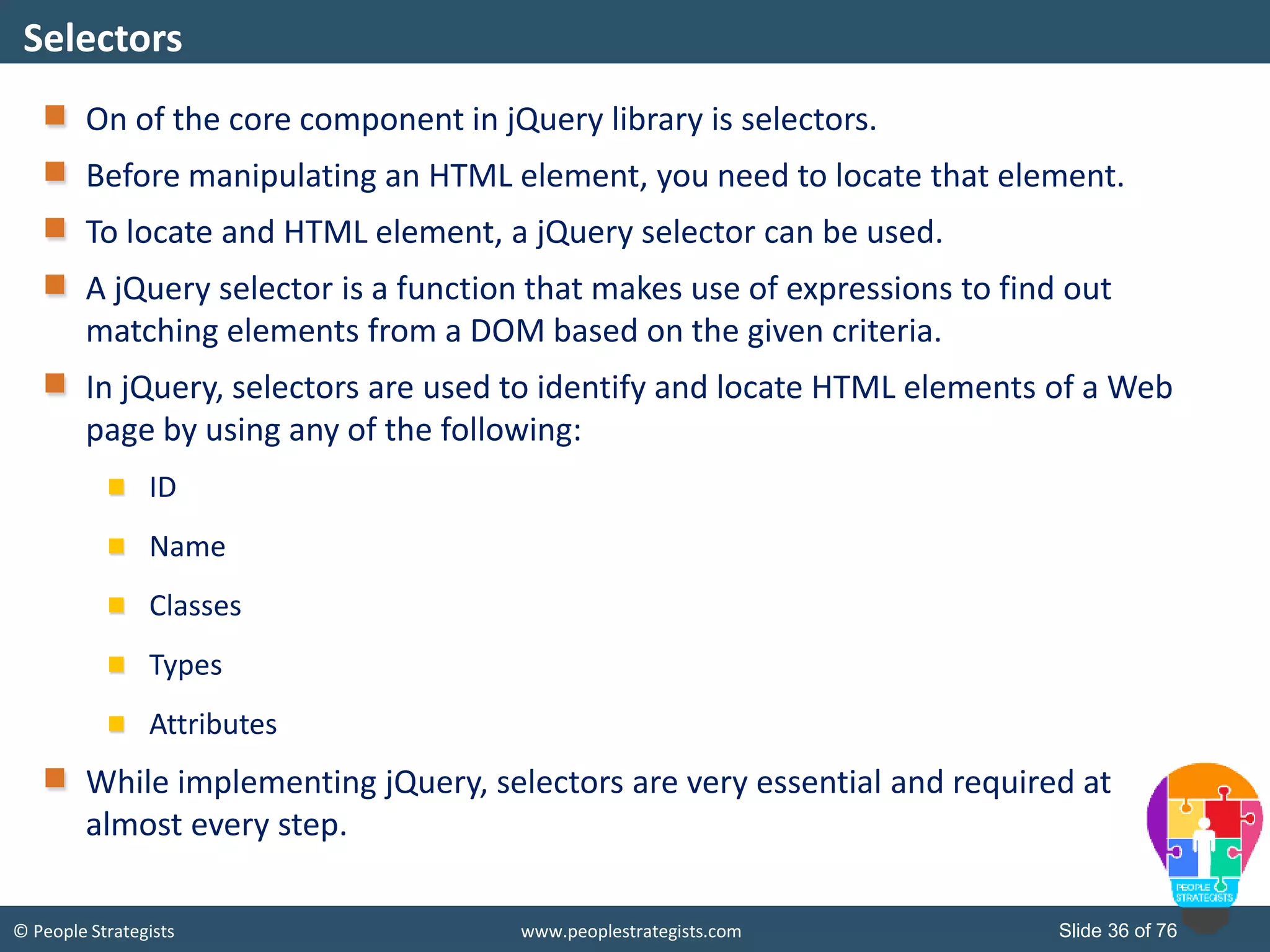
© People Strategists www.peoplestrategists.com Slide 36 of 76 On of the core component in jQuery library is selectors. Before manipulating an HTML element, you need to locate that element. To locate and HTML element, a jQuery selector can be used. A jQuery selector is a function that makes use of expressions to find out matching elements from a DOM based on the given criteria. In jQuery, selectors are used to identify and locate HTML elements of a Web page by using any of the following: ID Name Classes Types Attributes While implementing jQuery, selectors are very essential and required at almost every step. Selectors
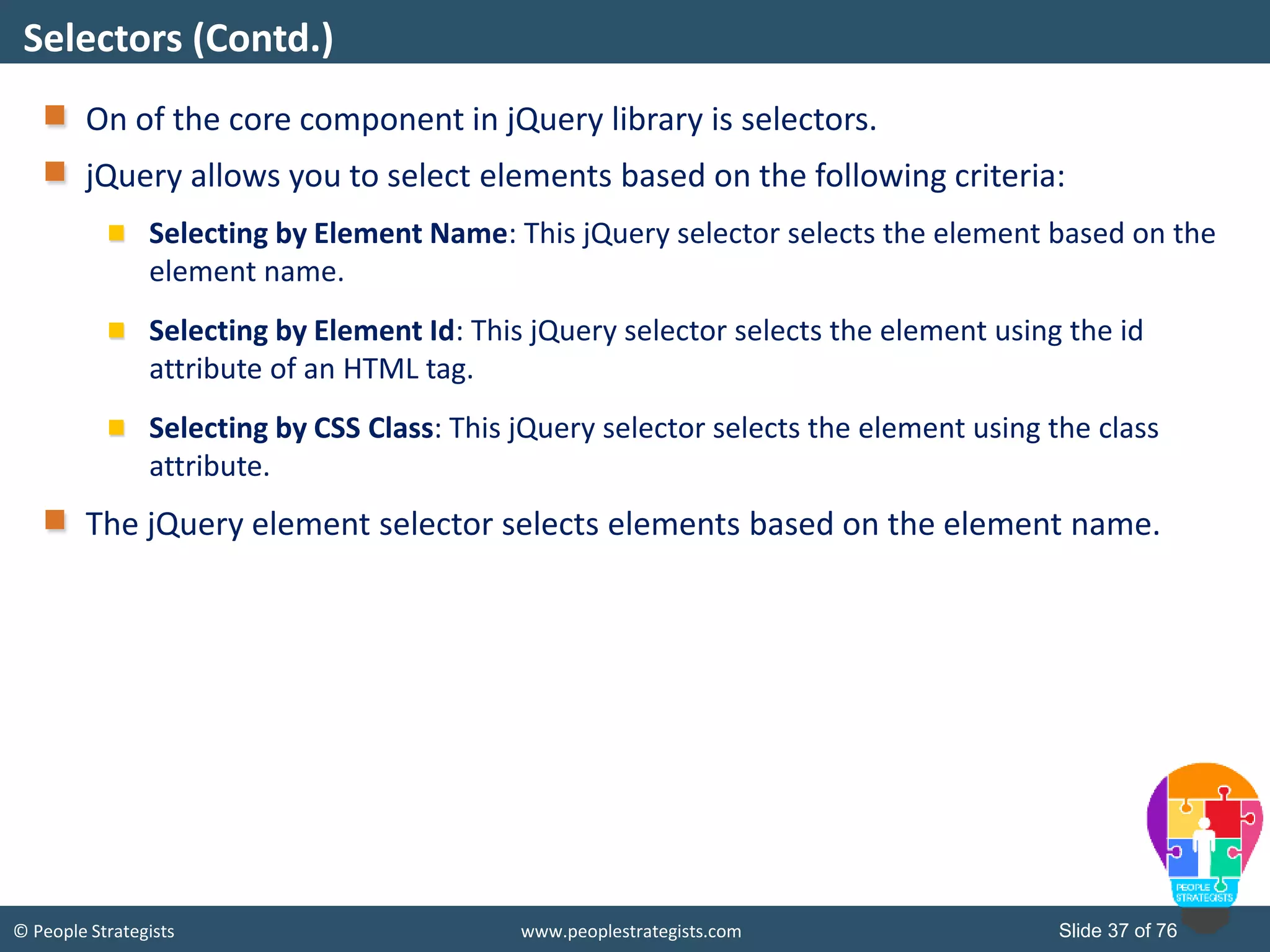
© People Strategists www.peoplestrategists.com Slide 37 of 76 On of the core component in jQuery library is selectors. jQuery allows you to select elements based on the following criteria: Selecting by Element Name: This jQuery selector selects the element based on the element name. Selecting by Element Id: This jQuery selector selects the element using the id attribute of an HTML tag. Selecting by CSS Class: This jQuery selector selects the element using the class attribute. The jQuery element selector selects elements based on the element name. Selectors (Contd.)
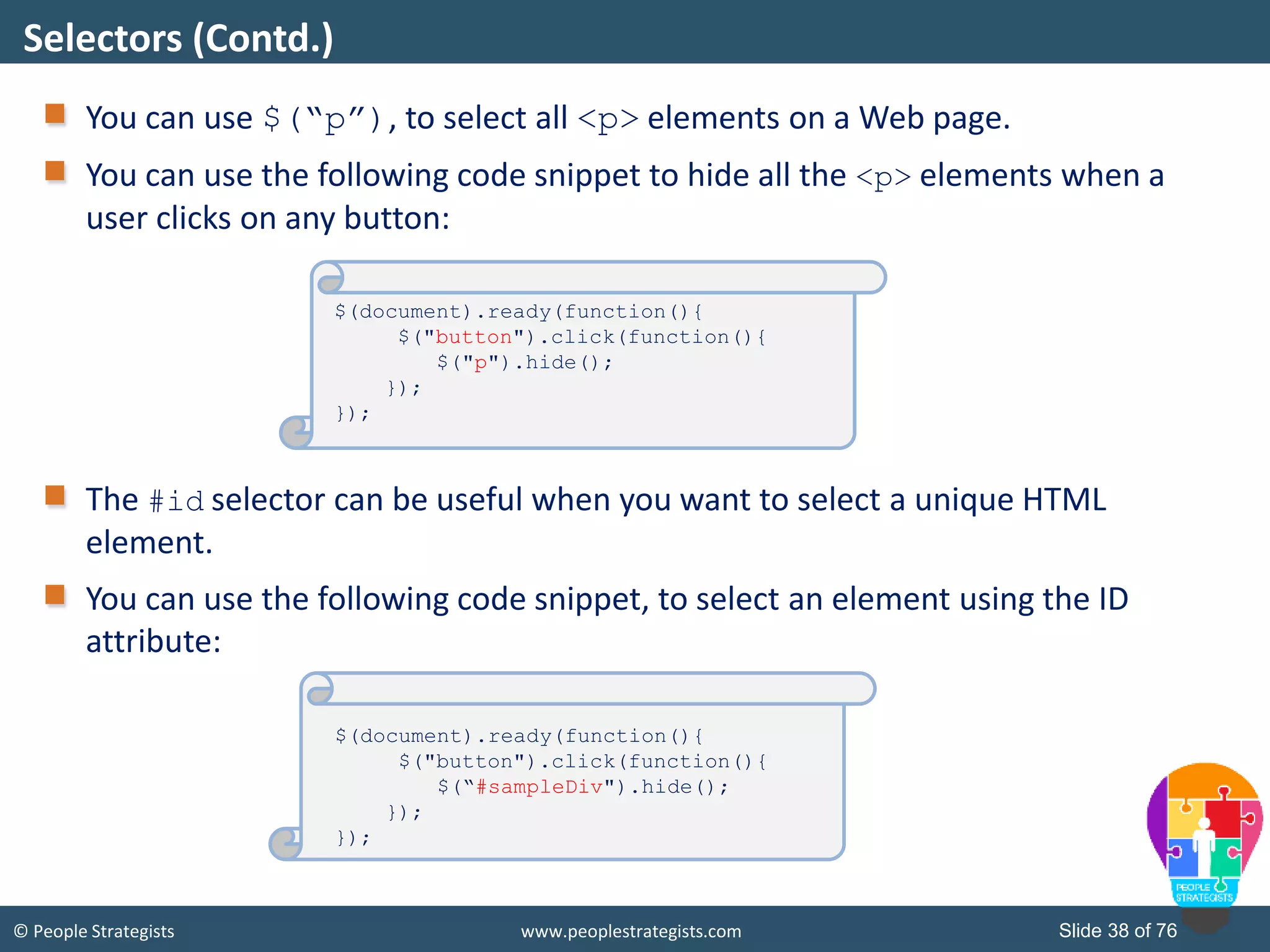
© People Strategists www.peoplestrategists.com Slide 38 of 76 You can use $(“p”), to select all <p> elements on a Web page. You can use the following code snippet to hide all the <p> elements when a user clicks on any button: The #id selector can be useful when you want to select a unique HTML element. You can use the following code snippet, to select an element using the ID attribute: Selectors (Contd.) $(document).ready(function(){ $("button").click(function(){ $("p").hide(); }); }); $(document).ready(function(){ $("button").click(function(){ $(“#sampleDiv").hide(); }); });
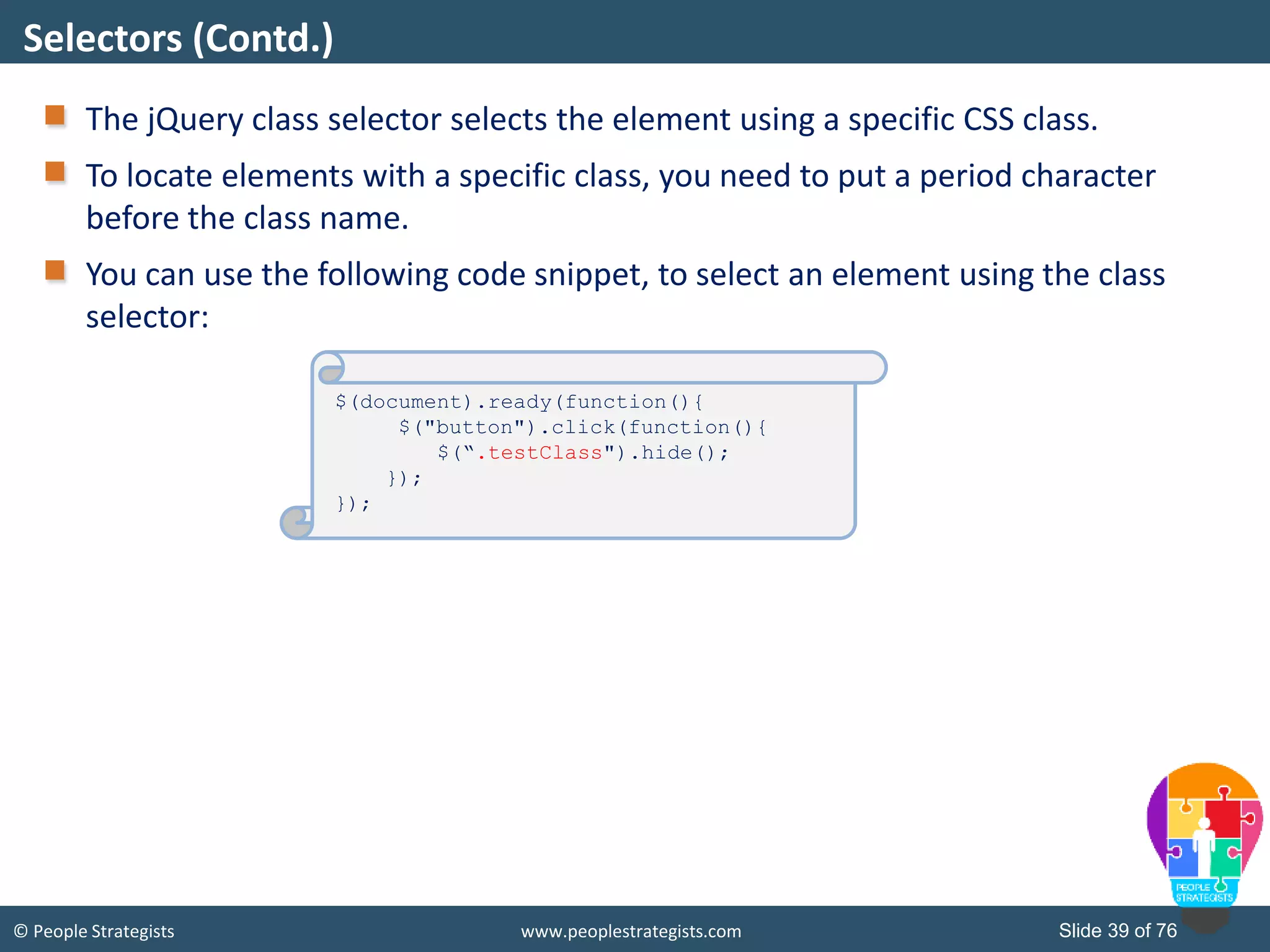
© People Strategists www.peoplestrategists.com Slide 39 of 76 The jQuery class selector selects the element using a specific CSS class. To locate elements with a specific class, you need to put a period character before the class name. You can use the following code snippet, to select an element using the class selector: Selectors (Contd.) $(document).ready(function(){ $("button").click(function(){ $(“.testClass").hide(); }); });
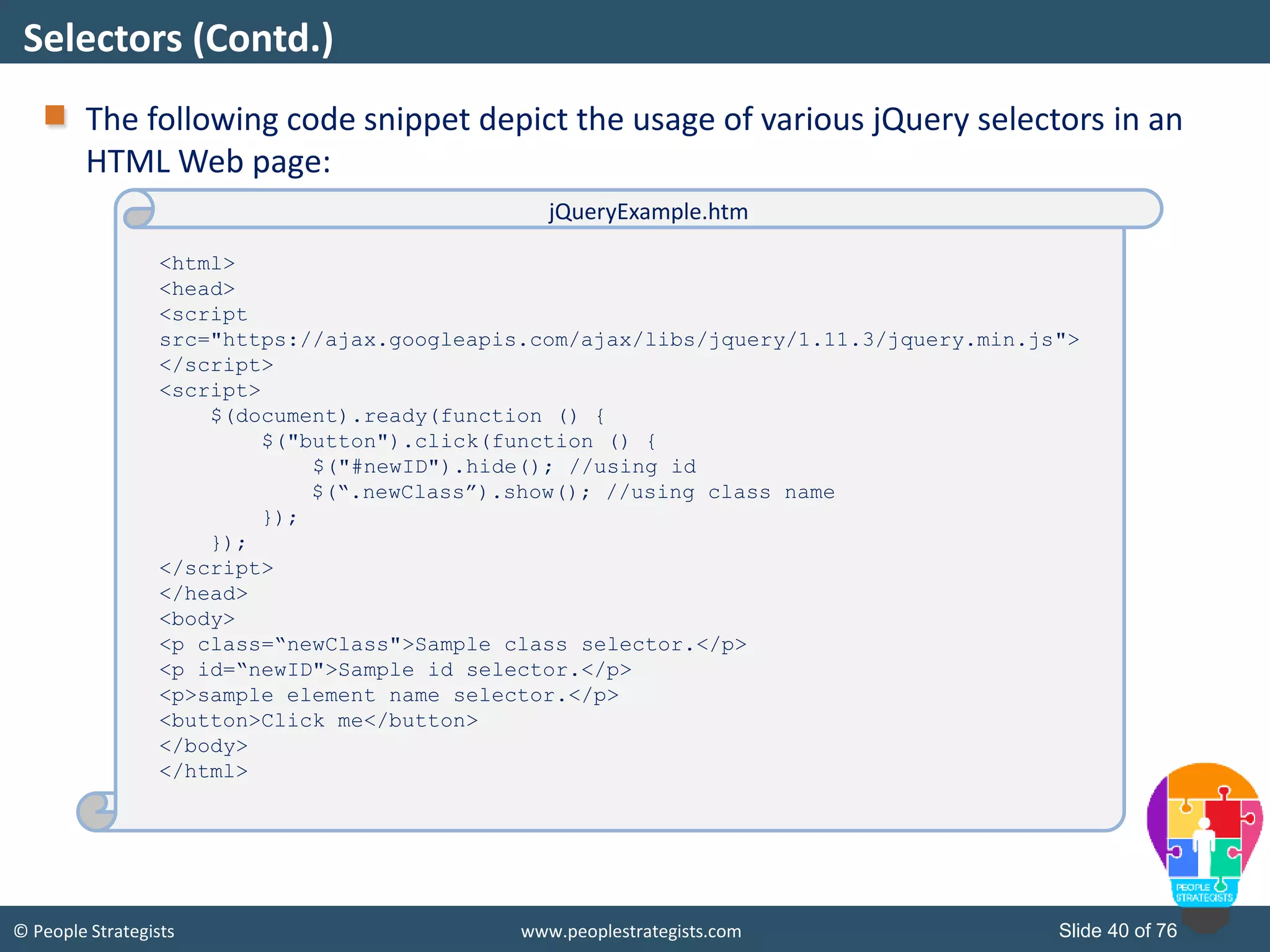
© People Strategists www.peoplestrategists.com Slide 40 of 76 The following code snippet depict the usage of various jQuery selectors in an HTML Web page: Selectors (Contd.) <html> <head> <script src="https://ajax.googleapis.com/ajax/libs/jquery/1.11.3/jquery.min.js"> </script> <script> $(document).ready(function () { $("button").click(function () { $("#newID").hide(); //using id $(“.newClass”).show(); //using class name }); }); </script> </head> <body> <p class=“newClass">Sample class selector.</p> <p id=“newID">Sample id selector.</p> <p>sample element name selector.</p> <button>Click me</button> </body> </html> jQueryExample.htm
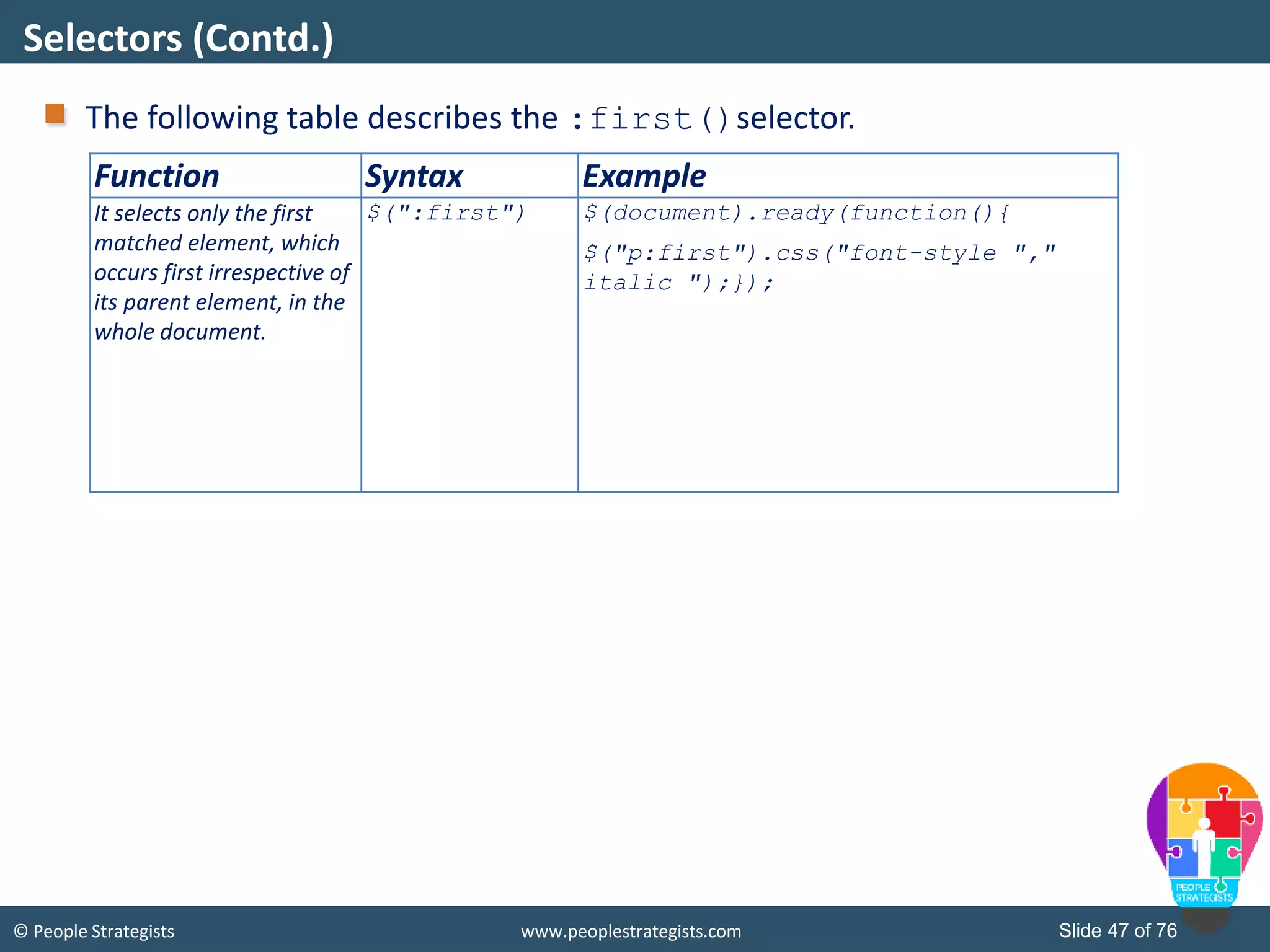
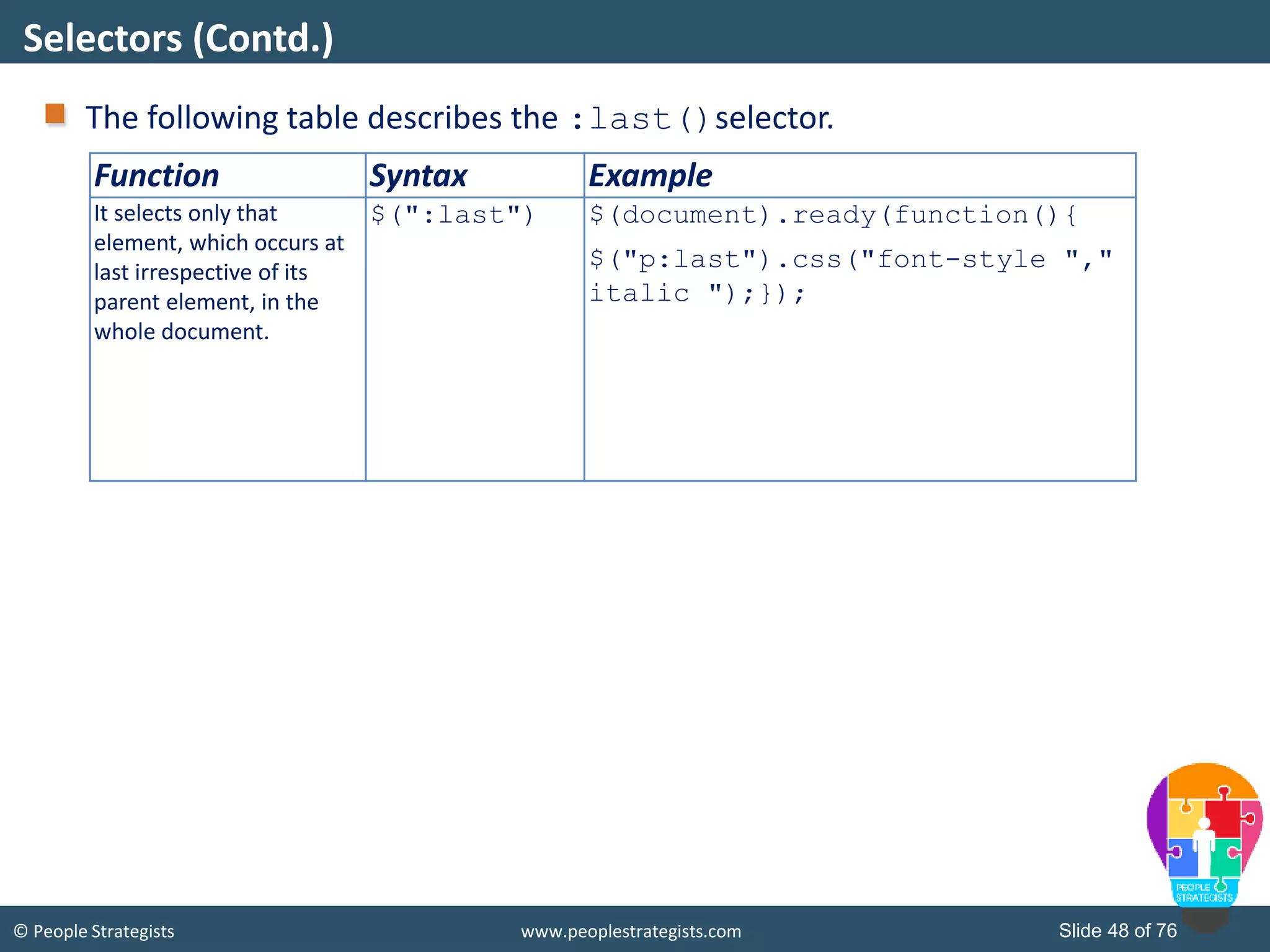
© People Strategists www.peoplestrategists.com Slide 41 of 76 There are some more jQuery selectors that are given in the following list: :contains() :odd :even :first-child :last-child :first :last Selectors (Contd.)
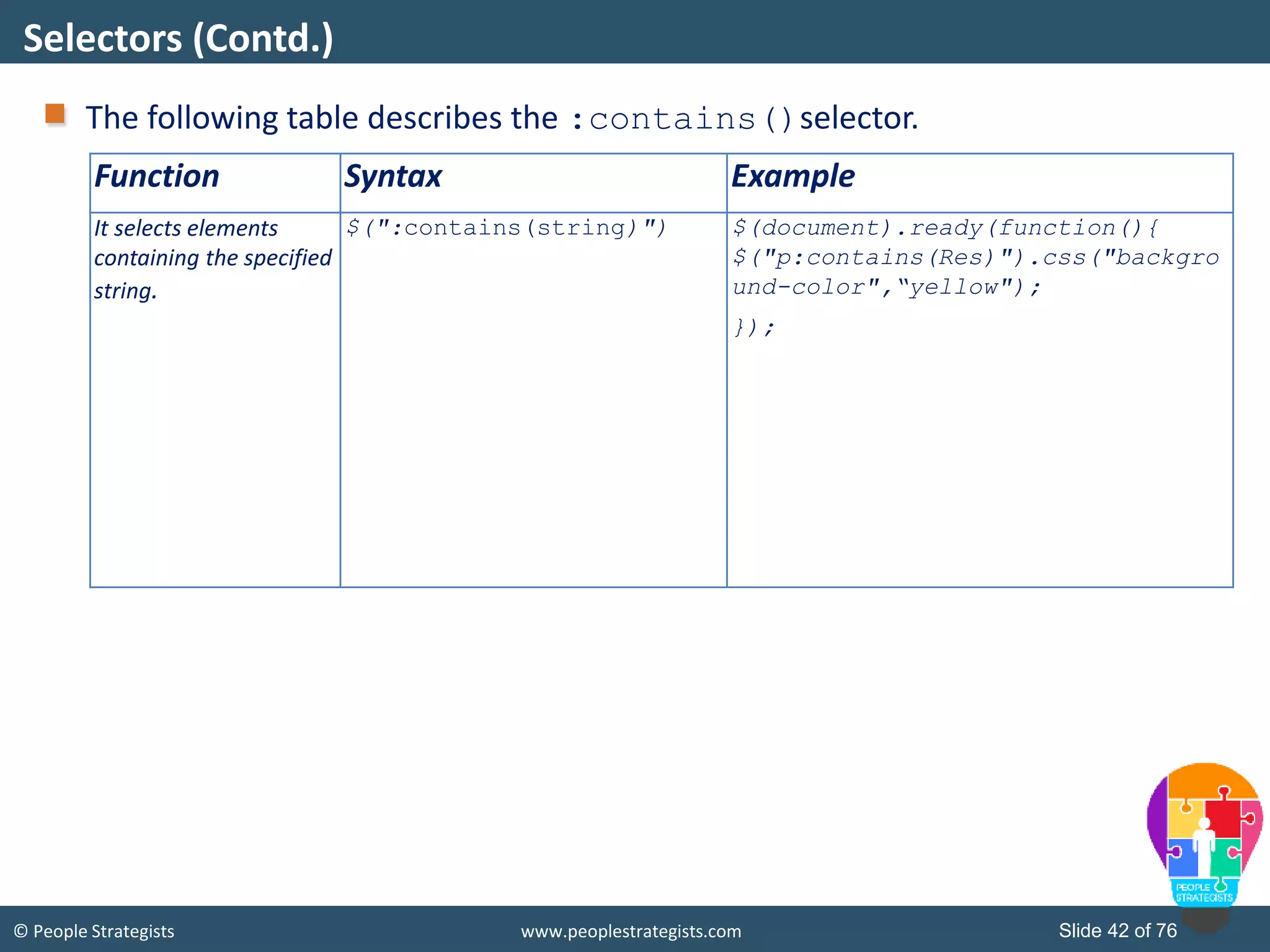
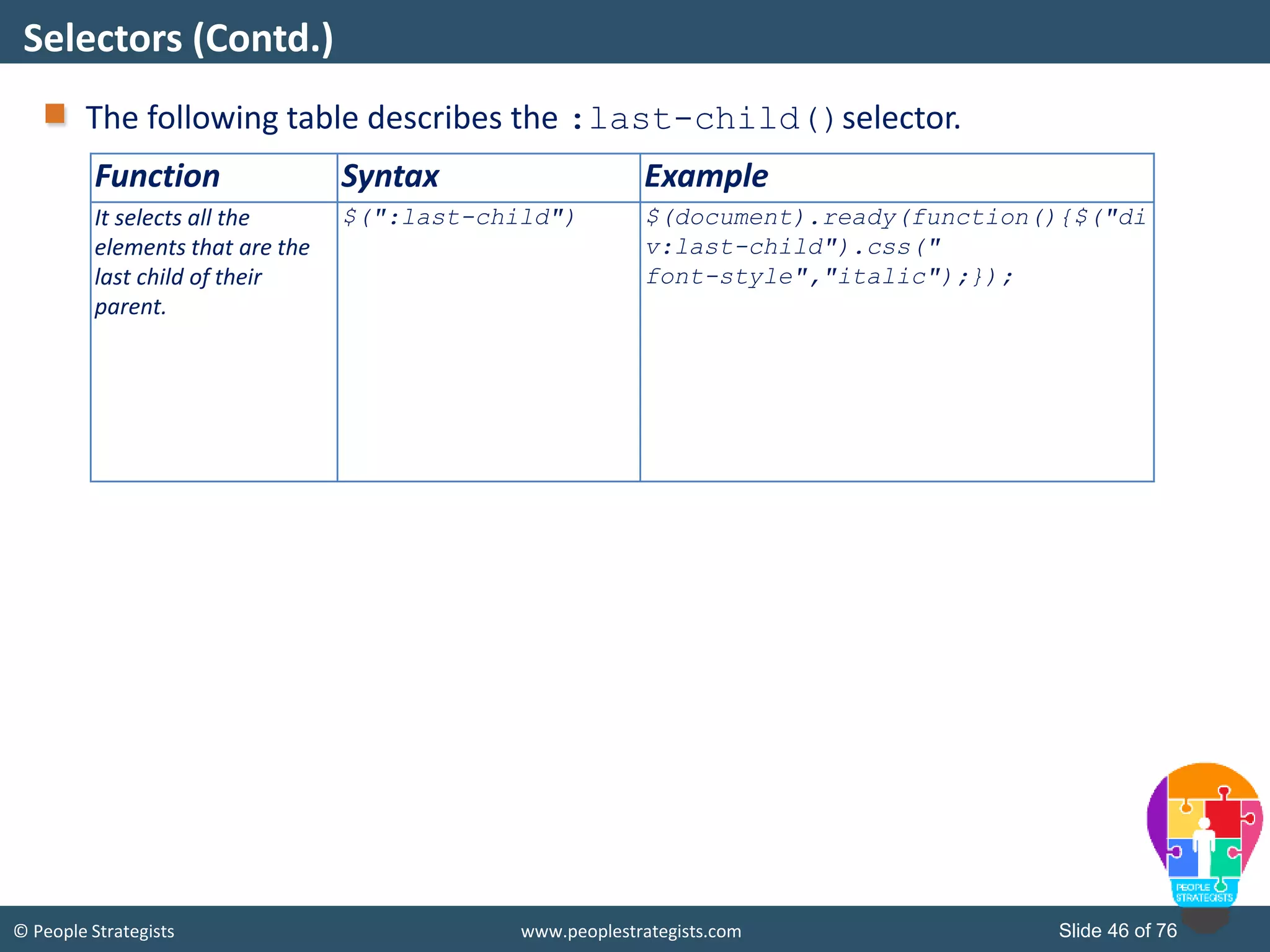
© People Strategists www.peoplestrategists.com Slide 42 of 76 The following table describes the :contains()selector. Selectors (Contd.) Function Syntax Example It selects elements containing the specified string. $(":contains(string)") $(document).ready(function(){ $("p:contains(Res)").css("backgro und-color",“yellow"); });
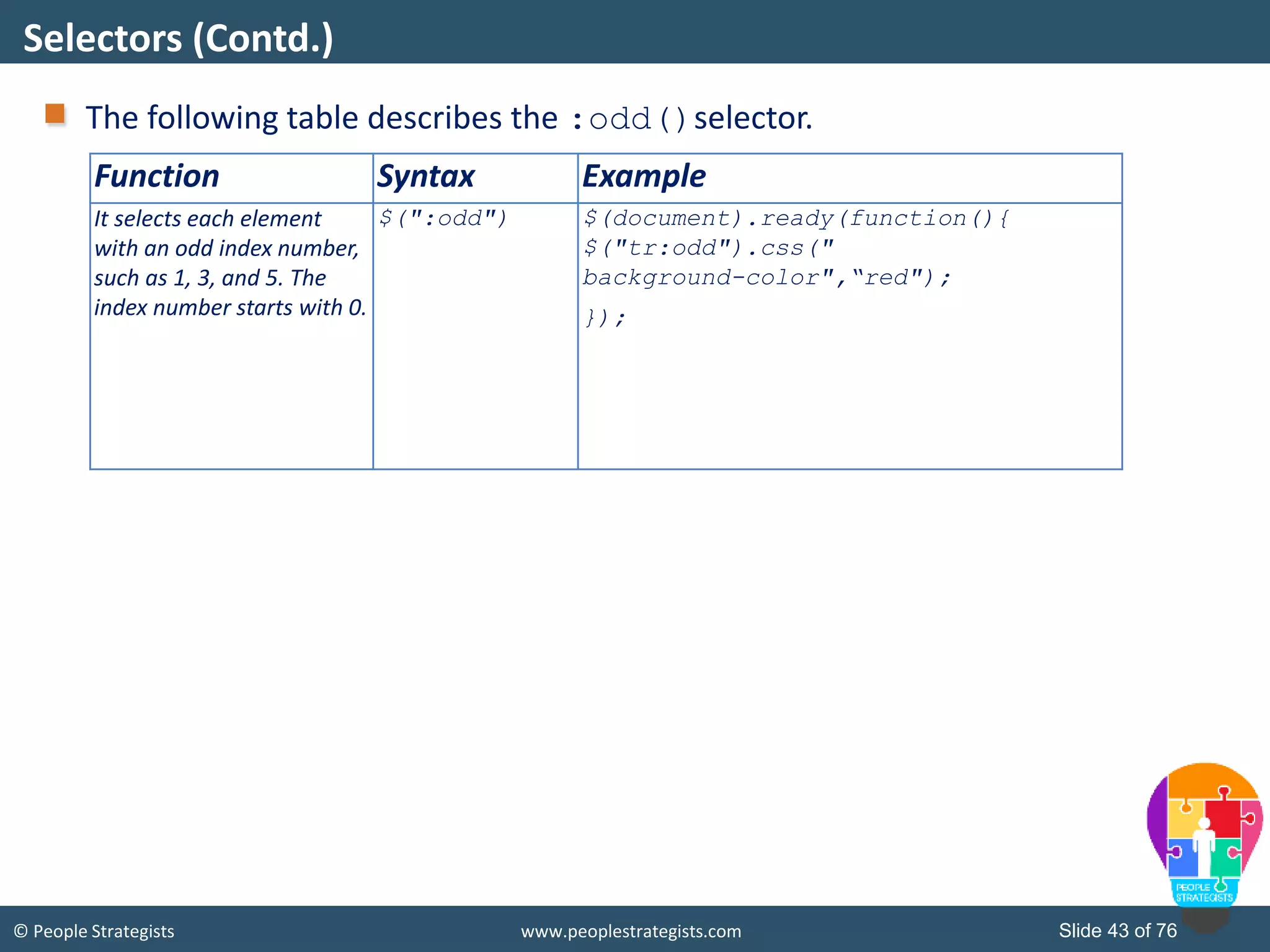
© People Strategists www.peoplestrategists.com Slide 43 of 76 The following table describes the :odd()selector. Selectors (Contd.) Function Syntax Example It selects each element with an odd index number, such as 1, 3, and 5. The index number starts with 0. $(":odd") $(document).ready(function(){ $("tr:odd").css(" background-color",“red"); });
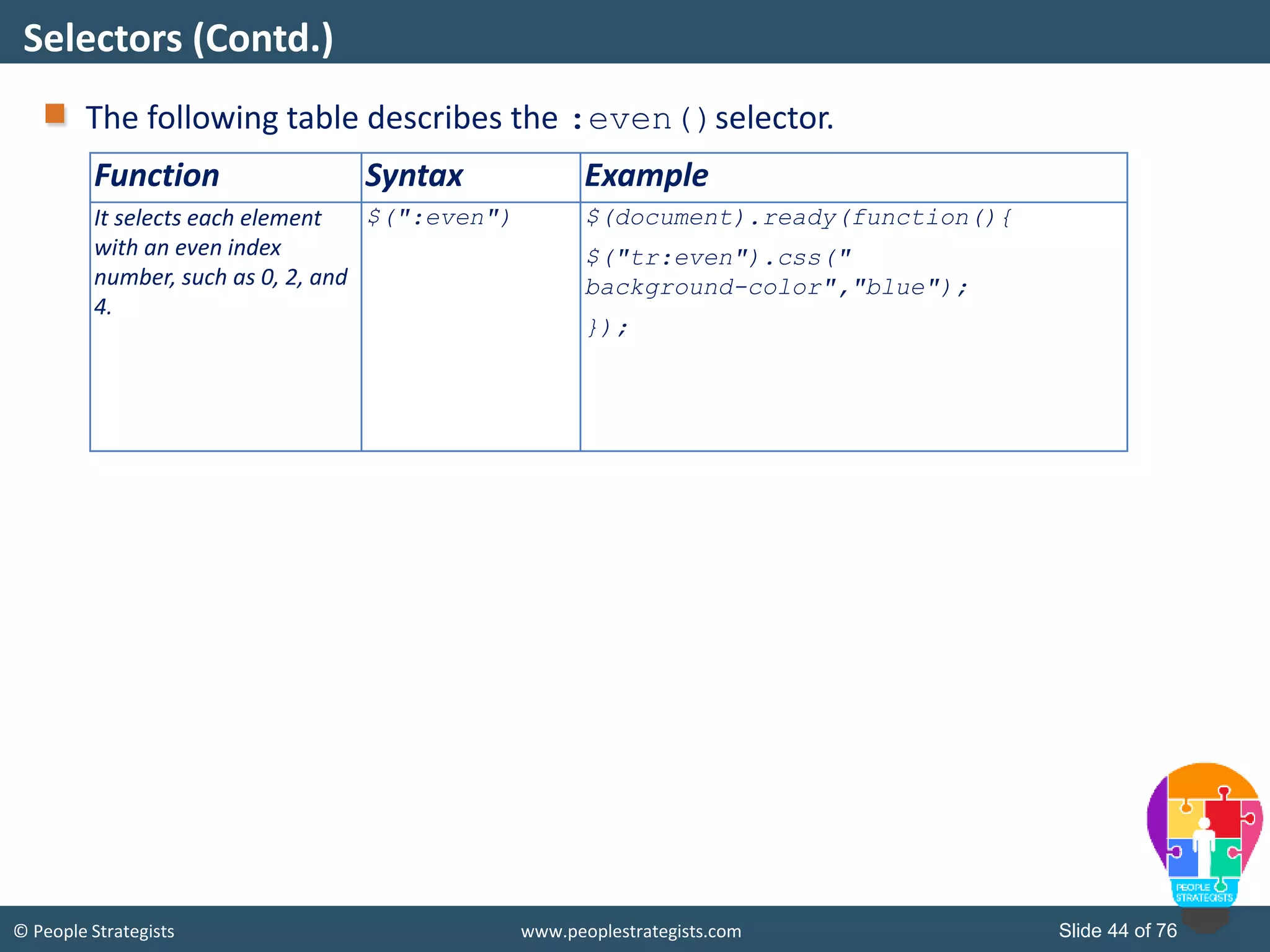
© People Strategists www.peoplestrategists.com Slide 44 of 76 The following table describes the :even()selector. Selectors (Contd.) Function Syntax Example It selects each element with an even index number, such as 0, 2, and 4. $(":even") $(document).ready(function(){ $("tr:even").css(" background-color","blue"); });
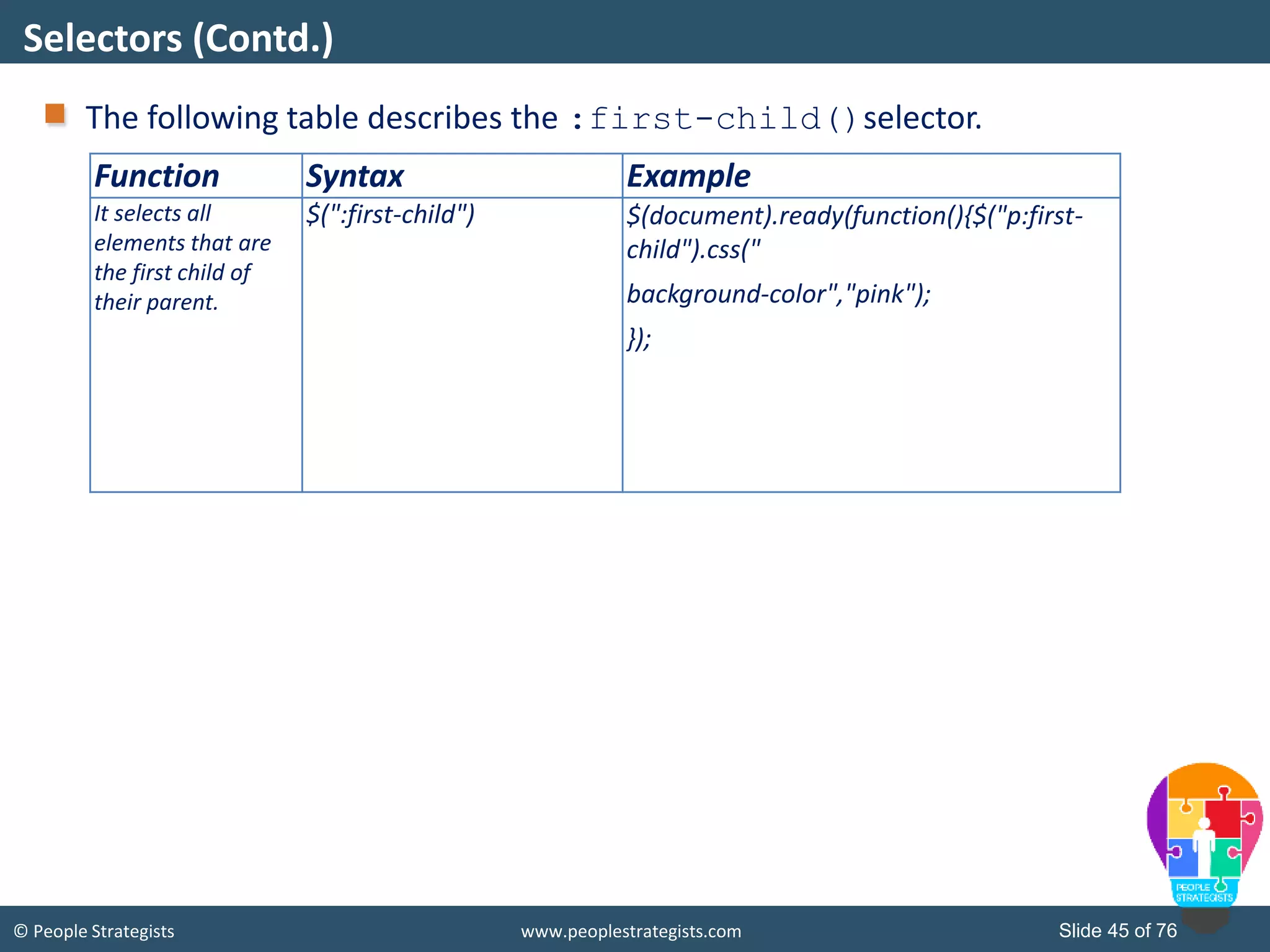
© People Strategists www.peoplestrategists.com Slide 45 of 76 The following table describes the :first-child()selector. Selectors (Contd.) Function Syntax Example It selects all elements that are the first child of their parent. $(":first-child") $(document).ready(function(){$("p:first- child").css(" background-color","pink"); });
© People Strategists www.peoplestrategists.com Slide 46 of 76 The following table describes the :last-child()selector. Selectors (Contd.) Function Syntax Example It selects all the elements that are the last child of their parent. $(":last-child") $(document).ready(function(){$("di v:last-child").css(" font-style","italic");});
© People Strategists www.peoplestrategists.com Slide 47 of 76 The following table describes the :first()selector. Selectors (Contd.) Function Syntax Example It selects only the first matched element, which occurs first irrespective of its parent element, in the whole document. $(":first") $(document).ready(function(){ $("p:first").css("font-style "," italic ");});
© People Strategists www.peoplestrategists.com Slide 48 of 76 The following table describes the :last()selector. Selectors (Contd.) Function Syntax Example It selects only that element, which occurs at last irrespective of its parent element, in the whole document. $(":last") $(document).ready(function(){ $("p:last").css("font-style "," italic ");});
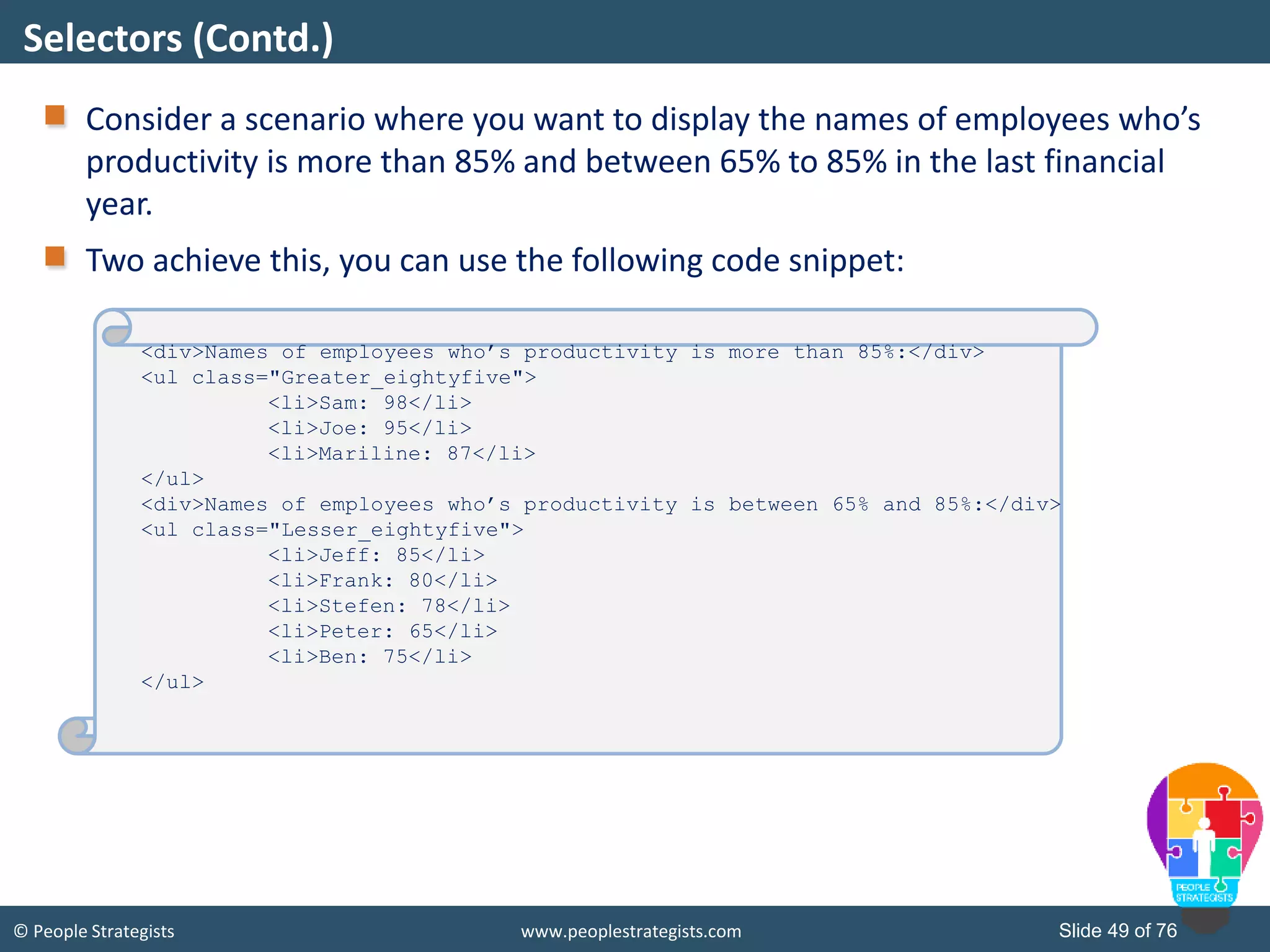
© People Strategists www.peoplestrategists.com Slide 49 of 76 Consider a scenario where you want to display the names of employees who’s productivity is more than 85% and between 65% to 85% in the last financial year. Two achieve this, you can use the following code snippet: Selectors (Contd.) <div>Names of employees who’s productivity is more than 85%:</div> <ul class="Greater_eightyfive"> <li>Sam: 98</li> <li>Joe: 95</li> <li>Mariline: 87</li> </ul> <div>Names of employees who’s productivity is between 65% and 85%:</div> <ul class="Lesser_eightyfive"> <li>Jeff: 85</li> <li>Frank: 80</li> <li>Stefen: 78</li> <li>Peter: 65</li> <li>Ben: 75</li> </ul>
© People Strategists www.peoplestrategists.com Slide 50 of 76 To highlight the names of those employees who’s productivity is more than 85% in yellow color, use the following code snippet: In the preceding code snippet, the <ul> element that has the value of the class attribute as Greater_eightyfive is selected and the background color, yellow, is applied to it. Selectors (Contd.) $(document).ready(function () { var res = $('ul[class="Greater_eightyfive"]'); res.css("background-color", "yellow"); });
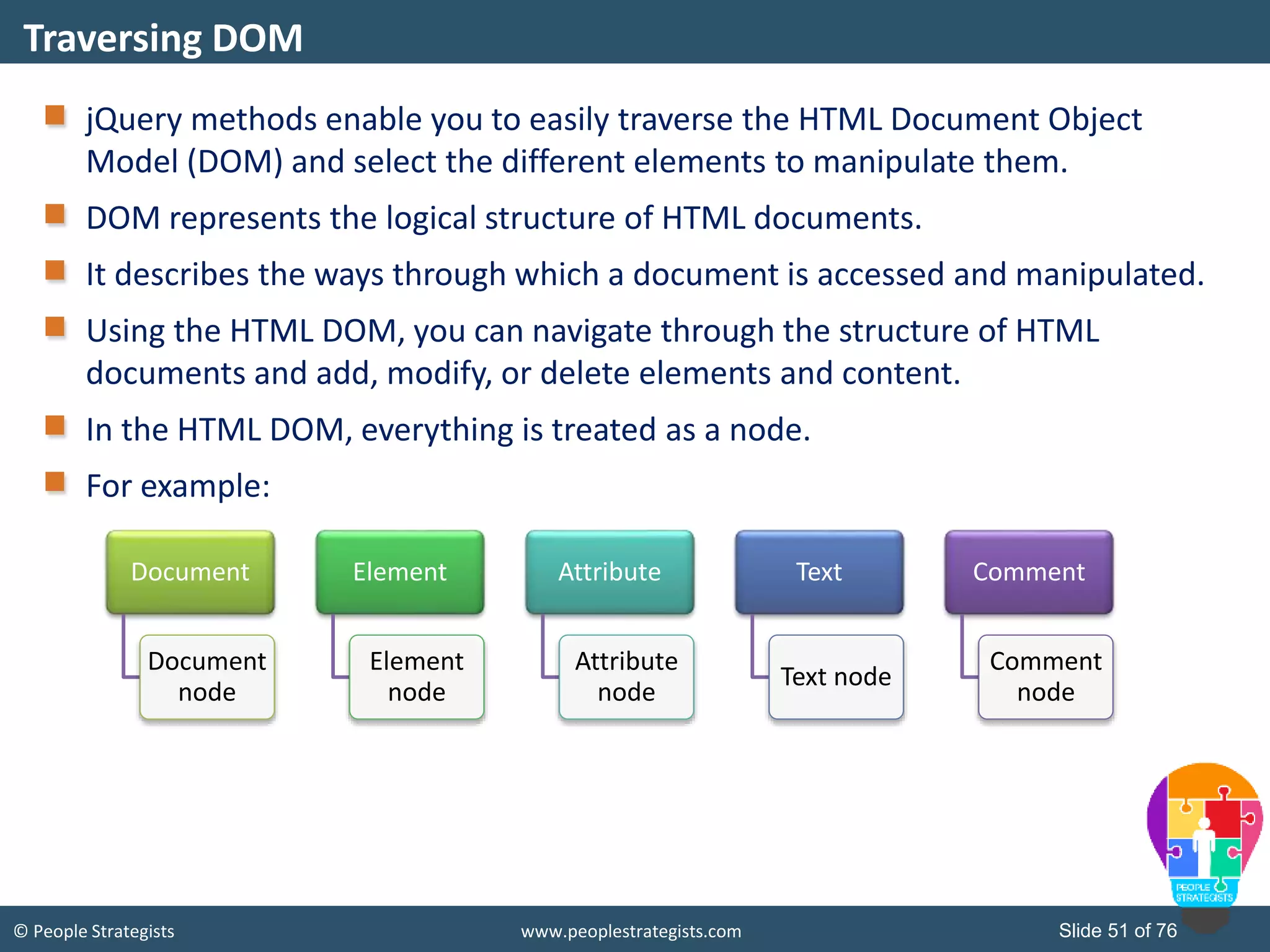
© People Strategists www.peoplestrategists.com Slide 51 of 76 jQuery methods enable you to easily traverse the HTML Document Object Model (DOM) and select the different elements to manipulate them. DOM represents the logical structure of HTML documents. It describes the ways through which a document is accessed and manipulated. Using the HTML DOM, you can navigate through the structure of HTML documents and add, modify, or delete elements and content. In the HTML DOM, everything is treated as a node. For example: Traversing DOM Document Document node Element Element node Attribute Attribute node Text Text node Comment Comment node
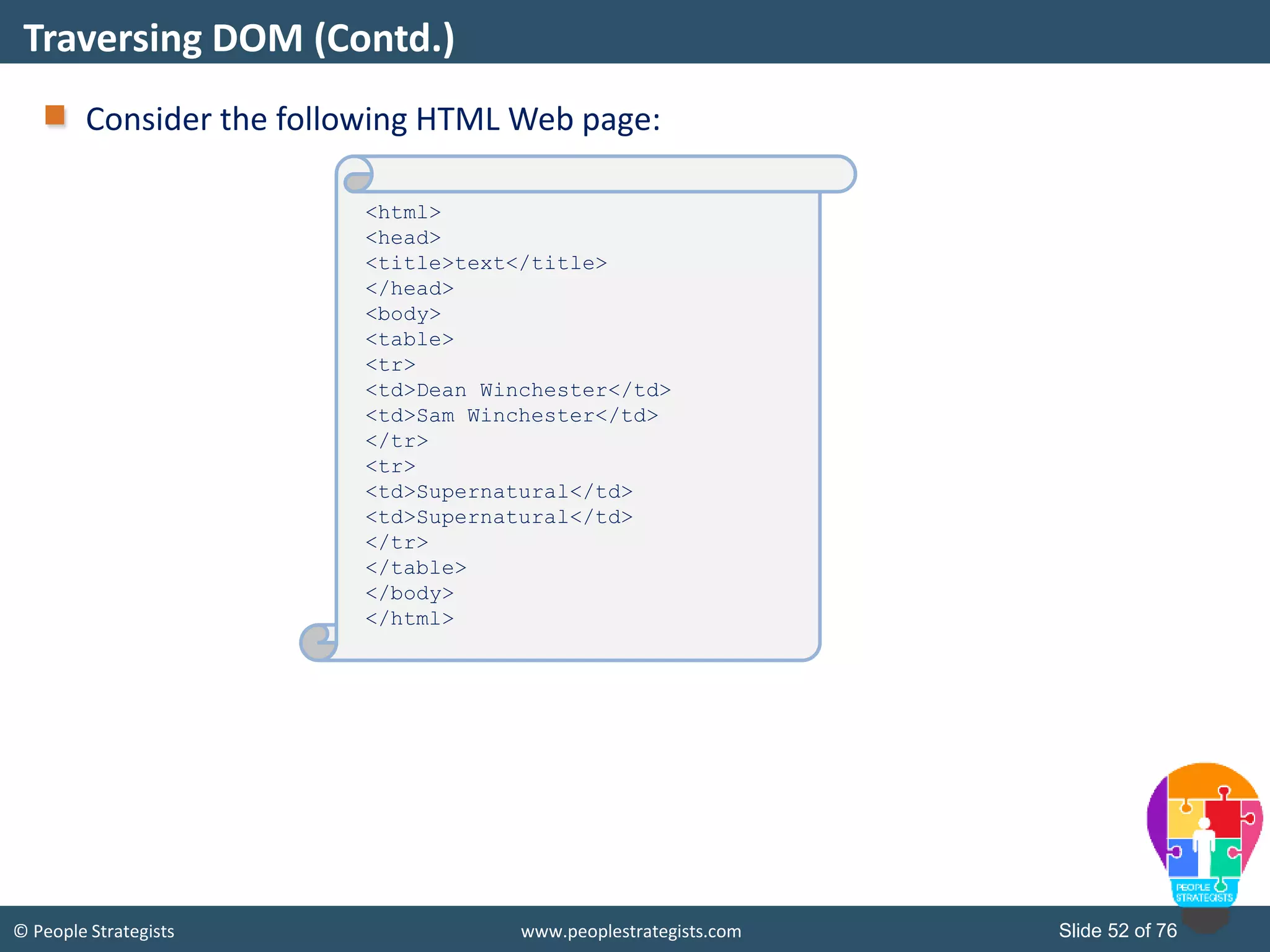
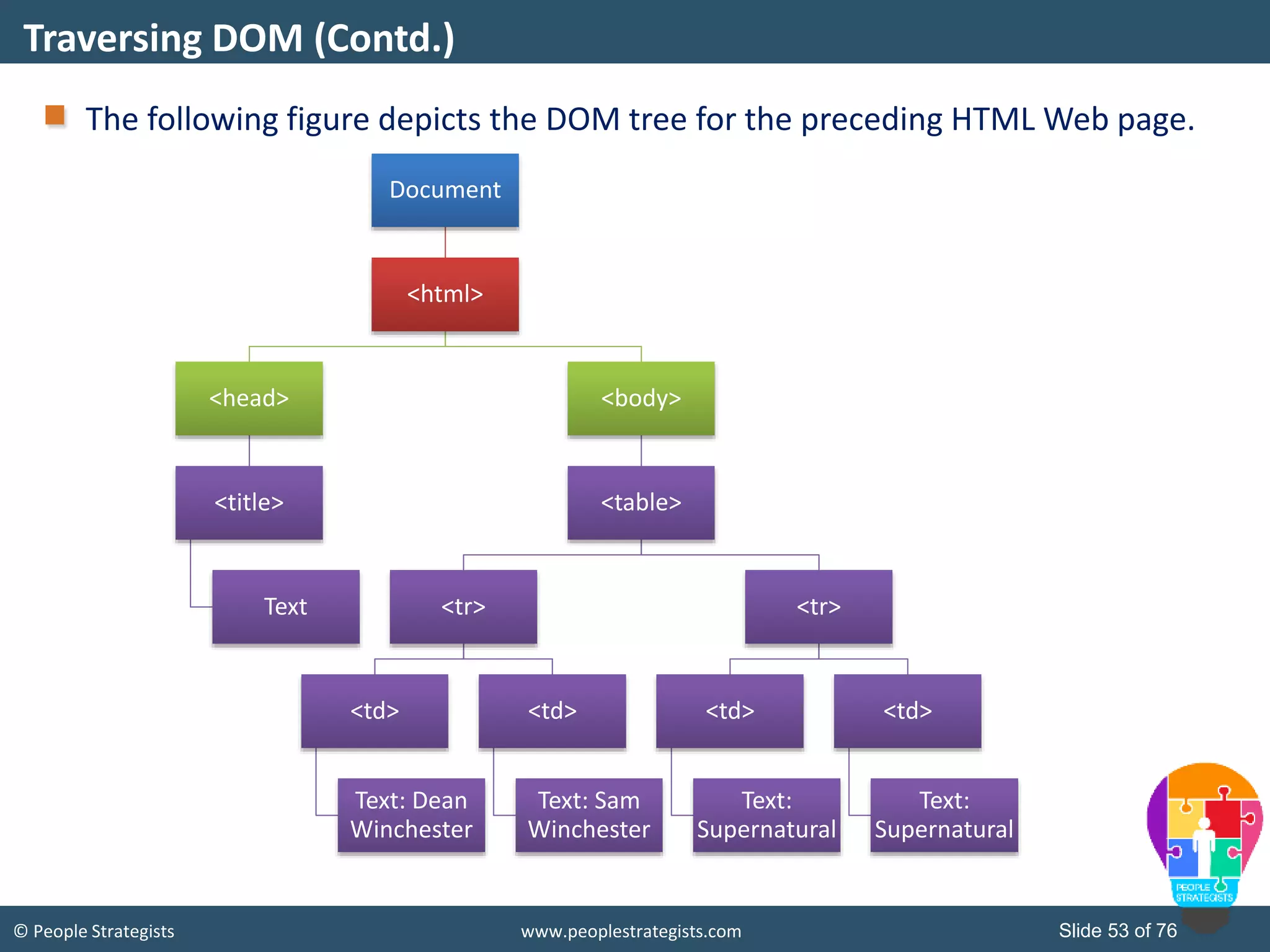
© People Strategists www.peoplestrategists.com Slide 52 of 76 Consider the following HTML Web page: Traversing DOM (Contd.) <html> <head> <title>text</title> </head> <body> <table> <tr> <td>Dean Winchester</td> <td>Sam Winchester</td> </tr> <tr> <td>Supernatural</td> <td>Supernatural</td> </tr> </table> </body> </html>
© People Strategists www.peoplestrategists.com Slide 53 of 76 The following figure depicts the DOM tree for the preceding HTML Web page. Traversing DOM (Contd.) Document <html> <head> <title> Text <body> <table> <tr> <td> Text: Dean Winchester <td> Text: Sam Winchester <tr> <td> Text: Supernatural <td> Text: Supernatural
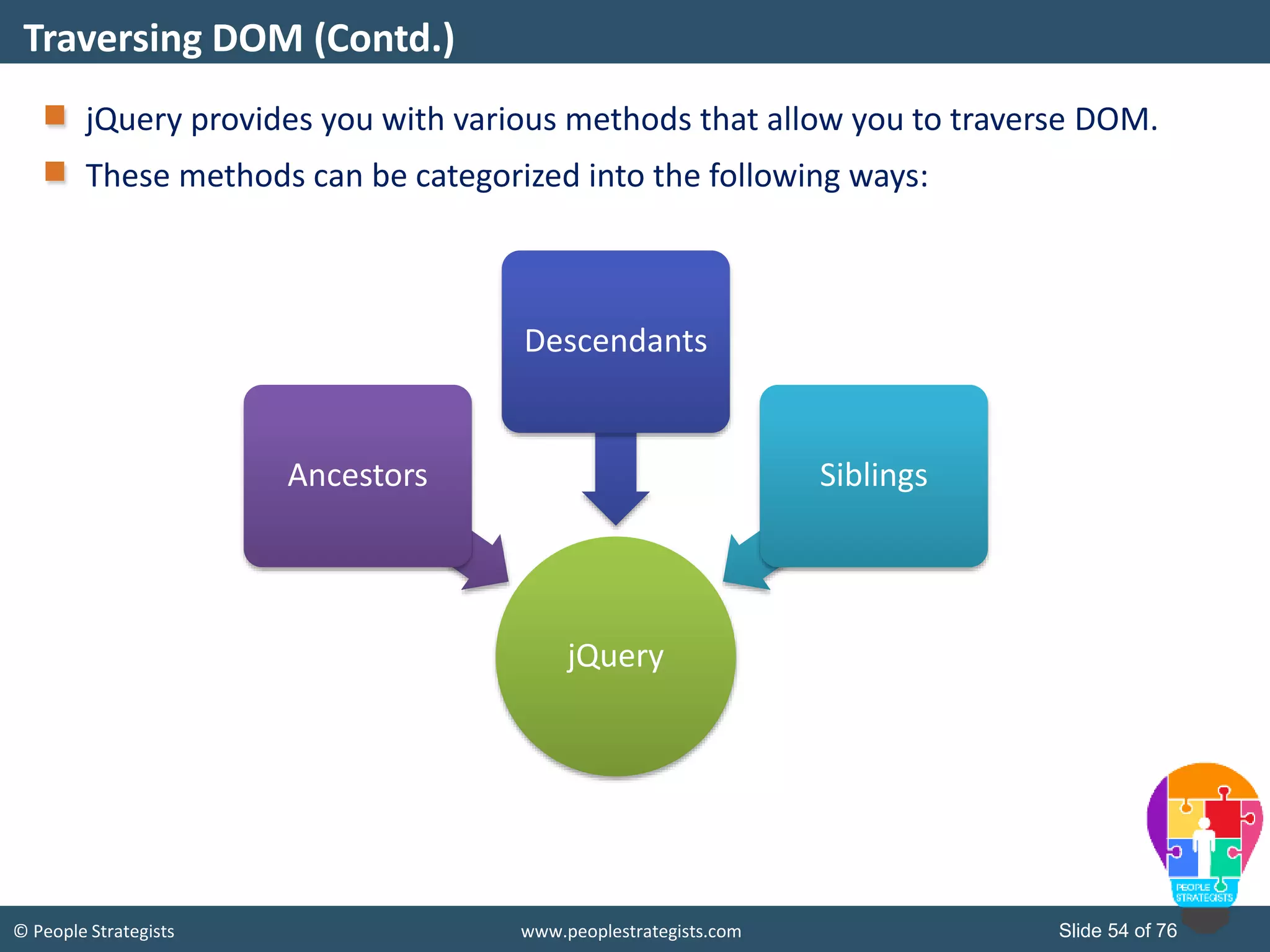
© People Strategists www.peoplestrategists.com Slide 54 of 76 jQuery provides you with various methods that allow you to traverse DOM. These methods can be categorized into the following ways: Traversing DOM (Contd.) jQuery Ancestors Descendants Siblings
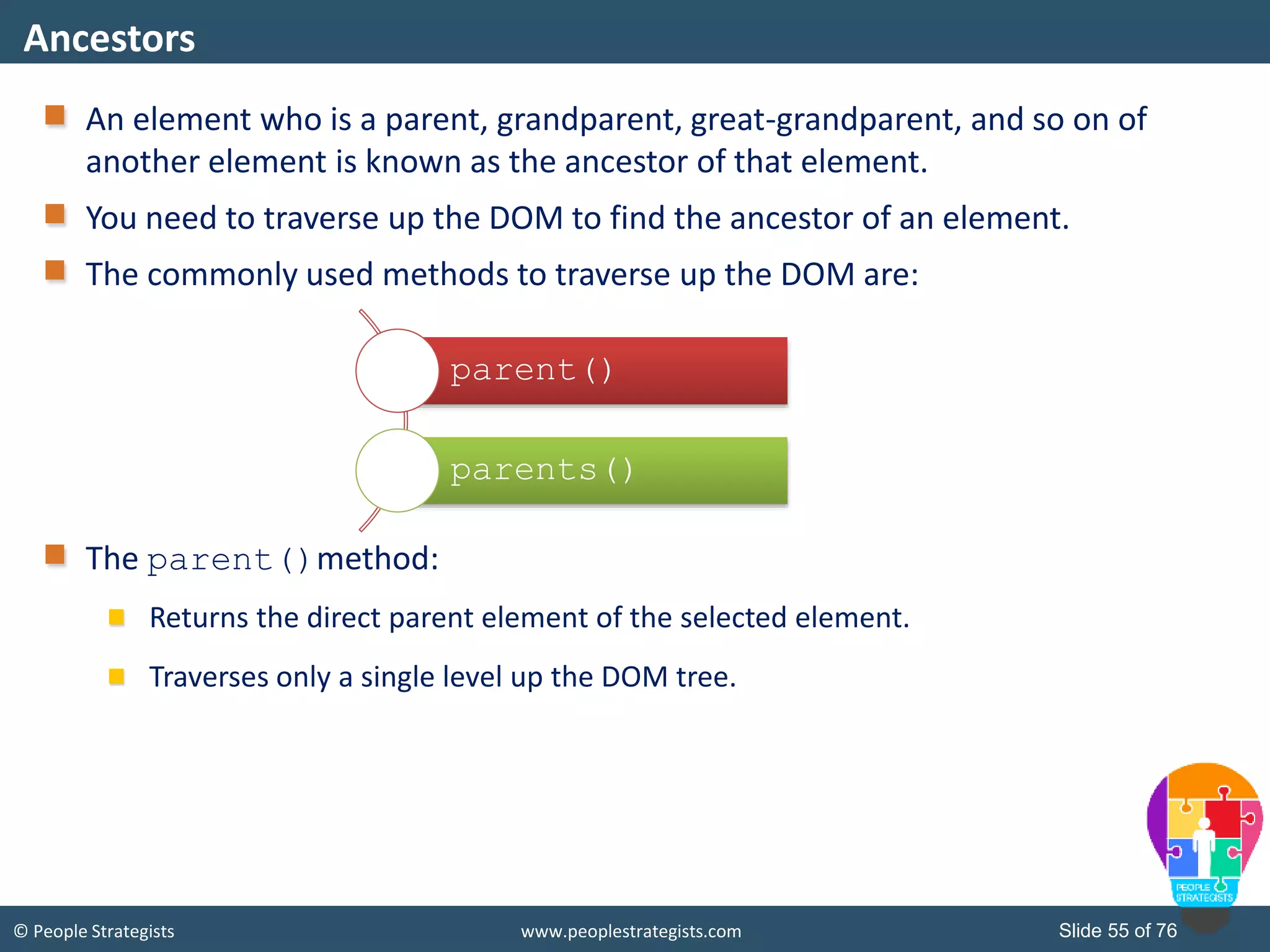
© People Strategists www.peoplestrategists.com Slide 55 of 76 An element who is a parent, grandparent, great-grandparent, and so on of another element is known as the ancestor of that element. You need to traverse up the DOM to find the ancestor of an element. The commonly used methods to traverse up the DOM are: The parent()method: Returns the direct parent element of the selected element. Traverses only a single level up the DOM tree. Ancestors parent() parents()
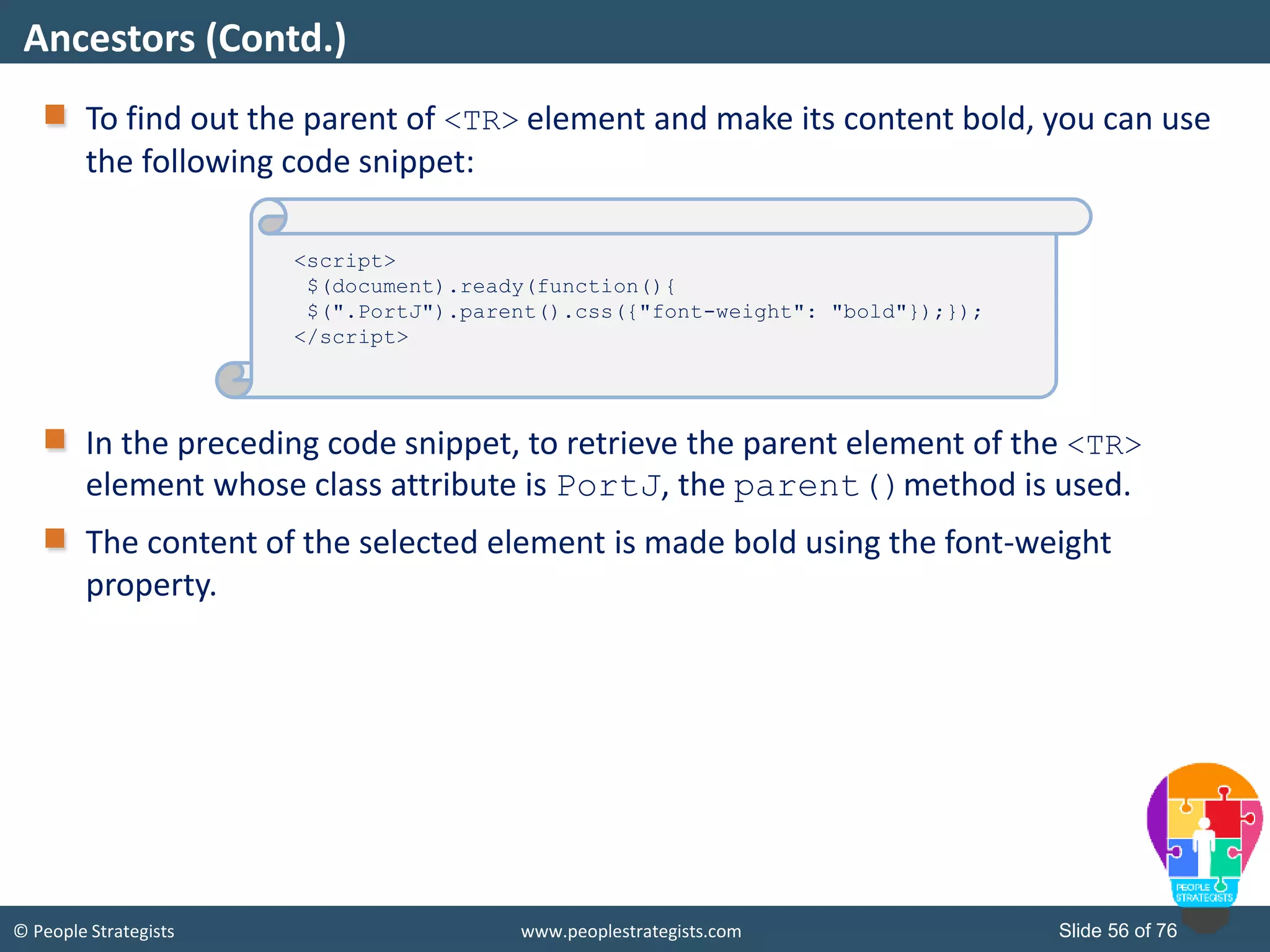
© People Strategists www.peoplestrategists.com Slide 56 of 76 To find out the parent of <TR> element and make its content bold, you can use the following code snippet: In the preceding code snippet, to retrieve the parent element of the <TR> element whose class attribute is PortJ, the parent()method is used. The content of the selected element is made bold using the font-weight property. Ancestors (Contd.) Destination.html <script> $(document).ready(function(){ $(".PortJ").parent().css({"font-weight": "bold"});}); </script>
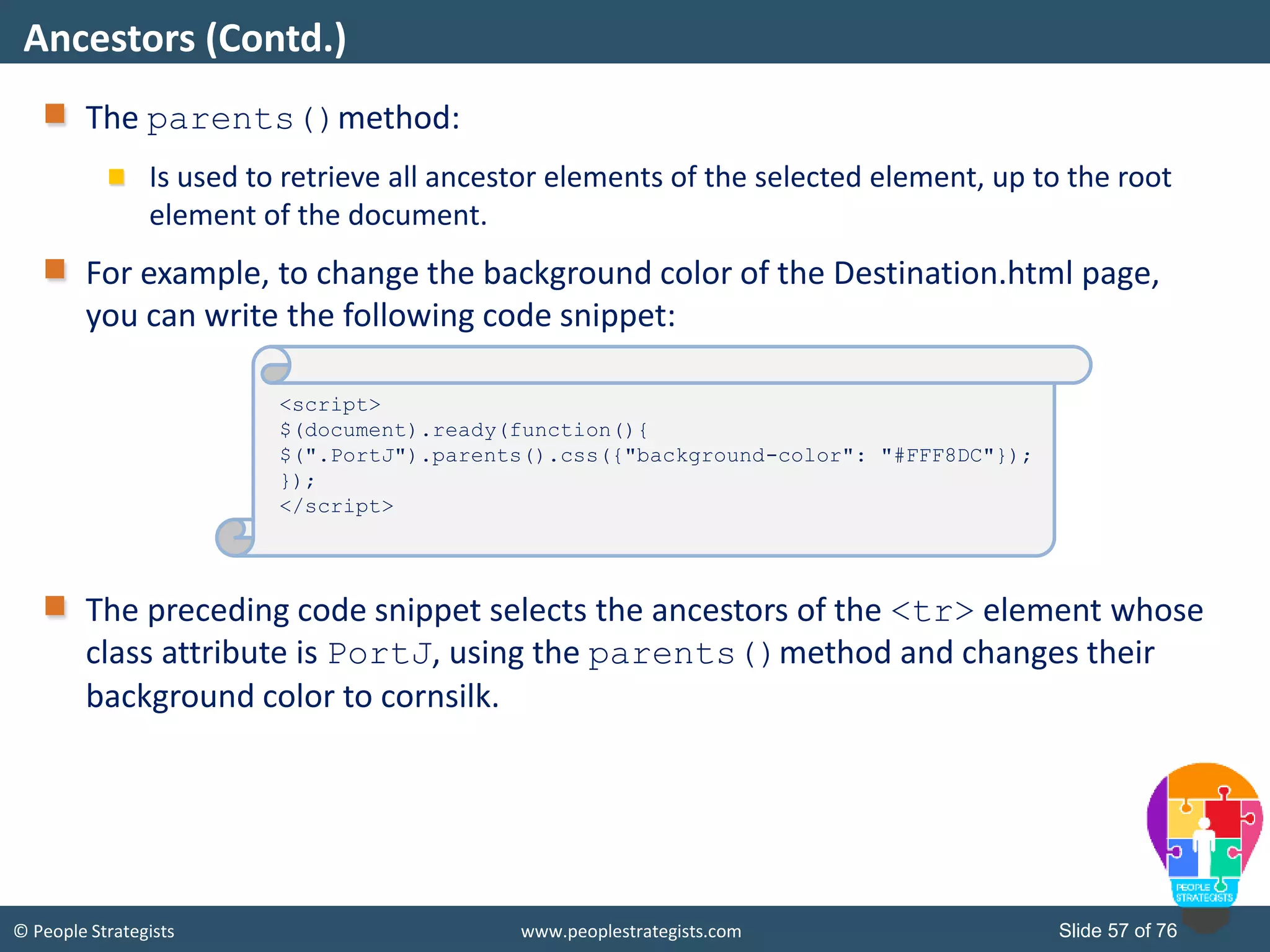
© People Strategists www.peoplestrategists.com Slide 57 of 76 The parents()method: Is used to retrieve all ancestor elements of the selected element, up to the root element of the document. For example, to change the background color of the Destination.html page, you can write the following code snippet: The preceding code snippet selects the ancestors of the <tr> element whose class attribute is PortJ, using the parents()method and changes their background color to cornsilk. Ancestors (Contd.) <script> $(document).ready(function(){ $(".PortJ").parents().css({"background-color": "#FFF8DC"}); }); </script>
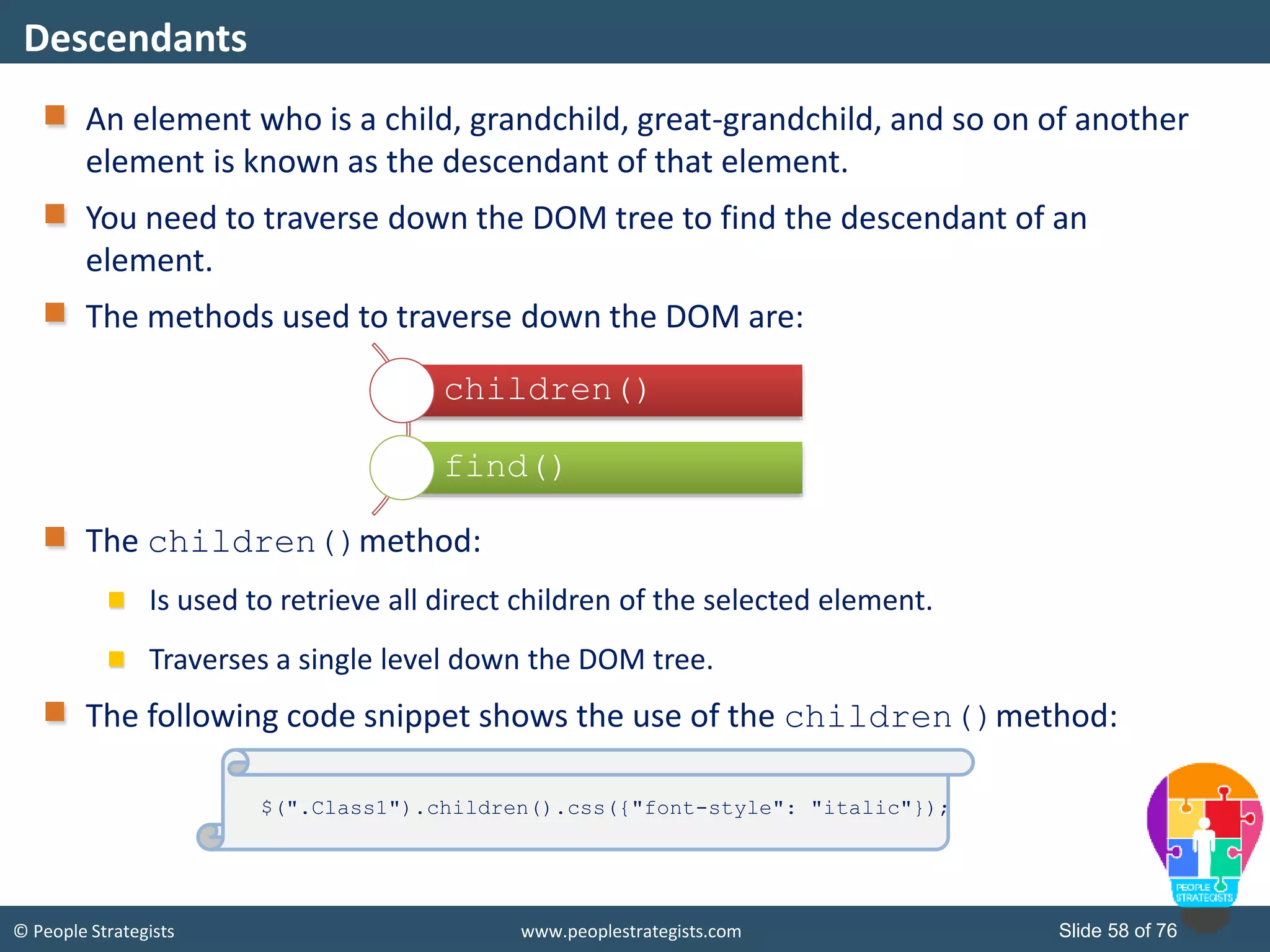
© People Strategists www.peoplestrategists.com Slide 58 of 76 An element who is a child, grandchild, great-grandchild, and so on of another element is known as the descendant of that element. You need to traverse down the DOM tree to find the descendant of an element. The methods used to traverse down the DOM are: The children()method: Is used to retrieve all direct children of the selected element. Traverses a single level down the DOM tree. The following code snippet shows the use of the children()method: Descendants children() find() $(".Class1").children().css({"font-style": "italic"});
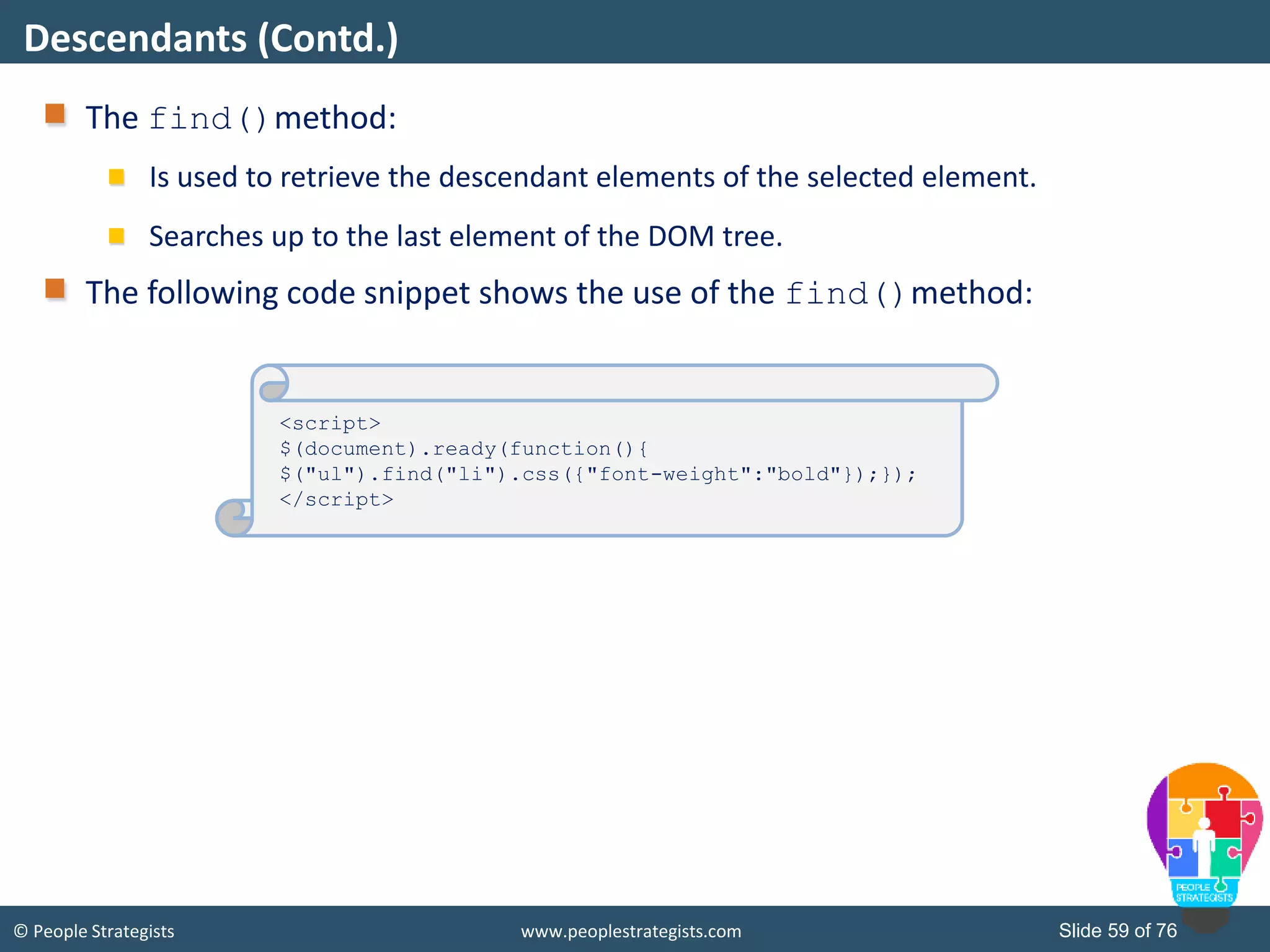
© People Strategists www.peoplestrategists.com Slide 59 of 76 The find()method: Is used to retrieve the descendant elements of the selected element. Searches up to the last element of the DOM tree. The following code snippet shows the use of the find()method: Descendants (Contd.) <script> $(document).ready(function(){ $("ul").find("li").css({"font-weight":"bold"});}); </script>
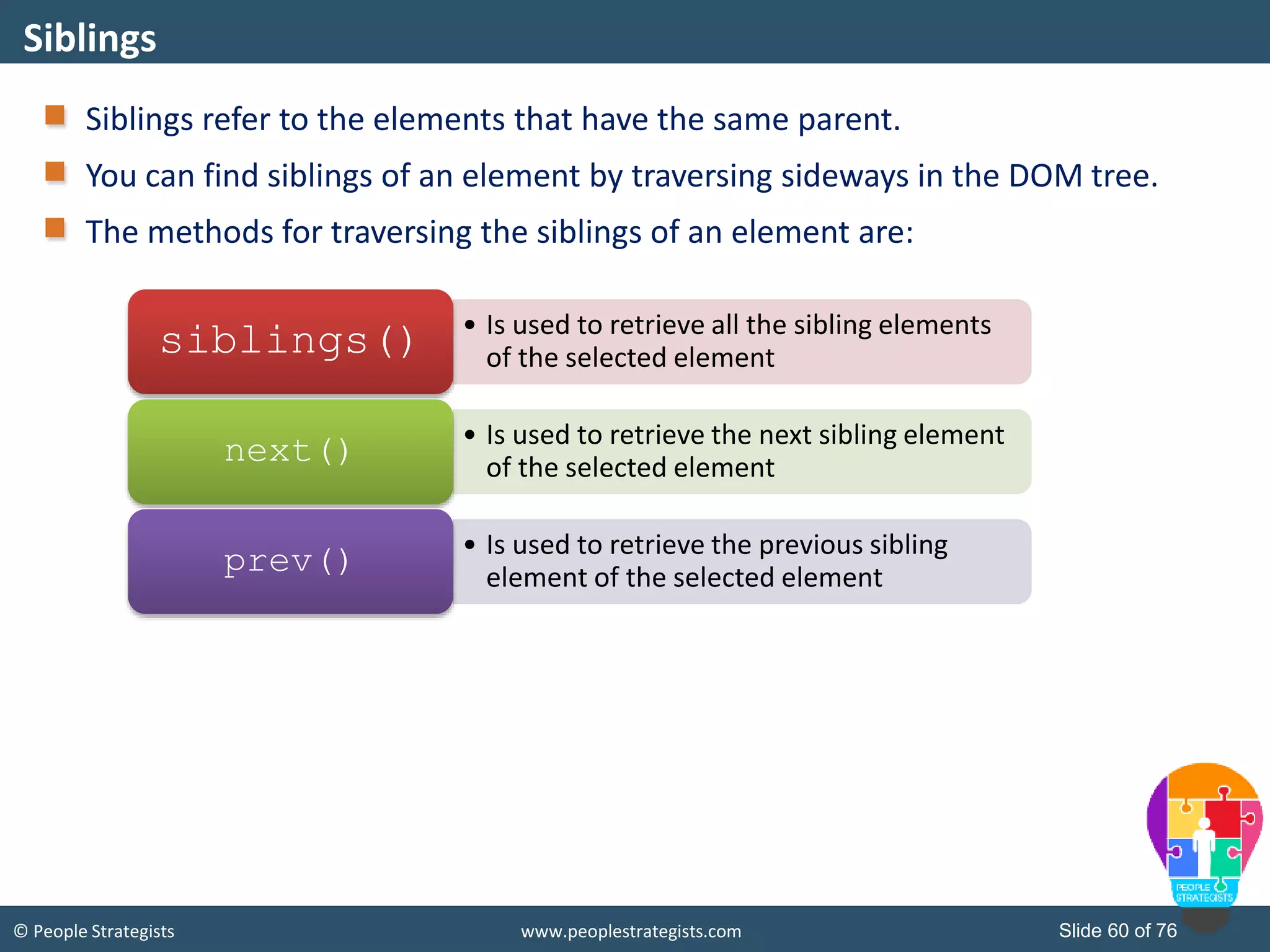
© People Strategists www.peoplestrategists.com Slide 60 of 76 Siblings refer to the elements that have the same parent. You can find siblings of an element by traversing sideways in the DOM tree. The methods for traversing the siblings of an element are: Siblings • Is used to retrieve all the sibling elements of the selected elementsiblings() • Is used to retrieve the next sibling element of the selected element next() • Is used to retrieve the previous sibling element of the selected element prev()
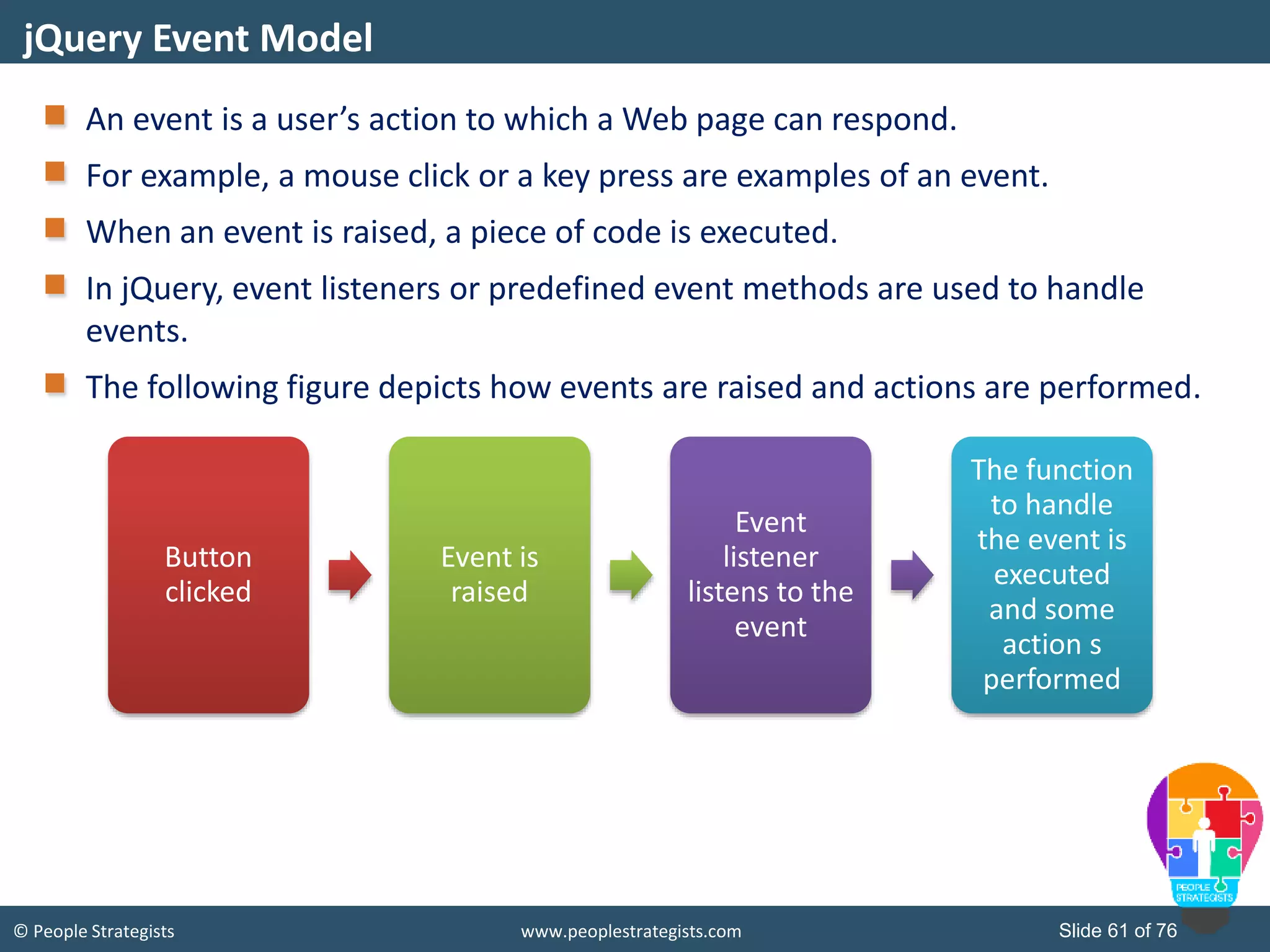
© People Strategists www.peoplestrategists.com Slide 61 of 76 An event is a user’s action to which a Web page can respond. For example, a mouse click or a key press are examples of an event. When an event is raised, a piece of code is executed. In jQuery, event listeners or predefined event methods are used to handle events. The following figure depicts how events are raised and actions are performed. jQuery Event Model Button clicked Event is raised Event listener listens to the event The function to handle the event is executed and some action s performed
© People Strategists www.peoplestrategists.com Slide 62 of 76 jQuery provides you the following methods to attach event handler to multiple events of a selected element(s): bind() on() The bind()method: Is used to attach one or more event handlers for the selected elements. Can be invoked by using the following syntax: To attach an event handler to a single event, you can use the following code snippet: To attach an event handler to multiple events, you can use the following code snippet: Binding Events $(selector).bind(event[,data],function $("p").bind("click",function(){ alert(" Click event raised"); }); $("#btn").bind("mouseover mouseout",function(){ $("#btn").toggleClass(“demo"); });
© People Strategists www.peoplestrategists.com Slide 63 of 76 The on()method can be used to attach one or multiple event handlers for the selected and their child elements. The following figure depicts the syntax to use the on()method. The following code snippet can be used to attach the click event to the <p> element at the click even of a button: Binding Events (Contd.) $(selector).on(event[,childSelector][,data],function [,map]) $("div").on("click","p",function(){ $(this).hide(); });
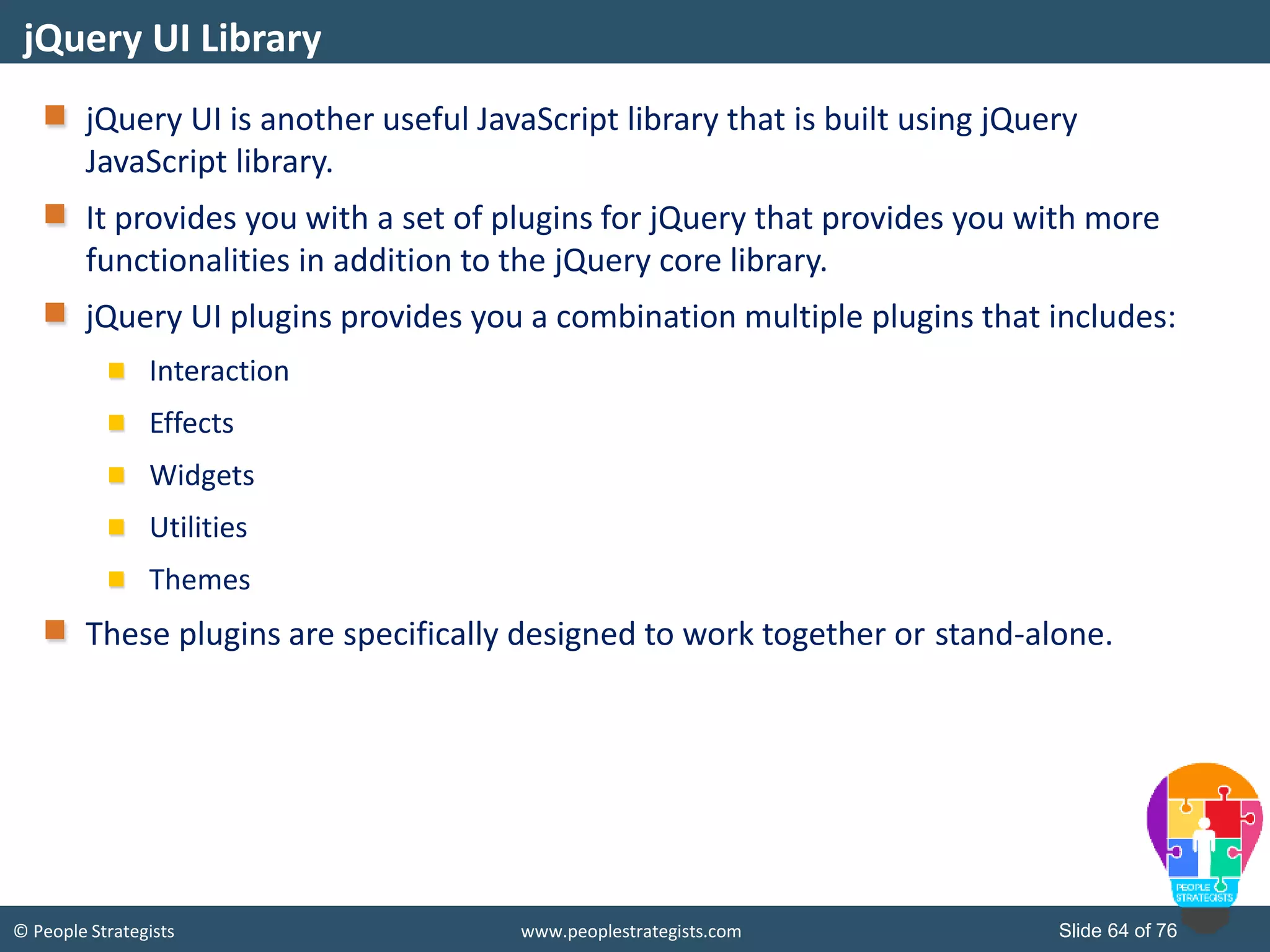
© People Strategists www.peoplestrategists.com Slide 64 of 76 jQuery UI is another useful JavaScript library that is built using jQuery JavaScript library. It provides you with a set of plugins for jQuery that provides you with more functionalities in addition to the jQuery core library. jQuery UI plugins provides you a combination multiple plugins that includes: Interaction Effects Widgets Utilities Themes These plugins are specifically designed to work together or stand-alone. jQuery UI Library
© People Strategists www.peoplestrategists.com Slide 65 of 76 To use jQuery UI library, you can: Download the library on your Web server or local host Include it directly into your Web pages using CDN. To include jQuery UI library directly into your Web page, you can use any of the following CDNs: jQuery UI Library (Contd.) <link rel="Stylesheet" href="http://ajax.aspnetcdn.com/ajax/jquery.ui/1.8.10/themes/redmond/jquery- ui.css" /> <script src="http://ajax.aspnetcdn.com/ajax/jquery/jquery- 1.8.0.js"></script> <script src="http://ajax.aspnetcdn.com/ajax/jquery.ui/1.8.22/jquery- ui.js"></script> <link rel="stylesheet" href="https://ajax.googleapis.com/ajax/libs/jqueryui/1.11.4/themes/smoothnes s/jquery-ui.css"> <script src="https://ajax.googleapis.com/ajax/libs/jquery/1.11.4/jquery.min.js"> <script src="https://ajax.googleapis.com/ajax/libs/jqueryui/1.11.4/jquery- ui.min.js"></script>
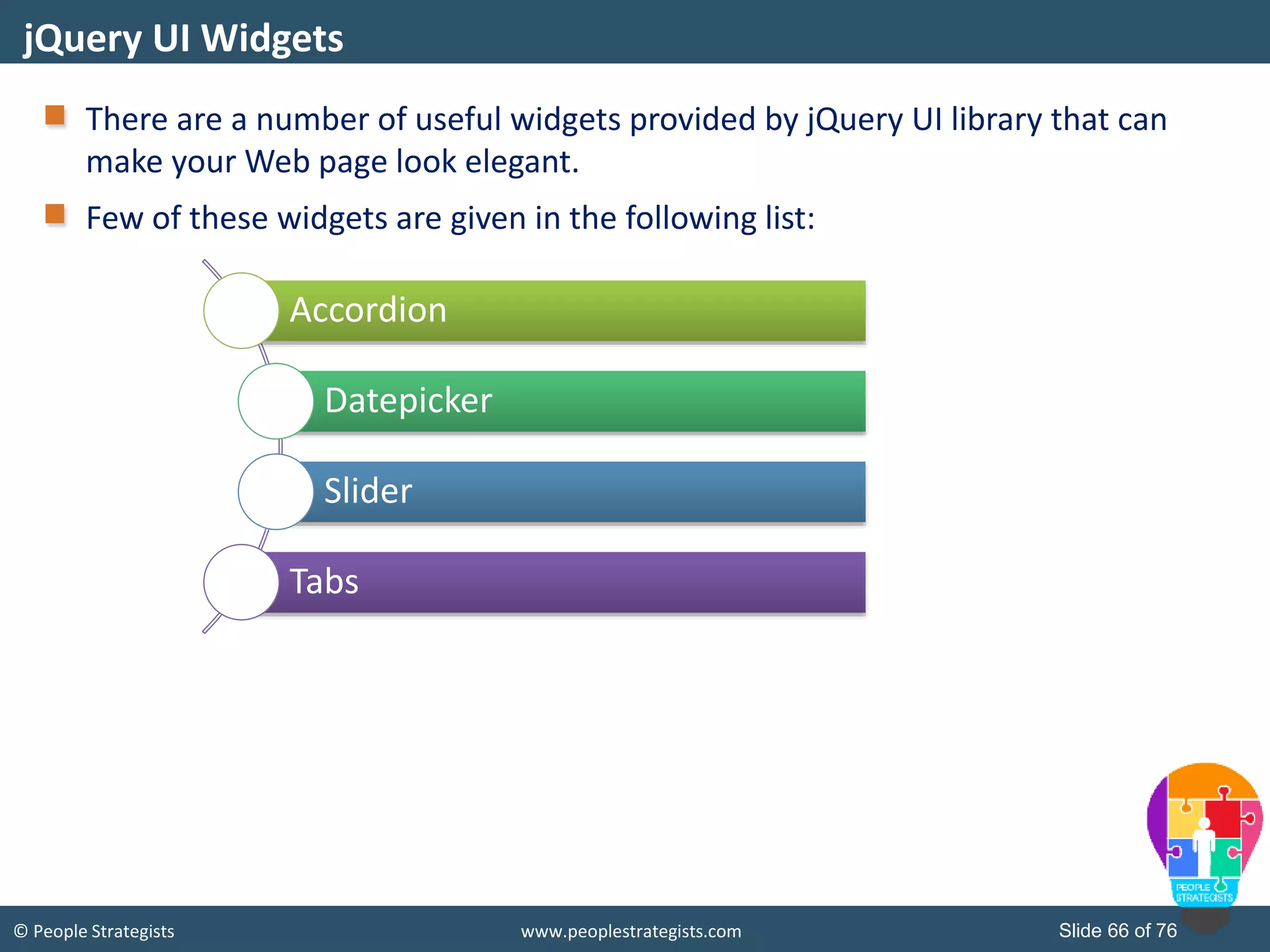
© People Strategists www.peoplestrategists.com Slide 66 of 76 There are a number of useful widgets provided by jQuery UI library that can make your Web page look elegant. Few of these widgets are given in the following list: jQuery UI Widgets Accordion Datepicker Slider Tabs
© People Strategists www.peoplestrategists.com Slide 67 of 76 The accordion widget is helpful when you need to display content or information in a limited amount a space with the help of collapsible content panels. The syntax to use accordion widget is as follows: $(selector, context).accordion(options); The following table depicts some of the important options that you can use with the accordion widget. Accordion Widget Option Description active Indicates the index of the menu that will be opened by default. animate Used to set how to animate changing menus. collapsible Allows user to close a menu by clicking on it. Disabled Allows you to disable the accordion.
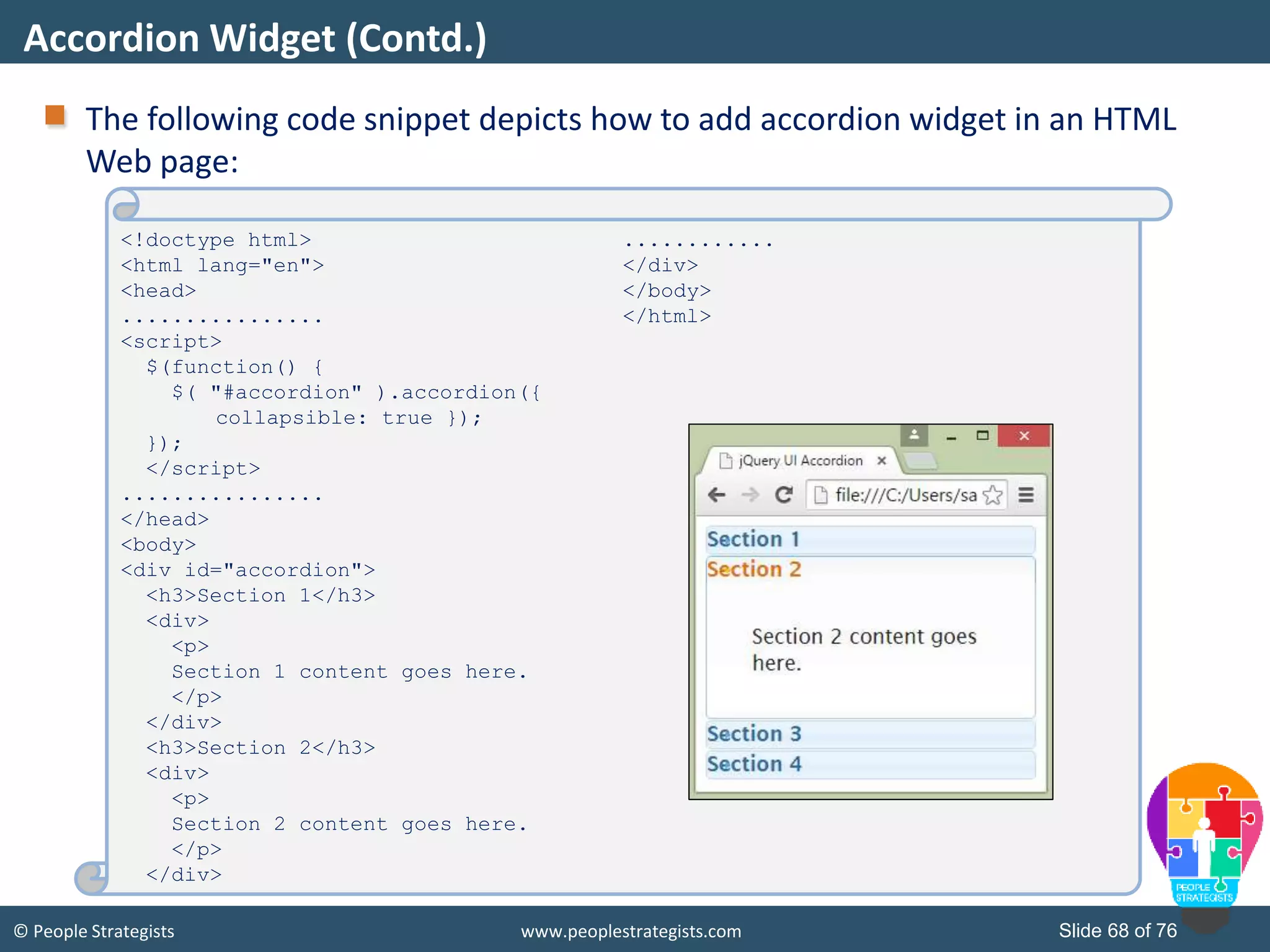
© People Strategists www.peoplestrategists.com Slide 68 of 76 The following code snippet depicts how to add accordion widget in an HTML Web page: Accordion Widget (Contd.) <!doctype html> <html lang="en"> <head> ................ <script> $(function() { $( "#accordion" ).accordion({ collapsible: true }); }); </script> ................ </head> <body> <div id="accordion"> <h3>Section 1</h3> <div> <p> Section 1 content goes here. </p> </div> <h3>Section 2</h3> <div> <p> Section 2 content goes here. </p> </div> ............ </div> </body> </html>
© People Strategists www.peoplestrategists.com Slide 69 of 76 The datepicker widget allows users to select a date quickly and visually. The syntax to use accordion widget is as follows: $(selector, context).datepicker(options); The following table depicts some of the important options that you can use with the datepicker widget. Datepicker Widget Option Description changeMonth Allows users to directly change the month without using the arrow buttons. changeYear Allows users to directly change the year without using the arrow buttons. dateFormat Allows you to specify the date format. defaultDate Allows you to set the initial date for the control.
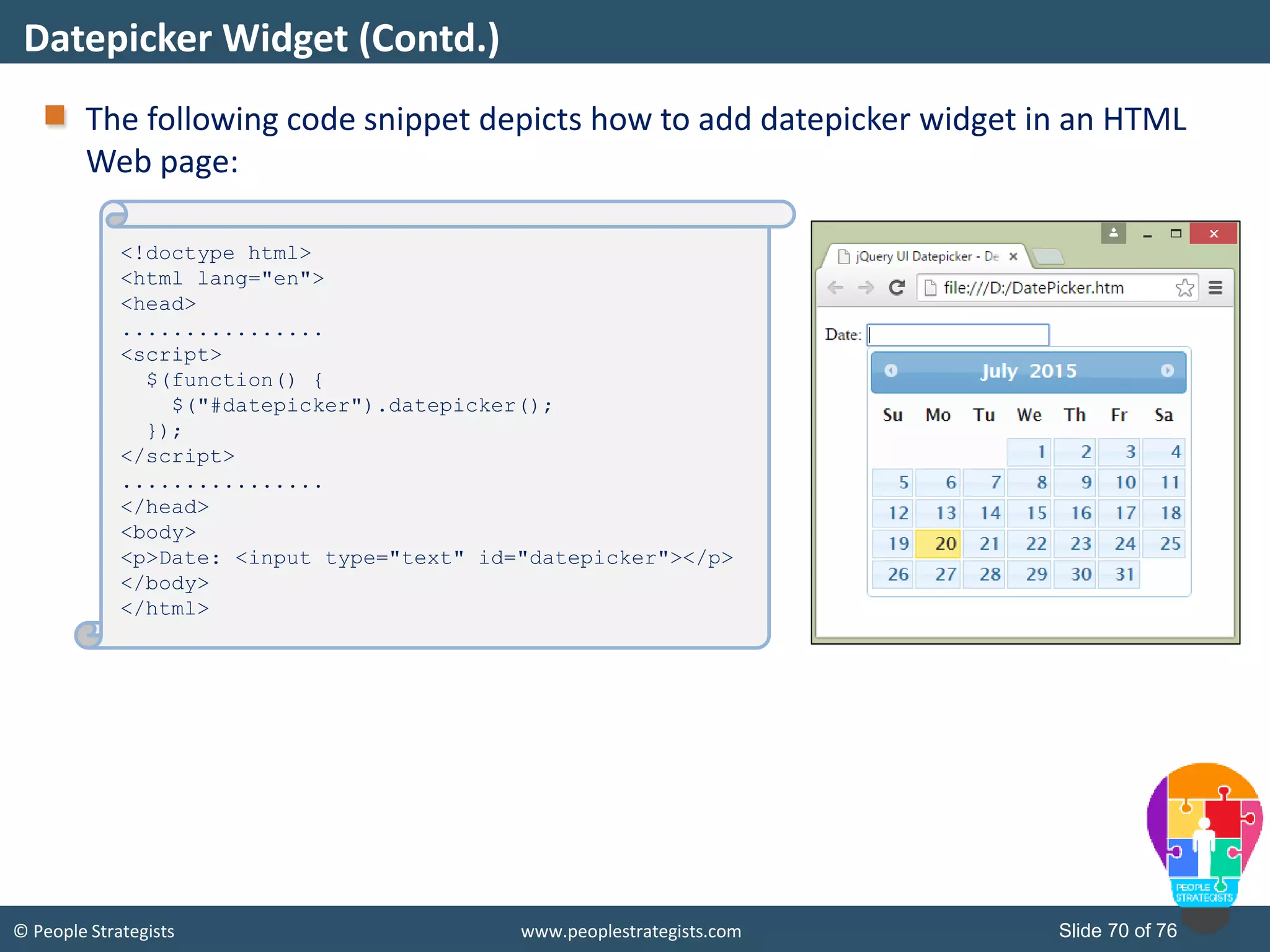
© People Strategists www.peoplestrategists.com Slide 70 of 76 The following code snippet depicts how to add datepicker widget in an HTML Web page: Datepicker Widget (Contd.) <!doctype html> <html lang="en"> <head> ................ <script> $(function() { $("#datepicker").datepicker(); }); </script> ................ </head> <body> <p>Date: <input type="text" id="datepicker"></p> </body> </html>
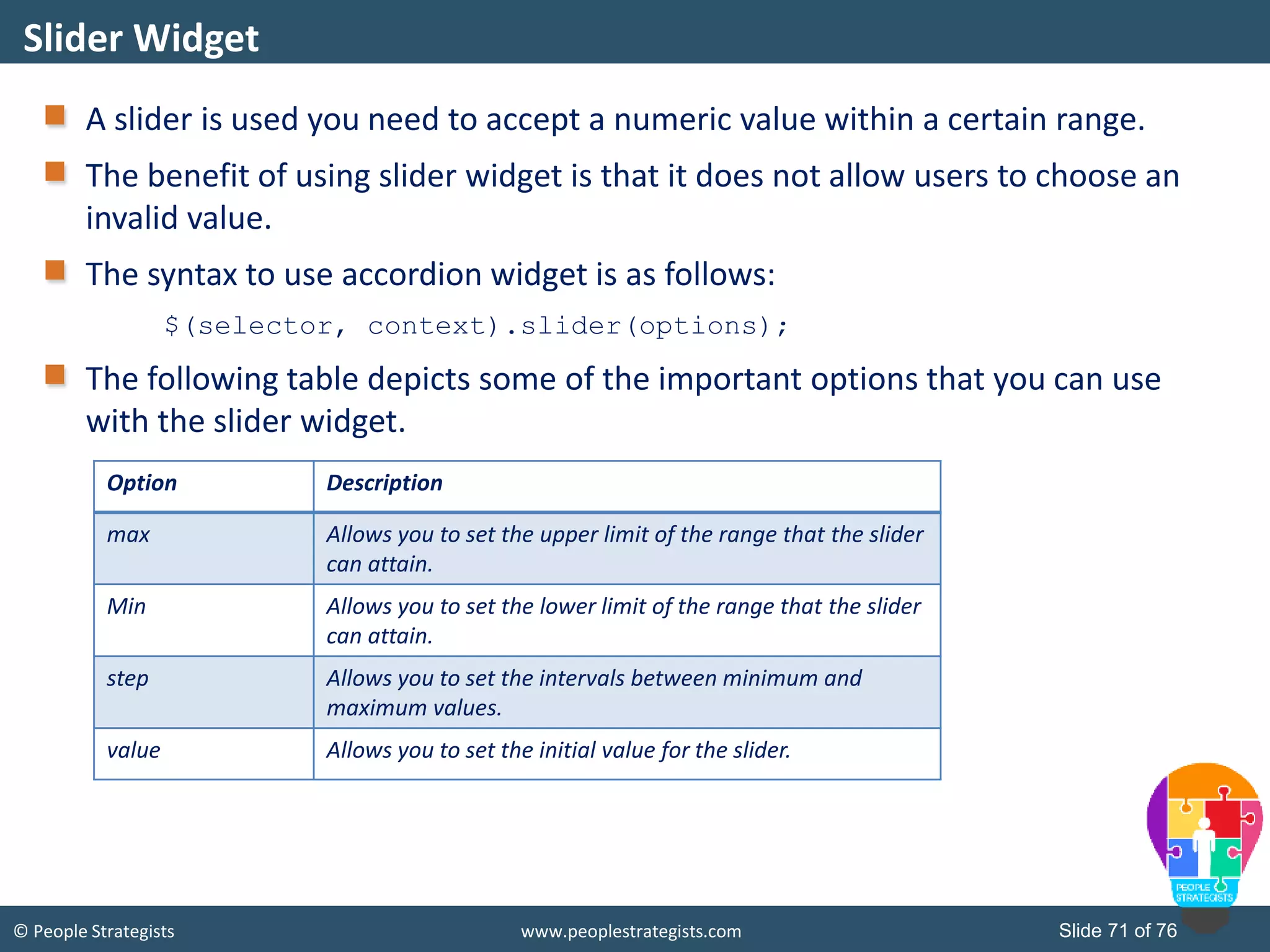
© People Strategists www.peoplestrategists.com Slide 71 of 76 A slider is used you need to accept a numeric value within a certain range. The benefit of using slider widget is that it does not allow users to choose an invalid value. The syntax to use accordion widget is as follows: $(selector, context).slider(options); The following table depicts some of the important options that you can use with the slider widget. Slider Widget Option Description max Allows you to set the upper limit of the range that the slider can attain. Min Allows you to set the lower limit of the range that the slider can attain. step Allows you to set the intervals between minimum and maximum values. value Allows you to set the initial value for the slider.
© People Strategists www.peoplestrategists.com Slide 72 of 76 The following code snippet depicts how to add slider widget in an HTML Web page: Slider Widget (Contd.) <!doctype html> <html lang="en"> <head> ................ <script> $(function() { $( "#slider-4" ).slider({ orientation:"vertical"}); $( "#slider-4" ).slider('disable'); $( "#slider-5" ).slider({ orientation:"vertical", value:50, slide: function( event, ui ) { $( "#minval" ).val( ui.value );} }); $( "#minval" ).val( $( "#slider- 5").slider( "value" ) ); }); </script> ................ </head> <body> <div id="slider-4"></div> <p> <label for="minval">Minumum value:</label> <input type="text" id="minval" style="border:0; color:#b9cd6d; font-weight:bold;"> </p> <div id="slider- 5"></div></body></div> </body> </html>
© People Strategists www.peoplestrategists.com Slide 73 of 76 The tabs widget allows you to display a logically grouped content in a single content area with the help of multiple panels. To use tabs efficiently, you need to include the following set of markups in you HTML Web page: Tabs must be represented using a list. Every tab title must be enclosed within <li> tag and wrapped using <a> tag. Every tab panel must have an ID that corresponds to the hash in the anchor of the associated tab. The syntax to use accordion widget is as follows: $(selector, context).tabs(options); Tabs Widget
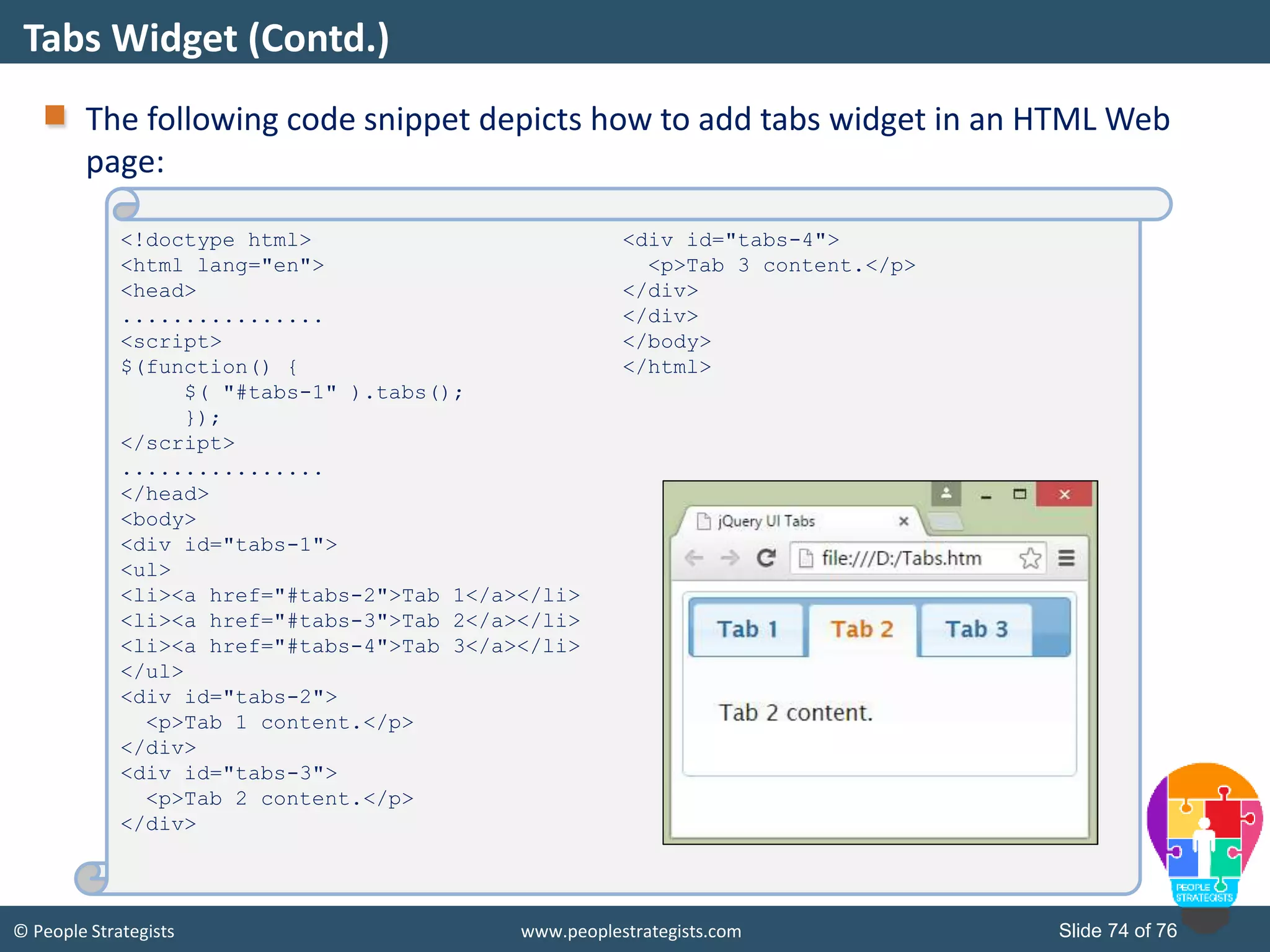
© People Strategists www.peoplestrategists.com Slide 74 of 76 The following code snippet depicts how to add tabs widget in an HTML Web page: Tabs Widget (Contd.) <!doctype html> <html lang="en"> <head> ................ <script> $(function() { $( "#tabs-1" ).tabs(); }); </script> ................ </head> <body> <div id="tabs-1"> <ul> <li><a href="#tabs-2">Tab 1</a></li> <li><a href="#tabs-3">Tab 2</a></li> <li><a href="#tabs-4">Tab 3</a></li> </ul> <div id="tabs-2"> <p>Tab 1 content.</p> </div> <div id="tabs-3"> <p>Tab 2 content.</p> </div> <div id="tabs-4"> <p>Tab 3 content.</p> </div> </div> </body> </html>
© People Strategists www.peoplestrategists.com Slide 75 of 76 In this session, you have learned that: AJAX stands for Asynchronous JavaScript and XML. AJAX allows Web pages or parts of them to be updated asynchronously. The XMLHttpRequest object is the most important component of AJAX. The XMLHttpRequest object establishes an independent connection channel between a Web page's client-side and server-side. jQuery is a fast and concise JavaScript library created by John Resig in 2006 with a motto of “write less, do more.” jQuery simplifies HTML document traversing, event handling, animating, and Ajax interactions for rapid Web development. Once the document ready event has fired, you can start manipulating the Web page. A jQuery selector is a function that makes use of expressions to find out matching elements from a DOM based on the given criteria. Summary
© People Strategists www.peoplestrategists.com Slide 76 of 76 jQuery methods enable you to easily traverse the HTML Document Object Model (DOM) and select the different elements to manipulate them. jQuery methods enable you to easily traverse the HTML Document Object Model (DOM) and select the different elements to manipulate them. In jQuery, event listeners or predefined event methods are used to handle events. jQuery UI is another useful JavaScript library that is built using jQuery JavaScript library. The accordion widget is helpful when you need to display content or information in a limited amount a space with the help of collapsible content panels. The datepicker widget allows users to select a date quickly and visually. A slider is used you need to accept a numeric value within a certain range. The tabs widget allows you to display a logically grouped content in a single content area with the help of multiple panels. Summary (Contd.)

Ajax and Jquery

  • 1.
    © People Strategistswww.peoplestrategists.com Slide 1 of 76 Ajax and JQuery
  • 2.
    © People Strategistswww.peoplestrategists.com Slide 2 of 76 In this session, you will learn to: Identify AJAX Web application model Work with AJAX Work with jQuery Implement selectors Manipulate and traverse DOM Implement jQuery UI widgets Objectives
  • 3.
    © People Strategistswww.peoplestrategists.com Slide 3 of 76 Introducing AJAX How does the score of a live cricket match updates automatically in a Web page?
  • 4.
    © People Strategistswww.peoplestrategists.com Slide 4 of 76 Introducing AJAX (Contd.)
  • 5.
    © People Strategistswww.peoplestrategists.com Slide 5 of 76 Introducing AJAX (Contd.) How to overcome these challenges?
  • 6.
    © People Strategistswww.peoplestrategists.com Slide 6 of 76 AJAX: Stands for Asynchronous JavaScript and XML. Is a new technique for creating better, faster, and more interactive Web applications with the help of XML, HTML, CSS, and Java Script. Allows Web pages or parts of them to be updated asynchronously. Is based on XMLHttpRequest object, also known as XHR object. Introducing AJAX (Contd.)
  • 7.
    © People Strategistswww.peoplestrategists.com Slide 7 of 76 AJAX: Is the use of the XMLHttpRequest object to communicate with the server-side scripts. Can send as well as receive information in a variety of formats, such as JSON, XML, HTML, and even text files. Most appealing characteristic is its asynchronous nature, which means, it communicate with the Web server without having to refresh the page. This lets you update portions of a page based upon user events. Two important features includes:  Making requests to the server without reloading the page.  Receiving and working with data from the server. Benefits of Using AJAX
  • 8.
    © People Strategistswww.peoplestrategists.com Slide 8 of 76 In the traditional Web applications: The users had to wait for the response from the server. Every request results in a new page loading. Synchronous “request/response” communication model was followed. Data, format, and styling are done on the server. The following figure depicts the traditional Web application model. Traditional Web Applications Model Web Browser Web Server User Interface HTTP Response HTTP Request HTML/CSS/JS Response Databases and Backend Processes
  • 9.
    © People Strategistswww.peoplestrategists.com Slide 9 of 76 In the AJAX Web application models: The result of an AJAX request may only update small parts of an existing HTML page. Data, format, and styling are done via JavaScript. The following figure depicts the AJAX Web application model. AJAX Web Application Model Web Browser Web Server User Interface HTTP Response HTTP Request HTML/CSS/JS Response Databases and Backend Processes AJAXEngine JS Call JS Call
  • 10.
    © People Strategistswww.peoplestrategists.com Slide 10 of 76 The following figure differentiates between traditional and AJAX Web application models. AJAX Web Application Model (Contd.) User Frontend Backend Traditional Web Application Model AJAX Web Application Model
  • 11.
    © People Strategistswww.peoplestrategists.com Slide 11 of 76 The following figure depicts the advantages and disadvantages of using AJAX Web application model. Advantages and Disadvantages of AJAX Advantages Disadvantages Better interactivity and responsiveness. Your page will be more pleasant to use. Reduced connections to the Web server because of partial rendering. Because you only load the data you need to update the page, instead of refreshing the entire page, you save bandwidth. It helps in reducing the network traffic. The back and refresh buttons become useless. Bookmarking this page will become useless. Requires JavaScript to be enabled on the Web browser. Network latency may break usability. Data loaded through AJAX won't be indexed by any of the major search engines. Hence, making it SEO unfriendly.
  • 12.
    © People Strategistswww.peoplestrategists.com Slide 12 of 76 The following list depicts some real-life scenarios where AJAX can be helpful: Autocomplete search text boxes Cascading dropdown list box Real-time communication, such as instant messaging Real-time data updates, such as score updates Immediate forms validation feedback Auto save user information Real-Life Scenarios for Using AJAX
  • 13.
    © People Strategistswww.peoplestrategists.com Slide 13 of 76 The following figures depict some examples of using AJAX on your Web page: Real-Life Examples of AJAX
  • 14.
    © People Strategistswww.peoplestrategists.com Slide 14 of 76 The following list describes the Web browsers supported by AJAX: Browser Support Mozilla Firefox 1.0 and Above Google Chrome Apple Safari 1.2 and Above Microsoft IE 5 and Above Opera 7.6 and Above
  • 15.
    © People Strategistswww.peoplestrategists.com Slide 15 of 76 The AJAX cannot work independently. It is used in combination with other technologies to create interactive Web pages that are described in the following list: JavaScript:  Loosely typed scripting language.  JavaScript function is called when an event occurs in a page.  Glue for the whole AJAX operation. DOM:  API for accessing and manipulating structured documents.  Represents the structure of XML and HTML documents. CSS:  Allows for a clear separation of the presentation style from the content and may be changed programmatically by JavaScript. XMLHttpRequest:  JavaScript object that performs asynchronous interaction with the server. Components of AJAX
  • 16.
    © People Strategistswww.peoplestrategists.com Slide 16 of 76 The XMLHttpRequest object: Is the most important component of AJAX. Has been available ever since Internet Explorer 5.5 was released in July 2000. Is an API that can be used by JavaScript, JScript, VBScript, and other Web browser scripting languages. Is used to transfer and manipulate XML data to and from a Web server using HTTP. Establishes an independent connection channel between a Web page's client-side and server-side. Besides XML, XMLHttpRequest can be used to fetch data in other formats, such as JSON or even plain text. Performs following operations:  Sends data from the client in the background.  Receives the data from the server.  Updates the webpage without reloading it. XMLHttpRequest Object
  • 17.
    © People Strategistswww.peoplestrategists.com Slide 17 of 76 The following figure depicts the process cycle of AJAX Web application model: XMLHttpRequest Object (Contd.) A client event occurs, such as a button click. An XMLHttpRequest object is created. The XMLHttpRequest object is configured. The XMLHttpRequest object makes an asynchronous request to the Web server. The Web server returns the result. The XMLHttpRequest object processes the result.
  • 18.
    © People Strategistswww.peoplestrategists.com Slide 18 of 76 The following table describes the common properties of the XMLHttpRequest object. XMLHttpRequest Object (Contd.) Property Description onReadyStateChange Is called whenever readyState attribute changes. It must not be used with synchronous requests. readyState Represents the state of the request. It ranges from 0 to 4, as described in the following list: • 0: UNOPENED, open() is not called. • 1: OPENED, open is called but send() is not called. • 2: HEADERS_RECEIVED, send() is called, and headers and status are available. • 3: LOADING, downloading data; responseText holds the data. • 4: DONE, the operation is completed fully. reponseText Returns response as text. responseXML Returns response as XML.
  • 19.
    © People Strategistswww.peoplestrategists.com Slide 19 of 76 The following table describes the essential methods of the XMLHttpRequest object. XMLHttpRequest Object (Contd.) Method Description void open(method, URL) Opens the request specifying get or post method and URL of the requested Web page. void open(method, URL, async) same as above but specifies asynchronous or not. void open(method, URL, async, username, password) same as above but specifies username and password. void send() sends get request. void send(string) send post request. setRequestHeader(header ,value) it adds request headers.
  • 20.
    © People Strategistswww.peoplestrategists.com Slide 20 of 76 The following figure depicts the syntax of creating an XMLHttpRequest object for modern Web browsers: The following figure depicts the syntax of creating an XMLHttpRequest object for old versions of Microsoft IE, that is, IE5 and IE6: XMLHttpRequest Object (Contd.) Variable = new XMLHttpRequest(); Variable = new ActiveXObject("Microsoft.XMLHTTP");
  • 21.
    © People Strategistswww.peoplestrategists.com Slide 21 of 76 To handle all modern Web browsers, including Microsoft IE5 and IE6, you need to check whether the Web browser supports the XMLHttpRequest object. The following code depicts how to create an XMLHttpRequest object for all the modern Web browsers, including Microsoft IE5 and IE6: XMLHttpRequest Object (Contd.) var xmlhttp; if (window.XMLHttpRequest) { //code for IE7+, Firefox, Chrome, Opera, and Safari xmlhttp=new XMLHttpRequest(); } else { // code for IE6, IE5 xmlhttp=new ActiveXObject("Microsoft.XMLHTTP"); }
  • 22.
    © People Strategistswww.peoplestrategists.com Slide 22 of 76 After creating an XMLHttpRequest object, you need to decide what you want to do after you receive the server response to your request. At this step, you need to define the JavaScript function, which will handle the server response. This can be done using the onreadystatechange property of the XMLHttpRequest object, as shown in the following code snippet: XMLHttpRequest Object (Contd.) xmlhttp.onreadystatechange = function(){ //process the server response };
  • 23.
    © People Strategistswww.peoplestrategists.com Slide 23 of 76 After setting the response function, you need to make the request. To make the request, you need to call the open()and send()methods of the XMLHttpRequest object, as shown in the following code snippet: The following list describes the parameter passed to open()method in the preceding code snippet: The first parameter is the HTTP request method, such as GET, POST, and HEAD. The second parameter is the URL of the Web page that you are requesting. The third parameter, optional, sets whether the request is asynchronous. XMLHttpRequest Object (Contd.) xmlhttp.open(‘GET’,’serverpage.asp’,true); xmlhttp.send(null);
  • 24.
    © People Strategistswww.peoplestrategists.com Slide 24 of 76 The following figure depicts some samples of using HTTP GET and POST request methods with AJAX: XMLHttpRequest Object (Contd.) //HTTP GET request without querystring xmlhttp.open(‘GET’,’serverpage.asp’,true); xmlhttp.send(null); //HTTP GET request with querystring xmlhttp.open(‘GET’,’serverpage.asp?username=’+Math.random (),true); xmlhttp.send(null); //HTTP GET request without querystring xmlhttp.open(‘GET’,’serverpage.asp?username=user1&pass=pa ssword”,true); xmlhttp.send(null); //HTTP POST request xmlhttp.open(‘POST’,’serverpage.asp’,true); xmlhttp.send(‘username=user1&pass=password’);
  • 25.
    © People Strategistswww.peoplestrategists.com Slide 25 of 76 To handle the server’s response: First, the response function needs to check the ready state of the request.  If the ready state has the value of 4, then you can proceed further. Next, you need to check the response code of the HTTP server response. The following code snippet depicts how to handle the server’s response: XMLHttpRequest Object (Contd.) xmlhttp.onreadystatechange = function(){ if (xmlhttp.readyState === 4) { // everything is good, the response is received if (xmlhttp.status === 200) { // process the response } else { // request encountered some problem, // for example, the response may contain a HTTP 404 (Not Found) response code } } else { // still not ready } };
  • 26.
    © People Strategistswww.peoplestrategists.com Slide 26 of 76 Fetching Data using XMLHttpRequest Object How to display the Web server’s response on a Web page?
  • 27.
    © People Strategistswww.peoplestrategists.com Slide 27 of 76 The following code snippet depicts how to display response from Web server on a Web page: Fetching Data using XMLHttpRequest Object (Contd.) <HTML> <HEAD> <SCRIPT language="JavaScript"> var xmlhttp = false; if(window.XMLHttpRequest) { xmlhttp = new XMLHttpRequest(); } else { xmlhttpp = new ActiveXObject("Microsoft.XMLHTTP"); } function getData(){ if(xmlhttp) { var div = document.getElementById("OutputDiv" ); xmlhttp.onreadystatechange = function() { if (xmlhttp.readyState == 4 && xmlhttp.status == 200) { div.innerHTML = xmlhttp.responseText; } else { alert ("Something went wrong!!"); }} xmlhttp.open("GET","SampleText.txt" ,true); xmlhttp.send(null); }} </SCRIPT> </HEAD> <BODY> <H1>Fetching response as text from server with AJAX</H1> <FORM NAME="form1"> <INPUT TYPE="button" Value="Fetch Data" onClick='getData()'> </FORM> <DIV id="OutputDiv"> <P>The fetched data will be displayed in this area.</P> </DIV> </BODY> </HTML> AJAXExample.htm
  • 28.
    © People Strategistswww.peoplestrategists.com Slide 28 of 76 The following figures depict the output of the preceding code. Fetching Data using XMLHttpRequest Object (Contd.)
  • 29.
    © People Strategistswww.peoplestrategists.com Slide 29 of 76 To display XML data from the server response, you need to make the following changes: Fetching Data using XMLHttpRequest Object (Contd.) . . . . . . . . . . . . . . . xmlhttp.onreadystatechange = function() { if (xmlhttp.readyState == 4 && xmlhttp.status == 200) { var xmldoc = xmlhttp.responseXML; var root_node = xmldoc.getElementsByTagName('root') .item(0); div.innerHTML = root_node.firstChild.data; } else { alert ("Something went wrong!!"); }} xmlhttp.open("GET",“TestFile.xml", true); xmlhttp.send(null); }} . . . . . . . . . . . . . . . AJAXExample.htm <?xml version="1.0" ?> <root> This is a test XML file. </root> TestFile.xml
  • 30.
    © People Strategistswww.peoplestrategists.com Slide 30 of 76 jQuery Is jQuery a part of JavaScript?
  • 31.
    © People Strategistswww.peoplestrategists.com Slide 31 of 76 jQuery is a fast and concise JavaScript library created by John Resig in 2006 with a motto of “write less, do more.” The purpose behind developing jQuery was to make it easier to use JavaScript. jQuery simplifies HTML document traversing, event handling, animating, and Ajax interactions for rapid Web development. jQuery is a JavaScript toolkit designed to simplify various tasks by writing less code. jQuery also simplifies a lot of the complicated things from JavaScript, like AJAX calls and DOM manipulation. Some of the core features of jQuery are: DOM manipulation Event handling AJAX Support Animations Lightweight jQuery (Contd.)
  • 32.
    © People Strategistswww.peoplestrategists.com Slide 32 of 76 There are a number of JavaScript frameworks available, but jQuery is one of the most popular framework. jQuery is extendable. Most of the biggest organization uses jQuery. Few of these organizations are: Microsoft Google IBM Amazon jQuery (Contd.)
  • 33.
    © People Strategistswww.peoplestrategists.com Slide 33 of 76 You can use jQuery by using one of the following ways: Local installation: You can download jQuery library on the Web server and include it inside your HTML Web pages. CDN based version: You can include jQuery library inside your HTML Web pages directly from Content Delivery Network (CDN). After downloading jQuery library on your local machine or Web server, you can include it inside your HTML Web pages using the following code snippet: Including jQuery <head> <script src = "jquery-1.11.3.min.js"></script> </head> SamplePage.htm
  • 34.
    © People Strategistswww.peoplestrategists.com Slide 34 of 76 In case you do not want to host the jQuery library, you can include it from a CDN, such as CDN hosted by Google or Microsoft. To use jQuery hosted by Google, you need to include the following code snippet in your HTML Web page: To use jQuery hosted by Microsoft, you need to include the following code snippet in your HTML Web page: Including jQuery (Contd.) <head> <script src="https://ajax.googleapis.com/ajax/libs/jquery/1.11.3/jquery.min.js"> </script> </head> SamplePage.htm <head> <script src="http://ajax.aspnetcdn.com/ajax/jQuery/jquery-1.11.3.min.js"> </script> </head> SamplePage.htm
  • 35.
    © People Strategistswww.peoplestrategists.com Slide 35 of 76 You can manipulate your Web page in jQuery with the help of document ready event. Once the document ready event has fired, you can start manipulating the Web page. The document ready event signifies that the DOM of the HTML Web page is ready. So you can manipulate it without worrying that parts of the DOM has not yet been created. The following code snippet depicts the document ready event in jQuery: jQuery Document Ready Event $(document).ready(function(){ // Your jQuery code goes here }); SamplePage.htm
  • 36.
    © People Strategistswww.peoplestrategists.com Slide 36 of 76 On of the core component in jQuery library is selectors. Before manipulating an HTML element, you need to locate that element. To locate and HTML element, a jQuery selector can be used. A jQuery selector is a function that makes use of expressions to find out matching elements from a DOM based on the given criteria. In jQuery, selectors are used to identify and locate HTML elements of a Web page by using any of the following: ID Name Classes Types Attributes While implementing jQuery, selectors are very essential and required at almost every step. Selectors
  • 37.
    © People Strategistswww.peoplestrategists.com Slide 37 of 76 On of the core component in jQuery library is selectors. jQuery allows you to select elements based on the following criteria: Selecting by Element Name: This jQuery selector selects the element based on the element name. Selecting by Element Id: This jQuery selector selects the element using the id attribute of an HTML tag. Selecting by CSS Class: This jQuery selector selects the element using the class attribute. The jQuery element selector selects elements based on the element name. Selectors (Contd.)
  • 38.
    © People Strategistswww.peoplestrategists.com Slide 38 of 76 You can use $(“p”), to select all <p> elements on a Web page. You can use the following code snippet to hide all the <p> elements when a user clicks on any button: The #id selector can be useful when you want to select a unique HTML element. You can use the following code snippet, to select an element using the ID attribute: Selectors (Contd.) $(document).ready(function(){ $("button").click(function(){ $("p").hide(); }); }); $(document).ready(function(){ $("button").click(function(){ $(“#sampleDiv").hide(); }); });
  • 39.
    © People Strategistswww.peoplestrategists.com Slide 39 of 76 The jQuery class selector selects the element using a specific CSS class. To locate elements with a specific class, you need to put a period character before the class name. You can use the following code snippet, to select an element using the class selector: Selectors (Contd.) $(document).ready(function(){ $("button").click(function(){ $(“.testClass").hide(); }); });
  • 40.
    © People Strategistswww.peoplestrategists.com Slide 40 of 76 The following code snippet depict the usage of various jQuery selectors in an HTML Web page: Selectors (Contd.) <html> <head> <script src="https://ajax.googleapis.com/ajax/libs/jquery/1.11.3/jquery.min.js"> </script> <script> $(document).ready(function () { $("button").click(function () { $("#newID").hide(); //using id $(“.newClass”).show(); //using class name }); }); </script> </head> <body> <p class=“newClass">Sample class selector.</p> <p id=“newID">Sample id selector.</p> <p>sample element name selector.</p> <button>Click me</button> </body> </html> jQueryExample.htm
  • 41.
    © People Strategistswww.peoplestrategists.com Slide 41 of 76 There are some more jQuery selectors that are given in the following list: :contains() :odd :even :first-child :last-child :first :last Selectors (Contd.)
  • 42.
    © People Strategistswww.peoplestrategists.com Slide 42 of 76 The following table describes the :contains()selector. Selectors (Contd.) Function Syntax Example It selects elements containing the specified string. $(":contains(string)") $(document).ready(function(){ $("p:contains(Res)").css("backgro und-color",“yellow"); });
  • 43.
    © People Strategistswww.peoplestrategists.com Slide 43 of 76 The following table describes the :odd()selector. Selectors (Contd.) Function Syntax Example It selects each element with an odd index number, such as 1, 3, and 5. The index number starts with 0. $(":odd") $(document).ready(function(){ $("tr:odd").css(" background-color",“red"); });
  • 44.
    © People Strategistswww.peoplestrategists.com Slide 44 of 76 The following table describes the :even()selector. Selectors (Contd.) Function Syntax Example It selects each element with an even index number, such as 0, 2, and 4. $(":even") $(document).ready(function(){ $("tr:even").css(" background-color","blue"); });
  • 45.
    © People Strategistswww.peoplestrategists.com Slide 45 of 76 The following table describes the :first-child()selector. Selectors (Contd.) Function Syntax Example It selects all elements that are the first child of their parent. $(":first-child") $(document).ready(function(){$("p:first- child").css(" background-color","pink"); });
  • 46.
    © People Strategistswww.peoplestrategists.com Slide 46 of 76 The following table describes the :last-child()selector. Selectors (Contd.) Function Syntax Example It selects all the elements that are the last child of their parent. $(":last-child") $(document).ready(function(){$("di v:last-child").css(" font-style","italic");});
  • 47.
    © People Strategistswww.peoplestrategists.com Slide 47 of 76 The following table describes the :first()selector. Selectors (Contd.) Function Syntax Example It selects only the first matched element, which occurs first irrespective of its parent element, in the whole document. $(":first") $(document).ready(function(){ $("p:first").css("font-style "," italic ");});
  • 48.
    © People Strategistswww.peoplestrategists.com Slide 48 of 76 The following table describes the :last()selector. Selectors (Contd.) Function Syntax Example It selects only that element, which occurs at last irrespective of its parent element, in the whole document. $(":last") $(document).ready(function(){ $("p:last").css("font-style "," italic ");});
  • 49.
    © People Strategistswww.peoplestrategists.com Slide 49 of 76 Consider a scenario where you want to display the names of employees who’s productivity is more than 85% and between 65% to 85% in the last financial year. Two achieve this, you can use the following code snippet: Selectors (Contd.) <div>Names of employees who’s productivity is more than 85%:</div> <ul class="Greater_eightyfive"> <li>Sam: 98</li> <li>Joe: 95</li> <li>Mariline: 87</li> </ul> <div>Names of employees who’s productivity is between 65% and 85%:</div> <ul class="Lesser_eightyfive"> <li>Jeff: 85</li> <li>Frank: 80</li> <li>Stefen: 78</li> <li>Peter: 65</li> <li>Ben: 75</li> </ul>
  • 50.
    © People Strategistswww.peoplestrategists.com Slide 50 of 76 To highlight the names of those employees who’s productivity is more than 85% in yellow color, use the following code snippet: In the preceding code snippet, the <ul> element that has the value of the class attribute as Greater_eightyfive is selected and the background color, yellow, is applied to it. Selectors (Contd.) $(document).ready(function () { var res = $('ul[class="Greater_eightyfive"]'); res.css("background-color", "yellow"); });
  • 51.
    © People Strategistswww.peoplestrategists.com Slide 51 of 76 jQuery methods enable you to easily traverse the HTML Document Object Model (DOM) and select the different elements to manipulate them. DOM represents the logical structure of HTML documents. It describes the ways through which a document is accessed and manipulated. Using the HTML DOM, you can navigate through the structure of HTML documents and add, modify, or delete elements and content. In the HTML DOM, everything is treated as a node. For example: Traversing DOM Document Document node Element Element node Attribute Attribute node Text Text node Comment Comment node
  • 52.
    © People Strategistswww.peoplestrategists.com Slide 52 of 76 Consider the following HTML Web page: Traversing DOM (Contd.) <html> <head> <title>text</title> </head> <body> <table> <tr> <td>Dean Winchester</td> <td>Sam Winchester</td> </tr> <tr> <td>Supernatural</td> <td>Supernatural</td> </tr> </table> </body> </html>
  • 53.
    © People Strategistswww.peoplestrategists.com Slide 53 of 76 The following figure depicts the DOM tree for the preceding HTML Web page. Traversing DOM (Contd.) Document <html> <head> <title> Text <body> <table> <tr> <td> Text: Dean Winchester <td> Text: Sam Winchester <tr> <td> Text: Supernatural <td> Text: Supernatural
  • 54.
    © People Strategistswww.peoplestrategists.com Slide 54 of 76 jQuery provides you with various methods that allow you to traverse DOM. These methods can be categorized into the following ways: Traversing DOM (Contd.) jQuery Ancestors Descendants Siblings
  • 55.
    © People Strategistswww.peoplestrategists.com Slide 55 of 76 An element who is a parent, grandparent, great-grandparent, and so on of another element is known as the ancestor of that element. You need to traverse up the DOM to find the ancestor of an element. The commonly used methods to traverse up the DOM are: The parent()method: Returns the direct parent element of the selected element. Traverses only a single level up the DOM tree. Ancestors parent() parents()
  • 56.
    © People Strategistswww.peoplestrategists.com Slide 56 of 76 To find out the parent of <TR> element and make its content bold, you can use the following code snippet: In the preceding code snippet, to retrieve the parent element of the <TR> element whose class attribute is PortJ, the parent()method is used. The content of the selected element is made bold using the font-weight property. Ancestors (Contd.) Destination.html <script> $(document).ready(function(){ $(".PortJ").parent().css({"font-weight": "bold"});}); </script>
  • 57.
    © People Strategistswww.peoplestrategists.com Slide 57 of 76 The parents()method: Is used to retrieve all ancestor elements of the selected element, up to the root element of the document. For example, to change the background color of the Destination.html page, you can write the following code snippet: The preceding code snippet selects the ancestors of the <tr> element whose class attribute is PortJ, using the parents()method and changes their background color to cornsilk. Ancestors (Contd.) <script> $(document).ready(function(){ $(".PortJ").parents().css({"background-color": "#FFF8DC"}); }); </script>
  • 58.
    © People Strategistswww.peoplestrategists.com Slide 58 of 76 An element who is a child, grandchild, great-grandchild, and so on of another element is known as the descendant of that element. You need to traverse down the DOM tree to find the descendant of an element. The methods used to traverse down the DOM are: The children()method: Is used to retrieve all direct children of the selected element. Traverses a single level down the DOM tree. The following code snippet shows the use of the children()method: Descendants children() find() $(".Class1").children().css({"font-style": "italic"});
  • 59.
    © People Strategistswww.peoplestrategists.com Slide 59 of 76 The find()method: Is used to retrieve the descendant elements of the selected element. Searches up to the last element of the DOM tree. The following code snippet shows the use of the find()method: Descendants (Contd.) <script> $(document).ready(function(){ $("ul").find("li").css({"font-weight":"bold"});}); </script>
  • 60.
    © People Strategistswww.peoplestrategists.com Slide 60 of 76 Siblings refer to the elements that have the same parent. You can find siblings of an element by traversing sideways in the DOM tree. The methods for traversing the siblings of an element are: Siblings • Is used to retrieve all the sibling elements of the selected elementsiblings() • Is used to retrieve the next sibling element of the selected element next() • Is used to retrieve the previous sibling element of the selected element prev()
  • 61.
    © People Strategistswww.peoplestrategists.com Slide 61 of 76 An event is a user’s action to which a Web page can respond. For example, a mouse click or a key press are examples of an event. When an event is raised, a piece of code is executed. In jQuery, event listeners or predefined event methods are used to handle events. The following figure depicts how events are raised and actions are performed. jQuery Event Model Button clicked Event is raised Event listener listens to the event The function to handle the event is executed and some action s performed
  • 62.
    © People Strategistswww.peoplestrategists.com Slide 62 of 76 jQuery provides you the following methods to attach event handler to multiple events of a selected element(s): bind() on() The bind()method: Is used to attach one or more event handlers for the selected elements. Can be invoked by using the following syntax: To attach an event handler to a single event, you can use the following code snippet: To attach an event handler to multiple events, you can use the following code snippet: Binding Events $(selector).bind(event[,data],function $("p").bind("click",function(){ alert(" Click event raised"); }); $("#btn").bind("mouseover mouseout",function(){ $("#btn").toggleClass(“demo"); });
  • 63.
    © People Strategistswww.peoplestrategists.com Slide 63 of 76 The on()method can be used to attach one or multiple event handlers for the selected and their child elements. The following figure depicts the syntax to use the on()method. The following code snippet can be used to attach the click event to the <p> element at the click even of a button: Binding Events (Contd.) $(selector).on(event[,childSelector][,data],function [,map]) $("div").on("click","p",function(){ $(this).hide(); });
  • 64.
    © People Strategistswww.peoplestrategists.com Slide 64 of 76 jQuery UI is another useful JavaScript library that is built using jQuery JavaScript library. It provides you with a set of plugins for jQuery that provides you with more functionalities in addition to the jQuery core library. jQuery UI plugins provides you a combination multiple plugins that includes: Interaction Effects Widgets Utilities Themes These plugins are specifically designed to work together or stand-alone. jQuery UI Library
  • 65.
    © People Strategistswww.peoplestrategists.com Slide 65 of 76 To use jQuery UI library, you can: Download the library on your Web server or local host Include it directly into your Web pages using CDN. To include jQuery UI library directly into your Web page, you can use any of the following CDNs: jQuery UI Library (Contd.) <link rel="Stylesheet" href="http://ajax.aspnetcdn.com/ajax/jquery.ui/1.8.10/themes/redmond/jquery- ui.css" /> <script src="http://ajax.aspnetcdn.com/ajax/jquery/jquery- 1.8.0.js"></script> <script src="http://ajax.aspnetcdn.com/ajax/jquery.ui/1.8.22/jquery- ui.js"></script> <link rel="stylesheet" href="https://ajax.googleapis.com/ajax/libs/jqueryui/1.11.4/themes/smoothnes s/jquery-ui.css"> <script src="https://ajax.googleapis.com/ajax/libs/jquery/1.11.4/jquery.min.js"> <script src="https://ajax.googleapis.com/ajax/libs/jqueryui/1.11.4/jquery- ui.min.js"></script>
  • 66.
    © People Strategistswww.peoplestrategists.com Slide 66 of 76 There are a number of useful widgets provided by jQuery UI library that can make your Web page look elegant. Few of these widgets are given in the following list: jQuery UI Widgets Accordion Datepicker Slider Tabs
  • 67.
    © People Strategistswww.peoplestrategists.com Slide 67 of 76 The accordion widget is helpful when you need to display content or information in a limited amount a space with the help of collapsible content panels. The syntax to use accordion widget is as follows: $(selector, context).accordion(options); The following table depicts some of the important options that you can use with the accordion widget. Accordion Widget Option Description active Indicates the index of the menu that will be opened by default. animate Used to set how to animate changing menus. collapsible Allows user to close a menu by clicking on it. Disabled Allows you to disable the accordion.
  • 68.
    © People Strategistswww.peoplestrategists.com Slide 68 of 76 The following code snippet depicts how to add accordion widget in an HTML Web page: Accordion Widget (Contd.) <!doctype html> <html lang="en"> <head> ................ <script> $(function() { $( "#accordion" ).accordion({ collapsible: true }); }); </script> ................ </head> <body> <div id="accordion"> <h3>Section 1</h3> <div> <p> Section 1 content goes here. </p> </div> <h3>Section 2</h3> <div> <p> Section 2 content goes here. </p> </div> ............ </div> </body> </html>
  • 69.
    © People Strategistswww.peoplestrategists.com Slide 69 of 76 The datepicker widget allows users to select a date quickly and visually. The syntax to use accordion widget is as follows: $(selector, context).datepicker(options); The following table depicts some of the important options that you can use with the datepicker widget. Datepicker Widget Option Description changeMonth Allows users to directly change the month without using the arrow buttons. changeYear Allows users to directly change the year without using the arrow buttons. dateFormat Allows you to specify the date format. defaultDate Allows you to set the initial date for the control.
  • 70.
    © People Strategistswww.peoplestrategists.com Slide 70 of 76 The following code snippet depicts how to add datepicker widget in an HTML Web page: Datepicker Widget (Contd.) <!doctype html> <html lang="en"> <head> ................ <script> $(function() { $("#datepicker").datepicker(); }); </script> ................ </head> <body> <p>Date: <input type="text" id="datepicker"></p> </body> </html>
  • 71.
    © People Strategistswww.peoplestrategists.com Slide 71 of 76 A slider is used you need to accept a numeric value within a certain range. The benefit of using slider widget is that it does not allow users to choose an invalid value. The syntax to use accordion widget is as follows: $(selector, context).slider(options); The following table depicts some of the important options that you can use with the slider widget. Slider Widget Option Description max Allows you to set the upper limit of the range that the slider can attain. Min Allows you to set the lower limit of the range that the slider can attain. step Allows you to set the intervals between minimum and maximum values. value Allows you to set the initial value for the slider.
  • 72.
    © People Strategistswww.peoplestrategists.com Slide 72 of 76 The following code snippet depicts how to add slider widget in an HTML Web page: Slider Widget (Contd.) <!doctype html> <html lang="en"> <head> ................ <script> $(function() { $( "#slider-4" ).slider({ orientation:"vertical"}); $( "#slider-4" ).slider('disable'); $( "#slider-5" ).slider({ orientation:"vertical", value:50, slide: function( event, ui ) { $( "#minval" ).val( ui.value );} }); $( "#minval" ).val( $( "#slider- 5").slider( "value" ) ); }); </script> ................ </head> <body> <div id="slider-4"></div> <p> <label for="minval">Minumum value:</label> <input type="text" id="minval" style="border:0; color:#b9cd6d; font-weight:bold;"> </p> <div id="slider- 5"></div></body></div> </body> </html>
  • 73.
    © People Strategistswww.peoplestrategists.com Slide 73 of 76 The tabs widget allows you to display a logically grouped content in a single content area with the help of multiple panels. To use tabs efficiently, you need to include the following set of markups in you HTML Web page: Tabs must be represented using a list. Every tab title must be enclosed within <li> tag and wrapped using <a> tag. Every tab panel must have an ID that corresponds to the hash in the anchor of the associated tab. The syntax to use accordion widget is as follows: $(selector, context).tabs(options); Tabs Widget
  • 74.
    © People Strategistswww.peoplestrategists.com Slide 74 of 76 The following code snippet depicts how to add tabs widget in an HTML Web page: Tabs Widget (Contd.) <!doctype html> <html lang="en"> <head> ................ <script> $(function() { $( "#tabs-1" ).tabs(); }); </script> ................ </head> <body> <div id="tabs-1"> <ul> <li><a href="#tabs-2">Tab 1</a></li> <li><a href="#tabs-3">Tab 2</a></li> <li><a href="#tabs-4">Tab 3</a></li> </ul> <div id="tabs-2"> <p>Tab 1 content.</p> </div> <div id="tabs-3"> <p>Tab 2 content.</p> </div> <div id="tabs-4"> <p>Tab 3 content.</p> </div> </div> </body> </html>
  • 75.
    © People Strategistswww.peoplestrategists.com Slide 75 of 76 In this session, you have learned that: AJAX stands for Asynchronous JavaScript and XML. AJAX allows Web pages or parts of them to be updated asynchronously. The XMLHttpRequest object is the most important component of AJAX. The XMLHttpRequest object establishes an independent connection channel between a Web page's client-side and server-side. jQuery is a fast and concise JavaScript library created by John Resig in 2006 with a motto of “write less, do more.” jQuery simplifies HTML document traversing, event handling, animating, and Ajax interactions for rapid Web development. Once the document ready event has fired, you can start manipulating the Web page. A jQuery selector is a function that makes use of expressions to find out matching elements from a DOM based on the given criteria. Summary
  • 76.
    © People Strategistswww.peoplestrategists.com Slide 76 of 76 jQuery methods enable you to easily traverse the HTML Document Object Model (DOM) and select the different elements to manipulate them. jQuery methods enable you to easily traverse the HTML Document Object Model (DOM) and select the different elements to manipulate them. In jQuery, event listeners or predefined event methods are used to handle events. jQuery UI is another useful JavaScript library that is built using jQuery JavaScript library. The accordion widget is helpful when you need to display content or information in a limited amount a space with the help of collapsible content panels. The datepicker widget allows users to select a date quickly and visually. A slider is used you need to accept a numeric value within a certain range. The tabs widget allows you to display a logically grouped content in a single content area with the help of multiple panels. Summary (Contd.)