Introduction to Arduino By: Karim El-Rayes By: Karim El-Rayes, 2015
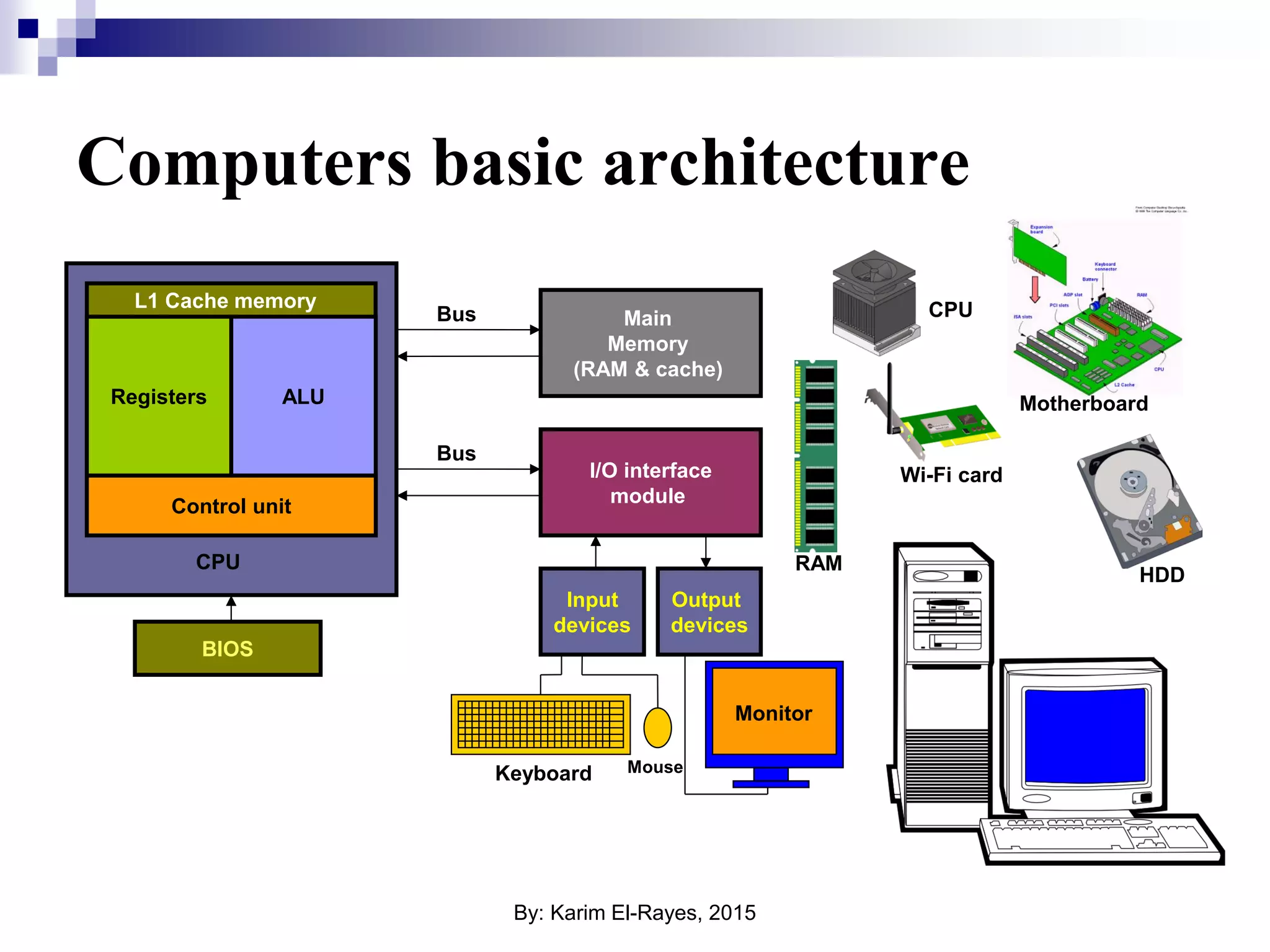
What about computers ! We all know that we can use computers to do anything like process control or data ciphering, but to have a computer we need a CPU, a main memory unit represented in a RAM module, a secondary storage element represented in Hard Disk Drive (HDD), some input devices to give instructions/orders like keyboard and a mouse, and some other output devices like a monitor and printer to check the system state, and maybe some communication devices to communicate with external world like Ethernet card, USB ports and wireless interface cards (Wi-Fi). By: Karim El-Rayes, 2015
Main Memory (RAM & cache) I/O interface module CPU Control unit ALURegisters Input devices Output devices Bus Bus BIOS L1 Cache memory Computers basic architecture Keyboard Mouse Monitor RAM HDD Motherboard CPU Wi-Fi card By: Karim El-Rayes, 2015
Is it good enough? Previously described system is very good and will be very efficient, featuring a very high computing capabilities BUT: 1. Big in size, you need a space for such system. 2. Very power hungry system, you can run on small batteries or solar cell in a rural place. 3. Expensive, let’s try to calculate the prices of Intel Core2Due processor, 1GB RAM slot, 80GB HDD, a monitor, a keyboard and finally a mouse !!! By: Karim El-Rayes, 2015
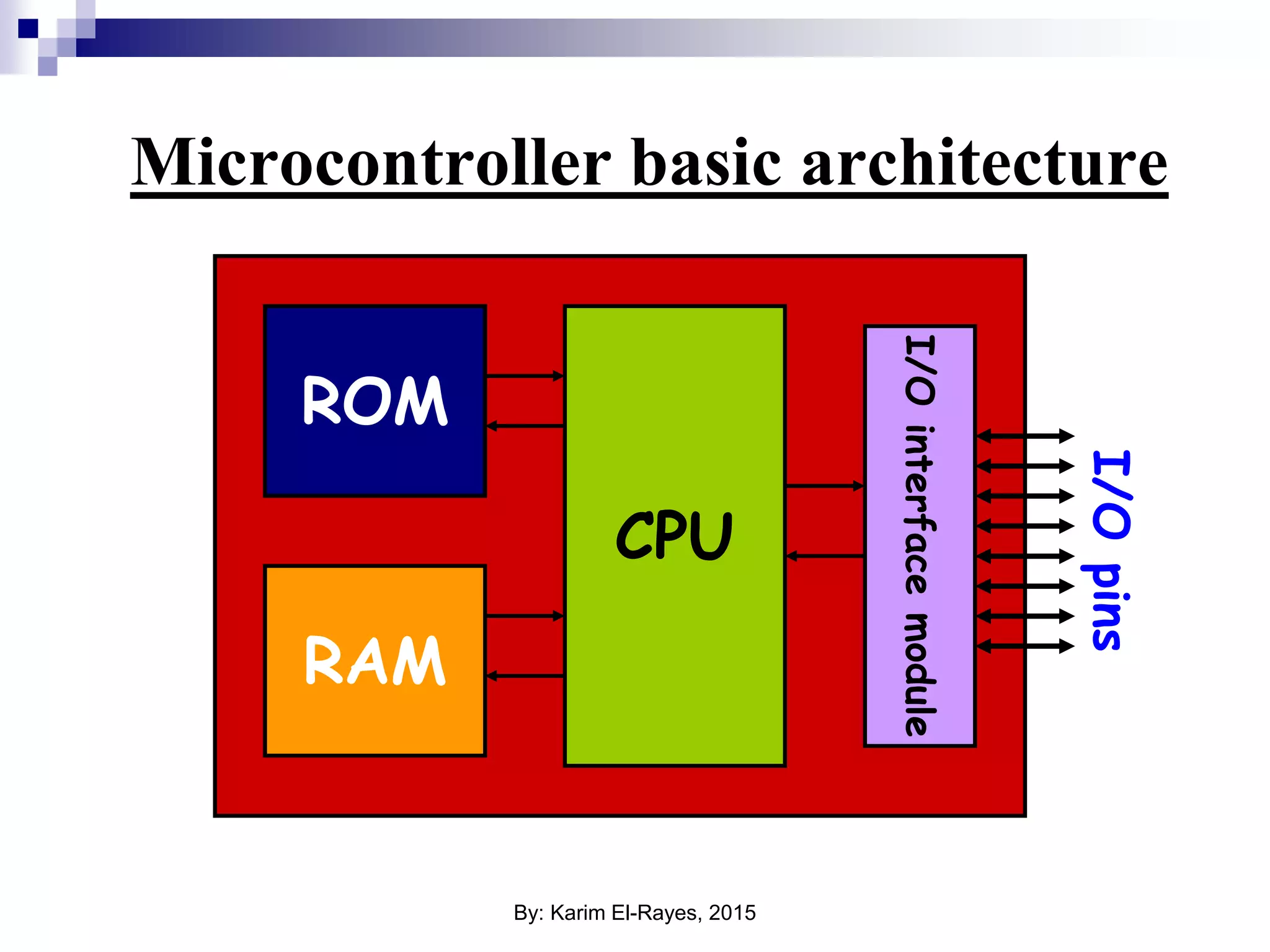
Microcontroller basic architecture ROM RAM CPU I/Ointerfacemodule I/Opins By: Karim El-Rayes, 2015
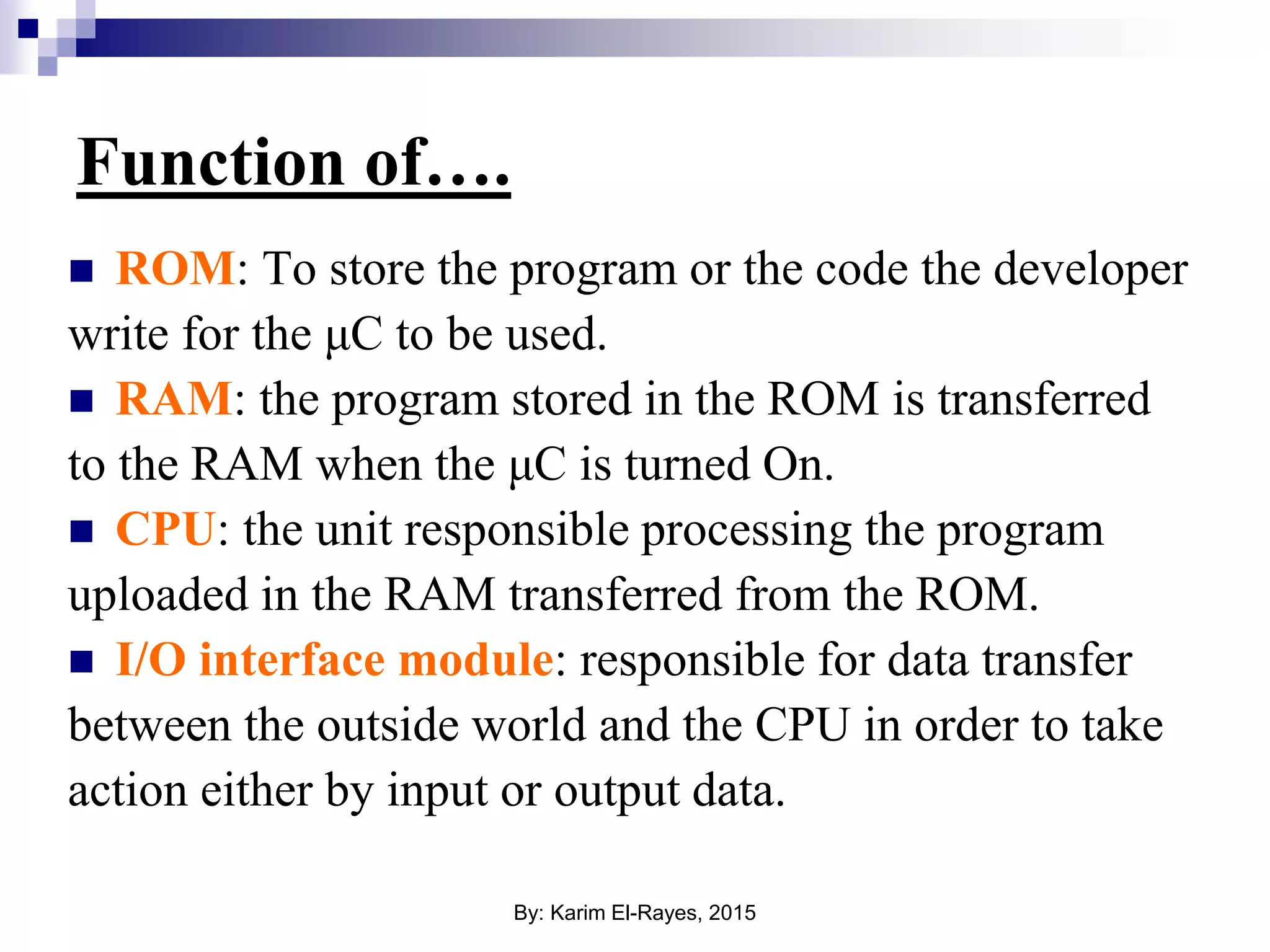
Function of….  ROM: To store the program or the code the developer write for the μC to be used.  RAM: the program stored in the ROM is transferred to the RAM when the μC is turned On.  CPU: the unit responsible processing the program uploaded in the RAM transferred from the ROM.  I/O interface module: responsible for data transfer between the outside world and the CPU in order to take action either by input or output data. By: Karim El-Rayes, 2015
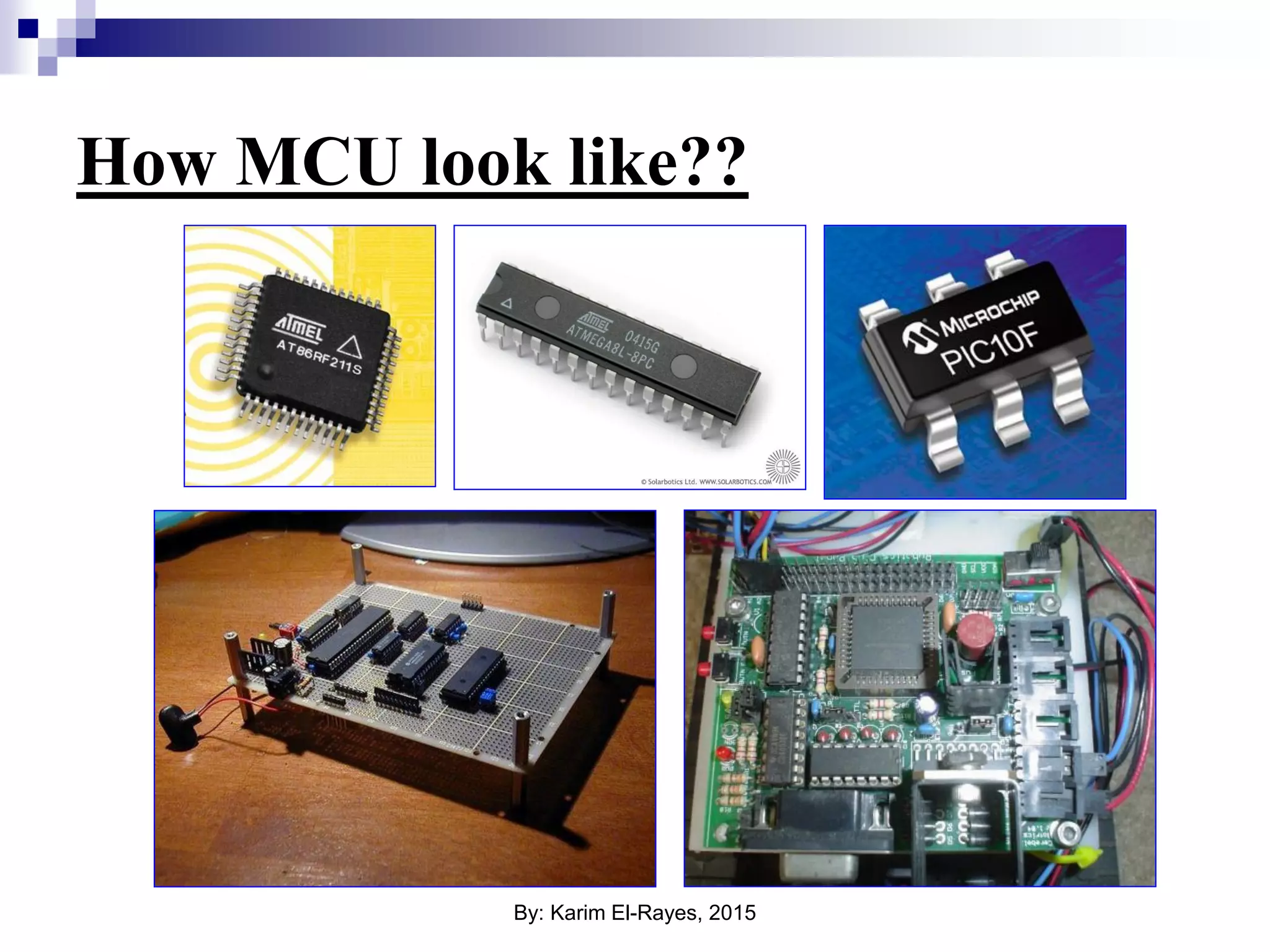
How MCU look like?? By: Karim El-Rayes, 2015
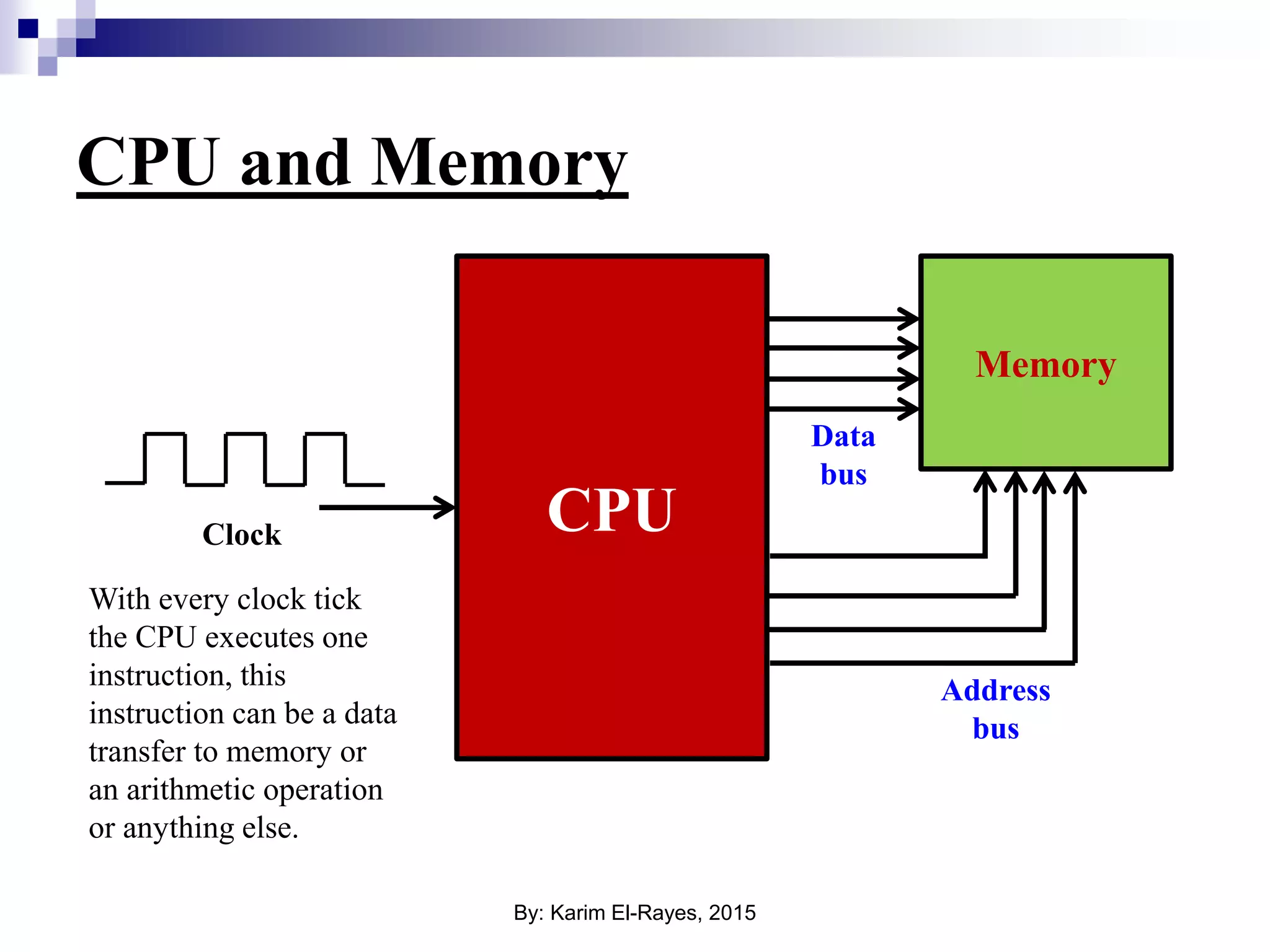
CPU and Memory CPU Memory Address bus Data bus Clock With every clock tick the CPU executes one instruction, this instruction can be a data transfer to memory or an arithmetic operation or anything else. By: Karim El-Rayes, 2015
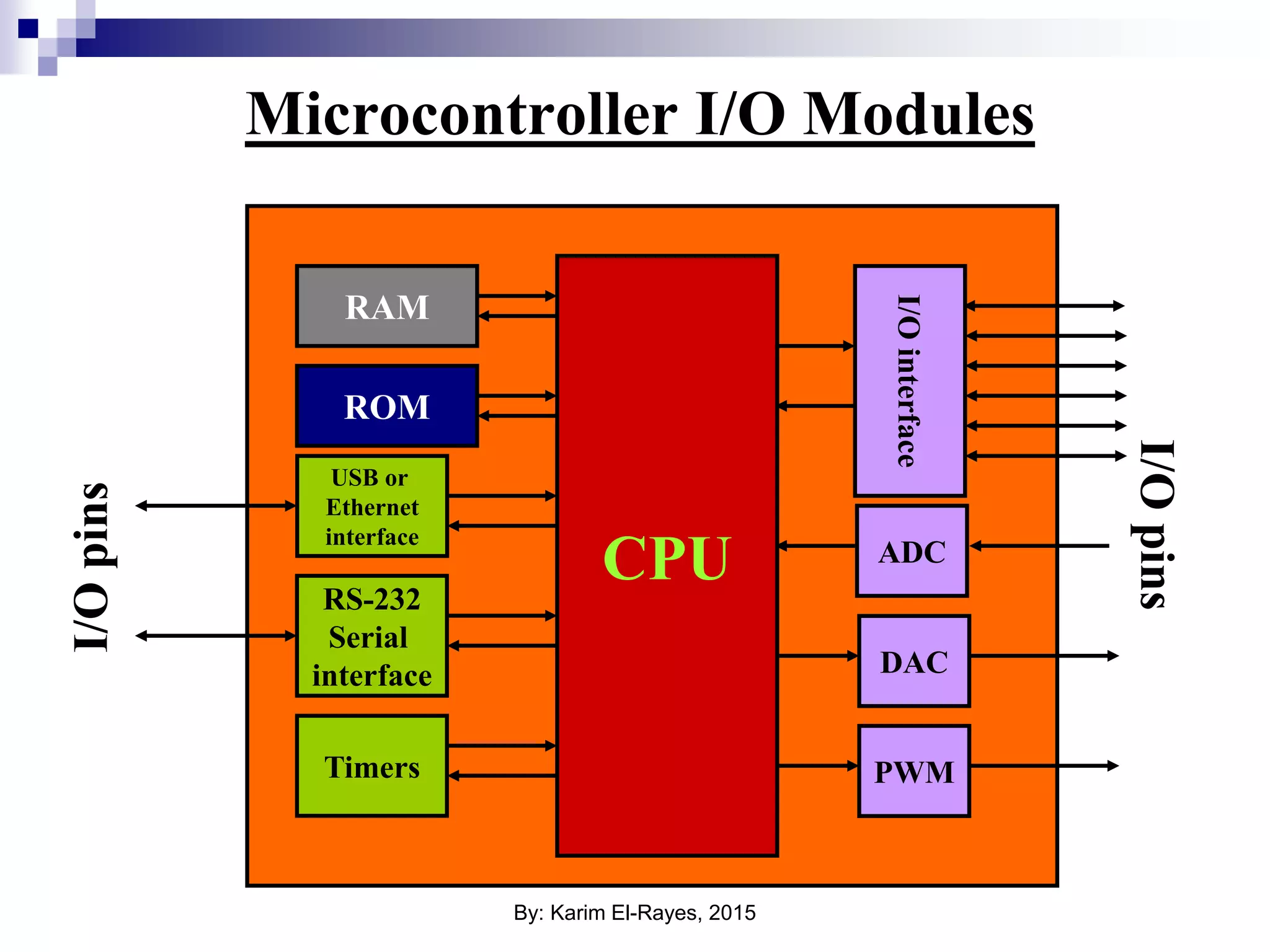
Microcontroller I/O Modules ROM RAM CPU I/Opins ADC DAC Timers RS-232 Serial interface PWM USB or Ethernet interface I/Opins I/Ointerface By: Karim El-Rayes, 2015
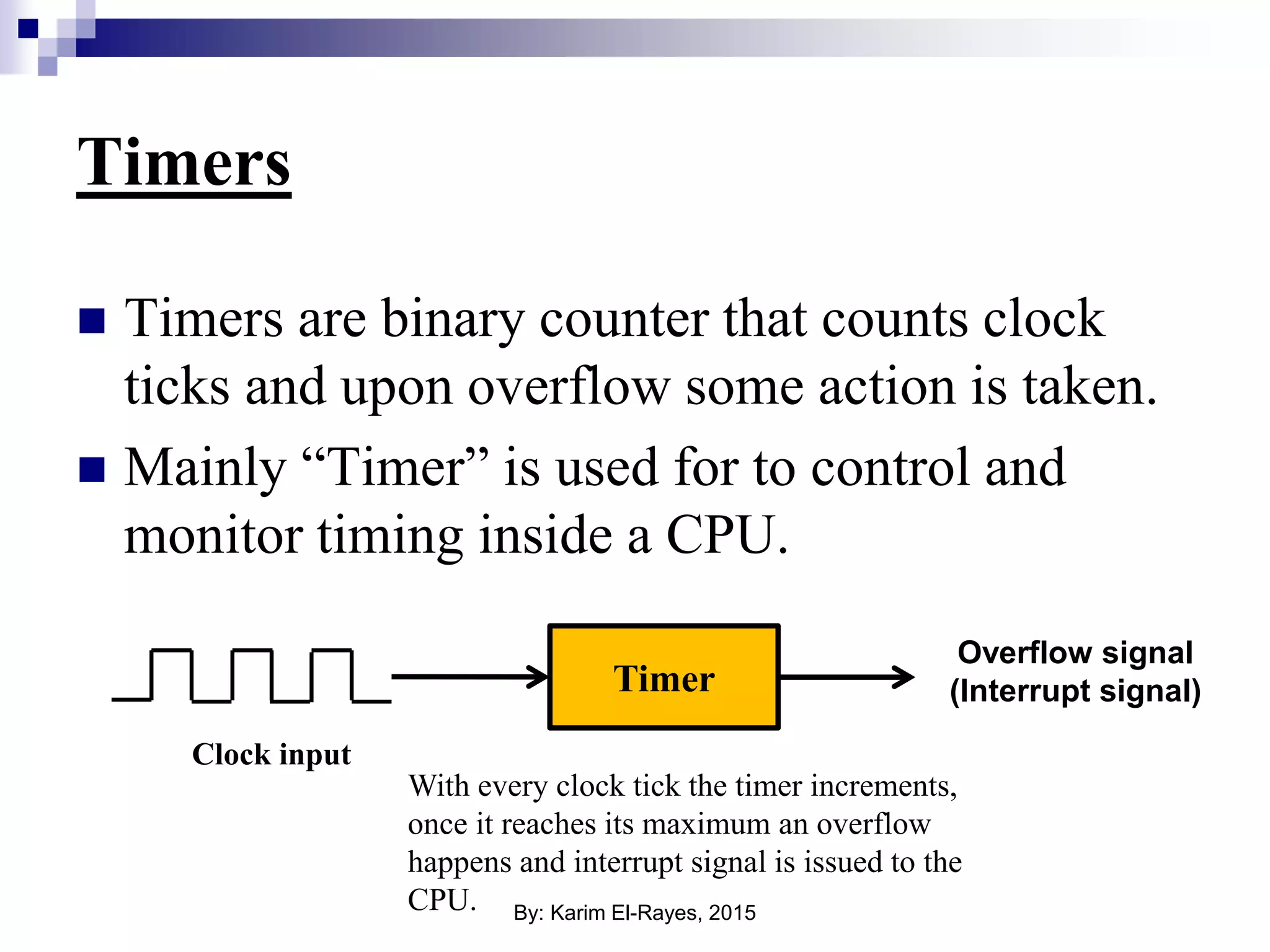
Timers  Timers are binary counter that counts clock ticks and upon overflow some action is taken.  Mainly “Timer” is used for to control and monitor timing inside a CPU. Timer Clock input With every clock tick the timer increments, once it reaches its maximum an overflow happens and interrupt signal is issued to the CPU. Overflow signal (Interrupt signal) By: Karim El-Rayes, 2015
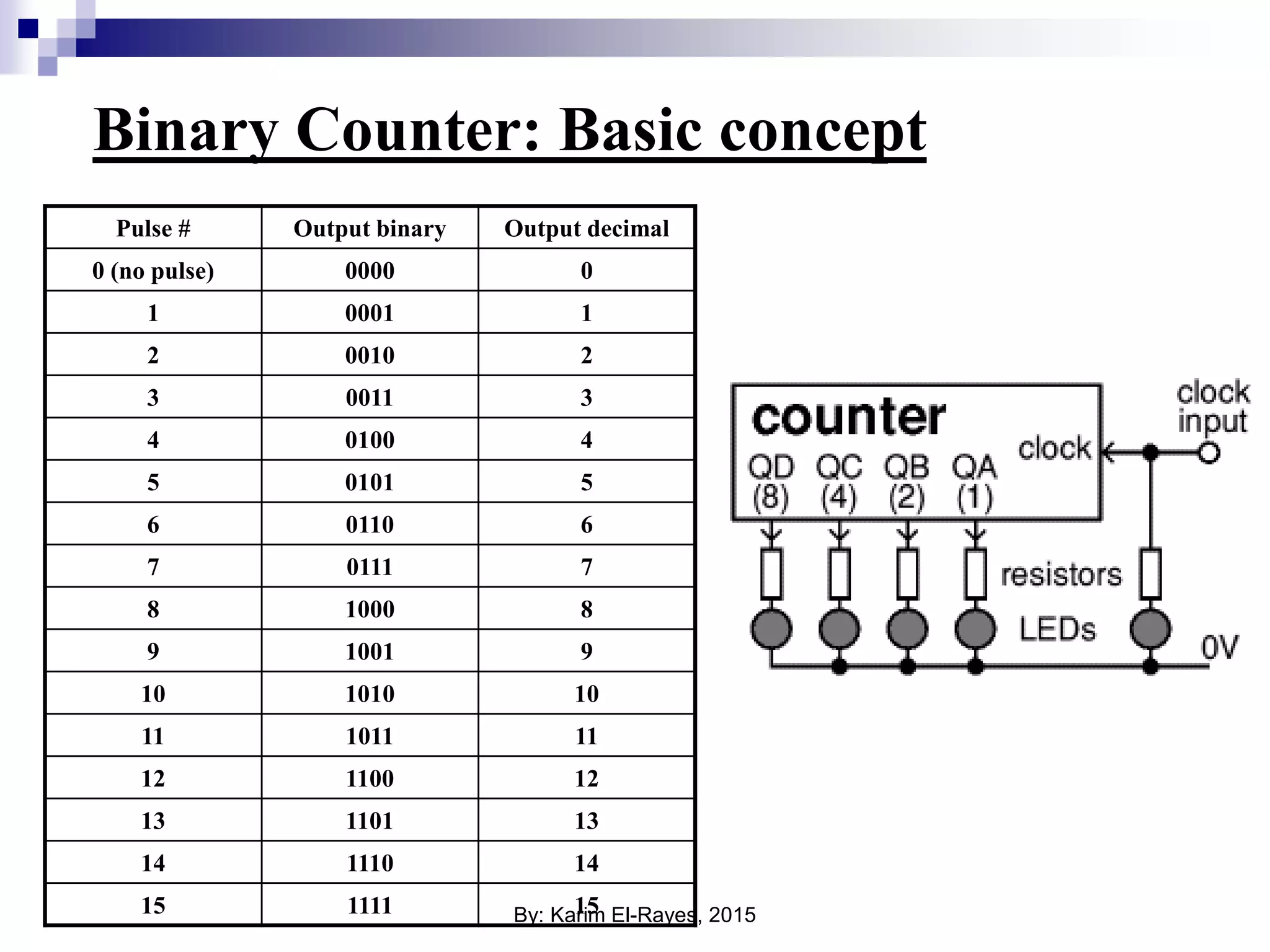
Binary Counter: Basic concept Pulse # Output binary Output decimal 0 (no pulse) 0000 0 1 0001 1 2 0010 2 3 0011 3 4 0100 4 5 0101 5 6 0110 6 7 0111 7 8 1000 8 9 1001 9 10 1010 10 11 1011 11 12 1100 12 13 1101 13 14 1110 14 15 1111 15By: Karim El-Rayes, 2015
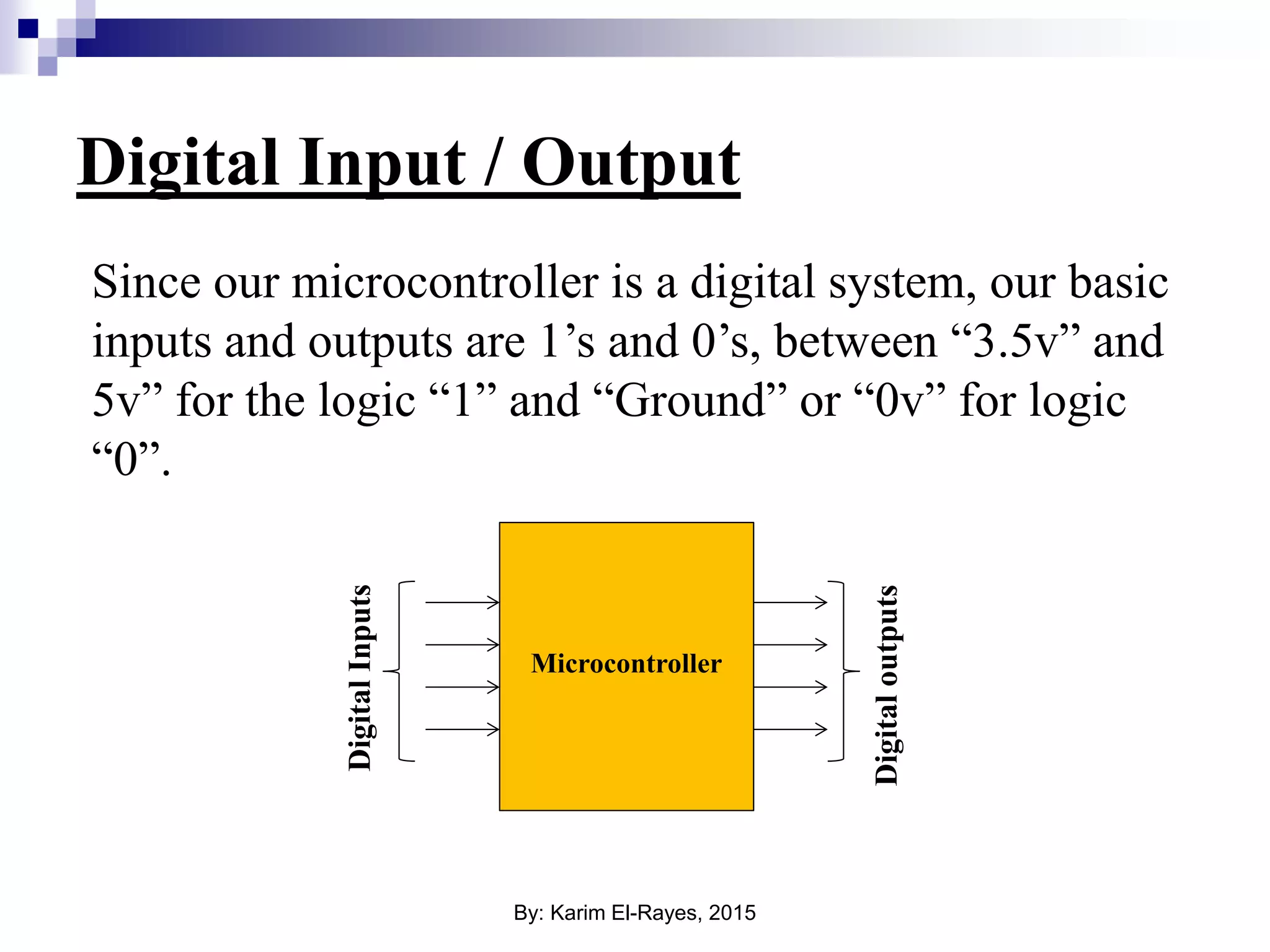
Digital Input / Output Since our microcontroller is a digital system, our basic inputs and outputs are 1’s and 0’s, between “3.5v” and 5v” for the logic “1” and “Ground” or “0v” for logic “0”. Microcontroller DigitalInputs Digitaloutputs By: Karim El-Rayes, 2015
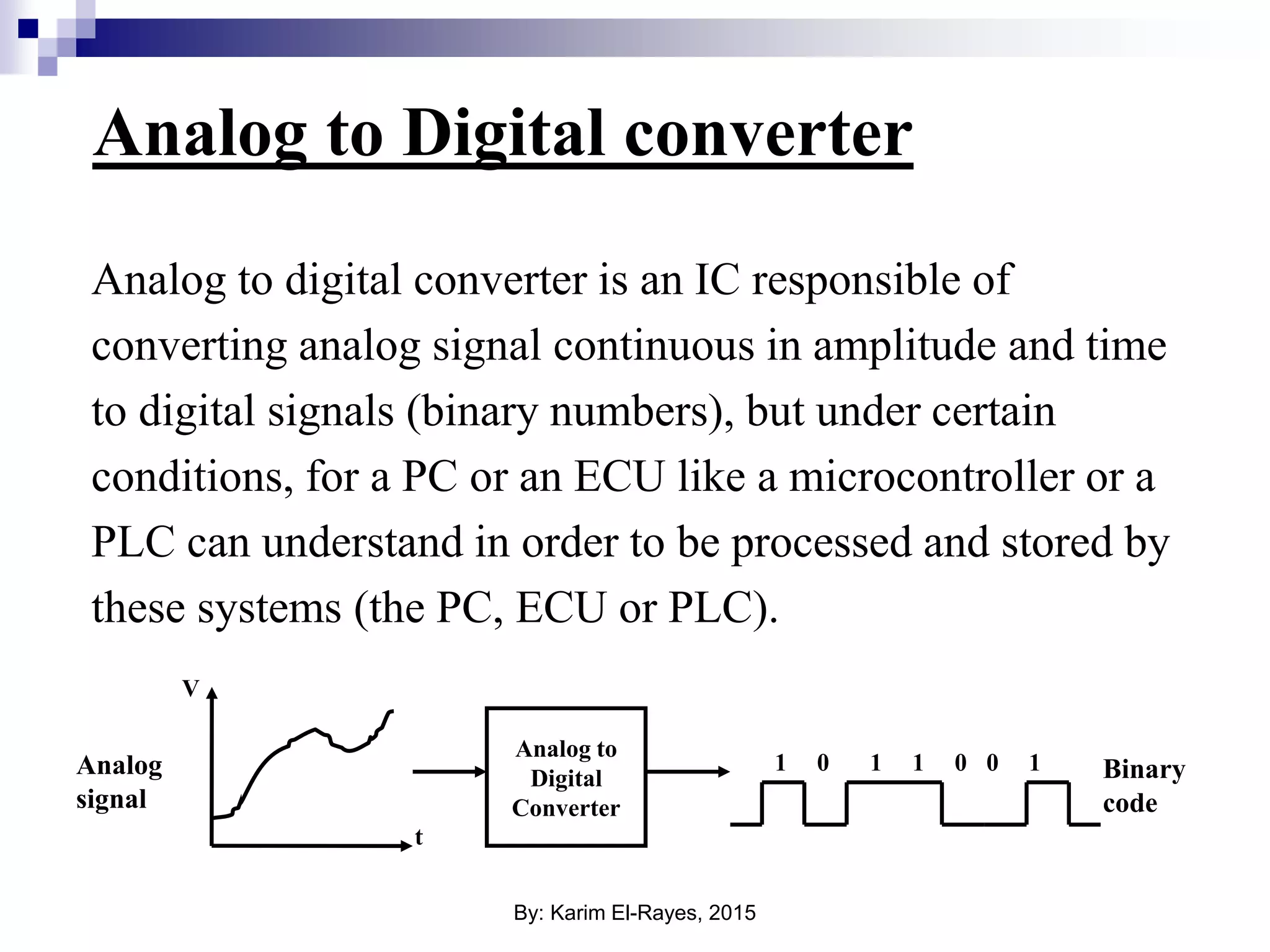
Analog to Digital converter Analog to digital converter is an IC responsible of converting analog signal continuous in amplitude and time to digital signals (binary numbers), but under certain conditions, for a PC or an ECU like a microcontroller or a PLC can understand in order to be processed and stored by these systems (the PC, ECU or PLC). Analog to Digital Converter 1 1 1 10 0 0 V t Analog signal Binary code By: Karim El-Rayes, 2015
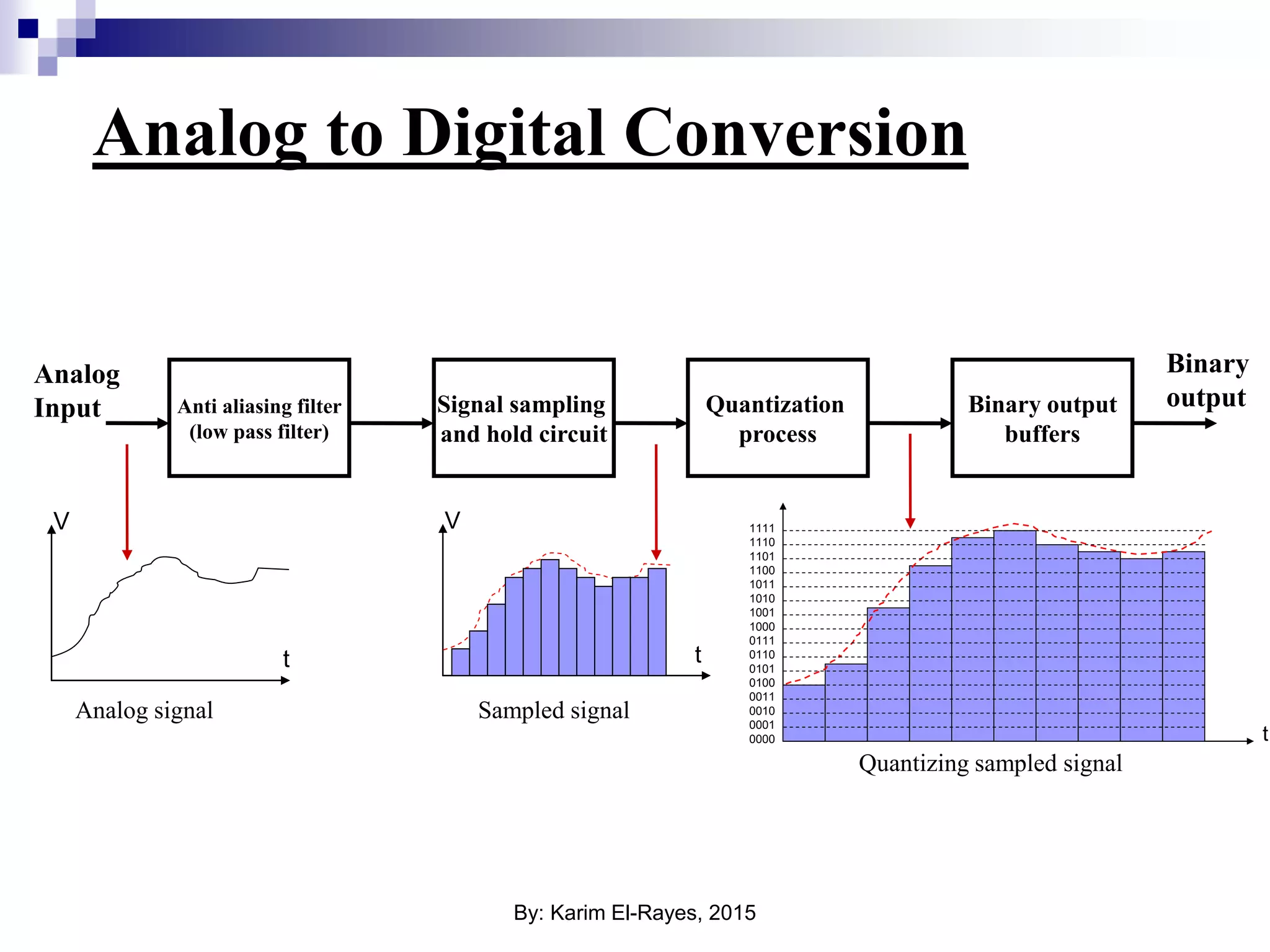
Analog to Digital Conversion Anti aliasing filter (low pass filter) Signal sampling and hold circuit Quantization process Binary output buffers Analog Input Binary output 0000 0001 0010 0011 0100 0101 0110 0111 1000 1001 1010 1011 1100 1101 1110 1111 t V t V t Analog signal Sampled signal Quantizing sampled signal By: Karim El-Rayes, 2015
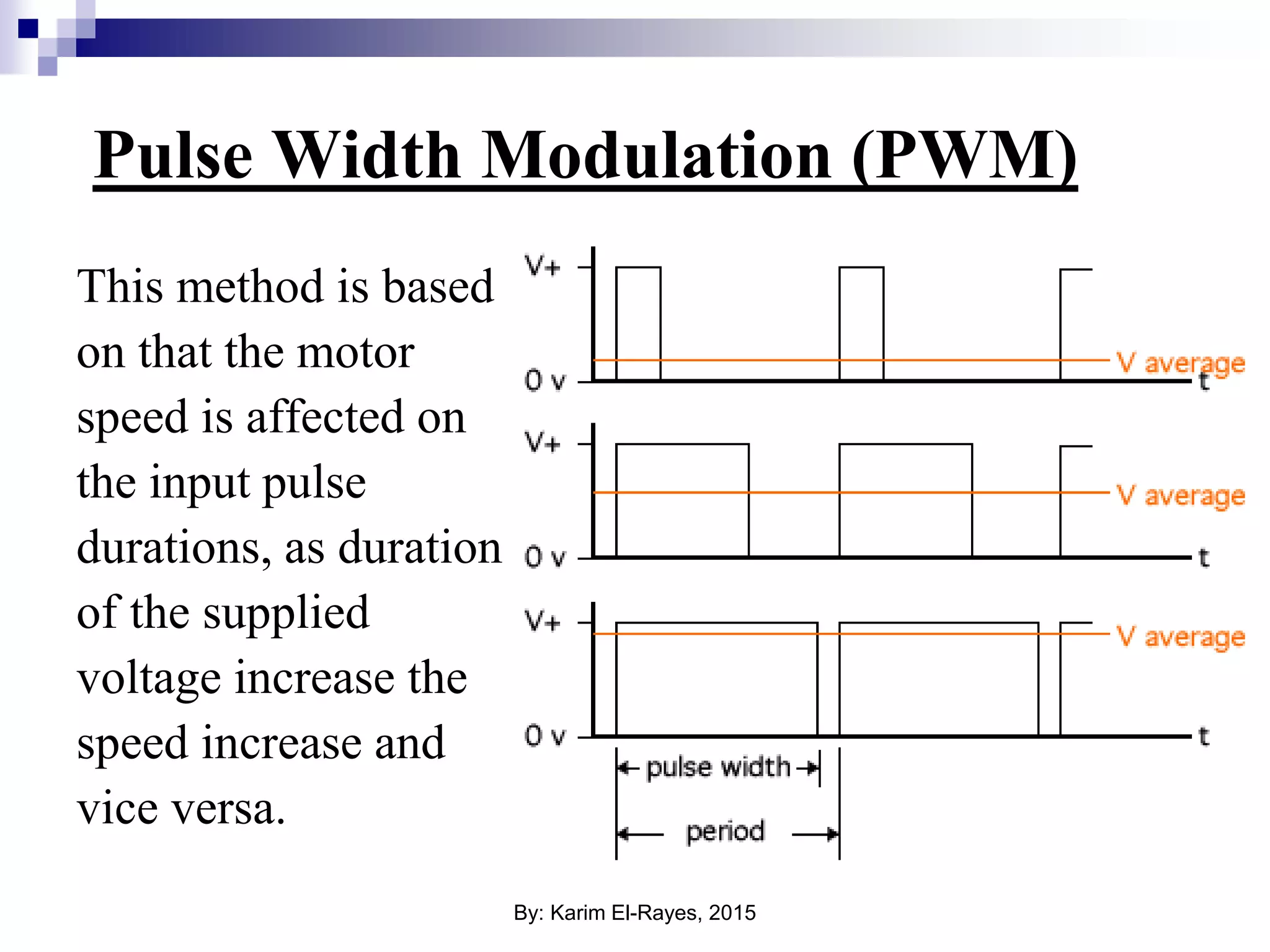
Pulse Width Modulation (PWM) This method is based on that the motor speed is affected on the input pulse durations, as duration of the supplied voltage increase the speed increase and vice versa. By: Karim El-Rayes, 2015
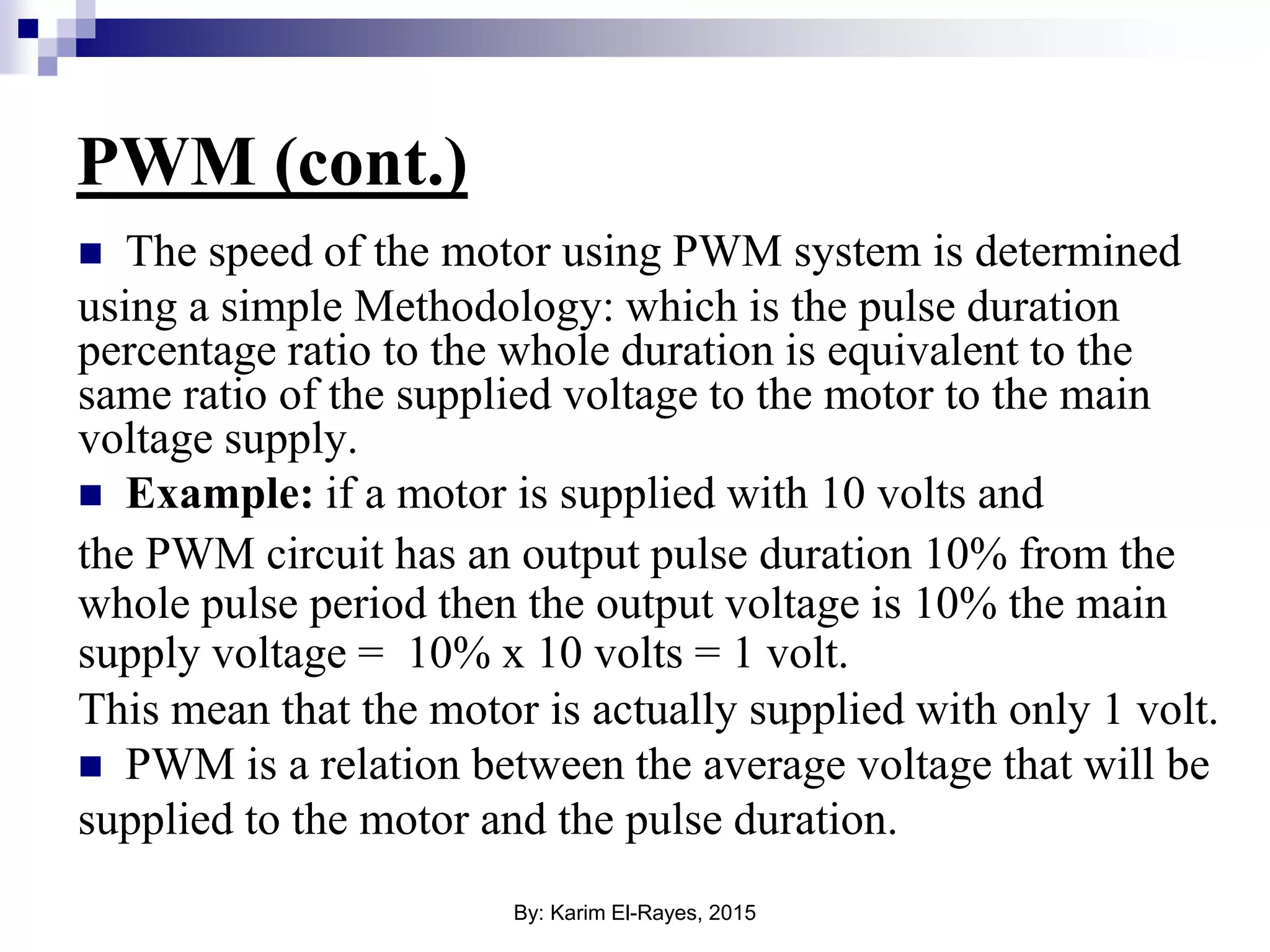
PWM (cont.)  The speed of the motor using PWM system is determined using a simple Methodology: which is the pulse duration percentage ratio to the whole duration is equivalent to the same ratio of the supplied voltage to the motor to the main voltage supply.  Example: if a motor is supplied with 10 volts and the PWM circuit has an output pulse duration 10% from the whole pulse period then the output voltage is 10% the main supply voltage = 10% x 10 volts = 1 volt. This mean that the motor is actually supplied with only 1 volt.  PWM is a relation between the average voltage that will be supplied to the motor and the pulse duration. By: Karim El-Rayes, 2015
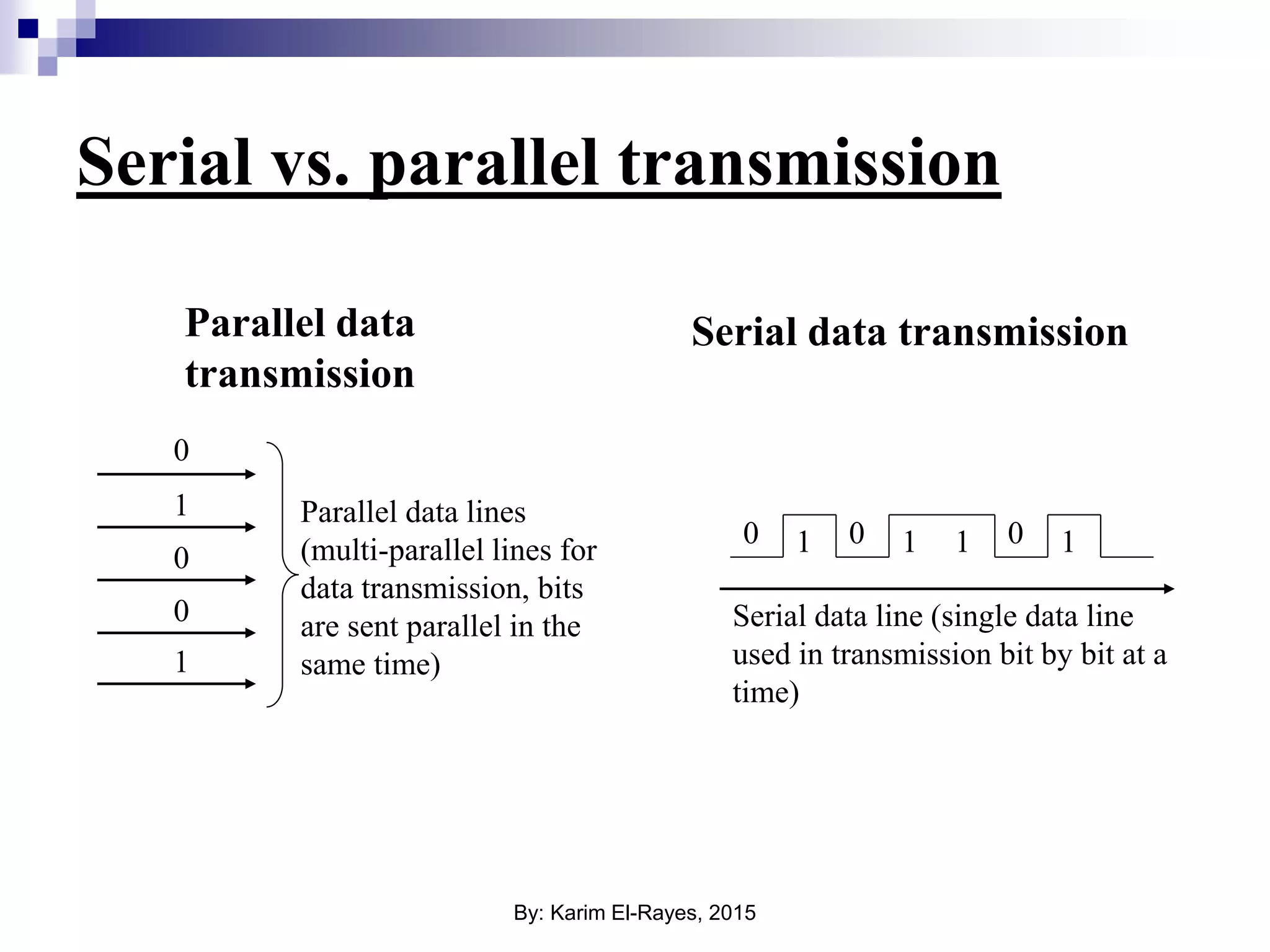
Serial vs. parallel transmission 0 0 0 1 1 1 1 1 10 0 0 Parallel data lines (multi-parallel lines for data transmission, bits are sent parallel in the same time) Serial data line (single data line used in transmission bit by bit at a time) Parallel data transmission Serial data transmission By: Karim El-Rayes, 2015
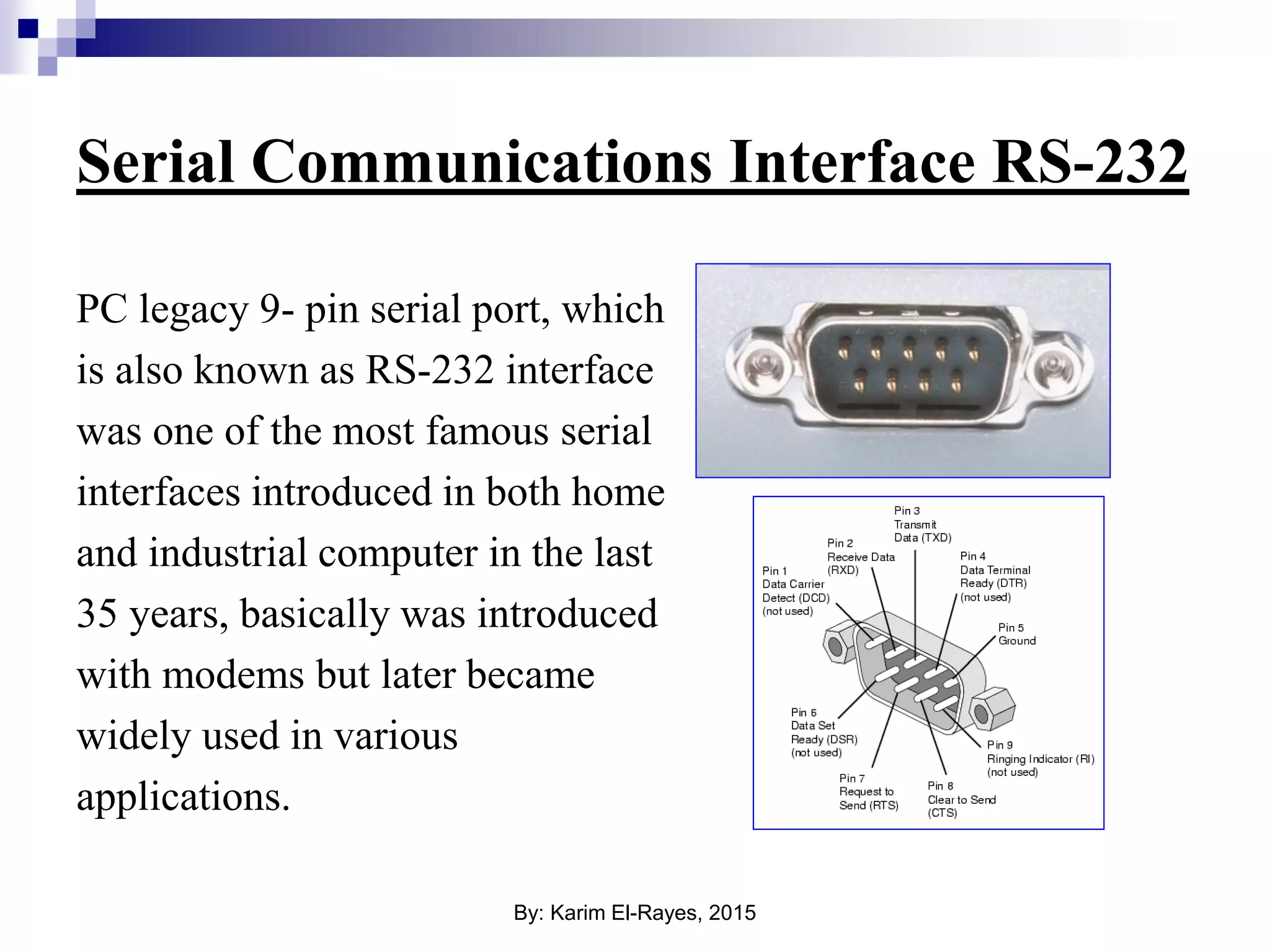
Serial Communications Interface RS-232 PC legacy 9- pin serial port, which is also known as RS-232 interface was one of the most famous serial interfaces introduced in both home and industrial computer in the last 35 years, basically was introduced with modems but later became widely used in various applications. By: Karim El-Rayes, 2015
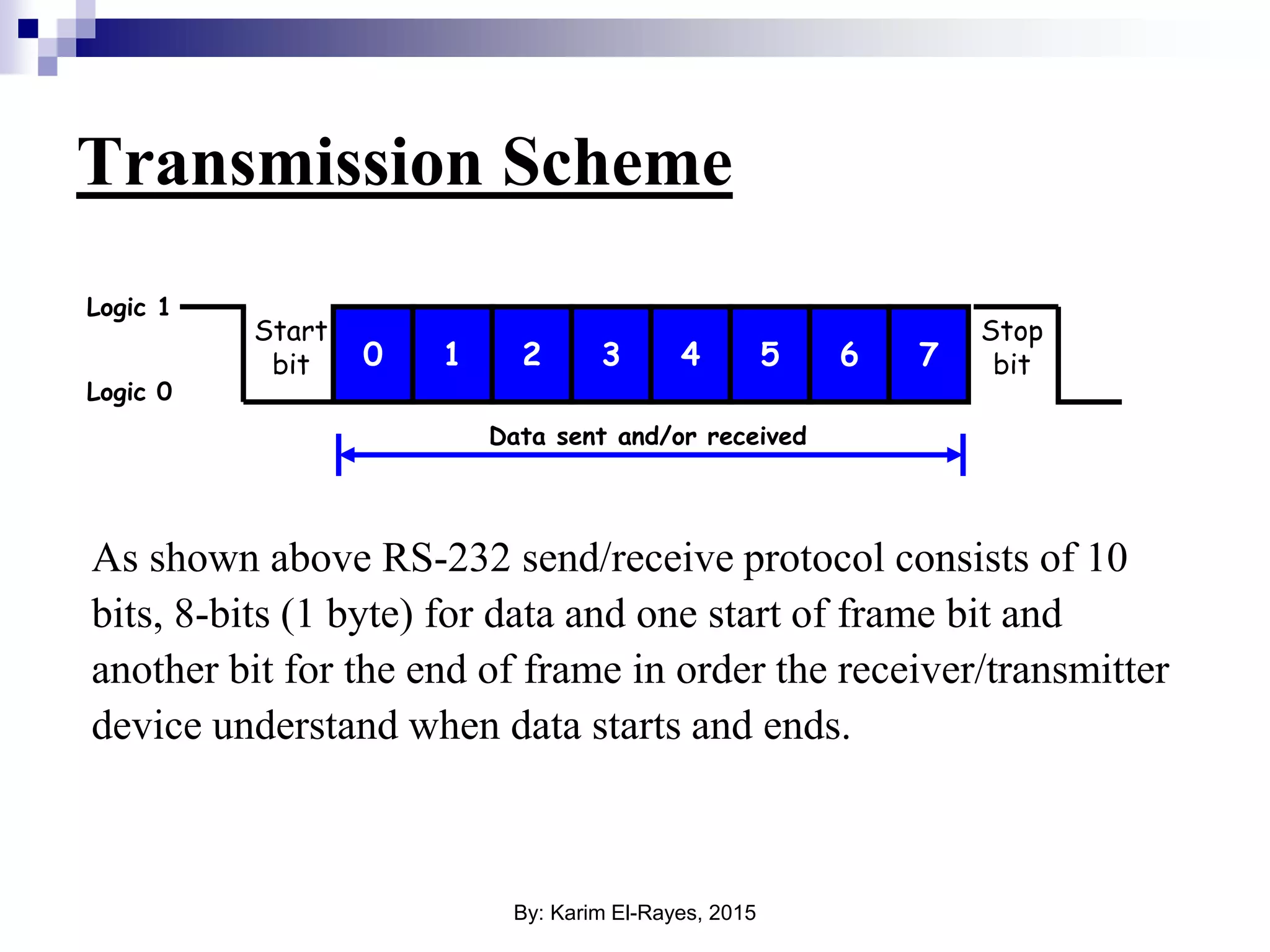
Transmission Scheme As shown above RS-232 send/receive protocol consists of 10 bits, 8-bits (1 byte) for data and one start of frame bit and another bit for the end of frame in order the receiver/transmitter device understand when data starts and ends. 0 1 2 3 4 5 6 7 Start bit Stop bit Logic 1 Logic 0 Data sent and/or received By: Karim El-Rayes, 2015
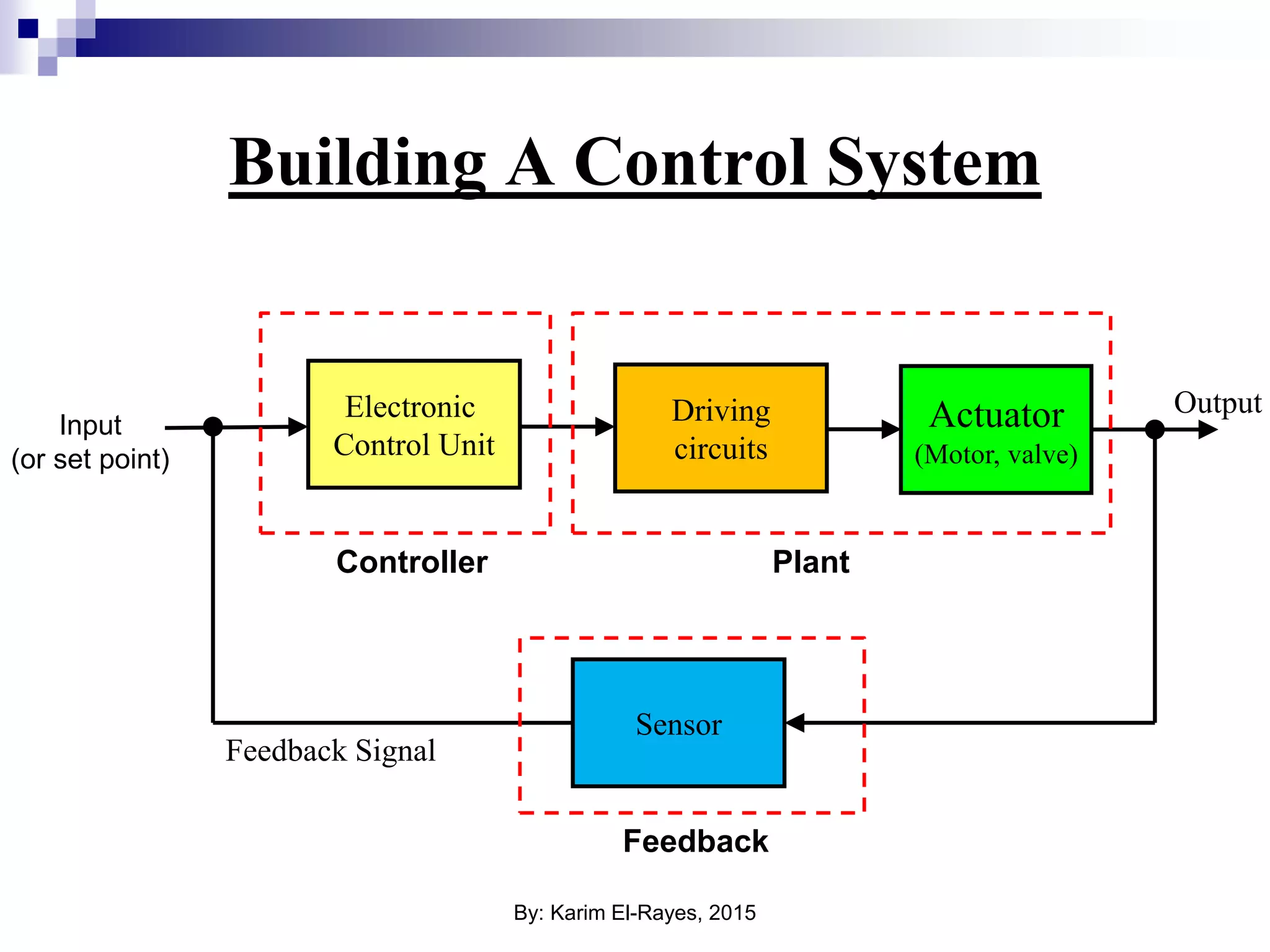
Building A Control System Electronic Control Unit Actuator (Motor, valve) Sensor Driving circuits Feedback Signal Input (or set point) Controller Plant Feedback Output By: Karim El-Rayes, 2015
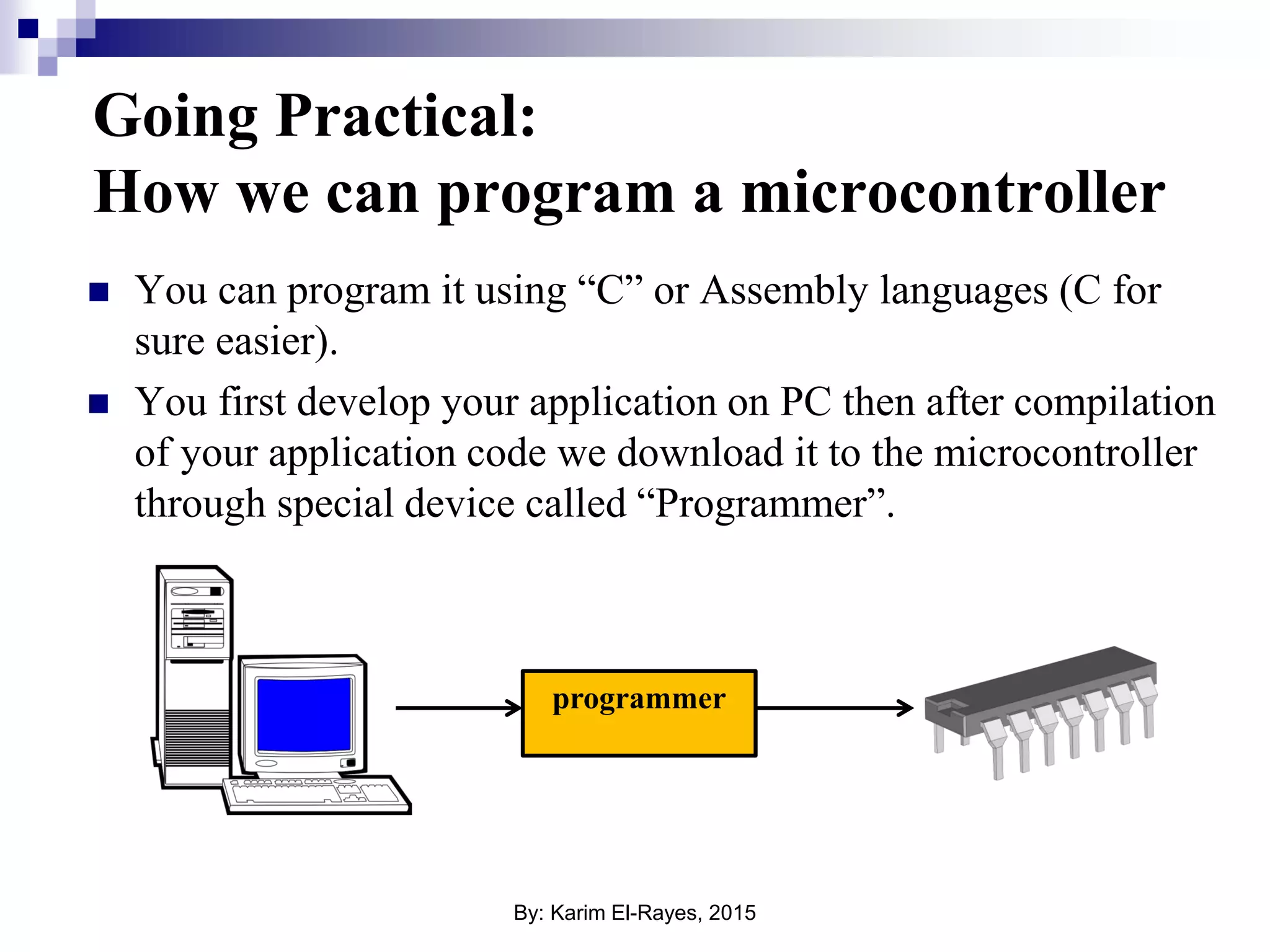
Going Practical: How we can program a microcontroller  You can program it using “C” or Assembly languages (C for sure easier).  You first develop your application on PC then after compilation of your application code we download it to the microcontroller through special device called “Programmer”. programmer By: Karim El-Rayes, 2015
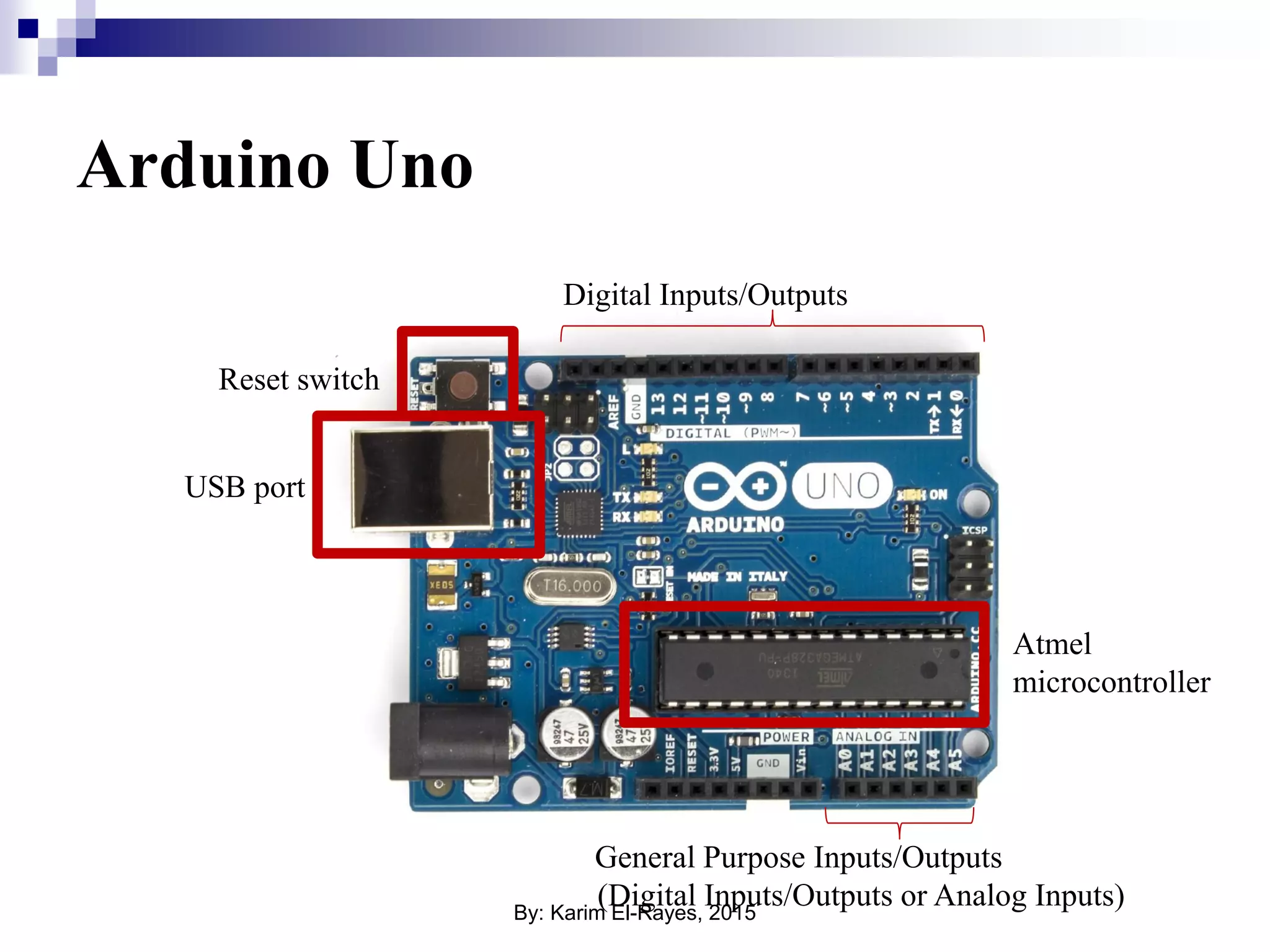
Arduino Uno Reset switch USB port Atmel microcontroller General Purpose Inputs/Outputs (Digital Inputs/Outputs or Analog Inputs) Digital Inputs/Outputs By: Karim El-Rayes, 2015
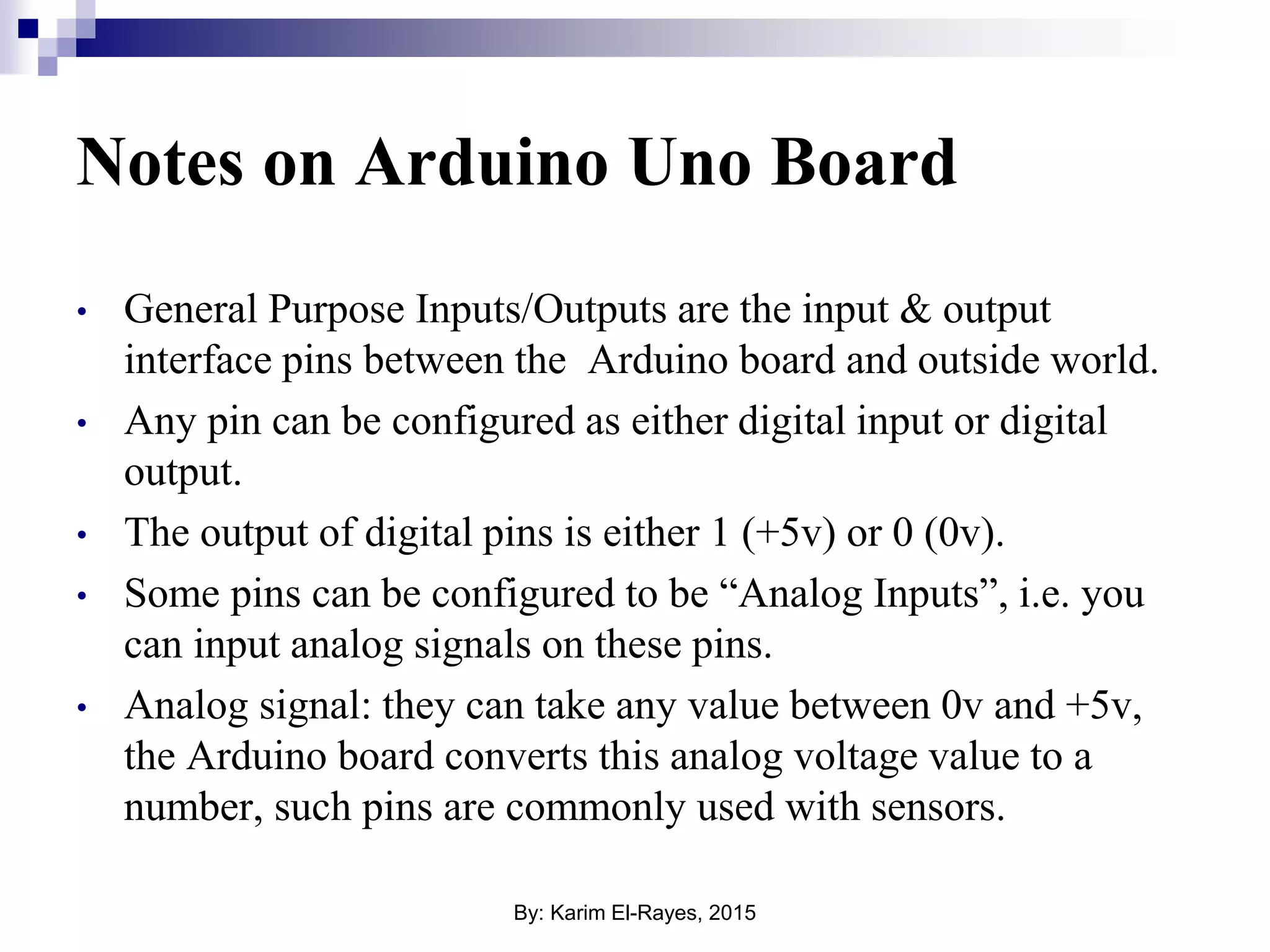
Notes on Arduino Uno Board • General Purpose Inputs/Outputs are the input & output interface pins between the Arduino board and outside world. • Any pin can be configured as either digital input or digital output. • The output of digital pins is either 1 (+5v) or 0 (0v). • Some pins can be configured to be “Analog Inputs”, i.e. you can input analog signals on these pins. • Analog signal: they can take any value between 0v and +5v, the Arduino board converts this analog voltage value to a number, such pins are commonly used with sensors. By: Karim El-Rayes, 2015
Introduction to Arduino Syntax  Coding style.  Data types.  I/O: digital read/write, analog read/write.  Serial interface.  If-else.  For loops. By: Karim El-Rayes, 2015
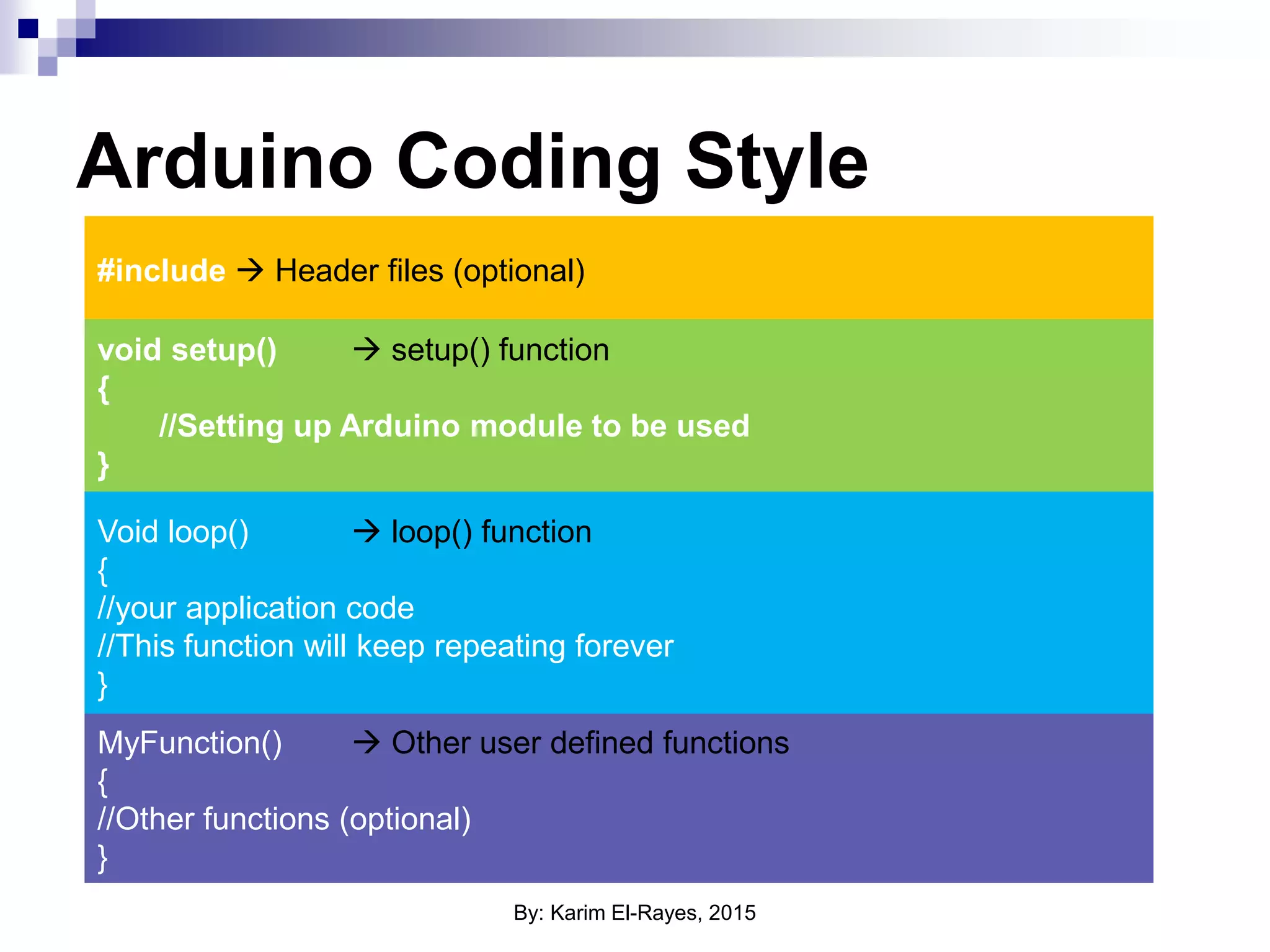
Arduino Coding Style #include  Header files (optional) void setup()  setup() function { //Setting up Arduino module to be used } Void loop()  loop() function { //your application code //This function will keep repeating forever } MyFunction()  Other user defined functions { //Other functions (optional) } By: Karim El-Rayes, 2015
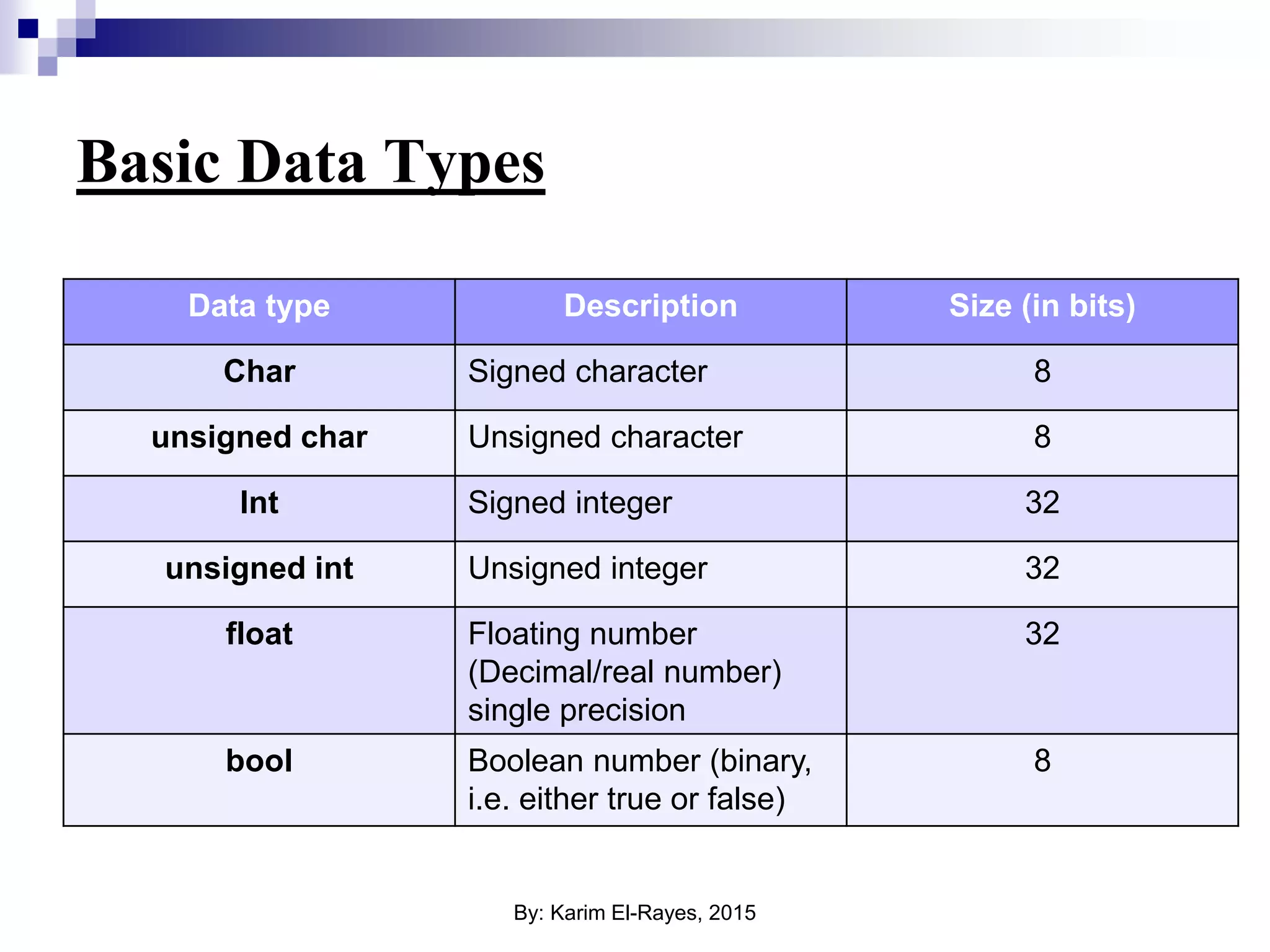
Basic Data Types Data type Description Size (in bits) Char Signed character 8 unsigned char Unsigned character 8 Int Signed integer 32 unsigned int Unsigned integer 32 float Floating number (Decimal/real number) single precision 32 bool Boolean number (binary, i.e. either true or false) 8 By: Karim El-Rayes, 2015
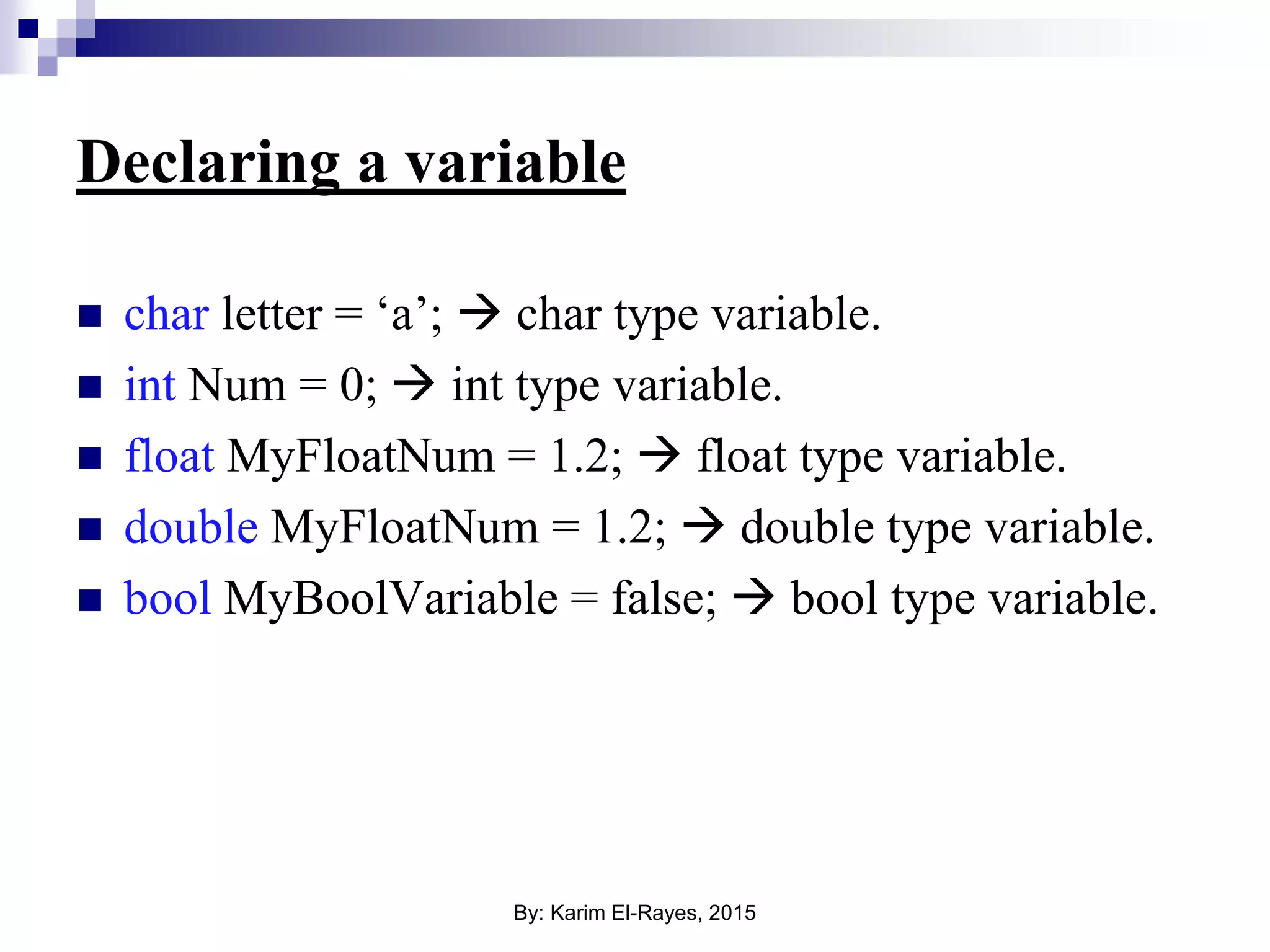
Declaring a variable  char letter = ‘a’;  char type variable.  int Num = 0;  int type variable.  float MyFloatNum = 1.2;  float type variable.  double MyFloatNum = 1.2;  double type variable.  bool MyBoolVariable = false;  bool type variable. By: Karim El-Rayes, 2015
Arrays Array is a list of variables of the same type, instead of declaring every variable separately they are declared in the form list or “Array”. Example: int Numbers[10];  Array of 10 integers. char MyArray[20];  Array of 20 character Note: a string in C is just an array of characters. By: Karim El-Rayes, 2015
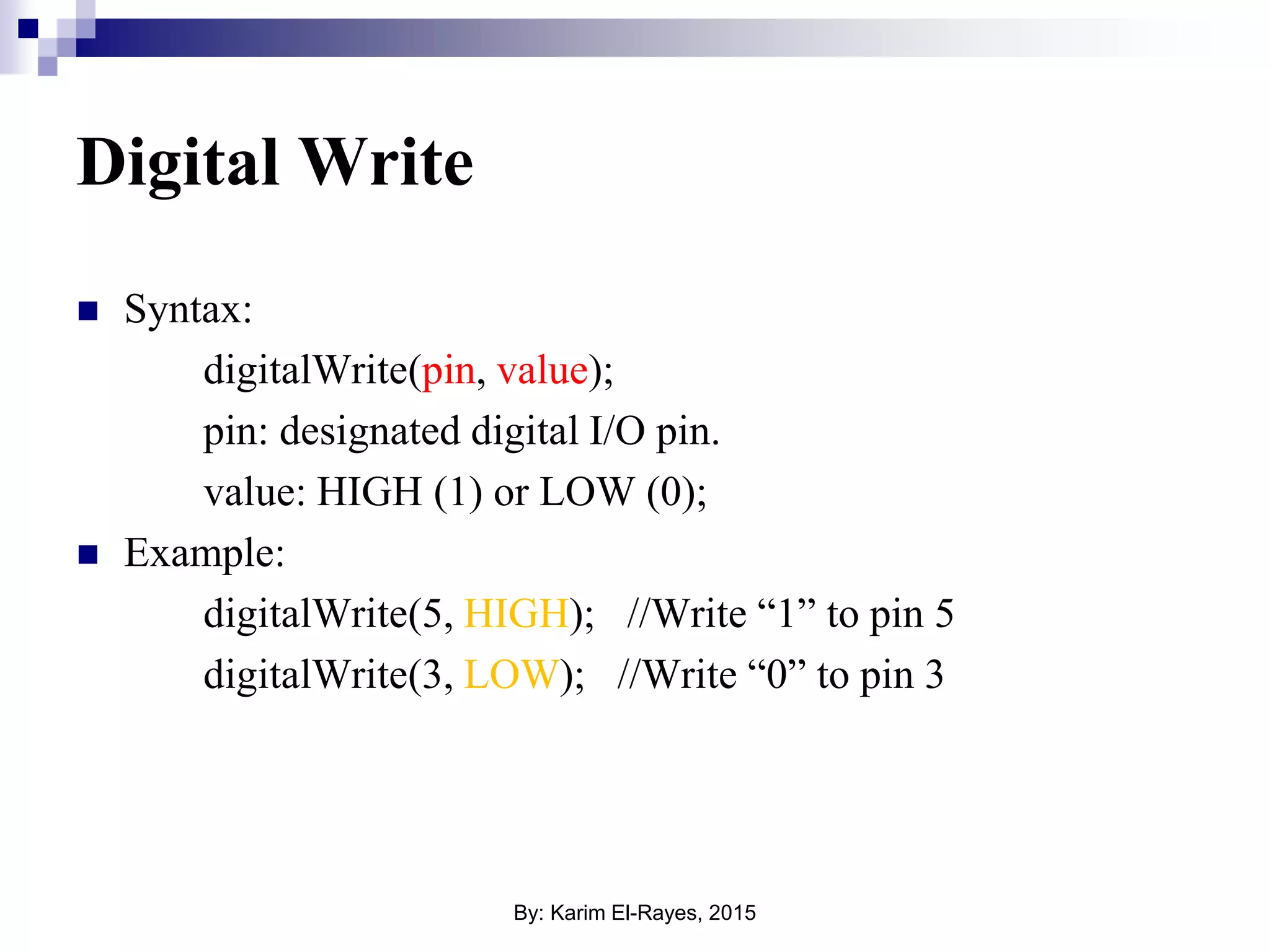
Digital Write  Syntax: digitalWrite(pin, value); pin: designated digital I/O pin. value: HIGH (1) or LOW (0);  Example: digitalWrite(5, HIGH); //Write “1” to pin 5 digitalWrite(3, LOW); //Write “0” to pin 3 By: Karim El-Rayes, 2015
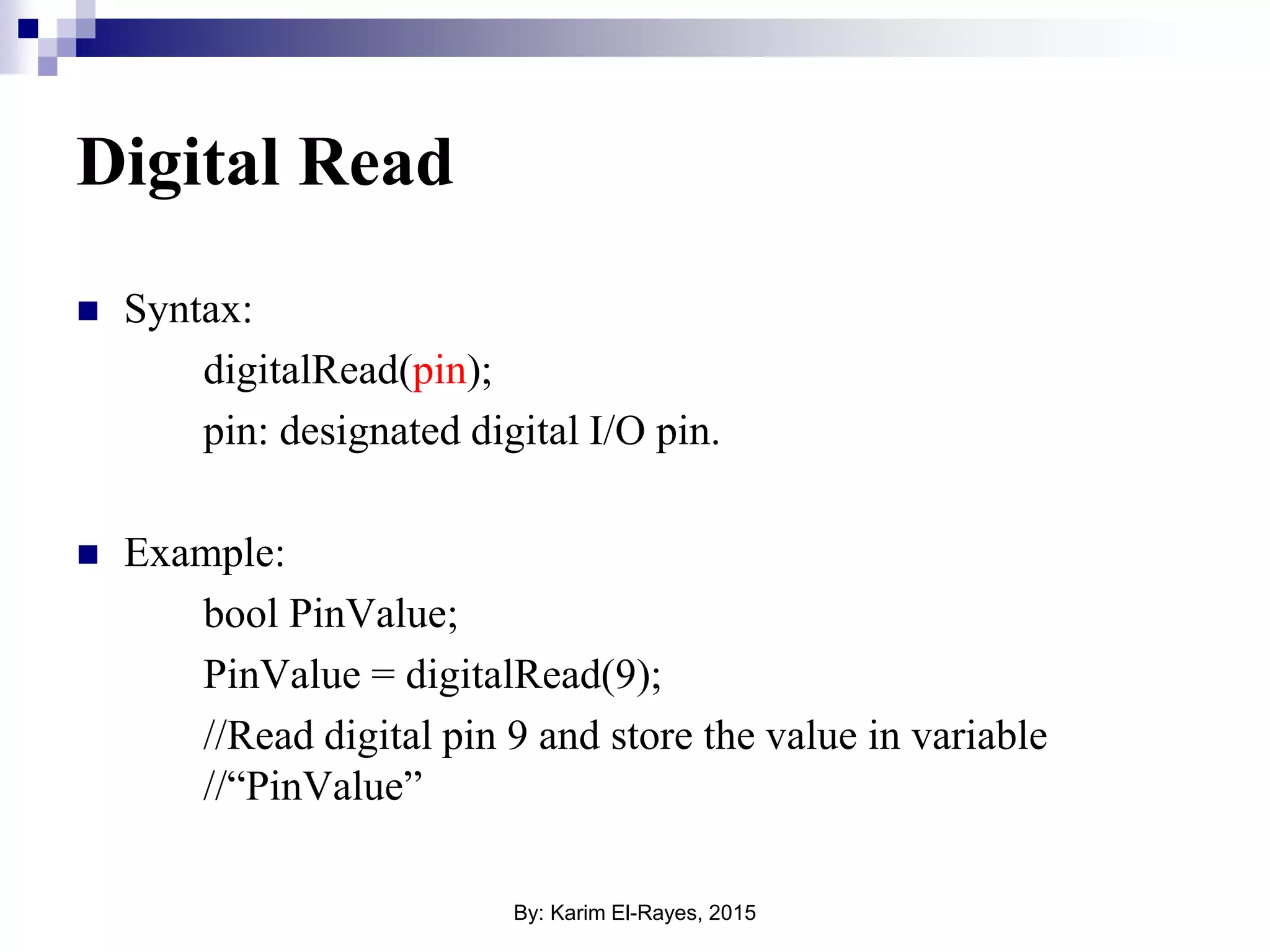
Digital Read  Syntax: digitalRead(pin); pin: designated digital I/O pin.  Example: bool PinValue; PinValue = digitalRead(9); //Read digital pin 9 and store the value in variable //“PinValue” By: Karim El-Rayes, 2015
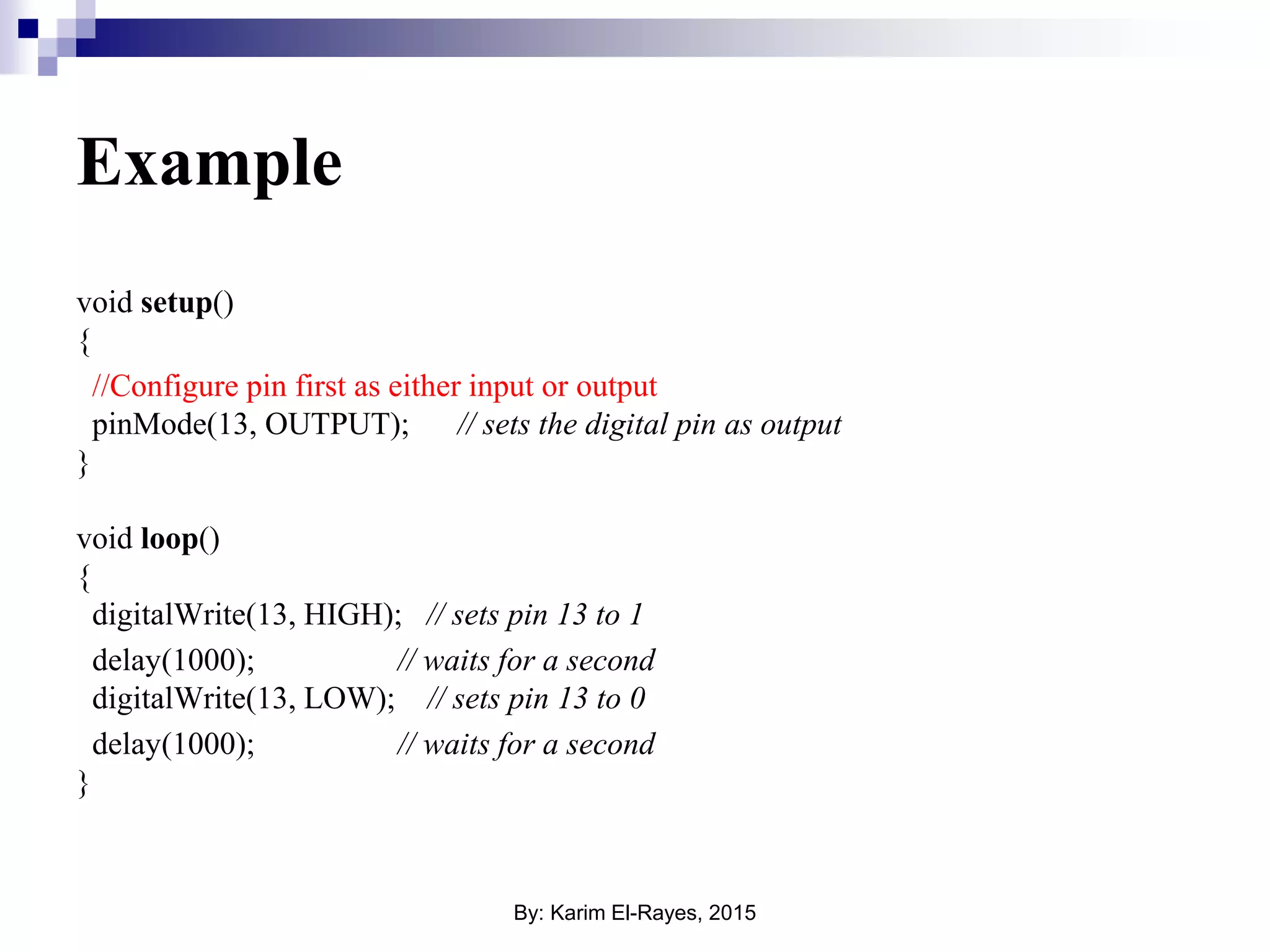
Example void setup() { //Configure pin first as either input or output pinMode(13, OUTPUT); // sets the digital pin as output } void loop() { digitalWrite(13, HIGH); // sets pin 13 to 1 delay(1000); // waits for a second digitalWrite(13, LOW); // sets pin 13 to 0 delay(1000); // waits for a second } By: Karim El-Rayes, 2015
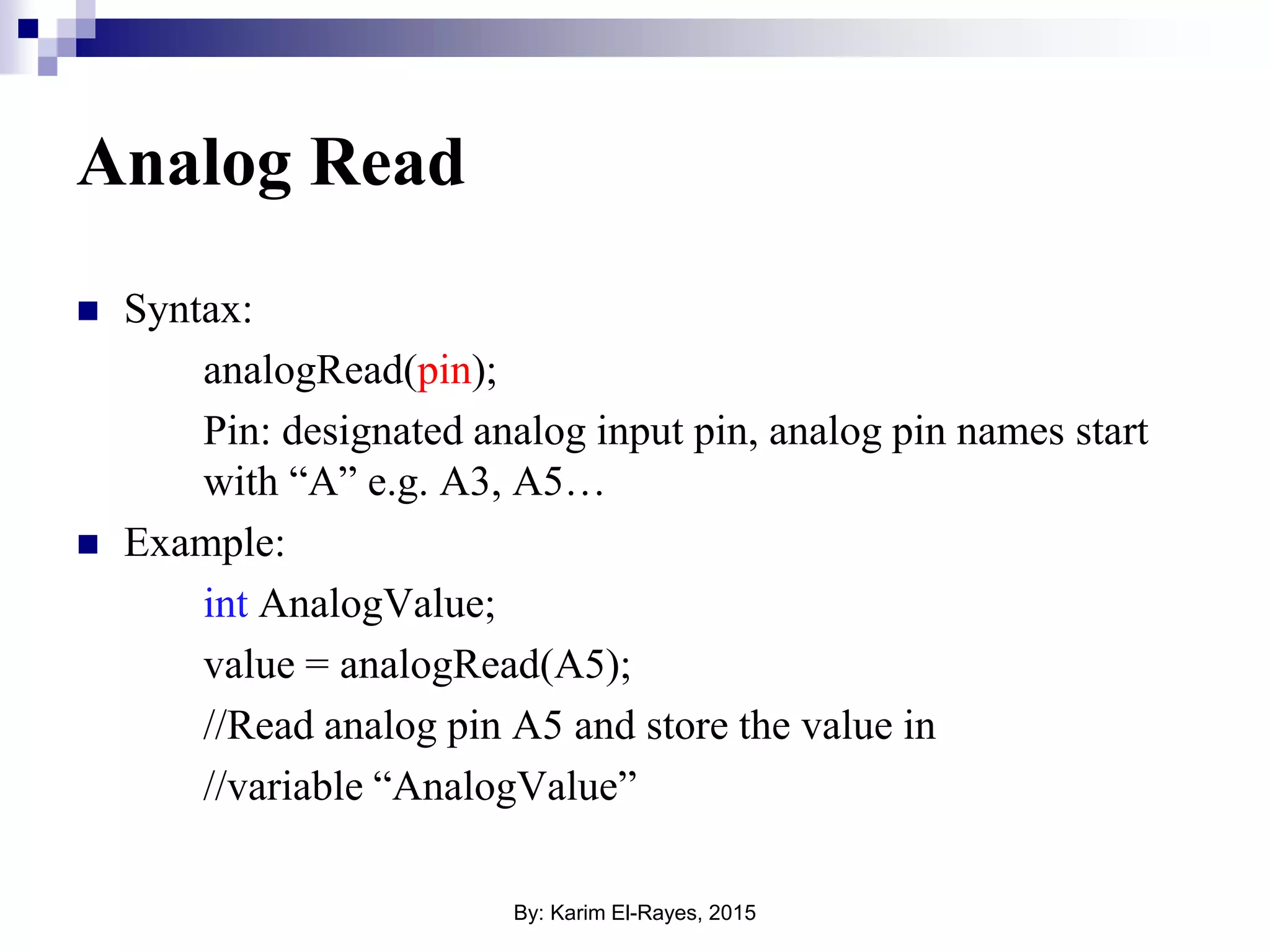
Analog Read  Syntax: analogRead(pin); Pin: designated analog input pin, analog pin names start with “A” e.g. A3, A5…  Example: int AnalogValue; value = analogRead(A5); //Read analog pin A5 and store the value in //variable “AnalogValue” By: Karim El-Rayes, 2015
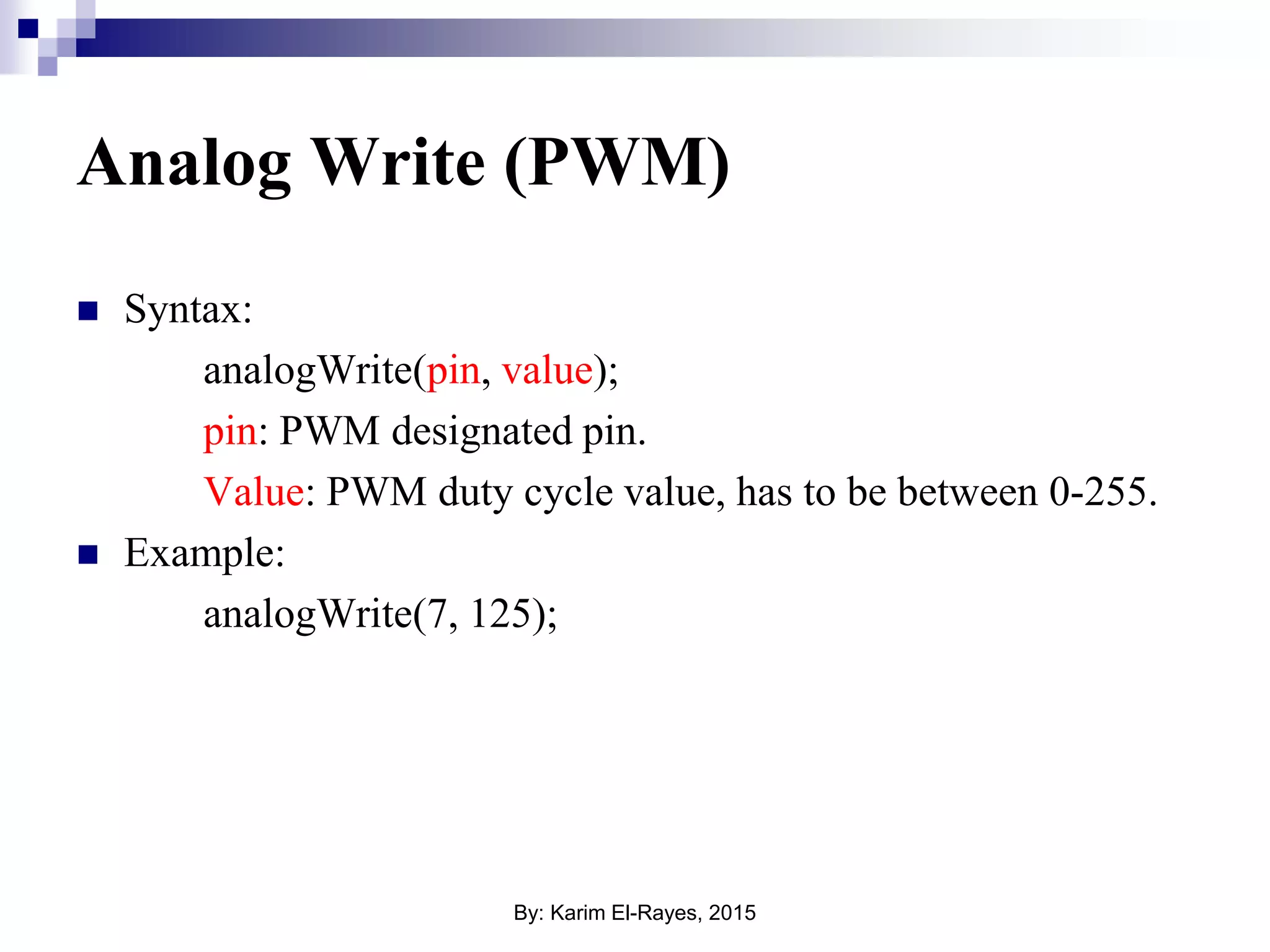
Analog Write (PWM)  Syntax: analogWrite(pin, value); pin: PWM designated pin. Value: PWM duty cycle value, has to be between 0-255.  Example: analogWrite(7, 125); By: Karim El-Rayes, 2015
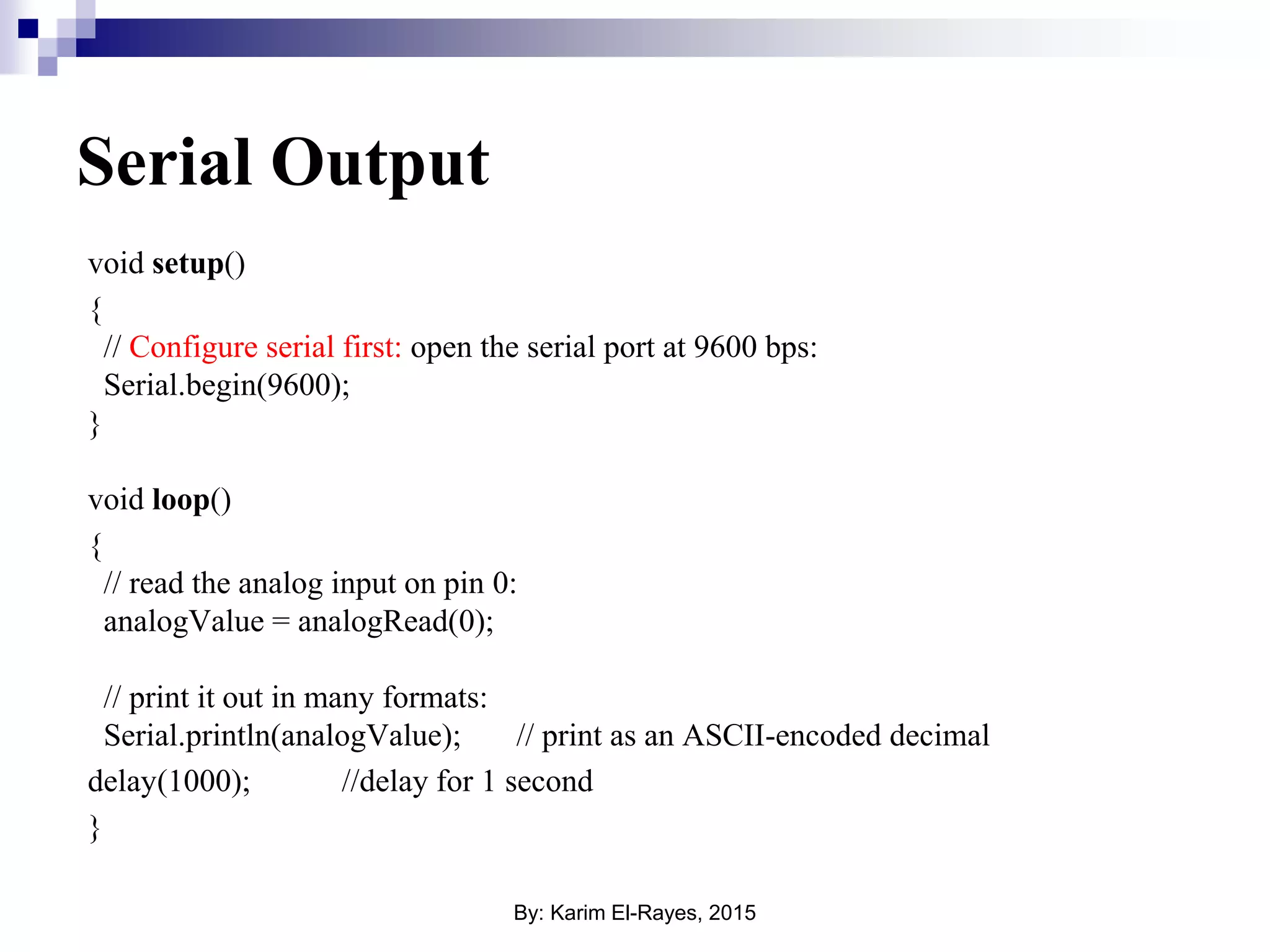
Serial Output void setup() { // Configure serial first: open the serial port at 9600 bps: Serial.begin(9600); } void loop() { // read the analog input on pin 0: analogValue = analogRead(0); // print it out in many formats: Serial.println(analogValue); // print as an ASCII-encoded decimal delay(1000); //delay for 1 second } By: Karim El-Rayes, 2015
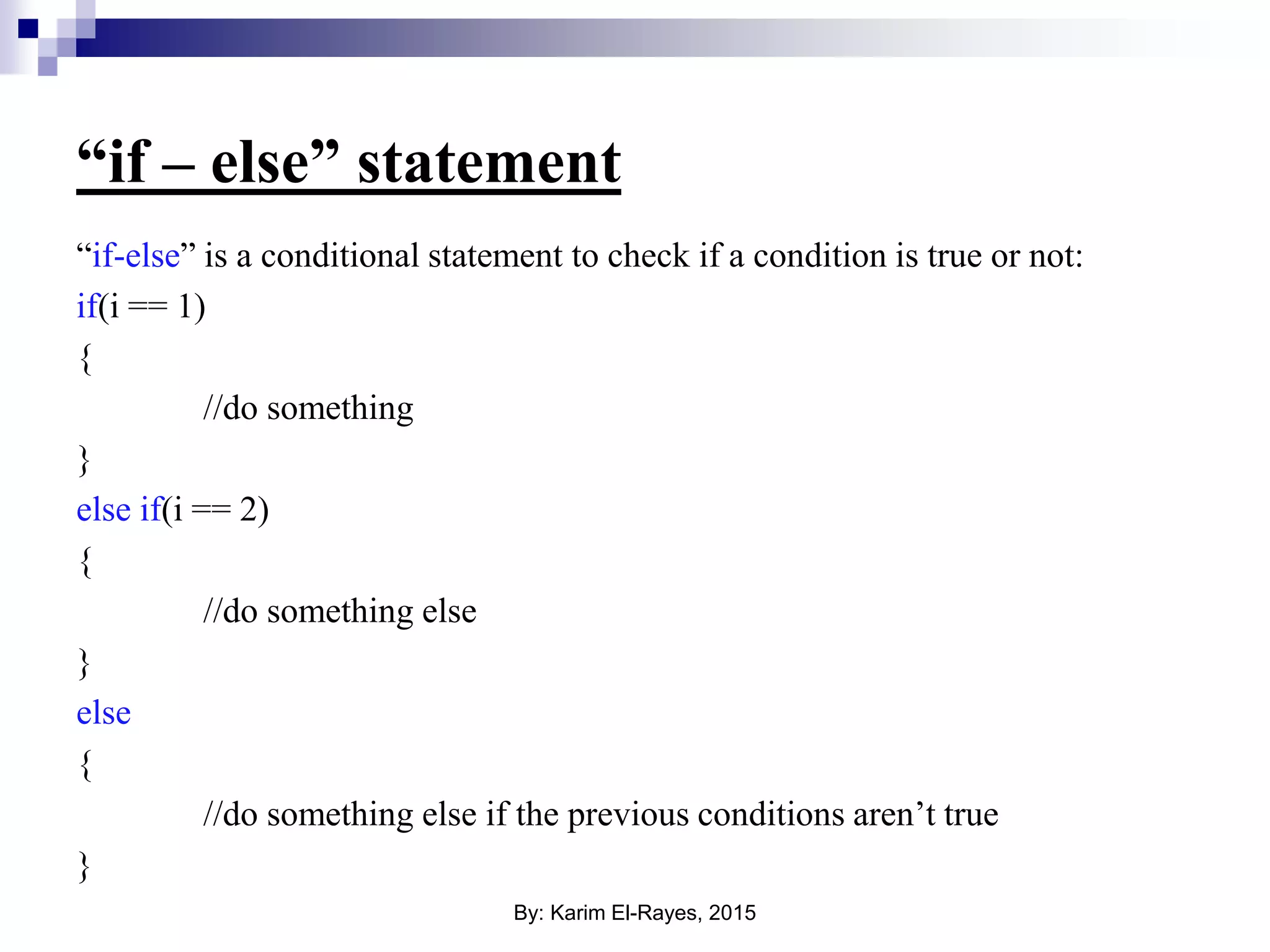
“if – else” statement “if-else” is a conditional statement to check if a condition is true or not: if(i == 1) { //do something } else if(i == 2) { //do something else } else { //do something else if the previous conditions aren’t true } By: Karim El-Rayes, 2015
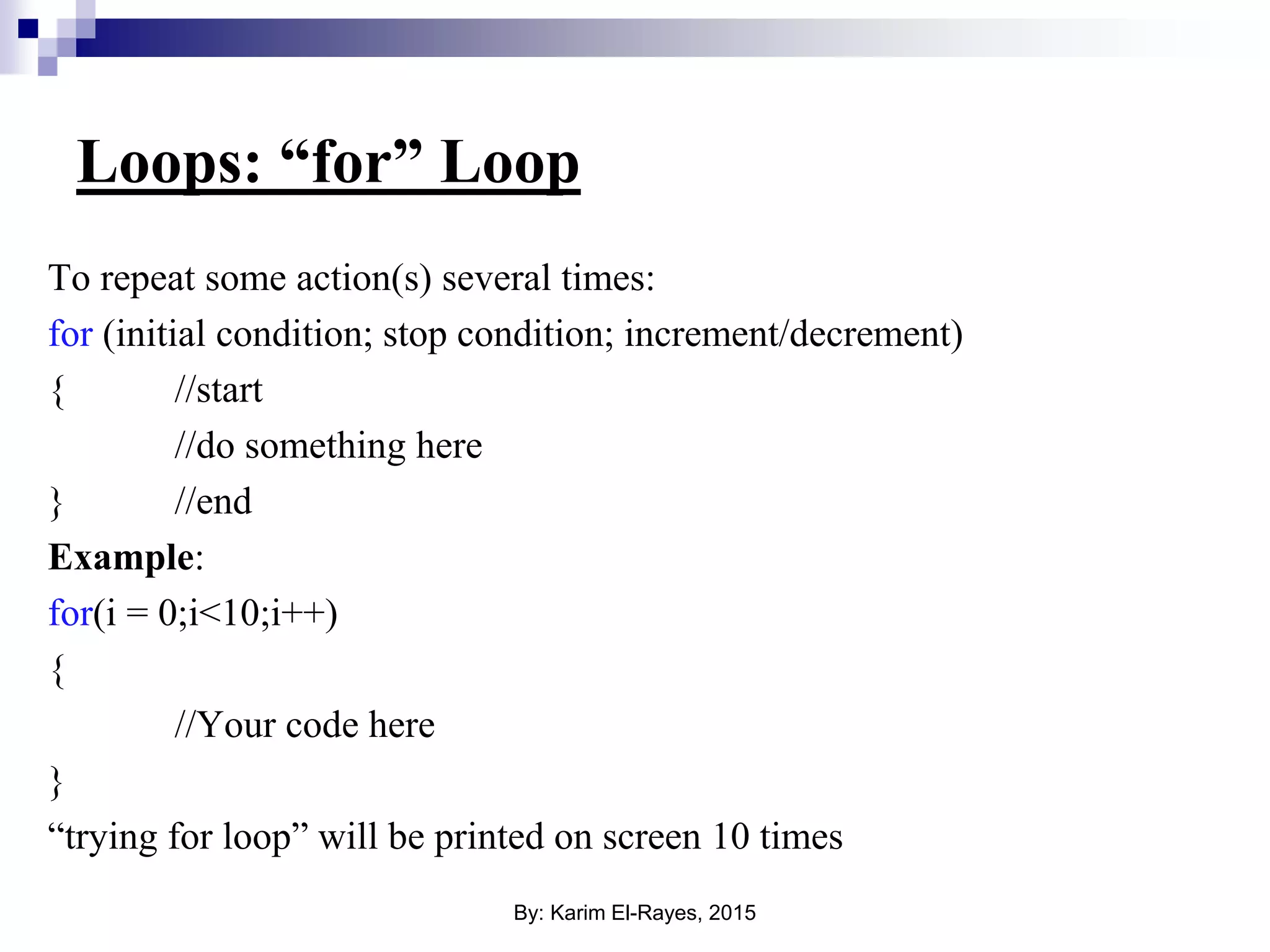
Loops: “for” Loop To repeat some action(s) several times: for (initial condition; stop condition; increment/decrement) { //start //do something here } //end Example: for(i = 0;i<10;i++) { //Your code here } “trying for loop” will be printed on screen 10 times By: Karim El-Rayes, 2015
List of acronyms & abbreviations  ADC: Analogue to Digital Converter.  ALU: Arithmetic & Logical Unit.  BIOS: Basic Input/Output System  CPU: Central Processing Unit.  DAC: Digital to Analogue Converter.  GPM (μP): General Purpose Microprocessor.  I/O: Input/Output.  MCU (μC): Microcontroller unit.  PWM: Pulse Width Modulation.  RAM: Random Access Memory.  ROM: Read Only Memory. Acronym of Serial Interfaces  UART: Universal Asynchronous Receiver Transmitter.  SPI: Serial Peripheral Interface.  I2C: Inter-Integrated Circuit  USB: Universal Serial Bus. By: Karim El-Rayes, 2015

Introduction to Arduino

  • 1.
    Introduction to Arduino By: KarimEl-Rayes By: Karim El-Rayes, 2015
  • 2.
    What about computers! We all know that we can use computers to do anything like process control or data ciphering, but to have a computer we need a CPU, a main memory unit represented in a RAM module, a secondary storage element represented in Hard Disk Drive (HDD), some input devices to give instructions/orders like keyboard and a mouse, and some other output devices like a monitor and printer to check the system state, and maybe some communication devices to communicate with external world like Ethernet card, USB ports and wireless interface cards (Wi-Fi). By: Karim El-Rayes, 2015
  • 3.
    Main Memory (RAM & cache) I/Ointerface module CPU Control unit ALURegisters Input devices Output devices Bus Bus BIOS L1 Cache memory Computers basic architecture Keyboard Mouse Monitor RAM HDD Motherboard CPU Wi-Fi card By: Karim El-Rayes, 2015
  • 4.
    Is it goodenough? Previously described system is very good and will be very efficient, featuring a very high computing capabilities BUT: 1. Big in size, you need a space for such system. 2. Very power hungry system, you can run on small batteries or solar cell in a rural place. 3. Expensive, let’s try to calculate the prices of Intel Core2Due processor, 1GB RAM slot, 80GB HDD, a monitor, a keyboard and finally a mouse !!! By: Karim El-Rayes, 2015
  • 5.
  • 6.
    Function of….  ROM:To store the program or the code the developer write for the μC to be used.  RAM: the program stored in the ROM is transferred to the RAM when the μC is turned On.  CPU: the unit responsible processing the program uploaded in the RAM transferred from the ROM.  I/O interface module: responsible for data transfer between the outside world and the CPU in order to take action either by input or output data. By: Karim El-Rayes, 2015
  • 7.
    How MCU looklike?? By: Karim El-Rayes, 2015
  • 8.
    CPU and Memory CPU Memory Address bus Data bus Clock Withevery clock tick the CPU executes one instruction, this instruction can be a data transfer to memory or an arithmetic operation or anything else. By: Karim El-Rayes, 2015
  • 9.
    Microcontroller I/O Modules ROM RAM CPU I/Opins ADC DAC Timers RS-232 Serial interface PWM USBor Ethernet interface I/Opins I/Ointerface By: Karim El-Rayes, 2015
  • 10.
    Timers  Timers arebinary counter that counts clock ticks and upon overflow some action is taken.  Mainly “Timer” is used for to control and monitor timing inside a CPU. Timer Clock input With every clock tick the timer increments, once it reaches its maximum an overflow happens and interrupt signal is issued to the CPU. Overflow signal (Interrupt signal) By: Karim El-Rayes, 2015
  • 11.
    Binary Counter: Basicconcept Pulse # Output binary Output decimal 0 (no pulse) 0000 0 1 0001 1 2 0010 2 3 0011 3 4 0100 4 5 0101 5 6 0110 6 7 0111 7 8 1000 8 9 1001 9 10 1010 10 11 1011 11 12 1100 12 13 1101 13 14 1110 14 15 1111 15By: Karim El-Rayes, 2015
  • 12.
    Digital Input /Output Since our microcontroller is a digital system, our basic inputs and outputs are 1’s and 0’s, between “3.5v” and 5v” for the logic “1” and “Ground” or “0v” for logic “0”. Microcontroller DigitalInputs Digitaloutputs By: Karim El-Rayes, 2015
  • 13.
    Analog to Digitalconverter Analog to digital converter is an IC responsible of converting analog signal continuous in amplitude and time to digital signals (binary numbers), but under certain conditions, for a PC or an ECU like a microcontroller or a PLC can understand in order to be processed and stored by these systems (the PC, ECU or PLC). Analog to Digital Converter 1 1 1 10 0 0 V t Analog signal Binary code By: Karim El-Rayes, 2015
  • 14.
    Analog to DigitalConversion Anti aliasing filter (low pass filter) Signal sampling and hold circuit Quantization process Binary output buffers Analog Input Binary output 0000 0001 0010 0011 0100 0101 0110 0111 1000 1001 1010 1011 1100 1101 1110 1111 t V t V t Analog signal Sampled signal Quantizing sampled signal By: Karim El-Rayes, 2015
  • 15.
    Pulse Width Modulation(PWM) This method is based on that the motor speed is affected on the input pulse durations, as duration of the supplied voltage increase the speed increase and vice versa. By: Karim El-Rayes, 2015
  • 16.
    PWM (cont.)  Thespeed of the motor using PWM system is determined using a simple Methodology: which is the pulse duration percentage ratio to the whole duration is equivalent to the same ratio of the supplied voltage to the motor to the main voltage supply.  Example: if a motor is supplied with 10 volts and the PWM circuit has an output pulse duration 10% from the whole pulse period then the output voltage is 10% the main supply voltage = 10% x 10 volts = 1 volt. This mean that the motor is actually supplied with only 1 volt.  PWM is a relation between the average voltage that will be supplied to the motor and the pulse duration. By: Karim El-Rayes, 2015
  • 17.
    Serial vs. paralleltransmission 0 0 0 1 1 1 1 1 10 0 0 Parallel data lines (multi-parallel lines for data transmission, bits are sent parallel in the same time) Serial data line (single data line used in transmission bit by bit at a time) Parallel data transmission Serial data transmission By: Karim El-Rayes, 2015
  • 18.
    Serial Communications InterfaceRS-232 PC legacy 9- pin serial port, which is also known as RS-232 interface was one of the most famous serial interfaces introduced in both home and industrial computer in the last 35 years, basically was introduced with modems but later became widely used in various applications. By: Karim El-Rayes, 2015
  • 19.
    Transmission Scheme As shownabove RS-232 send/receive protocol consists of 10 bits, 8-bits (1 byte) for data and one start of frame bit and another bit for the end of frame in order the receiver/transmitter device understand when data starts and ends. 0 1 2 3 4 5 6 7 Start bit Stop bit Logic 1 Logic 0 Data sent and/or received By: Karim El-Rayes, 2015
  • 20.
    Building A ControlSystem Electronic Control Unit Actuator (Motor, valve) Sensor Driving circuits Feedback Signal Input (or set point) Controller Plant Feedback Output By: Karim El-Rayes, 2015
  • 21.
    Going Practical: How wecan program a microcontroller  You can program it using “C” or Assembly languages (C for sure easier).  You first develop your application on PC then after compilation of your application code we download it to the microcontroller through special device called “Programmer”. programmer By: Karim El-Rayes, 2015
  • 22.
    Arduino Uno Reset switch USBport Atmel microcontroller General Purpose Inputs/Outputs (Digital Inputs/Outputs or Analog Inputs) Digital Inputs/Outputs By: Karim El-Rayes, 2015
  • 23.
    Notes on ArduinoUno Board • General Purpose Inputs/Outputs are the input & output interface pins between the Arduino board and outside world. • Any pin can be configured as either digital input or digital output. • The output of digital pins is either 1 (+5v) or 0 (0v). • Some pins can be configured to be “Analog Inputs”, i.e. you can input analog signals on these pins. • Analog signal: they can take any value between 0v and +5v, the Arduino board converts this analog voltage value to a number, such pins are commonly used with sensors. By: Karim El-Rayes, 2015
  • 24.
    Introduction to ArduinoSyntax  Coding style.  Data types.  I/O: digital read/write, analog read/write.  Serial interface.  If-else.  For loops. By: Karim El-Rayes, 2015
  • 25.
    Arduino Coding Style #include Header files (optional) void setup()  setup() function { //Setting up Arduino module to be used } Void loop()  loop() function { //your application code //This function will keep repeating forever } MyFunction()  Other user defined functions { //Other functions (optional) } By: Karim El-Rayes, 2015
  • 26.
    Basic Data Types Datatype Description Size (in bits) Char Signed character 8 unsigned char Unsigned character 8 Int Signed integer 32 unsigned int Unsigned integer 32 float Floating number (Decimal/real number) single precision 32 bool Boolean number (binary, i.e. either true or false) 8 By: Karim El-Rayes, 2015
  • 27.
    Declaring a variable char letter = ‘a’;  char type variable.  int Num = 0;  int type variable.  float MyFloatNum = 1.2;  float type variable.  double MyFloatNum = 1.2;  double type variable.  bool MyBoolVariable = false;  bool type variable. By: Karim El-Rayes, 2015
  • 28.
    Arrays Array is alist of variables of the same type, instead of declaring every variable separately they are declared in the form list or “Array”. Example: int Numbers[10];  Array of 10 integers. char MyArray[20];  Array of 20 character Note: a string in C is just an array of characters. By: Karim El-Rayes, 2015
  • 29.
    Digital Write  Syntax: digitalWrite(pin,value); pin: designated digital I/O pin. value: HIGH (1) or LOW (0);  Example: digitalWrite(5, HIGH); //Write “1” to pin 5 digitalWrite(3, LOW); //Write “0” to pin 3 By: Karim El-Rayes, 2015
  • 30.
    Digital Read  Syntax: digitalRead(pin); pin:designated digital I/O pin.  Example: bool PinValue; PinValue = digitalRead(9); //Read digital pin 9 and store the value in variable //“PinValue” By: Karim El-Rayes, 2015
  • 31.
    Example void setup() { //Configure pinfirst as either input or output pinMode(13, OUTPUT); // sets the digital pin as output } void loop() { digitalWrite(13, HIGH); // sets pin 13 to 1 delay(1000); // waits for a second digitalWrite(13, LOW); // sets pin 13 to 0 delay(1000); // waits for a second } By: Karim El-Rayes, 2015
  • 32.
    Analog Read  Syntax: analogRead(pin); Pin:designated analog input pin, analog pin names start with “A” e.g. A3, A5…  Example: int AnalogValue; value = analogRead(A5); //Read analog pin A5 and store the value in //variable “AnalogValue” By: Karim El-Rayes, 2015
  • 33.
    Analog Write (PWM) Syntax: analogWrite(pin, value); pin: PWM designated pin. Value: PWM duty cycle value, has to be between 0-255.  Example: analogWrite(7, 125); By: Karim El-Rayes, 2015
  • 34.
    Serial Output void setup() { //Configure serial first: open the serial port at 9600 bps: Serial.begin(9600); } void loop() { // read the analog input on pin 0: analogValue = analogRead(0); // print it out in many formats: Serial.println(analogValue); // print as an ASCII-encoded decimal delay(1000); //delay for 1 second } By: Karim El-Rayes, 2015
  • 35.
    “if – else”statement “if-else” is a conditional statement to check if a condition is true or not: if(i == 1) { //do something } else if(i == 2) { //do something else } else { //do something else if the previous conditions aren’t true } By: Karim El-Rayes, 2015
  • 36.
    Loops: “for” Loop Torepeat some action(s) several times: for (initial condition; stop condition; increment/decrement) { //start //do something here } //end Example: for(i = 0;i<10;i++) { //Your code here } “trying for loop” will be printed on screen 10 times By: Karim El-Rayes, 2015
  • 37.
    List of acronyms& abbreviations  ADC: Analogue to Digital Converter.  ALU: Arithmetic & Logical Unit.  BIOS: Basic Input/Output System  CPU: Central Processing Unit.  DAC: Digital to Analogue Converter.  GPM (μP): General Purpose Microprocessor.  I/O: Input/Output.  MCU (μC): Microcontroller unit.  PWM: Pulse Width Modulation.  RAM: Random Access Memory.  ROM: Read Only Memory. Acronym of Serial Interfaces  UART: Universal Asynchronous Receiver Transmitter.  SPI: Serial Peripheral Interface.  I2C: Inter-Integrated Circuit  USB: Universal Serial Bus. By: Karim El-Rayes, 2015