Showing posts with label clocks. Show all posts

2025-07-18

Pimping my Casio: Part Deux

Close to three years ago I wrote about using Oddly Specific Objects' alternate "motherboard" to modify a classic Casio F-91W watch: Pimping my Casio with Oddly Specific Objects' alternate motherboard and firmware. That blog post goes into the detail of swapping out the guts of the Casio and building and uploading the firmware. 

Happily, Oddly Specific Objects is back with a "Pro" version of their alternative Casio internals which now features an accelerometer and an alternative LCD. The original Sensor Watch used the existing Casio LCD display but the custom LCD allows for more complicated text to be displayed on screen. It's not a dot-matrix display so there are lots of limitations but it's still a fun upgrade.

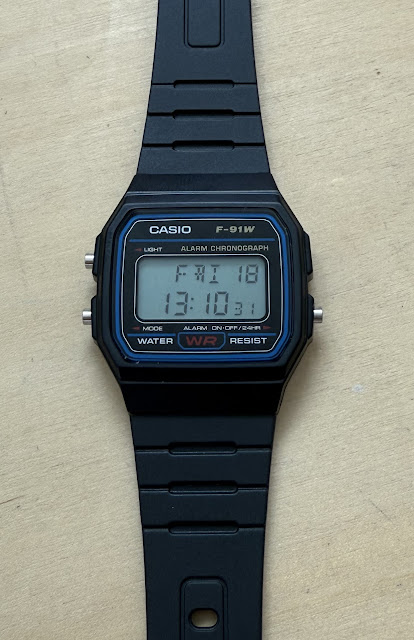
Also, the Sensor Watch Pro, as it's called, requires no soldering (unlike the original version). Here's one I prepared earlier (that is a Casio F-91W with new internals):


You can see the new display in action there showing the day as FRI. As with the original Sensor Watch there's a browser-based emulator that uses emscripten to get the watch running on your computer. This is pretty important because flashing new firmware to the watch requires dismantling it.


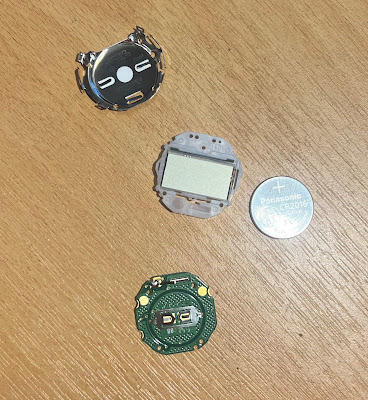
Since there's no soldering the process of upgrading your Casio is simply take it apart and put back in the parts that came in the kit (along with a small piece of metal that's transferred from the original Casio watch to make the battery connection):


Since I bought the optional accelerometer add on it's necessary to put in place a little piece of Kapton tape (you can see if covering the five pads on the image above) and the insert the accelerometer board itself:


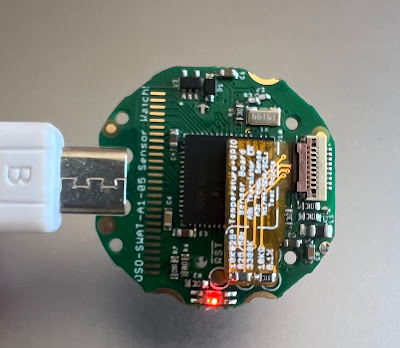
The five vertical traces at the top are the micro USB interface used for flashing the firmware. 


I modified the firmware to remove Imperial units and 12 hour clock (which I never want) and to choose my own selection of screens (I added the tally, accelerometer and light sensor screens).

The complete sequence of commands needed to build the firmware was:

brew install --cask gcc-arm-embedded
git clone https://github.com/joeycastillo/second-movement
cd second-movement
git submodule update --init --recursive
make BOARD=sensorwatch_pro DISPLAY=custom

And then to upload to the watch you connect the micro USB, click the tiny switch on the back twice very rapidly and a volume called WATCHBOOT appears on your machine. You can copy the firmware over to the watch with make install

To run the emulator you build with emscripten:

brew install emscripten
emmake make BOARD=sensorwatch_pro DISPLAY=custom
python3 -m http.server -d build-sim

And then visit localhost:8000/firmware.html in your browser.

2025-06-25

The discreet charm of the infrastructureless

Early in the morning in a European city, I awoke and wondered for a moment where I was. The room was totally black apart from a small glow from the face of my Casio Lineage watch lying on the bedside table. The luminous dial had absorbed sunlight during the day and was now giving off gentle light in the night; enough brightness to read the time.

Infrastructureless #1: sunlight + chemistry = glow in the dark.

The watch had also absorbed sunlight through its face during the day to recharge its battery. In all the time I've owned this watch I've never seen the battery drop below the what Casio calls HI (there are levels MID and LO but I'd only seen MID once when I took the watch from its original packaging)

Infrastructureless #2: sunlight + semiconductors = electrical power.

Clicking the top right button to illuminate the face further I could see the small LED display showing the local time in the European city (the main hands show my home time zone). And on the LED display a little black rectangle under RCVD indicated that somewhere in the night (it turned out at 02:04) the watch had picked up the signal from the DCF77 transmitter in Germany and set itself.

Infrastructureless #3: radio = correct time.

OK, DCF77 isn't totally without infrastructure, but one of the reasons I became a radio amateur is lack of infrastructure. Sure, you're able to read this because of the Internet but it's an incredibly complex system: layers and layers of technology and cooperating entities just so you can read this. 

On the other hand, radio amateurs just send out electromagnetic waves and talk to each other, no intervening infrastructure (well, ok, maybe you can count the ionosphere as infrastructure allowing long distance reception). And that's what DCF77, and the other five transmitters the Casio can receive in the US, UK, China and Japan, are doing: sending waves into the night to be picked up and decoded by whoever is listening.


Also, I'm just fascinated by radio propagation: my ancient Sharper Image clock sometimes picks up the US WWVB in Portugal.

2022-12-01

The Rogers Watch: a retro display and all the insides on the outside

This blog is about a watch I built using a microcontroller, a lovely bubble LED display (like the ones in my Commodore P50 and Rockwell 8R calculators) and a NATO watch strap. Along the way, I built a self-contained AVR programmer and learnt how to use OpenSCAD.

There's something comforting about those bubble LED displays. I managed to track down a small number on eBay but they seem to be very rare.

Here's the finished watch alongside my 44mm Apple Watch.


The watch design is entirely based on an idea implemented by Jürgen Müller and Inge P. They both built watches on a tiny breadboard. The type that seem to be ubiquitous giveaways with electronic components. I used one in my self-contained AVR programmer.

To start the project I duplicated Jürgen Müller's watch on a little breadboard:


There it's running with a totally unsuitable battery which is replaced with a LiPo battery for the real thing, but this at least proved that it worked. I deviated from the two previous projects by opting to solder the components to a breadboard and 3D print a case for it to go in. Sparkfun make a breadboard with the same size.

I programmed the AVR in the programmer I'd built and inserted it into the breadboard. Happily, it worked first time. Note that because the AVR is going to use an external clock (a tiny 32kHz crystal) it's necessary to supply a clock signal to the AVR while programming it. That's the yellow 8MHz connection in this picture.


Although the watch is kind of ugly I decided two things: first to name it after the architect Richard Rogers who famously designed the "inside out" Centre Pompidou in Paris; second to modify the firmware so that I could lay out the diodes at the top in a more pleasing manner. My fork of the code is here.

Then it was just a matter of duplicating the circuit on the breadboard. I took a long time over bending the leads to make everything look good and there are some really carefully placed connections that took some time to get right. Some of the connections are literally under the diode leads and I opted for bare wires for aesthetic reasons.


To minimize the amount of space taken up inside the watch I cut the legs off the components flush with the breadboard and soldered things in place. In the final assembly I also cut a small piece of clear plastic which goes between the battery and board to prevent anything sharp from puncturing the battery.


The battery is a 250mAh LiPo from Cellevia. I shortened its leads so that it fits in the watch case. To charge the battery I made a charger from a Sparkfun LiPo Charger Basic. I soldered the correct connector for this battery in place, added a USB cable and encased the whole thing in clear heatshrink.


Because of the work done by Inge P to put the microcontroller into its lowest power mode it draws about 10uA when the display is off (you press the button to see the time, cf. Sinclair Black Watch). With the battery I am using that should give the watch a time between charges of about 2 years 9 months.

The case is in two parts. There's a main case that holds the breadboard and there's a back that fits into it. Both have slots in them for the watch strap. I am using a 22mm NATO watch strap. 


The NATO strap is convenient because its design means that the hard plastic of the watch is not against your skin. And by having slots in the case and back the strap holds the whole thing together. To keep the breadboard in place I used.. glue.


And there you have it. And just like le Centre Pompidou it's either the most beautiful or the ugliest thing you've ever seen. If you want to build your own my fork of the code is here and the 3D case files are here.


There are two resistors, nine Schottky diodes, an ATtiny84A, the bubble display, a switch and a 32kHz crystal. Plus a bunch of small wires to make connections. It's not obvious from this that I put a tiny piece of clear heatshrink over the crystal and glued it in place. 

And finally, a few close ups should you wish to build your own version.


Need more crazy watch things? Read about my Casio F-91W's new mainboard.

2022-10-15

Pimping my Casio with Oddly Specific Objects' alternate motherboard and firmware

Some time ago I bought a replacement motherboard for my classic Casio F-91W from Crowd Supply. The project keeps the original Casio LCD but replaces the entire motherboard with a modern microcontroller and open firmware. The combination gives you long battery life but lots of new functionality in a classic case.

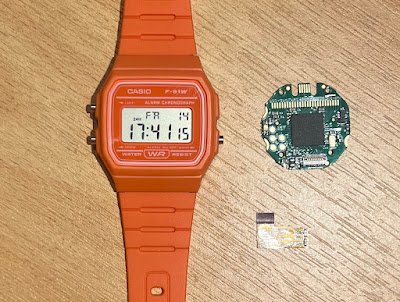
Here's my Casio before working on it. Next to it is the new motherboard and the tiny sensor module which has a thermometer on it. With it the Casio can show the current temperature. It's separate because the watch is intended to be hackable by allowing anyone to create a pluggable sensor module.


At the top of the motherboard you can see a tiny USB connector (it's micro USB Type B) which is how new firmware gets flashed onto the device. More on that below.

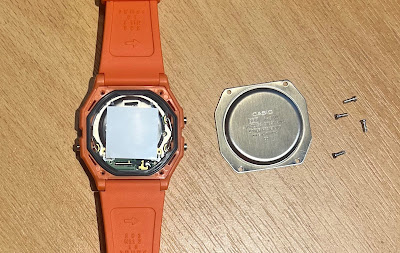
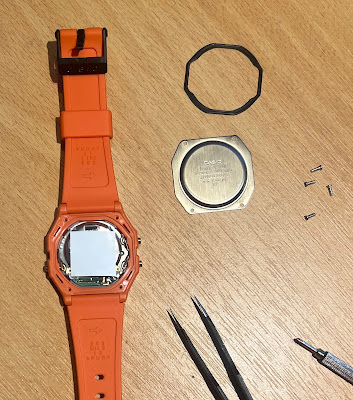
The first step is to remove the back of the watch with a small screwdriver.


Then remove the rubber seal that keeps the watch watertight. I used small pointed pincers that came with my soldering iron.


At this point the entire module can be carefully removed.


Next the tiny clips that hold the metal backing part of the module need to be eased open (see the official video for close ups of this). The watch will come apart into four pieces: the LCD, the current motherboard, the battery and the metal back.


Two things are needed next. The springy battery connector needs to be removed from the old motherboard; it pops off easily. And a little part needs to be unsoldered and re-soldered onto the next motherboard. Again, watch the video above for details of the soldering operation. I marked in the picture below where the little part was on the old motherboard and where it ended up. 


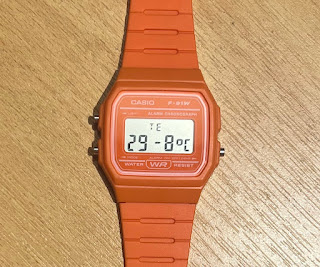
After that it's a small matter of putting it all back together. Once you've done that you'll have the basic set of functionality from the Movement firmware. Here's my completed watch showing the temperature:  29.8C. Yes, it was warm that evening.


But I don't really want the phases of the moon or a second time zone, but I would like a stopwatch and other functionality. And I never want the Fahrenheit option on the thermometer. 

So, next up is building firmware.

Changing the firmware

I modified the stock firmware from GitHub as follows:
  • Removed Fahrenheit
  • Removed 12 hour clock
  • Made the sequence of watch faces be clock, countdown timer, stopwatch, pulsometer, temperature, temperature log, sunrise/sunset, preferences, set time.
The last one is the simplest. If you want to just change the faces, it's simply a matter of altering the array in movement_config.h. The other two items were larger changes.

Building and testing the firmware

To build the firmware you need the open source code from GitHub:

  $ git clone [email protected]:joeycastillo/Sensor-Watch.git
  $ cd Sensor-Watch

The GNU GCC ARM embedded toolchain (I am using a Mac so I used brew to install):

  $ brew install --cask gcc-arm-embedded

After that it's just a matter of going to movement/make and running make

  $ cd movement/make
  $ make

It built cleanly for me. But the best part is there's an emulator that requires emscripten to compile the watch source code to WebAssembly.

  $ brew install emscripten

With that installed you can rebuild the binary and run it using Python. It creates a local web server that serves a page emulating the watch.

  $ make clean
  $ emmake make
  $ python3 -m http.server 8000 -d build

Then visit localhost:8000/watch.html to see and interact with the watch code you are working on.


Copying to the watch

Once you are happy with the code it can be simply copied to the watch. However, this requires dismantling the watch to access the micro USB connector. Here's the board connected with a standard micro USB cable I had lying around.


The red circle shows the location of the tiny reset button. You connect the USB cable to a computer and click that reset button twice. The red LED on the other side of the board will pulse and the watch will appear as a volume on your computer called WATCHBOOT.


Once it's appeared simply type

  $ make install

to copy over the firmware. Then reassemble your watch.

2022-06-09

The mysterious behaviour of the Flying Tiger Countdown Clock (and the bug that causes it)

Flying Tiger is a Danish "variety shop". It sells all manner of inexpensive trinkets, utensils and runs through stock quickly so there's always something seasonal. I came across a simple clock that shows the number of days remaining before some event (your birthday, the next solar eclipse, ..., whatever you choose).


It works. Sometimes, but other times it gets the "days remaining" count completely wrong. It can be wildly too large, or wildly too small. I couldn't resist trying to reverse engineer the algorithm used and the bugs that are in the implementation. 

Let's start with some combinations of the current date and the deadline being counted down to that work fine.

  Date        Deadline    Delta in Days  Displayed  Error

  2020-01-01  2021-01-01  366            366        0
  2020-01-01  2022-01-01  731            731        0
  2020-01-01  2023-01-01  1096           1096       0
  2020-01-01  2020-01-02  1              1          0
  2020-01-01  2020-02-01  31             31         0
  2020-01-01  2020-01-01  0              0          0
  2019-01-01  2020-01-01  365            365        0

Now take a look at when things go wrong.

Same Year


But here are some that go wildly wrong. My best guess at understanding why is based on assuming (after a lot of observation) that the programmer has a number of special cases within their code. Firstly, if the month and year are the same in the date and deadline then the number of days is correct (and I assume they just subtract the deadline from the date). This special case actually made tracking down what was going on for other combinations more complex (and later I realized that special case wasn't needed). But here are pairs of dates in the same year.

Date        Deadline    Delta in Days  Displayed  Error

2020-01-01  2020-09-01  244            244        0
2020-01-01  2020-10-01  274            18         -256
2022-09-10  2022-10-27  47             65327      65280
2022-10-10  2022-11-11  32             32         0

For the moment, ignore the third line as it involves more reasoning about what's happening. I believe the algorithm used to calculate the days is as follows (when both dates are in the same year). Here I show the working for the second line above. Notice how the result is correct with dates before and after September. (first and last lines above) We'll see why that matters soon.

  date_as_day_of_year     = day_of_year(2020-01-01)
  deadline_as_day_of_year = day_of_year(2020-10-01)

  delta                   = deadline_as_day_of_year - 
                            date_as_day_of_year

I am assuming that the clock has a day_of_year function that converts a date to a sequential day number (e.g. January 1 is day 0, February 25 is 55, etc.). It appears that the return value of that function is mistakenly turned into an unsigned 8-bit integer:

  date_as_day_of_year     = day_of_year(2020-01-01)     // 0
  deadline_as_day_of_year = day_of_year(2020-10-01)     // 18 (not 274)

  delta                   = deadline_as_day_of_year -
                            date_as_day_of_year         // 18

The reason September is important is that the 255th day of the year is September 12 (September 11 in leap years) and so calculations will go wrong when they cross September. Note that for the fourth line above the calculation works even though the returned values have been turned into unsigned 8-bit integers.


What about the strange number 65327? I think that comes about when the clock tries to display a negative integer. The calculation is:

  date_as_day_of_year     = day_of_year(2020-09-10)     // 253
  deadline_as_day_of_year = day_of_year(2020-10-27)     // 44

  delta                   = deadline_as_day_of_year -
                            date_as_day_of_year         // -209

If delta is an unsigned 16-bit integer then -209 comes out to be 65327. Alternately, it's signed but the output function (sprintf?) assumes it's unsigned.

So, it looks like the clock uses the day of the year for calculations and has type errors that cause weird output. What about spanning more than one year?

Crossing New Year


When crossing the new year the algorithm above won't work but something similar will. First calculate the remaining days in the current year and then the additional days in the subsequent year to reach the deadline. Add them together. Take an actual example from the clock (one that works!)

  Date        Deadline    Delta in Days  Displayed  Error

  2020-09-30  2021-01-02  94             94         0

Here's pseudocode for that:

  days_in_current_year    = days_in_year(2020-09-30)
  date_as_day_of_year     = day_of_year(2020-09-30)
  deadline_as_day_of_year = day_of_year(2021-01-02)

  delta                    = (days_in_current_year -
                              date_as_day_of_year) +
                             deadline_as_day_of_year  

(Note that I've ignored the case where there are multiple intervening years. The clock just adds the number of days in each additional year and does that part correctly.)

That algorithm appears to be what the clock is using and here's a long dump of test dates and deadlines. Look at the lines with errors. They all involve a date or deadline after September. Did the programmer make the same 8-bit unsigned int error twice?

  Date        Deadline    Delta in Days  Displayed  Error

  2020-08-30  2021-01-02  125            125        0
  2020-08-30  2021-02-02  156            156        0
  2020-08-30  2021-03-02  184            184        0
  2020-08-30  2021-04-02  215            215        0
  2020-08-30  2021-05-02  245            245        0
  2020-08-30  2021-06-02  276            276        0
  2020-08-30  2021-07-02  306            306        0
  2020-08-30  2021-08-02  337            337        0
  2020-08-30  2021-09-02  368            368        0
  2020-08-30  2021-10-02  398            142        -256
  2020-08-30  2021-11-02  429            173        -256
  2020-08-30  2021-12-02  459            203        -256
  2020-09-30  2021-01-02  94             94         0
  2020-09-30  2021-02-02  125            125        0
  2020-09-30  2021-03-02  153            153        0
  2020-09-30  2021-04-02  184            184        0
  2020-09-30  2021-05-02  214            214        0
  2020-09-30  2021-06-02  245            245        0
  2020-09-30  2021-07-02  275            275        0
  2020-09-30  2021-08-02  306            306        0
  2020-09-30  2021-09-02  337            337        0
  2020-09-30  2021-10-02  367            111        -256
  2020-09-30  2021-11-02  398            142        -256
  2020-09-30  2021-12-02  428            172        -256
  2020-10-30  2021-01-02  64             320        256
  2020-10-30  2021-02-02  95             351        256
  2020-10-30  2021-03-02  123            379        256
  2020-10-30  2021-04-02  154            410        256
  2020-10-30  2021-05-02  184            440        256
  2020-10-30  2021-06-02  215            471        256
  2020-10-30  2021-07-02  245            501        256
  2020-10-30  2021-08-02  276            532        256
  2020-10-30  2021-09-02  307            563        256
  2020-10-30  2021-10-02  337            337        0
  2020-10-30  2021-11-02  368            368        0
  2020-10-30  2021-12-02  398            398        0

Initially, I thought the programmer must have made the same error, but there was something odd. If it were true then the errors would be non-zero for part of September (after September 11 or 12) as well as October and beyond. But looking at the example I have above of September 30, the answer was correct.

And I suspect that there was more likely to be one bug causing the observed behaviour in all cases than multiple odd places where changing integer size happened.

The Bug


So, what could cause the value of day_of_year to be wrong for October, November and December, and, specifically, be off by 256? Actually, I think it's pretty easy to write that function incorrectly in a subtle way. Here's an implementation of day_of_year that is correct right up until September 30 and then goes wrong in exactly the way the clock fails. (I've ignored leap years for clarity, and because the clock handles leap years just fine).

  #include "stdio.h"
  #include "stdint.h"

  uint8_t days[12] = {31,28,31,30,31,30,31,31,30,31,30,31};

  uint16_t day_of_year(int month, int day) {
    uint8_t count = 0;
  
    for (int i = 1; i < month; i++) {
      count += days[i-1];
    }

    return count + day;
  }

  int main() {
    int m = 10;
    int d = 5;

    printf("%02d-%02d %d\n", m, d, day_of_year(m, d));
    return 0;
  }

Can you see the error? count only overflows after September. Naturally, there could be other ways to implement this function, including pre-computing the days in each month. But I think this is likely the source of the error that causes the clock to fail oddly.

So, Flying Tiger, where's the source code, and can I fix it?


2021-07-08

Receiving the WWVB time signal in Portugal (by accident)

For many, many years I've owned a Sharper Image clock that sets itself from the WWVB time signal in Fort Collins, CO. Well, it used to set itself when I lived in the US. For much more than a decade the clock has sat by the bed and I've manually set it. And it dutifully looked for a time signal it never received. But it worked absolutely fine with manual setting.

Until last night. 

At some point between 0300 UTC and 0600 UTC the clock received the WWVB time signal and set itself to EST with DST enabled. This morning the clock was "off" by five hours based on time in Lisbon.

The NIST propagation chart for the night doesn't show the signal hitting Portugal but somehow my trusty little clock picked it up. Although it makes sense that it set itself between those hours as that's the best time to "hear" the signal outside North America.


It's about 7,700 km along the great circle route from Fort Collins to Lisbon but the signal made it! Since this is an LF transmission at 60kHz the likely path is via bouncing off the ionosphere. Given that at night such bounces might be 2,000 km long it's likely the signal bounced two to three times to reach Lisbon.


Perhaps even more surprising than the long transmission path is that the UK MSF time signal (which uses a different format) transmits on the exact same frequency and is way closer.

2020-06-05

All the symmetrical watch faces (and code to generate them)

If you ever look at pictures of clocks and watches in advertising they are set to roughly 10:10 which is meant to be the most attractive (smiling!) position for the hands. They are actually set to 10:09.14 if the hands are truly symmetrical.

I wanted to know what all the possible symmetrical watch faces are and so I wrote some code using Processing. Here's the output (there's one watch face missing, 00:00 or 12:00, because it's very boring):


The key to writing this is to figure out the relationship between the hour and minute hands when the watch face is symmetrical. In an hour the minute hand moves through 360° and the hour hand moves through 30° (12 hours are shown on the watch face and 360/12 = 30).

The core loop inside the program is this:
  for (int h = 0; h <= 12; h++) {
    float m = (360-30*float(h))*2/13;
    int s = round(60*(m-floor(m)));
    int col = h%6;
    int row = floor(h/6);
    draw_clock((r+f)*(2*col+1), (r+f)*(row*2+1), r, h, floor(m), s);
  }
h is the hour number, m the number of minutes past the hour and s the number of seconds past the minute. As you can see, the loop looks at the hours 0 to 12 and then calculates the minutes and seconds using this formula:
    float m = (360-30*float(h))*2/13;
    int s = round(60*(m-floor(m)));
The s part is simple, it's just the decimal part of m turned into seconds. m is the interesting calculation and gives the number of minutes past the hour h (expressed as a decimal to also capture the seconds). Here are the details of how m is calculated from h.


If you look back at the watch face above it's not actually showing 10:09.14, it's showing 10:11.39. I think this is in part because it puts the second hand in a pleasing location. If I modify my program to show the location of the second hand you can see that perfect symmetry between hour and minute hands gets messed up by its presence.